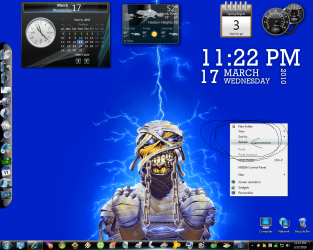
What is causing this image burned on my screen?

chengbin

New member
Local time
2:12 AM
Messages
14
I have this annoying tab burned on my screen, and I can't seem to get it off unless I reboot the computer. It happens sometimes when I press that button on a tab. It is permanently on my screen, unless I switch to playing a game like MW2 or Counter Strike, it disappears, but then if I click on another tab, it will burn it again.

Reboot is the only way to get rid of it. What is this problem? How can I fix it?

14yae76.jpg
 

My Computer My Computer

OS
windows 7
Have you tried uninstalling and reinstalling Chrome?

You may also want to switch to the beta or dev channel.
 

My Computer My Computer

Computer Manufacturer/Model Number
Custom
OS
Windows 7 Professional x64
CPU
Intel i7 2600K OC'd @ 4620 MHz
Motherboard
Asus P8Z68-V Pro
Memory
16GB GSkill Sniper 2133 Mhz (4x4GB)
Graphics Card(s)
EVGA GeForce GTX 480 SuperClocked+
Sound Card
Realtek High Definition Audio
Monitor(s) Displays
2x Acer S273HLbmii 27"
Screen Resolution
2 x 1920x1080
Hard Drives
64GB Crucial M4 SSD

Storage: Hitachi 1TB 5400RPM, Samsung 1.5TB 5400RPM
PSU
Corsair HW Series 750w (modular)
Case
Cooler Master HAF 932 Advanced Blue Edition
Cooling
CM Hyper 212+ CPU cooler, 3x 230mm + 1x 140mm case fans
Keyboard
Logitech MK320 (wireless)
Mouse
Logitech MK320 (wireless)
Internet Speed
30 Mb/s : 2 Mb/s
It is not Chrome's fault. I simply used chrome as an example. It is burned on the screen, so I can watch a video, and it will be there.
 

My Computer My Computer

OS
windows 7
What happens if you reboot, then go about your business without opening Chrome?
 

My Computer My Computer

Computer Manufacturer/Model Number
Custom
OS
Windows 7 Professional x64
CPU
Intel i7 2600K OC'd @ 4620 MHz
Motherboard
Asus P8Z68-V Pro
Memory
16GB GSkill Sniper 2133 Mhz (4x4GB)
Graphics Card(s)
EVGA GeForce GTX 480 SuperClocked+
Sound Card
Realtek High Definition Audio
Monitor(s) Displays
2x Acer S273HLbmii 27"
Screen Resolution
2 x 1920x1080
Hard Drives
64GB Crucial M4 SSD

Storage: Hitachi 1TB 5400RPM, Samsung 1.5TB 5400RPM
PSU
Corsair HW Series 750w (modular)
Case
Cooler Master HAF 932 Advanced Blue Edition
Cooling
CM Hyper 212+ CPU cooler, 3x 230mm + 1x 140mm case fans
Keyboard
Logitech MK320 (wireless)
Mouse
Logitech MK320 (wireless)
Internet Speed
30 Mb/s : 2 Mb/s
Which application(s) are you running when you click a tab?

I can think of no built in tabs in Windows 7 other than within applications. Maybe we can narrow down the application(s) and figure out a solution.

I suspect that some application or applications are not closing down these small windows properly. And they are coded to "stay on top".
 

My Computer My Computer

Computer Manufacturer/Model Number
Gateway GM5472
OS
Windows 7 Home Premium (64 bit)
CPU
AMD Athlon 56 X2 5000+
Motherboard
ECS MCP61P-AM
Memory
4.0 GB
Graphics Card(s)
Sapphire HD 4350 fanless w/512MB
Monitor(s) Displays
VeiwSonic VX2035WM
Screen Resolution
1680x1050
Other Info
Stock system except for the addition of 2GB memory, a Swann PCDVR 4 Card and a Hauppage dual HD tuner and a Sapphire HD 4550 video card
I have had this "burn in" rarely, but it will always go away eventually if I minimize and stuff.
Not sure what causes it.

I have not had it happen on my laptop or on my new install though.

~Lordbob
 

My Computer My Computer

Computer Manufacturer/Model Number
Hera
OS
Windows 7 Ultimate x64, Mint 9
CPU
Intel i5-2500k
Motherboard
ASUS P8P67 Pro
Memory
2x 4Gb Corsair VENGEANCE DDR3-1600
Graphics Card(s)
NVidia GeForce N260GTX Twin Frozr
Sound Card
Realtek HD OnBoard Audio
Monitor(s) Displays
ASUS 24" Monitor
Screen Resolution
1920x1080
Hard Drives
G.SKILL Phoenix Series 60GB SATA II MLC Internal Solid State Drive (SSD)
SAMSUNG Spinpoint F3R 1TB 7200 RPM 32MB Cache SATA II
PSU
Cooler Master Real Power Pro 750W
Case
Cooler Master Haf 932
Cooling
Fans
Keyboard
Razer Tarantula
Mouse
Razer Lachesis
Internet Speed
not fast enough
Closing chrome doesn't work.

I'm on a dev build of Chrome.
 

My Computer My Computer

OS
windows 7
I suspect Chrome is still causing the issue.

Try uninstalling Chrome, and rebooting. Hopefully the tab will go away.
 

My Computer My Computer

Computer Manufacturer/Model Number
Custom
OS
Windows 7 Professional x64
CPU
Intel i7 2600K OC'd @ 4620 MHz
Motherboard
Asus P8Z68-V Pro
Memory
16GB GSkill Sniper 2133 Mhz (4x4GB)
Graphics Card(s)
EVGA GeForce GTX 480 SuperClocked+
Sound Card
Realtek High Definition Audio
Monitor(s) Displays
2x Acer S273HLbmii 27"
Screen Resolution
2 x 1920x1080
Hard Drives
64GB Crucial M4 SSD

Storage: Hitachi 1TB 5400RPM, Samsung 1.5TB 5400RPM
PSU
Corsair HW Series 750w (modular)
Case
Cooler Master HAF 932 Advanced Blue Edition
Cooling
CM Hyper 212+ CPU cooler, 3x 230mm + 1x 140mm case fans
Keyboard
Logitech MK320 (wireless)
Mouse
Logitech MK320 (wireless)
Internet Speed
30 Mb/s : 2 Mb/s
Do you have the latest graphics driver installed? Is it always the same tab, and does it always appear in the same place?
 

My Computer My Computer

Computer type
PC/Desktop
Computer Manufacturer/Model Number
Dwarf Dwf/11/2012 r09/2013
OS
Windows 8.1 Pro RTM x64
CPU
Intel Core-i5-3570K 4-core @ 3.4GHz (Ivy Bridge) (OC 4.4GHz)
Motherboard
ASRock Z77 Extreme4-M
Memory
4 x 4GB DDR3-1600 Corsair Vengeance CMZ8GX3M2A1600C9B (16GB)
Graphics Card(s)
MSI GeForce GTX770 Gaming OC 2GB
Sound Card
Realtek High Definition on board solution (ALC 898)
Monitor(s) Displays
ViewSonic VA1912w Widescreen (VGA)
Screen Resolution
1440x900
Hard Drives
OCZ Agility 3 SSD 120GB SATA III x2 (RAID 0)
Samsung HD501LJ 500GB SATA II x2
Hitachi HDS721010CLA332 1TB SATA II
Iomega 1.5TB Ext USB 2.0
WD 2.0TB Ext USB 3.0
PSU
XFX Pro Series 850W Semi-Modular
Case
Gigabyte IF233
Cooling
1 x 120mm Front Inlet 1 x 120mm Rear Exhaust
Keyboard
Microsoft Comfort Curve Keyboard 3000 (USB)
Mouse
Microsoft Comfort Mouse 3000 for Business (USB)
Internet Speed
NetGear DG834Gv3 ADSL Modem/Router (Ethernet) ~4.0 Mb/s (O2)
Antivirus
Avast! 8.0.1497
Browser
IE 11
Other Info
Optical Drive: HL-DT-ST BD-RE BH10LS30 SATA Bluray
Lexmark S305 Printer/Scanner/Copier (USB)
WEI Score: 8.1/8.1/8.5/8.5/8.25
Asus Eee PC 1011PX Netbook (Windows 7 x86 Starter)
Yeah.... this might sound weird.... but here goes anyways.

First off, is it always that same "refresh" thing? If so, think of what you do just before it appears for the first time. Often it is something very simple which causes this. I've had this happen to me, and I couldn't get rid of it for a while.

How I finally got rid of it, weirdly enough (yes, I said it would be weird) was to clean both my keyboard and my mouse. Dirt accumulates under and beside buttons. Sometimes this causes buttons (keyboard and mouse) to hang in a certain position. which, in turn, sometimes means they are just barely in the press/not press position....

Also, if you have a wireless mouse, try changing the batteries. You never know.

By the way, have you tried pressing that "refresh" thing? See what it does?

If what I said above doesn't fix it, try eliminating your other programs (as you seem to be running quite a few) to see which one gets rid of the refresh. You should do the same for the background programs which don't show up in the taskbar.... sometimes they cause some weird behaviour in explorer/ the shell. It might just be that one of the background programs is doing this. So another good tip would be to update every single one of your programs to its latest version. Including drivers. And also, look up if any of these programs have any known issues with windows 7. You never know if they have.

edit: looking at the picture a little more closely.... it almost looks like it's either a right click on the c: prompt in the taskbar which left something behind, or a right click on the desktop background which left something behind. You could try right clicking either again, look for the refresh, clicking it and seeing whether that takes away the "burned in" image.... Usually does for me....

 

My Computer My Computer

OS
Win7 x64 NL
CPU
Intel Core 2 Duo E8400 3,0 GHz
Motherboard
Asus P5K Pro
Memory
4Gb Kingston Dual Channel Kit
Graphics Card(s)
ATI 4770
Sound Card
integrated
Monitor(s) Displays
samsung syncmaster 226cw
Screen Resolution
1680x1050
Hard Drives
Intel X25 2nd gen 80 GB
2X samsung 750 GB F1
2X WD 500 GB
Internet Speed
50 mbit fibre to the home
I've had this problem with all NVIDIA drivers.

Clicking the button wouldn't do anything. Think of it as someone taped that on your screen.

It is not always the same. Today I just figured it out how to "reproduce" the problem. If I launch a game like COD 6, and get out, the tab will disappear. But once I do a right click, AND click on any tab, that tab will stick on the screen.

Note: I don't know what program is causing this.
 

My Computer My Computer

OS
windows 7
Best solution for me is to uninstall a program one-by-one. I know it would be rather hard work or long-term, but it's best if you prefer not having it like that.

If one program you uninstalled doesn't do it, then just re-install it to go to the next one.
 

My Computer My Computer

Computer Manufacturer/Model Number
Gateway KAV60
OS
Windows 7 Home Premium 32-bit
Memory
2 GB
Screen Resolution
1024x600
Hard Drives
250 GB HDD
Internet Speed
Time Warner Cable/Road Runner
Other Info
Intel Atom processor N270
Multi-in-1 card reader
802.11b/g
NO optical drive
NO WWAN
NO Bluetooth
The problem is I don't know what causes this. It comes like once a week.
 

My Computer My Computer

OS
windows 7
Best solution for me is to uninstall a program one-by-one. I know it would be rather hard work or long-term, but it's best if you prefer not having it like that.

If one program you uninstalled doesn't do it, then just re-install it to go to the next one.
Do one-by-one uninstall to every program installed on your computer. Do you know when this started happening, though? Maybe you can trace back the last installed program, and that could have caused the most possibility that this is your issue.
 

My Computer My Computer

Computer Manufacturer/Model Number
Gateway KAV60
OS
Windows 7 Home Premium 32-bit
Memory
2 GB
Screen Resolution
1024x600
Hard Drives
250 GB HDD
Internet Speed
Time Warner Cable/Road Runner
Other Info
Intel Atom processor N270
Multi-in-1 card reader
802.11b/g
NO optical drive
NO WWAN
NO Bluetooth
You have a lot of stuff in the sys tray and a spiking task manager. What is running?
 

My Computer My Computer

Computer Manufacturer/Model Number
Sony Vaio Z46GDU
OS
Windows 7 Ultimate x86-64
CPU
[email protected] 1066MHz FSB
Motherboard
Sony branded
Memory
6GB DDR3 1066MHz
Graphics Card(s)
9300M GS 256MB Dedicated (Speed) + Intel4500MHD (Stamina)
Sound Card
Realtek HD Audio
Monitor(s) Displays
13.1' WXGA
Screen Resolution
1600x900
Hard Drives
320GB 7200RPM w/ 16MB cache
Internet Speed
1MB/s
You have a lot of stuff in the sys tray and a spiking task manager. What is running?
I noticed that, too. All those things running in your system tray and task bar can take up alot of resources, and sometimes even make your computer "lag" which can cause the "burning" of the tab there.
 

My Computer My Computer

Computer Manufacturer/Model Number
Gateway KAV60
OS
Windows 7 Home Premium 32-bit
Memory
2 GB
Screen Resolution
1024x600
Hard Drives
250 GB HDD
Internet Speed
Time Warner Cable/Road Runner
Other Info
Intel Atom processor N270
Multi-in-1 card reader
802.11b/g
NO optical drive
NO WWAN
NO Bluetooth
I`m sorry, what are we talking about here ? The tab on the left that says..Windows 7 forums ??
 

My Computer My Computer

Computer Manufacturer/Model Number
Myself
OS
Windows 7 Ultimate 64Bit
CPU
C2D E8200
Motherboard
XFX 750i
Memory
8GB PNY PC2-6400
Graphics Card(s)
BFG 9600GT x 2
Sound Card
Stock XFX Optical
Monitor(s) Displays
Gateway 22" HD Display
Hard Drives
C: 1 TB G: 500 GB H: 500 GB
PSU
Ultra LSP 550 Pro Lifetime Series
Case
Xion2
Cooling
ThermalTake
zomby, we are talking about that little thing on the side of the screen which says 'refresh'. It won't go away for this person.....
 

My Computer My Computer

OS
Win7 x64 NL
CPU
Intel Core 2 Duo E8400 3,0 GHz
Motherboard
Asus P5K Pro
Memory
4Gb Kingston Dual Channel Kit
Graphics Card(s)
ATI 4770
Sound Card
integrated
Monitor(s) Displays
samsung syncmaster 226cw
Screen Resolution
1680x1050
Hard Drives
Intel X25 2nd gen 80 GB
2X samsung 750 GB F1
2X WD 500 GB
Internet Speed
50 mbit fibre to the home
Unforunately I don't have time to uninstall one program at a time and figure out what the problem is. I'll just live with it, and hope it won't happen.

If anyone knows why this happens, I'm always happy to hear a solution.

Thanks guys.
 

My Computer My Computer

OS
windows 7
Is this what your talking about , but only the refresh tab remains.
 

Attachments

  • refresh.png
    refresh.png
    347.7 KB · Views: 33

My Computer My Computer

Computer Manufacturer/Model Number
Myself
OS
Windows 7 Ultimate 64Bit
CPU
C2D E8200
Motherboard
XFX 750i
Memory
8GB PNY PC2-6400
Graphics Card(s)
BFG 9600GT x 2
Sound Card
Stock XFX Optical
Monitor(s) Displays
Gateway 22" HD Display
Hard Drives
C: 1 TB G: 500 GB H: 500 GB
PSU
Ultra LSP 550 Pro Lifetime Series
Case
Xion2
Cooling
ThermalTake
Back
Top