Windows 7/DOCSIS 3/Linksys WMP300N

ekseattle

New member
Local time
12:22 PM
Messages
4
Hi all!
First, thanks to all the posts here, I was able to install Windows 7 with hardly any issues. The internal wireless gave me a problem for a bit until I saw a link to a driver on these forums. Well I have recently upgraded my internet connection here at work to the 50/10 business service through comcast (DOCSIS 3)
The internal nic even though rated as an N would only give me download speeds of top end 2 meg. I went and purchased a WMP300n from Linksys and it installed with no problems...however...still getting very slow speeds. I know the router works and my laptop (vista) gets full speed.
Is this an issue with Windows 7? Or is there some setting I possibly might be missing that keeps speeds slow...
let me know if you need any information from me.
Thanks in advance
 

My Computer My Computer

At a glance

Windows 7Intel Core 2 Quad q6700 @2.676 gigATI radeon HD 4800
Computer Manufacturer/Model Number
HP 9340F
OS
Windows 7
CPU
Intel Core 2 Quad q6700 @2.67
Memory
6 gig
Graphics Card(s)
ATI radeon HD 4800
Monitor(s) Displays
HP w2408h (dual)
Screen Resolution
1920x1200
Internet Speed
50/10
Other Info
NIC WMP300N
Ok just a followup to this...is there possibly some setting within seven itself that throttles the bandwidth. I have tried brand new wirless equipment but nothing works. I would blame signal degredation BUT I can use my laptop right next to it and it works just fine with a pcmcia linksys card...ie, full speed...the desktop with the wmp300n...can not better than 23 on a 50meg service...
 

My Computer My Computer

At a glance

Windows 7Intel Core 2 Quad q6700 @2.676 gigATI radeon HD 4800
Computer Manufacturer/Model Number
HP 9340F
OS
Windows 7
CPU
Intel Core 2 Quad q6700 @2.67
Memory
6 gig
Graphics Card(s)
ATI radeon HD 4800
Monitor(s) Displays
HP w2408h (dual)
Screen Resolution
1920x1200
Internet Speed
50/10
Other Info
NIC WMP300N
Sorry for asking quite a few questions, but I'm kind of confused reading your posts as you don't give the brand of the router but just your internet Wifi card.

You said that you tried your computer next to the router; have you tried to connect to the router using another mean than Wifi? like using an Ethernet NIC? Maybe the driver you found here (I don't know which) works ok, but is not giving the full potential of your card. Not sure which driver you use, but your card has a "Atheros AR5416" chipset, you might want to have a look here for drivers see if you find any newer/better drivers than the one you have isntalled: ATHEROS drivers for Microsoft Windows

You bought a 802.11n (draft) card, but are you certain that your router is N capable? What kind of card is your laptop using a b/g wifi card or a N card?

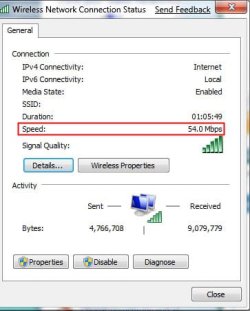
This is the speed link of a 802.11b/g wifi card connected to a 802.11b/g router.
 

Attachments

  • Untitled-1.jpg
    Untitled-1.jpg
    23.8 KB · Views: 490
Last edited:

My Computer My Computer

At a glance

Windows 7 x64
OS
Windows 7 x64
Hi Chris
Thanks for the response. And no worry on the questions...if thats what I need to get this figured out that is great!!! The router is the linksys WRT310N. It is indeed N capable. The wireles card that the laptop used was WPC600N (remember though--this was on Vista...not Seven)
As for trying a different router...I have no issues with that...it works fine when connected via ethernet or connected to the two other computers in my house. I can not try ethernet due to the router being upstairs...
I want to try one of the atheros drivers...how do I find out which driver the WMP300n uses?
Thanks
Ed
 

My Computer My Computer

At a glance

Windows 7Intel Core 2 Quad q6700 @2.676 gigATI radeon HD 4800
Computer Manufacturer/Model Number
HP 9340F
OS
Windows 7
CPU
Intel Core 2 Quad q6700 @2.67
Memory
6 gig
Graphics Card(s)
ATI radeon HD 4800
Monitor(s) Displays
HP w2408h (dual)
Screen Resolution
1920x1200
Internet Speed
50/10
Other Info
NIC WMP300N
If I use the windows supplied driver it actually installs a broadcom driver. From what I just read only the European version is Atheros based? Is that incorrect? If it is broadcom would there be a better version to use other than 4.176.75.11 dated 10/23/2008?
Thanks
Ed
 

My Computer My Computer

At a glance

Windows 7Intel Core 2 Quad q6700 @2.676 gigATI radeon HD 4800
Computer Manufacturer/Model Number
HP 9340F
OS
Windows 7
CPU
Intel Core 2 Quad q6700 @2.67
Memory
6 gig
Graphics Card(s)
ATI radeon HD 4800
Monitor(s) Displays
HP w2408h (dual)
Screen Resolution
1920x1200
Internet Speed
50/10
Other Info
NIC WMP300N
Wmp300n

If I use the windows supplied driver it actually installs a broadcom driver. From what I just read only the European version is Atheros based? Is that incorrect? If it is broadcom would there be a better version to use other than 4.176.75.11 dated 10/23/2008?
Thanks
Ed

Yes, you're right and don't even bother trying the Atheros drivers. If you're living in the U.S. you surely have broadcom chipset in your WMP300N adapter. I Should have looked a little more before, my mistake. I downloaded the drivers on the US linksys's website and the .inf shows that it's a BCM4329 chipset (PCI\VEN_14E4&DEV_4329) Broadcom Corporation - BCM4329 - Low-Power 802.11n with Bluetooth® 2.1 + EDR and FM (Tx and Rx)

I quickly looked up online for newer drivers and it seems that you have the latest drivers for your chipset. the download page for the wireless drivers is down on the broadcom's site... Broadcom Corporation - Bluetooth Software Download

I would blame signal degradation BUT I can use my laptop right next to it and it works just fine with a pcmcia linksys card
Must be a problem with the network drivers and Windows 7 then. The PCMCIA card you use has a BCM4328 chipset and broadcom releases the same drivers for the whole BCM43xx family.

Other than that, I don't know and Windows 7 has no new option to throttle the bandwidth that I know, unless you activated the QOS and messed up with its settings. Try to uncheck the QOS option in the adapter's "Wireless network Connection" panel, just in case, but I doubt it's the problem.

Sorry I'm not of any help :(
 
Last edited:

My Computer My Computer

At a glance

Windows 7 x64
OS
Windows 7 x64
OK WMP300N Users I have a quick and simple fix for the wireless lag and drop problem. First off go to you device manager and uninstall that Broadcom driver its not very good and the source of this mess. After that is gone, go to the Linksys website. Support and Services
plug in your model number and when asked for version select ver 1.0. Download it install the drivers and return to your device manager. If it isnt showing yet select scan for changes. the problem should be solved, came across a similar problem with automatic updates awhile ago with a phillips 7130 TV card windows update would give me the flytv driver which is garbage and would bog down my whole system. Remember, its Microsoft auto update is still just as usless as ever when it comes to specialty drivers.
 

My Computer My Computer

At a glance

windows 7
OS
windows 7
WRT310 and WMP300

I have exactly this router and adapter. My WMP300 is picking up zero signals even when sitting right next to the router. I think it's a broken card. Linksys chat support just said: this card is incompatible with windows 7 (I don't believe them).

Second, I have another wireless card that has the problem described by ed, the wireless N internet rate is a piddly 2Mbps. If I switch my router from "Mixed" to "G-only" then I get a full 15Mbps (my Comcast speed). This isn't an acceptable solution, but it's a good temporary fix.
 

My Computer My Computer

At a glance

Windows 7 build 7100Core 2 Duo 1.66GHz2GBATi
Computer Manufacturer/Model Number
Gateway M-151-X Laptop
OS
Windows 7 build 7100
CPU
Core 2 Duo 1.66GHz
Memory
2GB
Graphics Card(s)
ATi
Hard Drives
500GB 5400RPM 2.5"
I have exactly this router and adapter. My WMP300 is picking up zero signals even when sitting right next to the router. I think it's a broken card. Linksys chat support just said: this card is incompatible with windows 7 (I don't believe them).

Second, I have another wireless card that has the problem described by ed, the wireless N internet rate is a piddly 2Mbps. If I switch my router from "Mixed" to "G-only" then I get a full 15Mbps (my Comcast speed). This isn't an acceptable solution, but it's a good temporary fix.

I was having a similar issue and I solved it by going to Device Manager and then properties -> Advanced tab and then you'll see IBSS mode. Mine was set to '802.11a/b Only' and once I changed it to '802.11a/b/g/n Auto' mine was connecting at 54mbps (I'm only currently running a Linksys WRT54GS so only 'g' for me :(). If this doesn't help you, there may be a few more options you could try.
 

My Computer My Computer

At a glance

Windows 7 Professional x64AMD Phenom II X4 940 @ 3.6 & 2.4NBG.Skill DDR2-1066 CAS 5ATI Radeon HD 4850 512MB @ 800/1100 (Yay penc...
Computer Manufacturer/Model Number
Capwn Industries
OS
Windows 7 Professional x64
CPU
AMD Phenom II X4 940 @ 3.6 & 2.4NB
Motherboard
DFI LANPARTY DK 790GX-M2RS
Memory
G.Skill DDR2-1066 CAS 5
Graphics Card(s)
ATI Radeon HD 4850 512MB @ 800/1100 (Yay pencil mod!)
Sound Card
M-Audio ProFire 610
Monitor(s) Displays
Samsung SyncMaster220WM
Hard Drives
WD6401AALS
WD6400AAKS
PSU
Antec 850W TruePower Quattro
Case
LIAN LI ARMORSUIT PC-P50R
Cooling
Sunbeam Core-Contact Freezer w/ 120mm GELID WING 12 PL
I was having a similar issue and I solved it by going to Device Manager and then properties -> Advanced tab and then you'll see IBSS mode. Mine was set to '802.11a/b Only' and once I changed it to '802.11a/b/g/n Auto' mine was connecting at 54mbps (I'm only currently running a Linksys WRT54GS so only 'g' for me :(). If this doesn't help you, there may be a few more options you could try.

Thanks.

I fixed my problem a couple weeks ago. After a firmware update to my router, re-installing the adapter from the CD, and installing it's network utility, everything started working. I'm getting 270Mbps over my WLAN!! My other devices get half that (130Mbps).
 

My Computer My Computer

At a glance

Windows 7 build 7100Core 2 Duo 1.66GHz2GBATi
Computer Manufacturer/Model Number
Gateway M-151-X Laptop
OS
Windows 7 build 7100
CPU
Core 2 Duo 1.66GHz
Memory
2GB
Graphics Card(s)
ATi
Hard Drives
500GB 5400RPM 2.5"
I was having a similar issue and I solved it by going to Device Manager and then properties -> Advanced tab and then you'll see IBSS mode. Mine was set to '802.11a/b Only' and once I changed it to '802.11a/b/g/n Auto' mine was connecting at 54mbps (I'm only currently running a Linksys WRT54GS so only 'g' for me :(). If this doesn't help you, there may be a few more options you could try.

Thanks.

I fixed my problem a couple weeks ago. After a firmware update to my router, re-installing the adapter from the CD, and installing it's network utility, everything started working. I'm getting 270Mbps over my WLAN!! My other devices get half that (130Mbps).

Great, I'm glad to hear it! I do believe that this IBSS setting was part of the issue because Windows 7 defaults to a generic Broadcom driver (If you're using the WMP300N v1, v2 is EU and runs an Atheros chipset) and that IBSS setting most likely is default for that driver as a fail-safe since it most likely applies to many Broadcom devices. While installing the driver from the CD would have all these driver options automatically selected properly since it is a more specific driver of course. That and new router firmware is usually nice to fix strange problems as well (and hopefully not cause new ones!).
 

My Computer My Computer

At a glance

Windows 7 Professional x64AMD Phenom II X4 940 @ 3.6 & 2.4NBG.Skill DDR2-1066 CAS 5ATI Radeon HD 4850 512MB @ 800/1100 (Yay penc...
Computer Manufacturer/Model Number
Capwn Industries
OS
Windows 7 Professional x64
CPU
AMD Phenom II X4 940 @ 3.6 & 2.4NB
Motherboard
DFI LANPARTY DK 790GX-M2RS
Memory
G.Skill DDR2-1066 CAS 5
Graphics Card(s)
ATI Radeon HD 4850 512MB @ 800/1100 (Yay pencil mod!)
Sound Card
M-Audio ProFire 610
Monitor(s) Displays
Samsung SyncMaster220WM
Hard Drives
WD6401AALS
WD6400AAKS
PSU
Antec 850W TruePower Quattro
Case
LIAN LI ARMORSUIT PC-P50R
Cooling
Sunbeam Core-Contact Freezer w/ 120mm GELID WING 12 PL
Back
Top