Free space on C drive keeps decreasing?

timothyhuang

New member
Local time
5:52 PM
Messages
22
My OS is windows 7 32bit. What I have done to prevent decreasing is:
1. disable system restore on all drives.
2. turn off hybernation
3. move pagefile to other drives.
The problem is it is still decreasing, though in a lower rate.
Any suggestions?
Thanks.
 

My Computer My Computer

OS
windows 7 pro 32bit
CPU
E6300
welcome to the forum.

Maybe gie us more detail on how much space you have and how much it takes.

use ccleaner every once a while. defrag every once a while. Actually I only use Defraggler to see how much space is taken. Not sure if that Windows thing tells me what it wants me to see, or everything.

My C-drive uses 54-62 GB. I assume all fluctuation is windows related since I installed all applications a long time ago. As long as it goes down every once a while, I wouldn't worry. Sometimes you don't see the decrease before rebooting. AV software and other software also uses some temporary space. should check those settings to not accumulate too many log files.

Edit: when you deinstall software, make sure it deleted all the files. Some software just has incomplete deinstallation routines that leave data on the disk, like user data etc.
 

My Computer My Computer

Computer Manufacturer/Model Number
homemade
OS
W7 Pro 64
CPU
Intel i3 3220 @ 3.3 GHz
Motherboard
ASRock H77M
Memory
2x8GB DDR 3 1600 Kingston
Graphics Card(s)
onboard
Sound Card
onboard
Monitor(s) Displays
two 21" LCD
Hard Drives
128 GB Samsung 830
PSU
OCZ400MXSP
Cooling
Stock
Internet Speed
DSL
Do you run Disk Cleanup and delete browsing history files in Internet Options?
 

My Computer My Computer

OS
windows 7
Thank you two guys. I didn't install many on system drive c. Only some: Eset 4.0, ms office 2003, and xp mode. I do clean system from time to time using winUtilities pro. I can't think of other reasons than windows update.

C drive total: 42.7Gb
now 14.9Gb free.
several days ago, it was 15.5GB free
Months ago, it was around 18GB.
 

My Computer My Computer

OS
windows 7 pro 32bit
CPU
E6300
Well Timothy,

for comparison, here's my C:\ drive, which contains only Windows and installed programs, no user files, no browser cache and so on. I've got 44.5 GB used space on that drive.

The biggest thing that makes this number change is temporary files. Depending on which apps you use and how you have configured them your temporary folder can grow very fast, since most programs do not clean up after themselves. So, I just checked, my C:\Users\myusername folder has almost 10 GB in it. I guess it's time to clean up.
 

My Computer My Computer

Computer Manufacturer/Model Number
Dell Inspiron 530
OS
Windows 7 Ultimate (x64)
CPU
Q6600
Memory
8 GB
Graphics Card(s)
ATI Radeon HD 2600 XT
Monitor(s) Displays
Samsung Syncmaster P2450
Screen Resolution
1920x1080
Hard Drives
Samsung HD103UJ
Samsung HD501LJ
Internet Speed
25 Mb/s
Just some educational notes...

When you install new software on your computer, regardless of where you install it some programs still install files to the C: drive so the software can function properly. This of course isn't always the case, but for a lot of the larger software it is.

For instance, you can install Photoshop to a different drive, but Adobe installs Common Files as well as some DLL files on the C: drive. This happens with some games as well. Take Sims 3 for instance, you can install it to whichever driver you want, but it will create a folder on your C: drive as well.

Windows Updates will definitely take up space as you update more and more. To be perfectly honest with you, going from 18GB months ago, to 14.9GB now is nowhere near horrible. I wouldn't be hugely concerned until you notice a large decrease in a very short amount of time. In the mean time, as has already been suggested just run routine cleans and keep an eye on what's being installed. :)
 

My Computer My Computer

Computer type
PC/Desktop
Computer Manufacturer/Model Number
Custom Build
OS
Windows 7
CPU
AMD Phenom II X4 955 Black Edition
Motherboard
MSI 870A-G54
Memory
8GB
Graphics Card(s)
PNY XLR8 GeForce GTX 460 1024MB GDDR5
Monitor(s) Displays
2 x 24"
Thank you all.
Anyway, it's not a drastic change. I just want to find out the cause(s).
 

My Computer My Computer

OS
windows 7 pro 32bit
CPU
E6300
Enlightened by the foregoing discussions, I went into the Temporary Internet Files, located in C:\Users\(MyAccount)\AppData\Local\Microsoft\Windows, and found it occupied 15 plus GB! I then went to Control Panel ->internet options and deleted those temp files and freed 15GB.

A word about the cleaning software I used: I entrust my system to it, but it never did the job it claims.
 

My Computer My Computer

OS
windows 7 pro 32bit
CPU
E6300
Set your temporary internet files to delete on exit, and you could uncheck save favorite website files and they won`t keep building up.
 

Attachments

  • My sisiter.png
    My sisiter.png
    453.1 KB · Views: 808

My Computer My Computer

Computer Manufacturer/Model Number
Myself
OS
Windows 7 Ultimate 64Bit
CPU
C2D E8200
Motherboard
XFX 750i
Memory
8GB PNY PC2-6400
Graphics Card(s)
BFG 9600GT x 2
Sound Card
Stock XFX Optical
Monitor(s) Displays
Gateway 22" HD Display
Hard Drives
C: 1 TB G: 500 GB H: 500 GB
PSU
Ultra LSP 550 Pro Lifetime Series
Case
Xion2
Cooling
ThermalTake
My OS is windows 7 32bit. What I have done to prevent decreasing is:
1. disable system restore on all drives.
2. turn off hybernation
3. move pagefile to other drives.
The problem is it is still decreasing, though in a lower rate.
Any suggestions?
Thanks.

Have you checked to see if you have a load of junk in your temp files?

Open windows explorer on any folder.
In the address (not search) bar type %temp% and hit enter.
You can probably turf most of what you find there.
 

My Computer My Computer

Computer Manufacturer/Model Number
Homebrew
OS
XP Pro SP3 X86 / Win7 Pro X86
CPU
Amd 64 x2 4200 (2.4ghz)
Motherboard
Asus M2N-MX SE Plus
Memory
Kingston DDR2 800 2gb
Graphics Card(s)
Nvidia GF-8400
Sound Card
Realtek on Motherboard
Monitor(s) Displays
Acer x-193bw
Screen Resolution
1440 x 900
Hard Drives
Western Digital 500g
PSU
350watt In-Win
Case
In-Win
Cooling
Air
Keyboard
yes
Mouse
yes
Internet Speed
5mpbs
Other Info
Also ASRock ION 330 as HTPC (on XP).
Acer Aspire as GP netbook (on XP).
Glad to hear that you found the cause of your problem. Windows has some powerful cleanup tools.
Did you also run Disk Cleanup found in Start/All Programs/Accessories/System Tools? It cleans up some stuff that's not in the Browsing History cleanup section of Internet Options.
 

My Computer My Computer

OS
windows 7
Timothy,
Use CCleaner - Home which is a free program, excellent, used by the majority of people who regularly answer questions here.

Use CLEANMGR.EXE which is the Win 7 clean up program.
 

My Computer My Computer

Computer Manufacturer/Model Number
Toshiba Satellite S875D-S7239 laptop
OS
MS Windows 7 Ultimate SP1 64-bit
CPU
AMD A10-4600M
Motherboard
AMD Pumori (Socket FT1)
Memory
6.00 GB Dual-Channel DDR3 @ 798MHz (11-11-12-28)
Graphics Card(s)
AMD Radeon HD 7660G
Sound Card
High Definition Audio Device
Monitor(s) Displays
Generic PnP Monitor (1600x900@60Hz)
Screen Resolution
1600x900@60Hz
Hard Drives
SSD 119GB Corsair CSSD-V128GB2 ATA Device
Keyboard
Standard PS/2 Keyboard
Mouse
HP Wireless Optical Mobile Mouse Model FHA-3410
Internet Speed
What the local pub, local coffee shop offers.
Other Info
Optical Drive:MATSHITA BD-CMB UJ160B ATA Device


Also have an Asus ha1002xp netbook with Win 7 Ultimate installed.
Another vote for Ccleaner. You get set it to be as aggressive as you want to include deleting internet cookies. Unless you know what your are doing, I would not use the registry cleaner.
 

My Computer My Computer

Computer Manufacturer/Model Number
Home built
OS
Windows 7 Ultimate 32 bit
CPU
Intel(R) Pentium(R) 4 CPU 3.00GHz
Motherboard
ASUS P4P800-VM Motherboard Chipset: Intel 865G + ICH5
Memory
2.50 GB RAM
Graphics Card(s)
NVIDIA GeForce 7600 GS
Sound Card
SoundMax Integrated Digital Audio (Chip)
Monitor(s) Displays
ViewSonic VX 1962 wm
Screen Resolution
1680 X 1050
Hard Drives
Seagate Barracuda 7200.10 80 GB
ST380215A ATA Device 18.6 GB
Western Digital "My Book" external hard drive 750 GB
Cooling
Fan based
Keyboard
Microsoft Comfort Curve Keyboard 2000 v10 USB
Mouse
Logitec optic USB
Internet Speed
3.01 Mb/s download 0.64 Mb/s upload
Glad to hear that you found the cause of your problem. Windows has some powerful cleanup tools.
Did you also run Disk Cleanup found in Start/All Programs/Accessories/System Tools? It cleans up some stuff that's not in the Browsing History cleanup section of Internet Options.
I run Disk Cleanup very often, but that doesn't seem to erase Temp Internet files, I don't know why.
 

My Computer My Computer

OS
windows 7 pro 32bit
CPU
E6300
Glad to hear that you found the cause of your problem. Windows has some powerful cleanup tools.
Did you also run Disk Cleanup found in Start/All Programs/Accessories/System Tools? It cleans up some stuff that's not in the Browsing History cleanup section of Internet Options.
I run Disk Cleanup very often, but that doesn't seem to erase Temp Internet files, I don't know why.

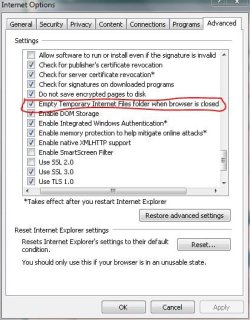
If you're using IE you may want to try this...

Click Tools in the upper right corner, then Internet Options then Advanced... about half way down is a setting to erase temporary files when exiting....

Capture.JPG
 

My Computer My Computer

Computer Manufacturer/Model Number
Homebrew
OS
XP Pro SP3 X86 / Win7 Pro X86
CPU
Amd 64 x2 4200 (2.4ghz)
Motherboard
Asus M2N-MX SE Plus
Memory
Kingston DDR2 800 2gb
Graphics Card(s)
Nvidia GF-8400
Sound Card
Realtek on Motherboard
Monitor(s) Displays
Acer x-193bw
Screen Resolution
1440 x 900
Hard Drives
Western Digital 500g
PSU
350watt In-Win
Case
In-Win
Cooling
Air
Keyboard
yes
Mouse
yes
Internet Speed
5mpbs
Other Info
Also ASRock ION 330 as HTPC (on XP).
Acer Aspire as GP netbook (on XP).
Does the "Temporary Internet Files" item have a check mark in its box in Disk Cleanup?
 

My Computer My Computer

OS
windows 7
Back
Top