it is possible that the torrent is overloading your router as previously said, its worth nothing that the new utorrent (2.1 beta) supports something called utp which should back off the connection when its needed (say for web browsing)
actually this was intorduced in 2.0 but i found it never worked for me until 2.1
i'm using utorrent 2.1 and i'm finding that i get faster speeds when running my pc in safe mode, why would this be?
this is my speedtest result
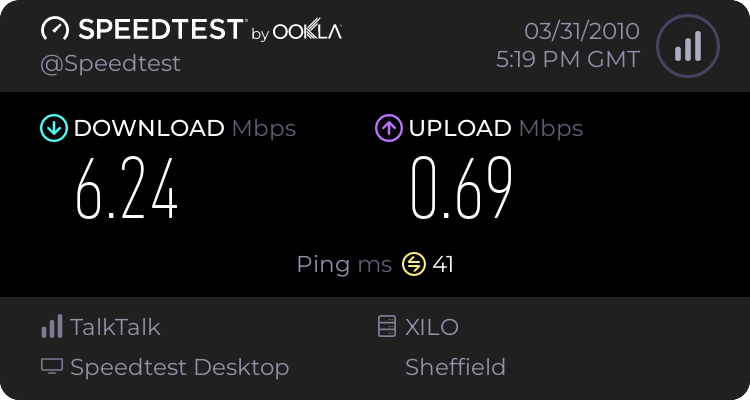
and tracert result
Microsoft Windows [Version 6.1.7600]
Copyright (c) 2009 Microsoft Corporation. All rights reserved.
C:\Users\matt_0978>tracert 64.233.181.105
Tracing route to ni-in-f105.1e100.net [64.233.181.105]
over a maximum of 30 hops:
1 1 ms 1 ms 1 ms 192.168.1.1
2 71 ms 72 ms 64 ms 92.25.160.1
3 34 ms 35 ms 34 ms 78.151.229.69
4 41 ms 41 ms 61 ms xe-10-0-0-rt002.man.as13285.net [78.151.225.9]
5 85 ms 52 ms 45 ms xe-11-1-0-rt001.the.as13285.net [62.24.240.6]
6 49 ms 43 ms 48 ms host-78-144-0-206.as13285.net [78.144.0.206]
7 46 ms 55 ms 53 ms xe-10-0-0-scr010.thn.as13285.net [78.144.0.224]
8 46 ms 47 ms 45 ms host-78-144-3-30.as13285.net [78.144.3.30]
9 64 ms 49 ms 48 ms 64.233.175.27
10 133 ms 50 ms 132 ms 209.85.250.54
11 158 ms 160 ms 168 ms 216.239.46.215
12 230 ms 230 ms 188 ms 209.85.240.224
13 332 ms 353 ms 196 ms 209.85.249.19
14 356 ms 245 ms 243 ms 209.85.241.211
15 421 ms 430 ms 354 ms 209.85.248.130
16 349 ms 432 ms 434 ms 209.85.242.233
17 466 ms 440 ms 420 ms 209.85.254.154
18 459 ms 436 ms 466 ms 209.85.243.146
19 445 ms 463 ms 452 ms 209.85.250.237
20 438 ms 444 ms 452 ms ni-in-f105.1e100.net [64.233.181.105]
Trace complete.
C:\Users\matt_0978>
can u give me any indication as to whether my current utorrent settings of max upload = 70kB/s, Global download limit = 0kB/s, Max connx = 400, Max peers = 90 and upload slots per torrent = 5 should be ok? Otherwise can you recommend more optimal settings please?



