Windows Media Player won't change "Unknown Artist"

limp

New member
Local time
1:47 PM
Messages
4
When Windows Media Player can't read a song's meta data correctly, it lists it under "Unknown Artist." When I right click the generic album picture and select "Find album info," a new window appears where I can enter the artist's correct name. However, changing the name from Unknown Artist to the correct name accomplishes nothing. The change is not saved, and WMP continues to list the album under Unknown Artist.

I have tried dragging the song to a correctly named album, but that doesn't work. The song won't drag.

Does anyone know what's wrong, or how to fix it? I need to be able to change the Unknown Artist designation to the correct name of the artist.
 

My Computer My Computer

At a glance

Windows 7
OS
Windows 7
Have you tried rescanning your library?
 

My Computer My Computer

At a glance

Windows 7 Ultimate x64 ®™Intel Core 2 Duo (2.2 GHz)2x 2GB Corsair (667 MHz)NVIDIA 8600M GS (256MB)
Computer Manufacturer/Model Number
Sony Vaio FZ21Z
OS
Windows 7 Ultimate x64 ®™
CPU
Intel Core 2 Duo (2.2 GHz)
Motherboard
Sony (Intel Chipset)
Memory
2x 2GB Corsair (667 MHz)
Graphics Card(s)
NVIDIA 8600M GS (256MB)
Sound Card
Sigmatel
Monitor(s) Displays
15.4" TFT X-Black
Screen Resolution
1280x800
Hard Drives
Western Digital 300GB Scorpio Black (7200rpm)
Mouse
Logitech Anywhere MX
Internet Speed
Sky 5MB
Just edit the album info yourself, don`t let it search.
 

My Computer My Computer

At a glance

Windows 7 Ultimate 64BitC2D E82008GB PNY PC2-6400BFG 9600GT x 2
Computer Manufacturer/Model Number
Myself
OS
Windows 7 Ultimate 64Bit
CPU
C2D E8200
Motherboard
XFX 750i
Memory
8GB PNY PC2-6400
Graphics Card(s)
BFG 9600GT x 2
Sound Card
Stock XFX Optical
Monitor(s) Displays
Gateway 22" HD Display
Hard Drives
C: 1 TB G: 500 GB H: 500 GB
PSU
Ultra LSP 550 Pro Lifetime Series
Case
Xion2
Cooling
ThermalTake

My Computer My Computer

At a glance

Windows 7 Home Premium (64 bit)Intel I5 2500K 3.3Ghz Stock8Gig Kingston DDRIII HyperX Blue 1333 MhzAMD Sapphire 7870 2GB
Computer type
PC/Desktop
Computer Manufacturer/Model Number
Self Built
OS
Windows 7 Home Premium (64 bit)
CPU
Intel I5 2500K 3.3Ghz Stock
Motherboard
Asus P8H 61-M LE USB 3
Memory
8Gig Kingston DDRIII HyperX Blue 1333 Mhz
Graphics Card(s)
AMD Sapphire 7870 2GB
Sound Card
Creative Fatality Pro
Monitor(s) Displays
27" BENQ LED
Screen Resolution
1920X1080
Hard Drives
1 x OCZ Agility 3 120GB SSD
1 x Seagate 250GB
1 x Western Digital 1000GB
1 x HP 500GB
PSU
700W Coolermaster Stealth Pro etc
Case
Coolermaster Scout
Cooling
Some fans
Keyboard
Some Logitech type.
Mouse
Logitech MX518
Internet Speed
Wireless 8mb
Other Info
Canon Scanner
Epson Printer
Nikon DSLR 3000
Wacom Tablet
Just use Windows Explorer, where your music is stored, open the tree, find the album, open it highlite the song, rt click, properties, details tab and there you can change any and all data, do apply, ok your done. you can cut, paste where ever you want to put it
 

My Computer My Computer

At a glance

Windows 7 Home Premium 64 bitIntel Core 2 quad Extreme Q9770 @ 3.2 GHz4x2 GB Muskin 1600 MHz ramNVidia GTX 250
Computer Manufacturer/Model Number
Dell XPS 730
OS
Windows 7 Home Premium 64 bit
CPU
Intel Core 2 quad Extreme Q9770 @ 3.2 GHz
Memory
4x2 GB Muskin 1600 MHz ram
Graphics Card(s)
NVidia GTX 250
Sound Card
Soundblaster X-Fi Fatality Champion
Monitor(s) Displays
2 Dell 2007WFP Ultrascans
Screen Resolution
3360 x 1050
Hard Drives
WD Black 1TB sata, 2-WD Black 500 sata, 2-Seagate 500 Go external
PSU
1000 Watt
Cooling
air
Keyboard
MS Natrual Keyboard Pro
Mouse
Logitech Wireless Trackball
Internet Speed
DSL Elite
hate to say it, cause i used windows media player for YEARS... but, I've downloaded Real Player SP (for Free) and LOVE IT ! It recognizes the artist right away, and setting up your library IS as easy as draggin n droppin. The sound is better and clearer as well. :D
 

My Computer My Computer

At a glance

windows 74G
Computer Manufacturer/Model Number
HP-G71
OS
windows 7
Memory
4G

My Computer My Computer

At a glance

Win 7 Ultimate 64-bit SP1 (desktop)Intel Core 2 Duo E84002x 2GB OCZ DDR II SDRAM PC2-6400NVIDIA GeForce 9400GT
Computer type
PC/Desktop
Computer Manufacturer/Model Number
Gigabyte Technology Co., Ltd.
OS
Win 7 Ultimate 64-bit SP1 (desktop)
CPU
Intel Core 2 Duo E8400
Motherboard
Gigabyte GA-EP35-DS3R
Memory
2x 2GB OCZ DDR II SDRAM PC2-6400
Graphics Card(s)
NVIDIA GeForce 9400GT
Monitor(s) Displays
HP 2009m(primary), Acer P191W
Screen Resolution
1600x900, 1440x900
Hard Drives
Internal:WD Caviar Black 640GB 32MB cache 7200RPM
External:Samsung Story Station 1TB HDD desktop drive
500GB Toshiba portable drive
PSU
Antec Earthwatts EA500D
Case
Antec Sonata III
Cooling
4 fans
Keyboard
Logitech Wave
Mouse
Logitech M-SBF90
Internet Speed
Slow due to home Wireless-G router
Antivirus
MSE, Hitman Pro, Malwarebytes
Browser
Chrome and Palemoon
Other Info
Laptop....Acer 5750Z-4835
15.6" HD Widescreen CineCrystal™ LED-backlit LCD Display: (1366x768 resolution, 16:9 aspect ratio)
Intel® Pentium® Processor B940 (2.0GHz, 2MB L3 cache)
Windows® 7 Home Premium,500GB Hard Drive,4GB DDR3 RAM, Intel® HD Graphics,8X DVD-Super Multi Double-Layer Drive
Multi-in-1 Digital Media Card Reader,802.11b/g/n Wi-Fi
Chrome and Palemoon, MSE, Hitman Pro
hate to say it, cause i used windows media player for YEARS... but, I've downloaded Real Player SP (for Free) and LOVE IT ! It recognizes the artist right away, and setting up your library IS as easy as draggin n droppin. The sound is better and clearer as well. :D
I have to call shenanigans on this.....a different program should make no difference on the sound of the same file, unless you're using different EQ settings. I've played the same tunes on WMP12, Mediamonkey, and VLC, and not heard a difference. :geek:
 

My Computer My Computer

At a glance

Win 7 Ultimate 64-bit SP1 (desktop)Intel Core 2 Duo E84002x 2GB OCZ DDR II SDRAM PC2-6400NVIDIA GeForce 9400GT
Computer type
PC/Desktop
Computer Manufacturer/Model Number
Gigabyte Technology Co., Ltd.
OS
Win 7 Ultimate 64-bit SP1 (desktop)
CPU
Intel Core 2 Duo E8400
Motherboard
Gigabyte GA-EP35-DS3R
Memory
2x 2GB OCZ DDR II SDRAM PC2-6400
Graphics Card(s)
NVIDIA GeForce 9400GT
Monitor(s) Displays
HP 2009m(primary), Acer P191W
Screen Resolution
1600x900, 1440x900
Hard Drives
Internal:WD Caviar Black 640GB 32MB cache 7200RPM
External:Samsung Story Station 1TB HDD desktop drive
500GB Toshiba portable drive
PSU
Antec Earthwatts EA500D
Case
Antec Sonata III
Cooling
4 fans
Keyboard
Logitech Wave
Mouse
Logitech M-SBF90
Internet Speed
Slow due to home Wireless-G router
Antivirus
MSE, Hitman Pro, Malwarebytes
Browser
Chrome and Palemoon
Other Info
Laptop....Acer 5750Z-4835
15.6" HD Widescreen CineCrystal™ LED-backlit LCD Display: (1366x768 resolution, 16:9 aspect ratio)
Intel® Pentium® Processor B940 (2.0GHz, 2MB L3 cache)
Windows® 7 Home Premium,500GB Hard Drive,4GB DDR3 RAM, Intel® HD Graphics,8X DVD-Super Multi Double-Layer Drive
Multi-in-1 Digital Media Card Reader,802.11b/g/n Wi-Fi
Chrome and Palemoon, MSE, Hitman Pro
hate to say it, cause i used windows media player for YEARS... but, I've downloaded Real Player SP (for Free) and LOVE IT ! It recognizes the artist right away, and setting up your library IS as easy as draggin n droppin. The sound is better and clearer as well. :D
I have to call shenanigans on this.....a different program should make no difference on the sound of the same file, unless you're using different EQ settings. I've played the same tunes on WMP12, Mediamonkey, and VLC, and not heard a difference. :geek:

+1 Noob the sound card didn't change, bit rate didn't change, speakers didn't change so it ought to sound the same:cool:
 

My Computer My Computer

At a glance

Windows 7 Home Premium 64 bitIntel Core 2 quad Extreme Q9770 @ 3.2 GHz4x2 GB Muskin 1600 MHz ramNVidia GTX 250
Computer Manufacturer/Model Number
Dell XPS 730
OS
Windows 7 Home Premium 64 bit
CPU
Intel Core 2 quad Extreme Q9770 @ 3.2 GHz
Memory
4x2 GB Muskin 1600 MHz ram
Graphics Card(s)
NVidia GTX 250
Sound Card
Soundblaster X-Fi Fatality Champion
Monitor(s) Displays
2 Dell 2007WFP Ultrascans
Screen Resolution
3360 x 1050
Hard Drives
WD Black 1TB sata, 2-WD Black 500 sata, 2-Seagate 500 Go external
PSU
1000 Watt
Cooling
air
Keyboard
MS Natrual Keyboard Pro
Mouse
Logitech Wireless Trackball
Internet Speed
DSL Elite
hate to say it, cause i used windows media player for YEARS... but, I've downloaded Real Player SP (for Free) and LOVE IT ! It recognizes the artist right away, and setting up your library IS as easy as draggin n droppin. The sound is better and clearer as well. :D
I have to call shenanigans on this.....a different program should make no difference on the sound of the same file, unless you're using different EQ settings. I've played the same tunes on WMP12, Mediamonkey, and VLC, and not heard a difference. :geek:

+1 Noob the sound card didn't change, bit rate didn't change, speakers didn't change so it ought to sound the same:cool:

Or the player could be using a different sound output, not sure what Media Player uses but I use Foobar2000 with this output, I can def hear a improvement over Media Player.

Foobar2000:Components 0.9/WASAPI output support (foo out wasapi) - Hydrogenaudio Knowledgebase
 

My Computer My Computer

At a glance

Windows 7 Home Premium (64 bit)Intel I5 2500K 3.3Ghz Stock8Gig Kingston DDRIII HyperX Blue 1333 MhzAMD Sapphire 7870 2GB
Computer type
PC/Desktop
Computer Manufacturer/Model Number
Self Built
OS
Windows 7 Home Premium (64 bit)
CPU
Intel I5 2500K 3.3Ghz Stock
Motherboard
Asus P8H 61-M LE USB 3
Memory
8Gig Kingston DDRIII HyperX Blue 1333 Mhz
Graphics Card(s)
AMD Sapphire 7870 2GB
Sound Card
Creative Fatality Pro
Monitor(s) Displays
27" BENQ LED
Screen Resolution
1920X1080
Hard Drives
1 x OCZ Agility 3 120GB SSD
1 x Seagate 250GB
1 x Western Digital 1000GB
1 x HP 500GB
PSU
700W Coolermaster Stealth Pro etc
Case
Coolermaster Scout
Cooling
Some fans
Keyboard
Some Logitech type.
Mouse
Logitech MX518
Internet Speed
Wireless 8mb
Other Info
Canon Scanner
Epson Printer
Nikon DSLR 3000
Wacom Tablet
Reply to FZ21Z: Yes.
Reply to Zomby88: How?
Reply to hybridfan: Mp3tag does not support WAV files.
Reply to 1Bowtie: Properties in the Details tab can not be edited.
 

My Computer My Computer

At a glance

Windows 7
OS
Windows 7
Reply to FZ21Z: Yes.
Reply to Zomby88: How?
Reply to hybridfan: Mp3tag does not support WAV files.
Reply to 1Bowtie: Properties in the Details tab can not be edited.
I don't think WAV files support tagging natively. If you were to convert them to FLAC(which is also lossless)they could then be tagged, and you'd save some hard drive space too.
 

My Computer My Computer

At a glance

Win 7 Ultimate 64-bit SP1 (desktop)Intel Core 2 Duo E84002x 2GB OCZ DDR II SDRAM PC2-6400NVIDIA GeForce 9400GT
Computer type
PC/Desktop
Computer Manufacturer/Model Number
Gigabyte Technology Co., Ltd.
OS
Win 7 Ultimate 64-bit SP1 (desktop)
CPU
Intel Core 2 Duo E8400
Motherboard
Gigabyte GA-EP35-DS3R
Memory
2x 2GB OCZ DDR II SDRAM PC2-6400
Graphics Card(s)
NVIDIA GeForce 9400GT
Monitor(s) Displays
HP 2009m(primary), Acer P191W
Screen Resolution
1600x900, 1440x900
Hard Drives
Internal:WD Caviar Black 640GB 32MB cache 7200RPM
External:Samsung Story Station 1TB HDD desktop drive
500GB Toshiba portable drive
PSU
Antec Earthwatts EA500D
Case
Antec Sonata III
Cooling
4 fans
Keyboard
Logitech Wave
Mouse
Logitech M-SBF90
Internet Speed
Slow due to home Wireless-G router
Antivirus
MSE, Hitman Pro, Malwarebytes
Browser
Chrome and Palemoon
Other Info
Laptop....Acer 5750Z-4835
15.6" HD Widescreen CineCrystal™ LED-backlit LCD Display: (1366x768 resolution, 16:9 aspect ratio)
Intel® Pentium® Processor B940 (2.0GHz, 2MB L3 cache)
Windows® 7 Home Premium,500GB Hard Drive,4GB DDR3 RAM, Intel® HD Graphics,8X DVD-Super Multi Double-Layer Drive
Multi-in-1 Digital Media Card Reader,802.11b/g/n Wi-Fi
Chrome and Palemoon, MSE, Hitman Pro
I personally convert everything to MP3, bit rate 192 which makes alittle bigger file but very good quality and then you can make any changes you need to in windows explorer under the properties of the song.
 

My Computer My Computer

At a glance

Windows 7 Home Premium 64 bitIntel Core 2 quad Extreme Q9770 @ 3.2 GHz4x2 GB Muskin 1600 MHz ramNVidia GTX 250
Computer Manufacturer/Model Number
Dell XPS 730
OS
Windows 7 Home Premium 64 bit
CPU
Intel Core 2 quad Extreme Q9770 @ 3.2 GHz
Memory
4x2 GB Muskin 1600 MHz ram
Graphics Card(s)
NVidia GTX 250
Sound Card
Soundblaster X-Fi Fatality Champion
Monitor(s) Displays
2 Dell 2007WFP Ultrascans
Screen Resolution
3360 x 1050
Hard Drives
WD Black 1TB sata, 2-WD Black 500 sata, 2-Seagate 500 Go external
PSU
1000 Watt
Cooling
air
Keyboard
MS Natrual Keyboard Pro
Mouse
Logitech Wireless Trackball
Internet Speed
DSL Elite
Thanks, everyone, for the suggestions. It's true that WAV has a problem with meta data, but the converter dBpoweramp http://www.dbpoweramp.com/ manages to preserve the meta data in WAV files. Unfortunately, dBpoweramp has other limitations. Converting to FLAC is one solution, but Windows Media Player doesn't support FLAC. Mp3tag is an excellent stand-alone tag editor, but it won't convert from one file format to another. I used to use Real Player, but I hated those ads.

Here is my solution. I used the converter xrecode II http://xrecode.com/ to convert my MP3 files to WMA Lossless. Xrecode II has a built-in tag editor, and just about every option imaginable. WMA Lossless equals the sound quality of WAV, makes smaller files, and is supported by Windows Media Player. All of the meta data was preserved.
 

My Computer My Computer

At a glance

Windows 7
OS
Windows 7
Thanks, everyone, for the suggestions. It's true that WAV has a problem with meta data, but the converter dBpoweramp dBpoweramp: CD Ripper & Audio Converter. Secure ripping to mp3, FLAC, m4a, Apple Lossless & WMA manages to preserve the meta data in WAV files. Unfortunately, dBpoweramp has other limitations. Converting to FLAC is one solution, but Windows Media Player doesn't support FLAC. Mp3tag is an excellent stand-alone tag editor, but it won't convert from one file format to another. I used to use Real Player, but I hated those ads.

Here is my solution. I used the converter xrecode II Convert flac to mp3, flac to wav, ape to mp3, cue to mp3, flac to alac, flac to m4a, flv to mp3 and more. to convert my MP3 files to WMA Lossless. Xrecode II has a built-in tag editor, and just about every option imaginable. WMA Lossless equals the sound quality of WAV, makes smaller files, and is supported by Windows Media Player. All of the meta data was preserved.
xrecode II is a nice little program....lets you play with all different formats....I've used it quite a bit.

However, if you like Windows Media Player so much that you went to all this trouble, you could have installed the Shark007.net - Windows 7 Codecs - WMP12 Codecs package to WMP and played the FLACs. Or, you could have used a different program altogether....Mediamonkey, Winamp, J. River Media Jukebox, VLC .....they all support FLAC natively, I believe. WMA lossless frankly sucks,IMO, because you can play it on your computer, and on a Zune player, and that's it.....most portable "mp3 players" won't play WMA lossless at all.

But, if you're happy with WMA lossless and WMP, then more power to ya.:geek:
 

My Computer My Computer

At a glance

Win 7 Ultimate 64-bit SP1 (desktop)Intel Core 2 Duo E84002x 2GB OCZ DDR II SDRAM PC2-6400NVIDIA GeForce 9400GT
Computer type
PC/Desktop
Computer Manufacturer/Model Number
Gigabyte Technology Co., Ltd.
OS
Win 7 Ultimate 64-bit SP1 (desktop)
CPU
Intel Core 2 Duo E8400
Motherboard
Gigabyte GA-EP35-DS3R
Memory
2x 2GB OCZ DDR II SDRAM PC2-6400
Graphics Card(s)
NVIDIA GeForce 9400GT
Monitor(s) Displays
HP 2009m(primary), Acer P191W
Screen Resolution
1600x900, 1440x900
Hard Drives
Internal:WD Caviar Black 640GB 32MB cache 7200RPM
External:Samsung Story Station 1TB HDD desktop drive
500GB Toshiba portable drive
PSU
Antec Earthwatts EA500D
Case
Antec Sonata III
Cooling
4 fans
Keyboard
Logitech Wave
Mouse
Logitech M-SBF90
Internet Speed
Slow due to home Wireless-G router
Antivirus
MSE, Hitman Pro, Malwarebytes
Browser
Chrome and Palemoon
Other Info
Laptop....Acer 5750Z-4835
15.6" HD Widescreen CineCrystal™ LED-backlit LCD Display: (1366x768 resolution, 16:9 aspect ratio)
Intel® Pentium® Processor B940 (2.0GHz, 2MB L3 cache)
Windows® 7 Home Premium,500GB Hard Drive,4GB DDR3 RAM, Intel® HD Graphics,8X DVD-Super Multi Double-Layer Drive
Multi-in-1 Digital Media Card Reader,802.11b/g/n Wi-Fi
Chrome and Palemoon, MSE, Hitman Pro
Hello, noobvious...

I'm not in love with Windows Media Player, but it comes with the system, so why not use it? The Shark codex package is a good suggestion, as is the Winamp player, which I like a lot. Only problem is, whichever you choose, that's one more program to install and configure. I don't use portable music players, so their lack of support for WMA Lossless is a non-issue. I stream my converted files to a Squeezebox, which does support WMA Lossless, for playback on my stereo system.

Thank you for taking the time to respond to my query.
 

My Computer My Computer

At a glance

Windows 7
OS
Windows 7
Hello, noobvious...

I'm not in love with Windows Media Player, but it comes with the system, so why not use it? The Shark codex package is a good suggestion, as is the Winamp player, which I like a lot. Only problem is, whichever you choose, that's one more program to install and configure. I don't use portable music players, so their lack of support for WMA Lossless is a non-issue. I stream my converted files to a Squeezebox, which does support WMA Lossless, for playback on my stereo system.

Thank you for taking the time to respond to my query.
Well, I'm glad you were able to find your solution, even if I wasn't able to help.:)
 

My Computer My Computer

At a glance

Win 7 Ultimate 64-bit SP1 (desktop)Intel Core 2 Duo E84002x 2GB OCZ DDR II SDRAM PC2-6400NVIDIA GeForce 9400GT
Computer type
PC/Desktop
Computer Manufacturer/Model Number
Gigabyte Technology Co., Ltd.
OS
Win 7 Ultimate 64-bit SP1 (desktop)
CPU
Intel Core 2 Duo E8400
Motherboard
Gigabyte GA-EP35-DS3R
Memory
2x 2GB OCZ DDR II SDRAM PC2-6400
Graphics Card(s)
NVIDIA GeForce 9400GT
Monitor(s) Displays
HP 2009m(primary), Acer P191W
Screen Resolution
1600x900, 1440x900
Hard Drives
Internal:WD Caviar Black 640GB 32MB cache 7200RPM
External:Samsung Story Station 1TB HDD desktop drive
500GB Toshiba portable drive
PSU
Antec Earthwatts EA500D
Case
Antec Sonata III
Cooling
4 fans
Keyboard
Logitech Wave
Mouse
Logitech M-SBF90
Internet Speed
Slow due to home Wireless-G router
Antivirus
MSE, Hitman Pro, Malwarebytes
Browser
Chrome and Palemoon
Other Info
Laptop....Acer 5750Z-4835
15.6" HD Widescreen CineCrystal™ LED-backlit LCD Display: (1366x768 resolution, 16:9 aspect ratio)
Intel® Pentium® Processor B940 (2.0GHz, 2MB L3 cache)
Windows® 7 Home Premium,500GB Hard Drive,4GB DDR3 RAM, Intel® HD Graphics,8X DVD-Super Multi Double-Layer Drive
Multi-in-1 Digital Media Card Reader,802.11b/g/n Wi-Fi
Chrome and Palemoon, MSE, Hitman Pro
When Windows Media Player can't read a song's meta data correctly, it lists it under "Unknown Artist." When I right click the generic album picture and select "Find album info," a new window appears where I can enter the artist's correct name. However, changing the name from Unknown Artist to the correct name accomplishes nothing. The change is not saved, and WMP continues to list the album under Unknown Artist.

I have tried dragging the song to a correctly named album, but that doesn't work. The song won't drag.

Does anyone know what's wrong, or how to fix it? I need to be able to change the Unknown Artist designation to the correct name of the artist.
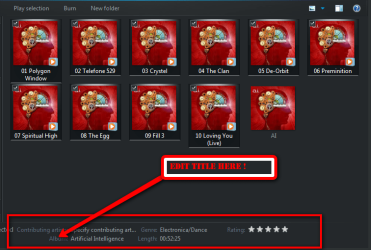
when i ocasionally have this problem i go to the original file right clicking on the track in wmp will give you the option to open file location and re edit the album title, the way i do it is to highlight 15 tracks (for some reason it wont edit if it is more ) be sure not to highlight any pictures only the tracks as it wont show the album specs at the bottom of the window hover over "album " and then type your title then save if your album is longer than 15 tracks then repeat from track 16 -30 and so on. close wmp and start it again it should update itself with the file changes if you have it watching your My Music file etc for changes hope this helps
EDIT -sorry i just realised you said unknown artist. the procedure is exactly the same as above except change album artist .
 

Attachments

  • 2010-04-16_1821.png
    2010-04-16_1821.png
    34.7 KB · Views: 54
Last edited:

My Computer My Computer

At a glance

Microsoft Windows 7 Home Premium 64-bit 7600IIx4 amd athelon 635 processor2x2gbati radeon HD 5450
Computer Manufacturer/Model Number
Hewlett packard/p6512uk
OS
Microsoft Windows 7 Home Premium 64-bit 7600
CPU
IIx4 amd athelon 635 processor
Motherboard
FOXCONN 2AA9
Memory
2x2gb
Graphics Card(s)
ati radeon HD 5450
Sound Card
(1) Realtek High Definition Audio (2) AMD High Definition
Monitor(s) Displays
samsung lcd tv 32"
Screen Resolution
1360x 768
Hard Drives
(1) WDC WD10 01FAES-60Z2A0 SATA Disk Device (2) Maxtor OneTouch USB Device (3) ST310003 33AS USB Device (4) WD My Book 1111 USB Device
PSU
?
Cooling
air!
Keyboard
wireless hp
Mouse
wireless Hp,optical
Internet Speed
1.10mb/s
Antivirus
MSE
Browser
Firefox
OK I think I'm on to this (zombie thread I know, but it's a relevant search return).

If your CD info stubbornly refuses to update, go to File>Manage Libraries>Music. If I'm right, your default library will be listed as "unresponsive". Make a note of the file path, remove any "unresponsive" library and then re-add it again (note, my system had the default recorded as "Users/Xxxxx/Music" but selecting the Users / Xxxxx / My Music folder shortcut worked fine). You may have to right click the library and reassign it as your default.

This worked for me - when I restarted WMP it correctly reported my new Adam Ant CD.
 

My Computer My Computer

At a glance

Windows 7 Home Premium 64 bitIntel Core i7 CPU 860 @ 2.80 GHz4 GBNvidia GeForce GTX670
Computer Manufacturer/Model Number
None
OS
Windows 7 Home Premium 64 bit
CPU
Intel Core i7 CPU 860 @ 2.80 GHz
Motherboard
ASRock H55M-LE
Memory
4 GB
Graphics Card(s)
Nvidia GeForce GTX670
Sound Card
VIA High Definition Audio
Monitor(s) Displays
LG W2363D
Screen Resolution
1920 x 1080
Hard Drives
Hitachi HDS721010CLA332 ATA Device
PSU
Galaxy 850W
Case
Basic
Cooling
Aircooled
Keyboard
KeySonic
Mouse
Cyborg RAT-7
Internet Speed
30Mbps D, 2Mbps U
Back
Top