URGENT! My baby (computer) died :(

Looking at the results, it's either power supply or CPU/motherboard faults. :(
 

My Computer My Computer

At a glance

Win7 Ultimate x64 on Desktop / Win7 Ultimate ...AMD Phenom 965 X4 3.4Ghz cpu Black Edition12 Gb DDR3Nvidea Gforce GTX 470
Computer Manufacturer/Model Number
Dilithium Computers/Engineering (Myself) Star date 42.739285.5432.9
OS
Win7 Ultimate x64 on Desktop / Win7 Ultimate x86 on laptop / Win7 x86 Starter on Netbook
CPU
AMD Phenom 965 X4 3.4Ghz cpu Black Edition
Motherboard
Gigabyte 790XT
Memory
12 Gb DDR3
Graphics Card(s)
Nvidea Gforce GTX 470
Sound Card
Onboard Realtek hi-fi
Monitor(s) Displays
Lg 3D led 23"
Screen Resolution
1920x1080
Hard Drives
Loads maxstore sata 1 & 2/ loads of partitions + 1Tb Hitachi sata 2. 256Gb Crucial ssd.
PSU
OCZ 700W GameXstream
Case
Artec 10000
Cooling
On board + many case fans
Keyboard
Logitech wireless K350
Mouse
Inferno gaming mouse
Internet Speed
Talk talk. 10Mb
Other Info
My PC was hand built with matchsticks. xbox 360 controller. Printers,fax.........
Well calling Best Buy didn't help at all. Tiger Direct wants freaken $129 to just test it and there's no other computer stores over here. I'm at a lost of what to do and I can't just run out and buy a new power supply, cpu, mobo. Is this someone's way of telling me I shouldn't be on the computer, it's ****en killing me.

On another note some good news: 2 of my front fans weren't working and I don't know how I missed em, but I hooked those up to and damn did it blow some dust every where.
 

My Computer My Computer

At a glance

Vista Ultimate x64, Windows 7 RC 7100Intel C2D E8400 @ 3.8ghz4x 2gb G.Skill DDR2 1600nVidia GTX260 896mb
OS
Vista Ultimate x64, Windows 7 RC 7100
CPU
Intel C2D E8400 @ 3.8ghz
Motherboard
ASUS P5Q SE PLUS
Memory
4x 2gb G.Skill DDR2 1600
Graphics Card(s)
nVidia GTX260 896mb
Sound Card
Onboard 5.1 Surround Sound
Monitor(s) Displays
22" Acer LCD and 19" Westinghouse LCD
Screen Resolution
1680x1050 and 1280x1024
Hard Drives
Seagate Barracuda 7200rpm 750gb
Western Digital 500gb
PSU
Corsair H520X 520w
Case
Antec 300
Keyboard
Old G15
Mouse
Logitech G5
Internet Speed
15mbps down .34mbps up
Hi Bryce,

It could be possible that your PSU is failing. To temporarily reduce the load, and also as part of the system debugging procedure, you need to reduce your system to the bare minimum. As we are interested in whether or not your motherboard is still functioning, disconnect ALL drives from both PSU and motherboard. Remove all but 1 stick of RAM. Power up and reboot. If you get a display on your monitor, power off and add one component at a time, starting with the RAM. Gradually add the components in this way until it fails to show anything on your monitor. Verify this by removing the last component you added. Remember to physically unplug your system from the mains supply before disconnecting and reconnecting components.

Please let us know how you get on.
 

My Computer My Computer

At a glance

Windows 8.1 Pro RTM x64Intel Core-i5-3570K 4-core @ 3.4GHz (Ivy Brid...4 x 4GB DDR3-1600 Corsair Vengeance CMZ8GX3M2...MSI GeForce GTX770 Gaming OC 2GB
Computer type
PC/Desktop
Computer Manufacturer/Model Number
Dwarf Dwf/11/2012 r09/2013
OS
Windows 8.1 Pro RTM x64
CPU
Intel Core-i5-3570K 4-core @ 3.4GHz (Ivy Bridge) (OC 4.4GHz)
Motherboard
ASRock Z77 Extreme4-M
Memory
4 x 4GB DDR3-1600 Corsair Vengeance CMZ8GX3M2A1600C9B (16GB)
Graphics Card(s)
MSI GeForce GTX770 Gaming OC 2GB
Sound Card
Realtek High Definition on board solution (ALC 898)
Monitor(s) Displays
ViewSonic VA1912w Widescreen (VGA)
Screen Resolution
1440x900
Hard Drives
OCZ Agility 3 SSD 120GB SATA III x2 (RAID 0)
Samsung HD501LJ 500GB SATA II x2
Hitachi HDS721010CLA332 1TB SATA II
Iomega 1.5TB Ext USB 2.0
WD 2.0TB Ext USB 3.0
PSU
XFX Pro Series 850W Semi-Modular
Case
Gigabyte IF233
Cooling
1 x 120mm Front Inlet 1 x 120mm Rear Exhaust
Keyboard
Microsoft Comfort Curve Keyboard 3000 (USB)
Mouse
Microsoft Comfort Mouse 3000 for Business (USB)
Internet Speed
NetGear DG834Gv3 ADSL Modem/Router (Ethernet) ~4.0 Mb/s (O2)
Antivirus
Avast! 8.0.1497
Browser
IE 11
Other Info
Optical Drive: HL-DT-ST BD-RE BH10LS30 SATA Bluray
Lexmark S305 Printer/Scanner/Copier (USB)
WEI Score: 8.1/8.1/8.5/8.5/8.25
Asus Eee PC 1011PX Netbook (Windows 7 x86 Starter)
I have seen systems that shut down whenever the heat builds up too much on the processor. (My Dell will not run without a fan for more than 2 seconds)

Just a suggestion - try removing the CPU fan and replacing the contact paste with a better conductor paste (such as Arctic Silver 5). If the CPU is getting too hot with the overclocking it may have destroyed the original paste and is causing the system to hold during boot.

I highly doubt Windows 7 7077 has anything to do with the problem.

Hope it gets better... soon...
 

My Computer My Computer

At a glance

Dual boot WindowsXP/Windows 7Intel Pentium 4 3.2GHz HT1 GBnVidia GeForce FX 5500
Computer Manufacturer/Model Number
Dell B-110
OS
Dual boot WindowsXP/Windows 7
CPU
Intel Pentium 4 3.2GHz HT
Memory
1 GB
Graphics Card(s)
nVidia GeForce FX 5500
Sound Card
Creative Soundblaster Audigy 2 ZS
Screen Resolution
1024 X 768 32bit
Hard Drives
2 WD - 80/160 GB
Other Info
Highly upgraded from Dell stock unit
I do vaguely remember it shutting off and rebooting in Vista x64 back in Feb. of this year I think it was. I was gaming (UT2004) and it just rebooted. But I think that was because the GFX card was at like 79C or something. That's also when I moved it to a cooler spot and ran sideless.

@Dwarf: I'll try that now. So, just the CPU, GPU, 1 stick of RAM first and then add from there.

Also, Best Buy said they do do a free test on it so I might run out there in a bit just to see what they think it is. I do hate going over there though and I almost always dog em about something :(
 

My Computer My Computer

At a glance

Vista Ultimate x64, Windows 7 RC 7100Intel C2D E8400 @ 3.8ghz4x 2gb G.Skill DDR2 1600nVidia GTX260 896mb
OS
Vista Ultimate x64, Windows 7 RC 7100
CPU
Intel C2D E8400 @ 3.8ghz
Motherboard
ASUS P5Q SE PLUS
Memory
4x 2gb G.Skill DDR2 1600
Graphics Card(s)
nVidia GTX260 896mb
Sound Card
Onboard 5.1 Surround Sound
Monitor(s) Displays
22" Acer LCD and 19" Westinghouse LCD
Screen Resolution
1680x1050 and 1280x1024
Hard Drives
Seagate Barracuda 7200rpm 750gb
Western Digital 500gb
PSU
Corsair H520X 520w
Case
Antec 300
Keyboard
Old G15
Mouse
Logitech G5
Internet Speed
15mbps down .34mbps up
I have seen systems that shut down whenever the heat builds up too much on the processor. (My Dell will not run without a fan for more than 2 seconds)

Just a suggestion - try removing the CPU fan and replacing the contact paste with a better conductor paste (such as Arctic Silver 5). If the CPU is getting too hot with the overclocking it may have destroyed the original paste and is causing the system to hold during boot.

I highly doubt Windows 7 7077 has anything to do with the problem.

Hope it gets better... soon...

That suggestion is certainly worth a try. Just a word of caution, though. Make sure that you clean the top of the CPU and the bottom of the heatsink thoroughly to remove ALL traces of the old Thermal Interface Material (TIM). When replacing TIM, place a very small amount on to the CPU and spread it out over the top of the chip. Whilst you have got the heatsink removed, check and clean the fins of the heatsink itself, and also the fan to remove any dust that has built up. Reattach the heatsink, and don't forget to plug the fan in to the appropriate header on the motherboard.
 

My Computer My Computer

At a glance

Windows 8.1 Pro RTM x64Intel Core-i5-3570K 4-core @ 3.4GHz (Ivy Brid...4 x 4GB DDR3-1600 Corsair Vengeance CMZ8GX3M2...MSI GeForce GTX770 Gaming OC 2GB
Computer type
PC/Desktop
Computer Manufacturer/Model Number
Dwarf Dwf/11/2012 r09/2013
OS
Windows 8.1 Pro RTM x64
CPU
Intel Core-i5-3570K 4-core @ 3.4GHz (Ivy Bridge) (OC 4.4GHz)
Motherboard
ASRock Z77 Extreme4-M
Memory
4 x 4GB DDR3-1600 Corsair Vengeance CMZ8GX3M2A1600C9B (16GB)
Graphics Card(s)
MSI GeForce GTX770 Gaming OC 2GB
Sound Card
Realtek High Definition on board solution (ALC 898)
Monitor(s) Displays
ViewSonic VA1912w Widescreen (VGA)
Screen Resolution
1440x900
Hard Drives
OCZ Agility 3 SSD 120GB SATA III x2 (RAID 0)
Samsung HD501LJ 500GB SATA II x2
Hitachi HDS721010CLA332 1TB SATA II
Iomega 1.5TB Ext USB 2.0
WD 2.0TB Ext USB 3.0
PSU
XFX Pro Series 850W Semi-Modular
Case
Gigabyte IF233
Cooling
1 x 120mm Front Inlet 1 x 120mm Rear Exhaust
Keyboard
Microsoft Comfort Curve Keyboard 3000 (USB)
Mouse
Microsoft Comfort Mouse 3000 for Business (USB)
Internet Speed
NetGear DG834Gv3 ADSL Modem/Router (Ethernet) ~4.0 Mb/s (O2)
Antivirus
Avast! 8.0.1497
Browser
IE 11
Other Info
Optical Drive: HL-DT-ST BD-RE BH10LS30 SATA Bluray
Lexmark S305 Printer/Scanner/Copier (USB)
WEI Score: 8.1/8.1/8.5/8.5/8.25
Asus Eee PC 1011PX Netbook (Windows 7 x86 Starter)
I did clean the heatsink and all the fans in the computer, but there's no thermal paste so yea. I kinda still got the stock heatsink and it's push pin type. It's been doing so well keeping cool to until now if it is overheating :(
 

My Computer My Computer

At a glance

Vista Ultimate x64, Windows 7 RC 7100Intel C2D E8400 @ 3.8ghz4x 2gb G.Skill DDR2 1600nVidia GTX260 896mb
OS
Vista Ultimate x64, Windows 7 RC 7100
CPU
Intel C2D E8400 @ 3.8ghz
Motherboard
ASUS P5Q SE PLUS
Memory
4x 2gb G.Skill DDR2 1600
Graphics Card(s)
nVidia GTX260 896mb
Sound Card
Onboard 5.1 Surround Sound
Monitor(s) Displays
22" Acer LCD and 19" Westinghouse LCD
Screen Resolution
1680x1050 and 1280x1024
Hard Drives
Seagate Barracuda 7200rpm 750gb
Western Digital 500gb
PSU
Corsair H520X 520w
Case
Antec 300
Keyboard
Old G15
Mouse
Logitech G5
Internet Speed
15mbps down .34mbps up
It needs thermal paste on it before even trying anything further otherwise the CPU is probably as good as dead. DONT try running it without it!!! :shock:

Edit: did you wipe it off whilst cleaning or has it all just dried up due to the heat?
 

My Computer My Computer

At a glance

XP Pro SP3 x86/Vista SP2 x64/Win7 x64 Triple-...AMD64 X2 AM2 5000+Corsair TWX 2Gb (2x1Gb) DDR2 800MhzPCI-X 2.0 Inno3D (NVidia) 9500GT 1Gb DDR2
Computer Manufacturer/Model Number
Self Built
OS
XP Pro SP3 x86/Vista SP2 x64/Win7 x64 Triple-boot
CPU
AMD64 X2 AM2 5000+
Motherboard
Asus MSN-X Plus
Memory
Corsair TWX 2Gb (2x1Gb) DDR2 800Mhz
Graphics Card(s)
PCI-X 2.0 Inno3D (NVidia) 9500GT 1Gb DDR2
Sound Card
Onboard Realtec ALC662-GR
Monitor(s) Displays
Relisys 17' CRT (model unknown)
Screen Resolution
1024x768
Hard Drives
750Gb Samsung 7200-3Gb/s 32Mb Cache SATA
PSU
500W
Cooling
Standard AMD CPU Fan, One side, front and rear case fan.
Keyboard
Microsoft Multimedia Keyboard
Mouse
Samsung Optical
Internet Speed
10M
See, I didn't know that when I built it, was kinda my first unassisted build lols. I thought the paste just held the heatsink on the CPU.

Well, I know now to use thermal paste if that was the cause.

Stupid, Stupid, Stupid, Stupid, Stupid!!!

EDIT: If the CPU is dead I just go out and buy a new one right? Does the warranty cover me being stupid and forgetting the thermal paste on it? I'm already looking at CPUs now lol. I might get a quad-core if I can get one for ~$180 that's highly OC'able and get a good thermal paste tube and cooler for it. I vow never to let this happen again. I feel like an idiot :(

What's thermal paste do then? I thought it just held the heatsink ontop of the CPU.
 

My Computer My Computer

At a glance

Vista Ultimate x64, Windows 7 RC 7100Intel C2D E8400 @ 3.8ghz4x 2gb G.Skill DDR2 1600nVidia GTX260 896mb
OS
Vista Ultimate x64, Windows 7 RC 7100
CPU
Intel C2D E8400 @ 3.8ghz
Motherboard
ASUS P5Q SE PLUS
Memory
4x 2gb G.Skill DDR2 1600
Graphics Card(s)
nVidia GTX260 896mb
Sound Card
Onboard 5.1 Surround Sound
Monitor(s) Displays
22" Acer LCD and 19" Westinghouse LCD
Screen Resolution
1680x1050 and 1280x1024
Hard Drives
Seagate Barracuda 7200rpm 750gb
Western Digital 500gb
PSU
Corsair H520X 520w
Case
Antec 300
Keyboard
Old G15
Mouse
Logitech G5
Internet Speed
15mbps down .34mbps up
Thermal paste helps conduct the heat, drawing it from the CPU and thru to the heatsync. Without it a heatsync will struggle too much to disperse of the heat on it's own.
 

My Computer My Computer

At a glance

Windows 7 Ultimate x64AMD Sempron Dual Core3GBNVIDIA GeForce 6150SE nForce 430
Computer Manufacturer/Model Number
Compaq Desktop
OS
Windows 7 Ultimate x64
CPU
AMD Sempron Dual Core
Memory
3GB
Graphics Card(s)
NVIDIA GeForce 6150SE nForce 430
Screen Resolution
1024x768
Hard Drives
150GB Sata
Thanks for the help everyone. I'll let you know what Best Buy says about it. I can't rep everyone on this thread can I?
 

My Computer My Computer

At a glance

Vista Ultimate x64, Windows 7 RC 7100Intel C2D E8400 @ 3.8ghz4x 2gb G.Skill DDR2 1600nVidia GTX260 896mb
OS
Vista Ultimate x64, Windows 7 RC 7100
CPU
Intel C2D E8400 @ 3.8ghz
Motherboard
ASUS P5Q SE PLUS
Memory
4x 2gb G.Skill DDR2 1600
Graphics Card(s)
nVidia GTX260 896mb
Sound Card
Onboard 5.1 Surround Sound
Monitor(s) Displays
22" Acer LCD and 19" Westinghouse LCD
Screen Resolution
1680x1050 and 1280x1024
Hard Drives
Seagate Barracuda 7200rpm 750gb
Western Digital 500gb
PSU
Corsair H520X 520w
Case
Antec 300
Keyboard
Old G15
Mouse
Logitech G5
Internet Speed
15mbps down .34mbps up
Hope it's not as bad as it sounds :)

You should be able to rep people, i can't see why not.
 

My Computer My Computer

At a glance

Windows 7 Ultimate x64AMD Sempron Dual Core3GBNVIDIA GeForce 6150SE nForce 430
Computer Manufacturer/Model Number
Compaq Desktop
OS
Windows 7 Ultimate x64
CPU
AMD Sempron Dual Core
Memory
3GB
Graphics Card(s)
NVIDIA GeForce 6150SE nForce 430
Screen Resolution
1024x768
Hard Drives
150GB Sata
Some stock heatsinks do come with a very small layer of thermal paste on them though, my stock AMD fan did (usually covered by a bit of plastic film that has to be peeled off and/or a plastic square cover over the bottom of the heatsink). but if theres no trace at all it doesn't look to promising.

IF the cpu is dead, you need to buy one that is compatable with your motherboard, or if you want a better CPU you need to buy a motherboard capable of running that CPU (and then your memory may not be compatable with the new mobo).

you should also check you havn't melted your motherboard around the CPU area and see if there's any sign of heat damage. otherwise the mobo could be fried too due to over-clocking it so much. :(
 

My Computer My Computer

At a glance

XP Pro SP3 x86/Vista SP2 x64/Win7 x64 Triple-...AMD64 X2 AM2 5000+Corsair TWX 2Gb (2x1Gb) DDR2 800MhzPCI-X 2.0 Inno3D (NVidia) 9500GT 1Gb DDR2
Computer Manufacturer/Model Number
Self Built
OS
XP Pro SP3 x86/Vista SP2 x64/Win7 x64 Triple-boot
CPU
AMD64 X2 AM2 5000+
Motherboard
Asus MSN-X Plus
Memory
Corsair TWX 2Gb (2x1Gb) DDR2 800Mhz
Graphics Card(s)
PCI-X 2.0 Inno3D (NVidia) 9500GT 1Gb DDR2
Sound Card
Onboard Realtec ALC662-GR
Monitor(s) Displays
Relisys 17' CRT (model unknown)
Screen Resolution
1024x768
Hard Drives
750Gb Samsung 7200-3Gb/s 32Mb Cache SATA
PSU
500W
Cooling
Standard AMD CPU Fan, One side, front and rear case fan.
Keyboard
Microsoft Multimedia Keyboard
Mouse
Samsung Optical
Internet Speed
10M
Thanks for the help everyone. I'll let you know what Best Buy says about it. I can't rep everyone on this thread can I?

Rep may be given to as many posts as you feel have helped you, or in some other way in your opinion merits it - you cannot however give rep twice to the same member until you have given rep to a number of other members.

Hope this clarifies things :D
 
Last edited by a moderator:

My Computers My Computers

  • At a glance

    Windows 11 Pro x64 [Latest Release and Releas...Ryzen 9 5950X, 3.8 - 5.2 MHz64GB [2 x 32GB] DDR4 3200MHz4GB NVIDIA GEFORCE GTX 1650 Ti
    Computer type
    PC/Desktop
    Computer Manufacturer/Model Number
    ChillBlast - Custom to my design
    OS
    Windows 11 Pro x64 [Latest Release and Release Preview]
    CPU
    Ryzen 9 5950X, 3.8 - 5.2 MHz
    Motherboard
    Asus Prime X570-Pro
    Memory
    64GB [2 x 32GB] DDR4 3200MHz
    Graphics Card(s)
    4GB NVIDIA GEFORCE GTX 1650 Ti
    Sound Card
    On-board SPDIF to 5.1 System + HDMI [5.1 system]
    Monitor(s) Displays
    32" UHD 32 Bit HDR Monitor + 43" UHD 4K 32Bit HDR TV
    Screen Resolution
    2 x 3840 x 2160 @60Hz
    Hard Drives
    1TB M2 SSD OS, 500GB Fast Access SSD, 2 x 8TB Data + Various Externals from 1TB to 4TB, 10TB NAS
    PSU
    NZXT C750 80 PLUS Gold 750W Modular PSU
    Case
    Workstation Case [Matt Black]
    Cooling
    NZXT Kraken X63 280mm CPU Cooler +2x Quiet Case fans
    Keyboard
    Logitech Wireless MX Keys & K400 + others
    Mouse
    Logitech Wireless MX Master 3S
    Internet Speed
    920 MB Down 50 MB Up
    Antivirus
    BitDefender Total Security Pro
    Browser
    Chrome (always run latest Non-Beta)
    Other Info
    Also run ...
    Laptop - Quad 8GB - Windows 10 Pro x64
    Nexus 7 Android tablet x2
    Samsung 10.2" tablet
    Blackview TAB 8 4G Android Tablet c/w Keyboard
    Wacom Intuos Pro Medium Pen Pad
    Wacom Intuos Pro Small Pen Pad
    Wacom Expresskeys Remote
    Loopdeck+ Graphics Controller
    Shuttle Pro v2 Control
  • At a glance

    Windows 11 Pro x64 Latest RPIntel I7 10750H 5.0GHz32GB [2x16GB] DDR4 2933 MHznVidia GTX1650Ti 4 GB GDDR6
    Computer type
    Laptop
    System Manufacturer/Model Number
    Dell XPS 17 10750H
    OS
    Windows 11 Pro x64 Latest RP
    CPU
    Intel I7 10750H 5.0GHz
    Motherboard
    Dell XPS
    Memory
    32GB [2x16GB] DDR4 2933 MHz
    Graphics Card(s)
    nVidia GTX1650Ti 4 GB GDDR6
    Sound Card
    Stock [Realtek] 4 Speaker
    Monitor(s) Displays
    17" IPS UHD+ Infinity Edge Touchscreen
    Screen Resolution
    3840 x 2400
    Hard Drives
    2TB M2 NVMe, 4TB External + various 500GB & 1TB External NVMe (also have access to spinner HDD from
    PSU
    Stock
    Case
    Stock XPS Aluminium & Carbon Fibre
    Cooling
    Stock - Active Fan Control
    Keyboard
    Backlit + Various Logitech
    Mouse
    Stock Track Pad + Logitech MX Trackball
    Internet Speed
    72 MB Down 18MB Up
    Browser
    Chrome
    Other Info
    Also run ...
    Laptop - Quad 8GB - Windows 10 Pro x64
    Nexus 7 Android tablet x2
    10.2" tablet
    Sony Z3 Android Smartphone
    Wacom Intuos Pro Medium Pen Pad
    Wacom Intuos Pro Small Pen Pad
    Wacom Expresskeys Remote
    Loopdeck+ Graphics Controller
    Shuttle Pro v2 Control Pad
    10TB NAS
You should also know that applying too much paste is just as bad as not applying it at all or applying too little. You should google around for thermal paste application methods, but there are generaly 2 "schools" of thermal paste application - one advocates a thin line accross the center of the CPU heat-spreader (the CPU, basically is much smaller than what you see. The metal cover on top of the CPU core is what you see and is called the heat-spreader). If applying a thin line of thermal paste, the heatsink is supposed to press it down and spread it out over the CPU. Also the heat from the CPU should help the paste spread more evenly under the heatsink.

The other method is applying a small drop of paste to the center of the CPU and then spreading it with a flat object (like a credit card or such) into a thin layer over the entire CPU heatspreader. Both methods work fine even though the actual source of heat in a CPU is under the very center of the heat-spreader.

It's up to you to chose which method you like better, but it should also be noted that the full "capacity" of the thermal paste for transferring heat is never achieved instantly. On Zalman's heat paste (the one distributed in small bottles) it even states that you should allow the paste to "settle" for a full week under normal usage conditions before it will realise its full potential.

As for types of paste, this is also debatable, but the general rule is go for the well-known manufacturers. All in all, the subject should (like most other things concerning computer assembly, components, etc. - IMHO) be throroughly researched before taking action. (also IMHO). (just on a side-note, I've been building computers for about 10 years now. Never a single burned CPU though, although I did manage to kill a motherboard with a screwdriver when taking off one of those horrible old AMD coolers)

And one last thing: if at all possible, NEVER leave the heatsink manufacturer's pre-applied paste on a cooler unlesss you really, really, really don't want to bother with applying paste yourself or you don't have any. Those are usually really bad (I can't forget the intel's box coolers with that almost rubbery 3mm thick dark gray muck they put on them that doesn't really work well either)

 

My Computer My Computer

At a glance

Windows 7 b7127Intel Core i7 92012 Gb DDR3-1333Nvidia GeForce GTX 280
OS
Windows 7 b7127
CPU
Intel Core i7 920
Motherboard
Asus P6T Deluxe x58
Memory
12 Gb DDR3-1333
Graphics Card(s)
Nvidia GeForce GTX 280
Sound Card
Creative SoundBlaster X-fi Audio + Integrated sound
Monitor(s) Displays
24'' LCD + 19'' CRT
Screen Resolution
1920x1200
Hard Drives
6 SATA, total space 4.5 Tb
PSU
880 W
Case
Thermaltake Armor
Cooling
Asus
Keyboard
Microsoft/Razer Reclusa
Mouse
Razer Lachesis
Internet Speed
7.5mbps down, 1 mbps up
Umm so you've been running an OC'ed CPU without any thermal paste? Hats off to your bravery, man. Just want to make sure that CPU is REALLY dead before you splurge on a new one :sarc:

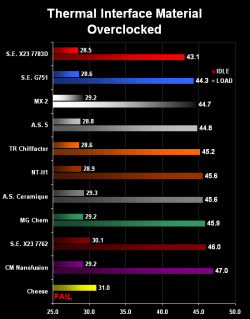
Here's a recent thermal paste shootout [H] Enthusiast - Thermal Paste Shootout - Q209
It shows how to correctly apply the stuff too.

I got 2 tubes of Shin-Etsu G-751 from here Shin-Etsu G-751 Thermal Compound 1.0 gram . It's not the cheapest per gram, but has pretty good temps and it's on sale with free shipping now. Each tube is good for at least 5 applications, if you do it right.
 

Attachments

  • 1236043439L0bdV188X7_4_3.png
    1236043439L0bdV188X7_4_3.png
    12.5 KB · Views: 22
Last edited by a moderator:

My Computer My Computer

At a glance

Win7 x64 7232 // XP x86 SP3E8400 @ 3.825GHz4GB G.Skill DDR2 1000MHzMSI 8800GTS (G92) in SLI
OS
Win7 x64 7232 // XP x86 SP3
CPU
E8400 @ 3.825GHz
Motherboard
EVGA 750i FTW
Memory
4GB G.Skill DDR2 1000MHz
Graphics Card(s)
MSI 8800GTS (G92) in SLI
Sound Card
HT|OMEGA Claro Plus+
Monitor(s) Displays
Dell S2209W
Screen Resolution
1920x1080
Hard Drives
WD Caviar Black 1TB //
Hitachi 7k1000.B 1TB //
WD SE16 640GB
PSU
Corsair 750TX
Case
ABS Monolith
Got back from Best Buy. The guy is very positive it's a dead motherboard but then I'm wondering would the CPU and all still come on if the motherboard was dead?

I'm calling ASUS now to see what they can do for me.
 

My Computer My Computer

At a glance

Vista Ultimate x64, Windows 7 RC 7100Intel C2D E8400 @ 3.8ghz4x 2gb G.Skill DDR2 1600nVidia GTX260 896mb
OS
Vista Ultimate x64, Windows 7 RC 7100
CPU
Intel C2D E8400 @ 3.8ghz
Motherboard
ASUS P5Q SE PLUS
Memory
4x 2gb G.Skill DDR2 1600
Graphics Card(s)
nVidia GTX260 896mb
Sound Card
Onboard 5.1 Surround Sound
Monitor(s) Displays
22" Acer LCD and 19" Westinghouse LCD
Screen Resolution
1680x1050 and 1280x1024
Hard Drives
Seagate Barracuda 7200rpm 750gb
Western Digital 500gb
PSU
Corsair H520X 520w
Case
Antec 300
Keyboard
Old G15
Mouse
Logitech G5
Internet Speed
15mbps down .34mbps up
Edit: He said he's tried hard booting 3-4 times Beginning, wouldn't that 'wake' it?

Well it did sound that way... But I was thinkin the same about it may be stuck in hibernete mode... Bryce - Sorry to hear you got problems on an almost new comp... :(
 

My Computer My Computer

At a glance

Windows 7 Home Premium 64bitInt i7 950 [3.06] O.C @3.36ghz Quad Core (HT)...DDR3 6GB/Kit PC3-16000 Patriot @ 1733 mhz = 7...NVIDIA GTS450 1GB PCI-E Zotac = 7.2 WEI
Computer type
PC/Desktop
Computer Manufacturer/Model Number
Generic Homebuilt
OS
Windows 7 Home Premium 64bit
CPU
Int i7 950 [3.06] O.C @3.36ghz Quad Core (HT) = 7.6 WEI
Motherboard
ATX LGA1366 DDR3 Asus Rampage III Formula
Memory
DDR3 6GB/Kit PC3-16000 Patriot @ 1733 mhz = 7.9 WEI
Graphics Card(s)
NVIDIA GTS450 1GB PCI-E Zotac = 7.2 WEI
Sound Card
X-Fi 2 Built-in 8-Channel High Definition
Monitor(s) Displays
LG-27"
Screen Resolution
1920 x1200
Hard Drives
Kingston 2.5" 120GB SATA 3.x MLC Int. SSD. = 7.9 WEI, 1TB WD SATA 3.x 64MB Blue.
PSU
600W Coolermaster eXtremePower Plus
Case
Coolermaster Centurion 590
Cooling
Zalman CNPS10X Extreme
Keyboard
Multimedia USB Logitech Wave
Mouse
Team Scorpion (Wired)
Other Info
Windows Experience Index = 7.2 overall
Just RMA'd it. And my new 22" monitor is ****ing awesome! To bad it's on my crappy laptop and I can't dual screen with my other monitor. I would pull out my 2nd best pc but its in the server rack and to hard to get to :(
 

My Computer My Computer

At a glance

Vista Ultimate x64, Windows 7 RC 7100Intel C2D E8400 @ 3.8ghz4x 2gb G.Skill DDR2 1600nVidia GTX260 896mb
OS
Vista Ultimate x64, Windows 7 RC 7100
CPU
Intel C2D E8400 @ 3.8ghz
Motherboard
ASUS P5Q SE PLUS
Memory
4x 2gb G.Skill DDR2 1600
Graphics Card(s)
nVidia GTX260 896mb
Sound Card
Onboard 5.1 Surround Sound
Monitor(s) Displays
22" Acer LCD and 19" Westinghouse LCD
Screen Resolution
1680x1050 and 1280x1024
Hard Drives
Seagate Barracuda 7200rpm 750gb
Western Digital 500gb
PSU
Corsair H520X 520w
Case
Antec 300
Keyboard
Old G15
Mouse
Logitech G5
Internet Speed
15mbps down .34mbps up
So, I've gotta tear my PC down to RMA the board...

I've gotta tear down my rig to RMA the board and all it's accessories. How should I go about removing the CPU and how should I store it? I don't really have the original packaging for it so kinda stumped on what to do and not screw it up.

Anyone know if mobo's come with an IDE cable or no? I think mine did but not sure lols.
 

My Computer My Computer

At a glance

Vista Ultimate x64, Windows 7 RC 7100Intel C2D E8400 @ 3.8ghz4x 2gb G.Skill DDR2 1600nVidia GTX260 896mb
OS
Vista Ultimate x64, Windows 7 RC 7100
CPU
Intel C2D E8400 @ 3.8ghz
Motherboard
ASUS P5Q SE PLUS
Memory
4x 2gb G.Skill DDR2 1600
Graphics Card(s)
nVidia GTX260 896mb
Sound Card
Onboard 5.1 Surround Sound
Monitor(s) Displays
22" Acer LCD and 19" Westinghouse LCD
Screen Resolution
1680x1050 and 1280x1024
Hard Drives
Seagate Barracuda 7200rpm 750gb
Western Digital 500gb
PSU
Corsair H520X 520w
Case
Antec 300
Keyboard
Old G15
Mouse
Logitech G5
Internet Speed
15mbps down .34mbps up
Back
Top