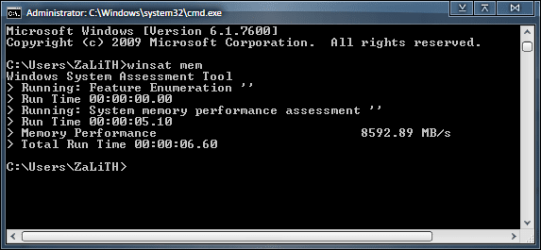
What's your memory assessment speed?

Status
Not open for further replies.
Kingston 2x2GB@1333Mhz 9/9/9/24 (isn't that suppose to be slow??)
No OC yet, will use the mobo OC button soon tho :p

Doesn't look slow to me :p

You got a nice setup, nothing wrong with your RAM or timings :D
 

My Computer My Computer

At a glance

Windows 7 Ult x64 - SP1/ Windows 8 Pro x64Intel Core i5-3570K 4.6GHz8GB (2X4GB) DDR3 1600 Corsair Vengeance CL8 1.5vSapphire HD 7770 Vapor-X OC 1GB DDR5
Computer type
PC/Desktop
Computer Manufacturer/Model Number
76~2.0
OS
Windows 7 Ult x64 - SP1/ Windows 8 Pro x64
CPU
Intel Core i5-3570K 4.6GHz
Motherboard
Gigabyte GA-Z77X UD3H, f18
Memory
8GB (2X4GB) DDR3 1600 Corsair Vengeance CL8 1.5v
Graphics Card(s)
Sapphire HD 7770 Vapor-X OC 1GB DDR5
Sound Card
Onboard VIA VT2021
Monitor(s) Displays
22" LCD Dell
Screen Resolution
1680x1050
Hard Drives
Samsung 840Pro 128GB SSD,
Seagate Barracuda 500GB SATA2 7200rpm 32MB cache, Seagate Barracuda 1TB SATA2 7200rpm 32MB cache,
PSU
Corsair HX650W
Case
Cooler Master Storm Scout
Cooling
Corsair H80 2x12cm Noctua NF P12 , 2x14cm case fans
Keyboard
Logitech Wave
Mouse
CM Sentinel
Internet Speed
Dismal
Antivirus
Avast
Browser
Opera Next
Other Info
Haswell laptop: HP Envy 17t-j, i7-4700MQ, GeForce 740M 2GB DDR3, 17.3" Full HD 1920x1080, 16GB RAM, Samsung 840 Pro 128GB, 1TB Hitachi 7200 HDD,
Desktop: eSATA ports,
External eSATA Seagate 500GB SATA2 7200rpm,
External WD USB 500GB
Kingston 2x2GB@1333Mhz 9/9/9/24 (isn't that suppose to be slow??)
No OC yet, will use the mobo OC button soon tho :p

Doesn't look slow to me :p

You got a nice setup, nothing wrong with your RAM or timings :D
What I mean is the timings are suppose to be slow but doesn't show in the overall speed, makes me think timings are a load of bull :D
 

My Computer My Computer

At a glance

Windows 7Intel i5 750Kingston 4 GB DDR3-1333Club3d HD 5770 OC CrossFire
OS
Windows 7
CPU
Intel i5 750
Motherboard
MSI P55-GD65
Memory
Kingston 4 GB DDR3-1333
Graphics Card(s)
Club3d HD 5770 OC CrossFire
Sound Card
Onboard 7.1 Realtek ALC889
Monitor(s) Displays
Iiyama ProLite E2407HDS-B1
Screen Resolution
1920x1080
Hard Drives
Intel X25-M G2 Postville 80 GB
Samsung F3 1TB
PSU
Cooler Master RealPower M620
Case
Cooler Master COSMOS 1000
Cooling
Scythe Mugen 2
Keyboard
Logitech G19 Gaming Keyboard
Mouse
Logitech Performance Mouse MX
Other Info
Logitech G27 Racing Wheel
Games: Need for Speed SHIFT | Colin McRae: Dirt 2 | Grand Theft Auto IV | Race Driver GRID
Last edited:

My Computer My Computer

At a glance

Windows 10 Home x64INTEL Core i5-750 Quad-Core 3.37GHzHyperX Fury Black Series 8GB (2 x 4GB) 1866MhzEVGA GeForce GTX 750 Superclocked 1GB 128-Bit...
Computer type
PC/Desktop
OS
Windows 10 Home x64
CPU
INTEL Core i5-750 Quad-Core 3.37GHz
Motherboard
ASUS P7P55D
Memory
HyperX Fury Black Series 8GB (2 x 4GB) 1866Mhz
Graphics Card(s)
EVGA GeForce GTX 750 Superclocked 1GB 128-Bit GDDR5
Monitor(s) Displays
LG 32MA68HY 32" IPS
Screen Resolution
1920 x 1080
Hard Drives
Samsung 840 Evo 120GB, SEAGATE 500GB Barracuda® 7200.12, SATA 3 Gb/s, 7200 RPM, 16MB cache
PSU
ANTEC TruePower New TP-550, 80 PLUS, 550W
Case
ANTEC Three Hundred Illusion
Cooling
COOLER MASTER Hyper 212 Plus, 4 x 120mm 1 x 140mm Noctua's
Internet Speed
85 + Mbps
Antivirus
Avast
Browser
Vivaldi
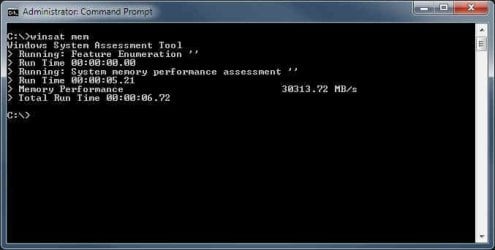
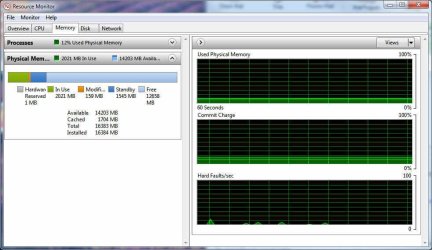
Here are a coupla screen dumps. Memory speed sez it's 30313 and change. Resmon tells me that only 2 gig out of the 16 on board are being used.

This is on a system with dual quad-core Opterons, each of which have 8 gig of "registered" (why didn't they just call it "buffered") memory.

When I run the WEI it comes up with a score of 7.2, showing the SATA disks as the slowest section.

Try as I might, I cannot get the system to use more than 3 gig of RAM, even when it bogs down at tells me that things have stopped working...like Firefox. That's a rather frequent event. I find that I have to reboot this sucker at least once a day and many times, many times more.

Here's the build diary on it:
Dreadnought

Long story short for those who haven't seen my posts in the WEI thread. I've been working with computers since 1966. Yeah. I'm old. But I've worked on everything from vacuum-tube analog systems to mainframes to...well, whatever. Then I spent the last 20 years of my career as a developer/analyst working mainly on one-off interface programs to port data from one system to another....and a buncha other stuff.

I had to retire early due to health problems and now I've started another career as a photographer and web designer/maintainer/whatever.

The reason I built this box is because I have literally millions of photos and I spend at least half of my waking hours editing them and the old box with XP just wasn't cuttin it. So I built this one. It's better, but I'm still not happy with it. And I'm really baffled by the seeming 3 or 4 gig limit on RAM.

I tried setting the # of processors and memory in msconfig, but that ended up having to go back to a restore point. It really didn't like what I told it, I guess. Further research seems to indicate that the advanced boot options for # of procs and memory amount are only to limit the system for troubleshooting purposes. I don't think I'll try that one again any time soon.

If anyone has any insight on how to free up or un-throttle memory usage, I'd sure appreciate it.

Btw, I otta mention that as of today I've tried some things that seem to help with performance from a subjective standpoint: I've set the task scheduler to prioritize background tasks rather than programs. Seems counter-intuitive but it really helped in running some cataloging programs that would generally wander off into no mans' land and hang. They ran completely and quickly after making that change.

I've also disabled the swap file. I have a 60 gig SSD for the OS and very little else. Freeing up 16 gig on it really helps with free space there.

Finally, I've started using Free Commander in place of Explorer. I'd been using Xplorer2, but it doesn't support a tree structure in both "panels."

Having said all that, I need to edit some photos from a shoot I did earlier in the day.

If ya got some ideas for tweaks, I'd sure like to give 'em a try. One thing I can't do is completely restructure the disk system with a RAID 3 or 4 setup. I won't have the time to do that until October or November based on my seasonal schedule for photo shoots.

Thanks,

 

My Computer My Computer

At a glance

Windows 7 Pro 64-bit2 x Opteron quad-core16 gig bufferedRadeon 4890 feeding my compnent stereo system...
Computer Manufacturer/Model Number
Home Built
OS
Windows 7 Pro 64-bit
CPU
2 x Opteron quad-core
Motherboard
TYAN Thunder N3600B Dual processor mobo
Memory
16 gig buffered
Graphics Card(s)
Radeon 4890 feeding my compnent stereo system. Sounds great
Sound Card
M-Audio Delta Audiophile
Monitor(s) Displays
Acer 24", Acer 21"
Screen Resolution
1980x1050 & 1680x1050
Hard Drives
Internal:

OCZ 60 gig SSD
2 x WD 1tb
1 WD 1.5tb
1 WD 320 GB

External:

3 x WD Mybook 1TB
PSU
Corsair 900w
Case
Coolermaster HAF 932
Cooling
Many fans, liquid cooling on the way but likely in November
Keyboard
Saitek red backlit
Mouse
Logitek USB
Internet Speed
Way too slow for a DSL line
Other Info
This is a build that was in progress but got pressed into service because of the need for large photo editing capability.

More will be revealed after "car season" (race cars, Salt Flats, etc.) is over in October. That's when the serious tweaking will start.

See Build Diary here:
http://www.raytherat.com/dreadnought/Welcome.html
Hmmm...where did the screen dumps go? Let's try that again.
 

Attachments

  • Winsat1.jpg
    Winsat1.jpg
    18.3 KB · Views: 33
  • ResMon2.jpg
    ResMon2.jpg
    67.9 KB · Views: 17

My Computer My Computer

At a glance

Windows 7 Pro 64-bit2 x Opteron quad-core16 gig bufferedRadeon 4890 feeding my compnent stereo system...
Computer Manufacturer/Model Number
Home Built
OS
Windows 7 Pro 64-bit
CPU
2 x Opteron quad-core
Motherboard
TYAN Thunder N3600B Dual processor mobo
Memory
16 gig buffered
Graphics Card(s)
Radeon 4890 feeding my compnent stereo system. Sounds great
Sound Card
M-Audio Delta Audiophile
Monitor(s) Displays
Acer 24", Acer 21"
Screen Resolution
1980x1050 & 1680x1050
Hard Drives
Internal:

OCZ 60 gig SSD
2 x WD 1tb
1 WD 1.5tb
1 WD 320 GB

External:

3 x WD Mybook 1TB
PSU
Corsair 900w
Case
Coolermaster HAF 932
Cooling
Many fans, liquid cooling on the way but likely in November
Keyboard
Saitek red backlit
Mouse
Logitek USB
Internet Speed
Way too slow for a DSL line
Other Info
This is a build that was in progress but got pressed into service because of the need for large photo editing capability.

More will be revealed after "car season" (race cars, Salt Flats, etc.) is over in October. That's when the serious tweaking will start.

See Build Diary here:
http://www.raytherat.com/dreadnought/Welcome.html
Here's mine, pretty decent I think DDR3 1333mhz 7-7-7-20
 

Attachments

  • memory bench.PNG
    memory bench.PNG
    37.8 KB · Views: 34

My Computer My Computer

At a glance

Windows 7 Ultimate x64INTEL CORE I5 750 180x20 all powersaving 1.168vOCZ 4GB DDR3 PC3-10666 (7-7-7-20-2t) @1.651vASUS 9800GT GLACIATOR FANSINK
Computer Manufacturer/Model Number
Custom Built/ Built by me, CR-48
OS
Windows 7 Ultimate x64
CPU
INTEL CORE I5 750 180x20 all powersaving 1.168v
Motherboard
MSI P55-GD55
Memory
OCZ 4GB DDR3 PC3-10666 (7-7-7-20-2t) @1.651v
Graphics Card(s)
ASUS 9800GT GLACIATOR FANSINK
Sound Card
ONBOARD REALTEK ALC889
Monitor(s) Displays
VIEWSONIC VX924, VIZIO VS420LF1A
Screen Resolution
VX924: 1280x1024 75hz, VS420LF1A: 1920x1080 60hz(1080p)
Hard Drives
HITACHI Deskstar HD31000 IDK/7K 1TB 7200RPM 32MB CACHE SATA II
PSU
OCZ MODXSTREAM PRO 700 WATT SEMI-MODULAR
Case
ANTEC 900
Cooling
CoolerMaster Hyper 212+
Keyboard
Logitech K520
Mouse
LOGITECH M310
Internet Speed
CHARTER PIPELINE 15MB DOWN/ 3MB UP
Other Info
ROUTER: DLINK DIR-655, Netgear WNR3500L (SamKnows)
MODEM: MOTOROLA SB6120
HTPC: AMD Athlon II x2 255 C3, Pegatron M2N78-LA (Violet 3.02) , Galaxy NVidia Geforce 210, HP OEM 300WATT PSU, Zalman Z7 Plus, SAMSUNG 3GB PC2-5300, SEAGATE 80GB SATA, Hauppauge WinTV-HVR-1800

My Computer My Computer

At a glance

Windows 7 Ultimate x64INTEL CORE I5 750 180x20 all powersaving 1.168vOCZ 4GB DDR3 PC3-10666 (7-7-7-20-2t) @1.651vASUS 9800GT GLACIATOR FANSINK
Computer Manufacturer/Model Number
Custom Built/ Built by me, CR-48
OS
Windows 7 Ultimate x64
CPU
INTEL CORE I5 750 180x20 all powersaving 1.168v
Motherboard
MSI P55-GD55
Memory
OCZ 4GB DDR3 PC3-10666 (7-7-7-20-2t) @1.651v
Graphics Card(s)
ASUS 9800GT GLACIATOR FANSINK
Sound Card
ONBOARD REALTEK ALC889
Monitor(s) Displays
VIEWSONIC VX924, VIZIO VS420LF1A
Screen Resolution
VX924: 1280x1024 75hz, VS420LF1A: 1920x1080 60hz(1080p)
Hard Drives
HITACHI Deskstar HD31000 IDK/7K 1TB 7200RPM 32MB CACHE SATA II
PSU
OCZ MODXSTREAM PRO 700 WATT SEMI-MODULAR
Case
ANTEC 900
Cooling
CoolerMaster Hyper 212+
Keyboard
Logitech K520
Mouse
LOGITECH M310
Internet Speed
CHARTER PIPELINE 15MB DOWN/ 3MB UP
Other Info
ROUTER: DLINK DIR-655, Netgear WNR3500L (SamKnows)
MODEM: MOTOROLA SB6120
HTPC: AMD Athlon II x2 255 C3, Pegatron M2N78-LA (Violet 3.02) , Galaxy NVidia Geforce 210, HP OEM 300WATT PSU, Zalman Z7 Plus, SAMSUNG 3GB PC2-5300, SEAGATE 80GB SATA, Hauppauge WinTV-HVR-1800
Doesn't look slow to me :p

You got a nice setup, nothing wrong with your RAM or timings :D
What I mean is the timings are suppose to be slow but doesn't show in the overall speed, makes me think timings are a load of bull :D

1333mhz should be 7-7-7-20 right?

Depends on the manufacturers specs and design. Can be different timings and voltage ranges from the same brand, depending on the model.

All are different.

Edit:
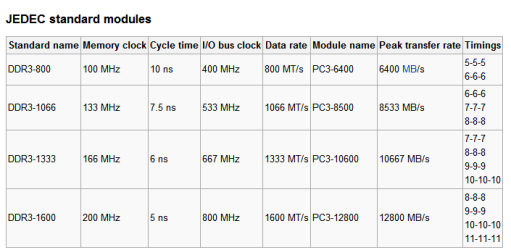
Here's some info on the timing ranges.
DDR3 SDRAM
 

Attachments

  • DDR3 timing ranges.PNG
    DDR3 timing ranges.PNG
    7.6 KB · Views: 24
Last edited:

My Computer My Computer

At a glance

Windows 7 Ult x64 - SP1/ Windows 8 Pro x64Intel Core i5-3570K 4.6GHz8GB (2X4GB) DDR3 1600 Corsair Vengeance CL8 1.5vSapphire HD 7770 Vapor-X OC 1GB DDR5
Computer type
PC/Desktop
Computer Manufacturer/Model Number
76~2.0
OS
Windows 7 Ult x64 - SP1/ Windows 8 Pro x64
CPU
Intel Core i5-3570K 4.6GHz
Motherboard
Gigabyte GA-Z77X UD3H, f18
Memory
8GB (2X4GB) DDR3 1600 Corsair Vengeance CL8 1.5v
Graphics Card(s)
Sapphire HD 7770 Vapor-X OC 1GB DDR5
Sound Card
Onboard VIA VT2021
Monitor(s) Displays
22" LCD Dell
Screen Resolution
1680x1050
Hard Drives
Samsung 840Pro 128GB SSD,
Seagate Barracuda 500GB SATA2 7200rpm 32MB cache, Seagate Barracuda 1TB SATA2 7200rpm 32MB cache,
PSU
Corsair HX650W
Case
Cooler Master Storm Scout
Cooling
Corsair H80 2x12cm Noctua NF P12 , 2x14cm case fans
Keyboard
Logitech Wave
Mouse
CM Sentinel
Internet Speed
Dismal
Antivirus
Avast
Browser
Opera Next
Other Info
Haswell laptop: HP Envy 17t-j, i7-4700MQ, GeForce 740M 2GB DDR3, 17.3" Full HD 1920x1080, 16GB RAM, Samsung 840 Pro 128GB, 1TB Hitachi 7200 HDD,
Desktop: eSATA ports,
External eSATA Seagate 500GB SATA2 7200rpm,
External WD USB 500GB
Ok , mines not a massive score , but considering the memory I don't think its bad.

I have 1 x 2gb stick of 800mhz and 1 x 1gb of 677mhz memory so totally mixed up.

Its overclocked in the bios to 900mhz and running in flex mode.
 

Attachments

  • winsat.JPG
    winsat.JPG
    32.4 KB · Views: 16

My Computer My Computer

At a glance

Windows 7 Professional 64 bit
OS
Windows 7 Professional 64 bit
Windows System Assessment Tool
> Running: Feature Enumeration ''
> Run Time 00:00:00.00
> Running: System memory performance assessment ''
> Run Time 00:00:05.18
> Memory Performance 4676.06 MB/s
> Total Run Time 00:00:07.85

This is with DDR2 4gb 1066. CL5-5-5-15. Can someone tell me if this is normal, or low? I'm seeing alot of high numbers... and something doesn't feel right.

Oh yeah, the Ram is Mushkin Blackline Frostbyte PC2-8500
 

My Computer My Computer

At a glance

Windows 7 Ultimate 64bitIntel Core i7 2600K @ 3.40GHzG.SKILL Ripjaws X F3 1600 16GBATI Radeon HD5870
OS
Windows 7 Ultimate 64bit
CPU
Intel Core i7 2600K @ 3.40GHz
Motherboard
ASUS P8Z68-V Pro Z68 LGA1155
Memory
G.SKILL Ripjaws X F3 1600 16GB
Graphics Card(s)
ATI Radeon HD5870
Screen Resolution
1680x1050
Hard Drives
Intel 510 Series 120GB Solid State Drive
Western Digital Caviar Black 1TB SATA3 6GB/S
PSU
Corsair Professional HX750W 750W
Case
Cooler Master Haf 932
Cooling
Noctua NH-D14
Keyboard
Logitech G15
Mouse
Logitech G5
Internet Speed
30MBps Down, 2MBps Up
Windows System Assessment Tool
> Running: Feature Enumeration ''
> Run Time 00:00:00.00
> Running: System memory performance assessment ''
> Run Time 00:00:05.18
> Memory Performance 4676.06 MB/s
> Total Run Time 00:00:07.85

This is with DDR2 4gb 1066. CL5-5-5-15. Can someone tell me if this is normal, or low? I'm seeing alot of high numbers... and something doesn't feel right.

Oh yeah, the Ram is Mushkin Blackline Frostbyte PC2-8500
That does seem a little bit low to me.... I would've thought PC8500 RAM would get more than that? I've only got PC6400 (DDR2-800) and I just got this now:
 

Attachments

  • WinSAT MEM.PNG
    WinSAT MEM.PNG
    7.8 KB · Views: 12

My Computer My Computer

At a glance

Win 10 x64 Pro x64 / Ubuntu 15.10 x64Intel i7-4960X4x8GB Corsair Dominator Platinum @2400MHz 10-...2x MSI GTX780Ti 3GB (SLI)
Computer type
PC/Desktop
OS
Win 10 x64 Pro x64 / Ubuntu 15.10 x64
CPU
Intel i7-4960X
Motherboard
Asus Rampage IV Black Edition
Memory
4x8GB Corsair Dominator Platinum @2400MHz 10-12-12-31
Graphics Card(s)
2x MSI GTX780Ti 3GB (SLI)
Sound Card
Onboard SupremeFX (Cirrus Logic CS4398)
Monitor(s) Displays
3x LG Cinema 27" IPS LED (27MP65)
Screen Resolution
[1920x1080]x3
Hard Drives
Crucial M500 120GB, Crucial M500 480GB, Toshiba DT01ACA200 2TB
PSU
CoolerMaster V1000
Case
Corsair Obsidian 750D
Cooling
ThermalTake Water 3.0 Extreme, 4xSP120, 3xAF120
Keyboard
Moshi Luna
Mouse
Logitech G700s / Roccat Tyon
Internet Speed
4Mb uncapped ADSL (Afrihost)
Antivirus
MS Security Essentials
Browser
Chrome... Duh. (:
What I mean is the timings are suppose to be slow but doesn't show in the overall speed, makes me think timings are a load of bull :D

1333mhz should be 7-7-7-20 right?

Depends on the manufacturers specs and design. Can be different timings and voltage ranges from the same brand, depending on the model.

All are different.

Edit:
Here's some info on the timing ranges.
DDR3 SDRAM
This is probably a dumb question but I rather ask here then read a few 100 pages to find a decent answer elsewhere online ;)
Peak transfer rate DDR3-1333: 10667 MB/s. Then where do the 16000+ scores come from?
 

My Computer My Computer

At a glance

Windows 7Intel i5 750Kingston 4 GB DDR3-1333Club3d HD 5770 OC CrossFire
OS
Windows 7
CPU
Intel i5 750
Motherboard
MSI P55-GD65
Memory
Kingston 4 GB DDR3-1333
Graphics Card(s)
Club3d HD 5770 OC CrossFire
Sound Card
Onboard 7.1 Realtek ALC889
Monitor(s) Displays
Iiyama ProLite E2407HDS-B1
Screen Resolution
1920x1080
Hard Drives
Intel X25-M G2 Postville 80 GB
Samsung F3 1TB
PSU
Cooler Master RealPower M620
Case
Cooler Master COSMOS 1000
Cooling
Scythe Mugen 2
Keyboard
Logitech G19 Gaming Keyboard
Mouse
Logitech Performance Mouse MX
Other Info
Logitech G27 Racing Wheel
Games: Need for Speed SHIFT | Colin McRae: Dirt 2 | Grand Theft Auto IV | Race Driver GRID
Windows System Assessment Tool
> Running: Feature Enumeration ''
> Run Time 00:00:00.00
> Running: System memory performance assessment ''
> Run Time 00:00:05.18
> Memory Performance 4676.06 MB/s
> Total Run Time 00:00:07.85

This is with DDR2 4gb 1066. CL5-5-5-15. Can someone tell me if this is normal, or low? I'm seeing alot of high numbers... and something doesn't feel right.

Oh yeah, the Ram is Mushkin Blackline Frostbyte PC2-8500
That does seem a little bit low to me.... I would've thought PC8500 RAM would get more than that? I've only got PC6400 (DDR2-800) and I just got this now:


So what could/should I do to fix it? Its brand new ram too..
 

My Computer My Computer

At a glance

Windows 7 Ultimate 64bitIntel Core i7 2600K @ 3.40GHzG.SKILL Ripjaws X F3 1600 16GBATI Radeon HD5870
OS
Windows 7 Ultimate 64bit
CPU
Intel Core i7 2600K @ 3.40GHz
Motherboard
ASUS P8Z68-V Pro Z68 LGA1155
Memory
G.SKILL Ripjaws X F3 1600 16GB
Graphics Card(s)
ATI Radeon HD5870
Screen Resolution
1680x1050
Hard Drives
Intel 510 Series 120GB Solid State Drive
Western Digital Caviar Black 1TB SATA3 6GB/S
PSU
Corsair Professional HX750W 750W
Case
Cooler Master Haf 932
Cooling
Noctua NH-D14
Keyboard
Logitech G15
Mouse
Logitech G5
Internet Speed
30MBps Down, 2MBps Up
So what could/should I do to fix it? Its brand new ram too..
I'm not really sure hey... Depending on the board and CPU you have (I have no experience with your hardware) you might be able to OC the RAM? Here's an interesting article at OverClock3D, maybe that'll help a bit? I'm not sure if it's the exact same RAM as yours though...
 

My Computer My Computer

At a glance

Win 10 x64 Pro x64 / Ubuntu 15.10 x64Intel i7-4960X4x8GB Corsair Dominator Platinum @2400MHz 10-...2x MSI GTX780Ti 3GB (SLI)
Computer type
PC/Desktop
OS
Win 10 x64 Pro x64 / Ubuntu 15.10 x64
CPU
Intel i7-4960X
Motherboard
Asus Rampage IV Black Edition
Memory
4x8GB Corsair Dominator Platinum @2400MHz 10-12-12-31
Graphics Card(s)
2x MSI GTX780Ti 3GB (SLI)
Sound Card
Onboard SupremeFX (Cirrus Logic CS4398)
Monitor(s) Displays
3x LG Cinema 27" IPS LED (27MP65)
Screen Resolution
[1920x1080]x3
Hard Drives
Crucial M500 120GB, Crucial M500 480GB, Toshiba DT01ACA200 2TB
PSU
CoolerMaster V1000
Case
Corsair Obsidian 750D
Cooling
ThermalTake Water 3.0 Extreme, 4xSP120, 3xAF120
Keyboard
Moshi Luna
Mouse
Logitech G700s / Roccat Tyon
Internet Speed
4Mb uncapped ADSL (Afrihost)
Antivirus
MS Security Essentials
Browser
Chrome... Duh. (:
Windows System Assessment Tool
> Running: Feature Enumeration ''
> Run Time 00:00:00.00
> Running: System memory performance assessment ''
> Run Time 00:00:05.18
> Memory Performance 4676.06 MB/s
> Total Run Time 00:00:07.85

This is with DDR2 4gb 1066. CL5-5-5-15. Can someone tell me if this is normal, or low? I'm seeing alot of high numbers... and something doesn't feel right.

Oh yeah, the Ram is Mushkin Blackline Frostbyte PC2-8500
That does seem a little bit low to me.... I would've thought PC8500 RAM would get more than that? I've only got PC6400 (DDR2-800) and I just got this now:


So what could/should I do to fix it? Its brand new ram too..

Did you leave the RAM at default settings?

Go to your BIOS, check the timings and voltage.

Does your MOBO and RAM have Extreme Memory Profile (X.M.P.)?

This will automatically detect your optimized RAM settings (info from the RAM).
 

My Computer My Computer

At a glance

Windows 7 Ult x64 - SP1/ Windows 8 Pro x64Intel Core i5-3570K 4.6GHz8GB (2X4GB) DDR3 1600 Corsair Vengeance CL8 1.5vSapphire HD 7770 Vapor-X OC 1GB DDR5
Computer type
PC/Desktop
Computer Manufacturer/Model Number
76~2.0
OS
Windows 7 Ult x64 - SP1/ Windows 8 Pro x64
CPU
Intel Core i5-3570K 4.6GHz
Motherboard
Gigabyte GA-Z77X UD3H, f18
Memory
8GB (2X4GB) DDR3 1600 Corsair Vengeance CL8 1.5v
Graphics Card(s)
Sapphire HD 7770 Vapor-X OC 1GB DDR5
Sound Card
Onboard VIA VT2021
Monitor(s) Displays
22" LCD Dell
Screen Resolution
1680x1050
Hard Drives
Samsung 840Pro 128GB SSD,
Seagate Barracuda 500GB SATA2 7200rpm 32MB cache, Seagate Barracuda 1TB SATA2 7200rpm 32MB cache,
PSU
Corsair HX650W
Case
Cooler Master Storm Scout
Cooling
Corsair H80 2x12cm Noctua NF P12 , 2x14cm case fans
Keyboard
Logitech Wave
Mouse
CM Sentinel
Internet Speed
Dismal
Antivirus
Avast
Browser
Opera Next
Other Info
Haswell laptop: HP Envy 17t-j, i7-4700MQ, GeForce 740M 2GB DDR3, 17.3" Full HD 1920x1080, 16GB RAM, Samsung 840 Pro 128GB, 1TB Hitachi 7200 HDD,
Desktop: eSATA ports,
External eSATA Seagate 500GB SATA2 7200rpm,
External WD USB 500GB
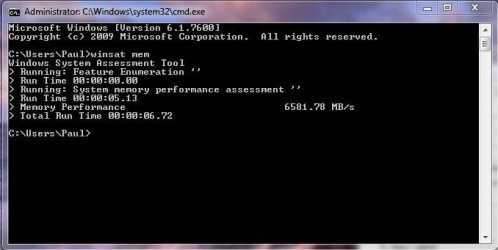
Hmm, I've just tried this on my DDR3 now. I have 1333MHz DDR3 RAM, and I only get around 6900MB/s in dual channel. I'm pretty sure I should be getting slightly higher than that :confused:

So I came back to this. As I bought the 3x2GB stick off a friend, I popped the 3rd stick in, fired up comp, and re-did the speed test. The speeds were exactly the same, and it was reported to still be in dual channel.. :huh:
 

My Computer My Computer

At a glance

Windows 8.1 Pro x64Intel Core i7 4790k8GB Corsair Dominator 1600MHzMSI TwinFrozr GeForce GTX770
Computer type
PC/Desktop
Computer Manufacturer/Model Number
Custom Built
OS
Windows 8.1 Pro x64
CPU
Intel Core i7 4790k
Motherboard
MSI Z97S Krait Edition
Memory
8GB Corsair Dominator 1600MHz
Graphics Card(s)
MSI TwinFrozr GeForce GTX770
Sound Card
ASUS Xonar DX/XD 7.1
Monitor(s) Displays
Dell 24" S2409W + Dell 20" E207WFP
Screen Resolution
1920x1080 + 1680x1050
Hard Drives
1x 120GB OCZ Agility 3, 1x 750GB Western Digital Caviar Black, 1x 1TB Western Digital Caviar Blue
PSU
Corsair HX850 modular
Case
Fractal Design Define R4
Cooling
Corsair H60 w/ twin Corsair SP120 fans
Keyboard
Logitech G510S Keyboard
Mouse
Logitech G500S Laser Mouse
Internet Speed
40Mbps
Antivirus
Microsoft Security Essentials
Browser
Google Chrome
Other Info
LG Blu-Ray player
Hmm, I've just tried this on my DDR3 now. I have 1333MHz DDR3 RAM, and I only get around 6900MB/s in dual channel. I'm pretty sure I should be getting slightly higher than that :confused:

So I came back to this. As I bought the 3x2GB stick off a friend, I popped the 3rd stick in, fired up comp, and re-did the speed test. The speeds were exactly the same, and it was reported to still be in dual channel.. :huh:
Of course, your cpu is either dual channel or triple channel compatible aka an I5-750 can handle 4-8-12-16GB (4*), the I7-920 6-12-18GB (6*), 2x3Gb on a i5-750 for one is useless.
 

My Computer My Computer

At a glance

Windows 7Intel i5 750Kingston 4 GB DDR3-1333Club3d HD 5770 OC CrossFire
OS
Windows 7
CPU
Intel i5 750
Motherboard
MSI P55-GD65
Memory
Kingston 4 GB DDR3-1333
Graphics Card(s)
Club3d HD 5770 OC CrossFire
Sound Card
Onboard 7.1 Realtek ALC889
Monitor(s) Displays
Iiyama ProLite E2407HDS-B1
Screen Resolution
1920x1080
Hard Drives
Intel X25-M G2 Postville 80 GB
Samsung F3 1TB
PSU
Cooler Master RealPower M620
Case
Cooler Master COSMOS 1000
Cooling
Scythe Mugen 2
Keyboard
Logitech G19 Gaming Keyboard
Mouse
Logitech Performance Mouse MX
Other Info
Logitech G27 Racing Wheel
Games: Need for Speed SHIFT | Colin McRae: Dirt 2 | Grand Theft Auto IV | Race Driver GRID
Hmm, I've just tried this on my DDR3 now. I have 1333MHz DDR3 RAM, and I only get around 6900MB/s in dual channel. I'm pretty sure I should be getting slightly higher than that :confused:

So I came back to this. As I bought the 3x2GB stick off a friend, I popped the 3rd stick in, fired up comp, and re-did the speed test. The speeds were exactly the same, and it was reported to still be in dual channel.. :huh:

Your processor is dual channel, as well as your board.

Looks like your speed is a bit slow.

I have a dual channel processor and board, 4X2GB XMS3 DDR3 1600 and get 19,424 MB/s.

Did you check the RAM settings in BIOS?
Voltage and timings.

Did you leave them at default settings or change them to the manufacturer specs?

Do you have a Extreme Memory Profile (X.M.P.) setting?

This will automatically set the RAM to manufacturer specs. If the voltage is higher than default it might increase the voltage on your processor, so check that before and after enabling XMP.

Hope this helps.

EDIT:
Just found this on a review of your MOBO: "The CPU and memory busses are “fully” independent of each other allowing you to pretty much dial up whatever speed you wish for each."
 
Last edited:

My Computer My Computer

At a glance

Windows 7 Ult x64 - SP1/ Windows 8 Pro x64Intel Core i5-3570K 4.6GHz8GB (2X4GB) DDR3 1600 Corsair Vengeance CL8 1.5vSapphire HD 7770 Vapor-X OC 1GB DDR5
Computer type
PC/Desktop
Computer Manufacturer/Model Number
76~2.0
OS
Windows 7 Ult x64 - SP1/ Windows 8 Pro x64
CPU
Intel Core i5-3570K 4.6GHz
Motherboard
Gigabyte GA-Z77X UD3H, f18
Memory
8GB (2X4GB) DDR3 1600 Corsair Vengeance CL8 1.5v
Graphics Card(s)
Sapphire HD 7770 Vapor-X OC 1GB DDR5
Sound Card
Onboard VIA VT2021
Monitor(s) Displays
22" LCD Dell
Screen Resolution
1680x1050
Hard Drives
Samsung 840Pro 128GB SSD,
Seagate Barracuda 500GB SATA2 7200rpm 32MB cache, Seagate Barracuda 1TB SATA2 7200rpm 32MB cache,
PSU
Corsair HX650W
Case
Cooler Master Storm Scout
Cooling
Corsair H80 2x12cm Noctua NF P12 , 2x14cm case fans
Keyboard
Logitech Wave
Mouse
CM Sentinel
Internet Speed
Dismal
Antivirus
Avast
Browser
Opera Next
Other Info
Haswell laptop: HP Envy 17t-j, i7-4700MQ, GeForce 740M 2GB DDR3, 17.3" Full HD 1920x1080, 16GB RAM, Samsung 840 Pro 128GB, 1TB Hitachi 7200 HDD,
Desktop: eSATA ports,
External eSATA Seagate 500GB SATA2 7200rpm,
External WD USB 500GB
did a little cpu upgrade just from the 140w to the 125w cpu with a little more o/c. this is ddr2 1066 but it is 8gb total ram at all factory settings it gets 10,000 but it does seem that quantity plays a factor in the speed.
 

Attachments

  • memtest.JPG
    memtest.JPG
    42.9 KB · Views: 21
Last edited:

My Computer My Computer

At a glance

windows 7 premium x64amd phenomII x6 1090 @ 4.018g ocz ocz platinum ddr3-2000 @2000xfx 5830
Computer Manufacturer/Model Number
me
OS
windows 7 premium x64
CPU
amd phenomII x6 1090 @ 4.01
Motherboard
asus m4a89gtd pro/usb3
Memory
8g ocz ocz platinum ddr3-2000 @2000
Graphics Card(s)
xfx 5830
Sound Card
onboard
Monitor(s) Displays
1 x acer al1706,1x viewsonic va902b, 1x dell e173fp
Screen Resolution
3840x1024
Hard Drives
1 sata 3.0g/s seagate 750gb
ocz vertex3 60 gb ssd x2 raid 1
PSU
750 corsair
Case
rosewill destroyer
Cooling
corsair h60
Internet Speed
50
Nice score, you got that RAM tuned :)

The more GB you have the better the score is, don't remember the details but someone explained it earlier in this thread.

It helps.
 

My Computer My Computer

At a glance

Windows 7 Ult x64 - SP1/ Windows 8 Pro x64Intel Core i5-3570K 4.6GHz8GB (2X4GB) DDR3 1600 Corsair Vengeance CL8 1.5vSapphire HD 7770 Vapor-X OC 1GB DDR5
Computer type
PC/Desktop
Computer Manufacturer/Model Number
76~2.0
OS
Windows 7 Ult x64 - SP1/ Windows 8 Pro x64
CPU
Intel Core i5-3570K 4.6GHz
Motherboard
Gigabyte GA-Z77X UD3H, f18
Memory
8GB (2X4GB) DDR3 1600 Corsair Vengeance CL8 1.5v
Graphics Card(s)
Sapphire HD 7770 Vapor-X OC 1GB DDR5
Sound Card
Onboard VIA VT2021
Monitor(s) Displays
22" LCD Dell
Screen Resolution
1680x1050
Hard Drives
Samsung 840Pro 128GB SSD,
Seagate Barracuda 500GB SATA2 7200rpm 32MB cache, Seagate Barracuda 1TB SATA2 7200rpm 32MB cache,
PSU
Corsair HX650W
Case
Cooler Master Storm Scout
Cooling
Corsair H80 2x12cm Noctua NF P12 , 2x14cm case fans
Keyboard
Logitech Wave
Mouse
CM Sentinel
Internet Speed
Dismal
Antivirus
Avast
Browser
Opera Next
Other Info
Haswell laptop: HP Envy 17t-j, i7-4700MQ, GeForce 740M 2GB DDR3, 17.3" Full HD 1920x1080, 16GB RAM, Samsung 840 Pro 128GB, 1TB Hitachi 7200 HDD,
Desktop: eSATA ports,
External eSATA Seagate 500GB SATA2 7200rpm,
External WD USB 500GB
Status
Not open for further replies.
Back
Top