Windows Vista to windows 7

Nano3

New member
Local time
3:40 AM
Messages
138
Location
Chicago IL / Springfield MA
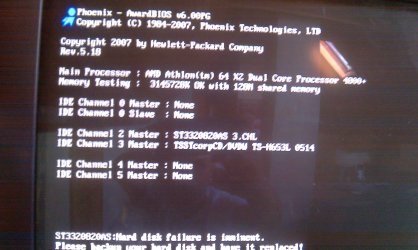
Working on my computer... Attached is a cell phone picture of the problem. Do i need a new HDD? If i press the F2 key it will boot up into Windows. This particular PC is running Windows Vista (Shivers) I'm thinking of possibly running Windows 7 on it. I have tried the startup repair... doesn't do anything. Any input would be greatly appreciated.
 

Attachments
  • IMAG0194.jpg
    IMAG0194.jpg
    485.3 KB · Views: 9
  • IMAG0197.jpg
    IMAG0197.jpg
    442.3 KB · Views: 7

My Computer My Computer

Computer Manufacturer/Model Number
HP Pavilion dv4-1275mx Entertainment Notebook PC
OS
7
CPU
2.1 GHz AMD Turion Ultra ZM-80 Processor
Memory
4GB
Graphics Card(s)
ATI Radeon HD 3200 GPU
Your picture didn't upload, so please give us the exact wording of the error message and what happens when you try to startup.
 
Sorry... thanks for the prompt response
 

My Computer My Computer

Computer Manufacturer/Model Number
HP Pavilion dv4-1275mx Entertainment Notebook PC
OS
7
CPU
2.1 GHz AMD Turion Ultra ZM-80 Processor
Memory
4GB
Graphics Card(s)
ATI Radeon HD 3200 GPU
Your pic did not attach. What brand & size & type of HD are you talking about ?

Describe the problem, Please ?
 

My Computer My Computer

Computer type
PC/Desktop
Computer Manufacturer/Model Number
Built them myself, Science Experiments !
OS
Win7 Enterprise, Win7 x86 (Ult 7600), Win7 x64 Ult 7600, TechNet RTM on AMD x64 (2.8Ghz)
CPU
AMD fx8350 4ghz, AMD-32 2400mhz, AMD-64 3200mhz, AMDx64 2.8G
Motherboard
SIS 755, ECS-K8M890M-M (Ult 7600), GigaByte & others
Memory
2gb, 4gb on the Ult 7600, 4gb on Technet RTM, 32gb on FX8350
Graphics Card(s)
Draw my own Graphics, several nVidia cards
Sound Card
on motherboard
Monitor(s) Displays
19" flat scr, 28" I-Inc widescr,22" Emprex Widescr, 23" Acer
Screen Resolution
1280 x 1024, 1440 x 900, 1920 x 1080
Hard Drives
6 pata Ide HD's & 2 Sata HD's
added 80gb external on Ult 7600 computer,
numerous extra 1tb, 2TB, 3Tb SATA HD's
A collection of ext HD Docks w/ HDs
PSU
430w, 550w, 600w, 700, 800, etc
Case
All Generic Full Towers
Cooling
Open Air & a few fans, some w/ colored LEDs
Keyboard
Compaq & Dell recycled from GoodWill
Mouse
Made in China Optical Wired Mouse
Internet Speed
Fast Cable InterNet
Antivirus
AVG Free on 24 different Desktops, NO Problems!
Browser
IE 8 is preferred, but use FireFox sometimes
Other Info
Linksys Routers, switches, & Hubs
Too Many USB Flash Drives to count, Biggest is 64GB !
Eight computers in my home network.
Sixteen computers at my business network.
Linked via TeamViewer !
Lots of old used spare computer parts everywhere!
It's a pavilion a6242n PC. the guts are original. Can you guys see the uploaded images now?
 

My Computer My Computer

Computer Manufacturer/Model Number
HP Pavilion dv4-1275mx Entertainment Notebook PC
OS
7
CPU
2.1 GHz AMD Turion Ultra ZM-80 Processor
Memory
4GB
Graphics Card(s)
ATI Radeon HD 3200 GPU
The pic shows a message that says "Hard disk failure is imminent". If this was my computer, I would get a new HD (same size or larger) and try to clone the existing drive to the new one using any one of a variety of free hard drive tools. HDClone is one though the free version limits the speed quite a bit.
 

My Computer My Computer

Computer type
PC/Desktop
Computer Manufacturer/Model Number
Lenovo IdeaCenter 450
OS
Windows 10 Pro X64
CPU
Intel Quad Core i7-4770 @ 3.4Ghz
Memory
16.0GB PC3-12800 DDR3 SDRAM 1600 MHz
Graphics Card(s)
Intel Integrated HD Graphics
Sound Card
Realtek HD Audio
Monitor(s) Displays
HP 22" LCD
Screen Resolution
1680 x 1050
Hard Drives
250GB Samsung EVO SATA-3 SSD
2TB Seagate ST2000DM001 SATA-2
1.5TB Seagate ST3150041AS SATA
Keyboard
Dell USB
Mouse
Lenovo USB
Internet Speed
Cable via Road Runner 3MB Upload, 30MB Download
Antivirus
Windows Defender, MBAM Pro, MBAE
Browser
Seamonkey
Other Info
UEFI/GPT
PLDS DVD-RW DH16AERSH
st3320820as :Hard disk failure is imminent.
Please backup your hard disk and have it replaced
 

My Computer My Computer

Computer Manufacturer/Model Number
HP Pavilion dv4-1275mx Entertainment Notebook PC
OS
7
CPU
2.1 GHz AMD Turion Ultra ZM-80 Processor
Memory
4GB
Graphics Card(s)
ATI Radeon HD 3200 GPU
Can you get your data off of the HD now? Do it.

Next burn to CD and run full diagnostics/repair scan for your make HD, as it can salvage the HD in some cases: Hard Drive Diagnostics Tools and Utilities (Storage) - TACKtech Corp.

Cloning is an excellent idea if the data is still intact. It is often included with purchase of a new HD, or you can save a Win7 backup image now to use in case it dies before you get to clone it.
 
The thing is... when i press the F2, it boots up to windows fine...
 

My Computer My Computer

Computer Manufacturer/Model Number
HP Pavilion dv4-1275mx Entertainment Notebook PC
OS
7
CPU
2.1 GHz AMD Turion Ultra ZM-80 Processor
Memory
4GB
Graphics Card(s)
ATI Radeon HD 3200 GPU
So i replaced the HDD... The original HDD was a SATA. I have an extra IDE HDD lying around. i set it up... windows XP started to boot up... Problem fixed. Now, I want to install Windows 7. went into BIOS and set up CD as first boot priority. Second, The HDD... for some reason it will not give me the option to boot from disk... Any Ideas?
 

My Computer My Computer

Computer Manufacturer/Model Number
HP Pavilion dv4-1275mx Entertainment Notebook PC
OS
7
CPU
2.1 GHz AMD Turion Ultra ZM-80 Processor
Memory
4GB
Graphics Card(s)
ATI Radeon HD 3200 GPU
Windows 7 installer is on a DVD, not CD. Set accordingly: http://pcsupport.about.com/od/tipstricks/ht/bootcddvd.htm

Make sure your IDE HD registers correctly in BIOS setup.

For the cleanest install, use Custom>Drive Options to delete all partitions, create New one(s) as you wish, then format before installing WIn7 to first partition.

Suggest you don't have old HD plugged in during install as it will establish a dual boot with SYstem MBR on old HD. You can plug it back in later to copy over files, giving it a letter in Disk Mgmt if it doesn't show up.

http://www.sevenforums.com/tutorials/1649-clean-install-windows-7-a.html

Another option is to save a Win7 backup image of the failing HD externally, then reimage it to the new HD using booted DVD Repair console>Recover using an Image.
http://www.sevenforums.com/tutorials/663-backup-complete-computer-create-image-backup.html
 
Correction: I have a IDE DVD drive and a SATA HDD... how do i boot from my IDE DVD drive?
 

My Computer My Computer

Computer Manufacturer/Model Number
HP Pavilion dv4-1275mx Entertainment Notebook PC
OS
7
CPU
2.1 GHz AMD Turion Ultra ZM-80 Processor
Memory
4GB
Graphics Card(s)
ATI Radeon HD 3200 GPU
Unplug the failing SATA HD until you finish your WIn7 install.

Set DVD drive first to boot in BIOS setup, then new HD.

Boot from Win7 DVD and install to the new HD using Custom>Drive Options to delete, create New and format.
 
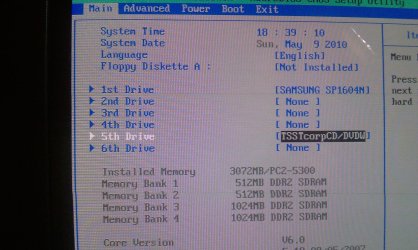
My problem is now getting the DVD drive to work. i set it to boot from DVD drive frist and then to HDD... im guessing my problem is as you guys said. IDE HD registers... thats my problem. i cannot find the option to do that
 

My Computer My Computer

Computer Manufacturer/Model Number
HP Pavilion dv4-1275mx Entertainment Notebook PC
OS
7
CPU
2.1 GHz AMD Turion Ultra ZM-80 Processor
Memory
4GB
Graphics Card(s)
ATI Radeon HD 3200 GPU
You cannot find the option to do what exactly?

What happens when you try to boot the DVD?
 
I went to a friends house and used his external USB DVD drive, Got windows on the HDD... my problem now is getting the DVD drive to work on the computer. It's a SATA DVD drive and i feel that the settings in the BIOS is what the problem is. Again, My harddrive on the computer is IDE and that is set as master.
 

Attachments

  • IMAG0002.jpg
    IMAG0002.jpg
    487.5 KB · Views: 4

My Computer My Computer

Computer Manufacturer/Model Number
HP Pavilion dv4-1275mx Entertainment Notebook PC
OS
7
CPU
2.1 GHz AMD Turion Ultra ZM-80 Processor
Memory
4GB
Graphics Card(s)
ATI Radeon HD 3200 GPU
BIOS
 

Attachments

  • IMAG0001.jpg
    IMAG0001.jpg
    780.7 KB · Views: 2

My Computer My Computer

Computer Manufacturer/Model Number
HP Pavilion dv4-1275mx Entertainment Notebook PC
OS
7
CPU
2.1 GHz AMD Turion Ultra ZM-80 Processor
Memory
4GB
Graphics Card(s)
ATI Radeon HD 3200 GPU
I went to a friends house and used his external USB DVD drive, Got windows on the HDD... my problem now is getting the DVD drive to work on the computer. It's a SATA DVD drive and i feel that the settings in the BIOS is what the problem is. Again, My harddrive on the computer is IDE and that is set as master.


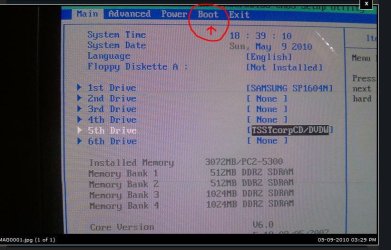
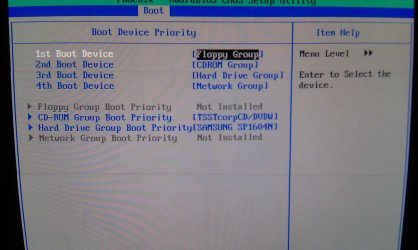
Have you tried the DVD SATA data cable in the other sata MB connections starting with the yellow/orange one ? What is the BOOT order setting under the BOOT tab in the bios settings ?
 

Attachments

  • Nano3_Bios_Boot.JPG
    Nano3_Bios_Boot.JPG
    74.4 KB · Views: 1

My Computer My Computer

Computer type
PC/Desktop
Computer Manufacturer/Model Number
Built them myself, Science Experiments !
OS
Win7 Enterprise, Win7 x86 (Ult 7600), Win7 x64 Ult 7600, TechNet RTM on AMD x64 (2.8Ghz)
CPU
AMD fx8350 4ghz, AMD-32 2400mhz, AMD-64 3200mhz, AMDx64 2.8G
Motherboard
SIS 755, ECS-K8M890M-M (Ult 7600), GigaByte & others
Memory
2gb, 4gb on the Ult 7600, 4gb on Technet RTM, 32gb on FX8350
Graphics Card(s)
Draw my own Graphics, several nVidia cards
Sound Card
on motherboard
Monitor(s) Displays
19" flat scr, 28" I-Inc widescr,22" Emprex Widescr, 23" Acer
Screen Resolution
1280 x 1024, 1440 x 900, 1920 x 1080
Hard Drives
6 pata Ide HD's & 2 Sata HD's
added 80gb external on Ult 7600 computer,
numerous extra 1tb, 2TB, 3Tb SATA HD's
A collection of ext HD Docks w/ HDs
PSU
430w, 550w, 600w, 700, 800, etc
Case
All Generic Full Towers
Cooling
Open Air & a few fans, some w/ colored LEDs
Keyboard
Compaq & Dell recycled from GoodWill
Mouse
Made in China Optical Wired Mouse
Internet Speed
Fast Cable InterNet
Antivirus
AVG Free on 24 different Desktops, NO Problems!
Browser
IE 8 is preferred, but use FireFox sometimes
Other Info
Linksys Routers, switches, & Hubs
Too Many USB Flash Drives to count, Biggest is 64GB !
Eight computers in my home network.
Sixteen computers at my business network.
Linked via TeamViewer !
Lots of old used spare computer parts everywhere!
I have tried the other slots...
 

Attachments

  • IMAG0003.jpg
    IMAG0003.jpg
    414.4 KB · Views: 1

My Computer My Computer

Computer Manufacturer/Model Number
HP Pavilion dv4-1275mx Entertainment Notebook PC
OS
7
CPU
2.1 GHz AMD Turion Ultra ZM-80 Processor
Memory
4GB
Graphics Card(s)
ATI Radeon HD 3200 GPU
Since there is no floppy installed, try moving CD/DVd to 1st position & HD to 2nd position
 

My Computer My Computer

Computer type
PC/Desktop
Computer Manufacturer/Model Number
Built them myself, Science Experiments !
OS
Win7 Enterprise, Win7 x86 (Ult 7600), Win7 x64 Ult 7600, TechNet RTM on AMD x64 (2.8Ghz)
CPU
AMD fx8350 4ghz, AMD-32 2400mhz, AMD-64 3200mhz, AMDx64 2.8G
Motherboard
SIS 755, ECS-K8M890M-M (Ult 7600), GigaByte & others
Memory
2gb, 4gb on the Ult 7600, 4gb on Technet RTM, 32gb on FX8350
Graphics Card(s)
Draw my own Graphics, several nVidia cards
Sound Card
on motherboard
Monitor(s) Displays
19" flat scr, 28" I-Inc widescr,22" Emprex Widescr, 23" Acer
Screen Resolution
1280 x 1024, 1440 x 900, 1920 x 1080
Hard Drives
6 pata Ide HD's & 2 Sata HD's
added 80gb external on Ult 7600 computer,
numerous extra 1tb, 2TB, 3Tb SATA HD's
A collection of ext HD Docks w/ HDs
PSU
430w, 550w, 600w, 700, 800, etc
Case
All Generic Full Towers
Cooling
Open Air & a few fans, some w/ colored LEDs
Keyboard
Compaq & Dell recycled from GoodWill
Mouse
Made in China Optical Wired Mouse
Internet Speed
Fast Cable InterNet
Antivirus
AVG Free on 24 different Desktops, NO Problems!
Browser
IE 8 is preferred, but use FireFox sometimes
Other Info
Linksys Routers, switches, & Hubs
Too Many USB Flash Drives to count, Biggest is 64GB !
Eight computers in my home network.
Sixteen computers at my business network.
Linked via TeamViewer !
Lots of old used spare computer parts everywhere!
Back
Top