- Local time
- 5:39 AM
- Messages
- 38
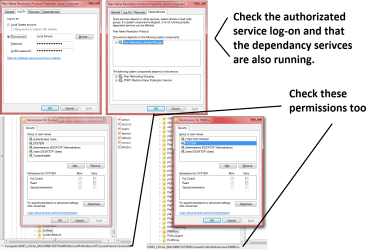
Hey, I came across an issue (too good to be good huh?). The thing is that after the upgrade I can't create a homegroup, the Peer Networking Grouping, the Peer Name Resolution Protocol and the PNRP Machine Name Publication Service refuse to start.
I already tried the known solution of deleting the idstore.sst file from the C:\windows\serviceProfiles\LocalService\AppData\Roaming\PeerNetworking folder but that didn't worked at all.
I really don't want to resource to formatting, I'm sure there has to be a solution somewhere since so far is the only thing I'm having issues with now.
Do you have any suggestions on what I can do?
Thanks in advance.
I already tried the known solution of deleting the idstore.sst file from the C:\windows\serviceProfiles\LocalService\AppData\Roaming\PeerNetworking folder but that didn't worked at all.
I really don't want to resource to formatting, I'm sure there has to be a solution somewhere since so far is the only thing I'm having issues with now.
Do you have any suggestions on what I can do?
Thanks in advance.
My Computer
At a glance
Windows 7 Ultimate 32 bits3 Ghz Core i5 4 Cores/4 Threads4 GB Kingston2 GB Radeon R7 240
- Computer type
- PC/Desktop
- Computer Manufacturer/Model Number
- Generic PC built by me
- OS
- Windows 7 Ultimate 32 bits
- CPU
- 3 Ghz Core i5 4 Cores/4 Threads
- Motherboard
- Asus P8B75-M/CSM
- Memory
- 4 GB Kingston
- Graphics Card(s)
- 2 GB Radeon R7 240
- Sound Card
- Via High Definition Audio
- Monitor(s) Displays
- 15" LG 505G and a 19" LG 19LG30 LCD TV/Monitor
- Screen Resolution
- 1366x768
- Hard Drives
- 7200 RPM Seagate Barracude 1TB SATA Disk (Main disk)
7200 RPM Seagate Barracude 500 GB SATA Disk (Backup disk)
- PSU
- Cable Management TR2 600 Watts
- Case
- Active Cool Black Case
- Cooling
- CPU's included fan
- Keyboard
- Microsoft Keyboard
- Mouse
- Arteck RX5 Laser Mouse
- Internet Speed
- 20mbps download and 3mbps upload
- Antivirus
- AVG Free 2015
- Browser
- Firefox and Chrome