Cant Install sony vegas 9.0 on Windos7 Please help

bornkilla3950

New member
Local time
12:12 PM
Messages
9
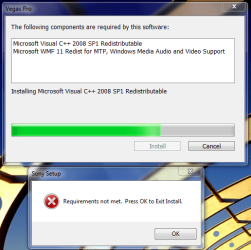
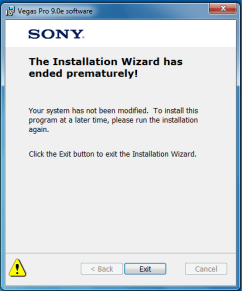
Hi, I just got windows 7 and I am unable to install sony vegas 9.0. i get a message saying " Requirements not met. Press OK to Exit Install. when it gets to the part where you install C++ and WMF11.

I have attached a picture of the error.

Please help I really need Vegas, since i make a lot of videos for school.
 

Attachments

  • Capture.PNG
    Capture.PNG
    35 KB · Views: 281
Last edited:

My Computer My Computer

At a glance

Windows7acer power51GBati radon 2400 pro
Computer Manufacturer/Model Number
Acer
OS
Windows7
CPU
acer power5
Motherboard
acer power5
Memory
1GB
Graphics Card(s)
ati radon 2400 pro
Sound Card
realtek
Monitor(s) Displays
kool
Hard Drives
100GB
I'm having exactly the same problem trying to install the demo :cry:
 

My Computer My Computer

At a glance

Windows 7 Professional / Windows 7 ProfessionalIntel Core i7-2600K 3.40GHz / Intel Core i7 7...16GB Kingston HyperX XMP 1600MHz / 8GB Samsun...MSI ATI Radeon HD6870 1GB Twin Frozr III / At...
Computer Manufacturer/Model Number
Custom / Laptop - Dell Studio 1558
OS
Windows 7 Professional / Windows 7 Professional
CPU
Intel Core i7-2600K 3.40GHz / Intel Core i7 720QM
Motherboard
Asus P67 Sabertooth **B3 Revision**
Memory
16GB Kingston HyperX XMP 1600MHz / 8GB Samsung DDR3 1333mhz
Graphics Card(s)
MSI ATI Radeon HD6870 1GB Twin Frozr III / Ati Radeon HD5450
Sound Card
Onboard 5.1
Monitor(s) Displays
Dell 24" FULL HD LED / Full HD WLED 15.4"
Screen Resolution
1920 x 1080 / 1920 x 1080
Hard Drives
Crucial C300 + 4 x Samsung F3 1TB + 2 x External WD 1TB 7200RPM / OCZ Vertex 2e 240gb + External WD 500GB 7200RPM
PSU
Corsair TX 750W
Case
Fractal Design Define XL Full Tower Case - Black Pearl
Cooling
2 x Fractal 120mm and 2 x Fractal 80mm Fans
Keyboard
Microsoft Digital Media Pro / Backlit
Mouse
Logitech MX Revolution / Logitech VX Revolution
Internet Speed
Sky Unlimited 20mb
Other Info
Samsung Blu-Ray Player and Billion 7800N Router
I fixed it lol

Hey just to let you know I fixed the problem now i have sony vegas up and running and have made couple of videos with it :D.

vegaspro90a_32bit

this is the file i downloaded try searching it on google
i lost the site i got the file from IT WASNT THE SONY WEBSITE
if i find it ill get back to you
 

My Computer My Computer

At a glance

Windows7acer power51GBati radon 2400 pro
Computer Manufacturer/Model Number
Acer
OS
Windows7
CPU
acer power5
Motherboard
acer power5
Memory
1GB
Graphics Card(s)
ati radon 2400 pro
Sound Card
realtek
Monitor(s) Displays
kool
Hard Drives
100GB
I got it working also :D Just rebooted the computer and tried again and it installed fine :confused:
 

My Computer My Computer

At a glance

Windows 7 Professional / Windows 7 ProfessionalIntel Core i7-2600K 3.40GHz / Intel Core i7 7...16GB Kingston HyperX XMP 1600MHz / 8GB Samsun...MSI ATI Radeon HD6870 1GB Twin Frozr III / At...
Computer Manufacturer/Model Number
Custom / Laptop - Dell Studio 1558
OS
Windows 7 Professional / Windows 7 Professional
CPU
Intel Core i7-2600K 3.40GHz / Intel Core i7 720QM
Motherboard
Asus P67 Sabertooth **B3 Revision**
Memory
16GB Kingston HyperX XMP 1600MHz / 8GB Samsung DDR3 1333mhz
Graphics Card(s)
MSI ATI Radeon HD6870 1GB Twin Frozr III / Ati Radeon HD5450
Sound Card
Onboard 5.1
Monitor(s) Displays
Dell 24" FULL HD LED / Full HD WLED 15.4"
Screen Resolution
1920 x 1080 / 1920 x 1080
Hard Drives
Crucial C300 + 4 x Samsung F3 1TB + 2 x External WD 1TB 7200RPM / OCZ Vertex 2e 240gb + External WD 500GB 7200RPM
PSU
Corsair TX 750W
Case
Fractal Design Define XL Full Tower Case - Black Pearl
Cooling
2 x Fractal 120mm and 2 x Fractal 80mm Fans
Keyboard
Microsoft Digital Media Pro / Backlit
Mouse
Logitech MX Revolution / Logitech VX Revolution
Internet Speed
Sky Unlimited 20mb
Other Info
Samsung Blu-Ray Player and Billion 7800N Router
Solution

After some hours of troubleshooting the installtion of Vegas Pro 9c on Win 7 64-bit I figured out the solution:

Microsoft Visual C++ Redistributable installation problems in Vegas Pro 9c:

The versions needed Are:

Microsoft Visual C++ 2005 Redistributable 8.0.59193
Microsoft Visual C++ 2008 Redistributable 9.0.30729.4148
Microsoft Visual C++ 2008 Redistributable 9.0.30729.4148 (x64)


If you are on a 64-bit Version of Vista or Windows 7 and installing a 64-bit version of
Vegas Pro, there will be 2 versions of the 2008 redistributable files, (x86) and (x64).

You can check whether the proper redistributable file is installed by going to:

Control Panel > Programs and Features on Windows Vista/Windows 7.

If the VegasPro installer did not install the proper versions correctly, I
recommend the following:

Uninstall all versions(traces) of Microsoft Visual C++ either using Control Panel or by

Microsoft Windows Installer Clean Up Utility (Recommended).

Get it here Windows Installer Clean Up Utility

Now attempt the installation again to retrieve the correct components automatically.

If it still doesn't work and gives you the following error:
Requrirements not met. Press OK to Exit Install.

attachment.php

attachment.php


You have to perform any of the following two options:

Option 1: Get the correct versions of Microsoft Visual C++ from the microsoft site.
If you can't get those versions, go to the option-2.

Option 2: Do the following:
1.Run the installer of Vegas Pro (32 or 64-bit).
2.When it prompts to install Microsoft Visual C++, Don't click install or exit and Go to the temp folder located at C:\Users\Username\AppData\Local\Temp.

Tip: You can access the "temp folder" by typing %temp% in the address bar.

3.Now open the folder "SonyInstall" or "SonyInstall_1", "SonyInstall_2" etc which one contains the program u want to install.
Here you'll find the following files:

vcredist_x86.exe and vcredist2_x86.exe (32-bit installation)
and
vcredist_x86.exe , vcredist2_x64.exe and vcredist2_x86.exe (64-bit installation)


These are the required versions of Microsoft Visual C++ for Vegas Pro.
4.Copy the above files or just run from that folder in sequence and install one by one.
If you get Error 1402 While Installing Visual C++, follow the steps 5-12. Otherwise skip to Step 13.

You get some error while installing Microsoft visual C++ like

"Error 1402.Could not open key:UNKNOWN\Components\DA42BC89BF25F5BD0AF18C3B9B1A1EE8\0000210303000000000000000000F01FEC
Verify that you have sufficient access to that key, or contact your support personnel."
attachment.php


5.Open registry (run->regedit)
6.Browse to: HKEY_LOCAL_MACHINE\SOFTWARE\Microsoft\Windows\CurrentVersion\Installer\UserData\S-1-5-18\Components
7.Right click on the components folder, click permissions.
8.On all the users there, tick full control (allow) and then apply. At some points it may
say it failed to set permissions for some keys, just keep going.
9. Click advanced, go to the owner tab.
10. Select whichever user you are, or administrators, tick "replace owner on subcontainers and objects" and click apply.
11.Click OK, go back to the window from beforehand and try to reapply full control settings for each user just to make sure.
12. Try your installer (Visual C++) again.
It will now install without any problem.
13. FINAL STEP:
Exit the installation of Vegas pro and re-run the installer.
It will install without a hitch.
Enjoy and Have Fun! :)

Regards
Buntoo
 

My Computer My Computer

At a glance

Windows 7 Ultimate 64-bitIntel Core2Duo E7500 2.93GhzCorsair XMS DDR3 1600MHz 4Gb (2x2) + 1333MHz ...MSI ATI Radeon 6850 Cyclone Power Edition OC
OS
Windows 7 Ultimate 64-bit
CPU
Intel Core2Duo E7500 2.93Ghz
Motherboard
MSI P45-C51
Memory
Corsair XMS DDR3 1600MHz 4Gb (2x2) + 1333MHz 2Gb (1x2)
Graphics Card(s)
MSI ATI Radeon 6850 Cyclone Power Edition OC
Monitor(s) Displays
Samsung HDTV Monitor P2370HD
Screen Resolution
1920x1080
Hard Drives
WD Caviar Black 500 GB Sata
Segate 80GB Sata
PSU
Silverstone Modular 500W
Mouse
Intel Wireless Mouse
Internet Speed
6mbps
After some hours of troubleshooting the installtion of Vegas Pro 9c on Win 7 64-bit I figured out the solution:

Microsoft Visual C++ Redistributable installation problems in Vegas Pro 9c:

The versions needed Are:

Microsoft Visual C++ 2005 Redistributable 8.0.59193
Microsoft Visual C++ 2008 Redistributable 9.0.30729.4148
Microsoft Visual C++ 2008 Redistributable 9.0.30729.4148 (x64)


If you are on a 64-bit Version of Vista or Windows 7 and installing a 64-bit version of
Vegas Pro, there will be 2 versions of the 2008 redistributable files, (x86) and (x64).

You can check whether the proper redistributable file is installed by going to:

Control Panel > Programs and Features on Windows Vista/Windows 7.

If the VegasPro installer did not install the proper versions correctly, I
recommend the following:

Uninstall all versions(traces) of Microsoft Visual C++ either using Control Panel or by

Microsoft Windows Installer Clean Up Utility (Recommended).

Get it here Windows Installer Clean Up Utility

Now attempt the installation again to retrieve the correct components automatically.

If it still doesn't work and gives you the following error:
Requrirements not met. Press OK to Exit Install.

attachment.php

attachment.php


You have to perform any of the following two options:

Option 1: Get the correct versions of Microsoft Visual C++ from the microsoft site.
If you can't get those versions, go to the option-2.

Option 2: Do the following:
1.Run the installer of Vegas Pro (32 or 64-bit).
2.When it prompts to install Microsoft Visual C++, Don't click install or exit and Go to the temp folder located at C:\Users\Username\AppData\Local\Temp.

Tip: You can access the "temp folder" by typing %temp% in the address bar.

3.Now open the folder "SonyInstall" or "SonyInstall_1", "SonyInstall_2" etc which one contains the program u want to install.
Here you'll find the following files:

vcredist_x86.exe and vcredist2_x86.exe (32-bit installation)
and
vcredist_x86.exe , vcredist2_x64.exe and vcredist2_x86.exe (64-bit installation)


These are the required versions of Microsoft Visual C++ for Vegas Pro.
4.Copy the above files or just run from that folder in sequence and install one by one.
If you get Error 1402 While Installing Visual C++, follow the steps 5-12. Otherwise skip to Step 13.

You get some error while installing Microsoft visual C++ like

"Error 1402.Could not open key:UNKNOWN\Components\DA42BC89BF25F5BD0AF18C3B9B1A1EE8\0000210303000000000000000000F01FEC
Verify that you have sufficient access to that key, or contact your support personnel."
attachment.php


5.Open registry (run->regedit)
6.Browse to: HKEY_LOCAL_MACHINE\SOFTWARE\Microsoft\Windows\CurrentVersion\Installer\UserData\S-1-5-18\Components
7.Right click on the components folder, click permissions.
8.On all the users there, tick full control (allow) and then apply. At some points it may
say it failed to set permissions for some keys, just keep going.
9. Click advanced, go to the owner tab.
10. Select whichever user you are, or administrators, tick "replace owner on subcontainers and objects" and click apply.
11.Click OK, go back to the window from beforehand and try to reapply full control settings for each user just to make sure.
12. Try your installer (Visual C++) again.
It will now install without any problem.
13. FINAL STEP:
Exit the installation of Vegas pro and re-run the installer.
It will install without a hitch.
Enjoy and Have Fun! :)

Regards
Buntoo

Registered on forums just to thank Buntoo...

Perfect solution. All problems with Vegas has now gone.

Thanks a lot.
 

My Computer My Computer

At a glance

Windows 7 x64
OS
Windows 7 x64
Yeees it works thanks to Buntoo

Option 2 worked like a charm:D
TYVM Buntoo
 

My Computer My Computer

At a glance

Win 7
OS
Win 7
@Cretinoo & B35A13
You are welcome :)
Its my pleasure that my work helped somebody.
 

My Computer My Computer

At a glance

Windows 7 Ultimate 64-bitIntel Core2Duo E7500 2.93GhzCorsair XMS DDR3 1600MHz 4Gb (2x2) + 1333MHz ...MSI ATI Radeon 6850 Cyclone Power Edition OC
OS
Windows 7 Ultimate 64-bit
CPU
Intel Core2Duo E7500 2.93Ghz
Motherboard
MSI P45-C51
Memory
Corsair XMS DDR3 1600MHz 4Gb (2x2) + 1333MHz 2Gb (1x2)
Graphics Card(s)
MSI ATI Radeon 6850 Cyclone Power Edition OC
Monitor(s) Displays
Samsung HDTV Monitor P2370HD
Screen Resolution
1920x1080
Hard Drives
WD Caviar Black 500 GB Sata
Segate 80GB Sata
PSU
Silverstone Modular 500W
Mouse
Intel Wireless Mouse
Internet Speed
6mbps
After some hours of troubleshooting the installtion of Vegas Pro 9c on Win 7 64-bit I figured out the solution:

Microsoft Visual C++ Redistributable installation problems in Vegas Pro 9c:

The versions needed Are:

Microsoft Visual C++ 2005 Redistributable 8.0.59193
Microsoft Visual C++ 2008 Redistributable 9.0.30729.4148
Microsoft Visual C++ 2008 Redistributable 9.0.30729.4148 (x64)


If you are on a 64-bit Version of Vista or Windows 7 and installing a 64-bit version of
Vegas Pro, there will be 2 versions of the 2008 redistributable files, (x86) and (x64).

You can check whether the proper redistributable file is installed by going to:

Control Panel > Programs and Features on Windows Vista/Windows 7.

If the VegasPro installer did not install the proper versions correctly, I
recommend the following:

Uninstall all versions(traces) of Microsoft Visual C++ either using Control Panel or by

Microsoft Windows Installer Clean Up Utility (Recommended).

Get it here Windows Installer Clean Up Utility

Now attempt the installation again to retrieve the correct components automatically.

If it still doesn't work and gives you the following error:
Requrirements not met. Press OK to Exit Install.

attachment.php

attachment.php


You have to perform any of the following two options:

Option 1: Get the correct versions of Microsoft Visual C++ from the microsoft site.
If you can't get those versions, go to the option-2.

Option 2: Do the following:
1.Run the installer of Vegas Pro (32 or 64-bit).
2.When it prompts to install Microsoft Visual C++, Don't click install or exit and Go to the temp folder located at C:\Users\Username\AppData\Local\Temp.

Tip: You can access the "temp folder" by typing %temp% in the address bar.

3.Now open the folder "SonyInstall" or "SonyInstall_1", "SonyInstall_2" etc which one contains the program u want to install.
Here you'll find the following files:

vcredist_x86.exe and vcredist2_x86.exe (32-bit installation)
and
vcredist_x86.exe , vcredist2_x64.exe and vcredist2_x86.exe (64-bit installation)


These are the required versions of Microsoft Visual C++ for Vegas Pro.
4.Copy the above files or just run from that folder in sequence and install one by one.
If you get Error 1402 While Installing Visual C++, follow the steps 5-12. Otherwise skip to Step 13.

You get some error while installing Microsoft visual C++ like

"Error 1402.Could not open key:UNKNOWN\Components\DA42BC89BF25F5BD0AF18C3B9B1A1EE8\0000210303000000000000000000F01FEC
Verify that you have sufficient access to that key, or contact your support personnel."
attachment.php


5.Open registry (run->regedit)
6.Browse to: HKEY_LOCAL_MACHINE\SOFTWARE\Microsoft\Windows\CurrentVersion\Installer\UserData\S-1-5-18\Components
7.Right click on the components folder, click permissions.
8.On all the users there, tick full control (allow) and then apply. At some points it may
say it failed to set permissions for some keys, just keep going.
9. Click advanced, go to the owner tab.
10. Select whichever user you are, or administrators, tick "replace owner on subcontainers and objects" and click apply.
11.Click OK, go back to the window from beforehand and try to reapply full control settings for each user just to make sure.
12. Try your installer (Visual C++) again.
It will now install without any problem.
13. FINAL STEP:
Exit the installation of Vegas pro and re-run the installer.
It will install without a hitch.
Enjoy and Have Fun! :)

Regards
Buntoo

HEY JUST SO YOU KNOW YOU'RE A LIFESAVER MAN. i have to go through the register on this forum just to say this. couldn't thank more. /speechless... thank god xD
 

My Computer My Computer

At a glance

Windows XP
OS
Windows XP
need help did it like you said with the temp, but it didn't work, and the biggest problem im having is i dont want to mess around with C++ because im using Visual basic 2010 which is used to make C++ apps...so im not sure what to do, i went to the Microsoft website and downloaded the files and installed them but it had not effect.
only the 2008 C++ is the problem...
and its the same error
'requirements not met"...
plz help.
 

My Computer My Computer

At a glance

Windows 7 Ultimate2 GBGm45 intel Family
Computer Manufacturer/Model Number
Acer Aspire 2930z
OS
Windows 7 Ultimate
Memory
2 GB
Graphics Card(s)
Gm45 intel Family
Monitor(s) Displays
PnP generic
Hard Drives
Hitachi 320 GB
@cyzero
U must uninstall all of C++ versions installed previously. I recommend u to use Windows Cleanup Utility to remove C++ previously installed versions. Now download the exactly same versions, i posted in my post. Enter the version number in gOoGle and it will take u to the right place of downloading. Or u can skip downloading and save ur time by doing it by installing from the temp folder.
 

My Computer My Computer

At a glance

Windows 7 Ultimate 64-bitIntel Core2Duo E7500 2.93GhzCorsair XMS DDR3 1600MHz 4Gb (2x2) + 1333MHz ...MSI ATI Radeon 6850 Cyclone Power Edition OC
OS
Windows 7 Ultimate 64-bit
CPU
Intel Core2Duo E7500 2.93Ghz
Motherboard
MSI P45-C51
Memory
Corsair XMS DDR3 1600MHz 4Gb (2x2) + 1333MHz 2Gb (1x2)
Graphics Card(s)
MSI ATI Radeon 6850 Cyclone Power Edition OC
Monitor(s) Displays
Samsung HDTV Monitor P2370HD
Screen Resolution
1920x1080
Hard Drives
WD Caviar Black 500 GB Sata
Segate 80GB Sata
PSU
Silverstone Modular 500W
Mouse
Intel Wireless Mouse
Internet Speed
6mbps
Help me please!!!!!!!!!!!!!!!!!!!!!

OK I have did exactly what you said except I have a problem downloading the C++ 2005 version. I downloaded the 2008 one but it won't let me do the 2005 one. So what should I do now?
 

My Computer My Computer

At a glance

Windows XP
OS
Windows XP
Okay clearly you dont understand what i mean...i have VISUAL C++ not c++ re-distributable...if i mess around with c++ i will most probably cause Visual C++ to not function...
 

My Computer My Computer

At a glance

Windows 7 Ultimate2 GBGm45 intel Family
Computer Manufacturer/Model Number
Acer Aspire 2930z
OS
Windows 7 Ultimate
Memory
2 GB
Graphics Card(s)
Gm45 intel Family
Monitor(s) Displays
PnP generic
Hard Drives
Hitachi 320 GB
i had a similar problem.....this message appears though after a lot of freezing.....i have tried uninstalling and reinstalling several times but this message keeps reappearing

Untitled.png
 

Attachments

  • Untitled.png
    Untitled.png
    10.3 KB · Views: 3

My Computer My Computer

At a glance

Windows 7 Ultimate2 GB
Computer Manufacturer/Model Number
Acer Extensa 5630Z
OS
Windows 7 Ultimate
Memory
2 GB
Hard Drives
69GB and 50GB
After some hours of troubleshooting the installtion of Vegas Pro 9c on Win 7 64-bit I figured out the solution:

Microsoft Visual C++ Redistributable installation problems in Vegas Pro 9c:

The versions needed Are:

Microsoft Visual C++ 2005 Redistributable 8.0.59193
Microsoft Visual C++ 2008 Redistributable 9.0.30729.4148
Microsoft Visual C++ 2008 Redistributable 9.0.30729.4148 (x64)


If you are on a 64-bit Version of Vista or Windows 7 and installing a 64-bit version of
Vegas Pro, there will be 2 versions of the 2008 redistributable files, (x86) and (x64).

You can check whether the proper redistributable file is installed by going to:

Control Panel > Programs and Features on Windows Vista/Windows 7.

If the VegasPro installer did not install the proper versions correctly, I
recommend the following:

Uninstall all versions(traces) of Microsoft Visual C++ either using Control Panel or by

Microsoft Windows Installer Clean Up Utility (Recommended).

Get it here Windows Installer Clean Up Utility

Now attempt the installation again to retrieve the correct components automatically.

If it still doesn't work and gives you the following error:
Requrirements not met. Press OK to Exit Install.

attachment.php

attachment.php


You have to perform any of the following two options:

Option 1: Get the correct versions of Microsoft Visual C++ from the microsoft site.
If you can't get those versions, go to the option-2.

Option 2: Do the following:
1.Run the installer of Vegas Pro (32 or 64-bit).
2.When it prompts to install Microsoft Visual C++, Don't click install or exit and Go to the temp folder located at C:\Users\Username\AppData\Local\Temp.

Tip: You can access the "temp folder" by typing %temp% in the address bar.

3.Now open the folder "SonyInstall" or "SonyInstall_1", "SonyInstall_2" etc which one contains the program u want to install.
Here you'll find the following files:

vcredist_x86.exe and vcredist2_x86.exe (32-bit installation)
and
vcredist_x86.exe , vcredist2_x64.exe and vcredist2_x86.exe (64-bit installation)


These are the required versions of Microsoft Visual C++ for Vegas Pro.
4.Copy the above files or just run from that folder in sequence and install one by one.
If you get Error 1402 While Installing Visual C++, follow the steps 5-12. Otherwise skip to Step 13.

You get some error while installing Microsoft visual C++ like

"Error 1402.Could not open key:UNKNOWN\Components\DA42BC89BF25F5BD0AF18C3B9B1A1EE8\0000210303000000000000000000F01FEC
Verify that you have sufficient access to that key, or contact your support personnel."
attachment.php


5.Open registry (run->regedit)
6.Browse to: HKEY_LOCAL_MACHINE\SOFTWARE\Microsoft\Windows\CurrentVersion\Installer\UserData\S-1-5-18\Components
7.Right click on the components folder, click permissions.
8.On all the users there, tick full control (allow) and then apply. At some points it may
say it failed to set permissions for some keys, just keep going.
9. Click advanced, go to the owner tab.
10. Select whichever user you are, or administrators, tick "replace owner on subcontainers and objects" and click apply.
11.Click OK, go back to the window from beforehand and try to reapply full control settings for each user just to make sure.
12. Try your installer (Visual C++) again.
It will now install without any problem.
13. FINAL STEP:
Exit the installation of Vegas pro and re-run the installer.
It will install without a hitch.
Enjoy and Have Fun! :)

Regards
Buntoo

Registered on forums just to thank Buntoo...

Perfect solution. All problems with Vegas has now gone.

Thanks a lot.

i made an account on this forum site, just to be able to say thank you!
 

My Computer My Computer

At a glance

windows 7 home premiumcore 2 duo 2.66 GHZ4GBNvidia Gt 220
Computer Manufacturer/Model Number
Asus
OS
windows 7 home premium
CPU
core 2 duo 2.66 GHZ
Memory
4GB
Graphics Card(s)
Nvidia Gt 220
Hard Drives
hitachi 7200rpm 500GB
Okay clearly you dont understand what i mean...i have VISUAL C++ not c++ re-distributable...if i mess around with c++ i will most probably cause Visual C++ to not function...

This is absolutely not the case.

There are at least 4 different versions of the c++ redistributable and they can all be installed togeather along with Visual C++ 2003, 2005, and 2008 without problem (Though if you install multiples of visual C++, start out with the oldest first and work to the newest)

Also, just because you have Visual C++ installed doesn't mean you have ALL of the c++ redistributables installed, it only installs the one that comes with whatever version of Visual C++ you installed, but programs made by older or newer versions of Visual C++ or visual Studio will require different versions of the C++ runtime.

If you install enough software you will eventually have all 4 (5 with 2010?) versions on your machine anyway since most programs install it behind the scenes as a normal part of their install procedure.
 

My Computer My Computer

At a glance

Windows 7 x64 Ultimatei7 96012 Gig Corsair DominatorNvidia 480
Computer Manufacturer/Model Number
Scratch built
OS
Windows 7 x64 Ultimate
CPU
i7 960
Motherboard
Asus P6X58D
Memory
12 Gig Corsair Dominator
Graphics Card(s)
Nvidia 480
Sound Card
Maudio Delta 44 + breakout box
Monitor(s) Displays
Dell UltraSharp U2410 24in and Samsung 21 dual monitors
Screen Resolution
1920x1200 and 1280x1024
Hard Drives
Primary: Intel X-25M G2 160G SSD
Secondary: Segate baracuda 1.0 TB
HDs in AHCI mode.
PSU
Corasair TX850
Case
Cooler Master HAF
Cooling
Corsair H50
Keyboard
Logitech G15 + N52 game pad
Mouse
Logitech MX518
Internet Speed
15kbs down 4.5kbps up
Other Info
WEI 7.6
CPU & RAM 7.6
Graphics 7.9
Hard disk 7.7
can u help please !

I'm having exactly the same problem trying to install the demo :cry:


I'm trying to install Sony Vegas on my windows 7 but cant do it.
the software installs okay but when i try to patch the files using keygen it always says
"an error occured while patching the files"

please help me !
 

My Computer My Computer

At a glance

Windows 7 Home 64 bitintel i54 Gigabyte
Computer Manufacturer/Model Number
Sony VAIO (VPCEB18FD)
OS
Windows 7 Home 64 bit
CPU
intel i5
Memory
4 Gigabyte
Hard Drives
500 gigabyte
Your asking for help to pirate commercial software?

This is NOT the place to to do that. (If a mod sees your post you may be instabanned)
 

My Computer My Computer

At a glance

Windows 7 x64 Ultimatei7 96012 Gig Corsair DominatorNvidia 480
Computer Manufacturer/Model Number
Scratch built
OS
Windows 7 x64 Ultimate
CPU
i7 960
Motherboard
Asus P6X58D
Memory
12 Gig Corsair Dominator
Graphics Card(s)
Nvidia 480
Sound Card
Maudio Delta 44 + breakout box
Monitor(s) Displays
Dell UltraSharp U2410 24in and Samsung 21 dual monitors
Screen Resolution
1920x1200 and 1280x1024
Hard Drives
Primary: Intel X-25M G2 160G SSD
Secondary: Segate baracuda 1.0 TB
HDs in AHCI mode.
PSU
Corasair TX850
Case
Cooler Master HAF
Cooling
Corsair H50
Keyboard
Logitech G15 + N52 game pad
Mouse
Logitech MX518
Internet Speed
15kbs down 4.5kbps up
Other Info
WEI 7.6
CPU & RAM 7.6
Graphics 7.9
Hard disk 7.7
Back
Top