Password Reset

How to Reset a Windows Password in Regedit at Boot

This is a fairly simple way to reset / change your Windows user account password if, for whatever reason you can't gain access to your account.

   Note
A big thank you to Everlong for helping me sort the last steps of this.

This tutorial can be used to reset the password in Windows 7 or Vista.​
   Information
If you don't have a proper Windows installation disk, have a look at the link below to create a repair disk that can be used to reset your user account password in Windows 7 and Vista.

(Windows 7) System Repair Disc - Create

(Vista) Create a Recovery Disc - Vista Forums

   Warning
Making changes to the Windows Registry has the potential to disable the PC, if you have any concerns over using the information set forth here please feel free to post a question in this same tutorial and we will be glad to help.

Be Advised: if you use this method to reset you're user account password ANY / All access to encrypted files stored in the account will be lost.

Let's get Started!

1) The Boot Priority in the BIOS needs to be set to boot first from the optical drive; insert your Windows disk and re-start the PC.
At the first screen select your language then Repair your computer then it'll do some searching, at System Recovery Options dot Use recovery tools then select the OS and click next; while there make note of the OS drive letter, it may not be C: like mine is D:.
Recovery Tools Next.jpg
2) At the next screen select "Command Prompt" then in the Command window type "regedit" (without the quotes) and hit enter.
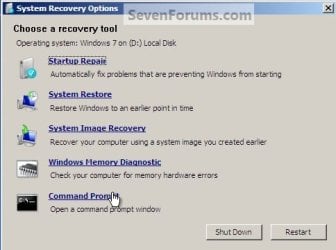
Command Prompt.jpg
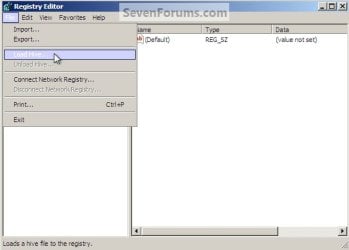
3) In the Registry Editor window that opens click to select "HKey_Local_Machine" then at the "File" menu select "Load Hive".
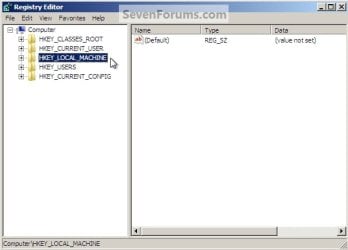
Choose HKLM.jpg
HKLM Load Hive.jpg
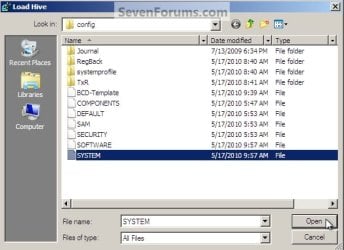
4) In the "Look In" in the "Load Hive" window that opens navigate to (in my case) LocalDiskD:\Windows\System32\config\SYSTEM and click "Open".
Choose OS Drive.jpg
System.jpg
5) In the "Load Hive", "Key Name" box give the new key a name e.g. " 123 " (it can be whatever you like) and click OK.
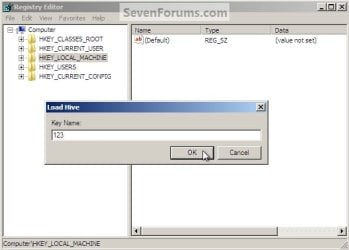
Key Name 123.jpg
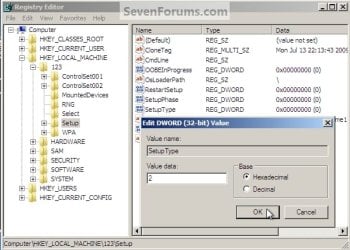
6) In the left pane of the registry Editor window click the " + " sign to expand the "HKey_Local_Machine" key then click the " + " sign to expand the "123" key then click to select the "Setup" key.
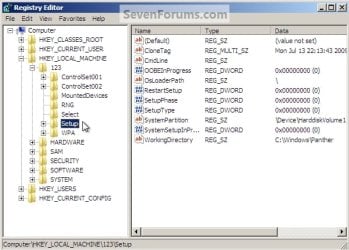
123 Setup.jpg
7) Now in the right pane right click "SetupType" and select "Modify", set the "Value data" to " 2 " and click OK.
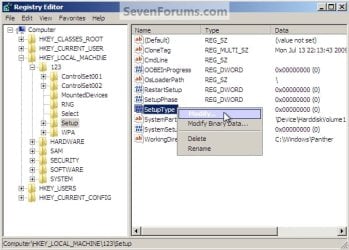
SetupType Modify.jpg
SetupType Value.jpg
8) Again in the right pane right click "CmdLine" and select "Modify" and set the "Value data" to "cmd.exe" and click OK.
com.jpg
9) Now just as a precaution, close the Registry Editor at the "File" menu click "Exit"; then in the Command window that's still open type "regedit" and hit enter to open the Registry Editor again.

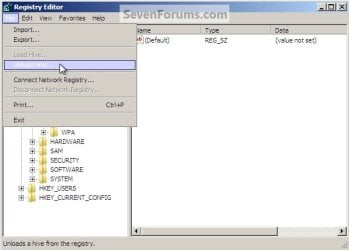
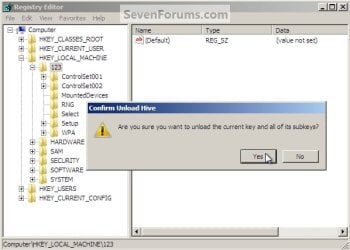
10) In the Registry Editor click the " + " sign to expand HKey_Local_Machine and click to select the new "123" key, at the "File" menu select "Unload Hive" and click "Yes" for the "Are you sure ..." question.
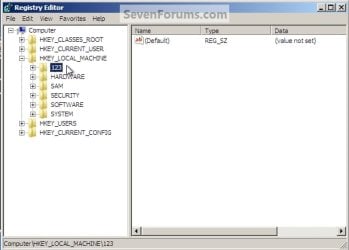
123 Key.jpg
123 Unload Hive.jpg
123 Unload Hive Yes.jpg
11) Now close the Registry Editor at the "File" menu click "Exit" then in the Command window type "exit" and hit enter to close the Command window, then remove the Windows disk and restart the PC.
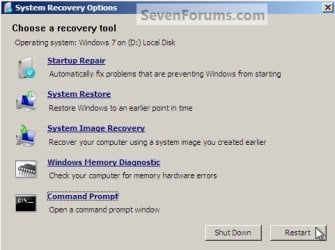
Re-Start.jpg
12) When the PC restarts a Command window will open, in that window type "net user <username> <new password>" mine is (net user "Bare Foot Kid" Test6) be advised: if you have a username like mine, with spaces, you must use " " quotes around the user name; when you get the "Command Completed Successfully" type "exit" in the Command window and hit enter; at the logon screen use the new password you chose.
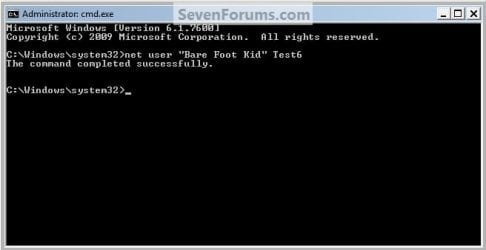
Test6.jpg
   Tip
If you like, you could type net user in the command prompt and press Enter to see a list of all names for each user account on the PC to help use with step 12.
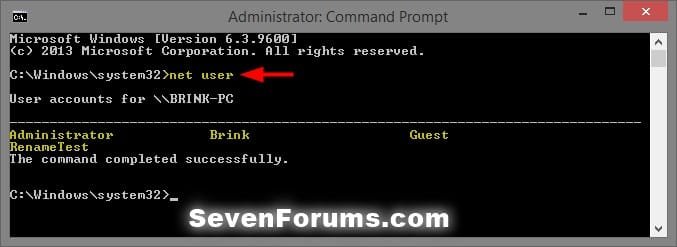
net-user.jpg


Enjoy! :)


Last edited by a moderator:
That's going to come in handy, good job Ted!
 

My Computer

Computer type
PC/Desktop
Computer Manufacturer/Model Number
Self Built
OS
Win 10 Pro x64
CPU
Intel I5-2500K @3.3GHz
Motherboard
Asrock P67 Extreme4
Memory
16GB G.Skill Ripjaws X (4x4GB)
Graphics Card(s)
EVGA GeForce 750 Ti SC 2GB
Sound Card
ASUS Xonar DG 5.1 Channels 24-bit 96KHz PCI Interface Sound
Monitor(s) Displays
auria eq2367
Screen Resolution
1920 x 1080
Hard Drives
250GB Samsung 850 EVO SSD
1TB WD Blue
1TB Hitachi
PSU
SeaSonic X 650W 80 Plus Gold
Case
Corsair Obsidian 750D
Cooling
Corsair H60, Three 140mm case fans
Keyboard
Logitech Wireless Keyboard K520
Mouse
Logitech Wireless Mouse M310
Internet Speed
Wave Broadband ~ 100 dn 5 up
Antivirus
Windows Defender, Malwarebytes Premium
Browser
Edge, IE11, Chrome
Other Info
Laptop specs: HP g7-1365dx /
CPU: AMD A6-3420M APU with Radeon(tm) HD Graphics /
RAM: Crucial 8Gb (2x4Gb) /
SSD: Crucial M4-CT128M4SSD2 ATA Device/ FW 000F /
GFX: AMD Radeon HD 6520G /
OS: Windows 10 Pro x64
Thanks Derek!
 

My Computer

Computer Manufacturer/Model Number
* BFK Customs *
OS
W 7 64-bit Ultimate
CPU
Intel Q9550 Yorkfield
Motherboard
ASUS P5Q Pro
Memory
8GB Dominator 8500C5D
Graphics Card(s)
ATI : XFX 5870
Sound Card
Realtek HD Audio 7-1
Monitor(s) Displays
1x 47" LCD HDMI & 3x 26" LCD HDMI
Screen Resolution
1920x1080P & 1920x1200
Hard Drives
1x 80GB Intel X25-M G2 SSD : 1x 500GB & 1x 640GB WD Caviar Black(s)
PSU
Corsair 620HX
Case
Cooler Master RC-690
Cooling
Tuniq Tower 120, 2x 140mm and 3x 120mm case fans
Keyboard
Microsoft 500
Mouse
Razer Diamondback 3G
Internet Speed
14 Mb/s
Other Info
1x Koutech 3Gb/s SATA HDD Hot Swap Rack
  • Like
Reactions: ryo
nice one..

but usually i'm use software for reset.just boot from cd and that's come into command prompt and reset for that.
 

My Computer

Computer Manufacturer/Model Number
built up
OS
windows 7
CPU
Phenom II AMD Dragon 3.5Ghz
Memory
DDR3 4GB
Graphics Card(s)
ATI Radeon 512Mb
Monitor(s) Displays
HP L1506
Screen Resolution
1152 x 864
Hard Drives
WDC 1 TB SATA-II Green Power
Keyboard
HP wireless keyboard
Mouse
HP Optic
Internet Speed
1GB
Thanks for the work done Ted.

Regards
 

My Computer

Computer Manufacturer/Model Number
Custom
OS
Win7 HP (x64)/Win7 Ultimate (x64)
CPU
Core i7 920
Motherboard
Intel X58
Memory
6 x 2GB Corsair XMS3
Graphics Card(s)
CF HD4890
Sound Card
Asus Xonar
Monitor(s) Displays
Dell 2408WFP
Screen Resolution
1920 x 1200
Hard Drives
2 x 150GB WDC Velociraptors (Raid 0)
1 x 1TB Seagate
1 x 1.5TB Seagate
PSU
Corsair HX1000W
Case
Antec 1200
Keyboard
Razer Lycosa/N52te
Mouse
Razer Lachesis
Hello Lomai, thanks!
 

My Computer

Computer Manufacturer/Model Number
* BFK Customs *
OS
W 7 64-bit Ultimate
CPU
Intel Q9550 Yorkfield
Motherboard
ASUS P5Q Pro
Memory
8GB Dominator 8500C5D
Graphics Card(s)
ATI : XFX 5870
Sound Card
Realtek HD Audio 7-1
Monitor(s) Displays
1x 47" LCD HDMI & 3x 26" LCD HDMI
Screen Resolution
1920x1080P & 1920x1200
Hard Drives
1x 80GB Intel X25-M G2 SSD : 1x 500GB & 1x 640GB WD Caviar Black(s)
PSU
Corsair 620HX
Case
Cooler Master RC-690
Cooling
Tuniq Tower 120, 2x 140mm and 3x 120mm case fans
Keyboard
Microsoft 500
Mouse
Razer Diamondback 3G
Internet Speed
14 Mb/s
Other Info
1x Koutech 3Gb/s SATA HDD Hot Swap Rack
Nice one Ted. I tested it out in a VM and it works like a charm.

Bookmarked. ;)
 

My Computer

Computer Manufacturer/Model Number
Custom
OS
Windows 7 Professional x64
CPU
Intel i7 2600K OC'd @ 4620 MHz
Motherboard
Asus P8Z68-V Pro
Memory
16GB GSkill Sniper 2133 Mhz (4x4GB)
Graphics Card(s)
EVGA GeForce GTX 480 SuperClocked+
Sound Card
Realtek High Definition Audio
Monitor(s) Displays
2x Acer S273HLbmii 27"
Screen Resolution
2 x 1920x1080
Hard Drives
64GB Crucial M4 SSD

Storage: Hitachi 1TB 5400RPM, Samsung 1.5TB 5400RPM
PSU
Corsair HW Series 750w (modular)
Case
Cooler Master HAF 932 Advanced Blue Edition
Cooling
CM Hyper 212+ CPU cooler, 3x 230mm + 1x 140mm case fans
Keyboard
Logitech MK320 (wireless)
Mouse
Logitech MK320 (wireless)
Internet Speed
30 Mb/s : 2 Mb/s
Thanks J_K, I tested it VB with both Windows 7 (about 4 different times) and Vista and on my rig with Windows 7; to be quite honest, it's really very easy to do. :)
 

My Computer

Computer Manufacturer/Model Number
* BFK Customs *
OS
W 7 64-bit Ultimate
CPU
Intel Q9550 Yorkfield
Motherboard
ASUS P5Q Pro
Memory
8GB Dominator 8500C5D
Graphics Card(s)
ATI : XFX 5870
Sound Card
Realtek HD Audio 7-1
Monitor(s) Displays
1x 47" LCD HDMI & 3x 26" LCD HDMI
Screen Resolution
1920x1080P & 1920x1200
Hard Drives
1x 80GB Intel X25-M G2 SSD : 1x 500GB & 1x 640GB WD Caviar Black(s)
PSU
Corsair 620HX
Case
Cooler Master RC-690
Cooling
Tuniq Tower 120, 2x 140mm and 3x 120mm case fans
Keyboard
Microsoft 500
Mouse
Razer Diamondback 3G
Internet Speed
14 Mb/s
Other Info
1x Koutech 3Gb/s SATA HDD Hot Swap Rack
Thanks J_K, I tested it VB with both Windows 7 (about 4 different times) and Vista and on my rig with Windows 7; to be quite honest, it's really very easy to do. :)
But hard enough it may discourage the 12 year old trying to hack into his parent's machine.

There's that delicate balance...
 

My Computer

Computer Manufacturer/Model Number
Custom
OS
Windows 7 Professional x64
CPU
Intel i7 2600K OC'd @ 4620 MHz
Motherboard
Asus P8Z68-V Pro
Memory
16GB GSkill Sniper 2133 Mhz (4x4GB)
Graphics Card(s)
EVGA GeForce GTX 480 SuperClocked+
Sound Card
Realtek High Definition Audio
Monitor(s) Displays
2x Acer S273HLbmii 27"
Screen Resolution
2 x 1920x1080
Hard Drives
64GB Crucial M4 SSD

Storage: Hitachi 1TB 5400RPM, Samsung 1.5TB 5400RPM
PSU
Corsair HW Series 750w (modular)
Case
Cooler Master HAF 932 Advanced Blue Edition
Cooling
CM Hyper 212+ CPU cooler, 3x 230mm + 1x 140mm case fans
Keyboard
Logitech MK320 (wireless)
Mouse
Logitech MK320 (wireless)
Internet Speed
30 Mb/s : 2 Mb/s
Wish I would have know this before. Learn something every day. THX to the Bare Foot Kid.
 

My Computer

Computer Manufacturer/Model Number
HP Compaq dc7100
OS
windows 7 Ultimate 64 Bit
CPU
Intel Pentium 4 531, 3000 MHz (15 x 200)
Motherboard
HP Compaq dc7100
Memory
3 Gigs DDR
Graphics Card(s)
EVGA e-GeForce 9500 GT
Sound Card
AD1981B(L) @ Intel 82801FB ICH6
Monitor(s) Displays
Acer AL1912 19.5"
Hard Drives
Drive #1 - WDC WD1200BEVS-22LAT0 (111 GB)
Drive #2 - HDT722525DLA380 (232 GB)
Drive #3 - WDC (Model Unknown) (320GB)
PSU
HP 340W Max
Case
HP Slim-Line
Cooling
Standard PSU dual fan,HP CPU side mount cooling,2.5 Case fan
Thanks J_K, I tested it VB with both Windows 7 (about 4 different times) and Vista and on my rig with Windows 7; to be quite honest, it's really very easy to do. :)
But hard enough it may discourage the 12 year old trying to hack into his parent's machine.

There's that delicate balance...

That's the only concern I had posting it but the positives out-weigh the negatives.

Wish I would have know this before. Learn something every day. THX to the Bare Foot Kid.

Hello Hannibal001, thanks!
 

My Computer

Computer Manufacturer/Model Number
* BFK Customs *
OS
W 7 64-bit Ultimate
CPU
Intel Q9550 Yorkfield
Motherboard
ASUS P5Q Pro
Memory
8GB Dominator 8500C5D
Graphics Card(s)
ATI : XFX 5870
Sound Card
Realtek HD Audio 7-1
Monitor(s) Displays
1x 47" LCD HDMI & 3x 26" LCD HDMI
Screen Resolution
1920x1080P & 1920x1200
Hard Drives
1x 80GB Intel X25-M G2 SSD : 1x 500GB & 1x 640GB WD Caviar Black(s)
PSU
Corsair 620HX
Case
Cooler Master RC-690
Cooling
Tuniq Tower 120, 2x 140mm and 3x 120mm case fans
Keyboard
Microsoft 500
Mouse
Razer Diamondback 3G
Internet Speed
14 Mb/s
Other Info
1x Koutech 3Gb/s SATA HDD Hot Swap Rack
Another one to keep! :)
 

My Computer

Computer Manufacturer/Model Number
"WartHog Wonder"
OS
Windows 7 Ultimate x64 SP1
CPU
AMD Phenom II X4, 945, Quad Core, 3.0 GHz
Motherboard
Gigabyte MA785GM-US2H
Memory
8GB G.Skill PI Black PC2 6400 * 4-4-4-12 @1.9v
Graphics Card(s)
NVIDIA 512MB 9600GT
Sound Card
Realtek ALC889A Chipset (onboard)
Monitor(s) Displays
2 x 22" Hans-G LCD
Screen Resolution
1680x1050
Hard Drives
650GB 7200RPM WD Caviar Black
PSU
OCZ 700w GameXstream
Case
Cooler Master CM 690 Midtower
Cooling
Xigmatek Gaia SD1283 CPU Cooler, Assorted 120mm case fans
Keyboard
Dell SK-8115
Mouse
Microsoft Comfort Optical Mouse 3000
Other Info
Liteon iHAS 424-98B 24x DVD/CD Writer

My Computer

Computer Manufacturer/Model Number
* BFK Customs *
OS
W 7 64-bit Ultimate
CPU
Intel Q9550 Yorkfield
Motherboard
ASUS P5Q Pro
Memory
8GB Dominator 8500C5D
Graphics Card(s)
ATI : XFX 5870
Sound Card
Realtek HD Audio 7-1
Monitor(s) Displays
1x 47" LCD HDMI & 3x 26" LCD HDMI
Screen Resolution
1920x1080P & 1920x1200
Hard Drives
1x 80GB Intel X25-M G2 SSD : 1x 500GB & 1x 640GB WD Caviar Black(s)
PSU
Corsair 620HX
Case
Cooler Master RC-690
Cooling
Tuniq Tower 120, 2x 140mm and 3x 120mm case fans
Keyboard
Microsoft 500
Mouse
Razer Diamondback 3G
Internet Speed
14 Mb/s
Other Info
1x Koutech 3Gb/s SATA HDD Hot Swap Rack
which method are you referring to when you say all encrypted messages will be lost? And what determines which messages are encrypted or not? Sorry, new to this computer world.
 

My Computer

OS
windows 7
Hello taskforce403, welcome to Seven Forums!


The method described in this tutorial, if you use this tutorial to reset a user account password all encrypted files be lost; you would have to have personally used encryption software to encrypt files, Windows does not encrypt any files by default, all system files will remain unchanged.
 

My Computer

Computer Manufacturer/Model Number
* BFK Customs *
OS
W 7 64-bit Ultimate
CPU
Intel Q9550 Yorkfield
Motherboard
ASUS P5Q Pro
Memory
8GB Dominator 8500C5D
Graphics Card(s)
ATI : XFX 5870
Sound Card
Realtek HD Audio 7-1
Monitor(s) Displays
1x 47" LCD HDMI & 3x 26" LCD HDMI
Screen Resolution
1920x1080P & 1920x1200
Hard Drives
1x 80GB Intel X25-M G2 SSD : 1x 500GB & 1x 640GB WD Caviar Black(s)
PSU
Corsair 620HX
Case
Cooler Master RC-690
Cooling
Tuniq Tower 120, 2x 140mm and 3x 120mm case fans
Keyboard
Microsoft 500
Mouse
Razer Diamondback 3G
Internet Speed
14 Mb/s
Other Info
1x Koutech 3Gb/s SATA HDD Hot Swap Rack
Hello George Atanas, welcome to Seven Forums; I'm glad you find it useful, thanks for the feedback.
 

My Computer

Computer Manufacturer/Model Number
* BFK Customs *
OS
W 7 64-bit Ultimate
CPU
Intel Q9550 Yorkfield
Motherboard
ASUS P5Q Pro
Memory
8GB Dominator 8500C5D
Graphics Card(s)
ATI : XFX 5870
Sound Card
Realtek HD Audio 7-1
Monitor(s) Displays
1x 47" LCD HDMI & 3x 26" LCD HDMI
Screen Resolution
1920x1080P & 1920x1200
Hard Drives
1x 80GB Intel X25-M G2 SSD : 1x 500GB & 1x 640GB WD Caviar Black(s)
PSU
Corsair 620HX
Case
Cooler Master RC-690
Cooling
Tuniq Tower 120, 2x 140mm and 3x 120mm case fans
Keyboard
Microsoft 500
Mouse
Razer Diamondback 3G
Internet Speed
14 Mb/s
Other Info
1x Koutech 3Gb/s SATA HDD Hot Swap Rack
i have ever experienced the problem of forgetting Windows password, my solved way is use the Windows Password Reset Kit 1.5.
 

My Computer

OS
windows server 2003
Bookmarked (I'm 16) I can hack into the family computer! (I forgot password)

Lol not really!

----------
Thanks,
Kcmartz

Sent from my Motorola Cliq
 

My Computer

Computer Manufacturer/Model Number
HP Pavilion dv7t-4000 CTO Select Edition Entertainment Notebook PC
OS
Windows 7 Ultimate 64 Bit
CPU
Intel(R) Core(TM) i3 CPU M 350 @ 2.27GHz (4 CPUs), ~2.3GHz
Motherboard
Hewlett-Packard 144B 65.19 (not sure though)
Memory
4 GB
Graphics Card(s)
ATI Mobility Radeon HD 5470
Sound Card
Speakers and Headphones (IDT High Definition Audio CODEC)
Monitor(s) Displays
1 Moniter
Screen Resolution
17"
Hard Drives
465GB HD Internal
--100GB Google Drive--
PSU
Doesn't show anywhere.
Case
HP/Silver
Cooling
Fan
Keyboard
US / Built in
Mouse
Logitech M510 with Unify
Internet Speed
Broadband - Comcast
Other Info
PSU and Motherboard I couldn't find too well. So I just wrote what I wrote.
Just had to use this guide myself when trying to fix one of my Mum's friend's laptop. Works great.
 

My Computer

Computer type
PC/Desktop
Computer Manufacturer/Model Number
Custom Built
OS
Windows 8.1 Pro x64
CPU
Intel Core i7 4790k
Motherboard
MSI Z97S Krait Edition
Memory
8GB Corsair Dominator 1600MHz
Graphics Card(s)
MSI TwinFrozr GeForce GTX770
Sound Card
ASUS Xonar DX/XD 7.1
Monitor(s) Displays
Dell 24" S2409W + Dell 20" E207WFP
Screen Resolution
1920x1080 + 1680x1050
Hard Drives
1x 120GB OCZ Agility 3, 1x 750GB Western Digital Caviar Black, 1x 1TB Western Digital Caviar Blue
PSU
Corsair HX850 modular
Case
Fractal Design Define R4
Cooling
Corsair H60 w/ twin Corsair SP120 fans
Keyboard
Logitech G510S Keyboard
Mouse
Logitech G500S Laser Mouse
Internet Speed
40Mbps
Antivirus
Microsoft Security Essentials
Browser
Google Chrome
Other Info
LG Blu-Ray player
Back
Top