8GB disappearance each partition in win 7

Local time
7:29 PM
Messages
64
Location
Jakarta
I got one hardisk (Seagate SATA 7200rpm 80GB) on my windows 7 PC and I have had it partitioned into two partitions:
System C: 29.2GB
Logical D: 45.2GB

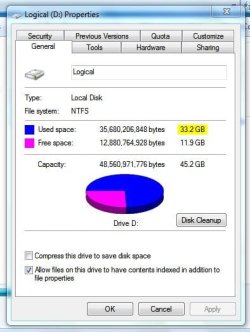
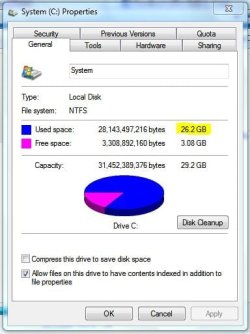
at the properties window I've come across by right-clicking the drive icon and click 'properties' it is said that the 'used space' in
C: is 26.2GB and in
D: is 33.2GB
as you can see at the 1st set of pictures.

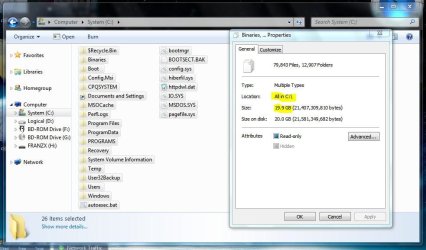
but the thing is when I open C: or D: and blocked all the files in there (include hidden files and protected operating system files) and right-clicked on all the blocked files and clicked properties, the volume of those blocked files is 8GB SMALLER than the volume said in previous 'properties' window. see 2nd set of pictures please.

so where the hell is my 16GB? 8GB each partition. or is it normal?
 

Attachments
  • C.JPG
    C.JPG
    35.5 KB · Views: 11
  • D.JPG
    D.JPG
    38 KB · Views: 8
  • CC.JPG
    CC.JPG
    75.6 KB · Views: 15
  • DD.JPG
    DD.JPG
    79.2 KB · Views: 9

My Computer My Computer

Computer Manufacturer/Model Number
Desktop
OS
Windows 7 build 7100, XP SP3
CPU
QX6850
Motherboard
DFI LANParty UT P45 T3RS
Memory
Patriot 4GB Viper II
Graphics Card(s)
ASUS HD4890
Monitor(s) Displays
Asus LS201 LCD 20"
Hard Drives
Hitachi 160GB x2
PSU
CoolerMaster Real Power 850w
Case
Thermaltake Armor
Internet Speed
768kbps DSL
well, little less than 16GB actually.
any clue?
 

My Computer My Computer

Computer Manufacturer/Model Number
Desktop
OS
Windows 7 build 7100, XP SP3
CPU
QX6850
Motherboard
DFI LANParty UT P45 T3RS
Memory
Patriot 4GB Viper II
Graphics Card(s)
ASUS HD4890
Monitor(s) Displays
Asus LS201 LCD 20"
Hard Drives
Hitachi 160GB x2
PSU
CoolerMaster Real Power 850w
Case
Thermaltake Armor
Internet Speed
768kbps DSL
You will find that certain directories (System Volume Information for 1) will not show any space being used. This 1 directory houses all your restore points so can use up quite a bit of space.

As this space is not being calculated by right clicking, it will not show as used space (as shown in your last 2 pics).

Hope this helps :)
 

My Computer My Computer

Computer Manufacturer/Model Number
Compaq Desktop
OS
Windows 7 Ultimate x64
CPU
AMD Sempron Dual Core
Memory
3GB
Graphics Card(s)
NVIDIA GeForce 6150SE nForce 430
Screen Resolution
1024x768
Hard Drives
150GB Sata
I turned off system restore on D a long ago, is it safe to delete System Volume Information in D now?
 

My Computer My Computer

Computer Manufacturer/Model Number
Desktop
OS
Windows 7 build 7100, XP SP3
CPU
QX6850
Motherboard
DFI LANParty UT P45 T3RS
Memory
Patriot 4GB Viper II
Graphics Card(s)
ASUS HD4890
Monitor(s) Displays
Asus LS201 LCD 20"
Hard Drives
Hitachi 160GB x2
PSU
CoolerMaster Real Power 850w
Case
Thermaltake Armor
Internet Speed
768kbps DSL
You will need to do some vigorous security changes to get access to that directory but i think it should be ok.

Also, click the scales icon to add/minus rep to people :)

Add: if you hover the mouse over each icon you get a description of each
 

My Computer My Computer

Computer Manufacturer/Model Number
Compaq Desktop
OS
Windows 7 Ultimate x64
CPU
AMD Sempron Dual Core
Memory
3GB
Graphics Card(s)
NVIDIA GeForce 6150SE nForce 430
Screen Resolution
1024x768
Hard Drives
150GB Sata
okay I get it, thanks, but I can't get that System Volume Information deleted.
 

My Computer My Computer

Computer Manufacturer/Model Number
Desktop
OS
Windows 7 build 7100, XP SP3
CPU
QX6850
Motherboard
DFI LANParty UT P45 T3RS
Memory
Patriot 4GB Viper II
Graphics Card(s)
ASUS HD4890
Monitor(s) Displays
Asus LS201 LCD 20"
Hard Drives
Hitachi 160GB x2
PSU
CoolerMaster Real Power 850w
Case
Thermaltake Armor
Internet Speed
768kbps DSL

My Computer My Computer

Computer Manufacturer/Model Number
Compaq Desktop
OS
Windows 7 Ultimate x64
CPU
AMD Sempron Dual Core
Memory
3GB
Graphics Card(s)
NVIDIA GeForce 6150SE nForce 430
Screen Resolution
1024x768
Hard Drives
150GB Sata
I already has that take ownership context menu, I take its ownership and see a command prompt scrolling about 5 seconds. but still, I cant delete it. I delete it, I click yes, but it's still there and my partition don't free up.
 

My Computer My Computer

Computer Manufacturer/Model Number
Desktop
OS
Windows 7 build 7100, XP SP3
CPU
QX6850
Motherboard
DFI LANParty UT P45 T3RS
Memory
Patriot 4GB Viper II
Graphics Card(s)
ASUS HD4890
Monitor(s) Displays
Asus LS201 LCD 20"
Hard Drives
Hitachi 160GB x2
PSU
CoolerMaster Real Power 850w
Case
Thermaltake Armor
Internet Speed
768kbps DSL
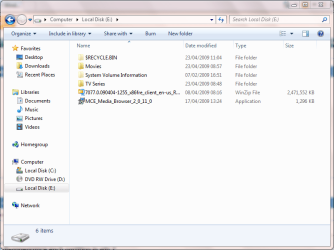
I've had the same think happen to me. In this pic my external HD was freshly formatted this morning and after restarting you can clearly see the directory there. It might be that it is indeed empty but i, like you, can't get rid of it.

If that's the case then there must be some underlying directories & files that are causing incorrect size info but i don't know how to tell :o
 

Attachments

  • Capture.PNG
    Capture.PNG
    31.8 KB · Views: 17

My Computer My Computer

Computer Manufacturer/Model Number
Compaq Desktop
OS
Windows 7 Ultimate x64
CPU
AMD Sempron Dual Core
Memory
3GB
Graphics Card(s)
NVIDIA GeForce 6150SE nForce 430
Screen Resolution
1024x768
Hard Drives
150GB Sata
really? is it happen only on windows 7? thanks for the info anyway, another rep for u.
 

My Computer My Computer

Computer Manufacturer/Model Number
Desktop
OS
Windows 7 build 7100, XP SP3
CPU
QX6850
Motherboard
DFI LANParty UT P45 T3RS
Memory
Patriot 4GB Viper II
Graphics Card(s)
ASUS HD4890
Monitor(s) Displays
Asus LS201 LCD 20"
Hard Drives
Hitachi 160GB x2
PSU
CoolerMaster Real Power 850w
Case
Thermaltake Armor
Internet Speed
768kbps DSL
I think it's since Vista that this has been introduced. It could be that it hold all the information regarding that drive (size, contents) so windows doesn't need to re-establish what the device is.

Maybe :p
 

My Computer My Computer

Computer Manufacturer/Model Number
Compaq Desktop
OS
Windows 7 Ultimate x64
CPU
AMD Sempron Dual Core
Memory
3GB
Graphics Card(s)
NVIDIA GeForce 6150SE nForce 430
Screen Resolution
1024x768
Hard Drives
150GB Sata
It could be the MFT thats taking up that space as it does take up quite a bit.
 

My Computer My Computer

Computer Manufacturer/Model Number
self built
OS
Windows 7 Professional 64-bit
CPU
Intel E8400 3GHz
Motherboard
Intel DX48BT2
Memory
Kingston PC3-10700H 4Gb
Graphics Card(s)
XFX Radeon HD 5850 BlackEd.
Sound Card
Asus Xonar DG
Monitor(s) Displays
2x Samsung SM-T220HD 22"
Screen Resolution
1680x1050 on two monitors
Hard Drives
OCZ Vertex 2 120gb 3.5" (OS)
Seagate Momentus XT 500gb
Samsung F3 1Tb (games)
2x Samsung F1 1Tb
PSU
Thermaltake ToughPower 850w
Case
Thermaltake Armor
Cooling
Scythe Mugen II
Keyboard
Microsoft Comfort Curve USB
Mouse
Razer Diamondback 3G
Internet Speed
8128/443
what's MFT?
 

My Computer My Computer

Computer Manufacturer/Model Number
Desktop
OS
Windows 7 build 7100, XP SP3
CPU
QX6850
Motherboard
DFI LANParty UT P45 T3RS
Memory
Patriot 4GB Viper II
Graphics Card(s)
ASUS HD4890
Monitor(s) Displays
Asus LS201 LCD 20"
Hard Drives
Hitachi 160GB x2
PSU
CoolerMaster Real Power 850w
Case
Thermaltake Armor
Internet Speed
768kbps DSL

My Computer My Computer

Computer Manufacturer/Model Number
self built
OS
Windows 7 Professional 64-bit
CPU
Intel E8400 3GHz
Motherboard
Intel DX48BT2
Memory
Kingston PC3-10700H 4Gb
Graphics Card(s)
XFX Radeon HD 5850 BlackEd.
Sound Card
Asus Xonar DG
Monitor(s) Displays
2x Samsung SM-T220HD 22"
Screen Resolution
1680x1050 on two monitors
Hard Drives
OCZ Vertex 2 120gb 3.5" (OS)
Seagate Momentus XT 500gb
Samsung F3 1Tb (games)
2x Samsung F1 1Tb
PSU
Thermaltake ToughPower 850w
Case
Thermaltake Armor
Cooling
Scythe Mugen II
Keyboard
Microsoft Comfort Curve USB
Mouse
Razer Diamondback 3G
Internet Speed
8128/443
Back
Top