Julio Andretti
Banned
I got one hardisk (Seagate SATA 7200rpm 80GB) on my windows 7 PC and I have had it partitioned into two partitions:
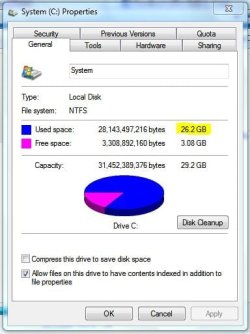
System C: 29.2GB
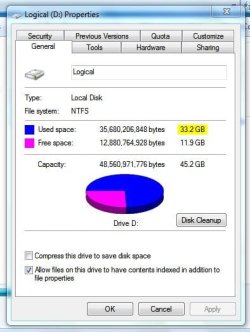
Logical D: 45.2GB
at the properties window I've come across by right-clicking the drive icon and click 'properties' it is said that the 'used space' in
C: is 26.2GB and in
D: is 33.2GB
as you can see at the 1st set of pictures.
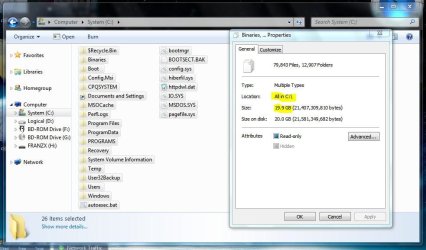
but the thing is when I open C: or D: and blocked all the files in there (include hidden files and protected operating system files) and right-clicked on all the blocked files and clicked properties, the volume of those blocked files is 8GB SMALLER than the volume said in previous 'properties' window. see 2nd set of pictures please.
so where the hell is my 16GB? 8GB each partition. or is it normal?
System C: 29.2GB
Logical D: 45.2GB
at the properties window I've come across by right-clicking the drive icon and click 'properties' it is said that the 'used space' in
C: is 26.2GB and in
D: is 33.2GB
as you can see at the 1st set of pictures.
but the thing is when I open C: or D: and blocked all the files in there (include hidden files and protected operating system files) and right-clicked on all the blocked files and clicked properties, the volume of those blocked files is 8GB SMALLER than the volume said in previous 'properties' window. see 2nd set of pictures please.
so where the hell is my 16GB? 8GB each partition. or is it normal?
Attachments

My Computer
- Computer Manufacturer/Model Number
- Desktop
- OS
- Windows 7 build 7100, XP SP3
- CPU
- QX6850
- Motherboard
- DFI LANParty UT P45 T3RS
- Memory
- Patriot 4GB Viper II
- Graphics Card(s)
- ASUS HD4890
- Monitor(s) Displays
- Asus LS201 LCD 20"
- Hard Drives
- Hitachi 160GB x2
- PSU
- CoolerMaster Real Power 850w
- Case
- Thermaltake Armor
- Internet Speed
- 768kbps DSL