over clocking my Q9550

id like to see your stats and how you set up your bios's

yes my CPU is an E0 at least thats what it says on box

i would say im running above stock cooling - im still air cooled but with a coolmaster v-8 69.69 CFM fan and the mas of cooler i think im good i did do Prime 95 for almost 20 hours on this computer at the OC speed of 3.2 and i kept hitting 50 C i didnt like the little fire symbol that speedfan puts up so i stopped it

i got this right when i7 where coming out my buddy tried to get me into a i7 but it would have been 30.00 more and that was a deal breaker for new PC hell the woman bitched to high haven when she found out i spent 600.00 on all the parts LOL

Check out my profile i have photos about rig in there

Stable settings are as follows for my Q9650.

As for my voltage settings, Q9650 4.05GHz, 780i FTW,9X multi, 450 FSB,1800QDR using the 4:3 divider with memory 1200MHz, 24/7 settings. I like the 9X multi best for this CPU.

14 hours Prime Blend stable.
SPP-1.45
MCP-1.65
SPP-MCP HT 1.4
CPU-PLL - 1.6
FSB 1.325
Vcore 1.38125 without Vdroop 1.368 cpu-z
GTLVref +100
+85
+100
+85
Memory voltage 2.125

4 hours Prime Blend stable.
For 1920 FSB 4.32GHz,9X multi, using the 5:4 divider memory at 1200MHz.
SPP -1.5
MCP-1.675
SPP-MCP HT 1.45
CPU-PLL 1.6
FSB 1.325
Vcore 1.46 without Vdroop cpu-z 1.44
GTLVref +95
+55
+95
+55
memory voltage 2.125

If you really want to be confused or maybe even learn something, try following the thread in the link below.

Q9650 4050Mhz Blendstable GTLVref SHORTCUT
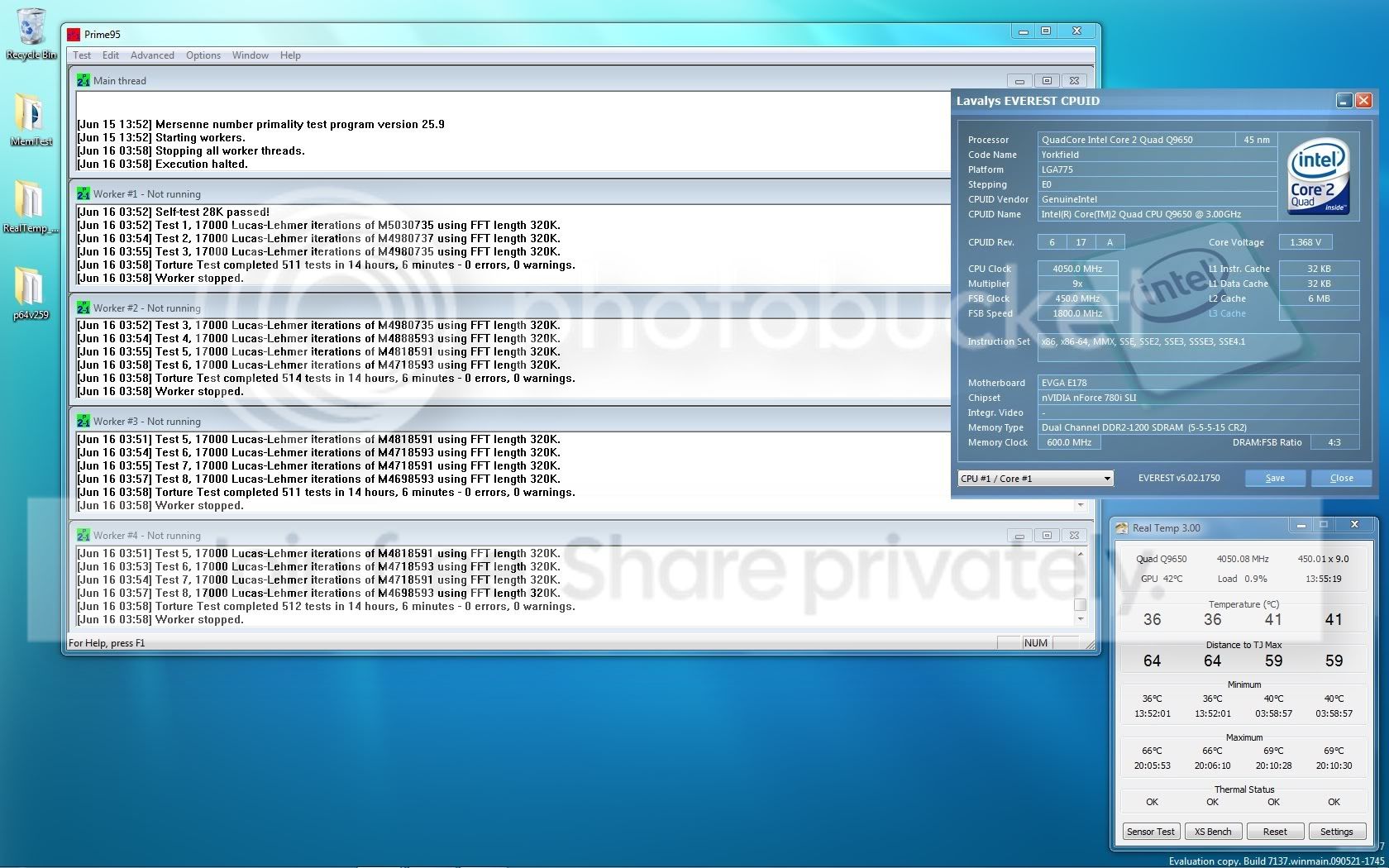
14hoursBlend4050Mhz.jpg
 
Last edited:

My Computer

Computer type
PC/Desktop
Computer Manufacturer/Model Number
Home built
OS
Windows 7 Ult, Windows 8.1 Pro,
CPU
Q9650-4.275GHz, E8600 4.5GHz, E6750-3.8GHz
Motherboard
Evga 780i FTW
Memory
G.Skill PC2 9600 1200Mhz 5 5 5 15 2T
Graphics Card(s)
GTX480
Sound Card
Asus Xonar D2
Monitor(s) Displays
HannsG
Screen Resolution
1680X1050
Hard Drives
GSkill Phoenix Pro 120GB SSD
PSU
ThermalTake Toughpower 1000Watt modular
Case
ThermalTake XaserV
Cooling
Xigmatek S1283
Keyboard
Logitech G15
Mouse
Logitech G9
Internet Speed
T1
wate is this for 17 or Q9550?
id like to see your stats and how you set up your bios's

yes my CPU is an E0 at least thats what it says on box

i would say im running above stock cooling - im still air cooled but with a coolmaster v-8 69.69 CFM fan and the mas of cooler i think im good i did do Prime 95 for almost 20 hours on this computer at the OC speed of 3.2 and i kept hitting 50 C i didnt like the little fire symbol that speedfan puts up so i stopped it

i got this right when i7 where coming out my buddy tried to get me into a i7 but it would have been 30.00 more and that was a deal breaker for new PC hell the woman bitched to high haven when she found out i spent 600.00 on all the parts LOL

Check out my profile i have photos about rig in there

Stable settings are as follows.

As for my voltage settings for 4.05GHz and my 780i FTW at 1800QDR using the 4:3 divider with memory 1200MHz.
14 hours Prime Blend stable.
SPP-1.45
MCP-1.65
SPP-MCP HT 1.4
CPU-PLL - 1.6
FSB 1.325
Vcore 1.38125 without Vdroop 1.37 cpu-z
GTLVref +100
+85
+100
+85
Memory voltage 2.125

4 hours Prime Blend stable.
For 1920 FSB 4.32GHz using the 5:4 divider memory at 1200MHz.
SPP -1.5
MCP-1.675
SPP-MCP HT 1.45
CPU-PLL 1.6
FSB 1.325
Vcore 1.46 without Vdroop
GTLVref +95
+55
+95
+55
memory voltage 2.125

If you really want to be confused or maybe even learn something, try following the thread in the link below.

Q9650 4050Mhz Blendstable GTLVref SHORTCUT=
 

My Computer

Computer Manufacturer/Model Number
Custom built by myself
OS
Windows 7 Ultimate 64 bit
CPU
Intel Core 2 quad Q9550 2.83 12 MB Cache 95 Watt OC to 3.4
Motherboard
Gigabyte GA-EP45-UD3P Rev 1.6 Socket 775 Running 1600 FSB
Memory
4 GB Patriot Viper II 1066 2X2GB Memory PV224G8500ELKB
Graphics Card(s)
NVIDIA GeForce 9500 GT GV-N95TOC-1GI overclocked to 650 MHz
Sound Card
Realtec HD on board
Monitor(s) Displays
LG W2053TQ
Screen Resolution
1600X900
Hard Drives
Hatchi 160 GB SATA II System drive
Hatchi 400 GB SATA II Data
Hatchi 500 GB SATA II Data
Hitachi 2 TB SATA II Backup
PSU
Ultra LSP750 750-Watt
Case
Leadertek FX626 or Foxconn FX-626BKH
Cooling
Cool Master V-8 (its Big),1 80 MM Fan and 2 92 MM Fan
Keyboard
Dell Quietkey (POS)
Mouse
GE PS2 Optical
Internet Speed
8 down 1 up
Other Info
LS-120 Drive(IDE) - Lite-on iHOS104 Blu-ray(SATA) - HP DVD Burner with lightscribe(IDE) - media card reader
wate is this for 17 or Q9550?
id like to see your stats and how you set up your bios's

yes my CPU is an E0 at least thats what it says on box

i would say im running above stock cooling - im still air cooled but with a coolmaster v-8 69.69 CFM fan and the mas of cooler i think im good i did do Prime 95 for almost 20 hours on this computer at the OC speed of 3.2 and i kept hitting 50 C i didnt like the little fire symbol that speedfan puts up so i stopped it

i got this right when i7 where coming out my buddy tried to get me into a i7 but it would have been 30.00 more and that was a deal breaker for new PC hell the woman bitched to high haven when she found out i spent 600.00 on all the parts LOL

Check out my profile i have photos about rig in there

Stable settings are as follows.

As for my voltage settings for 4.05GHz and my 780i FTW at 1800QDR using the 4:3 divider with memory 1200MHz.
14 hours Prime Blend stable.
SPP-1.45
MCP-1.65
SPP-MCP HT 1.4
CPU-PLL - 1.6
FSB 1.325
Vcore 1.38125 without Vdroop 1.37 cpu-z
GTLVref +100
+85
+100
+85
Memory voltage 2.125

4 hours Prime Blend stable.
For 1920 FSB 4.32GHz using the 5:4 divider memory at 1200MHz.
SPP -1.5
MCP-1.675
SPP-MCP HT 1.45
CPU-PLL 1.6
FSB 1.325
Vcore 1.46 without Vdroop
GTLVref +95
+55
+95
+55
memory voltage 2.125

If you really want to be confused or maybe even learn something, try following the thread in the link below.

Q9650 4050Mhz Blendstable GTLVref SHORTCUT=

He has a 9650, but it will more or less apply for a 9550, too.
 

My Computer

Computer type
PC/Desktop
Computer Manufacturer/Model Number
Custom Built
OS
Windows 8.1 Pro x64
CPU
Intel Core i7 4790k
Motherboard
MSI Z97S Krait Edition
Memory
8GB Corsair Dominator 1600MHz
Graphics Card(s)
MSI TwinFrozr GeForce GTX770
Sound Card
ASUS Xonar DX/XD 7.1
Monitor(s) Displays
Dell 24" S2409W + Dell 20" E207WFP
Screen Resolution
1920x1080 + 1680x1050
Hard Drives
1x 120GB OCZ Agility 3, 1x 750GB Western Digital Caviar Black, 1x 1TB Western Digital Caviar Blue
PSU
Corsair HX850 modular
Case
Fractal Design Define R4
Cooling
Corsair H60 w/ twin Corsair SP120 fans
Keyboard
Logitech G510S Keyboard
Mouse
Logitech G500S Laser Mouse
Internet Speed
40Mbps
Antivirus
Microsoft Security Essentials
Browser
Google Chrome
Other Info
LG Blu-Ray player
ok so this is my CPuz


My Computer

Computer Manufacturer/Model Number
Custom built by myself
OS
Windows 7 Ultimate 64 bit
CPU
Intel Core 2 quad Q9550 2.83 12 MB Cache 95 Watt OC to 3.4
Motherboard
Gigabyte GA-EP45-UD3P Rev 1.6 Socket 775 Running 1600 FSB
Memory
4 GB Patriot Viper II 1066 2X2GB Memory PV224G8500ELKB
Graphics Card(s)
NVIDIA GeForce 9500 GT GV-N95TOC-1GI overclocked to 650 MHz
Sound Card
Realtec HD on board
Monitor(s) Displays
LG W2053TQ
Screen Resolution
1600X900
Hard Drives
Hatchi 160 GB SATA II System drive
Hatchi 400 GB SATA II Data
Hatchi 500 GB SATA II Data
Hitachi 2 TB SATA II Backup
PSU
Ultra LSP750 750-Watt
Case
Leadertek FX626 or Foxconn FX-626BKH
Cooling
Cool Master V-8 (its Big),1 80 MM Fan and 2 92 MM Fan
Keyboard
Dell Quietkey (POS)
Mouse
GE PS2 Optical
Internet Speed
8 down 1 up
Other Info
LS-120 Drive(IDE) - Lite-on iHOS104 Blu-ray(SATA) - HP DVD Burner with lightscribe(IDE) - media card reader
If you just flip the multiplier back to 8.5 now, you'd get 3.4GHz, which is what I have it on and it runs fine. Though either way the 9550 seems to really start to shine from 400MHz upwards.
 

My Computer

Computer type
PC/Desktop
Computer Manufacturer/Model Number
Custom Built
OS
Windows 8.1 Pro x64
CPU
Intel Core i7 4790k
Motherboard
MSI Z97S Krait Edition
Memory
8GB Corsair Dominator 1600MHz
Graphics Card(s)
MSI TwinFrozr GeForce GTX770
Sound Card
ASUS Xonar DX/XD 7.1
Monitor(s) Displays
Dell 24" S2409W + Dell 20" E207WFP
Screen Resolution
1920x1080 + 1680x1050
Hard Drives
1x 120GB OCZ Agility 3, 1x 750GB Western Digital Caviar Black, 1x 1TB Western Digital Caviar Blue
PSU
Corsair HX850 modular
Case
Fractal Design Define R4
Cooling
Corsair H60 w/ twin Corsair SP120 fans
Keyboard
Logitech G510S Keyboard
Mouse
Logitech G500S Laser Mouse
Internet Speed
40Mbps
Antivirus
Microsoft Security Essentials
Browser
Google Chrome
Other Info
LG Blu-Ray player
il keep that in mind i tried it before and it wouldn't boot
 

My Computer

Computer Manufacturer/Model Number
Custom built by myself
OS
Windows 7 Ultimate 64 bit
CPU
Intel Core 2 quad Q9550 2.83 12 MB Cache 95 Watt OC to 3.4
Motherboard
Gigabyte GA-EP45-UD3P Rev 1.6 Socket 775 Running 1600 FSB
Memory
4 GB Patriot Viper II 1066 2X2GB Memory PV224G8500ELKB
Graphics Card(s)
NVIDIA GeForce 9500 GT GV-N95TOC-1GI overclocked to 650 MHz
Sound Card
Realtec HD on board
Monitor(s) Displays
LG W2053TQ
Screen Resolution
1600X900
Hard Drives
Hatchi 160 GB SATA II System drive
Hatchi 400 GB SATA II Data
Hatchi 500 GB SATA II Data
Hitachi 2 TB SATA II Backup
PSU
Ultra LSP750 750-Watt
Case
Leadertek FX626 or Foxconn FX-626BKH
Cooling
Cool Master V-8 (its Big),1 80 MM Fan and 2 92 MM Fan
Keyboard
Dell Quietkey (POS)
Mouse
GE PS2 Optical
Internet Speed
8 down 1 up
Other Info
LS-120 Drive(IDE) - Lite-on iHOS104 Blu-ray(SATA) - HP DVD Burner with lightscribe(IDE) - media card reader
fliped it to 8.5 dont know what i did wrong before

THANK YOU pparks1 and Everlong 400x8.5=3.40 with 1066 Ram
MB Intelligent Tweaker (M.I.T.)
Robust Graphics Booster Turbo
CPU Clock Ratio 8x
Fine CPU Clock Ratio +0.5
Under Clock Chip Control
CPU Host Clock Control Enabled
CPU Host Frequency (Mhz) 400
PCI Express Frequency (Mhz) 100
DRAM Performance Control
Performance Enhance Turbo
(G)MCH Frequency Latch 400
System Memory Multiplier 2.66D
Memory Frequency (Mhz) 1066
DRAM Timing Selectable Manual
CAS Latency Time 5
tRCD 5
tRP 5
tRAS 15
Mother Board Voltage Control
Load Line Calibration Enabled
CPU VCore 1.27500V
DRAM Voltage 2.100V
Advanced Bios Features
CPU Thermal Monitor 2 (TM2) Disabled
CPU EIST Function Disabled
Init Display First PEG
Integrated Peripherals
SATA RAID/AHCI Mode Enabled
USB Keyboard Function Enabled
USB Mouse Function Enabled
USB Storage Function Enabled
Power Management
HPET Mode 64-bit Mode
PC Health
CPU Warning Temperature 60 C/140 F
CPU FAN Fail Warning Enabled
Fan Fail Warning Enabled if you see RPM Speed
CPU Smart FAN Control Disabled

Status: ?? still running Prime 95 1 hour into it no errors


my CPUz


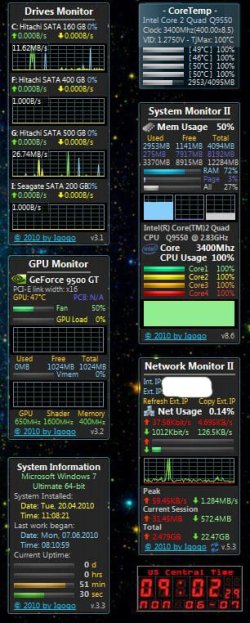
attached is screen capture of gadgets wile running prime 95 temps seem ok still
 

Attachments

  • Capture.JPG
    Capture.JPG
    93.9 KB · Views: 37

My Computer

Computer Manufacturer/Model Number
Custom built by myself
OS
Windows 7 Ultimate 64 bit
CPU
Intel Core 2 quad Q9550 2.83 12 MB Cache 95 Watt OC to 3.4
Motherboard
Gigabyte GA-EP45-UD3P Rev 1.6 Socket 775 Running 1600 FSB
Memory
4 GB Patriot Viper II 1066 2X2GB Memory PV224G8500ELKB
Graphics Card(s)
NVIDIA GeForce 9500 GT GV-N95TOC-1GI overclocked to 650 MHz
Sound Card
Realtec HD on board
Monitor(s) Displays
LG W2053TQ
Screen Resolution
1600X900
Hard Drives
Hatchi 160 GB SATA II System drive
Hatchi 400 GB SATA II Data
Hatchi 500 GB SATA II Data
Hitachi 2 TB SATA II Backup
PSU
Ultra LSP750 750-Watt
Case
Leadertek FX626 or Foxconn FX-626BKH
Cooling
Cool Master V-8 (its Big),1 80 MM Fan and 2 92 MM Fan
Keyboard
Dell Quietkey (POS)
Mouse
GE PS2 Optical
Internet Speed
8 down 1 up
Other Info
LS-120 Drive(IDE) - Lite-on iHOS104 Blu-ray(SATA) - HP DVD Burner with lightscribe(IDE) - media card reader
Where did you pick up that cool gadget FVCPI99?
 

My Computer

Computer type
PC/Desktop
Computer Manufacturer/Model Number
Home built
OS
Windows 7 Ult, Windows 8.1 Pro,
CPU
Q9650-4.275GHz, E8600 4.5GHz, E6750-3.8GHz
Motherboard
Evga 780i FTW
Memory
G.Skill PC2 9600 1200Mhz 5 5 5 15 2T
Graphics Card(s)
GTX480
Sound Card
Asus Xonar D2
Monitor(s) Displays
HannsG
Screen Resolution
1680X1050
Hard Drives
GSkill Phoenix Pro 120GB SSD
PSU
ThermalTake Toughpower 1000Watt modular
Case
ThermalTake XaserV
Cooling
Xigmatek S1283
Keyboard
Logitech G15
Mouse
Logitech G9
Internet Speed
T1

My Computer

Computer Manufacturer/Model Number
Custom built by myself
OS
Windows 7 Ultimate 64 bit
CPU
Intel Core 2 quad Q9550 2.83 12 MB Cache 95 Watt OC to 3.4
Motherboard
Gigabyte GA-EP45-UD3P Rev 1.6 Socket 775 Running 1600 FSB
Memory
4 GB Patriot Viper II 1066 2X2GB Memory PV224G8500ELKB
Graphics Card(s)
NVIDIA GeForce 9500 GT GV-N95TOC-1GI overclocked to 650 MHz
Sound Card
Realtec HD on board
Monitor(s) Displays
LG W2053TQ
Screen Resolution
1600X900
Hard Drives
Hatchi 160 GB SATA II System drive
Hatchi 400 GB SATA II Data
Hatchi 500 GB SATA II Data
Hitachi 2 TB SATA II Backup
PSU
Ultra LSP750 750-Watt
Case
Leadertek FX626 or Foxconn FX-626BKH
Cooling
Cool Master V-8 (its Big),1 80 MM Fan and 2 92 MM Fan
Keyboard
Dell Quietkey (POS)
Mouse
GE PS2 Optical
Internet Speed
8 down 1 up
Other Info
LS-120 Drive(IDE) - Lite-on iHOS104 Blu-ray(SATA) - HP DVD Burner with lightscribe(IDE) - media card reader
Where did you pick up that cool gadget FVCPI99?

the CPU network drive GPU monitors and the system up time can be found here
Most Wanted and Popular Windows 7 and Windows Vista Gadgets
the core temp just search for core temp you will need to run core temp if you want to know how to run it at startup let me know il send u the how to
the time is from microsofts gadgets site

Thanks for the links. I have the older versions but the new ones have a bigger display and look better to me.

How is the overclock with your Q9550 going? Have you made 10 hours of Prime Blend yet? 10 hours is a complete loop of Prime Blend start to finish, no reason to run it longer than that. I just know you can safely squeeze 3.825Ghz out of that one. :)

The sweet spot for your CPU should be the same 8.5 multi, 3.825Ghz CPU, 450 FSB, 1800 QDR, using the 4:3 divider, Unlinked with memory speed at 900Mhz should work for you after some adjustments to the chipset and CPU Vcore voltages.

Or if you had the faster pc2 9600 memory the 1200Mhz memory speed which is using the same 4:3 divider would also work. With good cooling and reasonable voltages it can be done.

This is just guessing at the straps your board likes to use but most DDR2 boards are pretty close as far as dividers go. These are just suggestions but I've seen those chips make those numbers quite a few times. ;)
 

My Computer

Computer type
PC/Desktop
Computer Manufacturer/Model Number
Home built
OS
Windows 7 Ult, Windows 8.1 Pro,
CPU
Q9650-4.275GHz, E8600 4.5GHz, E6750-3.8GHz
Motherboard
Evga 780i FTW
Memory
G.Skill PC2 9600 1200Mhz 5 5 5 15 2T
Graphics Card(s)
GTX480
Sound Card
Asus Xonar D2
Monitor(s) Displays
HannsG
Screen Resolution
1680X1050
Hard Drives
GSkill Phoenix Pro 120GB SSD
PSU
ThermalTake Toughpower 1000Watt modular
Case
ThermalTake XaserV
Cooling
Xigmatek S1283
Keyboard
Logitech G15
Mouse
Logitech G9
Internet Speed
T1
running fine - 24 hours of prime 95 stable no errors

leaving it right wear it is
 

My Computer

Computer Manufacturer/Model Number
Custom built by myself
OS
Windows 7 Ultimate 64 bit
CPU
Intel Core 2 quad Q9550 2.83 12 MB Cache 95 Watt OC to 3.4
Motherboard
Gigabyte GA-EP45-UD3P Rev 1.6 Socket 775 Running 1600 FSB
Memory
4 GB Patriot Viper II 1066 2X2GB Memory PV224G8500ELKB
Graphics Card(s)
NVIDIA GeForce 9500 GT GV-N95TOC-1GI overclocked to 650 MHz
Sound Card
Realtec HD on board
Monitor(s) Displays
LG W2053TQ
Screen Resolution
1600X900
Hard Drives
Hatchi 160 GB SATA II System drive
Hatchi 400 GB SATA II Data
Hatchi 500 GB SATA II Data
Hitachi 2 TB SATA II Backup
PSU
Ultra LSP750 750-Watt
Case
Leadertek FX626 or Foxconn FX-626BKH
Cooling
Cool Master V-8 (its Big),1 80 MM Fan and 2 92 MM Fan
Keyboard
Dell Quietkey (POS)
Mouse
GE PS2 Optical
Internet Speed
8 down 1 up
Other Info
LS-120 Drive(IDE) - Lite-on iHOS104 Blu-ray(SATA) - HP DVD Burner with lightscribe(IDE) - media card reader
You mentioned this...> I will be posting my settings and if its stable or not and please if you know anything about what im doing please help cuz its my first time also please check back from time to time i will post question if im stuck which im sure wont be to long

I'm sorry, I thought that because you started an entire thread on overclocking your CPU that you might be open to suggestions or advice, apparently that isn't the case? If so I'm sorry about that. What you said in the statement above would lead me to believe you wanted some help with this.

I hope you mean the Prime 95 Blend test because the small FFT test doesn't stress the memory controller or chip set and isn't a good test of overall stablity. Running anything more than 10 hours is a waste of time because the entire test repeats itself over and over again. Just though you might want to know the facts about stablity testing with Prime 95 and also how to achieve a higher overclock with your CPU...;)
 
Last edited:

My Computer

Computer type
PC/Desktop
Computer Manufacturer/Model Number
Home built
OS
Windows 7 Ult, Windows 8.1 Pro,
CPU
Q9650-4.275GHz, E8600 4.5GHz, E6750-3.8GHz
Motherboard
Evga 780i FTW
Memory
G.Skill PC2 9600 1200Mhz 5 5 5 15 2T
Graphics Card(s)
GTX480
Sound Card
Asus Xonar D2
Monitor(s) Displays
HannsG
Screen Resolution
1680X1050
Hard Drives
GSkill Phoenix Pro 120GB SSD
PSU
ThermalTake Toughpower 1000Watt modular
Case
ThermalTake XaserV
Cooling
Xigmatek S1283
Keyboard
Logitech G15
Mouse
Logitech G9
Internet Speed
T1
You mentioned this...> I will be posting my settings and if its stable or not and please if you know anything about what im doing please help cuz its my first time also please check back from time to time i will post question if im stuck which im sure wont be to long

I'm sorry, I thought that because you started an entire thread on overclocking your CPU that you might be open to suggestions or advice, apparently that isn't the case? If so I'm sorry about that. What you said in the statement above would lead me to believe you wanted some help with this.

I hope you mean the Prime 95 Blend test because the small FFT test doesn't stress the memory controller or chip set and isn't a good test of overall stablity. Running anything more than 10 hours is a waste of time because the entire test repeats itself over and over again. Just though you might want to know the facts about stablity testing with Prime 95 and also how to achieve a higher overclock with your CPU...;)

ahh yes yes my target OC was 3.5 im trying to OC my CPU not burn it up im stiiting at 3.4 close enough to target yes ever test i do is blend i did take suggestions and they worked other then that i dont know what you point is

plus your not OCing a 9550 your OCing a 9650 kinda apples and oranges there huh??
what may work for 9650 might not work for a 9550 could i over clock a 2.8 northwood the same as a 9550 .. no just like the 9650 it OC is different

another point trying to get peck performance which setting y 1066 ram at 900 would defeat that
 

My Computer

Computer Manufacturer/Model Number
Custom built by myself
OS
Windows 7 Ultimate 64 bit
CPU
Intel Core 2 quad Q9550 2.83 12 MB Cache 95 Watt OC to 3.4
Motherboard
Gigabyte GA-EP45-UD3P Rev 1.6 Socket 775 Running 1600 FSB
Memory
4 GB Patriot Viper II 1066 2X2GB Memory PV224G8500ELKB
Graphics Card(s)
NVIDIA GeForce 9500 GT GV-N95TOC-1GI overclocked to 650 MHz
Sound Card
Realtec HD on board
Monitor(s) Displays
LG W2053TQ
Screen Resolution
1600X900
Hard Drives
Hatchi 160 GB SATA II System drive
Hatchi 400 GB SATA II Data
Hatchi 500 GB SATA II Data
Hitachi 2 TB SATA II Backup
PSU
Ultra LSP750 750-Watt
Case
Leadertek FX626 or Foxconn FX-626BKH
Cooling
Cool Master V-8 (its Big),1 80 MM Fan and 2 92 MM Fan
Keyboard
Dell Quietkey (POS)
Mouse
GE PS2 Optical
Internet Speed
8 down 1 up
Other Info
LS-120 Drive(IDE) - Lite-on iHOS104 Blu-ray(SATA) - HP DVD Burner with lightscribe(IDE) - media card reader
The only difference between the Q9650 chev has and the Q9550 you have is the Q9650 has a default multiplier of 9 instead of 8.5, so they're practical identical apart from the 170MHz speed difference at stock.

There is also the QX9650 that has the unlocked multiplier.
 

My Computer

Computer type
PC/Desktop
Computer Manufacturer/Model Number
Custom Built
OS
Windows 8.1 Pro x64
CPU
Intel Core i7 4790k
Motherboard
MSI Z97S Krait Edition
Memory
8GB Corsair Dominator 1600MHz
Graphics Card(s)
MSI TwinFrozr GeForce GTX770
Sound Card
ASUS Xonar DX/XD 7.1
Monitor(s) Displays
Dell 24" S2409W + Dell 20" E207WFP
Screen Resolution
1920x1080 + 1680x1050
Hard Drives
1x 120GB OCZ Agility 3, 1x 750GB Western Digital Caviar Black, 1x 1TB Western Digital Caviar Blue
PSU
Corsair HX850 modular
Case
Fractal Design Define R4
Cooling
Corsair H60 w/ twin Corsair SP120 fans
Keyboard
Logitech G510S Keyboard
Mouse
Logitech G500S Laser Mouse
Internet Speed
40Mbps
Antivirus
Microsoft Security Essentials
Browser
Google Chrome
Other Info
LG Blu-Ray player
The only difference between the Q9650 chev has and the Q9550 you have is the Q9650 has a default multiplier of 9 instead of 8.5, so they're practical identical apart from the 170MHz speed difference at stock.

There is also the QX9650 that has the unlocked multiplier.

beside the only differences that you list the stepping is also differant Q9550 is C0 C1 and E0 were the Q9650 is only E0

plus ever CPU is different along with motherboards

i got an identical CPU and board and when i do what i did to this system i get BSOD
 

My Computer

Computer Manufacturer/Model Number
Custom built by myself
OS
Windows 7 Ultimate 64 bit
CPU
Intel Core 2 quad Q9550 2.83 12 MB Cache 95 Watt OC to 3.4
Motherboard
Gigabyte GA-EP45-UD3P Rev 1.6 Socket 775 Running 1600 FSB
Memory
4 GB Patriot Viper II 1066 2X2GB Memory PV224G8500ELKB
Graphics Card(s)
NVIDIA GeForce 9500 GT GV-N95TOC-1GI overclocked to 650 MHz
Sound Card
Realtec HD on board
Monitor(s) Displays
LG W2053TQ
Screen Resolution
1600X900
Hard Drives
Hatchi 160 GB SATA II System drive
Hatchi 400 GB SATA II Data
Hatchi 500 GB SATA II Data
Hitachi 2 TB SATA II Backup
PSU
Ultra LSP750 750-Watt
Case
Leadertek FX626 or Foxconn FX-626BKH
Cooling
Cool Master V-8 (its Big),1 80 MM Fan and 2 92 MM Fan
Keyboard
Dell Quietkey (POS)
Mouse
GE PS2 Optical
Internet Speed
8 down 1 up
Other Info
LS-120 Drive(IDE) - Lite-on iHOS104 Blu-ray(SATA) - HP DVD Burner with lightscribe(IDE) - media card reader
FCVPI99;779872 another point trying to get peck performance which setting y 1066 ram at 900 would defeat that[/QUOTE said:
The actual RAM speed means very little.
FSB speed & Timings will play a larger role.

Once your CPU and FSB is stable, start working a bit with the timings.

Assuming 1600FSb is the goal:

The bandwidth difference between a 400/1066 strap for example @ 5-5-5-15
and
333/800 strap (960ish RAM speed) 5-5-5-12 will be little to none. In fact, depending on your sub-timings and cross channel settings, you may be able to get a bit better bandwidth at these speeds than at 1066.

IMHO, PRIME is OK if you have time to kill and as a secondary test.
A more accurate test for Heat and stability is Intel Burn Test.
Many OCers hate this app because thier precious OC that was Prime stable bites it under IBT in less than 2 minutes.

just my 2cents for what its worth.
 
Last edited:

My Computer

Computer Manufacturer/Model Number
Custom (Self Build)
OS
Windows 7 Home Premium 64bit
CPU
Intel Core i7 2700k
Motherboard
eVGA P67 SLI
Memory
8GB Mushkin Redline Ridgebacks @1866
Graphics Card(s)
EVGA GTX570 SC
Sound Card
XiFi Titanium HD
Monitor(s) Displays
LG W2453V
Screen Resolution
1920x1080
Hard Drives
Intel 320 80GB -- Intel X25-V 40GB --WD Black 1TB x2 -- WD Blue 640GB
PSU
Seasonic x750
Case
Corsair 600T SE White
Cooling
eVGA Superclocked CPU Cooler
Keyboard
Saitek Cyborg
Antivirus
Kaspersky
Browser
IE
Other Info
LG BD/DVD
wow ran it fine for 100 tests cool im happy
 

My Computer

Computer Manufacturer/Model Number
Custom built by myself
OS
Windows 7 Ultimate 64 bit
CPU
Intel Core 2 quad Q9550 2.83 12 MB Cache 95 Watt OC to 3.4
Motherboard
Gigabyte GA-EP45-UD3P Rev 1.6 Socket 775 Running 1600 FSB
Memory
4 GB Patriot Viper II 1066 2X2GB Memory PV224G8500ELKB
Graphics Card(s)
NVIDIA GeForce 9500 GT GV-N95TOC-1GI overclocked to 650 MHz
Sound Card
Realtec HD on board
Monitor(s) Displays
LG W2053TQ
Screen Resolution
1600X900
Hard Drives
Hatchi 160 GB SATA II System drive
Hatchi 400 GB SATA II Data
Hatchi 500 GB SATA II Data
Hitachi 2 TB SATA II Backup
PSU
Ultra LSP750 750-Watt
Case
Leadertek FX626 or Foxconn FX-626BKH
Cooling
Cool Master V-8 (its Big),1 80 MM Fan and 2 92 MM Fan
Keyboard
Dell Quietkey (POS)
Mouse
GE PS2 Optical
Internet Speed
8 down 1 up
Other Info
LS-120 Drive(IDE) - Lite-on iHOS104 Blu-ray(SATA) - HP DVD Burner with lightscribe(IDE) - media card reader
You mentioned this...> I will be posting my settings and if its stable or not and please if you know anything about what im doing please help cuz its my first time also please check back from time to time i will post question if im stuck which im sure wont be to long

I'm sorry, I thought that because you started an entire thread on overclocking your CPU that you might be open to suggestions or advice, apparently that isn't the case? If so I'm sorry about that. What you said in the statement above would lead me to believe you wanted some help with this.

I hope you mean the Prime 95 Blend test because the small FFT test doesn't stress the memory controller or chip set and isn't a good test of overall stablity. Running anything more than 10 hours is a waste of time because the entire test repeats itself over and over again. Just though you might want to know the facts about stablity testing with Prime 95 and also how to achieve a higher overclock with your CPU...;)

ahh yes yes my target OC was 3.5 im trying to OC my CPU not burn it up im stiiting at 3.4 close enough to target yes ever test i do is blend i did take suggestions and they worked other then that i dont know what you point is

plus your not OCing a 9550 your OCing a 9650 kinda apples and oranges there huh??
what may work for 9650 might not work for a 9550 could i over clock a 2.8 northwood the same as a 9550 .. no just like the 9650 it OC is different

another point trying to get peck performance which setting y 1066 ram at 900 would defeat that


I think maybe you have underestimated my abilities by just a tad here. I know exactly what the safe limits are for your Q9550 because I have helped hundreds of people overclock them in the past. And not that 3.4Ghz isn't a good overclock because it's perfectly fine.

The numbers I gave you are well proven and in fact are safe 24/7 limits for your particular CPU. Remember that your the one who started the thread looking for safe limits and answers. I was only trying to give them to you based on my considerable experiance in this area. ;)

Not apples and oranges at all, in the fact the two CPU's can safely run numbers very close to each other.

As for the memory settings. The difference between 1066 and 900 is only 166Mhz which is nothing compaired to the gains you might see by going from 3.4GHz to 3.825Ghz with your CPU. I have in fact measured the difference in these gains and CPU overclocking ALWAYS comes out on top.

I will however have to disagree with Wishmaster as to which stablity test is the best. Prime Blend is in fact superior to the Intel burn test. I've seen so many so called stable Intel burn tests fail Prime Blend within minutes. We aren't talking about Prime small fft's which only stresses the CPU or large fft's also isn't a complete test. Prime Blend is the real deal.

In fact I have dug those Intel burn test guys out so many times over at the EVGA forum that I lost count. I have 37 blue ribbons over there for helping people overclock their CPU's. They come in there crying an complaining that their games are crashing after running the Intel burn test all the time. It's sad a sight indeed.

The fact of the matter is the the Intel burn test is famous for burning up CPU's and isn't worth the risk. This fact repeats itself at overclocking forums all over the internet. It also doesn't stress the chip set or memory controller nearly as well as Prime Blend. It also gets the CPU much hotter than it would ever come close to with normal use. Heat kills CPU's so why take the risk.

I believe the problem is that people do not run the required 10 hours of Prime blend which is a complete loop start to finish and is mandatory for total stablity. Running the test a couple hours isn't even close to stable but people seem to think it is.

Looking at the numbers of my overclocks I would have to say I have at least some evidence to back up my statements. ;)

I run my Q9650 at 4.05GHz 24/7 using 1.36 Vcore cpu-z and can easily run at 4.275GHz for benching with complete stablity, all on air. You can see the numbers in my sig for my other CPU's.
 
Last edited:

My Computer

Computer type
PC/Desktop
Computer Manufacturer/Model Number
Home built
OS
Windows 7 Ult, Windows 8.1 Pro,
CPU
Q9650-4.275GHz, E8600 4.5GHz, E6750-3.8GHz
Motherboard
Evga 780i FTW
Memory
G.Skill PC2 9600 1200Mhz 5 5 5 15 2T
Graphics Card(s)
GTX480
Sound Card
Asus Xonar D2
Monitor(s) Displays
HannsG
Screen Resolution
1680X1050
Hard Drives
GSkill Phoenix Pro 120GB SSD
PSU
ThermalTake Toughpower 1000Watt modular
Case
ThermalTake XaserV
Cooling
Xigmatek S1283
Keyboard
Logitech G15
Mouse
Logitech G9
Internet Speed
T1
Good points Chev.

But perhaps I should clarify just a bit.

I like IBT mostly because its much faster at spoting errors when looking for a target goal, and it seems to yield better results for me using 8GB RAM. (fills it all up)

I have seen Prime pass for 24 hrs and IBT fail in 5 passes, but also have seen IBT pass 25 passes and Prime fail within 4-5 hrs.

I believe using IBT to find a target goal, and passing 25 passes MAX stress once there is a good start.

At which point, Prime is a good idea for 10hrs or so.

Although theres never a 100% foolproof stability test, Ive found if you can pass both, theres usually not going to be a issue.


We may disagree somewhat on the subject, but what would Seven Forums be if we couldnt debate our experiences and thoughts :)
But you've made some excellent points. Certainly worth re-thinking.
 

My Computer

Computer Manufacturer/Model Number
Custom (Self Build)
OS
Windows 7 Home Premium 64bit
CPU
Intel Core i7 2700k
Motherboard
eVGA P67 SLI
Memory
8GB Mushkin Redline Ridgebacks @1866
Graphics Card(s)
EVGA GTX570 SC
Sound Card
XiFi Titanium HD
Monitor(s) Displays
LG W2453V
Screen Resolution
1920x1080
Hard Drives
Intel 320 80GB -- Intel X25-V 40GB --WD Black 1TB x2 -- WD Blue 640GB
PSU
Seasonic x750
Case
Corsair 600T SE White
Cooling
eVGA Superclocked CPU Cooler
Keyboard
Saitek Cyborg
Antivirus
Kaspersky
Browser
IE
Other Info
LG BD/DVD
from what i know im over clocking my CPU -- NO its a locked chip you cant over clock the CPU on a locked chip im over clocking my mother board and im siting pretty for my board -- its max stock FSB is 1600 which is right were i am the stock FSB with my Q9550 is 1333 but my board can take the X chips that have the 1600 FSB

i dont want to kill my computer

i have been saying the wring thing this whole time so for that im sorry also im OC'ing using Stock voltage of 1.275
 

My Computer

Computer Manufacturer/Model Number
Custom built by myself
OS
Windows 7 Ultimate 64 bit
CPU
Intel Core 2 quad Q9550 2.83 12 MB Cache 95 Watt OC to 3.4
Motherboard
Gigabyte GA-EP45-UD3P Rev 1.6 Socket 775 Running 1600 FSB
Memory
4 GB Patriot Viper II 1066 2X2GB Memory PV224G8500ELKB
Graphics Card(s)
NVIDIA GeForce 9500 GT GV-N95TOC-1GI overclocked to 650 MHz
Sound Card
Realtec HD on board
Monitor(s) Displays
LG W2053TQ
Screen Resolution
1600X900
Hard Drives
Hatchi 160 GB SATA II System drive
Hatchi 400 GB SATA II Data
Hatchi 500 GB SATA II Data
Hitachi 2 TB SATA II Backup
PSU
Ultra LSP750 750-Watt
Case
Leadertek FX626 or Foxconn FX-626BKH
Cooling
Cool Master V-8 (its Big),1 80 MM Fan and 2 92 MM Fan
Keyboard
Dell Quietkey (POS)
Mouse
GE PS2 Optical
Internet Speed
8 down 1 up
Other Info
LS-120 Drive(IDE) - Lite-on iHOS104 Blu-ray(SATA) - HP DVD Burner with lightscribe(IDE) - media card reader
Back
Top