Unidentified Network - No Network Access, since downloading Windows 7

Gnomestone

New member
Local time
9:58 AM
Messages
7
I had Windows Vista and everything was fine, today I decided to use my free Windows 7 upgrade and I can't connect through my router. It started when I downloaded Windows 7 and I went to connect and it showed my network it said "Unable to connect to "network"". Then after a little why, it didn't even show my network their at all. It just said "Unidentified Network, No network access". I've tried nearly everything, I'm connected now through the modem, but obviously I want to fix this situation with my router so I can connect through my router.

Also, every since I got Windows 7, I can't go to my routers IP address at http://192.168.1.1 - it just won't open the page. I was going to reset all router settings to default but it wouldn't let me access it.

I did read a lot of the other threads on this subject, I've tried Disabling then Enabling Local Network Connection, didn't work. Please help me guys.
 

My Computer My Computer

At a glance

Windows 7
OS
Windows 7

My Computer My Computer

At a glance

Windows 7 Ult, Windows 8.1 Pro,Q9650-4.275GHz, E8600 4.5GHz, E6750-3.8GHzG.Skill PC2 9600 1200Mhz 5 5 5 15 2TGTX480
Computer type
PC/Desktop
Computer Manufacturer/Model Number
Home built
OS
Windows 7 Ult, Windows 8.1 Pro,
CPU
Q9650-4.275GHz, E8600 4.5GHz, E6750-3.8GHz
Motherboard
Evga 780i FTW
Memory
G.Skill PC2 9600 1200Mhz 5 5 5 15 2T
Graphics Card(s)
GTX480
Sound Card
Asus Xonar D2
Monitor(s) Displays
HannsG
Screen Resolution
1680X1050
Hard Drives
GSkill Phoenix Pro 120GB SSD
PSU
ThermalTake Toughpower 1000Watt modular
Case
ThermalTake XaserV
Cooling
Xigmatek S1283
Keyboard
Logitech G15
Mouse
Logitech G9
Internet Speed
T1
This problem usually has to do with a secondary default gateway in the Windows 7 network adaptors Ipv4 settings. The link below shows you how to fix that problem. ;)

Windows 7 Unidentified Network, Limited Access, No Internet Connection Problem Resolved

Sorry that didn't work. I put in 192.168.1.1 as the default gateway and to no avail. One thing I'd like to note, when I put IPconfig into command prompt, the autoconfiguration IPv4 Address was 169.254.XX.XXX ill leave last 5 numbers blank. Was I supposed to put that as the default gateway? or the 192.168.1.1 (which I did put as the default gateway).
 

My Computer My Computer

At a glance

Windows 7
OS
Windows 7
Usually the IPv4 address will use the first part of the default gateway so the IPv4 address should be 191.168.1.XXX, the XXX being assigned by your router. You can also enter this info manually in your IPv4 network connection properties window. The correct default gateway also depends on which brand of router you are using.

I believe the ipconfig showed you the address assigned by your modem.

In most cases simply resetting the router by using the routers reset button will fix this type of problem. Although certain routers require that you update the firmware in order to work properly with Windows 7. Just set the IPv4 properties to use DHCP first then reset the router using the hidden little reset button and reboot your machine.
 

My Computer My Computer

At a glance

Windows 7 Ult, Windows 8.1 Pro,Q9650-4.275GHz, E8600 4.5GHz, E6750-3.8GHzG.Skill PC2 9600 1200Mhz 5 5 5 15 2TGTX480
Computer type
PC/Desktop
Computer Manufacturer/Model Number
Home built
OS
Windows 7 Ult, Windows 8.1 Pro,
CPU
Q9650-4.275GHz, E8600 4.5GHz, E6750-3.8GHz
Motherboard
Evga 780i FTW
Memory
G.Skill PC2 9600 1200Mhz 5 5 5 15 2T
Graphics Card(s)
GTX480
Sound Card
Asus Xonar D2
Monitor(s) Displays
HannsG
Screen Resolution
1680X1050
Hard Drives
GSkill Phoenix Pro 120GB SSD
PSU
ThermalTake Toughpower 1000Watt modular
Case
ThermalTake XaserV
Cooling
Xigmatek S1283
Keyboard
Logitech G15
Mouse
Logitech G9
Internet Speed
T1
By resetting my router, at least my network was shown on the list now, yet when I try to connect is says "Windows can't connect to linksys".

I see my connection on the list now, it just won't connect. And the most frustrating part, I can't go to my linksys routers setup page because it won't show up, prior to downloading Windows 7 it asked me username and pass and then it let me configure, now it just doesn't do anything.
 

My Computer My Computer

At a glance

Windows 7
OS
Windows 7
Let me explain the IP addresses between modem and router (I can connect to modem, but can't to router).

Router (can't connect)
Auto-Configuration IPv4 Address: 169.254.XX.XXX (I'm putting X's in the last spot on purpose just because I don't want to give full address)
Subnet Mask: 255.255.0.0
Default Gateway: Blank (nothing shown here)

Modem (this works fine I can connect and it has totally different IP addresses)
IPv4 Address (note it doesn't say Auto-Configuration like the Router does): 98.220.92.XXX (again I purposely put X's at the end because I don't want information given out)
Subnet Mask: 255.255.248.0
Default Gateway (this has one, unlike the router): 98.220.XX.X (I put X's to avoid giving away the whole thing)

So there's a lot of information for you guys, please help thank you.
 

My Computer My Computer

At a glance

Windows 7
OS
Windows 7
My router is a Linksys WRT150N Wireless-N Home Router. It's not very old and worked perfectly with Windows Vista. Also I checked to see if there was any firmware updates, but no there isn't any new ones.

Also, if you need any information to help me please let me know what info you need.
 

My Computer My Computer

At a glance

Windows 7
OS
Windows 7
That router should be working for you without any problems. I'm not so sure this is a router problem as you described earlier.

Are you sure you have the chipset drivers installed properly? You might want to look in Device Manager to find that out.

It might also help to uninstall your wireless network driver and let Windows install the default one for you.

It should be able to access your routers set up page by typing in 191.168.1.1 in the URL of your browser. Set it to use DHCP if you want the IP's assigned automatically.

Maybe the Linksys support page will help, with wireless routers you need to start the set up from inside Windows 7. It's a farily simple process. http://homesupport.cisco.com/en-us/wireless/lbc/WRT150N?referrer=www.linksysbycisco.com

Upgrades can also be problematic so if you are still having problems setting up your router it might work best to perform a clean install of Windows 7.
http://www.sevenforums.com/tutorials/1649-clean-install-windows-7-a.html

Another problem I've seen with Vista to Windows 7 upgrades is that winsock gets messed up and needs to be reset in order for your browser to work properly.

1. Click start, type cmd in the Start Search box, right-click cmd.exe, click Run as administrator, and then press Continue.


2. Type netsh winsock reset at the command prompt, and then press ENTER.

Note If the command is typed incorrectly, you will receive an error message. Type the command again. When the command is completed successfully, a confirmation appears, followed by a new command prompt. Then, go to step 3.


3. Type exit, and then press ENTER. You should be prompted to reboot, if not you should reboot and test.
 
Last edited:

My Computer My Computer

At a glance

Windows 7 Ult, Windows 8.1 Pro,Q9650-4.275GHz, E8600 4.5GHz, E6750-3.8GHzG.Skill PC2 9600 1200Mhz 5 5 5 15 2TGTX480
Computer type
PC/Desktop
Computer Manufacturer/Model Number
Home built
OS
Windows 7 Ult, Windows 8.1 Pro,
CPU
Q9650-4.275GHz, E8600 4.5GHz, E6750-3.8GHz
Motherboard
Evga 780i FTW
Memory
G.Skill PC2 9600 1200Mhz 5 5 5 15 2T
Graphics Card(s)
GTX480
Sound Card
Asus Xonar D2
Monitor(s) Displays
HannsG
Screen Resolution
1680X1050
Hard Drives
GSkill Phoenix Pro 120GB SSD
PSU
ThermalTake Toughpower 1000Watt modular
Case
ThermalTake XaserV
Cooling
Xigmatek S1283
Keyboard
Logitech G15
Mouse
Logitech G9
Internet Speed
T1
your modem IP address is a WAN address not an internal one, the default gateway there is actually your ISP's gateway (which is hidden from you when you use a router as the router just broadcasts itself as the gateway) and so the IP address being different on the router is not the issue as far as that is concerned

I dont suppose its possible the router has failed? that seriously sounds like a DCHP issue to me.
 

My Computer My Computer

At a glance

Windows 10 Pro x64Intel Core i5 7400 @ 3.00GHz8GB 2133Mhz DDR4 (OEM supplied)Gygabyte Windforce GTX 1050Ti (Factory Overcl...
Computer type
PC/Desktop
Computer Manufacturer/Model Number
Medion Erazer (note to self: insert model number) - with custom additions
OS
Windows 10 Pro x64
CPU
Intel Core i5 7400 @ 3.00GHz
Motherboard
OEM supllied with PC
Memory
8GB 2133Mhz DDR4 (OEM supplied)
Graphics Card(s)
Gygabyte Windforce GTX 1050Ti (Factory Overclocked)
Sound Card
Realtek
Monitor(s) Displays
Acer Al1980 + HKC
Screen Resolution
1360*768(HKC) / 1280*1024(Acer)
Hard Drives
1TB Toshiba
1TB WD Caviar Green
120GB Samsung Evo 840
PSU
OEM supplied (no power rating on case)
Case
OEM Supplied
Cooling
Stock
Keyboard
Logitech Wireless
Mouse
Logitect Wireless
Internet Speed
40Mb/s Down 10Mb/s Up
Antivirus
Defender
Browser
Firefox
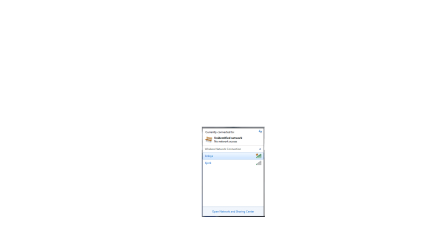
The router hasn't failed. The lights on it are perfect and my connection shows up on the list, it just won't connect to it. Let me show u a pic (check it in the attachment). My connection is the one that says "Linksys" it won't let me connect to it. Even stranger, when I enter the linksys IP in my browser, I can't access the setup page, it doesn't even ask for a username and password like it used to.
 

Attachments

  • Untitled.png
    Untitled.png
    8.3 KB · Views: 184

My Computer My Computer

At a glance

Windows 7
OS
Windows 7
I'm following this post since it also pertains to me.

My setup:

Asus M2N32 Sli Wireless Edition Mobo with nForce Network Controller. Real-tek Wireless Built-in.
Router: Linksys WRT110 (Factory Firmware)
I also use a switch in my setup: Linksys 5 Port 10/100 EZXS55W

I have a laptop that connects wire-lessly with no issues. My Desktop with the Asus Motherboard has built in Wireless which connects fine.

When I try to use the wired network with the desktop, Windows 7 shoots out the "Unidentified Network". Weird thing is, it worked fine for the first few hours of operation as a wired PC. Then the PC went to sleep and I haven't been able to revive the wired network since.

Running wireless wouldn't bother me, but I use this PC as a Media Server and Voip Server. Wireless doesn't always cut it in these circumstances.

I've tried uninstalling and re-installing the network drivers. I've tried setting the adapters to a static IP.

Here is a list of the different fixes I've tried:
Windows 7 Unidentified Network, Limited Access, No Internet Connection Problem Resolved

Change ‘Unidentified network’ from Public to Work in Windows 7 - dimeby8 - Site Home - MSDN Blogs

http://www.sevenforums.com/network-sharing/14260-windows-7-unidentified-network-help.html

And about a dozen more...my history is already gone though.

I don't know what to do, it was working fine in Vista for 9 months. Win7 was working fine for half a day. Now, nothing. I'm open to ideas...I'll mess with troubleshooting. I think I've narrowed it down to the router, or the switch. I've read that Windows 7 has the ability to "detect" my switch and gets confused where the default gateway is even though it's programmed statically.

I'm at my wits end with this, why does everything else work fine...and my HARD WIRED network doesn't. Very frustrating. :mad:
 

My Computer My Computer

At a glance

Windows 7 RC 7100AMD Athlon X2 6400+4GB G-SkilleVGA 8800GTS 640MB
Computer Manufacturer/Model Number
Home Built
OS
Windows 7 RC 7100
CPU
AMD Athlon X2 6400+
Motherboard
Asus M2N32 Wireless, SLi
Memory
4GB G-Skill
Graphics Card(s)
eVGA 8800GTS 640MB
Sound Card
MoBo
Monitor(s) Displays
22" View Sonic
Hard Drives
Internal - WD 250GB
External - USB 320GB (Can't remember Manu)
PSU
700 Watt
Case
Cooler Master
Cooling
Umm...fans
I'm following this post since it also pertains to me.

My setup:

Asus M2N32 Sli Wireless Edition Mobo with nForce Network Controller. Real-tek Wireless Built-in.
Router: Linksys WRT110 (Factory Firmware)
I also use a switch in my setup: Linksys 5 Port 10/100 EZXS55W

I have a laptop that connects wire-lessly with no issues. My Desktop with the Asus Motherboard has built in Wireless which connects fine.

When I try to use the wired network with the desktop, Windows 7 shoots out the "Unidentified Network". Weird thing is, it worked fine for the first few hours of operation as a wired PC. Then the PC went to sleep and I haven't been able to revive the wired network since.

Running wireless wouldn't bother me, but I use this PC as a Media Server and Voip Server. Wireless doesn't always cut it in these circumstances.

I've tried uninstalling and re-installing the network drivers. I've tried setting the adapters to a static IP.

Here is a list of the different fixes I've tried:
Windows 7 Unidentified Network, Limited Access, No Internet Connection Problem Resolved

Change ‘Unidentified network’ from Public to Work in Windows 7 - dimeby8 - Site Home - MSDN Blogs

http://www.sevenforums.com/network-sharing/14260-windows-7-unidentified-network-help.html

And about a dozen more...my history is already gone though.

I don't know what to do, it was working fine in Vista for 9 months. Win7 was working fine for half a day. Now, nothing. I'm open to ideas...I'll mess with troubleshooting. I think I've narrowed it down to the router, or the switch. I've read that Windows 7 has the ability to "detect" my switch and gets confused where the default gateway is even though it's programmed statically.

I'm at my wits end with this, why does everything else work fine...and my HARD WIRED network doesn't. Very frustrating. :mad:

Other people with your exact model of board seem to have the same problems with the wired connection and Windows 7. The Asus site shows some possible fixes that might work for you. ;)

You might also want to update your network drivers directly from the Nvidia site.
http://www.nvidia.com/object/nforce_win764_15.51.html


ASUSTeK Computer Inc.-Forum- M2N32-SLI Deluxe - Windows 7 Unidentified Network
 

My Computer My Computer

At a glance

Windows 7 Ult, Windows 8.1 Pro,Q9650-4.275GHz, E8600 4.5GHz, E6750-3.8GHzG.Skill PC2 9600 1200Mhz 5 5 5 15 2TGTX480
Computer type
PC/Desktop
Computer Manufacturer/Model Number
Home built
OS
Windows 7 Ult, Windows 8.1 Pro,
CPU
Q9650-4.275GHz, E8600 4.5GHz, E6750-3.8GHz
Motherboard
Evga 780i FTW
Memory
G.Skill PC2 9600 1200Mhz 5 5 5 15 2T
Graphics Card(s)
GTX480
Sound Card
Asus Xonar D2
Monitor(s) Displays
HannsG
Screen Resolution
1680X1050
Hard Drives
GSkill Phoenix Pro 120GB SSD
PSU
ThermalTake Toughpower 1000Watt modular
Case
ThermalTake XaserV
Cooling
Xigmatek S1283
Keyboard
Logitech G15
Mouse
Logitech G9
Internet Speed
T1
chev, do you have any questions or anything that could help you solve my problem? I could give you info, if you want more IP info let me know how to obtain and I'll tell you.
 

My Computer My Computer

At a glance

Windows 7
OS
Windows 7
chev, do you have any questions or anything that could help you solve my problem? I could give you info, if you want more IP info let me know how to obtain and I'll tell you.

At this point I would try a clean install of Windows 7. There are so many problems associated with the upgrade installs that it's hard to nail down the exact problem. I can reinstall Win 7 on my faster machines in about 20 minutes so it's worth a try.

Clean Install Windows 7
 
Last edited:

My Computer My Computer

At a glance

Windows 7 Ult, Windows 8.1 Pro,Q9650-4.275GHz, E8600 4.5GHz, E6750-3.8GHzG.Skill PC2 9600 1200Mhz 5 5 5 15 2TGTX480
Computer type
PC/Desktop
Computer Manufacturer/Model Number
Home built
OS
Windows 7 Ult, Windows 8.1 Pro,
CPU
Q9650-4.275GHz, E8600 4.5GHz, E6750-3.8GHz
Motherboard
Evga 780i FTW
Memory
G.Skill PC2 9600 1200Mhz 5 5 5 15 2T
Graphics Card(s)
GTX480
Sound Card
Asus Xonar D2
Monitor(s) Displays
HannsG
Screen Resolution
1680X1050
Hard Drives
GSkill Phoenix Pro 120GB SSD
PSU
ThermalTake Toughpower 1000Watt modular
Case
ThermalTake XaserV
Cooling
Xigmatek S1283
Keyboard
Logitech G15
Mouse
Logitech G9
Internet Speed
T1
Make sure your router firmware is up-to-date. We upgrade all the drivers in our PC for Windows 7 but forget to upgrade the router firmware. I upgraded my router firmware and all those unidentified network problems went away. It is much easier than forcing windows 7 to work with an out-dated router firmware. I wish this forgotten upgrade of the router is promulgated by Microsoft. Consequently many of us wasted a lot of time on this one.
 

My Computer My Computer

At a glance

windows 7Xeon
Computer Manufacturer/Model Number
Dell Precision
OS
windows 7
CPU
Xeon
I recently got bit by the limited access network, no Internet connection problem and here's the solution I found.

I am running Vista Home Premium. Recently I tried to install Microsoft Security Essentials. The install failed.

As I researched this, I found that I had not gotten any Windows updates in several months.

So I decided to go back to the last recover point, which was around the time I stopped getting OS updates.

After going back to the recovery point and rebooting, I lost Internet connectivity.

Running ipconfig showed an ip address that started with 169, so I knew that my router didn't give me an IP address as it should with DHCP turned on. Also, there was no gateway.

I searched the Internet for solutions and tried all sorts of things (the regedit solution, a new, different second NIC card, tested the CAT 5 network cable with another computer, turned some services off, turned other services on, static IP address), but nothing seemed to work.

Then when I looked at my network stack, I saw the standard Client for Microsoft Networks and the TCP/IP protocols, but I also saw an entry from Symantec.

My computer from HP came bundled with a trial subscription to Norton Anti-Virus. The subscription had expired some time ago and before installing MS Security Essentials, I uninstalled Norton using standard Vista software removal procedures.

Well it seems that the standard procedure doesn't always work right. I found a reference at a Windows Q&A site to a Norton utility that would remove all traces of Norton products in the event that a partial install was creating problems.

I downloaded the tool from Symantec Norton's site, and presto my problem disappeared completely. Within twenty minutes, I had the almost 50 OS updates I missed downloaded and installed, along with MS Security Essentials.

So watch out friends. A partial or otherwise corrupted Norton Anti-Virus install could be your problem too!
 

My Computer My Computer

At a glance

Vista Home Premium 64 bitQuad core8GBNVIDA
Computer Manufacturer/Model Number
HP A6645F
OS
Vista Home Premium 64 bit
CPU
Quad core
Motherboard
OEM HP
Memory
8GB
Graphics Card(s)
NVIDA
Hard Drives
1TB SATA
I know this is a really late response to this problem and I really wish I could have posted it when you presented it. However the way that I fix this little error is I have to unplug my computer from power completely. Meaning unplug the power cable from the back of the PC tower, out of the PSU. Wait aprox 10 seconds to be sure all the power is drained (lights should go off on MB) and then plug it back in and viola! it works. Standby does something strange to the network probably due to the AI NAP feature that asus implemented. The network is designed to always stay online for networking reasons and standby powers everything off in a way that it doesn't like. So I'd suggest if anyone ever has a problem like this on a laptop to disconnect the thing from the charger and unplug your battery for about 10 seconds and then hook it all back up. I would imagine it would operate the same way as my desktop computer does. How to fix this? I don't know yet but I'm going to look into it because I would like to be able to use a standby feature as it's the best way to save wear and tear on your harddisk headers. Also saves A LOT of boot up time lol. Peace
 

My Computer My Computer

At a glance

Windows XP ProAMD Athlon 7750 Dual-Core4GB OCZ Gold Dual Channel 800 MHZEVGA Geforce 460 GTX 1GB
OS
Windows XP Pro
CPU
AMD Athlon 7750 Dual-Core
Motherboard
Asus M2N32
Memory
4GB OCZ Gold Dual Channel 800 MHZ
Graphics Card(s)
EVGA Geforce 460 GTX 1GB
Back
Top