Show Us Your WEI (2)

Status
Not open for further replies.
Hello all!


There's a new tutorial here at Seven Forums some may find useful, at the link below! ;)


How to Ready an SSD to Re-Install an Operating System
I will be into this Guide soon as, Ted thanks for that I have a new chip 965 AMD and will add an SSD and hope to level out around the 7.4 without any overclocking :sarc: the 7.9 is great but to expensive for me at this time.Good to see them coming through good work guys.
 

My Computer My Computer

OS
Seven 64 Ultimate
CPU
AMD 965
Motherboard
Gigabyte
Memory
8G Corsair Dominator
Graphics Card(s)
XFX 5770
Sound Card
and another XFX5770
Monitor(s) Displays
LG 24"&HP22"
Hard Drives
Samsung500g and external
PSU
650
Cooling
AIR
Internet Speed
Very Sloooooowwww
Hello all!


There's a new tutorial here at Seven Forums some may find useful, at the link below! ;)


How to Ready an SSD to Re-Install an Operating System
I will be into this Guide soon as, Ted thanks for that I have a new chip 965 AMD and will add an SSD and hope to level out around the 7.4 without any overclocking :sarc: the 7.9 is great but to expensive for me at this time.Good to see them coming through good work guys.


Hello Mattz!

I would only do Step Three and Step Four in the tutorial with a new SSD, You have no need to do a "clean all" as there will be no data to remove to start with, the reason to do those steps is so you don't get the 100MB boot partition and the Windows.old file during install. Remember to post back with the new WEI scores.
 

My Computer My Computer

Computer Manufacturer/Model Number
* BFK Customs *
OS
W 7 64-bit Ultimate
CPU
Intel Q9550 Yorkfield
Motherboard
ASUS P5Q Pro
Memory
8GB Dominator 8500C5D
Graphics Card(s)
ATI : XFX 5870
Sound Card
Realtek HD Audio 7-1
Monitor(s) Displays
1x 47" LCD HDMI & 3x 26" LCD HDMI
Screen Resolution
1920x1080P & 1920x1200
Hard Drives
1x 80GB Intel X25-M G2 SSD : 1x 500GB & 1x 640GB WD Caviar Black(s)
PSU
Corsair 620HX
Case
Cooler Master RC-690
Cooling
Tuniq Tower 120, 2x 140mm and 3x 120mm case fans
Keyboard
Microsoft 500
Mouse
Razer Diamondback 3G
Internet Speed
14 Mb/s
Other Info
1x Koutech 3Gb/s SATA HDD Hot Swap Rack

My Computer My Computer

Computer Manufacturer/Model Number
Asus Extreme System
OS
Windows 7 Ultimate x64
CPU
Intel Core i7 980X Hexacore CPU @ 4.69 GHz
Motherboard
Asus Rampage III Extreme
Memory
12 GB Kingston HyperX DDR3 in Tri-Channel at 2000 MHz
Graphics Card(s)
2 x GTX295 in Quad SLI configuration
Sound Card
Integrated X-fi
Monitor(s) Displays
Samsung 305T 30 inch 6ms LCD monitor, 2 x Samsung 245BMW
Screen Resolution
2560x1600
Hard Drives
9 x Intel 160 GB 34 nm SSD drives in RAID6 on Areca 1231ml PCI-E x8 controller with 4GB read-ahead cache
PSU
1000 Watt Antec
Case
CoolerMaster HAF922
Cooling
Stock heatsink/fan that came with the 980X CPU
Keyboard
Ideazon Merc Stealth Gaming Keyboard
Mouse
Logitech MX-518 Gaming Mouse
Internet Speed
33 mbs
Other Info
Xeno Gaming NIC with 400 MHz NPU and 128 MB cache
@thobel: The memory subtest is skewed towards timings rather than size or clock, 7-7-7-19-cr1 should do it.
I've got 6g of ddr3 1333mhz and I've tried out those timings that you sugested, they got rejected, couldn't boot.... There's something strange though, I can't change the cmmand rate, that option is not available.
 

My Computer My Computer

Computer Manufacturer/Model Number
It's a Custom Build.....
OS
Windows 7 Ultimate x64, 7600.20647 RTM
CPU
Intel Core2Quad Q9505 @ 4.0Ghz
Motherboard
Intel Skyburg DP45SG
Memory
6GB Transcend DDR3-1333 Dual Channel
Graphics Card(s)
ASUS GTX285 1GB GDDR3
Sound Card
OnBoard Intel IDT HD Audio
Monitor(s) Displays
HP w2207h 22" WideScreen LCD, VGA & HDMI
Screen Resolution
1680x1050, 60Hz
Hard Drives
1TB WD Caviar Black, Green Power...
1TB Dell, 32Mb/s, Internal SATA
320GB Seagate Internal SATA (3 Partitions)
PSU
Omega 600W ATX2.0 Dual Rail, 2x Fans
Case
Cooler Master HAF 922
Cooling
Corsair Hydro H50 in Push-Pull mode, 4 Case Fans with LED
Keyboard
White aigo keyboard with blue LED on the keys....
Mouse
Genius Mini Tracer
Internet Speed
I'm ashamed to say...
Other Info
Aigo wireless keyboard(black) and a 2.1 Speaker System(white)
@oidicle: You really need good quality ram, I said that to thobel because he has those corsair 1600mhz sticks which are generally very good and can run much tighter timings. Maybe check the transcend forums and see how far people there are pushing your particular modules.
 

My Computer My Computer

OS
w7x64u
CPU
i7 980x @4.5ghz 24/7
Motherboard
gigabyte x58a-ud7
Memory
6gb dominator gt 2000mhz c7
Graphics Card(s)
ati 5970+5870
Sound Card
x-fi
Monitor(s) Displays
dell u2410
Screen Resolution
1920x1200
Hard Drives
8x256gb crucial c300 R0 on lsi 9260
samsung f3 2tb
intel x25-v 40gb
PSU
Enermax Galaxy 1250w
Case
Mountain Mods Ascension
Cooling
dual loop wc
Keyboard
logitech g110
Mouse
ms explorer mouse
Internet Speed
25mbit cable
@oidicle: You really need good quality ram, I said that to thobel because he has those corsair 1600mhz sticks which are generally very good and can run much tighter timings. Maybe check the transcend forums and see how far people there are pushing your particular modules.


I did a quick run at 7-7-7-19 1T and it didnt go well I'll do alittle testing later tonight

I'm tempted to go buy the Corsair ddr3 2000's and run it at 1600-1800 with tighter timings
 

My Computer My Computer

Computer Manufacturer/Model Number
Custom
OS
Windows 7 Ult
CPU
I7 980X
Motherboard
ASUS Rampage III
Memory
6GB Corsair Dominator DDR3 1600
Graphics Card(s)
GTX480 Tri Sli
Sound Card
Creative X-Fi Titanium
Monitor(s) Displays
30" Dell
Screen Resolution
2560x1600
Hard Drives
Intel X25m G2 160GBx3 Raid 0
PSU
Silverstone 1500
Case
Corsair 800D
Cooling
Liquid
Keyboard
Logitech G19
Mouse
Logitech G9x
Internet Speed
25MB/5MB
Other Info
Speakers: Bose Compantion 5
Water Cooling: 2 Loops 120.3 for Video Cards
140.1 for CPU
@thobal: The 2000c7 kit is rated for 7-8-7-20-cr2 but runs fine on my board 7-7-7-19-cr1. Just needs a bit of vqpi. They're expensive though probably the c8 kit is just as good and will save you some money.

Stepping away from synthetic benchmarks there is likely little (if any) difference between 7.8 and 7.9 in real world usage.
 

My Computer My Computer

OS
w7x64u
CPU
i7 980x @4.5ghz 24/7
Motherboard
gigabyte x58a-ud7
Memory
6gb dominator gt 2000mhz c7
Graphics Card(s)
ati 5970+5870
Sound Card
x-fi
Monitor(s) Displays
dell u2410
Screen Resolution
1920x1200
Hard Drives
8x256gb crucial c300 R0 on lsi 9260
samsung f3 2tb
intel x25-v 40gb
PSU
Enermax Galaxy 1250w
Case
Mountain Mods Ascension
Cooling
dual loop wc
Keyboard
logitech g110
Mouse
ms explorer mouse
Internet Speed
25mbit cable
@oidicle: You really need good quality ram, I said that to thobel because he has those corsair 1600mhz sticks which are generally very good and can run much tighter timings. Maybe check the transcend forums and see how far people there are pushing your particular modules.


I did a quick run at 7-7-7-19 1T and it didnt go well I'll do alittle testing later tonight

I'm tempted to go buy the Corsair ddr3 2000's and run it at 1600-1800 with tighter timings

take it easy guys :)

i know it hurts not to get the WEI score you were hoping for, but replacing 6gb ram from x brand with another 6gb from y brand just because it’s got a bit higher bus speed won’t really boost the performance...in other words… that split of a second is really not worth the money...unless you are sick :D
 

My Computer My Computer

Computer Manufacturer/Model Number
Gigabyte EX58Extreme
OS
win7 Enterprise X64
CPU
i7 920
Motherboard
Gigabyte Ex58 Extreme
Memory
OCZ 6GB DDR3 1600 MHZ, runnong @ 1560
Graphics Card(s)
Sapphair HD 5850 1 GB GDDR5
Sound Card
Built in SPDIF, Samsung hometheater system 5.1
Monitor(s) Displays
Hitachi 42" LCD 1920 X 1080
Screen Resolution
1920 x 1080
Hard Drives
2X 160GB Maxtor RAID0, 500GB WD (Bakcup & movies), 2TB Seagate.
PSU
thermaltake thoughpower 850 WATT
Case
thearmaltake Armur
Cooling
Satandard Intel CPU, Standard thermaltake Arum fans
Keyboard
Microsoft IR wireless
Mouse
Microsoft IR wireless
Internet Speed
4MB
@thobal: The 2000c7 kit is rated for 7-8-7-20-cr2 but runs fine on my board 7-7-7-19-cr1. Just needs a bit of vqpi. They're expensive though probably the c8 kit is just as good and will save you some money.

Stepping away from synthetic benchmarks there is likely little (if any) difference between 7.8 and 7.9 in real world usage.

Might be barking up the wrong tree here...

Badly written software that runs in the background as services or processes can cause hard faults, which can contribute to poor CPU and memory performance. Hard faults occur when a program tries to access memory outside of it's allocated memory space. The OS has to recover from hard faults, which slows everything down. To get to the resource monitor, start task manager, click the performance tab, then click the Resource Monitor button. In resource monitor, click the Memory tab to view Hard faults per second.

After installing Crysis, my memory WEI rating went down to 7.8 too. With resource monitor I was getting lots of memory hard faults. So I started systematically uninstalling some of the extras that got installed when I installed Crysis. I found that once I got rid of Game Spy, my memory WEI score went back up to 7.9 and I was getting nil for hard faults again.

Another thing that can affect performance is single bit ECC. When you overclock your CPU, GPU, system memory or GPU memory, you may be inadvertantly increasing the frequency of correctable single bit errors. And if you are running your memory at anything greater than 1066 MHz, you are overclocking your memory. The act of correcting these errors may serve to counter the benefits of overclocking. You may end up slowing down your system instead of speeding it up. There are registers in your chipset that keep track of the number of errors corrected, but there is no standard for where these registers are. They are different for each chipset. Some BIOS's allow access to these registers.

Even if you are using non-ECC memory, the Windows kernel has built-in single-bit errror correction (since Windows 2000 anyway). Single bit error correction is completely invisible to the user, but if it happens too often the act of correcting the errors will adversely affect performance.

Sorry if all this is all common knowledge, but I've found that it pays to look at any software issues before you start tweaking hardware.

 
Last edited:

My Computer My Computer

Computer Manufacturer/Model Number
Asus Extreme System
OS
Windows 7 Ultimate x64
CPU
Intel Core i7 980X Hexacore CPU @ 4.69 GHz
Motherboard
Asus Rampage III Extreme
Memory
12 GB Kingston HyperX DDR3 in Tri-Channel at 2000 MHz
Graphics Card(s)
2 x GTX295 in Quad SLI configuration
Sound Card
Integrated X-fi
Monitor(s) Displays
Samsung 305T 30 inch 6ms LCD monitor, 2 x Samsung 245BMW
Screen Resolution
2560x1600
Hard Drives
9 x Intel 160 GB 34 nm SSD drives in RAID6 on Areca 1231ml PCI-E x8 controller with 4GB read-ahead cache
PSU
1000 Watt Antec
Case
CoolerMaster HAF922
Cooling
Stock heatsink/fan that came with the 980X CPU
Keyboard
Ideazon Merc Stealth Gaming Keyboard
Mouse
Logitech MX-518 Gaming Mouse
Internet Speed
33 mbs
Other Info
Xeno Gaming NIC with 400 MHz NPU and 128 MB cache
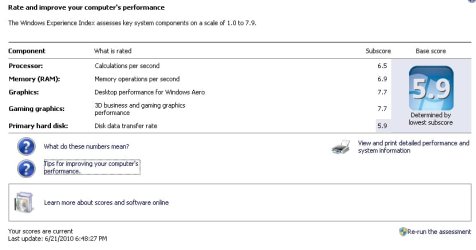
Mine:

I guess my HD is bottleneck, still not a horrid score, but don't really see it as that much of an issue, probably related to mediocre motherboard.

My PC is custom and I built it 2-3 years ago, with just video card upgrade since.
I don't overclock, this motherboard will BSOD at bootup if I try any of it's built in overclocking settings, very bizarre, don't care though, runs everything I use well.
 

Attachments

  • faladu_WEIscore.jpg
    faladu_WEIscore.jpg
    36.8 KB · Views: 28

My Computer My Computer

Computer type
PC/Desktop
Computer Manufacturer/Model Number
Self Built Custom
OS
Windows 7 Ultimate Retail Box (64-bit installed) + Service Pack 1
CPU
AMD FX-8350 CPU v1.15 (or 1.0F) BIOS was required!
Motherboard
MSI 890FXA-GD70
Memory
8G CAS-7 G-Skill DDR3 @1333 (2 fours) [mobo nonOC max rec'd]
Graphics Card(s)
Radeon HD 7950 [3 gigs of GDDR5] MSI Twin Frozr model
Sound Card
Realtek High Definition Audio (onboard mobo, ALC-889 chip)
Monitor(s) Displays
2 WS LED Monitors: One LG One Viewsonic
Screen Resolution
1920 by 1080
Hard Drives
SSD for OS: Samsung 840 Pro
SSD for VM and utilities: Adata SX900
7200 RPM SATA HDs for the rest: Hitachi and Seagate
PSU
Corsair TX850 - 850W max, in service since August 2010.
Case
Thermaltake Armor A90
Cooling
Thermaltake Spin Q CPU Cooler, in service since August 2010
Keyboard
Logitech G11
Mouse
Logitech M310 Wireless
Internet Speed
100 Megabit broadband supposedly upgraded from 50 (Cable)
Antivirus
Bitdefender Internet Security 2014 suite
Browser
Pale Moon 64-bit main, also IceDragon, Opera, and Maxthon.
Other Info
CompTIA A+ certified (220-800 series) in July 2013.
Hello Faladu.


As long as it does what you need it to do, that's all that matters!
 

My Computer My Computer

Computer Manufacturer/Model Number
* BFK Customs *
OS
W 7 64-bit Ultimate
CPU
Intel Q9550 Yorkfield
Motherboard
ASUS P5Q Pro
Memory
8GB Dominator 8500C5D
Graphics Card(s)
ATI : XFX 5870
Sound Card
Realtek HD Audio 7-1
Monitor(s) Displays
1x 47" LCD HDMI & 3x 26" LCD HDMI
Screen Resolution
1920x1080P & 1920x1200
Hard Drives
1x 80GB Intel X25-M G2 SSD : 1x 500GB & 1x 640GB WD Caviar Black(s)
PSU
Corsair 620HX
Case
Cooler Master RC-690
Cooling
Tuniq Tower 120, 2x 140mm and 3x 120mm case fans
Keyboard
Microsoft 500
Mouse
Razer Diamondback 3G
Internet Speed
14 Mb/s
Other Info
1x Koutech 3Gb/s SATA HDD Hot Swap Rack
Mine:

I guess my HD is bottleneck, still not a horrid score, but don't really see it as that much of an issue, probably related to mediocre motherboard.

My PC is custom and I built it 2-3 years ago, with just video card upgrade since.
I don't overclock, this motherboard will BSOD at bootup if I try any of it's built in overclocking settings, very bizarre, don't care though, runs everything I use well.

Looks good, if it's running everything you need then you're all set.
 

My Computer My Computer

Computer type
PC/Desktop
Computer Manufacturer/Model Number
76~2.0
OS
Windows 7 Ult x64 - SP1/ Windows 8 Pro x64
CPU
Intel Core i5-3570K 4.6GHz
Motherboard
Gigabyte GA-Z77X UD3H, f18
Memory
8GB (2X4GB) DDR3 1600 Corsair Vengeance CL8 1.5v
Graphics Card(s)
Sapphire HD 7770 Vapor-X OC 1GB DDR5
Sound Card
Onboard VIA VT2021
Monitor(s) Displays
22" LCD Dell
Screen Resolution
1680x1050
Hard Drives
Samsung 840Pro 128GB SSD,
Seagate Barracuda 500GB SATA2 7200rpm 32MB cache, Seagate Barracuda 1TB SATA2 7200rpm 32MB cache,
PSU
Corsair HX650W
Case
Cooler Master Storm Scout
Cooling
Corsair H80 2x12cm Noctua NF P12 , 2x14cm case fans
Keyboard
Logitech Wave
Mouse
CM Sentinel
Internet Speed
Dismal
Antivirus
Avast
Browser
Opera Next
Other Info
Haswell laptop: HP Envy 17t-j, i7-4700MQ, GeForce 740M 2GB DDR3, 17.3" Full HD 1920x1080, 16GB RAM, Samsung 840 Pro 128GB, 1TB Hitachi 7200 HDD,
Desktop: eSATA ports,
External eSATA Seagate 500GB SATA2 7200rpm,
External WD USB 500GB
@Faladu: Storage is almost always the bottleneck, even with a great ssd setup. Your scores are great, no worries.
 

My Computer My Computer

OS
w7x64u
CPU
i7 980x @4.5ghz 24/7
Motherboard
gigabyte x58a-ud7
Memory
6gb dominator gt 2000mhz c7
Graphics Card(s)
ati 5970+5870
Sound Card
x-fi
Monitor(s) Displays
dell u2410
Screen Resolution
1920x1200
Hard Drives
8x256gb crucial c300 R0 on lsi 9260
samsung f3 2tb
intel x25-v 40gb
PSU
Enermax Galaxy 1250w
Case
Mountain Mods Ascension
Cooling
dual loop wc
Keyboard
logitech g110
Mouse
ms explorer mouse
Internet Speed
25mbit cable
Thanks for confirmation guys!

I do what I can on my budget.

I would love to see a SSD in action, I have yet to.
 

My Computer My Computer

Computer type
PC/Desktop
Computer Manufacturer/Model Number
Self Built Custom
OS
Windows 7 Ultimate Retail Box (64-bit installed) + Service Pack 1
CPU
AMD FX-8350 CPU v1.15 (or 1.0F) BIOS was required!
Motherboard
MSI 890FXA-GD70
Memory
8G CAS-7 G-Skill DDR3 @1333 (2 fours) [mobo nonOC max rec'd]
Graphics Card(s)
Radeon HD 7950 [3 gigs of GDDR5] MSI Twin Frozr model
Sound Card
Realtek High Definition Audio (onboard mobo, ALC-889 chip)
Monitor(s) Displays
2 WS LED Monitors: One LG One Viewsonic
Screen Resolution
1920 by 1080
Hard Drives
SSD for OS: Samsung 840 Pro
SSD for VM and utilities: Adata SX900
7200 RPM SATA HDs for the rest: Hitachi and Seagate
PSU
Corsair TX850 - 850W max, in service since August 2010.
Case
Thermaltake Armor A90
Cooling
Thermaltake Spin Q CPU Cooler, in service since August 2010
Keyboard
Logitech G11
Mouse
Logitech M310 Wireless
Internet Speed
100 Megabit broadband supposedly upgraded from 50 (Cable)
Antivirus
Bitdefender Internet Security 2014 suite
Browser
Pale Moon 64-bit main, also IceDragon, Opera, and Maxthon.
Other Info
CompTIA A+ certified (220-800 series) in July 2013.
Hello madtownidiot, good numbers!


I posted it in another thread for you but you may have missed it, did you have a chance to have a look at the new tutorial, at the link below before you did the re-install to the SSDs.


How to Ready an SSD to Re-Install an Operating System


Edit: Where'd your post go to?
 

My Computer My Computer

Computer Manufacturer/Model Number
* BFK Customs *
OS
W 7 64-bit Ultimate
CPU
Intel Q9550 Yorkfield
Motherboard
ASUS P5Q Pro
Memory
8GB Dominator 8500C5D
Graphics Card(s)
ATI : XFX 5870
Sound Card
Realtek HD Audio 7-1
Monitor(s) Displays
1x 47" LCD HDMI & 3x 26" LCD HDMI
Screen Resolution
1920x1080P & 1920x1200
Hard Drives
1x 80GB Intel X25-M G2 SSD : 1x 500GB & 1x 640GB WD Caviar Black(s)
PSU
Corsair 620HX
Case
Cooler Master RC-690
Cooling
Tuniq Tower 120, 2x 140mm and 3x 120mm case fans
Keyboard
Microsoft 500
Mouse
Razer Diamondback 3G
Internet Speed
14 Mb/s
Other Info
1x Koutech 3Gb/s SATA HDD Hot Swap Rack
Hello madtownidiot, good numbers!


I posted it in another thread for you but you may have missed it, did you have a chance to have a look at the new tutorial, at the link below before you did the re-install to the SSDs.


How to Ready an SSD to Re-Install an Operating System


Edit: Where'd your post go to?
just realized all the scores dropped.. rerunning the assessment now
I never saw that tutorial, until just now, but it's a very good one
 
Hello madtownidiot, good numbers!


I posted it in another thread for you but you may have missed it, did you have a chance to have a look at the new tutorial, at the link below before you did the re-install to the SSDs.


How to Ready an SSD to Re-Install an Operating System


Edit: Where'd your post go to?
just realized all the scores dropped.. rerunning the assessment now
I never saw that tutorial, until just now, but it's a very good one

Wow, that is a really good score for a laptop.
 

My Computer My Computer

Computer Manufacturer/Model Number
Intel WBIBX10J
OS
Linux (Debian, Android)
CPU
Intel Core i7 860
Motherboard
Intel DP55WB
Memory
2x 2GB Kingston DDR3-1333
Graphics Card(s)
AMD Radeon HD 5750
Sound Card
Realtek ALC888
Monitor(s) Displays
2x Dell Inc. E248WFP
Screen Resolution
3840x1200
Hard Drives
Intel X25-V
Samsung HD103SJ
PSU
Corsair CX400
Case
Silverstone GD05
Cooling
Stock
Keyboard
Dell Inc. Bluetooth Wireless
Internet Speed
30 Mbps
Hello madtownidiot, good numbers!


I posted it in another thread for you but you may have missed it, did you have a chance to have a look at the new tutorial, at the link below before you did the re-install to the SSDs.


How to Ready an SSD to Re-Install an Operating System


Edit: Where'd your post go to?
just realized all the scores dropped.. rerunning the assessment now
I never saw that tutorial, until just now, but it's a very good one

Those are great numbers! :thumbsup:

A Guy
 

My Computer My Computer

Computer type
PC/Desktop
OS
Windows 10 Home x64
CPU
INTEL Core i5-750 Quad-Core 3.37GHz
Motherboard
ASUS P7P55D
Memory
HyperX Fury Black Series 8GB (2 x 4GB) 1866Mhz
Graphics Card(s)
EVGA GeForce GTX 750 Superclocked 1GB 128-Bit GDDR5
Monitor(s) Displays
LG 32MA68HY 32" IPS
Screen Resolution
1920 x 1080
Hard Drives
Samsung 840 Evo 120GB, SEAGATE 500GB Barracuda® 7200.12, SATA 3 Gb/s, 7200 RPM, 16MB cache
PSU
ANTEC TruePower New TP-550, 80 PLUS, 550W
Case
ANTEC Three Hundred Illusion
Cooling
COOLER MASTER Hyper 212 Plus, 4 x 120mm 1 x 140mm Noctua's
Internet Speed
85 + Mbps
Antivirus
Avast
Browser
Vivaldi
Whew, the scores posted here just blow me away!!
 

My Computer My Computer

Computer type
PC/Desktop
Computer Manufacturer/Model Number
Self built
OS
Windows 10 Pro (x64)
CPU
AMD RYZEN 7 1700+Stock Wraith Spire
Motherboard
ASUS PRIME B350M-A
Memory
Corsair 8GB (1 x 8 GB) DDR4 Vengeance LPX 2400Mhz
Graphics Card(s)
SAPPHIRE RX 470 4GB (Platinum Edition)
Monitor(s) Displays
BenQ VZ2250H
Screen Resolution
1920x1080
Hard Drives
120GB Samsung 750 Evo (OS/Programs)+1TB ST Firecuda (Games/Creative Applications)+1TB WD Green (Storage)
PSU
Antec VP650PM
Case
Coolermaster K380 Mid-Tower
Cooling
Side:Antec F19 120mm+Rear:Tt ISGC Fan12
Keyboard
Logitech K200
Mouse
Dragonwar Ele-G9 Thor
Internet Speed
Slow by 21st Century Standards :(
Antivirus
Bitdefender Internet Security and MBAM
Browser
Firefox
Other Info
Creative Inspire T3130
My memory is the bottleneck and there's no way to upgrade to faster RAM. It's running @ 1420 Mhz and the cpu is clocked to 3.59 GHz. I have to admit I had to set my laptop in the freezer to keep it from overheating during the benchmarks.
 
Status
Not open for further replies.
Back
Top