@thobal: The 2000c7 kit is rated for 7-8-7-20-cr2 but runs fine on my board 7-7-7-19-cr1. Just needs a bit of vqpi. They're expensive though probably the c8 kit is just as good and will save you some money.
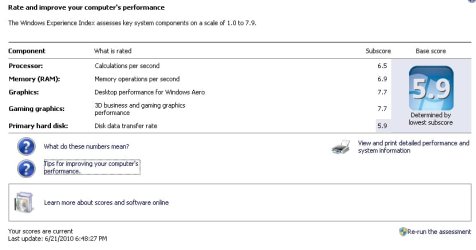
Stepping away from synthetic benchmarks there is likely little (if any) difference between 7.8 and 7.9 in real world usage.
Might be barking up the wrong tree here...
Badly written software that runs in the background as services or processes can cause hard faults, which can contribute to poor CPU and memory performance. Hard faults occur when a program tries to access memory outside of it's allocated memory space. The OS has to recover from hard faults, which slows everything down. To get to the resource monitor, start task manager, click the performance tab, then click the Resource Monitor button. In resource monitor, click the Memory tab to view Hard faults per second.
After installing Crysis, my memory WEI rating went down to 7.8 too. With resource monitor I was getting lots of memory hard faults. So I started systematically uninstalling some of the extras that got installed when I installed Crysis. I found that once I got rid of Game Spy, my memory WEI score went back up to 7.9 and I was getting nil for hard faults again.
Another thing that can affect performance is single bit ECC. When you overclock your CPU, GPU, system memory or GPU memory, you may be inadvertantly increasing the frequency of correctable single bit errors. And if you are running your memory at anything greater than 1066 MHz, you
are overclocking your memory. The act of correcting these errors may serve to counter the benefits of overclocking. You may end up slowing down your system instead of speeding it up. There are registers in your chipset that keep track of the number of errors corrected, but there is no standard for where these registers are. They are different for each chipset. Some BIOS's allow access to these registers.
Even if you are using non-ECC memory, the Windows kernel has built-in single-bit errror correction (since Windows 2000 anyway). Single bit error correction is completely invisible to the user, but if it happens too often the act of correcting the errors
will adversely affect performance.
Sorry if all this is all common knowledge, but I've found that it pays to look at any software issues before you start tweaking hardware.