Windows WEI Decreased w/ SSD

MattMJB0188

New member
Local time
4:45 PM
Messages
75
Location
Santa Clarita, CA
I have a 2010 Macbook Pro and installed an Intel X25 M 160GB SSD and my Windows 7 WEI went from 5.9 with a 7200rpm hd to a 5.2 with an SSD. The graphics got the worst rating and the SSD the highest. I can post a screen shot.

Having a Macbook Pro should have nothing to do with this. I am curious is to why I was getting a 5.9 before my Intel SSD which is amazing. This is not a big deal and obviously makes no difference in terms of general performance but if someone can shed some light upon this I would greatly appreciate it. Thanks

Matt
 

My Computer My Computer

Computer Manufacturer/Model Number
Apple Macbook Pro 15" 2010
OS
Mac OS X / Windows 7 Home Premium 64-bit
CPU
Intel Core i5 @ 2.4 GHz
Memory
8GB DDR3
Graphics Card(s)
NVidia GeForce GT330 M
Screen Resolution
1680x1050
Hard Drives
Intel X25 Mainstream G2 160 GB
That Intel should show around 7.6

My guess is it has something to do with drivers, bios settings.
Typically you want to be in AHCI mode, and use either Win7s default AHCI drivers, or Intel Drivers if you have a Intel Chipset.

Did you do a clean install on the SSD? May possibly be alignment issues as well.
 

My Computer My Computer

Computer Manufacturer/Model Number
Custom (Self Build)
OS
Windows 7 Home Premium 64bit
CPU
Intel Core i7 2700k
Motherboard
eVGA P67 SLI
Memory
8GB Mushkin Redline Ridgebacks @1866
Graphics Card(s)
EVGA GTX570 SC
Sound Card
XiFi Titanium HD
Monitor(s) Displays
LG W2453V
Screen Resolution
1920x1080
Hard Drives
Intel 320 80GB -- Intel X25-V 40GB --WD Black 1TB x2 -- WD Blue 640GB
PSU
Seasonic x750
Case
Corsair 600T SE White
Cooling
eVGA Superclocked CPU Cooler
Keyboard
Saitek Cyborg
Antivirus
Kaspersky
Browser
IE
Other Info
LG BD/DVD
Along with what Wishmaster said, I would update the firmware if it isn't already the latest.

After updating the firmware, enabling AHCI in BIOS, installing the latest Intel chipset driver, and installing the latest Intel RST driver, I get 7.6 with a Intel X25-V in WEI.
 

My Computer My Computer

Computer Manufacturer/Model Number
Intel WBIBX10J
OS
Linux (Debian, Android)
CPU
Intel Core i7 860
Motherboard
Intel DP55WB
Memory
2x 2GB Kingston DDR3-1333
Graphics Card(s)
AMD Radeon HD 5750
Sound Card
Realtek ALC888
Monitor(s) Displays
2x Dell Inc. E248WFP
Screen Resolution
3840x1200
Hard Drives
Intel X25-V
Samsung HD103SJ
PSU
Corsair CX400
Case
Silverstone GD05
Cooling
Stock
Keyboard
Dell Inc. Bluetooth Wireless
Internet Speed
30 Mbps
Thanks but this is a Macbook Pro. I don't think there are bios and I am using the latest Boot camp drivers that Apple has released. The SSD has the firmware and before the ssd I got 5.9 which was last week? I was still able to get a 5.9 with Apple's drivers before why I can't I get it with my ssd? I do believe I got a 7.6 for the SSD.
 

My Computer My Computer

Computer Manufacturer/Model Number
Apple Macbook Pro 15" 2010
OS
Mac OS X / Windows 7 Home Premium 64-bit
CPU
Intel Core i5 @ 2.4 GHz
Memory
8GB DDR3
Graphics Card(s)
NVidia GeForce GT330 M
Screen Resolution
1680x1050
Hard Drives
Intel X25 Mainstream G2 160 GB
Thanks but this is a Macbook Pro. I don't think there are bios and I am using the latest Boot camp drivers that Apple has released. The SSD has the firmware and before the ssd I got 5.9 which was last week? I was still able to get a 5.9 with Apple's drivers before why I can't I get it with my ssd? I do believe I got a 7.6 for the SSD.

Yeah, Macs use EFI not BIOS, AHCI should be enabled by default... at least from what I've heard since 2008 Macs.

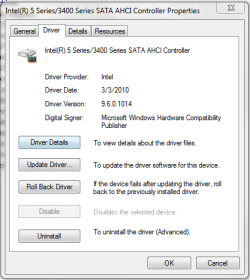
In Windows can you go to Device Manager and under IDE ATA/ATAPI controllers right click the AHCI controller and go to properties. It should look similar to this:

ahci.PNG

If you are using a generic driver supplied to Apple or Microsoft you most likely will get worse performance.

Download the Intel SSD Toolbox in Windows and post what firmware revision of the SSD you have.
 

My Computer My Computer

Computer Manufacturer/Model Number
Intel WBIBX10J
OS
Linux (Debian, Android)
CPU
Intel Core i7 860
Motherboard
Intel DP55WB
Memory
2x 2GB Kingston DDR3-1333
Graphics Card(s)
AMD Radeon HD 5750
Sound Card
Realtek ALC888
Monitor(s) Displays
2x Dell Inc. E248WFP
Screen Resolution
3840x1200
Hard Drives
Intel X25-V
Samsung HD103SJ
PSU
Corsair CX400
Case
Silverstone GD05
Cooling
Stock
Keyboard
Dell Inc. Bluetooth Wireless
Internet Speed
30 Mbps
Ya know what I didn't even think to install any of the SSD software on Windows. That could be why. I will do that later. I already have the latest firmware. I checked before I put it in my laptop.

So I would want to download this: ?

 Intel® Solid State Drive Toolbox

This would work with my Intel X25 M G2 160GB right? Sorry for the stupid question just don't want to mess anything up.
 

My Computer My Computer

Computer Manufacturer/Model Number
Apple Macbook Pro 15" 2010
OS
Mac OS X / Windows 7 Home Premium 64-bit
CPU
Intel Core i5 @ 2.4 GHz
Memory
8GB DDR3
Graphics Card(s)
NVidia GeForce GT330 M
Screen Resolution
1680x1050
Hard Drives
Intel X25 Mainstream G2 160 GB
Did you align the SSD?
 

My Computer My Computer

Computer Manufacturer/Model Number
HP, Dell, Gateway, Toshiba - 4 laptops and 2 desktops
OS
Vista, Windows7, Mint Mate, Zorin, Windows 8
CPU
from 1.6GHz Duo to i7
Monitor(s) Displays
2x HP w2207
Hard Drives
5x HDD, 7x SSD, 12x Externals
Keyboard
with trackball - no mices
Mouse
Trackball mice
Internet Speed
DSL 6000
Thanks but this is a Macbook Pro. I don't think there are bios and I am using the latest Boot camp drivers that Apple has released. The SSD has the firmware and before the ssd I got 5.9 which was last week? I was still able to get a 5.9 with Apple's drivers before why I can't I get it with my ssd? I do believe I got a 7.6 for the SSD.

Yeah, Macs use EFI not BIOS, AHCI should be enabled by default... at least from what I've heard since 2008 Macs.

In Windows can you go to Device Manager and under IDE ATA/ATAPI controllers right click the AHCI controller and go to properties. It should look similar to this:

View attachment 81537

If you are using a generic driver supplied to Apple or Microsoft you most likely will get worse performance.

Download the Intel SSD Toolbox in Windows and post what firmware revision of the SSD you have.

Firmware version 2CV102HD

I see you have a later driver, how do I get the latest driver? I clicked on update driver but that didn't work?


My Computer My Computer

Computer Manufacturer/Model Number
Apple Macbook Pro 15" 2010
OS
Mac OS X / Windows 7 Home Premium 64-bit
CPU
Intel Core i5 @ 2.4 GHz
Memory
8GB DDR3
Graphics Card(s)
NVidia GeForce GT330 M
Screen Resolution
1680x1050
Hard Drives
Intel X25 Mainstream G2 160 GB
Thanks but this is a Macbook Pro. I don't think there are bios and I am using the latest Boot camp drivers that Apple has released. The SSD has the firmware and before the ssd I got 5.9 which was last week? I was still able to get a 5.9 with Apple's drivers before why I can't I get it with my ssd? I do believe I got a 7.6 for the SSD.

Yeah, Macs use EFI not BIOS, AHCI should be enabled by default... at least from what I've heard since 2008 Macs.

In Windows can you go to Device Manager and under IDE ATA/ATAPI controllers right click the AHCI controller and go to properties. It should look similar to this:

View attachment 81537

If you are using a generic driver supplied to Apple or Microsoft you most likely will get worse performance.

Download the Intel SSD Toolbox in Windows and post what firmware revision of the SSD you have.

Firmware version 2CV102HD

I see you have a later driver, how do I get the latest driver? I clicked on update driver but that didn't work?


Here:  64-bit Intel® RST Driver Files for F6 Install

Unzip this, then in Device Manager

1.) Right click the AHCI controller
2.) Select update driver software
3.) Browse my computer for driver software
4.) Make sure Include subfolders is checked and select the directory you just unzipped
5.) Click Next and let the driver install.
6.) Restart Windows or your computer.
 

My Computer My Computer

Computer Manufacturer/Model Number
Intel WBIBX10J
OS
Linux (Debian, Android)
CPU
Intel Core i7 860
Motherboard
Intel DP55WB
Memory
2x 2GB Kingston DDR3-1333
Graphics Card(s)
AMD Radeon HD 5750
Sound Card
Realtek ALC888
Monitor(s) Displays
2x Dell Inc. E248WFP
Screen Resolution
3840x1200
Hard Drives
Intel X25-V
Samsung HD103SJ
PSU
Corsair CX400
Case
Silverstone GD05
Cooling
Stock
Keyboard
Dell Inc. Bluetooth Wireless
Internet Speed
30 Mbps
thanks but it says I already have the most up to date driver installed?
 

My Computer My Computer

Computer Manufacturer/Model Number
Apple Macbook Pro 15" 2010
OS
Mac OS X / Windows 7 Home Premium 64-bit
CPU
Intel Core i5 @ 2.4 GHz
Memory
8GB DDR3
Graphics Card(s)
NVidia GeForce GT330 M
Screen Resolution
1680x1050
Hard Drives
Intel X25 Mainstream G2 160 GB
Bump
 

My Computer My Computer

Computer Manufacturer/Model Number
Apple Macbook Pro 15" 2010
OS
Mac OS X / Windows 7 Home Premium 64-bit
CPU
Intel Core i5 @ 2.4 GHz
Memory
8GB DDR3
Graphics Card(s)
NVidia GeForce GT330 M
Screen Resolution
1680x1050
Hard Drives
Intel X25 Mainstream G2 160 GB
You need to manually update the driver by choosing the option: Let Me Choose
as per Firestriders instructions.

Please fill out the info in the calculator here:
techPowerUp! :: SSD Alignment Calculator

Instructions are provided for each step on the "How To GET" tab

Please let us know the results.
 

My Computer My Computer

Computer Manufacturer/Model Number
Custom (Self Build)
OS
Windows 7 Home Premium 64bit
CPU
Intel Core i7 2700k
Motherboard
eVGA P67 SLI
Memory
8GB Mushkin Redline Ridgebacks @1866
Graphics Card(s)
EVGA GTX570 SC
Sound Card
XiFi Titanium HD
Monitor(s) Displays
LG W2453V
Screen Resolution
1920x1080
Hard Drives
Intel 320 80GB -- Intel X25-V 40GB --WD Black 1TB x2 -- WD Blue 640GB
PSU
Seasonic x750
Case
Corsair 600T SE White
Cooling
eVGA Superclocked CPU Cooler
Keyboard
Saitek Cyborg
Antivirus
Kaspersky
Browser
IE
Other Info
LG BD/DVD
Back
Top