Acer Laptop Screen Problem-Inverter or Backlight

Shook

New member
Member
VIP
Local time
2:50 PM
Messages
109
Acer Laptop Screen Problem*Updated* w/ Video

Sooooo.... I'm working on a free hand-me-down laptop. Had a hard drive problem, which I fixed and happened to find 4GB of RAM to toss into it... and what do ya know, the screen starts messing up as soon as I fixed it... :(

The laptop is not very old so I would like to fix it... onto my problem.

qGPmR.jpg


The screen sort of "flickers" and "moves around" and also has a pink tint to it every once in awhile. The screen is this way as soon as I power on the laptop, and having it plugged into the wall proves no difference. Another strange thing is, if I leave it on, after about 5-10 minutes its works perfect, but only for about 15 seconds, then back to like the picture above.

- Tried hooking it up to my desktop monitor, works great.
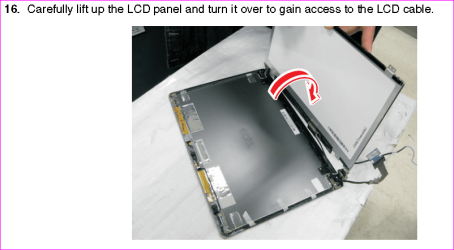
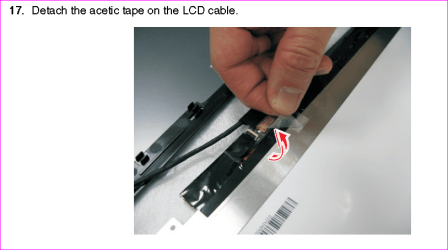
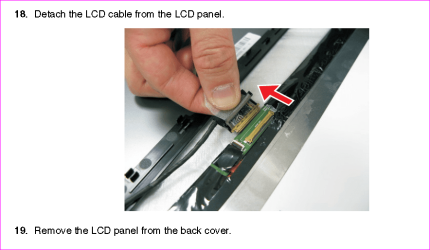
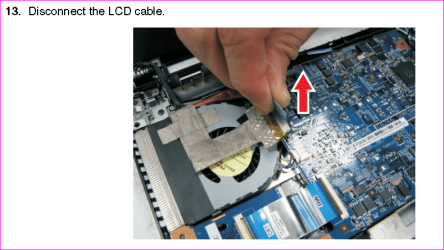
- Took this thing apart, checked the all of the wire connections, seem to be solid and fooling with them with the lappy on did no justice. I'm stumped basically.

So now I'm wondering, backlight or inverter?

EDIT: Oops forgot the laptop info
Acer Aspire 7520-5071
17" Dual-Core 4GB RAM
Any comments/help?

Thanks in advance,
-Shook
--------------UPDATE----------
So I tried an inverter.... no fix
Noticed that while messing with the video cable to the LCD made the screen go in and out.....
Ordered a new LCD cable.... no fix


Sooo I made a short video
http://www.youtube.com/watch?v=d9vAGRl3ewc
 
Last edited:

My Computer My Computer

Computer Manufacturer/Model Number
ME
OS
Windows 7 Ultimate x64
CPU
Intel i5 2500k @ 4.7Ghz
Motherboard
ASUS P8Z68-V
Memory
16GB Corsair Vengeance DDR3 1600
Graphics Card(s)
EVGA Classified GTX560ti 448 core
Sound Card
ASUS Xonar DG - Logitech G930 Headset
Monitor(s) Displays
ASUS 24" VE247
Screen Resolution
1920x1080
Hard Drives
120GB OCZ Agility 3 SSD
WD 500GB Caviar Blue x 2
PSU
Seasonic x650 Gold Certified Modular
Case
Corsair 400R / NZXT Sentry Mesh Fan Controller
Cooling
Corsair H100 / XIGMATEK 120mm White LED x 9
Keyboard
Logitech G15
Mouse
Logitech G9x
Internet Speed
20Mbit
Normally when the backlight goes out, it will affect the full screen. It can flicker or go out completely. This can be checked with a flashlight held up to a text area on screen and looking for the contrasting image on the LCD. From the way you describe the working then stopping, it sounds to me like the inverter is building up a charge then letting go.
 

My Computer My Computer

OS
Win 7 Enterprise x64
CPU
i7 920
Motherboard
Asus P6T
Memory
6gb Corsair XMS3 DDR3
Graphics Card(s)
EVGA Nvidia GeForce 9500 GT
Sound Card
Realtek High Definition Audio (onboard Mb)
Monitor(s) Displays
20" MAG innovision, 42" Sharp Aqu
Screen Resolution
1680 X 1050
Hard Drives
WDC WD1001FALS (x2)
WDC WD1600JS
WDC WD2500JB
PSU
Ultra X4 750W
Case
Cooler Master HAF 932
Cooling
Cooler Master 212 plus
Keyboard
Logitech
Mouse
Logitech
Internet Speed
DSL @ 730
If it happens the inverter to be messed-up, those Acer computers are easy to unmount. Try to find the inverter on *bay or amazon
 

My Computer My Computer

Computer type
PC/Desktop
Computer Manufacturer/Model Number
Custom Build
OS
Windows 7 Professional SP1 - x64 [Non-UEFI Boot]
CPU
Ivy Bridge Core i5 3570K (Delidded)
Motherboard
Asus P8Z77-V LE PLUS
Memory
G.Skill "Ares" DDR3 PC3-12800 - 1600MHz (16Gb)
Graphics Card(s)
Asus Dual-RX480-O4G
Sound Card
Creative Sound Blaster Z w/5.1 sound system
Monitor(s) Displays
Asus IPS 23"
Screen Resolution
16/9
Hard Drives
Internal:
500Go Sata 6Gb/s (x2)
500Go Sata 3Gb/s (x2)
SSD 60Go Sata 6Gb/s
PSU
In Win C 900W Series 80+ Platinum
Case
Thermaltake Chaser A71
Cooling
Custom Water Cooling Loop
Keyboard
Cooler Master QuickFire XTi
Mouse
Razer Imperator 2012 (4G)
Antivirus
MSE
Browser
IE 11.0.xxx Rtm
Other Info
"Raid0" with Intel Smart Response Technology (HDD/SSD)
it sounds to me like the inverter is building up a charge then letting go.

So your money is on the inverter?

Yea I've found an inverter for around $20-$30 on eBay. Very easy to change, have had it open already. Just hoping someone knowledgeable with LCD screens, would be able to tell me if it was in fact the inverter or the CFL bulb(which I would contemplate changing myself, but sounds like quite the pain in the ass)
 
Last edited:

My Computer My Computer

Computer Manufacturer/Model Number
ME
OS
Windows 7 Ultimate x64
CPU
Intel i5 2500k @ 4.7Ghz
Motherboard
ASUS P8Z68-V
Memory
16GB Corsair Vengeance DDR3 1600
Graphics Card(s)
EVGA Classified GTX560ti 448 core
Sound Card
ASUS Xonar DG - Logitech G930 Headset
Monitor(s) Displays
ASUS 24" VE247
Screen Resolution
1920x1080
Hard Drives
120GB OCZ Agility 3 SSD
WD 500GB Caviar Blue x 2
PSU
Seasonic x650 Gold Certified Modular
Case
Corsair 400R / NZXT Sentry Mesh Fan Controller
Cooling
Corsair H100 / XIGMATEK 120mm White LED x 9
Keyboard
Logitech G15
Mouse
Logitech G9x
Internet Speed
20Mbit
After looking at your screen shot again, I looks more like a video cable issue on the LCD. If you can inspect the ribbon cables around the LCD and look for any place there is a sharp bend, it could be a broken trace in the ribbon cable, or a loose /unseated connector.
 

My Computer My Computer

OS
Win 7 Enterprise x64
CPU
i7 920
Motherboard
Asus P6T
Memory
6gb Corsair XMS3 DDR3
Graphics Card(s)
EVGA Nvidia GeForce 9500 GT
Sound Card
Realtek High Definition Audio (onboard Mb)
Monitor(s) Displays
20" MAG innovision, 42" Sharp Aqu
Screen Resolution
1680 X 1050
Hard Drives
WDC WD1001FALS (x2)
WDC WD1600JS
WDC WD2500JB
PSU
Ultra X4 750W
Case
Cooler Master HAF 932
Cooling
Cooler Master 212 plus
Keyboard
Logitech
Mouse
Logitech
Internet Speed
DSL @ 730
I would say it is a loose connection, so do have a look.
 

My Computer My Computer

Computer Manufacturer/Model Number
Advent
OS
Dual-boot: Windows 7 HP 32-bit SP1 & Windows XP Pro 32-bit SP2.
CPU
AMD Phenom X4 9550 2.8Ghz
Motherboard
FOXCONN A6VMX (Socket 940)
Memory
4.0GB RAM
Graphics Card(s)
256MB On-board ATI Radeon X1200 Series
Sound Card
UnKnown
Monitor(s) Displays
19" TFT Mointor
Screen Resolution
1400 by 900
Hard Drives
500GB Western Digital WDC
Keyboard
HP Keyboard
Internet Speed
Dial-up via Mobile phone (Three)
Other Info
80GB External Hard-drive.

Also I have an old Windows XP Laptop for backup/occasional use etc.
yeah..it may have been a loose connection with the LCD..happened to me before with the same brand but different model...
 

My Computer My Computer

Computer type
PC/Desktop
Computer Manufacturer/Model Number
Dell inspiron 1564
OS
MS Windows 8
CPU
Intel Core i5 @ 2.27GHz Arrandale 32nm Technology
Motherboard
Dell Inc. 0M9XW4 (U2E1)
Memory
8.0GB Dual-Channel DDR3 @ 532MHz (7-7-7-20)
Graphics Card(s)
ATI Mobility Radeon HD 4300 Series (Dell)
Sound Card
Realtek High Definition Audio
Monitor(s) Displays
Generic PnP Monitor on ATI Mobility Radeon HD 4330
Screen Resolution
1366x768 pixels
Hard Drives
1 tb TOSHIBA (SATA)
PSU
built-in
Case
Dell Laptop
Cooling
built-in
Keyboard
built-in
Mouse
Dell Touchpad/Microsoft Arc Mouse
Other Info
Snake Laptop Skin, Detachable Alfa USB wifi with custom 15dbi antenna (for better signal range)
I have had the whole thing apart, checking the cable for loose connection, checking the insulation of the wires, but nothing looked suspect to me. I have the whole screen apart at the hinges and the body of the laptop down to the motherboard.
 

My Computer My Computer

Computer Manufacturer/Model Number
ME
OS
Windows 7 Ultimate x64
CPU
Intel i5 2500k @ 4.7Ghz
Motherboard
ASUS P8Z68-V
Memory
16GB Corsair Vengeance DDR3 1600
Graphics Card(s)
EVGA Classified GTX560ti 448 core
Sound Card
ASUS Xonar DG - Logitech G930 Headset
Monitor(s) Displays
ASUS 24" VE247
Screen Resolution
1920x1080
Hard Drives
120GB OCZ Agility 3 SSD
WD 500GB Caviar Blue x 2
PSU
Seasonic x650 Gold Certified Modular
Case
Corsair 400R / NZXT Sentry Mesh Fan Controller
Cooling
Corsair H100 / XIGMATEK 120mm White LED x 9
Keyboard
Logitech G15
Mouse
Logitech G9x
Internet Speed
20Mbit
I have had the whole thing apart, checking the cable for loose connection, checking the insulation of the wires, but nothing looked suspect to me. I have the whole screen apart at the hinges and the body of the laptop down to the motherboard.

What's about this piece...behind the Lcd, is it well plugged? :
 

Attachments

  • Capture1.PNG
    Capture1.PNG
    73.1 KB · Views: 206
  • Capture2.PNG
    Capture2.PNG
    68.8 KB · Views: 203
  • Capture3.PNG
    Capture3.PNG
    84.9 KB · Views: 187

My Computer My Computer

Computer type
PC/Desktop
Computer Manufacturer/Model Number
Custom Build
OS
Windows 7 Professional SP1 - x64 [Non-UEFI Boot]
CPU
Ivy Bridge Core i5 3570K (Delidded)
Motherboard
Asus P8Z77-V LE PLUS
Memory
G.Skill "Ares" DDR3 PC3-12800 - 1600MHz (16Gb)
Graphics Card(s)
Asus Dual-RX480-O4G
Sound Card
Creative Sound Blaster Z w/5.1 sound system
Monitor(s) Displays
Asus IPS 23"
Screen Resolution
16/9
Hard Drives
Internal:
500Go Sata 6Gb/s (x2)
500Go Sata 3Gb/s (x2)
SSD 60Go Sata 6Gb/s
PSU
In Win C 900W Series 80+ Platinum
Case
Thermaltake Chaser A71
Cooling
Custom Water Cooling Loop
Keyboard
Cooler Master QuickFire XTi
Mouse
Razer Imperator 2012 (4G)
Antivirus
MSE
Browser
IE 11.0.xxx Rtm
Other Info
"Raid0" with Intel Smart Response Technology (HDD/SSD)
Could be here aswell...move it or try to unplug and replug carefully:
 

Attachments

  • Capture.PNG
    Capture.PNG
    131.7 KB · Views: 149

My Computer My Computer

Computer type
PC/Desktop
Computer Manufacturer/Model Number
Custom Build
OS
Windows 7 Professional SP1 - x64 [Non-UEFI Boot]
CPU
Ivy Bridge Core i5 3570K (Delidded)
Motherboard
Asus P8Z77-V LE PLUS
Memory
G.Skill "Ares" DDR3 PC3-12800 - 1600MHz (16Gb)
Graphics Card(s)
Asus Dual-RX480-O4G
Sound Card
Creative Sound Blaster Z w/5.1 sound system
Monitor(s) Displays
Asus IPS 23"
Screen Resolution
16/9
Hard Drives
Internal:
500Go Sata 6Gb/s (x2)
500Go Sata 3Gb/s (x2)
SSD 60Go Sata 6Gb/s
PSU
In Win C 900W Series 80+ Platinum
Case
Thermaltake Chaser A71
Cooling
Custom Water Cooling Loop
Keyboard
Cooler Master QuickFire XTi
Mouse
Razer Imperator 2012 (4G)
Antivirus
MSE
Browser
IE 11.0.xxx Rtm
Other Info
"Raid0" with Intel Smart Response Technology (HDD/SSD)
That is a different style laptop, BUT

Yes both connections of the video cable are secure. Removing some of the wrap that goes around it, shows a bare wire, but it looks like its supposed to be that way. I think anyways.

Tore the whole thing apart this morning in frustration.

But I found an inverter on ebay for $7 shipped and ordered it. Once that arrives I will try it, and if that doesn't fix it, I'm going to attempt to replace the cfl bulb/backlight.
 

My Computer My Computer

Computer Manufacturer/Model Number
ME
OS
Windows 7 Ultimate x64
CPU
Intel i5 2500k @ 4.7Ghz
Motherboard
ASUS P8Z68-V
Memory
16GB Corsair Vengeance DDR3 1600
Graphics Card(s)
EVGA Classified GTX560ti 448 core
Sound Card
ASUS Xonar DG - Logitech G930 Headset
Monitor(s) Displays
ASUS 24" VE247
Screen Resolution
1920x1080
Hard Drives
120GB OCZ Agility 3 SSD
WD 500GB Caviar Blue x 2
PSU
Seasonic x650 Gold Certified Modular
Case
Corsair 400R / NZXT Sentry Mesh Fan Controller
Cooling
Corsair H100 / XIGMATEK 120mm White LED x 9
Keyboard
Logitech G15
Mouse
Logitech G9x
Internet Speed
20Mbit
That is a different style laptop, BUT

Yes both connections of the video cable are secure. Removing some of the wrap that goes around it, shows a bare wire, but it looks like its supposed to be that way. I think anyways.

Tore the whole thing apart this morning in frustration.

But I found an inverter on ebay for $7 shipped and ordered it. Once that arrives I will try it, and if that doesn't fix it, I'm going to attempt to replace the cfl bulb/backlight.

Yes it is different Acer Laptop (my brand), but though it could help better.:)

Good luck with the replacement part!
 

My Computer My Computer

Computer type
PC/Desktop
Computer Manufacturer/Model Number
Custom Build
OS
Windows 7 Professional SP1 - x64 [Non-UEFI Boot]
CPU
Ivy Bridge Core i5 3570K (Delidded)
Motherboard
Asus P8Z77-V LE PLUS
Memory
G.Skill "Ares" DDR3 PC3-12800 - 1600MHz (16Gb)
Graphics Card(s)
Asus Dual-RX480-O4G
Sound Card
Creative Sound Blaster Z w/5.1 sound system
Monitor(s) Displays
Asus IPS 23"
Screen Resolution
16/9
Hard Drives
Internal:
500Go Sata 6Gb/s (x2)
500Go Sata 3Gb/s (x2)
SSD 60Go Sata 6Gb/s
PSU
In Win C 900W Series 80+ Platinum
Case
Thermaltake Chaser A71
Cooling
Custom Water Cooling Loop
Keyboard
Cooler Master QuickFire XTi
Mouse
Razer Imperator 2012 (4G)
Antivirus
MSE
Browser
IE 11.0.xxx Rtm
Other Info
"Raid0" with Intel Smart Response Technology (HDD/SSD)
While you're no doubt on the right track.... did you try it with the original RAM.

Ap
 

My Computer My Computer

Computer Manufacturer/Model Number
Assembled in my workshop
OS
Windows 7 Home Premium
CPU
Intel Core 2 Duo @ 3.00gHz
Motherboard
Gigabyte GA-P35-S3G
Memory
4 GB
Graphics Card(s)
ATI Radeon HD 2600 XT
Sound Card
RME 24/96 Card, Realtek Internal Audio PreSonus FireStudio
Monitor(s) Displays
Acer 1917 (x2)
Screen Resolution
1280 x 1024 on both monitors
Hard Drives
Three 250GB Seagate SATA Barracuda 7200rpm
PSU
Rosewill 500-watt
Case
Rosewill mid-tower
Cooling
Noctua NH-U9B (CPU), PwrSupply fan + single large case Fan
Keyboard
Macally w/2/USB ports.
Mouse
Trackman Wheel
Other Info
Event 20/20 bas studio monitors, Yamaha sub.
Rackmount Korg/Roland/Yamaha synthesizers,
Cubase MIDI/audio recording. Sony Soundforge audio/mastering software. CD Architect Mastering. RME & Presonus audio interfaces.
I hate to say it, but it does not sound, or act like an inverter at all, nor does it sound like a backlight issue. I am more suspicious of a mainboard issue with the gpu. I hope that it IS the inverter, but every bad inverter that I've ever seen simply resulted in the LCD panel going dark, while you could view, very, very dimly, an otherwise normal desktop
 

My Computer My Computer

OS
Windows 7 Home Premium 64 bit
You screenshot doesn't look like backlight/inverter issue at all. Neither will cause video distortion like that. You would have a mostly normal picture flickering, or off (can see w/ flashlight). It's a video signal problem of some sort. Either the display itself, or the GPU.

A Guy
 

My Computer My Computer

Computer type
PC/Desktop
OS
Windows 10 Home x64
CPU
INTEL Core i5-750 Quad-Core 3.37GHz
Motherboard
ASUS P7P55D
Memory
HyperX Fury Black Series 8GB (2 x 4GB) 1866Mhz
Graphics Card(s)
EVGA GeForce GTX 750 Superclocked 1GB 128-Bit GDDR5
Monitor(s) Displays
LG 32MA68HY 32" IPS
Screen Resolution
1920 x 1080
Hard Drives
Samsung 840 Evo 120GB, SEAGATE 500GB Barracuda® 7200.12, SATA 3 Gb/s, 7200 RPM, 16MB cache
PSU
ANTEC TruePower New TP-550, 80 PLUS, 550W
Case
ANTEC Three Hundred Illusion
Cooling
COOLER MASTER Hyper 212 Plus, 4 x 120mm 1 x 140mm Noctua's
Internet Speed
85 + Mbps
Antivirus
Avast
Browser
Vivaldi
Well since it displays just fine on an external monitor, does that not rule out the problem being in the GPU?

And trying it with the old RAM was the very first thing I did, to no avail.
 

My Computer My Computer

Computer Manufacturer/Model Number
ME
OS
Windows 7 Ultimate x64
CPU
Intel i5 2500k @ 4.7Ghz
Motherboard
ASUS P8Z68-V
Memory
16GB Corsair Vengeance DDR3 1600
Graphics Card(s)
EVGA Classified GTX560ti 448 core
Sound Card
ASUS Xonar DG - Logitech G930 Headset
Monitor(s) Displays
ASUS 24" VE247
Screen Resolution
1920x1080
Hard Drives
120GB OCZ Agility 3 SSD
WD 500GB Caviar Blue x 2
PSU
Seasonic x650 Gold Certified Modular
Case
Corsair 400R / NZXT Sentry Mesh Fan Controller
Cooling
Corsair H100 / XIGMATEK 120mm White LED x 9
Keyboard
Logitech G15
Mouse
Logitech G9x
Internet Speed
20Mbit
have you tried this; turn the laptop ON and swivel the LCD back and forth (like as if you're closing and opening the LCD) and see if some changes going on........loose connection cant be barely seen by just looking at it....mostly loose connections are the wires passing through the hinges...what I did before was take out the cover of the LCD...while it is turn ON but be careful....try holding and putting pressure on those wires which has splice in it and those wires which have insulations(joint connections)...as you know some connections tend to loose with the motion of closing and opening of the LCD..and two splices of wires even though it seems they are connected if you look at it, if they are loose they just barely touching each other. well it did worked for me because as in my in case I saw some changes while closing and opening the lid partially.

Hope this helps
 
Last edited:

My Computer My Computer

Computer type
PC/Desktop
Computer Manufacturer/Model Number
Dell inspiron 1564
OS
MS Windows 8
CPU
Intel Core i5 @ 2.27GHz Arrandale 32nm Technology
Motherboard
Dell Inc. 0M9XW4 (U2E1)
Memory
8.0GB Dual-Channel DDR3 @ 532MHz (7-7-7-20)
Graphics Card(s)
ATI Mobility Radeon HD 4300 Series (Dell)
Sound Card
Realtek High Definition Audio
Monitor(s) Displays
Generic PnP Monitor on ATI Mobility Radeon HD 4330
Screen Resolution
1366x768 pixels
Hard Drives
1 tb TOSHIBA (SATA)
PSU
built-in
Case
Dell Laptop
Cooling
built-in
Keyboard
built-in
Mouse
Dell Touchpad/Microsoft Arc Mouse
Other Info
Snake Laptop Skin, Detachable Alfa USB wifi with custom 15dbi antenna (for better signal range)
UPDATE-

Tried inverter, no luck
Tried video cable, no luck


Check out my video of the problem, sorry for poor quality
YouTube - Laptop Screen Issue
 

My Computer My Computer

Computer Manufacturer/Model Number
ME
OS
Windows 7 Ultimate x64
CPU
Intel i5 2500k @ 4.7Ghz
Motherboard
ASUS P8Z68-V
Memory
16GB Corsair Vengeance DDR3 1600
Graphics Card(s)
EVGA Classified GTX560ti 448 core
Sound Card
ASUS Xonar DG - Logitech G930 Headset
Monitor(s) Displays
ASUS 24" VE247
Screen Resolution
1920x1080
Hard Drives
120GB OCZ Agility 3 SSD
WD 500GB Caviar Blue x 2
PSU
Seasonic x650 Gold Certified Modular
Case
Corsair 400R / NZXT Sentry Mesh Fan Controller
Cooling
Corsair H100 / XIGMATEK 120mm White LED x 9
Keyboard
Logitech G15
Mouse
Logitech G9x
Internet Speed
20Mbit
Back
Top