Want to overclock trough BIOS

vIp3 n0 wAy

New member
Local time
11:01 AM
Messages
10
Hello, I want to overclock my CPU and GPU trough BIOS. The problem is, since i installed Windows 7 Ultimate x64 (clean install) my BIOS is diffrent : Photo0156.jpg
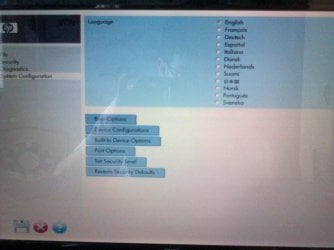
On windows XP (previos OS) i had a normal bluescreen typed BIOS with all the settings. Now on this BIOS there aren't any settings for overclocking ,actually there almost aren't any settings at all..... because i want to overclock my CPU i need the other BIOS . Any sugestions ? :confused:. And before you say, yes i have tried OC software, but i cant chage the settings because of the BIOS.
 

My Computer My Computer

Computer Manufacturer/Model Number
Hewlett packard
OS
Windows 7 Ultimate x64
CPU
Dual Core AMD Athlon x2 QL-60 1,9 Ghz
Motherboard
Hewlett Packard Compaq 6735s
Memory
2 GB
Graphics Card(s)
ATI Radeon HD 3200
Sound Card
SoundMAX integrated Digital Audio
Monitor(s) Displays
SAMSUNG SyncMaster 940mw 19"
Hard Drives
TOSHIBA MK2552GSX ATA 240 GB
The bios has nothing to do with the OS; it's independent, so 7 didn't change or alter it in any way. If it's different, that's something you had to have done. Aside from the fact that HP, like most OEM's, locks their bios' so you can't really overclock, it's a bad idea trying to OC a laptop.
 

My Computer My Computer

OS
7 Ultimate x64
CPU
i5-2500k
Motherboard
Asus P8P67 Pro
Memory
8GB G.Skill Ripjaws X F3-12800CL7D-8GBXH 1866MHz 8-9-8-24
Graphics Card(s)
EVGA GTX 570 SC
Sound Card
X-Fi Titanium Fatality
Monitor(s) Displays
Samsung S27A550H 27" LED
Screen Resolution
1920x1080
Hard Drives
OCZ Vertex 3 120GB.
1TB Samsung F3.
2TB Samsung F4.
PSU
PC Power & Cooling Silencer 760
Case
Lian Li Lancool K62
Cooling
Thermalright Venomous X Black/Scythe S-Flex/Shin-Etsu X23
Keyboard
MS Natural Elite 4000 Ergonomic
Mouse
Logitech G500
Internet Speed
6MB/768
Other Info
Logitech Z-5500 505 watts.
D-Link DGL-4500.
Tripp-Lite Smart Pro 1500.
That photo shows the HP logo... Sorry to say, but you will no luck trying to overclock your pc via bios with an HP pc.
 

My Computer My Computer

Computer Manufacturer/Model Number
Rig 1
OS
Windows 7 Ultimate x64
CPU
AMD Phenom II X4 940 Black Edition @ 3.4GHz (AM2+)
Motherboard
Gigabyte GA-MA790X-UD4P (AM2+)
Memory
Corsair CM2X4096-8500C5 (4 X 2GB)
Graphics Card(s)
XFX Radeon HD 5770 / Diamond Radeon HD 5770 CrossFireX
Sound Card
Asus Xonar DS (PCI)
Monitor(s) Displays
Samsung SyncMaster 932bw+ (3)
Screen Resolution
4320x900
Hard Drives
OCZ Vertex 2 80 GB - Windows 7 System --
WD Caviar Black 1TB - Music, Movies, Vids, Pics --
WD Caviar Black 640GB - User Profiles & Games --
WD My Book 320GB external
PSU
Corsair CMPSU-750TX
Case
Cooler Master HAF 932
Cooling
Corsair Hydro Series H50
Keyboard
Logitech Desktop Wave
Mouse
Logitech LX8 Laser
Internet Speed
20 down / 2 up
Other Info
LG GGC-H20L Blu-Ray / HDDVD combo --
Hauppauge HVR-1250 --
Silverstone MFP-51 --
Logitech Webcam C600
Thanks for replying. Well if i can't OC from the BIOS , can someone tell me a OC software that is compatible with my system ? I really would apreciate it :) .
 

My Computer My Computer

Computer Manufacturer/Model Number
Hewlett packard
OS
Windows 7 Ultimate x64
CPU
Dual Core AMD Athlon x2 QL-60 1,9 Ghz
Motherboard
Hewlett Packard Compaq 6735s
Memory
2 GB
Graphics Card(s)
ATI Radeon HD 3200
Sound Card
SoundMAX integrated Digital Audio
Monitor(s) Displays
SAMSUNG SyncMaster 940mw 19"
Hard Drives
TOSHIBA MK2552GSX ATA 240 GB
Thanks for replying. Well if i can't OC from the BIOS , can someone tell me a OC software that is compatible with my system ? I really would apreciate it :) .

In my view, i would'nt go down the thrid party route, unless its specifically created for a particular motherboard type/brand (i.e. Asus AI Suite for Asus motherboard).

OC Software could easily corrupt your PC or worse.

And, as said in a previous post, don't OC a lappy, the heat that it would produce would not be healthy at all and could, again, corrupt your laptop or worse.

My 10 pence worth,

Lucky
 

My Computer My Computer

Computer Manufacturer/Model Number
The HAFmeister (Custom)
OS
Windows 7 Ultimate x64 RTM + SP1
CPU
Intel Core i7 950 3.06GHZ (OC'd to 3.99Ghz)
Motherboard
Asus Rampage III Extreme x58 SATA 6GB & USB 3.0
Memory
6GB OCZ Reaper HPC Edition PC3-16000 (set 1606Mhz 8-8-8-26)
Graphics Card(s)
EVGA Nvidia Geforce GTX 570
Sound Card
Creative SB X-Fi Titanium Fatal1ty Professional Series
Monitor(s) Displays
Samsung SM2433BW 24" Widescreen Monitor
Screen Resolution
1920x1200
Hard Drives
Western Digital Caviar Black 500GB 32Mb Buffer SATA II
Western Digital Caviar Black 750GB 32Mb Buffer SATA II
Western Digital Caviar Blue 500GB 16Mb Buffer SATA II
Western Digital My Book Essential Edition 750GB USB
Samsung Spinpoint 2TB SATA II
PSU
Thermaltake Toughpower 1200w (Modular)
Case
CoolerMaster HAF-932
Cooling
Zalman Reserator XT and ZM-WB5 Plus - GPU uses Stock coolers
Keyboard
Logitech G510
Mouse
Logitech G9 Gaming Mouse
Internet Speed
3MB Profile - 350-400kbs (Real-Speed)
Other Info
IcyBox Hot-Swap Bay,
Logitech G27 Steering Wheel,
Xbox 360 Wirless Elite Controller with Microsoft Reciever and
Play & Charge Kit,
Belkin USB Wireless Adaptor,
GAME Generic Controller (Playstation Looky-Likey),
Epson SX125 All-in-One.
... it's a bad idea trying to OC a laptop.
Thanks for replying. Well if i can't OC from the BIOS , can someone tell me a OC software that is compatible with my system ? I really would apreciate it :) .

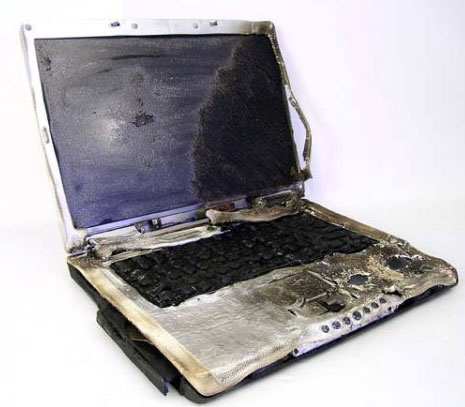
OK, let's try a different approach. Is this what you want to end up with?

1408_BurnedLaptop_1.jpg


Laptops are not designed to dissipate all the added heat that goes along with overclocking. They simply don't have the room necessary for the extra heatsinks and fans overclocking requires. What you have is a machine that, in all likelihood, runs too warm as it is. Don't compound the problem. You may get a slight fps increase in your games; however, you will severely reduce the life of the machine... and by that I mean guys with the same notions as you have reduced their machines to a pile of junk in a few short months.

Don't do it. If you want to get into overclocking, build yourself a machine.
 

My Computer My Computer

OS
7 Ultimate x64
CPU
i5-2500k
Motherboard
Asus P8P67 Pro
Memory
8GB G.Skill Ripjaws X F3-12800CL7D-8GBXH 1866MHz 8-9-8-24
Graphics Card(s)
EVGA GTX 570 SC
Sound Card
X-Fi Titanium Fatality
Monitor(s) Displays
Samsung S27A550H 27" LED
Screen Resolution
1920x1080
Hard Drives
OCZ Vertex 3 120GB.
1TB Samsung F3.
2TB Samsung F4.
PSU
PC Power & Cooling Silencer 760
Case
Lian Li Lancool K62
Cooling
Thermalright Venomous X Black/Scythe S-Flex/Shin-Etsu X23
Keyboard
MS Natural Elite 4000 Ergonomic
Mouse
Logitech G500
Internet Speed
6MB/768
Other Info
Logitech Z-5500 505 watts.
D-Link DGL-4500.
Tripp-Lite Smart Pro 1500.
OK, let's try a different approach. Is this what you want to end up with?

1408_BurnedLaptop_1.jpg


Laptops are not designed to dissipate all the added heat that goes along with overclocking. They simply don't have the room necessary for the extra heatsinks and fans overclocking requires. What you have is a machine that, in all likelihood, runs too warm as it is. Don't compound the problem. You may get a slight fps increase in your games; however, you will severely reduce the life of the machine... and by that I mean guys with the same notions as you have reduced their machines to a pile of junk in a few short months.

Don't do it. If you want to get into overclocking, build yourself a machine.

Thnx. Can you tell me how to build a rig that can get atleast 50 fps on maxed out Crysis (and ain't that expensive to build). Thanks again :p .
 

My Computer My Computer

Computer Manufacturer/Model Number
Hewlett packard
OS
Windows 7 Ultimate x64
CPU
Dual Core AMD Athlon x2 QL-60 1,9 Ghz
Motherboard
Hewlett Packard Compaq 6735s
Memory
2 GB
Graphics Card(s)
ATI Radeon HD 3200
Sound Card
SoundMAX integrated Digital Audio
Monitor(s) Displays
SAMSUNG SyncMaster 940mw 19"
Hard Drives
TOSHIBA MK2552GSX ATA 240 GB
OK, let's try a different approach. Is this what you want to end up with?

1408_BurnedLaptop_1.jpg


Laptops are not designed to dissipate all the added heat that goes along with overclocking. They simply don't have the room necessary for the extra heatsinks and fans overclocking requires. What you have is a machine that, in all likelihood, runs too warm as it is. Don't compound the problem. You may get a slight fps increase in your games; however, you will severely reduce the life of the machine... and by that I mean guys with the same notions as you have reduced their machines to a pile of junk in a few short months.

Don't do it. If you want to get into overclocking, build yourself a machine.

Thnx. Can you tell me how to build a rig that can get atleast 50 fps on maxed out Crysis (and ain't that expensive to build). Thanks again :p .

You can buy all your parts on sale if you want; I built my computer for ~$600. To get 50fps on maxed out Crysis you would need a very powerful GPU either a HD5850 or a gtx470 would do, correct me if I'm wrong. However, IMO, Crysis is not a very good game to base your wants on, you're better off choosing games that you would enjoy rather than being able to play Crysis and not enjoy it.
 

My Computer My Computer

Computer Manufacturer/Model Number
Custom Built/ Built by me, CR-48
OS
Windows 7 Ultimate x64
CPU
INTEL CORE I5 750 180x20 all powersaving 1.168v
Motherboard
MSI P55-GD55
Memory
OCZ 4GB DDR3 PC3-10666 (7-7-7-20-2t) @1.651v
Graphics Card(s)
ASUS 9800GT GLACIATOR FANSINK
Sound Card
ONBOARD REALTEK ALC889
Monitor(s) Displays
VIEWSONIC VX924, VIZIO VS420LF1A
Screen Resolution
VX924: 1280x1024 75hz, VS420LF1A: 1920x1080 60hz(1080p)
Hard Drives
HITACHI Deskstar HD31000 IDK/7K 1TB 7200RPM 32MB CACHE SATA II
PSU
OCZ MODXSTREAM PRO 700 WATT SEMI-MODULAR
Case
ANTEC 900
Cooling
CoolerMaster Hyper 212+
Keyboard
Logitech K520
Mouse
LOGITECH M310
Internet Speed
CHARTER PIPELINE 15MB DOWN/ 3MB UP
Other Info
ROUTER: DLINK DIR-655, Netgear WNR3500L (SamKnows)
MODEM: MOTOROLA SB6120
HTPC: AMD Athlon II x2 255 C3, Pegatron M2N78-LA (Violet 3.02) , Galaxy NVidia Geforce 210, HP OEM 300WATT PSU, Zalman Z7 Plus, SAMSUNG 3GB PC2-5300, SEAGATE 80GB SATA, Hauppauge WinTV-HVR-1800
Back
Top