64 bit Control Panel

Bidski

New member
Local time
6:16 PM
Messages
20
Hi all,

I was wondering why my control panel only shows some programs (ODBC and mail for example) as 32 bit only. I have a 64 bit OS and a 64 bit processor, so why isnt it showing the 64 bit versions of these programs?

Regards
Bidski
 

My Computer My Computer

At a glance

Windows 7 Premium 64 bit
OS
Windows 7 Premium 64 bit

My Computer My Computer

At a glance

Windows 7 Home Premium 64bitIntel(R)Core(TM)2 quad [email protected] 2.39GHz6GB DDR2 6400GeForce 8500/512MB
Computer Manufacturer/Model Number
HP M9077c
OS
Windows 7 Home Premium 64bit
CPU
Intel(R)Core(TM)2 quad [email protected] 2.39GHz
Motherboard
ASUSeK
Memory
6GB DDR2 6400
Graphics Card(s)
GeForce 8500/512MB
Sound Card
Realtek High Def Audio
Monitor(s) Displays
HP w2408 LCD 24" widescreen
Screen Resolution
1920x1200
Cooling
6 pack of Bud
Keyboard
MS wireless Inteli
Mouse
MS wireless Inteli
Wow, is it that bad????

Regards
Bidski
 

My Computer My Computer

At a glance

Windows 7 Premium 64 bit
OS
Windows 7 Premium 64 bit
Bidski, not showing anything but the 32 bit entries? Or everything including the 32 bit entries? If it is the second that is how it should be as the 64 bit entries will not show as such, they will just be listed by their name.
 

My Computer My Computer

At a glance

Win 7 Ultimate x64FX-8350 @ 4.6 GHz so farADATA XPG V1 Series Black 8GB DDR3 1600Sapphire R9 270x Dual-X
Computer type
PC/Desktop
Computer Manufacturer/Model Number
Me
OS
Win 7 Ultimate x64
CPU
FX-8350 @ 4.6 GHz so far
Motherboard
Asus M5A97 EVO
Memory
ADATA XPG V1 Series Black 8GB DDR3 1600
Graphics Card(s)
Sapphire R9 270x Dual-X
Sound Card
Xonar DGX w/ Corsair Vengence 1300
Monitor(s) Displays
Acer S232HL Abid
Screen Resolution
1920x1080
Hard Drives
120 GB OCZ Vertex 3
500 GB Seagate 7200.12
PSU
Antec Earthwatts 650W Green
Case
Antec Three Hundred
Cooling
Cooler Master 212 EVO
Keyboard
Logitech G510
Mouse
Logitech G500s
Internet Speed
35000/3000
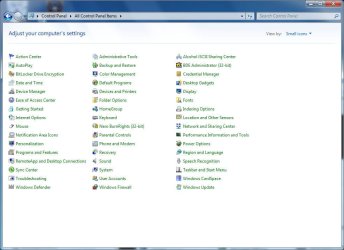
It only shows the 32 bit ones (except for java). Attached a screenshot.
 

Attachments

  • ControlPanel.png
    ControlPanel.png
    51 KB · Views: 273

My Computer My Computer

At a glance

Windows 7 Premium 64 bit
OS
Windows 7 Premium 64 bit
That's normal. Many apps do not have a 64bit version. Mine is the same.
 

My Computer My Computer

At a glance

Windows 10 Pro X64Intel Quad Core i7-4770 @ 3.4Ghz16.0GB PC3-12800 DDR3 SDRAM 1600 MHzIntel Integrated HD Graphics
Computer type
PC/Desktop
Computer Manufacturer/Model Number
Lenovo IdeaCenter 450
OS
Windows 10 Pro X64
CPU
Intel Quad Core i7-4770 @ 3.4Ghz
Memory
16.0GB PC3-12800 DDR3 SDRAM 1600 MHz
Graphics Card(s)
Intel Integrated HD Graphics
Sound Card
Realtek HD Audio
Monitor(s) Displays
HP 22" LCD
Screen Resolution
1680 x 1050
Hard Drives
250GB Samsung EVO SATA-3 SSD
2TB Seagate ST2000DM001 SATA-2
1.5TB Seagate ST3150041AS SATA
Keyboard
Dell USB
Mouse
Lenovo USB
Internet Speed
Cable via Road Runner 3MB Upload, 30MB Download
Antivirus
Windows Defender, MBAM Pro, MBAE
Browser
Seamonkey
Other Info
UEFI/GPT
PLDS DVD-RW DH16AERSH
you are right, many apps do not have a 64 bit version, but I know that ODBC does. I know the file is on my system (C:\Windows\SysWOW64 or something like that). I just want to know why that along with any others arent showing up in control panel.

Regards
Bidski
 

My Computer My Computer

At a glance

Windows 7 Premium 64 bit
OS
Windows 7 Premium 64 bit
Hi all,

I was wondering why my control panel only shows some programs (ODBC and mail for example) as 32 bit only. I have a 64 bit OS and a 64 bit processor, so why isnt it showing the 64 bit versions of these programs?

Regards
Bidski

Screenshots would help.
 

My Computer My Computer

At a glance

Windows 7 Home Premium x64Intel Core 2 Quad Q9450 @ 3.2GHz4GB DDR2-800MSI Radeon HD 5850
OS
Windows 7 Home Premium x64
CPU
Intel Core 2 Quad Q9450 @ 3.2GHz
Motherboard
Asus P5Q PRO Turbo
Memory
4GB DDR2-800
Graphics Card(s)
MSI Radeon HD 5850
Sound Card
Creative Labs Audigy2 ZS
Monitor(s) Displays
Samsung 225BW
Hard Drives
(2) 1TB Samsung F1, (2) 1.5TB Samsung F2, 1TB Samsung F2, 2TB Samsung F3
PSU
Corsair HX650
Case
Antec Nine Hundred
I have shown a screenshot of my control panel, anything else you would like to see?

Regards
Bidski
 

My Computer My Computer

At a glance

Windows 7 Premium 64 bit
OS
Windows 7 Premium 64 bit
you are right, many apps do not have a 64 bit version, but I know that ODBC does. I know the file is on my system (C:\Windows\SysWOW64 or something like that). I just want to know why that along with any others arent showing up in control panel.

Regards
Bidski

Here is my own control panel:
control_panel.jpg

It is also likely that ODBC is only installed as 32-bit. You mention that you can see the files for it in "C:\Windows\SysWOW64". Are they also in "C:\Windows\System32" and/or "C:\Windows\System"?

On my machine, the "C:\Windows\SysWOW64" almost echos the contents of "C:\Windows\System"

To be clear "SysWOW64" stand for "System Windows on Windows 64", and is used for compatibility of 32-bit program running on 64-bit Windows.
 

My Computer My Computer

At a glance

Windows 7 Professional 32-bit SP1AMD A4/A63.00GB EDOVMware SVGA 3D
Computer type
PC/Desktop
Computer Manufacturer/Model Number
Virtual Machine
OS
Windows 7 Professional 32-bit SP1
CPU
AMD A4/A6
Motherboard
Intel Corporation 440BX Desktop Reference Platform
Memory
3.00GB EDO
Graphics Card(s)
VMware SVGA 3D
Sound Card
High Definition Audio Device
Monitor(s) Displays
Generic Non-PnP Monitor on VMware SVGA 3D
Screen Resolution
1440x900
Hard Drives
1 x 60GB VMware Virtual SATA Hard Drive ATA Device
Antivirus
Kaspersky Total Security
I cant attest to what exactly is installed, all I know is that if I run the odbcad32.exe that is in SysWOW64 directory I have access to more drivers than I do if I run the one that is in control panel, drivers that I know are from 64 bit programs.

Regards
Bidski
 

My Computer My Computer

At a glance

Windows 7 Premium 64 bit
OS
Windows 7 Premium 64 bit
you are right, many apps do not have a 64 bit version, but I know that ODBC does. I know the file is on my system (C:\Windows\SysWOW64 or something like that). I just want to know why that along with any others arent showing up in control panel.

Regards
Bidski

Note: The C:\Windows\SysWOW64 folder on a (x64) system is the 32bit folder.

The C:\Windows\System32 is the 64bit folder on a (x64) system. I know it is confusing but that is how MS did it. -WS
 

My Computer My Computer

At a glance

Windows 7 Enterprise (x64); Windows Server 20...16GB
Computer type
PC/Desktop
Computer Manufacturer/Model Number
Dell OP7010
OS
Windows 7 Enterprise (x64); Windows Server 2008 R2 (x64)
Memory
16GB
Monitor(s) Displays
4 Dell 24" LCD
Screen Resolution
1280x1024
Keyboard
Dell
Mouse
Dell Optical
Internet Speed
40meg
I cant attest to what exactly is installed, all I know is that if I run the odbcad32.exe that is in SysWOW64 directory I have access to more drivers than I do if I run the one that is in control panel, drivers that I know are from 64 bit programs.

Regards
Bidski

Take a look at the file odbcad32.exe 32 means it is a 32bit program. Since it is in the SysWOW64 directory we know for sure it is 32bit. -WS
 

My Computer My Computer

At a glance

Windows 7 Enterprise (x64); Windows Server 20...16GB
Computer type
PC/Desktop
Computer Manufacturer/Model Number
Dell OP7010
OS
Windows 7 Enterprise (x64); Windows Server 2008 R2 (x64)
Memory
16GB
Monitor(s) Displays
4 Dell 24" LCD
Screen Resolution
1280x1024
Keyboard
Dell
Mouse
Dell Optical
Internet Speed
40meg
I understand what you are saying, but the program in the system32 directory is named the same (even more confusion) and that one displays a different set of drivers compared to the one in SysWOW64.

As I understand it, programs installed in C:\Program Files are 64 bit programs and programs installed in C:\Program Files (x86) are 32 bit programs?

I have a program installed in C:\Program Files and I know it is a 64 bit program, but its ODBC drivers only show up in the odbcad32.exe that is in the SysWOW64 folder.

Why is this?

Regards
Bidski
 

My Computer My Computer

At a glance

Windows 7 Premium 64 bit
OS
Windows 7 Premium 64 bit
Unknown, because the installer installed it that way??

What happens if you run the odbcad32.exe in the System32 directory does it work? If it does not it, it may be that the installer did not know how to install the software correctly on a 64bit system and put the file in the System32 directory; however Windows 7 64bit is smart and knows that is not correct because it is a 32bit software and copied the file to the SysWOW64 directory. If everything is working there should be no problems.
 

My Computer My Computer

At a glance

Windows 7 Enterprise (x64); Windows Server 20...16GB
Computer type
PC/Desktop
Computer Manufacturer/Model Number
Dell OP7010
OS
Windows 7 Enterprise (x64); Windows Server 2008 R2 (x64)
Memory
16GB
Monitor(s) Displays
4 Dell 24" LCD
Screen Resolution
1280x1024
Keyboard
Dell
Mouse
Dell Optical
Internet Speed
40meg
As I understand it, programs installed in C:\Program Files are 64 bit programs and programs installed in C:\Program Files (x86) are 32 bit programs?

Supposedly. You can install 32-bit applications under C:\Program Files and they will work without a problem.
 

My Computer My Computer

At a glance

Windows 7 Home Premium x64Intel Core 2 Quad Q9450 @ 3.2GHz4GB DDR2-800MSI Radeon HD 5850
OS
Windows 7 Home Premium x64
CPU
Intel Core 2 Quad Q9450 @ 3.2GHz
Motherboard
Asus P5Q PRO Turbo
Memory
4GB DDR2-800
Graphics Card(s)
MSI Radeon HD 5850
Sound Card
Creative Labs Audigy2 ZS
Monitor(s) Displays
Samsung 225BW
Hard Drives
(2) 1TB Samsung F1, (2) 1.5TB Samsung F2, 1TB Samsung F2, 2TB Samsung F3
PSU
Corsair HX650
Case
Antec Nine Hundred
As I understand it, programs installed in C:\Program Files are 64 bit programs and programs installed in C:\Program Files (x86) are 32 bit programs?

Supposedly. You can install 32-bit applications under C:\Program Files and they will work without a problem.

This is true, I have done it many times. The catch is that if someone else needs to work on the computer they have no idea that you did this and must assume that all software in (x86) is 32bit and all not in (x86) is 64bit.

My advice is to try to keep 32bit and 64bit programs in the correct folders for ease of working on your system and/or if others need to work on it too. JMHO.
 
Last edited:

My Computer My Computer

At a glance

Windows 7 Enterprise (x64); Windows Server 20...16GB
Computer type
PC/Desktop
Computer Manufacturer/Model Number
Dell OP7010
OS
Windows 7 Enterprise (x64); Windows Server 2008 R2 (x64)
Memory
16GB
Monitor(s) Displays
4 Dell 24" LCD
Screen Resolution
1280x1024
Keyboard
Dell
Mouse
Dell Optical
Internet Speed
40meg
Ok my bad. I think the program I am using is 64 bit, but the ODBC driver is 32 bit, but either way, why isnt control panel showing both versions of ODBC? Is there some way to get it to do that?
 

My Computer My Computer

At a glance

Windows 7 Premium 64 bit
OS
Windows 7 Premium 64 bit
Bidski, good question. I don't know. Is this something that you can easily uninstall and then re-install to do some testing??
 

My Computer My Computer

At a glance

Windows 7 Enterprise (x64); Windows Server 20...16GB
Computer type
PC/Desktop
Computer Manufacturer/Model Number
Dell OP7010
OS
Windows 7 Enterprise (x64); Windows Server 2008 R2 (x64)
Memory
16GB
Monitor(s) Displays
4 Dell 24" LCD
Screen Resolution
1280x1024
Keyboard
Dell
Mouse
Dell Optical
Internet Speed
40meg
Ok my bad. I think the program I am using is 64 bit, but the ODBC driver is 32 bit, but either way, why isn't control panel showing both versions of ODBC? Is there some way to get it to do that?
You wanna see more in the control panel??? Definitely Less Is Bes', Neat is Sweet! ;) My ODBC, by the way, does not display 32 bit in its title.
 

Attachments

  • 09-07-201022-29-58.png
    09-07-201022-29-58.png
    29.1 KB · Views: 38

My Computer My Computer

At a glance

Windows 7 x64
OS
Windows 7 x64
Back
Top