Need i to roll back to Windows 2000Pro to get a smart Operating System

Well we all have went through a learning with Windows 7. For me it went smooth with a few little parts I had to work out. If one wants it to work or look like a 10 old system, well that isn't going to happen. Most every day things that people use there computer for are easy to work out with a little learning and trying. I agree with MacGyvr 100%. If one doesn't want to learn the new Windows 7 and still wants a 10 year old operating system then by all means remove Windows 7 and install your old system and be happy. But before you do that you might want to go to the Microsoft site and look for Windows 7 for beginners or just Google (Windows 7 for beginners).
 

My Computer My Computer

At a glance

Windows 10 Pro. 64/ version 1709 Windows 7 Pr...Intel i7-6800K @ 4.3Corsair Platinum 16 gig @2400EVGA GTX 1070 OC
Computer type
PC/Desktop
Computer Manufacturer/Model Number
Home made Desktop
OS
Windows 10 Pro. 64/ version 1709 Windows 7 Pro/64
CPU
Intel i7-6800K @ 4.3
Motherboard
ASUS X-99 Deluxe II
Memory
Corsair Platinum 16 gig @2400
Graphics Card(s)
EVGA GTX 1070 OC
Monitor(s) Displays
Asus 27" LED LCD/VE278Q
Screen Resolution
1920-1080 or 1280-720 HDMI
Hard Drives
INTEL SSD 730-240 Gb Sata 3.0/
PSU
EVGA Platium 1200W
Case
Phanteks Luxe Tempered Glass 8 fans/ one radiator
Cooling
XSPC/ Water Cooled CPU
Keyboard
Das 4 Professional
Mouse
Logitech M705/MX Anywhere 2-S
Internet Speed
100 mbits
Antivirus
Microsoft Security Essentials/ Malwarebytes Premium 3.0/ SAS
Browser
I.E. 11 default/Firefox/ ISP Time Warner Cable/Spectrum
Other Info
LG BluRay Burner/
Sound system-KLipsch-THX/
Icy Dock ssd Hot Swap bays.
I don't like piling on the comments, but all the OP's customizations would have taken less time to research and configure than it would have to type the initial rant. Based on the OP's comments, he's a techno-phobe who would rather rant and rave than spend the same amount of time learning and being productive. As an IT Manager, I see this far too often. A computer doesn't use ESP to configure itself the way the user wants, so a tantrum we must have.

Besides, why bother ranting about Windows 2000, when XP was far superior? I think that was just the proof that the OP has been out of the OS scene for a decade or more, and just was cranky about having to get used to a new OS.

Anyways, the solutions are there. Windows 7 is FAR more customizable than your precious Windows 2000, so you should learn to enoy that, rather than rant about it. It's the best consumer OS available, especially given the high end hardware you have chosen.
 

My Computer My Computer

At a glance

Windows 7 Ultimate x64 SP1Intel Core i7-260012 GB Patriot Extreme DDR3-1333Nvidia GTX 470
OS
Windows 7 Ultimate x64 SP1
CPU
Intel Core i7-2600
Motherboard
Gigabyte GA-P67A-UD3P-B3
Memory
12 GB Patriot Extreme DDR3-1333
Graphics Card(s)
Nvidia GTX 470
Monitor(s) Displays
Dell UltraSharp 2209WA
Hard Drives
OCZ Agility3 240 GB, WD5001AALS, WD7501AALS
PSU
OCZ ModStream 700W
Case
CoolerMaster HAF 912 Advanced
Cooling
CoolerMaster Hyper 212 Plus
Rant or not, it appears to be resolved. ;)
 

My Computer My Computer

At a glance

Win 10 Pro x64Intel I5-2500K @3.3GHz16GB G.Skill Ripjaws X (4x4GB)EVGA GeForce 750 Ti SC 2GB
Computer type
PC/Desktop
Computer Manufacturer/Model Number
Self Built
OS
Win 10 Pro x64
CPU
Intel I5-2500K @3.3GHz
Motherboard
Asrock P67 Extreme4
Memory
16GB G.Skill Ripjaws X (4x4GB)
Graphics Card(s)
EVGA GeForce 750 Ti SC 2GB
Sound Card
ASUS Xonar DG 5.1 Channels 24-bit 96KHz PCI Interface Sound
Monitor(s) Displays
auria eq2367
Screen Resolution
1920 x 1080
Hard Drives
250GB Samsung 850 EVO SSD
1TB WD Blue
1TB Hitachi
PSU
SeaSonic X 650W 80 Plus Gold
Case
Corsair Obsidian 750D
Cooling
Corsair H60, Three 140mm case fans
Keyboard
Logitech Wireless Keyboard K520
Mouse
Logitech Wireless Mouse M310
Internet Speed
Wave Broadband ~ 100 dn 5 up
Antivirus
Windows Defender, Malwarebytes Premium
Browser
Edge, IE11, Chrome
Other Info
Laptop specs: HP g7-1365dx /
CPU: AMD A6-3420M APU with Radeon(tm) HD Graphics /
RAM: Crucial 8Gb (2x4Gb) /
SSD: Crucial M4-CT128M4SSD2 ATA Device/ FW 000F /
GFX: AMD Radeon HD 6520G /
OS: Windows 10 Pro x64
Rant or not, it appears to be resolved. ;)
That's the important part. At least now, the OP knows the deal about Windows 7, and instead of being another uninformed, anti-W7 ranter, he's an informed, Windows 7 user.
 

My Computer My Computer

At a glance

Windows 7 Ultimate x64 SP1Intel Core i7-260012 GB Patriot Extreme DDR3-1333Nvidia GTX 470
OS
Windows 7 Ultimate x64 SP1
CPU
Intel Core i7-2600
Motherboard
Gigabyte GA-P67A-UD3P-B3
Memory
12 GB Patriot Extreme DDR3-1333
Graphics Card(s)
Nvidia GTX 470
Monitor(s) Displays
Dell UltraSharp 2209WA
Hard Drives
OCZ Agility3 240 GB, WD5001AALS, WD7501AALS
PSU
OCZ ModStream 700W
Case
CoolerMaster HAF 912 Advanced
Cooling
CoolerMaster Hyper 212 Plus
Just for giggles, I'm going to install win2k on one of my boxes.
I think I have an old NT3 or 4 server cd lying about somewhere. I'l load that too.
If this thread isnt closed by when I do it... I'l post pics :D
 

My Computer My Computer

At a glance

Windows 7 EnterpriseIntel Pentium Dual E2200 @2.2GHz4GBPalit GForce 9500GT 1GB
OS
Windows 7 Enterprise
CPU
Intel Pentium Dual E2200 @2.2GHz
Motherboard
Gigabyte II-G31
Memory
4GB
Graphics Card(s)
Palit GForce 9500GT 1GB
Sound Card
onBoard
Hard Drives
WesternDigital: 250GB + 1TB + 1TB + 2TB
PSU
450W
Case
CoolerMaster CM690
Cooling
Corsair H50
Mouse
Logitech MX518
Besides, why bother ranting about Windows 2000, when XP was far superior? I think that was just the proof that the OP has been out of the OS scene for a decade or more, and just was cranky about having to get used to a new OS.

Anyways, the solutions are there. Windows 7 is FAR more customizable than your precious Windows 2000, so you should learn to enoy that, rather than rant about it. It's the best consumer OS available, especially given the high end hardware you have chosen.

i Had been using Quick Launch for 10 years without knowing the feature was call "Quick Launch" At the time i started this tread, i was so desparate to get it back that i was looking for key registry hacks to make those pinned icons behave like Quick Launch. And since i was getting no where with the pinned icons and the hacks :cry:..... i didn't like Win7 .... it's hard to look for something if you don't know the name of it.

Perharp , the reason i comented that "Windows 7 is no more than Vista packaged under a different label" is because an XP user influenced me to think that way, ... One little apps i absoulutly love is the snipping tool, i just can't get over how handy that thing is, ... he calls it "just a gadget" as if it's unimportant .... but the way it snip & save a little warning window in seconds or gets me out of a bind with flash text that won't copy paste .... i just love it

i 've been looking for the (click edit / find on this page) for days because I.E. 8 doesn't have an edit tab , and i was just about to ask you guys where they hide it, but i just found it.
Like my buddy who had a stroke in 2003, he had to relearn speach, and he would get frustated when he stalls with mouth open, he had to reconnect all those paths in his head.
Were i fell of the wagon with XP was the lack of support .... if i had found a forum like this one 5 years ago , we wouldn't be having this discussion.

i thought this would be just like any other forum where you ask a question and ready yourself for a long wait. There are forums where you won't get a reply unless the title of your tread is a discution topic. Instead i see an amazing support group with top notch tutorials. I'm still at the stage where i need a hunting license before i can find the new paths and defaults but i'm already getting encouraging results
 

My Computer My Computer

At a glance

Windows 7 Enterprise (x64)Intel i7 860 Quad Core4GB @ 1600Mhz Kingston with XMPENGTS250 Dark Knight cooler (1GB GDDR3)
Computer Manufacturer/Model Number
BlueDove Custom
OS
Windows 7 Enterprise (x64)
CPU
Intel i7 860 Quad Core
Motherboard
Intel DP55KG
Memory
4GB @ 1600Mhz Kingston with XMP
Graphics Card(s)
ENGTS250 Dark Knight cooler (1GB GDDR3)
Sound Card
onboard -- Realtek HD
Monitor(s) Displays
Samsung SyncMaster 245T with MagicRotation
Screen Resolution
1920 x 1200
Hard Drives
2 x 150GB raptor 10,000rpm
1 x 2000GB Black Caviar 7,200rpm
1 x 2000GB Green Caviar 7,200rpm
2 x 2000GB Green Caviar 5,400rpm
PSU
Thermaltake TR2 RX 750W
Case
Antec p182
Cooling
Corsair liquid cooler
Keyboard
Microsoft comfort curve 2000
Mouse
Microsoft comfort serie 4500
Internet Speed
180KB/s
Other Info
Backup Drives:
4 Bay Enclosure Mediasonic
4 x 2000GB Green Caviar
That's alright BlueDove,

You found the best place to learn everything you need to know about windows 7,

nobody leaves here without some sort of answer. Keep asking till you're satisfied.
 

My Computer My Computer

At a glance

Win 10 Pro x64Intel I5-2500K @3.3GHz16GB G.Skill Ripjaws X (4x4GB)EVGA GeForce 750 Ti SC 2GB
Computer type
PC/Desktop
Computer Manufacturer/Model Number
Self Built
OS
Win 10 Pro x64
CPU
Intel I5-2500K @3.3GHz
Motherboard
Asrock P67 Extreme4
Memory
16GB G.Skill Ripjaws X (4x4GB)
Graphics Card(s)
EVGA GeForce 750 Ti SC 2GB
Sound Card
ASUS Xonar DG 5.1 Channels 24-bit 96KHz PCI Interface Sound
Monitor(s) Displays
auria eq2367
Screen Resolution
1920 x 1080
Hard Drives
250GB Samsung 850 EVO SSD
1TB WD Blue
1TB Hitachi
PSU
SeaSonic X 650W 80 Plus Gold
Case
Corsair Obsidian 750D
Cooling
Corsair H60, Three 140mm case fans
Keyboard
Logitech Wireless Keyboard K520
Mouse
Logitech Wireless Mouse M310
Internet Speed
Wave Broadband ~ 100 dn 5 up
Antivirus
Windows Defender, Malwarebytes Premium
Browser
Edge, IE11, Chrome
Other Info
Laptop specs: HP g7-1365dx /
CPU: AMD A6-3420M APU with Radeon(tm) HD Graphics /
RAM: Crucial 8Gb (2x4Gb) /
SSD: Crucial M4-CT128M4SSD2 ATA Device/ FW 000F /
GFX: AMD Radeon HD 6520G /
OS: Windows 10 Pro x64
...the reason i comented that "Windows 7 is no more than Vista packaged under a different label" is because an XP user influenced me to think that way, ...
I remember when I switched to WinXP (about six months after its official release) thinking that it stunk and wanting my good ol' Win98se back. I was USED to W98. I knew where everything was. I knew how to tweak everything to get it just like I wanted it. Suddenly, nothing was where it "ought" to be and I felt the same way I did with my first computer and DOS/Win3.1. Within a month or so I was in love with WinXP and wondered what I ever saw in Win98.

(You'd think I was talking about girls here, wouldn't you?) :o

What you mentioned (and derekimo seconded) about having a place to ask questions and learn is so true. Win7 has tons of options for customization. Once you find the ones that work best for you I think you'll feel right at home. :)
 

My Computer My Computer

At a glance

Main - Windows 7 Pro SP1 64-Bit; 2nd - Window...Main - Core i7 2600K; 2nd - Core i7 920Main - 16GB Corsair Vengeance; 2nd - 12GB Cor...Main - XFX Radeon 6870 1GB; 2nd - XFX Radeon ...
Computer Manufacturer/Model Number
Self
OS
Main - Windows 7 Pro SP1 64-Bit; 2nd - Windows Server 2008 R2
CPU
Main - Core i7 2600K; 2nd - Core i7 920
Motherboard
Main - Asus P8Z68-V Pro/Gen3; 2nd - Gigabyte GA-EX58-UDR3
Memory
Main - 16GB Corsair Vengeance; 2nd - 12GB Corsair Vengeance
Graphics Card(s)
Main - XFX Radeon 6870 1GB; 2nd - XFX Radeon 4870 1GB
Sound Card
Both: Onboard Realtek Azalia
Monitor(s) Displays
Main - Hann 25" + I-INC 25" + Acer 23"; 2nd - Upgrading Soon
Screen Resolution
Main - 1920x1080 (All Three Monitors); 2nd - Upgrading Soon
Hard Drives
Main - (1) Crucial M4 128GB (Boot)
Main - (1) Seagate 2TB 64MB Cache (Data)
Main - (1) Seagate 2TB 64MB Cache (Data Backup)
2nd - (1) Intel X25-M SSD 80GB (Boot)
2nd - (3) Seagate 1TB 32MB Cache (Data Backup)
2nd - (1) Seagate 320GB (Because)
PSU
Main - OCZ 600W Modular; 2nd - OCZ 600W
Case
Main - Thermaltake Element G; 2nd - NZXT something or other
Cooling
Main - Corsair H80; 2nd - Prolimatech Megahalems
Keyboard
Main - Razer Reclusa; 2nd - Old MS Keyboard
Mouse
Main - Logitech MX Revolution; 2nd - Old MS Mouse
Internet Speed
20Mbps Time-Warner Cable
Perharp , the reason i comented that "Windows 7 is no more than Vista packaged under a different label" is because an XP user influenced me to think that way, ... One little apps i absoulutly love is the snipping tool, i just can't get over how handy that thing is, ... he calls it "just a gadget" as if it's unimportant .... but the way it snip & save a little warning window in seconds or gets me out of a bind with flash text that won't copy paste .... i just love it
Snip tool is great it is always on my superbar, I like the way that you can open it then hit escape and then open menu or anything and drill down to what you want to show and then hit control prtscrn and take a snip. thats a great tool when trying to show a path to your mother or brother to get them where they need to be. Enjoy Bluedove. Lots of us here have been using 7 since before beta jan 2009 so we are just a bit ahead of you but you will catch up :D
 

My Computer My Computer

At a glance

Windows 7 Ulti. x64AMD Phenom 8450 triple-core 2.10 ghz4GBATI Radion HD 3200
Computer Manufacturer/Model Number
Gateway GT5692
OS
Windows 7 Ulti. x64
CPU
AMD Phenom 8450 triple-core 2.10 ghz
Memory
4GB
Graphics Card(s)
ATI Radion HD 3200
Monitor(s) Displays
Gateway FPD1775W
Screen Resolution
1280x720
Hard Drives
465.6613 Gibibytes
I learn every day I visit this site. I don't always post but I do read a lot of posts and the answers to solve lots of problems. One never stops learning if one applies them self.
 

My Computer My Computer

At a glance

Windows 10 Pro. 64/ version 1709 Windows 7 Pr...Intel i7-6800K @ 4.3Corsair Platinum 16 gig @2400EVGA GTX 1070 OC
Computer type
PC/Desktop
Computer Manufacturer/Model Number
Home made Desktop
OS
Windows 10 Pro. 64/ version 1709 Windows 7 Pro/64
CPU
Intel i7-6800K @ 4.3
Motherboard
ASUS X-99 Deluxe II
Memory
Corsair Platinum 16 gig @2400
Graphics Card(s)
EVGA GTX 1070 OC
Monitor(s) Displays
Asus 27" LED LCD/VE278Q
Screen Resolution
1920-1080 or 1280-720 HDMI
Hard Drives
INTEL SSD 730-240 Gb Sata 3.0/
PSU
EVGA Platium 1200W
Case
Phanteks Luxe Tempered Glass 8 fans/ one radiator
Cooling
XSPC/ Water Cooled CPU
Keyboard
Das 4 Professional
Mouse
Logitech M705/MX Anywhere 2-S
Internet Speed
100 mbits
Antivirus
Microsoft Security Essentials/ Malwarebytes Premium 3.0/ SAS
Browser
I.E. 11 default/Firefox/ ISP Time Warner Cable/Spectrum
Other Info
LG BluRay Burner/
Sound system-KLipsch-THX/
Icy Dock ssd Hot Swap bays.
Um. Does anyone have DOS 3.x on floppy iso anywhere? And is it legal for you to send me a copy...?
I cant get NT4 server to install without it... :(
 

My Computer My Computer

At a glance

Windows 7 EnterpriseIntel Pentium Dual E2200 @2.2GHz4GBPalit GForce 9500GT 1GB
OS
Windows 7 Enterprise
CPU
Intel Pentium Dual E2200 @2.2GHz
Motherboard
Gigabyte II-G31
Memory
4GB
Graphics Card(s)
Palit GForce 9500GT 1GB
Sound Card
onBoard
Hard Drives
WesternDigital: 250GB + 1TB + 1TB + 2TB
PSU
450W
Case
CoolerMaster CM690
Cooling
Corsair H50
Mouse
Logitech MX518

My Computer My Computer

At a glance

Main - Windows 7 Pro SP1 64-Bit; 2nd - Window...Main - Core i7 2600K; 2nd - Core i7 920Main - 16GB Corsair Vengeance; 2nd - 12GB Cor...Main - XFX Radeon 6870 1GB; 2nd - XFX Radeon ...
Computer Manufacturer/Model Number
Self
OS
Main - Windows 7 Pro SP1 64-Bit; 2nd - Windows Server 2008 R2
CPU
Main - Core i7 2600K; 2nd - Core i7 920
Motherboard
Main - Asus P8Z68-V Pro/Gen3; 2nd - Gigabyte GA-EX58-UDR3
Memory
Main - 16GB Corsair Vengeance; 2nd - 12GB Corsair Vengeance
Graphics Card(s)
Main - XFX Radeon 6870 1GB; 2nd - XFX Radeon 4870 1GB
Sound Card
Both: Onboard Realtek Azalia
Monitor(s) Displays
Main - Hann 25" + I-INC 25" + Acer 23"; 2nd - Upgrading Soon
Screen Resolution
Main - 1920x1080 (All Three Monitors); 2nd - Upgrading Soon
Hard Drives
Main - (1) Crucial M4 128GB (Boot)
Main - (1) Seagate 2TB 64MB Cache (Data)
Main - (1) Seagate 2TB 64MB Cache (Data Backup)
2nd - (1) Intel X25-M SSD 80GB (Boot)
2nd - (3) Seagate 1TB 32MB Cache (Data Backup)
2nd - (1) Seagate 320GB (Because)
PSU
Main - OCZ 600W Modular; 2nd - OCZ 600W
Case
Main - Thermaltake Element G; 2nd - NZXT something or other
Cooling
Main - Corsair H80; 2nd - Prolimatech Megahalems
Keyboard
Main - Razer Reclusa; 2nd - Old MS Keyboard
Mouse
Main - Logitech MX Revolution; 2nd - Old MS Mouse
Internet Speed
20Mbps Time-Warner Cable
I remember when I switched to WinXP (about six months after its official release) thinking that it stunk and wanting my good ol' Win98se back. I was USED to W98. I knew where everything was. I knew how to tweak everything to get it just like I wanted it. Suddenly, nothing was where it "ought" to be and I felt the same way I did with my first computer and DOS/Win3.1. Within a month or so I was in love with WinXP and wondered what I ever saw in Win98.

(You'd think I was talking about girls here, wouldn't you?) :o
One could
Some girls are just like that you know
once they move in , i can't find a single thing but they know where all my stuff is

i love my new taskbar , it now looks just like what i wanted

and i am also looking for a fix to get my folder the way i want them
i would love to have the default set to details and the size colum next to the name i pictured
 

Attachments

  • newtaskbar.JPG
    newtaskbar.JPG
    22.5 KB · Views: 4
  • What.Drive.Me.Nuts.JPG
    What.Drive.Me.Nuts.JPG
    83.5 KB · Views: 7

My Computer My Computer

At a glance

Windows 7 Enterprise (x64)Intel i7 860 Quad Core4GB @ 1600Mhz Kingston with XMPENGTS250 Dark Knight cooler (1GB GDDR3)
Computer Manufacturer/Model Number
BlueDove Custom
OS
Windows 7 Enterprise (x64)
CPU
Intel i7 860 Quad Core
Motherboard
Intel DP55KG
Memory
4GB @ 1600Mhz Kingston with XMP
Graphics Card(s)
ENGTS250 Dark Knight cooler (1GB GDDR3)
Sound Card
onboard -- Realtek HD
Monitor(s) Displays
Samsung SyncMaster 245T with MagicRotation
Screen Resolution
1920 x 1200
Hard Drives
2 x 150GB raptor 10,000rpm
1 x 2000GB Black Caviar 7,200rpm
1 x 2000GB Green Caviar 7,200rpm
2 x 2000GB Green Caviar 5,400rpm
PSU
Thermaltake TR2 RX 750W
Case
Antec p182
Cooling
Corsair liquid cooler
Keyboard
Microsoft comfort curve 2000
Mouse
Microsoft comfort serie 4500
Internet Speed
180KB/s
Other Info
Backup Drives:
4 Bay Enclosure Mediasonic
4 x 2000GB Green Caviar
Hi Bluedove,
Its nice to see your tone has changed since your original post, and that you are starting to enjoy the benefits of Win7.

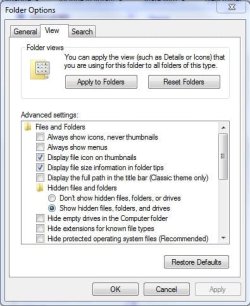
If you open explorer, set your view to the way you like it.
Then go to tools>folder options. On the view tab, click the 'apply to Folders' button.
That should set your current view to apply to all folders of that type.
Capture2.JPG

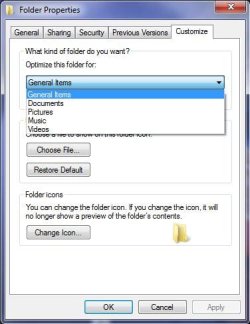
A folder type by default, is usually General.
You can set each one by right clicking the folder > properties > customize
Capture.JPG
Its handy to have your default folder view as details, and picture folders as large thumbnails.


@profdlp: Cheers, I'l give that a go tonight.
 

My Computer My Computer

At a glance

Windows 7 EnterpriseIntel Pentium Dual E2200 @2.2GHz4GBPalit GForce 9500GT 1GB
OS
Windows 7 Enterprise
CPU
Intel Pentium Dual E2200 @2.2GHz
Motherboard
Gigabyte II-G31
Memory
4GB
Graphics Card(s)
Palit GForce 9500GT 1GB
Sound Card
onBoard
Hard Drives
WesternDigital: 250GB + 1TB + 1TB + 2TB
PSU
450W
Case
CoolerMaster CM690
Cooling
Corsair H50
Mouse
Logitech MX518
Hi Bluedove,
Its nice to see your tone has changed since your original post, and that you are starting to enjoy the benefits of Win7.

If you open explorer, set your view to the way you like it.
Then go to tools>folder options. On the view tab, click the 'apply to Folders' button.

The problem was that i was missing the menu toolbar in my folders
(another thing windows had disabled on me.) so i couldn't get to the end of the process
i got it all fixed now , folders says to the new setting even after renaming them

Maybe i will figure someday what those big icons are for , maybe a nice setting for jpg ?

The thing i was doing wrong from day 1 was that i was searching for solutions in the library search bar instead on the search bar above the start button
The few first days were the worst , strange setting and defaults , couldn't even figure out the new layout of control pannel , and not knowing the name of the feature "Quick Launch" really agravated things, ... Windows 7 did not take away any of the good stuff , they just hided it very well. I might be lost here and there with the new control panel , but if i realy get stuck , i can find the answer quickly at sevenforum, The worst behind me now , and i'm discovering benefits everyday.
Few stormy days and nothing but nice weather to look forward :thumbsup:
There a lot of stuff i already love from Windows 7, the snip tool is the coolest thing i ever seen, the friendlyness and lack of constant interruption by Windows 7 Firewall is a huge gain. Internet Explorer 8 with zoom level is nice too , i won't use it often but where it's needed , i will be glad to have it. The list goes on , but really , all the credits belongs to the gurus of sevenforum.com , it's you guys who made all the difference, you woke me up from a nightmare.

i am scratching my head now and i can't think of anything else to fix
i am formating my 2TB hard drives ,
i will now work on the security , and windows updates
backing up my Operating system and setting is next
then i can move in with all my data and the rest of my programs,
 

My Computer My Computer

At a glance

Windows 7 Enterprise (x64)Intel i7 860 Quad Core4GB @ 1600Mhz Kingston with XMPENGTS250 Dark Knight cooler (1GB GDDR3)
Computer Manufacturer/Model Number
BlueDove Custom
OS
Windows 7 Enterprise (x64)
CPU
Intel i7 860 Quad Core
Motherboard
Intel DP55KG
Memory
4GB @ 1600Mhz Kingston with XMP
Graphics Card(s)
ENGTS250 Dark Knight cooler (1GB GDDR3)
Sound Card
onboard -- Realtek HD
Monitor(s) Displays
Samsung SyncMaster 245T with MagicRotation
Screen Resolution
1920 x 1200
Hard Drives
2 x 150GB raptor 10,000rpm
1 x 2000GB Black Caviar 7,200rpm
1 x 2000GB Green Caviar 7,200rpm
2 x 2000GB Green Caviar 5,400rpm
PSU
Thermaltake TR2 RX 750W
Case
Antec p182
Cooling
Corsair liquid cooler
Keyboard
Microsoft comfort curve 2000
Mouse
Microsoft comfort serie 4500
Internet Speed
180KB/s
Other Info
Backup Drives:
4 Bay Enclosure Mediasonic
4 x 2000GB Green Caviar
...Maybe i will figure someday what those big icons are for , maybe a nice setting for jpg ?...
The only time I've found them really useful is when I'm sorting a lot of data. (I'm a nut about having my stuff where I can find it.) Having the super-jumbo icons makes it easier to see where to put something without having to open each individual file, close it, then remember that "187876568a.jpg" goes in the "Redheads" folder. :geek:
 

My Computer My Computer

At a glance

Main - Windows 7 Pro SP1 64-Bit; 2nd - Window...Main - Core i7 2600K; 2nd - Core i7 920Main - 16GB Corsair Vengeance; 2nd - 12GB Cor...Main - XFX Radeon 6870 1GB; 2nd - XFX Radeon ...
Computer Manufacturer/Model Number
Self
OS
Main - Windows 7 Pro SP1 64-Bit; 2nd - Windows Server 2008 R2
CPU
Main - Core i7 2600K; 2nd - Core i7 920
Motherboard
Main - Asus P8Z68-V Pro/Gen3; 2nd - Gigabyte GA-EX58-UDR3
Memory
Main - 16GB Corsair Vengeance; 2nd - 12GB Corsair Vengeance
Graphics Card(s)
Main - XFX Radeon 6870 1GB; 2nd - XFX Radeon 4870 1GB
Sound Card
Both: Onboard Realtek Azalia
Monitor(s) Displays
Main - Hann 25" + I-INC 25" + Acer 23"; 2nd - Upgrading Soon
Screen Resolution
Main - 1920x1080 (All Three Monitors); 2nd - Upgrading Soon
Hard Drives
Main - (1) Crucial M4 128GB (Boot)
Main - (1) Seagate 2TB 64MB Cache (Data)
Main - (1) Seagate 2TB 64MB Cache (Data Backup)
2nd - (1) Intel X25-M SSD 80GB (Boot)
2nd - (3) Seagate 1TB 32MB Cache (Data Backup)
2nd - (1) Seagate 320GB (Because)
PSU
Main - OCZ 600W Modular; 2nd - OCZ 600W
Case
Main - Thermaltake Element G; 2nd - NZXT something or other
Cooling
Main - Corsair H80; 2nd - Prolimatech Megahalems
Keyboard
Main - Razer Reclusa; 2nd - Old MS Keyboard
Mouse
Main - Logitech MX Revolution; 2nd - Old MS Mouse
Internet Speed
20Mbps Time-Warner Cable
Well we all have went through a learning with Windows 7. For me it went smooth with a few little parts I had to work out. If one wants it to work or look like a 10 old system, well that isn't going to happen. Most every day things that people use there computer for are easy to work out with a little learning and trying. I agree with MacGyvr 100%. If one doesn't want to learn the new Windows 7 and still wants a 10 year old operating system then by all means remove Windows 7 and install your old system and be happy. But before you do that you might want to go to the Microsoft site and look for Windows 7 for beginners or just Google (Windows 7 for beginners).

i got to correct you on your statement Layback Bear
Thanks to the great support of sevenforum gurus and tutorials
i was able to edit all needed settings to make it feel and look like windows 2000 Pro
the taskbar totaly emulate my old system taskbar , it has the same features, works the same, and it look the same
even my folders are the same except for the shortcuts to the left of my files
so you see , i have lost nothing , but i have gained so much already and i'm sure i will gain even more once i learn all its features and unleach its power,
once again , i lost nothing , and i got an operating system with (x64) that will be supported for many years to come.

Anyways, the solutions are there. Windows 7 is FAR more customizable than your precious Windows 2000, so you should learn to enoy that, rather than rant about it. It's the best consumer OS available, especially given the high end hardware you have chosen.

Hi DeaconFrost
your perfectly right about Windows 7 capability and ability to be costomized
it proved to be everything i could have dreamed of plus so much more.
There is nothing left on those setting to dislike , it's all costomized now , and i'm happy
i'm retiring my Pentium D , and it has the (x64) capability
so i'm thinking of using it as an offline dummy on which i could experiment
with all the strange stuff and settings , while keeping my Quadcore with the feel i 'm used to.

This is really like having the best of two worlds
 

My Computer My Computer

At a glance

Windows 7 Enterprise (x64)Intel i7 860 Quad Core4GB @ 1600Mhz Kingston with XMPENGTS250 Dark Knight cooler (1GB GDDR3)
Computer Manufacturer/Model Number
BlueDove Custom
OS
Windows 7 Enterprise (x64)
CPU
Intel i7 860 Quad Core
Motherboard
Intel DP55KG
Memory
4GB @ 1600Mhz Kingston with XMP
Graphics Card(s)
ENGTS250 Dark Knight cooler (1GB GDDR3)
Sound Card
onboard -- Realtek HD
Monitor(s) Displays
Samsung SyncMaster 245T with MagicRotation
Screen Resolution
1920 x 1200
Hard Drives
2 x 150GB raptor 10,000rpm
1 x 2000GB Black Caviar 7,200rpm
1 x 2000GB Green Caviar 7,200rpm
2 x 2000GB Green Caviar 5,400rpm
PSU
Thermaltake TR2 RX 750W
Case
Antec p182
Cooling
Corsair liquid cooler
Keyboard
Microsoft comfort curve 2000
Mouse
Microsoft comfort serie 4500
Internet Speed
180KB/s
Other Info
Backup Drives:
4 Bay Enclosure Mediasonic
4 x 2000GB Green Caviar

My Computer My Computer

At a glance

Windows 7 EnterpriseIntel Pentium Dual E2200 @2.2GHz4GBPalit GForce 9500GT 1GB
OS
Windows 7 Enterprise
CPU
Intel Pentium Dual E2200 @2.2GHz
Motherboard
Gigabyte II-G31
Memory
4GB
Graphics Card(s)
Palit GForce 9500GT 1GB
Sound Card
onBoard
Hard Drives
WesternDigital: 250GB + 1TB + 1TB + 2TB
PSU
450W
Case
CoolerMaster CM690
Cooling
Corsair H50
Mouse
Logitech MX518
BlueDove I'm happy you got Windows 7 looking and working the way you like it. Some how I knew you would. Happy computing.
 

My Computer My Computer

At a glance

Windows 10 Pro. 64/ version 1709 Windows 7 Pr...Intel i7-6800K @ 4.3Corsair Platinum 16 gig @2400EVGA GTX 1070 OC
Computer type
PC/Desktop
Computer Manufacturer/Model Number
Home made Desktop
OS
Windows 10 Pro. 64/ version 1709 Windows 7 Pro/64
CPU
Intel i7-6800K @ 4.3
Motherboard
ASUS X-99 Deluxe II
Memory
Corsair Platinum 16 gig @2400
Graphics Card(s)
EVGA GTX 1070 OC
Monitor(s) Displays
Asus 27" LED LCD/VE278Q
Screen Resolution
1920-1080 or 1280-720 HDMI
Hard Drives
INTEL SSD 730-240 Gb Sata 3.0/
PSU
EVGA Platium 1200W
Case
Phanteks Luxe Tempered Glass 8 fans/ one radiator
Cooling
XSPC/ Water Cooled CPU
Keyboard
Das 4 Professional
Mouse
Logitech M705/MX Anywhere 2-S
Internet Speed
100 mbits
Antivirus
Microsoft Security Essentials/ Malwarebytes Premium 3.0/ SAS
Browser
I.E. 11 default/Firefox/ ISP Time Warner Cable/Spectrum
Other Info
LG BluRay Burner/
Sound system-KLipsch-THX/
Icy Dock ssd Hot Swap bays.
Back
Top