Authentec Drivers

Everything else works fine, just this one stupid problem. I have a feeling it has something to do with the Asus MB, the Authentec fingerprint scanner, and the 64 bit architecture. Even on Microsoft's site under this particular sensor, it says it is not compatible with Windows 7 64, 32 bit yes, but 64 no. So I don't know what to think anymore.
 

My Computer My Computer

At a glance

Windows 7 Ultimate 64 bitIntel T94004GBNvidia 9600 GM
Computer Manufacturer/Model Number
ASUS M70Vm-C1
OS
Windows 7 Ultimate 64 bit
CPU
Intel T9400
Memory
4GB
Graphics Card(s)
Nvidia 9600 GM
Monitor(s) Displays
17" WUXGA
Hard Drives
(2) 500GB 7200Rpm Seagate
Everything else works fine, just this one stupid problem. I have a feeling it has something to do with the Asus MB, the Authentec fingerprint scanner, and the 64 bit architecture. Even on Microsoft's site under this particular sensor, it says it is not compatible with Windows 7 64, 32 bit yes, but 64 no. So I don't know what to think anymore.

Where on MS's site does it state that. The fact that they have a WHQL 64-bit driver for the device, means that the device is supported.
 

My Computer My Computer

At a glance

Windows 7 x64 (RTM via MSDN)Intel Core 2 Duo T9300 (2.5 GHz)4 GB SODIMMS (System Max)nVidia 8600M GS 256MB
Computer Manufacturer/Model Number
MPC Transport T2500 Laptop
OS
Windows 7 x64 (RTM via MSDN)
CPU
Intel Core 2 Duo T9300 (2.5 GHz)
Motherboard
MPC
Memory
4 GB SODIMMS (System Max)
Graphics Card(s)
nVidia 8600M GS 256MB
Sound Card
Realtek On-Board
Monitor(s) Displays
15.4" LCD with a Dell 2005FPW 20" attached
Screen Resolution
1680x1050 (15.4") and 1680x1050 (20")
Hard Drives
Toshiba 2.5" 320 GB 7200 RPM
Everything else works fine, just this one stupid problem. I have a feeling it has something to do with the Asus MB, the Authentec fingerprint scanner, and the 64 bit architecture. Even on Microsoft's site under this particular sensor, it says it is not compatible with Windows 7 64, 32 bit yes, but 64 no. So I don't know what to think anymore.

Where on MS's site does it state that. The fact that they have a WHQL 64-bit driver for the device, means that the device is supported.
Windows 7 Compatibility for Authentec: Drivers, Updates, Downloads
 

My Computer My Computer

At a glance

Windows 7 Ultimate 64 bitIntel T94004GBNvidia 9600 GM
Computer Manufacturer/Model Number
ASUS M70Vm-C1
OS
Windows 7 Ultimate 64 bit
CPU
Intel T9400
Memory
4GB
Graphics Card(s)
Nvidia 9600 GM
Monitor(s) Displays
17" WUXGA
Hard Drives
(2) 500GB 7200Rpm Seagate
Can you tell by what I sent you what version of TrueSuite I have?
 

My Computer My Computer

At a glance

Windows 7 Ultimate 64 bitIntel T94004GBNvidia 9600 GM
Computer Manufacturer/Model Number
ASUS M70Vm-C1
OS
Windows 7 Ultimate 64 bit
CPU
Intel T9400
Memory
4GB
Graphics Card(s)
Nvidia 9600 GM
Monitor(s) Displays
17" WUXGA
Hard Drives
(2) 500GB 7200Rpm Seagate
I could revert to a 32 bit W7, but I don't want to loose my RAM. I would rather loose the fingerprint scanner, or buy one that is compatible with 64 bit.
 

My Computer My Computer

At a glance

Windows 7 Ultimate 64 bitIntel T94004GBNvidia 9600 GM
Computer Manufacturer/Model Number
ASUS M70Vm-C1
OS
Windows 7 Ultimate 64 bit
CPU
Intel T9400
Memory
4GB
Graphics Card(s)
Nvidia 9600 GM
Monitor(s) Displays
17" WUXGA
Hard Drives
(2) 500GB 7200Rpm Seagate
No idea about the ruesuite version, but I'm sure it's the latest. The large .dll file in the update download is basically the TrueSuite software.

We have both HP and MPC laptops in this office and I have had the fingerprint scanner working on both. Both types of laptops are using the AES1610 sensor. This is with x64. I believe the MS compatibility page is wrong.

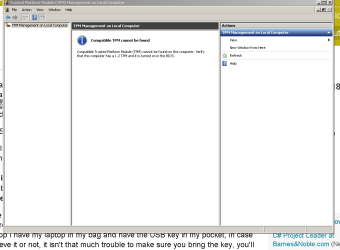
One last thought. Is the TPM chip in your laptop functioning? The 1610 sensor makes use of the TPM chip.
 

My Computer My Computer

At a glance

Windows 7 x64 (RTM via MSDN)Intel Core 2 Duo T9300 (2.5 GHz)4 GB SODIMMS (System Max)nVidia 8600M GS 256MB
Computer Manufacturer/Model Number
MPC Transport T2500 Laptop
OS
Windows 7 x64 (RTM via MSDN)
CPU
Intel Core 2 Duo T9300 (2.5 GHz)
Motherboard
MPC
Memory
4 GB SODIMMS (System Max)
Graphics Card(s)
nVidia 8600M GS 256MB
Sound Card
Realtek On-Board
Monitor(s) Displays
15.4" LCD with a Dell 2005FPW 20" attached
Screen Resolution
1680x1050 (15.4") and 1680x1050 (20")
Hard Drives
Toshiba 2.5" 320 GB 7200 RPM
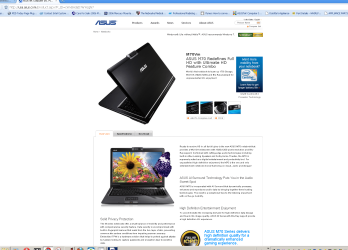
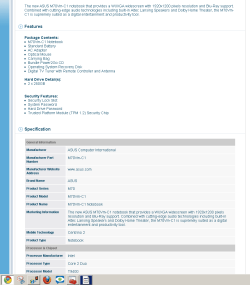
I don't think mine has a TPM chip. I know the Asus site said it does, but I've heard theat the North American versions did not have it. I have not seen anything labeled TPM in BIOS. What else could it be called?
 

My Computer My Computer

At a glance

Windows 7 Ultimate 64 bitIntel T94004GBNvidia 9600 GM
Computer Manufacturer/Model Number
ASUS M70Vm-C1
OS
Windows 7 Ultimate 64 bit
CPU
Intel T9400
Memory
4GB
Graphics Card(s)
Nvidia 9600 GM
Monitor(s) Displays
17" WUXGA
Hard Drives
(2) 500GB 7200Rpm Seagate
Alot of the "descriptions" on Asus's site have been wrong. I know I will never buy another Asus again. Too many discrepencies in descriptions about features and functions. Next time I will get a Lenovo.
 

My Computer My Computer

At a glance

Windows 7 Ultimate 64 bitIntel T94004GBNvidia 9600 GM
Computer Manufacturer/Model Number
ASUS M70Vm-C1
OS
Windows 7 Ultimate 64 bit
CPU
Intel T9400
Memory
4GB
Graphics Card(s)
Nvidia 9600 GM
Monitor(s) Displays
17" WUXGA
Hard Drives
(2) 500GB 7200Rpm Seagate
Go to device manager and look at the security devices. There should be an entry for the Trusted Platform Module. If it is not there, then you need to go through your BIOS and possible turn it on. If it is not in your BIOS, then you don't have one. I was pretty sure that most laptops produced in the last 3 years had a TPM.
 

My Computer My Computer

At a glance

Windows 7 x64 (RTM via MSDN)Intel Core 2 Duo T9300 (2.5 GHz)4 GB SODIMMS (System Max)nVidia 8600M GS 256MB
Computer Manufacturer/Model Number
MPC Transport T2500 Laptop
OS
Windows 7 x64 (RTM via MSDN)
CPU
Intel Core 2 Duo T9300 (2.5 GHz)
Motherboard
MPC
Memory
4 GB SODIMMS (System Max)
Graphics Card(s)
nVidia 8600M GS 256MB
Sound Card
Realtek On-Board
Monitor(s) Displays
15.4" LCD with a Dell 2005FPW 20" attached
Screen Resolution
1680x1050 (15.4") and 1680x1050 (20")
Hard Drives
Toshiba 2.5" 320 GB 7200 RPM
Doing some research on-line, it looks like the TPM was an optional piece of equipment, so you might not have it available.
 

My Computer My Computer

At a glance

Windows 7 x64 (RTM via MSDN)Intel Core 2 Duo T9300 (2.5 GHz)4 GB SODIMMS (System Max)nVidia 8600M GS 256MB
Computer Manufacturer/Model Number
MPC Transport T2500 Laptop
OS
Windows 7 x64 (RTM via MSDN)
CPU
Intel Core 2 Duo T9300 (2.5 GHz)
Motherboard
MPC
Memory
4 GB SODIMMS (System Max)
Graphics Card(s)
nVidia 8600M GS 256MB
Sound Card
Realtek On-Board
Monitor(s) Displays
15.4" LCD with a Dell 2005FPW 20" attached
Screen Resolution
1680x1050 (15.4") and 1680x1050 (20")
Hard Drives
Toshiba 2.5" 320 GB 7200 RPM
So if I don't have a TPM, then what else might be conflicting?
 

My Computer My Computer

At a glance

Windows 7 Ultimate 64 bitIntel T94004GBNvidia 9600 GM
Computer Manufacturer/Model Number
ASUS M70Vm-C1
OS
Windows 7 Ultimate 64 bit
CPU
Intel T9400
Memory
4GB
Graphics Card(s)
Nvidia 9600 GM
Monitor(s) Displays
17" WUXGA
Hard Drives
(2) 500GB 7200Rpm Seagate
64-bit windows (Vista and Win7) have some extra security measures added to them, including KPP (also known as PatchGuard) and ALSR. I suspect that without the TPM, the drivers cannot verify login. Once you're logged in, it works fine, but during the initial login, it won't work.
 

My Computer My Computer

At a glance

Windows 7 x64 (RTM via MSDN)Intel Core 2 Duo T9300 (2.5 GHz)4 GB SODIMMS (System Max)nVidia 8600M GS 256MB
Computer Manufacturer/Model Number
MPC Transport T2500 Laptop
OS
Windows 7 x64 (RTM via MSDN)
CPU
Intel Core 2 Duo T9300 (2.5 GHz)
Motherboard
MPC
Memory
4 GB SODIMMS (System Max)
Graphics Card(s)
nVidia 8600M GS 256MB
Sound Card
Realtek On-Board
Monitor(s) Displays
15.4" LCD with a Dell 2005FPW 20" attached
Screen Resolution
1680x1050 (15.4") and 1680x1050 (20")
Hard Drives
Toshiba 2.5" 320 GB 7200 RPM
64-bit windows (Vista and Win7) have some extra security measures added to them, including KPP (also known as PatchGuard) and ALSR. I suspect that without the TPM, the drivers cannot verify login. Once you're logged in, it works fine, but during the initial login, it won't work.

That is exactly what happens, so why does it still work with Vista 32 and let me log into windows? Maybe that is why Asus shipped this thing with Vista 32 and not 64.
 

My Computer My Computer

At a glance

Windows 7 Ultimate 64 bitIntel T94004GBNvidia 9600 GM
Computer Manufacturer/Model Number
ASUS M70Vm-C1
OS
Windows 7 Ultimate 64 bit
CPU
Intel T9400
Memory
4GB
Graphics Card(s)
Nvidia 9600 GM
Monitor(s) Displays
17" WUXGA
Hard Drives
(2) 500GB 7200Rpm Seagate
Windows x32 does not have these additional security measures.
 

My Computer My Computer

At a glance

Windows 7 x64 (RTM via MSDN)Intel Core 2 Duo T9300 (2.5 GHz)4 GB SODIMMS (System Max)nVidia 8600M GS 256MB
Computer Manufacturer/Model Number
MPC Transport T2500 Laptop
OS
Windows 7 x64 (RTM via MSDN)
CPU
Intel Core 2 Duo T9300 (2.5 GHz)
Motherboard
MPC
Memory
4 GB SODIMMS (System Max)
Graphics Card(s)
nVidia 8600M GS 256MB
Sound Card
Realtek On-Board
Monitor(s) Displays
15.4" LCD with a Dell 2005FPW 20" attached
Screen Resolution
1680x1050 (15.4") and 1680x1050 (20")
Hard Drives
Toshiba 2.5" 320 GB 7200 RPM
Anyway around it without TPM? Can TPM be added after the fact?
 

My Computer My Computer

At a glance

Windows 7 Ultimate 64 bitIntel T94004GBNvidia 9600 GM
Computer Manufacturer/Model Number
ASUS M70Vm-C1
OS
Windows 7 Ultimate 64 bit
CPU
Intel T9400
Memory
4GB
Graphics Card(s)
Nvidia 9600 GM
Monitor(s) Displays
17" WUXGA
Hard Drives
(2) 500GB 7200Rpm Seagate
The TPM is a physical chip soldered to the mainboard. They are, in fact, designed not to be easily replacable. The point of them is to hold cryptographic keys specific to the system they are installed in. It would defeat the purpose to be able to easily swap them out.
 

My Computer My Computer

At a glance

Windows 7 x64 (RTM via MSDN)Intel Core 2 Duo T9300 (2.5 GHz)4 GB SODIMMS (System Max)nVidia 8600M GS 256MB
Computer Manufacturer/Model Number
MPC Transport T2500 Laptop
OS
Windows 7 x64 (RTM via MSDN)
CPU
Intel Core 2 Duo T9300 (2.5 GHz)
Motherboard
MPC
Memory
4 GB SODIMMS (System Max)
Graphics Card(s)
nVidia 8600M GS 256MB
Sound Card
Realtek On-Board
Monitor(s) Displays
15.4" LCD with a Dell 2005FPW 20" attached
Screen Resolution
1680x1050 (15.4") and 1680x1050 (20")
Hard Drives
Toshiba 2.5" 320 GB 7200 RPM
Any way to bypass the W7 64 added security features that aren't in the 32 bit version?
 

My Computer My Computer

At a glance

Windows 7 Ultimate 64 bitIntel T94004GBNvidia 9600 GM
Computer Manufacturer/Model Number
ASUS M70Vm-C1
OS
Windows 7 Ultimate 64 bit
CPU
Intel T9400
Memory
4GB
Graphics Card(s)
Nvidia 9600 GM
Monitor(s) Displays
17" WUXGA
Hard Drives
(2) 500GB 7200Rpm Seagate
None that I know of. These are kernel level operations that would require rather extensive hacking abilities.

I now understand MS's incompatible statement now. I think they should have put an asterix and noted that it only works with a TPM.
 

My Computer My Computer

At a glance

Windows 7 x64 (RTM via MSDN)Intel Core 2 Duo T9300 (2.5 GHz)4 GB SODIMMS (System Max)nVidia 8600M GS 256MB
Computer Manufacturer/Model Number
MPC Transport T2500 Laptop
OS
Windows 7 x64 (RTM via MSDN)
CPU
Intel Core 2 Duo T9300 (2.5 GHz)
Motherboard
MPC
Memory
4 GB SODIMMS (System Max)
Graphics Card(s)
nVidia 8600M GS 256MB
Sound Card
Realtek On-Board
Monitor(s) Displays
15.4" LCD with a Dell 2005FPW 20" attached
Screen Resolution
1680x1050 (15.4") and 1680x1050 (20")
Hard Drives
Toshiba 2.5" 320 GB 7200 RPM
No, no TPM on my notebook. Looks like the question has been answered. But as you can see, Asus advertised my notebook as coming with a TPM, even supplied their retailers with the same information. Do you think I can make them add it to my laptop?
 

Attachments

  • CaptureTPM.PNG
    CaptureTPM.PNG
    14 KB · Views: 15
  • CaptureM70Vm asus site.PNG
    CaptureM70Vm asus site.PNG
    147.9 KB · Views: 13
  • CaptureM70Vm-C1 ad.PNG
    CaptureM70Vm-C1 ad.PNG
    19.4 KB · Views: 17

My Computer My Computer

At a glance

Windows 7 Ultimate 64 bitIntel T94004GBNvidia 9600 GM
Computer Manufacturer/Model Number
ASUS M70Vm-C1
OS
Windows 7 Ultimate 64 bit
CPU
Intel T9400
Memory
4GB
Graphics Card(s)
Nvidia 9600 GM
Monitor(s) Displays
17" WUXGA
Hard Drives
(2) 500GB 7200Rpm Seagate
I downloaded the M70vm manual and it actually states that the TPM comes in selected models. You need check and see if you actually bought one of those models. No, they can't add the TPM after the fact. It is soldered onto the motherboard.

Also, did you go into the BIOS and make sure it is turned on?
 

My Computer My Computer

At a glance

Windows 7 x64 (RTM via MSDN)Intel Core 2 Duo T9300 (2.5 GHz)4 GB SODIMMS (System Max)nVidia 8600M GS 256MB
Computer Manufacturer/Model Number
MPC Transport T2500 Laptop
OS
Windows 7 x64 (RTM via MSDN)
CPU
Intel Core 2 Duo T9300 (2.5 GHz)
Motherboard
MPC
Memory
4 GB SODIMMS (System Max)
Graphics Card(s)
nVidia 8600M GS 256MB
Sound Card
Realtek On-Board
Monitor(s) Displays
15.4" LCD with a Dell 2005FPW 20" attached
Screen Resolution
1680x1050 (15.4") and 1680x1050 (20")
Hard Drives
Toshiba 2.5" 320 GB 7200 RPM
Back
Top