Show us your SSD performance

Status
Not open for further replies.
HD Tune Pro: INTEL SSDSA2M160G2GC Benchmark

Test capacity: full

Read transfer rate
...Transfer Rate Minimum : 162.7 MB/s
Transfer Rate Maximum : 232.7 MB/s
Transfer Rate Average : 227.9 MB/s
Access Time : 0.1 ms
Burst Rate : 195.8 MB/s
CPU Usage : 1.5%


Hello Bill, just for future reference mate. ;)


How to Post a Screenshot in Seven Forums
 

My Computer

Computer Manufacturer/Model Number
* BFK Customs *
OS
W 7 64-bit Ultimate
CPU
Intel Q9550 Yorkfield
Motherboard
ASUS P5Q Pro
Memory
8GB Dominator 8500C5D
Graphics Card(s)
ATI : XFX 5870
Sound Card
Realtek HD Audio 7-1
Monitor(s) Displays
1x 47" LCD HDMI & 3x 26" LCD HDMI
Screen Resolution
1920x1080P & 1920x1200
Hard Drives
1x 80GB Intel X25-M G2 SSD : 1x 500GB & 1x 640GB WD Caviar Black(s)
PSU
Corsair 620HX
Case
Cooler Master RC-690
Cooling
Tuniq Tower 120, 2x 140mm and 3x 120mm case fans
Keyboard
Microsoft 500
Mouse
Razer Diamondback 3G
Internet Speed
14 Mb/s
Other Info
1x Koutech 3Gb/s SATA HDD Hot Swap Rack
HD Tune Pro: INTEL SSDSA2M160G2GC Benchmark

Test capacity: full

Read transfer rate
...Transfer Rate Minimum : 162.7 MB/s
Transfer Rate Maximum : 232.7 MB/s
Transfer Rate Average : 227.9 MB/s
Access Time : 0.1 ms
Burst Rate : 195.8 MB/s
CPU Usage : 1.5%

Looks good :cool:

How long have you had it running?
Any slowdown or have you had to re-install?
 

My Computer

Computer type
PC/Desktop
Computer Manufacturer/Model Number
76~2.0
OS
Windows 7 Ult x64 - SP1/ Windows 8 Pro x64
CPU
Intel Core i5-3570K 4.6GHz
Motherboard
Gigabyte GA-Z77X UD3H, f18
Memory
8GB (2X4GB) DDR3 1600 Corsair Vengeance CL8 1.5v
Graphics Card(s)
Sapphire HD 7770 Vapor-X OC 1GB DDR5
Sound Card
Onboard VIA VT2021
Monitor(s) Displays
22" LCD Dell
Screen Resolution
1680x1050
Hard Drives
Samsung 840Pro 128GB SSD,
Seagate Barracuda 500GB SATA2 7200rpm 32MB cache, Seagate Barracuda 1TB SATA2 7200rpm 32MB cache,
PSU
Corsair HX650W
Case
Cooler Master Storm Scout
Cooling
Corsair H80 2x12cm Noctua NF P12 , 2x14cm case fans
Keyboard
Logitech Wave
Mouse
CM Sentinel
Internet Speed
Dismal
Antivirus
Avast
Browser
Opera Next
Other Info
Haswell laptop: HP Envy 17t-j, i7-4700MQ, GeForce 740M 2GB DDR3, 17.3" Full HD 1920x1080, 16GB RAM, Samsung 840 Pro 128GB, 1TB Hitachi 7200 HDD,
Desktop: eSATA ports,
External eSATA Seagate 500GB SATA2 7200rpm,
External WD USB 500GB
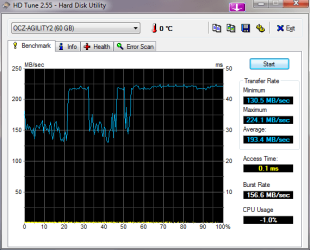
I just got this a week ago. This is my first benchtest. This just doesnt seem right to me
 

Attachments

  • HDTune_Benchmark_OCZ-AGILITY2.png
    HDTune_Benchmark_OCZ-AGILITY2.png
    45.5 KB · Views: 18

My Computer

Computer Manufacturer/Model Number
Built
OS
Windows 7 RTM
CPU
Intel I7 920 2.67 ghz
Motherboard
EVGA X58
Memory
6GB CORSAIR DOMINATOR
Graphics Card(s)
GeForce GTX 260 Core 216 896MB 448-bit GDDR3 PCI Express 2.0
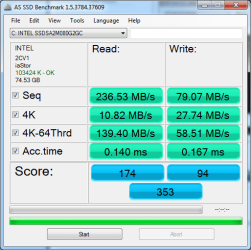
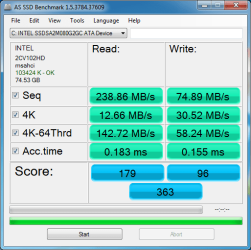
Just installed my new Intel 80GB yesterday in my laptop. Benchmarks seem pretty average and I'm very impressed so far.
 

Attachments

  • ssd bench iastor.png
    ssd bench iastor.png
    55.6 KB · Views: 3
  • ssd bench msahci.png
    ssd bench msahci.png
    61.9 KB · Views: 1

My Computer

Computer Manufacturer/Model Number
Hewlett-Packard
OS
Windows 7 Professional x64
CPU
Intel Core 2 Duo P8400 2.26GHz
Memory
4GB
Graphics Card(s)
NVIDIA GeForce 9600M GT
Sound Card
Integrated Sound
Monitor(s) Displays
17" Laptop Display
Hard Drives
1 x Intel X-25M G2 80GB SSD
1 x Western Digital WD3200BEKT 320GB 7200rpm
Hello GotMilk, welcome to Seven Forums!
 

My Computer

Computer Manufacturer/Model Number
* BFK Customs *
OS
W 7 64-bit Ultimate
CPU
Intel Q9550 Yorkfield
Motherboard
ASUS P5Q Pro
Memory
8GB Dominator 8500C5D
Graphics Card(s)
ATI : XFX 5870
Sound Card
Realtek HD Audio 7-1
Monitor(s) Displays
1x 47" LCD HDMI & 3x 26" LCD HDMI
Screen Resolution
1920x1080P & 1920x1200
Hard Drives
1x 80GB Intel X25-M G2 SSD : 1x 500GB & 1x 640GB WD Caviar Black(s)
PSU
Corsair 620HX
Case
Cooler Master RC-690
Cooling
Tuniq Tower 120, 2x 140mm and 3x 120mm case fans
Keyboard
Microsoft 500
Mouse
Razer Diamondback 3G
Internet Speed
14 Mb/s
Other Info
1x Koutech 3Gb/s SATA HDD Hot Swap Rack

My Computer

Computer Manufacturer/Model Number
Hewlett-Packard
OS
Windows 7 Professional x64
CPU
Intel Core 2 Duo P8400 2.26GHz
Memory
4GB
Graphics Card(s)
NVIDIA GeForce 9600M GT
Sound Card
Integrated Sound
Monitor(s) Displays
17" Laptop Display
Hard Drives
1 x Intel X-25M G2 80GB SSD
1 x Western Digital WD3200BEKT 320GB 7200rpm
I just got this a week ago. This is my first benchtest. This just doesnt seem right to me
Were you running your OS on this drive when you tested? If so, that might explain the drops and such. Most of us with very straight lines were running the SSD as a secondary drive when we did the benchmark test.
 

My Computer

Computer Manufacturer/Model Number
Self-Built in July 2009
OS
Windows 7 Ultimate x64
CPU
Intel Q9550 2.83Ghz OC'd to 3.40Ghz
Motherboard
Gigabyte GA-EP45-UD3R rev. 1.1, F12 BIOS
Memory
8GB G.Skill PI DDR2-800, 4-4-4-12 timings
Graphics Card(s)
EVGA 1280MB Nvidia GeForce GTX570
Sound Card
Realtek ALC899A 8 channel onboard audio
Monitor(s) Displays
23" Acer x233H
Screen Resolution
1920x1080
Hard Drives
Intel X25-M 80GB Gen 2 SSD
Western Digital 1TB Caviar Black, 32MB cache. WD1001FALS
PSU
Corsair 620HX modular
Case
Antec P182
Cooling
stock
Keyboard
ABS M1 Mechanical
Mouse
Logitech G9 Laser Mouse
Internet Speed
15/2 cable modem
Other Info
Windows and Linux enthusiast. Logitech G35 Headset.
I just got this a week ago. This is my first benchtest. This just doesnt seem right to me

If your running the SSD when you did the test, might be AV running a scan.

Good numbers...
 

My Computer

Computer type
PC/Desktop
Computer Manufacturer/Model Number
76~2.0
OS
Windows 7 Ult x64 - SP1/ Windows 8 Pro x64
CPU
Intel Core i5-3570K 4.6GHz
Motherboard
Gigabyte GA-Z77X UD3H, f18
Memory
8GB (2X4GB) DDR3 1600 Corsair Vengeance CL8 1.5v
Graphics Card(s)
Sapphire HD 7770 Vapor-X OC 1GB DDR5
Sound Card
Onboard VIA VT2021
Monitor(s) Displays
22" LCD Dell
Screen Resolution
1680x1050
Hard Drives
Samsung 840Pro 128GB SSD,
Seagate Barracuda 500GB SATA2 7200rpm 32MB cache, Seagate Barracuda 1TB SATA2 7200rpm 32MB cache,
PSU
Corsair HX650W
Case
Cooler Master Storm Scout
Cooling
Corsair H80 2x12cm Noctua NF P12 , 2x14cm case fans
Keyboard
Logitech Wave
Mouse
CM Sentinel
Internet Speed
Dismal
Antivirus
Avast
Browser
Opera Next
Other Info
Haswell laptop: HP Envy 17t-j, i7-4700MQ, GeForce 740M 2GB DDR3, 17.3" Full HD 1920x1080, 16GB RAM, Samsung 840 Pro 128GB, 1TB Hitachi 7200 HDD,
Desktop: eSATA ports,
External eSATA Seagate 500GB SATA2 7200rpm,
External WD USB 500GB

My Computer

Computer type
PC/Desktop
Computer Manufacturer/Model Number
benchtec, built to personal specs
OS
Windows10 Pro - 64Bit vs.10547
CPU
i7-965 Extreme Edition (8 Cores) at 3.3GHz (no OC)
Motherboard
BloodRageX58 (Socket1366)
Memory
12G Corsair Dominator DDR3 - tripled
Graphics Card(s)
2xAMD SapphireNITRO R9 380(4G) crossfire
Sound Card
Sonar(SB)X-Fi onboard
Monitor(s) Displays
SyncMaster P2050 20"
Screen Resolution
1600x900 (widescreen)
Hard Drives
480G\OCZSolid3SSD, 64G\OCZVertex3SSD,60G\OCZVertex2SSD, 1TB\spinpointF1SATAHDD
PSU
1200w Power Station Gold
Case
ANTEC 900/2 all blue lights, etc..
Cooling
Noctua SE1366 NH-U12P - a tight fit, but a monster cooler!!
Keyboard
Logitech G19 (wired)
Mouse
Logitech G9 Laser (wired)
Internet Speed
150mb unlimited
Browser
IE11(RP)
Other Info
Xbox One, Nokia735 Windows10 mobile, LG HD/DVD/Blu-Ray r/w, CyberlinkPowerDVD15, LogitechZ5500-SS(5.1), LogitechG35Phones-SS(7.1),MSOffice 2007,CorelDrawX7,Painter2016, Wacom Intuos Pro-SE

My Computer

Computer Manufacturer/Model Number
* BFK Customs *
OS
W 7 64-bit Ultimate
CPU
Intel Q9550 Yorkfield
Motherboard
ASUS P5Q Pro
Memory
8GB Dominator 8500C5D
Graphics Card(s)
ATI : XFX 5870
Sound Card
Realtek HD Audio 7-1
Monitor(s) Displays
1x 47" LCD HDMI & 3x 26" LCD HDMI
Screen Resolution
1920x1080P & 1920x1200
Hard Drives
1x 80GB Intel X25-M G2 SSD : 1x 500GB & 1x 640GB WD Caviar Black(s)
PSU
Corsair 620HX
Case
Cooler Master RC-690
Cooling
Tuniq Tower 120, 2x 140mm and 3x 120mm case fans
Keyboard
Microsoft 500
Mouse
Razer Diamondback 3G
Internet Speed
14 Mb/s
Other Info
1x Koutech 3Gb/s SATA HDD Hot Swap Rack
Page file on a conventional drive?

I was reading some reviews on an SSD drive and ran across a post stating you should put your page file on another drive to save space. That got me wondering... wouldn't this impede performance?

I'm of the opinion that I would want to have my page file on the fastest drive in the system.

So, have you moved your page file to a conventional drive to save space?

Thanks

Here's the review on newegg by PASysBuilder.....

Pros: Very fast. Very, very fast. Really fast. Did I mention it was fast? Be sure to put your windows page file on a traditional hard disk, disable Superfetch, disable drive indexing, disable defrag, leave 20% of the space unallocated, and DON'T BENCH CONSTANTLY. This will prolong the life of the drive.

Customer Reviews Of OCZ Vertex Series OCZSSD2-1VTX120G 2.5" 120GB SATA II MLC Internal Solid State Drive (SSD)
 

My Computer

Computer type
PC/Desktop
Computer Manufacturer/Model Number
Custom built by me.
OS
Windows 10 Pro
CPU
Intel Core i7-4770K (3.5Ghz)
Motherboard
Gigabyte G1 Sniper 5 (F10 Bios)
Memory
32 gig Corsair Dominator Platinum (4x8Gig)
Graphics Card(s)
Sapphire Tri-X R9 Fury
Sound Card
Soundblaster ZXR
Monitor(s) Displays
NEC PA242W 24" LCD Monitor
Screen Resolution
1920 x 1200
Hard Drives
Primary - Samsung 850 Pro (512gig), Samsung 840 Pro (256gig), 2TB WD Caviar Black.
PSU
EVGA Supernova 1000 G2
Case
Cooler Master HAF X
Cooling
Corsair H100i with Corsair Air Series SP120 Quiet Fans
Keyboard
Logitech Wireless Wave
Mouse
Logitech Performance MX
Internet Speed
High Speed Cable
Antivirus
Norton Security
Browser
IE11
Other Info
Memory Timings - 1866MHz @ 9-9-9-27-1T @ 1.5 volts
Well it might. If your page file is used much. If you have like 12 gig of ram though then it's just wasting space :)

It's a tradeoff for space vs performance. A 160 gig or larger drive you might leave it. For a 40 gig you might move it.

The one thing that makes even more sense is to disable hibernation or move the hibernation drive. You'll save another 4/8/12/or more gig instantly on the SSD there too.
 

My Computer

Computer Manufacturer/Model Number
Scratch built
OS
Windows 7 x64 Ultimate
CPU
i7 960
Motherboard
Asus P6X58D
Memory
12 Gig Corsair Dominator
Graphics Card(s)
Nvidia 480
Sound Card
Maudio Delta 44 + breakout box
Monitor(s) Displays
Dell UltraSharp U2410 24in and Samsung 21 dual monitors
Screen Resolution
1920x1200 and 1280x1024
Hard Drives
Primary: Intel X-25M G2 160G SSD
Secondary: Segate baracuda 1.0 TB
HDs in AHCI mode.
PSU
Corasair TX850
Case
Cooler Master HAF
Cooling
Corsair H50
Keyboard
Logitech G15 + N52 game pad
Mouse
Logitech MX518
Internet Speed
15kbs down 4.5kbps up
Other Info
WEI 7.6
CPU & RAM 7.6
Graphics 7.9
Hard disk 7.7
Since I don't have a SSD drive yet I tend not to think of space being a problem, even though I have my "C" drive partitioned at 120gig. With both my page file and hibernation file (10.5gig total) on the drive, plus most default folder locations, my "C" drive is 65gig. This is also with system restore turned on.

I suppose I would think differently if I had limited space. This is another reason why I would have to get at least a 120gig SSD drive.

At any rate my question was to get an idea of where people are putting their page file in relationship to performance vs space.
 

My Computer

Computer type
PC/Desktop
Computer Manufacturer/Model Number
Custom built by me.
OS
Windows 10 Pro
CPU
Intel Core i7-4770K (3.5Ghz)
Motherboard
Gigabyte G1 Sniper 5 (F10 Bios)
Memory
32 gig Corsair Dominator Platinum (4x8Gig)
Graphics Card(s)
Sapphire Tri-X R9 Fury
Sound Card
Soundblaster ZXR
Monitor(s) Displays
NEC PA242W 24" LCD Monitor
Screen Resolution
1920 x 1200
Hard Drives
Primary - Samsung 850 Pro (512gig), Samsung 840 Pro (256gig), 2TB WD Caviar Black.
PSU
EVGA Supernova 1000 G2
Case
Cooler Master HAF X
Cooling
Corsair H100i with Corsair Air Series SP120 Quiet Fans
Keyboard
Logitech Wireless Wave
Mouse
Logitech Performance MX
Internet Speed
High Speed Cable
Antivirus
Norton Security
Browser
IE11
Other Info
Memory Timings - 1866MHz @ 9-9-9-27-1T @ 1.5 volts
I was reading some reviews on an SSD drive and ran across a post stating you should put your page file on another drive to save space. That got me wondering... wouldn't this impede performance?
If you have a reasonable amount of RAM (3 or 4GBs), it does not really matter. There will be very little traffic on the pagefile. But in general, that should not be neccessary anyhow. Even a small 30GB SSD should be ample for the system (unless you have massive amounts of games in your program file). My system with a vast selection of programs (no games) installed never exceeded 18GBs. I have only deleted the hibernation file and moved the user files to another partition.
 

My Computer

Computer Manufacturer/Model Number
HP, Dell, Gateway, Toshiba - 4 laptops and 2 desktops
OS
Vista, Windows7, Mint Mate, Zorin, Windows 8
CPU
from 1.6GHz Duo to i7
Monitor(s) Displays
2x HP w2207
Hard Drives
5x HDD, 7x SSD, 12x Externals
Keyboard
with trackball - no mices
Mouse
Trackball mice
Internet Speed
DSL 6000
At any rate my question was to get an idea of where people are putting their page file in relationship to performance vs space.

I have the 80GB Intel SSD drive for C and a 1TB Western Digital Caviar Black as my D drive. My rig has 8GB of RAM as I use virtual machines quite a bit. My page file is set up on my D drive and my hibernation file is turned off completely as I never hibernate my desktop. I leave the page file on my mechanical drive as I have set it statically to 12GB and don't want to burn that kind of space.

With the apps that I load, Windows 7 Ultimate 64-bit with a game or two on the hard drive...I have about 50GB free out of my usable 74GB of space.
 

My Computer

Computer Manufacturer/Model Number
Self-Built in July 2009
OS
Windows 7 Ultimate x64
CPU
Intel Q9550 2.83Ghz OC'd to 3.40Ghz
Motherboard
Gigabyte GA-EP45-UD3R rev. 1.1, F12 BIOS
Memory
8GB G.Skill PI DDR2-800, 4-4-4-12 timings
Graphics Card(s)
EVGA 1280MB Nvidia GeForce GTX570
Sound Card
Realtek ALC899A 8 channel onboard audio
Monitor(s) Displays
23" Acer x233H
Screen Resolution
1920x1080
Hard Drives
Intel X25-M 80GB Gen 2 SSD
Western Digital 1TB Caviar Black, 32MB cache. WD1001FALS
PSU
Corsair 620HX modular
Case
Antec P182
Cooling
stock
Keyboard
ABS M1 Mechanical
Mouse
Logitech G9 Laser Mouse
Internet Speed
15/2 cable modem
Other Info
Windows and Linux enthusiast. Logitech G35 Headset.
I leave the page file/size at default and disable hibernation, I install most progs/apps to a spinner and I have 8GB of RAM and an 80GB Intel G2 SSD and I have 30GB free space.
 

My Computer

Computer Manufacturer/Model Number
* BFK Customs *
OS
W 7 64-bit Ultimate
CPU
Intel Q9550 Yorkfield
Motherboard
ASUS P5Q Pro
Memory
8GB Dominator 8500C5D
Graphics Card(s)
ATI : XFX 5870
Sound Card
Realtek HD Audio 7-1
Monitor(s) Displays
1x 47" LCD HDMI & 3x 26" LCD HDMI
Screen Resolution
1920x1080P & 1920x1200
Hard Drives
1x 80GB Intel X25-M G2 SSD : 1x 500GB & 1x 640GB WD Caviar Black(s)
PSU
Corsair 620HX
Case
Cooler Master RC-690
Cooling
Tuniq Tower 120, 2x 140mm and 3x 120mm case fans
Keyboard
Microsoft 500
Mouse
Razer Diamondback 3G
Internet Speed
14 Mb/s
Other Info
1x Koutech 3Gb/s SATA HDD Hot Swap Rack
If you have a reasonable amount of RAM (3 or 4GBs), it does not really matter. There will be very little traffic on the pagefile.

That makes sense.

My system with a vast selection of programs (no games) installed never exceeded 18GBs. I have only deleted the hibernation file and moved the user files to another partition.

:D I must have vast(er) programs because my "C" drive is 65gig! And this is with my games, photos, & music files on a separate partition/hard drive. Even if I moved my page & hib file, that would still leave me with 54gig. I haven't/won't move the user files.

 

My Computer

Computer type
PC/Desktop
Computer Manufacturer/Model Number
Custom built by me.
OS
Windows 10 Pro
CPU
Intel Core i7-4770K (3.5Ghz)
Motherboard
Gigabyte G1 Sniper 5 (F10 Bios)
Memory
32 gig Corsair Dominator Platinum (4x8Gig)
Graphics Card(s)
Sapphire Tri-X R9 Fury
Sound Card
Soundblaster ZXR
Monitor(s) Displays
NEC PA242W 24" LCD Monitor
Screen Resolution
1920 x 1200
Hard Drives
Primary - Samsung 850 Pro (512gig), Samsung 840 Pro (256gig), 2TB WD Caviar Black.
PSU
EVGA Supernova 1000 G2
Case
Cooler Master HAF X
Cooling
Corsair H100i with Corsair Air Series SP120 Quiet Fans
Keyboard
Logitech Wireless Wave
Mouse
Logitech Performance MX
Internet Speed
High Speed Cable
Antivirus
Norton Security
Browser
IE11
Other Info
Memory Timings - 1866MHz @ 9-9-9-27-1T @ 1.5 volts
I leave the page file/size at default and disable hibernation, I install most progs/apps to a spinner and I have 8GB of RAM and an 80GB Intel G2 SSD and I have 30GB free space.

When I decide to go with an SSD drive, it will be at least a 120 and I'll have it setup like I currently have my 120 gig partition setup... default user(s), page file, hib file on that drive, games, photos, music on a seperate drive/partition.

I use hybrid sleep so I need hiberbation, since I have plenty of space, it's not an issue.

I get the feeling that most will leave the page file at it's default location. That's my feeling as well.

Thanks.

Gotta go.
 

My Computer

Computer type
PC/Desktop
Computer Manufacturer/Model Number
Custom built by me.
OS
Windows 10 Pro
CPU
Intel Core i7-4770K (3.5Ghz)
Motherboard
Gigabyte G1 Sniper 5 (F10 Bios)
Memory
32 gig Corsair Dominator Platinum (4x8Gig)
Graphics Card(s)
Sapphire Tri-X R9 Fury
Sound Card
Soundblaster ZXR
Monitor(s) Displays
NEC PA242W 24" LCD Monitor
Screen Resolution
1920 x 1200
Hard Drives
Primary - Samsung 850 Pro (512gig), Samsung 840 Pro (256gig), 2TB WD Caviar Black.
PSU
EVGA Supernova 1000 G2
Case
Cooler Master HAF X
Cooling
Corsair H100i with Corsair Air Series SP120 Quiet Fans
Keyboard
Logitech Wireless Wave
Mouse
Logitech Performance MX
Internet Speed
High Speed Cable
Antivirus
Norton Security
Browser
IE11
Other Info
Memory Timings - 1866MHz @ 9-9-9-27-1T @ 1.5 volts
I must have vast(er) programs because my "C" drive is 65gig! And this is with my games, photos, & music files on a separate partition/hard drive. Even if I moved my page & hib file, that would still leave me with 54gig. I haven't/won't move the user files.
sygnus, there must be something wrong. I suggest you check with WinDirStat what's on this disk. There is no way the system can take that much space.
 

My Computer

Computer Manufacturer/Model Number
HP, Dell, Gateway, Toshiba - 4 laptops and 2 desktops
OS
Vista, Windows7, Mint Mate, Zorin, Windows 8
CPU
from 1.6GHz Duo to i7
Monitor(s) Displays
2x HP w2207
Hard Drives
5x HDD, 7x SSD, 12x Externals
Keyboard
with trackball - no mices
Mouse
Trackball mice
Internet Speed
DSL 6000
:D I must have vast(er) programs because my "C" drive is 65gig!

Well, it obviously depends upon the apps that you use and how much you install. For me personally, I keep my machine as light-weight as possible. The apps that I use are all pretty small, and I only install what I need (firefox, 7zip, fox it reader, notepad++, dvd fab and dvd shrink, imgburn, OpenOffice, Acronis True Image, truecrypt, exact audio copy, VMWare Player 3.1 and Microsoft Security Essentials). Almost everything else ends up in a virtual machine. I think the only games that I have loaded now are Crysis and Wolfenstein. So, together with my OS...I'm under 30GB used....and I have the pagefile on the spinner and hibernate shut off. I limit system restore to 2%.

whs;865699[COLOR=#000000 said:
]Sygnus, there must be something wrong. I suggest you check with WinDirStat what's on this disk. There is no way the system can take that much space.[/COLOR]
I think he is saying he installs lots of applications that take up lots of disk space. Clearly Windows isn't using that much space...but chances are pretty good that his C:\Program Files directory is pretty large. The combined total of my program files and program files(x86) is about 5GB.
 

My Computer

Computer Manufacturer/Model Number
Self-Built in July 2009
OS
Windows 7 Ultimate x64
CPU
Intel Q9550 2.83Ghz OC'd to 3.40Ghz
Motherboard
Gigabyte GA-EP45-UD3R rev. 1.1, F12 BIOS
Memory
8GB G.Skill PI DDR2-800, 4-4-4-12 timings
Graphics Card(s)
EVGA 1280MB Nvidia GeForce GTX570
Sound Card
Realtek ALC899A 8 channel onboard audio
Monitor(s) Displays
23" Acer x233H
Screen Resolution
1920x1080
Hard Drives
Intel X25-M 80GB Gen 2 SSD
Western Digital 1TB Caviar Black, 32MB cache. WD1001FALS
PSU
Corsair 620HX modular
Case
Antec P182
Cooling
stock
Keyboard
ABS M1 Mechanical
Mouse
Logitech G9 Laser Mouse
Internet Speed
15/2 cable modem
Other Info
Windows and Linux enthusiast. Logitech G35 Headset.
Status
Not open for further replies.
Back
Top