AHCI : Enable in Windows 7 / Vista

AHCI : Enable in Vista and Windows 7 after OS install


   Information
AHCI Advanced Host Controller Interface makes NCQ Native Command Queing along with hot-plugging or hot swapping through SATA Serial-ATA host controllers possible; Vista was the first to offer this feature. The issue with AHCI is it needs to be enabled in the BIOS prior to OS installation; doing so after you have installed the OS will disable the PC. The reason why is Windows disables the AHCI drivers not needed durring installation.

This tutorial will show you how to enable AHCI after you have installed the OS if you didn't already have AHCI enable in the BIOS when you installed the OS.

   Warning
Changing values in the Windows registry can disable your machine; if you're not sure how to do this please post a question in this tutorial and someone will be glad to help you.
   Note
This method will also work for Windows Vista though the default DWORD string value in Vista will be "4" where it will be "3" in Windows 7.

As a precaution it would be a good idea to create a "System Restore Point" before you start this, the tutorial can be found at the link below.

System Restore Point - Create


Let's get started!
1) In the Windows start menu search box type regedit, right click the entry, click Run as Administrator, enter your user credentials for the UAC prompt, then click yes to open regedit.

Start_Regedit.jpg
UAC_Regedit.jpg

2) In regedit navigate to HKEY_LOCAL_MACHINE\SYSTEM\CurrentControlSet\services.

3) In the left pane, click on msahci, in the right pane double click on Start to modify it.
RegEdit1.jpg
RegEdit2.jpg
4) In the window that opens change the value to 0 (zero), and click OK.
RegEdit3.jpg
5) In the left pane, click on iaStorV (if there), in the right pane double click on Start to modify it. Repeat step 4, and go to step 6 below.

NOTE: From: Error message occurs after you change the SATA mode of the boot drive

6) Close Registry Editor.
7) Now you'll need to restart the PC and go into the BIOS and enable AHCI. When Windows boots up, it will finish installing the AHCI drivers.

AHCI Driver.jpg
AHCI Driver2.jpg

8) You will need one final restart to finish the process after the drivers are installed.

Restart.jpg
   Note
For those with nForce boards, have a look at the Information post below.

The method was worked out by Everlong and credit for that goes to him, thanks mate!


Enjoy! :)


Last edited by a moderator:
I came across AHCI in my Bios..so there is a slight performance improvement right?
 

My Computer My Computer

At a glance

Windows 8 Professional x64core 2 duo T55504 GBGMA X3100
Computer Manufacturer/Model Number
aspire 5920
OS
Windows 8 Professional x64
CPU
core 2 duo T5550
Memory
4 GB
Graphics Card(s)
GMA X3100
Hard Drives
160 GB + 320 GB
Internet Speed
2 mbps
I came across AHCI in my Bios..so there is a slight performance improvement right?
If you see the AHCI option in your BIOS, that means your motherboard supports SATA drives and quite possible the RAID features (AHCI is essentially a RAID function that can be used without requiring a RAID array to be set up).

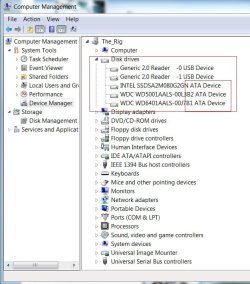
As to which interface your harddrive uses, check it this way: right-click on 'Computer', select 'Computer Management', on the left select 'Device Manager', and on the right expand the 'Disk Drives' section.

If you could post a screenshot of that window so we can see the harddrive model numbers, we should be able to tell you whether or not your drive is SATA or IDE.

The only other method I can think of off-hand is for you to open your case and look at what cable the drive connects to the motherboard with.


Also, to help us help you, you might want to fill in your system specs, I'd suggest using Speccy http://www.piriform.com/speccyto get the information (it's free and shows a good amount of information).
 

My Computer My Computer

At a glance

Win 10 x64 Pro x64 / Ubuntu 15.10 x64Intel i7-4960X4x8GB Corsair Dominator Platinum @2400MHz 10-...2x MSI GTX780Ti 3GB (SLI)
Computer type
PC/Desktop
OS
Win 10 x64 Pro x64 / Ubuntu 15.10 x64
CPU
Intel i7-4960X
Motherboard
Asus Rampage IV Black Edition
Memory
4x8GB Corsair Dominator Platinum @2400MHz 10-12-12-31
Graphics Card(s)
2x MSI GTX780Ti 3GB (SLI)
Sound Card
Onboard SupremeFX (Cirrus Logic CS4398)
Monitor(s) Displays
3x LG Cinema 27" IPS LED (27MP65)
Screen Resolution
[1920x1080]x3
Hard Drives
Crucial M500 120GB, Crucial M500 480GB, Toshiba DT01ACA200 2TB
PSU
CoolerMaster V1000
Case
Corsair Obsidian 750D
Cooling
ThermalTake Water 3.0 Extreme, 4xSP120, 3xAF120
Keyboard
Moshi Luna
Mouse
Logitech G700s / Roccat Tyon
Internet Speed
4Mb uncapped ADSL (Afrihost)
Antivirus
MS Security Essentials
Browser
Chrome... Duh. (:
Hello bagavan.


This, in the snip below, is what ZaLiTH is asking for, if yours says "ATA" like mine then you may be able to use this function; also have a look at these articles, at the links below to get a better understanding of some of the functions of the AHCI controller.

Advanced Host Controller Interface

Native Command Queing
click to enlarge
ATA.jpg
 

My Computer My Computer

At a glance

W 7 64-bit UltimateIntel Q9550 Yorkfield8GB Dominator 8500C5DATI : XFX 5870
Computer Manufacturer/Model Number
* BFK Customs *
OS
W 7 64-bit Ultimate
CPU
Intel Q9550 Yorkfield
Motherboard
ASUS P5Q Pro
Memory
8GB Dominator 8500C5D
Graphics Card(s)
ATI : XFX 5870
Sound Card
Realtek HD Audio 7-1
Monitor(s) Displays
1x 47" LCD HDMI & 3x 26" LCD HDMI
Screen Resolution
1920x1080P & 1920x1200
Hard Drives
1x 80GB Intel X25-M G2 SSD : 1x 500GB & 1x 640GB WD Caviar Black(s)
PSU
Corsair 620HX
Case
Cooler Master RC-690
Cooling
Tuniq Tower 120, 2x 140mm and 3x 120mm case fans
Keyboard
Microsoft 500
Mouse
Razer Diamondback 3G
Internet Speed
14 Mb/s
Other Info
1x Koutech 3Gb/s SATA HDD Hot Swap Rack
I am posting a screenshot of my hard disk model..
 

Attachments

  • hdd.PNG
    hdd.PNG
    1.2 KB · Views: 1,117

My Computer My Computer

At a glance

Windows 8 Professional x64core 2 duo T55504 GBGMA X3100
Computer Manufacturer/Model Number
aspire 5920
OS
Windows 8 Professional x64
CPU
core 2 duo T5550
Memory
4 GB
Graphics Card(s)
GMA X3100
Hard Drives
160 GB + 320 GB
Internet Speed
2 mbps
Hello bagavan.


This, in the snip below, is what ZaLiTH is asking for, if yours says "ATA" like mine then you may be able to use this function; also have a look at these articles, at the links below to get a better understanding of some of the functions of the AHCI controller.

Advanced Host Controller Interface

Native Command Queingclick to enlarge
View attachment 89763
Thanks BFK.. I'm at work on my *cough cough* crappy XP machine at the moment. Otherwise I would've put up an example screenshot of that...

I am posting a screenshot of my hard disk model..
I don't even need to Google that one.. Lol. Western Digital Blue drive, 160GB SATA. So, in short; yes, you can use AHCI and yes, you may quite possibly see a small improvement in performance.

One thing I'd suggest, read my comments (and maybe the posts above and below it to get a better idea of the conversation that went on) over here (link). Using AHCI doesn't guarantee a performance boost.
 

My Computer My Computer

At a glance

Win 10 x64 Pro x64 / Ubuntu 15.10 x64Intel i7-4960X4x8GB Corsair Dominator Platinum @2400MHz 10-...2x MSI GTX780Ti 3GB (SLI)
Computer type
PC/Desktop
OS
Win 10 x64 Pro x64 / Ubuntu 15.10 x64
CPU
Intel i7-4960X
Motherboard
Asus Rampage IV Black Edition
Memory
4x8GB Corsair Dominator Platinum @2400MHz 10-12-12-31
Graphics Card(s)
2x MSI GTX780Ti 3GB (SLI)
Sound Card
Onboard SupremeFX (Cirrus Logic CS4398)
Monitor(s) Displays
3x LG Cinema 27" IPS LED (27MP65)
Screen Resolution
[1920x1080]x3
Hard Drives
Crucial M500 120GB, Crucial M500 480GB, Toshiba DT01ACA200 2TB
PSU
CoolerMaster V1000
Case
Corsair Obsidian 750D
Cooling
ThermalTake Water 3.0 Extreme, 4xSP120, 3xAF120
Keyboard
Moshi Luna
Mouse
Logitech G700s / Roccat Tyon
Internet Speed
4Mb uncapped ADSL (Afrihost)
Antivirus
MS Security Essentials
Browser
Chrome... Duh. (:
what about raid?is it available?
 

My Computer My Computer

At a glance

Windows 8 Professional x64core 2 duo T55504 GBGMA X3100
Computer Manufacturer/Model Number
aspire 5920
OS
Windows 8 Professional x64
CPU
core 2 duo T5550
Memory
4 GB
Graphics Card(s)
GMA X3100
Hard Drives
160 GB + 320 GB
Internet Speed
2 mbps
what about raid?is it available?
That would depend on your motherboard; your motherboard would have to support RAID. You can get your motherboard make and model number from Device Manager as well, or if you get Speccy (link in my post above).

Just keep in mind if you do want to set up RAID, you need at least two drives, the closer they are in make / model / size the better. But to do so, whatever information you currently have on them will be lost when creating the RAID array... So unless you're going to buy two new drives and set up RAID from the start, or have enough space to backup everything to a separate drive, it isn't really too practical to try set it up.
 

My Computer My Computer

At a glance

Win 10 x64 Pro x64 / Ubuntu 15.10 x64Intel i7-4960X4x8GB Corsair Dominator Platinum @2400MHz 10-...2x MSI GTX780Ti 3GB (SLI)
Computer type
PC/Desktop
OS
Win 10 x64 Pro x64 / Ubuntu 15.10 x64
CPU
Intel i7-4960X
Motherboard
Asus Rampage IV Black Edition
Memory
4x8GB Corsair Dominator Platinum @2400MHz 10-12-12-31
Graphics Card(s)
2x MSI GTX780Ti 3GB (SLI)
Sound Card
Onboard SupremeFX (Cirrus Logic CS4398)
Monitor(s) Displays
3x LG Cinema 27" IPS LED (27MP65)
Screen Resolution
[1920x1080]x3
Hard Drives
Crucial M500 120GB, Crucial M500 480GB, Toshiba DT01ACA200 2TB
PSU
CoolerMaster V1000
Case
Corsair Obsidian 750D
Cooling
ThermalTake Water 3.0 Extreme, 4xSP120, 3xAF120
Keyboard
Moshi Luna
Mouse
Logitech G700s / Roccat Tyon
Internet Speed
4Mb uncapped ADSL (Afrihost)
Antivirus
MS Security Essentials
Browser
Chrome... Duh. (:
first off, greetings,

So I followed the steps as mentioned in post 1 BUT when I get to step 4 and despite several restarts, I only see pic1 (installing) without the notes for a restart next to ata channels 1,0,2 and have never seen pic2 in step 4 (driver installation which reads "ready to use")..

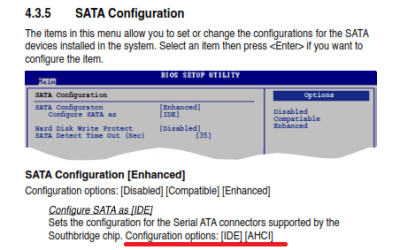
I think that I should also mention that when in my bios, the Asus P5KC, although provides a listing for sata configuration, (and the manual notes both IDE and ACHI) ACHI is nowhere to be seen !!! I can only find it in "Advanced device configuration" under the J-Micron eSATA/PATA controller.. which is what I changed and saw some of the drivers being installed..

any assistance would be appreciated..
 

My Computer My Computer

At a glance

sevenq66004gbhd2600pro
OS
seven
CPU
q6600
Motherboard
asus p5kc
Memory
4gb
Graphics Card(s)
hd2600pro
Welcome to Seven Forums.

According to your Asus P5KC motherboard manual it doesn't support AHCI or RAID only IDE.

Only your J-Micron eSATA/PATA controller has it.
 

My Computer My Computer

At a glance

Windows 7 Ult x64 - SP1/ Windows 8 Pro x64Intel Core i5-3570K 4.6GHz8GB (2X4GB) DDR3 1600 Corsair Vengeance CL8 1.5vSapphire HD 7770 Vapor-X OC 1GB DDR5
Computer type
PC/Desktop
Computer Manufacturer/Model Number
76~2.0
OS
Windows 7 Ult x64 - SP1/ Windows 8 Pro x64
CPU
Intel Core i5-3570K 4.6GHz
Motherboard
Gigabyte GA-Z77X UD3H, f18
Memory
8GB (2X4GB) DDR3 1600 Corsair Vengeance CL8 1.5v
Graphics Card(s)
Sapphire HD 7770 Vapor-X OC 1GB DDR5
Sound Card
Onboard VIA VT2021
Monitor(s) Displays
22" LCD Dell
Screen Resolution
1680x1050
Hard Drives
Samsung 840Pro 128GB SSD,
Seagate Barracuda 500GB SATA2 7200rpm 32MB cache, Seagate Barracuda 1TB SATA2 7200rpm 32MB cache,
PSU
Corsair HX650W
Case
Cooler Master Storm Scout
Cooling
Corsair H80 2x12cm Noctua NF P12 , 2x14cm case fans
Keyboard
Logitech Wave
Mouse
CM Sentinel
Internet Speed
Dismal
Antivirus
Avast
Browser
Opera Next
Other Info
Haswell laptop: HP Envy 17t-j, i7-4700MQ, GeForce 740M 2GB DDR3, 17.3" Full HD 1920x1080, 16GB RAM, Samsung 840 Pro 128GB, 1TB Hitachi 7200 HDD,
Desktop: eSATA ports,
External eSATA Seagate 500GB SATA2 7200rpm,
External WD USB 500GB
Hi Dave..
Are you sure, did I misunderstand the following?
 

Attachments

  • Untitled.png
    Untitled.png
    18.2 KB · Views: 476

My Computer My Computer

At a glance

sevenq66004gbhd2600pro
OS
seven
CPU
q6600
Motherboard
asus p5kc
Memory
4gb
Graphics Card(s)
hd2600pro
Had a hard time finding your manual.

The first time, the AHCI option wasn't there.

Were you able to find it in the BIOS?
At the place in BIOS you posted does it give you a SATA option?

This might be a motherboard version issue or BIOS version issue.

Do you have the last BIOS version installed?
 

My Computer My Computer

At a glance

Windows 7 Ult x64 - SP1/ Windows 8 Pro x64Intel Core i5-3570K 4.6GHz8GB (2X4GB) DDR3 1600 Corsair Vengeance CL8 1.5vSapphire HD 7770 Vapor-X OC 1GB DDR5
Computer type
PC/Desktop
Computer Manufacturer/Model Number
76~2.0
OS
Windows 7 Ult x64 - SP1/ Windows 8 Pro x64
CPU
Intel Core i5-3570K 4.6GHz
Motherboard
Gigabyte GA-Z77X UD3H, f18
Memory
8GB (2X4GB) DDR3 1600 Corsair Vengeance CL8 1.5v
Graphics Card(s)
Sapphire HD 7770 Vapor-X OC 1GB DDR5
Sound Card
Onboard VIA VT2021
Monitor(s) Displays
22" LCD Dell
Screen Resolution
1680x1050
Hard Drives
Samsung 840Pro 128GB SSD,
Seagate Barracuda 500GB SATA2 7200rpm 32MB cache, Seagate Barracuda 1TB SATA2 7200rpm 32MB cache,
PSU
Corsair HX650W
Case
Cooler Master Storm Scout
Cooling
Corsair H80 2x12cm Noctua NF P12 , 2x14cm case fans
Keyboard
Logitech Wave
Mouse
CM Sentinel
Internet Speed
Dismal
Antivirus
Avast
Browser
Opera Next
Other Info
Haswell laptop: HP Envy 17t-j, i7-4700MQ, GeForce 740M 2GB DDR3, 17.3" Full HD 1920x1080, 16GB RAM, Samsung 840 Pro 128GB, 1TB Hitachi 7200 HDD,
Desktop: eSATA ports,
External eSATA Seagate 500GB SATA2 7200rpm,
External WD USB 500GB
Nope, the "Configure SATA as" option only gives me the choice of IDE, nothing about ACHI.. Even did a new install of 7 and since I unfortunately could only alter the J-Micron through BIOS did see the previously "hidden" driver installation.. But I'm guessing that since it can't be found in the BIOS (I mean the configure SATA option), it must be related to the J-Micron.

ASUS doesn't provide win7 BIOS for this board,so I went from my original XP64bit to a Vista64 (both were latest versions) hoping that that might do the trick.. but no success.
 

My Computer My Computer

At a glance

sevenq66004gbhd2600pro
OS
seven
CPU
q6600
Motherboard
asus p5kc
Memory
4gb
Graphics Card(s)
hd2600pro
OK so I tried out the J-Micron with a fresh install of 7..
HDTune does see the HD as SATA and UDMA6 (which I guess means that everything is working fine) but the results simply don't justify the whole fuss. (identical if not worse than those while on IDE and of course worse than how I've seen the HD perform on various online reviews)

I'm guessing that I must have missed some really obvious setting that I shouldn't have.
Any help appreciated.
 

My Computer My Computer

At a glance

sevenq66004gbhd2600pro
OS
seven
CPU
q6600
Motherboard
asus p5kc
Memory
4gb
Graphics Card(s)
hd2600pro
OK so I tried out the J-Micron with a fresh install of 7..
HDTune does see the HD as SATA and UDMA6 (which I guess means that everything is working fine) but the results simply don't justify the whole fuss. (identical if not worse than those while on IDE and of course worse than how I've seen the HD perform on various online reviews)

I'm guessing that I must have missed some really obvious setting that I shouldn't have.
Any help appreciated.
Dave76 had a valid point earlier; while the JMicron JMB363 controller itself supports SATA / AHCI / RAID, you specific motherboard chipset may not make use of all that controller's features.

The manual appears to be wrong as it refers to RAID which the ICH7 can not support.[/quote]So, I would highly recommend getting SIW and having a look at the exact chipset setup you're running on that board.
 

My Computer My Computer

At a glance

Win 10 x64 Pro x64 / Ubuntu 15.10 x64Intel i7-4960X4x8GB Corsair Dominator Platinum @2400MHz 10-...2x MSI GTX780Ti 3GB (SLI)
Computer type
PC/Desktop
OS
Win 10 x64 Pro x64 / Ubuntu 15.10 x64
CPU
Intel i7-4960X
Motherboard
Asus Rampage IV Black Edition
Memory
4x8GB Corsair Dominator Platinum @2400MHz 10-12-12-31
Graphics Card(s)
2x MSI GTX780Ti 3GB (SLI)
Sound Card
Onboard SupremeFX (Cirrus Logic CS4398)
Monitor(s) Displays
3x LG Cinema 27" IPS LED (27MP65)
Screen Resolution
[1920x1080]x3
Hard Drives
Crucial M500 120GB, Crucial M500 480GB, Toshiba DT01ACA200 2TB
PSU
CoolerMaster V1000
Case
Corsair Obsidian 750D
Cooling
ThermalTake Water 3.0 Extreme, 4xSP120, 3xAF120
Keyboard
Moshi Luna
Mouse
Logitech G700s / Roccat Tyon
Internet Speed
4Mb uncapped ADSL (Afrihost)
Antivirus
MS Security Essentials
Browser
Chrome... Duh. (:
Hi I have a asus p5qpl-vm epu motherboard, I followed all the steps. When I get to BIOS I can't find the AHCI. Where can I find this?

Thanks
 

My Computer My Computer

At a glance

Windows 7 64 bit
OS
Windows 7 64 bit
Hello futureaviator, welcome to Seven Forums!


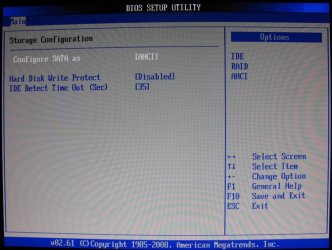
I have a P5Q Pro and this is where AHCI is for my board.


click to enlarge
SATA.JPG
 

My Computer My Computer

At a glance

W 7 64-bit UltimateIntel Q9550 Yorkfield8GB Dominator 8500C5DATI : XFX 5870
Computer Manufacturer/Model Number
* BFK Customs *
OS
W 7 64-bit Ultimate
CPU
Intel Q9550 Yorkfield
Motherboard
ASUS P5Q Pro
Memory
8GB Dominator 8500C5D
Graphics Card(s)
ATI : XFX 5870
Sound Card
Realtek HD Audio 7-1
Monitor(s) Displays
1x 47" LCD HDMI & 3x 26" LCD HDMI
Screen Resolution
1920x1080P & 1920x1200
Hard Drives
1x 80GB Intel X25-M G2 SSD : 1x 500GB & 1x 640GB WD Caviar Black(s)
PSU
Corsair 620HX
Case
Cooler Master RC-690
Cooling
Tuniq Tower 120, 2x 140mm and 3x 120mm case fans
Keyboard
Microsoft 500
Mouse
Razer Diamondback 3G
Internet Speed
14 Mb/s
Other Info
1x Koutech 3Gb/s SATA HDD Hot Swap Rack
Hi ZaLiTH
Well the P5KC doesn't have an ICH7 but an ICH9 which can support AHCI so I really can't say what the issue with the J-Micron was, but anyway, all's well since I finally got around it..
I read in the ASUS forums about AHCI being disabled/removed from P5KC BIOS.. so after some reading, I crossflashed the P5KC with Kokakey and gave the mobo P5KR BIOS and by doing so got AHCI :party:
The only issue now seems to be that the Ethernet port, while fully functional, won't let me connect to the internet.. but I guess that that's a whole differet thread.

Thanks for all the help.
 

My Computer My Computer

At a glance

sevenq66004gbhd2600pro
OS
seven
CPU
q6600
Motherboard
asus p5kc
Memory
4gb
Graphics Card(s)
hd2600pro
Good news you found the solution to the AHCI problem.

Thanks for letting us know.
 

My Computer My Computer

At a glance

Windows 7 Ult x64 - SP1/ Windows 8 Pro x64Intel Core i5-3570K 4.6GHz8GB (2X4GB) DDR3 1600 Corsair Vengeance CL8 1.5vSapphire HD 7770 Vapor-X OC 1GB DDR5
Computer type
PC/Desktop
Computer Manufacturer/Model Number
76~2.0
OS
Windows 7 Ult x64 - SP1/ Windows 8 Pro x64
CPU
Intel Core i5-3570K 4.6GHz
Motherboard
Gigabyte GA-Z77X UD3H, f18
Memory
8GB (2X4GB) DDR3 1600 Corsair Vengeance CL8 1.5v
Graphics Card(s)
Sapphire HD 7770 Vapor-X OC 1GB DDR5
Sound Card
Onboard VIA VT2021
Monitor(s) Displays
22" LCD Dell
Screen Resolution
1680x1050
Hard Drives
Samsung 840Pro 128GB SSD,
Seagate Barracuda 500GB SATA2 7200rpm 32MB cache, Seagate Barracuda 1TB SATA2 7200rpm 32MB cache,
PSU
Corsair HX650W
Case
Cooler Master Storm Scout
Cooling
Corsair H80 2x12cm Noctua NF P12 , 2x14cm case fans
Keyboard
Logitech Wave
Mouse
CM Sentinel
Internet Speed
Dismal
Antivirus
Avast
Browser
Opera Next
Other Info
Haswell laptop: HP Envy 17t-j, i7-4700MQ, GeForce 740M 2GB DDR3, 17.3" Full HD 1920x1080, 16GB RAM, Samsung 840 Pro 128GB, 1TB Hitachi 7200 HDD,
Desktop: eSATA ports,
External eSATA Seagate 500GB SATA2 7200rpm,
External WD USB 500GB
Thanks BFK.

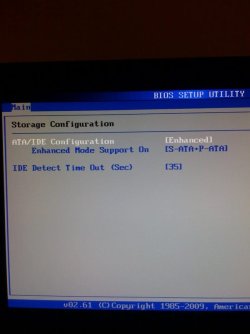
This is what I see in my BIOS. Do I need to update my motherboard?
 

Attachments

  • photo.jpg
    photo.jpg
    29.1 KB · Views: 790

My Computer My Computer

At a glance

Windows 7 64 bit
OS
Windows 7 64 bit
Thanks BFK.

This is what I see in my BIOS. Do I need to update my motherboard?


Hello again.


You could see if "Configure as AHCI" will be offered in a BIOS update, you are aware of the hazards a BIOS update present correct?
 

My Computer My Computer

At a glance

W 7 64-bit UltimateIntel Q9550 Yorkfield8GB Dominator 8500C5DATI : XFX 5870
Computer Manufacturer/Model Number
* BFK Customs *
OS
W 7 64-bit Ultimate
CPU
Intel Q9550 Yorkfield
Motherboard
ASUS P5Q Pro
Memory
8GB Dominator 8500C5D
Graphics Card(s)
ATI : XFX 5870
Sound Card
Realtek HD Audio 7-1
Monitor(s) Displays
1x 47" LCD HDMI & 3x 26" LCD HDMI
Screen Resolution
1920x1080P & 1920x1200
Hard Drives
1x 80GB Intel X25-M G2 SSD : 1x 500GB & 1x 640GB WD Caviar Black(s)
PSU
Corsair 620HX
Case
Cooler Master RC-690
Cooling
Tuniq Tower 120, 2x 140mm and 3x 120mm case fans
Keyboard
Microsoft 500
Mouse
Razer Diamondback 3G
Internet Speed
14 Mb/s
Other Info
1x Koutech 3Gb/s SATA HDD Hot Swap Rack
Back
Top