Solved defrag c: -w -v worked on vista?

pacinitaly

HappyGuru Lovin 2Help
Guru
VIP
Local time
9:06 AM
Messages
1,093
Location
the worst state in america
when I open an elevated cmd on vista x86, and type... defrag c: -w -v
it worked.

on my win7 x64 it does not.


anyone know why?


~Carmine
 

My Computer My Computer

At a glance

windows 7 professional & ultimate 64bit laptops2.27 boost to 2.53 & 2.53 boost to 2.804GBIntel® Graphics Media Accelerator HD
Computer Manufacturer/Model Number
Gateway/NV7923u & NV79C52u Laptops
OS
windows 7 professional & ultimate 64bit laptops
CPU
2.27 boost to 2.53 & 2.53 boost to 2.80
Motherboard
Mobile Intel® HM55 Express Chipset ???
Memory
4GB
Graphics Card(s)
Intel® Graphics Media Accelerator HD
Sound Card
realtek High-definition audio support
Monitor(s) Displays
17.3 " HD 1600 x 900
Hard Drives
hatachi Travelstar 5400 500GB & west digital 500GB
Internet Speed
35MB fios
What is "defrag c: -w -v" supposed to do?
 

My Computer My Computer

At a glance

Windows 7 Professional SP1 64-bitIntel Core i5-2450M @2.5 GHz6 GB DDR3 1333MHzIntel HD 3000
Computer type
Laptop
Computer Manufacturer/Model Number
Toshiba P775-S7100
OS
Windows 7 Professional SP1 64-bit
CPU
Intel Core i5-2450M @2.5 GHz
Memory
6 GB DDR3 1333MHz
Graphics Card(s)
Intel HD 3000
Monitor(s) Displays
Built-in 17.3" LED; 22" Insignia NS-L22Q-10A
Screen Resolution
1600x900; 1360x768
Hard Drives
750 GB Hitachi
1TB Seagate FreeAgent External
Internet Speed
Verizon DSL Speed(Down/Up): 3360 Kbps / 800 Kbps
Antivirus
MSE and MBAM Pro
Browser
IE10
Maybe if you read the help file...
Microsoft Disk Defragmenter
Copyright (c) 2007 Microsoft Corp.

Description:

Locates and consolidates fragmented files on local volumes to
improve system performance.

Syntax:

defrag <volumes> | /C | /E <volumes> [/H] [/M | [/U] [/V]]
defrag <volumes> | /C | /E <volumes> /A [/H] [/M | [/U] [/V]]
defrag <volumes> | /C | /E <volumes> /X [/H] [/M | [/U] [/V]]
defrag <volume> /T [/H] [/U] [/V]

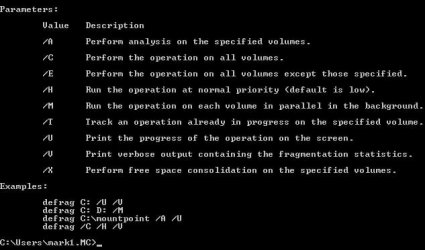
Parameters:

Value Description

/A Perform analysis on the specified volumes.

/C Perform the operation on all volumes.

/E Perform the operation on all volumes except those specified.

/H Run the operation at normal priority (default is low).

/M Run the operation on each volume in parallel in the background.

/T Track an operation already in progress on the specified volume.

/U Print the progress of the operation on the screen.

/V Print verbose output containing the fragmentation statistics.

/X Perform free space consolidation on the specified volumes.

Examples:

defrag C: /U /V
defrag C: D: /M
defrag C:\mountpoint /A /U
defrag /C /H /V
 

My Computer My Computer

At a glance

Windows 10 Pro (x64)Intel Core i7-3930K (3.2GHz - 4.5GHz)4x Samsung 4GB PC3-12800 DDR3 (16GB 1600MHz)Nvidia Geforce GTX 690
Computer type
PC/Desktop
Computer Manufacturer/Model Number
Alienware Aurora ALX R4
OS
Windows 10 Pro (x64)
CPU
Intel Core i7-3930K (3.2GHz - 4.5GHz)
Motherboard
Alienware Aurora-R4 x79
Memory
4x Samsung 4GB PC3-12800 DDR3 (16GB 1600MHz)
Graphics Card(s)
Nvidia Geforce GTX 690
Sound Card
SteelSeries Siberia Elite
Monitor(s) Displays
Dell UltraSharp U3011
Screen Resolution
2560x1600
Hard Drives
Samsung 850 Pro 256 GB, Seagate 1TB Desktop Hybrid HDD, 2x Western Digital 4TB Green HDD
PSU
875W Some Dell PSU <.<
Case
Alienware Aurora ALX
Cooling
Custom Liquid Cooling (EK CPU & GPU blocks) dual EK 480RAD
Keyboard
Logitech G710+ Mechanical
Mouse
Logitech G700s
Internet Speed
Verizon Fios (50 mbps average)
Other Info
Server: Intel NUC D54250WYK: i5-4250U, 16GB, 256 GB mSATA, Windows Server 2012 R2
Maybe if you read the help file...
Microsoft Disk Defragmenter
Copyright (c) 2007 Microsoft Corp.

Description:

Locates and consolidates fragmented files on local volumes to
improve system performance.

Syntax:

defrag <volumes> | /C | /E <volumes> [/H] [/M | [/U] [/V]]
defrag <volumes> | /C | /E <volumes> /A [/H] [/M | [/U] [/V]]
defrag <volumes> | /C | /E <volumes> /X [/H] [/M | [/U] [/V]]
defrag <volume> /T [/H] [/U] [/V]

Parameters:

Value Description

/A Perform analysis on the specified volumes.

/C Perform the operation on all volumes.

/E Perform the operation on all volumes except those specified.

/H Run the operation at normal priority (default is low).

/M Run the operation on each volume in parallel in the background.

/T Track an operation already in progress on the specified volume.

/U Print the progress of the operation on the screen.

/V Print verbose output containing the fragmentation statistics.

/X Perform free space consolidation on the specified volumes.

Examples:

defrag C: /U /V
defrag C: D: /M
defrag C:\mountpoint /A /U
defrag /C /H /V

I did read and I got >c/ again
 

My Computer My Computer

At a glance

windows 7 professional & ultimate 64bit laptops2.27 boost to 2.53 & 2.53 boost to 2.804GBIntel® Graphics Media Accelerator HD
Computer Manufacturer/Model Number
Gateway/NV7923u & NV79C52u Laptops
OS
windows 7 professional & ultimate 64bit laptops
CPU
2.27 boost to 2.53 & 2.53 boost to 2.80
Motherboard
Mobile Intel® HM55 Express Chipset ???
Memory
4GB
Graphics Card(s)
Intel® Graphics Media Accelerator HD
Sound Card
realtek High-definition audio support
Monitor(s) Displays
17.3 " HD 1600 x 900
Hard Drives
hatachi Travelstar 5400 500GB & west digital 500GB
Internet Speed
35MB fios

My Computer My Computer

At a glance

windows 7 professional & ultimate 64bit laptops2.27 boost to 2.53 & 2.53 boost to 2.804GBIntel® Graphics Media Accelerator HD
Computer Manufacturer/Model Number
Gateway/NV7923u & NV79C52u Laptops
OS
windows 7 professional & ultimate 64bit laptops
CPU
2.27 boost to 2.53 & 2.53 boost to 2.80
Motherboard
Mobile Intel® HM55 Express Chipset ???
Memory
4GB
Graphics Card(s)
Intel® Graphics Media Accelerator HD
Sound Card
realtek High-definition audio support
Monitor(s) Displays
17.3 " HD 1600 x 900
Hard Drives
hatachi Travelstar 5400 500GB & west digital 500GB
Internet Speed
35MB fios
Logic Earth posted the list of switches available.

I don't see a W switch.

Why are you attempting a W switch?

Or a V switch for that matter, if all you want to do is a simple defrag.
 

My Computer My Computer

At a glance

Windows 7 Home Premium SP1, 64-bitIntel Skylake i5-6600K, not overclocked8 GB HyperX DDR4-2666 (2 x 4 GB)none; graphics are integrated on CPU
Computer type
PC/Desktop
Computer Manufacturer/Model Number
Ignatz Special; 4 speed manual gearbox; factory air conditioning; one of one
OS
Windows 7 Home Premium SP1, 64-bit
CPU
Intel Skylake i5-6600K, not overclocked
Motherboard
AsRock Z170M Extreme 4, micro ATX
Memory
8 GB HyperX DDR4-2666 (2 x 4 GB)
Graphics Card(s)
none; graphics are integrated on CPU
Sound Card
onboard: Realtek ALC1150; external: USB Behringer UF0-202
Monitor(s) Displays
Dell S2340M 23 inch IPS
Screen Resolution
1600 x 900
Hard Drives
System: Crucial MX100 series SSD, 128 GB;
Data: Samsung Spinpoint 103SJ, 1 TB;
Backup: WD Caviar Green WD30EZRX-00D8PB0, 3 TB
PSU
Rosewill SilentNight 500 watt fanless, semi-modular
Case
Antec Solo II
Cooling
Noctua NH-U12S; Noctua F12 intake, Noctua S12A exhaust
Keyboard
Microsoft 200 6JH-00001 USB
Mouse
Dell or Microsoft optical wired; USB
Antivirus
Microsoft Security Essentials and Malwarebytes Premium
Browser
Pale Moon
Other Info
All fans PWM; speeds at idle: CPU circa 500 rpm; intake circa 600 rpm; exhaust circa 600 rpm; CPU temps 27 idle and 47 C load in a warm room (27 C/81 F) when running Intel Extreme Tuning Utility stress test.
These are the only options:
 

Attachments

  • defrag.jpg
    defrag.jpg
    28.9 KB · Views: 63

My Computer My Computer

At a glance

Systems 1 and 2: Windows 7 Enterprise x64, Wi...System 1: i7 [email protected], System 2: AMD FX-41...System 1: 8GB System 2: 8GBSystem 1: ATI FirePro V4800 System 2: Radeon ...
Computer Manufacturer/Model Number
Dell and Custom
OS
Systems 1 and 2: Windows 7 Enterprise x64, Win 8 Developer
CPU
System 1: i7 [email protected], System 2: AMD FX-4100 Zambezi 3.6G
Motherboard
System 1:Dell 06NWYK System 2: ASUS M5A97 AM3+
Memory
System 1: 8GB System 2: 8GB
Graphics Card(s)
System 1: ATI FirePro V4800 System 2: Radeon HD 6850
Sound Card
System 1: onboard System 2: onboard
Monitor(s) Displays
System1: Viewsonic HDMI 24"
Screen Resolution
System 1: 1920x1080 System 2: 1920x1080
Hard Drives
System 1: Mirrored .5B drives System 2: Seagate Barracuda ST1000DM003 1TB 7200 RPM 64MB Cache SATA 6.0Gb/s
Case
System 1: Dell System 2: Cooler Master
Internet Speed
10 MBPS
The /W switch is described as "Performs full defragmentation. Attempts to consolidate all file fragments, regardless of their size." What this implies is that file fragments larger than 64 mb too are optimized, this is simply not the case in win7 which ignores the larger chunks. You can read all about the benefits of this change in design in this blog.

Disk Defragmentation – Background and Engineering the Windows 7 Improvements - Engineering Windows 7 - Site Home - MSDN Blogs

So, theres no point in using the -w switch.
 

My Computer My Computer

At a glance

Windows 7 x64 pro/ Windows 7 x86 Pro/ XP SP3 x86
Computer Manufacturer/Model Number
Too many to describe...
OS
Windows 7 x64 pro/ Windows 7 x86 Pro/ XP SP3 x86
On Vista, defrag -w does a full fragmentation and consolidation regardless of file size - Windows 7's defrag was changed so this is no longer necessary as the previous poster mentioned, so there's no need for a -w option anymore (Win7 does add the -x option, which tries to consolidate free space as well, although you must run -x separate from other options).
 

My Computer My Computer

At a glance

Windows 10 Pro x64Intel Core i7 4790K @ 4.5GHz32GB DDR3Nvidia GeForce GTX970
Computer type
PC/Desktop
Computer Manufacturer/Model Number
Custom
OS
Windows 10 Pro x64
CPU
Intel Core i7 4790K @ 4.5GHz
Motherboard
Asus Maximus Hero VII
Memory
32GB DDR3
Graphics Card(s)
Nvidia GeForce GTX970
Sound Card
Realtek HD Audio
Screen Resolution
1920x1200
Hard Drives
1x Samsung 250GB SSD
4x WD RE 2TB (RAIDZ)
PSU
Corsair AX760i
Case
Fractal Design Define R4
Cooling
Noctua NH-D15
The /W switch is described as "Performs full defragmentation. Attempts to consolidate all file fragments, regardless of their size." What this implies is that file fragments larger than 64 mb too are optimized, this is simply not the case in win7 which ignores the larger chunks. You can read all about the benefits of this change in design in this blog.

Disk Defragmentation – Background and Engineering the Windows 7 Improvements - Engineering Windows 7 - Site Home - MSDN Blogs

So, theres no point in using the -w switch.

On Vista, defrag -w does a full fragmentation and consolidation regardless of file size - Windows 7's defrag was changed so this is no longer necessary as the previous poster mentioned, so there's no need for a -w option anymore (Win7 does add the -x option, which tries to consolidate free space as well, although you must run -x separate from other options).


thank you guys
 

My Computer My Computer

At a glance

windows 7 professional & ultimate 64bit laptops2.27 boost to 2.53 & 2.53 boost to 2.804GBIntel® Graphics Media Accelerator HD
Computer Manufacturer/Model Number
Gateway/NV7923u & NV79C52u Laptops
OS
windows 7 professional & ultimate 64bit laptops
CPU
2.27 boost to 2.53 & 2.53 boost to 2.80
Motherboard
Mobile Intel® HM55 Express Chipset ???
Memory
4GB
Graphics Card(s)
Intel® Graphics Media Accelerator HD
Sound Card
realtek High-definition audio support
Monitor(s) Displays
17.3 " HD 1600 x 900
Hard Drives
hatachi Travelstar 5400 500GB & west digital 500GB
Internet Speed
35MB fios
The -w switch seems to work here on my computer Windows 7 64bits SP1. It is not listed when you defrag /? but there is also no error message.

Another undocumented switch is the /b (boot optimization) which only works on the boot volume.
 

My Computer My Computer

At a glance

Windows 7 64 bit Ultimate
OS
Windows 7 64 bit Ultimate
ohh well
 

Attachments

  • qgat.JPG
    qgat.JPG
    42 KB · Views: 28

My Computer My Computer

At a glance

windows 7 professional & ultimate 64bit laptops2.27 boost to 2.53 & 2.53 boost to 2.804GBIntel® Graphics Media Accelerator HD
Computer Manufacturer/Model Number
Gateway/NV7923u & NV79C52u Laptops
OS
windows 7 professional & ultimate 64bit laptops
CPU
2.27 boost to 2.53 & 2.53 boost to 2.80
Motherboard
Mobile Intel® HM55 Express Chipset ???
Memory
4GB
Graphics Card(s)
Intel® Graphics Media Accelerator HD
Sound Card
realtek High-definition audio support
Monitor(s) Displays
17.3 " HD 1600 x 900
Hard Drives
hatachi Travelstar 5400 500GB & west digital 500GB
Internet Speed
35MB fios
The -w switch seems to work here on my computer Windows 7 64bits SP1. It is not listed when you defrag /? but there is also no error message.
Allowing the app to run with a particular switch option with no feedback and actually doing something are two different things ;).
 

My Computer My Computer

At a glance

Windows 10 Pro x64Intel Core i7 4790K @ 4.5GHz32GB DDR3Nvidia GeForce GTX970
Computer type
PC/Desktop
Computer Manufacturer/Model Number
Custom
OS
Windows 10 Pro x64
CPU
Intel Core i7 4790K @ 4.5GHz
Motherboard
Asus Maximus Hero VII
Memory
32GB DDR3
Graphics Card(s)
Nvidia GeForce GTX970
Sound Card
Realtek HD Audio
Screen Resolution
1920x1200
Hard Drives
1x Samsung 250GB SSD
4x WD RE 2TB (RAIDZ)
PSU
Corsair AX760i
Case
Fractal Design Define R4
Cooling
Noctua NH-D15
Back
Top