System Imaging as Additional Protection

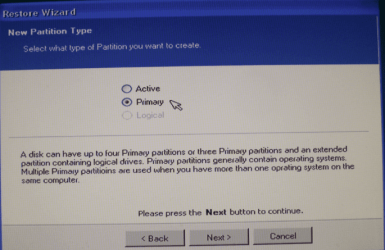
My guess would be that the problem came from the fact that you declared the partition as Active and not as Primary.
 

Attachments

  • 2010-03-25_1805.png
    2010-03-25_1805.png
    119.4 KB · Views: 5

My Computer My Computer

Computer Manufacturer/Model Number
HP, Dell, Gateway, Toshiba - 4 laptops and 2 desktops
OS
Vista, Windows7, Mint Mate, Zorin, Windows 8
CPU
from 1.6GHz Duo to i7
Monitor(s) Displays
2x HP w2207
Hard Drives
5x HDD, 7x SSD, 12x Externals
Keyboard
with trackball - no mices
Mouse
Trackball mice
Internet Speed
DSL 6000
Of course there is one other alternative to this hidden partition debate.

If you use diskpart to create a single partion when initially installing Windows, the hidden partition will never be created.
It will be created as a hidden folder on the OS partition instead.


Going this route, this eliminates the need to back up or restore the MBR at all doesn't it?
The single partiton should also be active.
 

My Computer My Computer

Computer Manufacturer/Model Number
Custom (Self Build)
OS
Windows 7 Home Premium 64bit
CPU
Intel Core i7 2700k
Motherboard
eVGA P67 SLI
Memory
8GB Mushkin Redline Ridgebacks @1866
Graphics Card(s)
EVGA GTX570 SC
Sound Card
XiFi Titanium HD
Monitor(s) Displays
LG W2453V
Screen Resolution
1920x1080
Hard Drives
Intel 320 80GB -- Intel X25-V 40GB --WD Black 1TB x2 -- WD Blue 640GB
PSU
Seasonic x750
Case
Corsair 600T SE White
Cooling
eVGA Superclocked CPU Cooler
Keyboard
Saitek Cyborg
Antivirus
Kaspersky
Browser
IE
Other Info
LG BD/DVD
My guess would be that the problem came from the fact that you declared the partition as Active and not as Primary.

Please bear with me, but I am trying to understand the many and varied differences in using Macruim Reflect to restore Vista and Win 7. Every one of the dozens of times I used Reflect to restore an Image in Vista I did so with it as an active partition with 100% success.

Are you saying that with Win 7 the Image that the OS is on must be restored as a Primary partition all by itself without restoring the MBR or the 100 MB active boot partition and that jimbo45's admonition:

"If you image the system (or at least the OS partition) using non MS software such as Acronis / Macrium etc. etc. there is often a hidden small SYSTEM partition. On restore you might get a BSOD on booting up the system. The problem is caused by a change in W7 to the boot manager" is baseless and should be ignored?

Again, please bear with me because I need to know precisely what to do next time I'm in the PE and at the moment I'm getting two opposite sets of instructions of how to restore an Image with Macrium Reflect in Win 7. Thanks for your patience.

~Maxx~
 

My Computer My Computer

Computer Manufacturer/Model Number
HP HPE 270f
OS
Windows 7 x64 Home Premium
CPU
Intel Core i7 930 @ 2.8 Ghz Socket 1366 LGA
Motherboard
Pegatron Truckee v1.04E41
Memory
8 GB 1366 Mhz DDR3 (PC3-10700) RAM
Graphics Card(s)
ATI Radeon 5770 1 GB DDR5 RAM
Sound Card
Realtech High Definition
Monitor(s) Displays
32" Sony Bravia
Screen Resolution
1366 X 768
Hard Drives
Intel 25nm 120 GB Series 320 SSD HD Tune- 265 MBps Read/ 130 MBps Write

LaCie 1TB + 1TB RAID 0 eSATA Drive HD Tune- 160 MBps Read/ 90 MBps Write
Keyboard
Logitech Illuminated
Mouse
Logitech MX Revolution
Internet Speed
36.4 Mbps Maximum on a 37 Mbps Motorola SB501 Modem
If you have the 100MB partion:

The 100MB hidden partition is the Active partition.

The partition Win7 is installed is a Primary


If you install without the Hidden partition, The entire partition is "Active" just like Vista.
 

My Computer My Computer

Computer Manufacturer/Model Number
Custom (Self Build)
OS
Windows 7 Home Premium 64bit
CPU
Intel Core i7 2700k
Motherboard
eVGA P67 SLI
Memory
8GB Mushkin Redline Ridgebacks @1866
Graphics Card(s)
EVGA GTX570 SC
Sound Card
XiFi Titanium HD
Monitor(s) Displays
LG W2453V
Screen Resolution
1920x1080
Hard Drives
Intel 320 80GB -- Intel X25-V 40GB --WD Black 1TB x2 -- WD Blue 640GB
PSU
Seasonic x750
Case
Corsair 600T SE White
Cooling
eVGA Superclocked CPU Cooler
Keyboard
Saitek Cyborg
Antivirus
Kaspersky
Browser
IE
Other Info
LG BD/DVD
If you have the 100MB partion:

The 100MB hidden partition is the Active partition.

The partition Win7 is installed is a Primary

Wishmaster- Thanks for all of your help! This quote from Nick over at the Macrium Forums brought what you've said into crystal clear focus regarding how to use Macrium Reflect to restore a Backup Image in Win.7...

"Some, not all, Windows 7 installations include a hidden, 100MB 'System Reserved' partition. If this partition exists then it is the 'Active' partition on the system and contains the Boot Configuration Data (BCD).

If your PC has a 'System Reserved' partition:

1. When restoring back to the original disk restore your 'C' partition as 'Primary' not 'Active'. It isn't necessary to restore the SR partition.

2. If you are restoring to a new/different disk then you should first restore the SR partition as 'Active' then 'C' as 'Primary'. Do not increase the size of the SR partition.

3. If you take the fix boot problems then make the SR the 'Active' partition.

If your PC doesn't have a 'System Reserved' partition:

1. Restore 'C' as the 'Active' partition.

2. If you take the fix boot problems then make 'C' the 'Active' partition."


Hope this helps

Nick - Macrium Support

~Maxx~
 
Last edited:

My Computer My Computer

Computer Manufacturer/Model Number
HP HPE 270f
OS
Windows 7 x64 Home Premium
CPU
Intel Core i7 930 @ 2.8 Ghz Socket 1366 LGA
Motherboard
Pegatron Truckee v1.04E41
Memory
8 GB 1366 Mhz DDR3 (PC3-10700) RAM
Graphics Card(s)
ATI Radeon 5770 1 GB DDR5 RAM
Sound Card
Realtech High Definition
Monitor(s) Displays
32" Sony Bravia
Screen Resolution
1366 X 768
Hard Drives
Intel 25nm 120 GB Series 320 SSD HD Tune- 265 MBps Read/ 130 MBps Write

LaCie 1TB + 1TB RAID 0 eSATA Drive HD Tune- 160 MBps Read/ 90 MBps Write
Keyboard
Logitech Illuminated
Mouse
Logitech MX Revolution
Internet Speed
36.4 Mbps Maximum on a 37 Mbps Motorola SB501 Modem
Of course there is one other alternative to this hidden partition debate.

If you use diskpart to create a single partion when initially installing Windows, the hidden partition will never be created.
It will be created as a hidden folder on the OS partition instead.


Going this route, this eliminates the need to back up or restore the MBR at all doesn't it?
The single partiton should also be active.

I've often recommended this as it makes backup / restore far simpler.

After you've installed Windows 7 the first time you can then use something like GPARTED (Free download) to "shrink" the partition to say 60 or so GB and then partition the rest of your disk how you want it -- I have one partition for Data, one for Web related stuff and one for multi-media (audio / video).

If you have more than one HDD use a SEPARATE disk for Windows paging area and any photoshop scratch files. Moving photoshop scratch files on to a separate disk from the OS will improve performance.

Cheers
jim
 

My Computer My Computer

Computer type
PC/Desktop
Computer Manufacturer/Model Number
Custom built, several laptops HP/ASUS
OS
Linux CENTOS 7 / various Windows OS'es and servers
CPU
Intel i7 Intel i5
Memory
8GB, 16GB
Graphics Card(s)
On Motherboard
Sound Card
Realtek HD audio
Monitor(s) Displays
Apple Cinema display, Samsung LCD
Screen Resolution
1920 X 1080
Hard Drives
4 X 1TB SATA
Mouse
Toshiba wireless laser
Internet Speed
> 20MB up
Maxxwire, I think Wishmaster clarified the "Active" question. If you mark a partition (e.g. C) as Active, the BIOS will be looking on that partition for the MBR. But if the MBR is on the 100MB partition, it will not find it and you get the error that you have seen.
In your Vista examples you did not have that 100MB partition and the MBR was on C. So it was the active partition by default.
 

My Computer My Computer

Computer Manufacturer/Model Number
HP, Dell, Gateway, Toshiba - 4 laptops and 2 desktops
OS
Vista, Windows7, Mint Mate, Zorin, Windows 8
CPU
from 1.6GHz Duo to i7
Monitor(s) Displays
2x HP w2207
Hard Drives
5x HDD, 7x SSD, 12x Externals
Keyboard
with trackball - no mices
Mouse
Trackball mice
Internet Speed
DSL 6000
Excellent article Wishmaster.

This should be sticky'ed here and on several other forums.

This is good information that everyone should know about.


Excellent Post :D

I had a look at Macruim the other day but there doesn't seem to be a bootable USB option, unless I'm not looking hard enough (only saw CD/DVD creation available) which is my main reason for using PDB, I can do a backup & restore all from the bootable USB.

Use it with my Netbook as well.

With free Macrium you can image to a USB stick, but the recovery CD must be a CD. There is no stick option.

Macrium Reflect has a Linux based rescue CD, which comes as an ISO file.
This can be put on a USB memory stick when you use a bootable app on the root of the USB memory stick.

It's quick and easy to do, you can add many helpful apps to the bootable memory stick.

The Seven forums tuts are good.

MS-DOS Bootable Flash Drive - Create

Install Windows 7 from USB Pen Drive Using Grub4Dos

Using the same source and Grub method mentioned above, the Corsair site has a nice version:

How to Create the Ultimate Bootable USB Flash Drive.

Info on editing the menu: The Ultimate USB Flash Drive — Advanced Features

Select the utility you wish to use and it will be loaded. The versatility of this tool is apparent once you begin to use it. The two default utilities, Memtest86+ and FreeDOS, are invaluable during system builds and trouble shooting.

Your flash drive can become a virtual toolbox of utilities that you can carry in your pocket as opposed to carrying archaic floppy disks or bulky CDs and DVDs. You also have the option of far greater storage capacity when using a USB flash drive. Your USB flash drive will still be fully functional as a removable storage drive. This is a great tool for testing memory or running programs from a DOS prompt such as firmware or BIOS updaters. The only real limits are the drive size and your creativity.
After the bootable USB memory stick is prepared just add the program ISO file and do a quick edit of the menu, you'll have a menu list to choose from when you boot from it.

You can add ISO files, edit the menu so they are listed.
Add any files/folders and still use you USB memory stick as you would normally.

I used this last method and added Macrium Reflect's rescue CD ISO (Rescue ISO - Disc Image File) file and it runs perfectly.

 
Last edited:

My Computer My Computer

Computer type
PC/Desktop
Computer Manufacturer/Model Number
76~2.0
OS
Windows 7 Ult x64 - SP1/ Windows 8 Pro x64
CPU
Intel Core i5-3570K 4.6GHz
Motherboard
Gigabyte GA-Z77X UD3H, f18
Memory
8GB (2X4GB) DDR3 1600 Corsair Vengeance CL8 1.5v
Graphics Card(s)
Sapphire HD 7770 Vapor-X OC 1GB DDR5
Sound Card
Onboard VIA VT2021
Monitor(s) Displays
22" LCD Dell
Screen Resolution
1680x1050
Hard Drives
Samsung 840Pro 128GB SSD,
Seagate Barracuda 500GB SATA2 7200rpm 32MB cache, Seagate Barracuda 1TB SATA2 7200rpm 32MB cache,
PSU
Corsair HX650W
Case
Cooler Master Storm Scout
Cooling
Corsair H80 2x12cm Noctua NF P12 , 2x14cm case fans
Keyboard
Logitech Wave
Mouse
CM Sentinel
Internet Speed
Dismal
Antivirus
Avast
Browser
Opera Next
Other Info
Haswell laptop: HP Envy 17t-j, i7-4700MQ, GeForce 740M 2GB DDR3, 17.3" Full HD 1920x1080, 16GB RAM, Samsung 840 Pro 128GB, 1TB Hitachi 7200 HDD,
Desktop: eSATA ports,
External eSATA Seagate 500GB SATA2 7200rpm,
External WD USB 500GB
  • Like
Reactions: whs
Maxxwire, I think Wishmaster clarified the "Active" question.

Yes, that is clear now. What was not completely clear to me was whether or not it is necessary to restore the SR partition in a Macrium Reflect Image Restore involving a Win 7 computer which has that 100 MB partition as mine does. Thanks to the advise I've gotten here I am confident that my next Reflect Restore of my Win 7 x64 computer will be a 100% successful one.

~Maxx~
 

My Computer My Computer

Computer Manufacturer/Model Number
HP HPE 270f
OS
Windows 7 x64 Home Premium
CPU
Intel Core i7 930 @ 2.8 Ghz Socket 1366 LGA
Motherboard
Pegatron Truckee v1.04E41
Memory
8 GB 1366 Mhz DDR3 (PC3-10700) RAM
Graphics Card(s)
ATI Radeon 5770 1 GB DDR5 RAM
Sound Card
Realtech High Definition
Monitor(s) Displays
32" Sony Bravia
Screen Resolution
1366 X 768
Hard Drives
Intel 25nm 120 GB Series 320 SSD HD Tune- 265 MBps Read/ 130 MBps Write

LaCie 1TB + 1TB RAID 0 eSATA Drive HD Tune- 160 MBps Read/ 90 MBps Write
Keyboard
Logitech Illuminated
Mouse
Logitech MX Revolution
Internet Speed
36.4 Mbps Maximum on a 37 Mbps Motorola SB501 Modem
Wishmaster- Earlier this evening I put the advise you gave about restoring the Macrium Reflect C Drive Image in Win 7 as a Primary Partition and not only did it worked like Gang Busters, but the complete Image Restore took only 4 minutes and 36 seconds for the 22.6 GB partition!

The only remaining question I have is about whether to replace the MBR during the Image Restoration like the program recommends?

~Maxx~
 

My Computer My Computer

Computer Manufacturer/Model Number
HP HPE 270f
OS
Windows 7 x64 Home Premium
CPU
Intel Core i7 930 @ 2.8 Ghz Socket 1366 LGA
Motherboard
Pegatron Truckee v1.04E41
Memory
8 GB 1366 Mhz DDR3 (PC3-10700) RAM
Graphics Card(s)
ATI Radeon 5770 1 GB DDR5 RAM
Sound Card
Realtech High Definition
Monitor(s) Displays
32" Sony Bravia
Screen Resolution
1366 X 768
Hard Drives
Intel 25nm 120 GB Series 320 SSD HD Tune- 265 MBps Read/ 130 MBps Write

LaCie 1TB + 1TB RAID 0 eSATA Drive HD Tune- 160 MBps Read/ 90 MBps Write
Keyboard
Logitech Illuminated
Mouse
Logitech MX Revolution
Internet Speed
36.4 Mbps Maximum on a 37 Mbps Motorola SB501 Modem

My Computer My Computer

Computer type
PC/Desktop
OS
Windows 10 Home x64
CPU
INTEL Core i5-750 Quad-Core 3.37GHz
Motherboard
ASUS P7P55D
Memory
HyperX Fury Black Series 8GB (2 x 4GB) 1866Mhz
Graphics Card(s)
EVGA GeForce GTX 750 Superclocked 1GB 128-Bit GDDR5
Monitor(s) Displays
LG 32MA68HY 32" IPS
Screen Resolution
1920 x 1080
Hard Drives
Samsung 840 Evo 120GB, SEAGATE 500GB Barracuda® 7200.12, SATA 3 Gb/s, 7200 RPM, 16MB cache
PSU
ANTEC TruePower New TP-550, 80 PLUS, 550W
Case
ANTEC Three Hundred Illusion
Cooling
COOLER MASTER Hyper 212 Plus, 4 x 120mm 1 x 140mm Noctua's
Internet Speed
85 + Mbps
Antivirus
Avast
Browser
Vivaldi
The only remaining question I have is about whether to replace the MBR during the Image Restoration like the program recommends?
Do this only if the MBR is on your C partition (C is the active partition). If you have the little 100MB partition as active partition, then you must not restore the MBR.
 

My Computer My Computer

Computer Manufacturer/Model Number
HP, Dell, Gateway, Toshiba - 4 laptops and 2 desktops
OS
Vista, Windows7, Mint Mate, Zorin, Windows 8
CPU
from 1.6GHz Duo to i7
Monitor(s) Displays
2x HP w2207
Hard Drives
5x HDD, 7x SSD, 12x Externals
Keyboard
with trackball - no mices
Mouse
Trackball mice
Internet Speed
DSL 6000
Thanks WHS! That was the last piece of information I needed to confidently do a Reflect Image Restoration! Its been a long haul in that my Win 7 x64 desktop refuses to recognize either the Reflect Rescue CD or the Windows 7 Rescue CD, but I got that solved and I thanks to the help I got here on the SevenForums I was able to complete the Image Restoration.

~Maxx~
 

My Computer My Computer

Computer Manufacturer/Model Number
HP HPE 270f
OS
Windows 7 x64 Home Premium
CPU
Intel Core i7 930 @ 2.8 Ghz Socket 1366 LGA
Motherboard
Pegatron Truckee v1.04E41
Memory
8 GB 1366 Mhz DDR3 (PC3-10700) RAM
Graphics Card(s)
ATI Radeon 5770 1 GB DDR5 RAM
Sound Card
Realtech High Definition
Monitor(s) Displays
32" Sony Bravia
Screen Resolution
1366 X 768
Hard Drives
Intel 25nm 120 GB Series 320 SSD HD Tune- 265 MBps Read/ 130 MBps Write

LaCie 1TB + 1TB RAID 0 eSATA Drive HD Tune- 160 MBps Read/ 90 MBps Write
Keyboard
Logitech Illuminated
Mouse
Logitech MX Revolution
Internet Speed
36.4 Mbps Maximum on a 37 Mbps Motorola SB501 Modem
Back
Top