
Wireless Adapter is giving slow internet

darknightz0117

New member
Member
VIP
Local time
8:14 PM
Messages
179
I can't seem to pinpoint the problem here. My computer can't seem to connect to the internet at the speeds my internet provider gives. I'm supposed to get 12 Mbps, but I only get about 4. I thought it was the adapter, but I can't be sure anymore. Before my fresh new reinstall of Windows 7, the adapter gave me up to about 11 or 12 Mbps on average. But after the new install of Windows 7, my speed dropped drastically

The same versions of Windows 7 were installed on the machine, and drivers are up to date according to DriverMax and Windows update. The adapter is the Airlink 101 Ultra Mini USB Wireless Adapter.

If anyone can help, I would really appreciate it!!
 

My Computer My Computer

At a glance

Windows 7AMD Phenom II X4 5552x2GB OCZ Platinum Edition DDR3 PC3-10666Sapphire Radeon 6870
OS
Windows 7
CPU
AMD Phenom II X4 555
Motherboard
Biostar TA785G3
Memory
2x2GB OCZ Platinum Edition DDR3 PC3-10666
Graphics Card(s)
Sapphire Radeon 6870
Hard Drives
Generic SSD (64GB)
Samsung F3 (1TB)
Seagate (1TB)
Case
Antec 300
i posted your specs for adapter take note of the data speed
when i use a 150Mbps adapter my actual speed will be half 75 Mbs so i use a 300Mbs so a get 150 Mbs
what router do you use is it wireless n?

AWLL5088 Wireless N 150 Ultra Mini USB Adapter

Based on Wireless N technology, up to 3 times faster than 802.11g*
WPA2, WPA, and WEP enhanced wireless security provide fully protection for your network
More reliable and stable wireless connection
The smallest USB adapter: Super mini size and compact design for greater flexibility
Fully compatible with 802.11b/g/n network devices


Extend the range of your current Airlink101® or other wireless network with new Wireless N 150 Ultra Mini USB Adapter.
It is the smallest wireless USB adpater.
AWLL5088 Wireless N 150 Super Mini USB Adapter is great for environments with the need for higher wireless data traffic.
This USB adapter is fully backward compatible with 802.11b/g and RoHS compliant.


Specifications

Frequency Band 2.4GHz
Standards IEEE 802.11n
IEEE 802.11b / 802.11g
Interface USB 2.0 / USB 1.1
Data Rate Transmitting: Up to 150Mbps*
Receiving: Up to 150Mbps*


Security WPA2/WPA-PSK (TKIP & AES)
WEP 64/128-bit
802.1x
Antenna Type Built-in 1 chip antenna
Dimensions 34 x 14 x 6mm (L x W x H)
LEDs Link/Power
Quality of Service WMM
Temperature Operating: 0°C to 55°C (32°F ~ 131°F)
Storage: -20°C to 70°C (-4°F ~ 158°F)
Certification FCC, CE
Warranty Limited 1-year warranty
 
Last edited:

My Computer My Computer

At a glance

Operating System : Windows 7 Home Premium Edi...Processor : Intel Core 2 Quad Q8300 @ 2500 MHzPhysical Memory :8GB Corsair4x 2GB 800MHz C5 ...Video Card : XFX 6700 AMD
Computer Manufacturer/Model Number
packard bell IXTREME M5722
OS
Operating System : Windows 7 Home Premium Edition 6.01.7600 SP1 (x64)
CPU
Processor : Intel Core 2 Quad Q8300 @ 2500 MHz
Motherboard
Mainboard : Packard Bell (Acer EG43M )
Memory
Physical Memory :8GB Corsair4x 2GB 800MHz C5 DDR2
Graphics Card(s)
Video Card : XFX 6700 AMD
Monitor(s) Displays
Maestro 234DL - BenQ V2220 - BenQ VW2420H
Screen Resolution
Current Display :1920x1080p pixels at 60 Hz in HD LED
Hard Drives
Hard Disks : WDC (1000 GB)
Drive C: (Hard Disk) : 428 GB available on 491 GB
Drive D: (Hard Disk) : 426 GB available on 492 GB
SAMSUNG spinpoint HD103SJ 1000.2 GB
(X 2) KINGSTON SSD NOW V 30GB
PSU
XFX ProSeries 550W PSU
Case
PACKARD BELL IXTREME
Cooling
System Blower Current: 150mA Air Flow16CFM ;Akasa 90mm rear
Keyboard
Gigabyte Aivia K8100
Mouse
TRUST-Wireless Laser Mouse - Carbon edition MI-7770C
Internet Speed
TP-LINK > TL-WN951N / AV500 Gigabit Powerline Adapters
Browser
chrome dev
Other Info
EXTRA COOLING>(FAN CONTROLLER) PC Bay Cooler 3 x 40mm fans; Akasa AK-HD-BL Blue hard drive cooler 2 x 40 mm fan 4500 rpm 29.7 dBA
Bios> American Megatrends Inc.
Version : P01-A1
Date : 08/31/2009

Attachments

  • speed test friday.PNG
    speed test friday.PNG
    50.4 KB · Views: 137
Last edited:

My Computer My Computer

At a glance

Operating System : Windows 7 Home Premium Edi...Processor : Intel Core 2 Quad Q8300 @ 2500 MHzPhysical Memory :8GB Corsair4x 2GB 800MHz C5 ...Video Card : XFX 6700 AMD
Computer Manufacturer/Model Number
packard bell IXTREME M5722
OS
Operating System : Windows 7 Home Premium Edition 6.01.7600 SP1 (x64)
CPU
Processor : Intel Core 2 Quad Q8300 @ 2500 MHz
Motherboard
Mainboard : Packard Bell (Acer EG43M )
Memory
Physical Memory :8GB Corsair4x 2GB 800MHz C5 DDR2
Graphics Card(s)
Video Card : XFX 6700 AMD
Monitor(s) Displays
Maestro 234DL - BenQ V2220 - BenQ VW2420H
Screen Resolution
Current Display :1920x1080p pixels at 60 Hz in HD LED
Hard Drives
Hard Disks : WDC (1000 GB)
Drive C: (Hard Disk) : 428 GB available on 491 GB
Drive D: (Hard Disk) : 426 GB available on 492 GB
SAMSUNG spinpoint HD103SJ 1000.2 GB
(X 2) KINGSTON SSD NOW V 30GB
PSU
XFX ProSeries 550W PSU
Case
PACKARD BELL IXTREME
Cooling
System Blower Current: 150mA Air Flow16CFM ;Akasa 90mm rear
Keyboard
Gigabyte Aivia K8100
Mouse
TRUST-Wireless Laser Mouse - Carbon edition MI-7770C
Internet Speed
TP-LINK > TL-WN951N / AV500 Gigabit Powerline Adapters
Browser
chrome dev
Other Info
EXTRA COOLING>(FAN CONTROLLER) PC Bay Cooler 3 x 40mm fans; Akasa AK-HD-BL Blue hard drive cooler 2 x 40 mm fan 4500 rpm 29.7 dBA
Bios> American Megatrends Inc.
Version : P01-A1
Date : 08/31/2009
I can't seem to pinpoint the problem here. My computer can't seem to connect to the internet at the speeds my internet provider gives. I'm supposed to get 12 Mbps, but I only get about 4. I thought it was the adapter, but I can't be sure anymore. Before my fresh new reinstall of Windows 7, the adapter gave me up to about 11 or 12 Mbps on average. But after the new install of Windows 7, my speed dropped drastically

The same versions of Windows 7 were installed on the machine, and drivers are up to date according to DriverMax and Windows update. The adapter is the Airlink 101 Ultra Mini USB Wireless Adapter.

If anyone can help, I would really appreciate it!!

How is the signal strength ? Have you gone directly to Airlink for the newest possible driver? Have you testes your download speed at a site like speedtest.net?


Ken
 

My Computer My Computer

At a glance

Win 8 Release candidate 8400[email protected]4 gigsNvidia 9600M
Computer Manufacturer/Model Number
HP Pavillion dv-7 1005 Tx
OS
Win 8 Release candidate 8400
CPU
[email protected]
Memory
4 gigs
Graphics Card(s)
Nvidia 9600M
Sound Card
HD built-in
Monitor(s) Displays
17" Wxga
Screen Resolution
1440x900
Cooling
none
Internet Speed
45Mb down 5Mb up
i posted your specs for adapter take note of the data speed
when i use a 150Mbps adapter my actual speed will be half 75 Mbs so i use a 300Mbs so a get 150 Mbs
what router do you use is it wireless n?

AWLL5088 Wireless N 150 Ultra Mini USB Adapter

Based on Wireless N technology, up to 3 times faster than 802.11g*
WPA2, WPA, and WEP enhanced wireless security provide fully protection for your network
More reliable and stable wireless connection
The smallest USB adapter: Super mini size and compact design for greater flexibility
Fully compatible with 802.11b/g/n network devices


Extend the range of your current Airlink101® or other wireless network with new Wireless N 150 Ultra Mini USB Adapter.
It is the smallest wireless USB adpater.
AWLL5088 Wireless N 150 Super Mini USB Adapter is great for environments with the need for higher wireless data traffic.
This USB adapter is fully backward compatible with 802.11b/g and RoHS compliant.


Specifications

Frequency Band 2.4GHz
Standards IEEE 802.11n
IEEE 802.11b / 802.11g
Interface USB 2.0 / USB 1.1
Data Rate Transmitting: Up to 150Mbps*
Receiving: Up to 150Mbps*


Security WPA2/WPA-PSK (TKIP & AES)
WEP 64/128-bit
802.1x
Antenna Type Built-in 1 chip antenna
Dimensions 34 x 14 x 6mm (L x W x H)
LEDs Link/Power
Quality of Service WMM
Temperature Operating: 0°C to 55°C (32°F ~ 131°F)
Storage: -20°C to 70°C (-4°F ~ 158°F)
Certification FCC, CE
Warranty Limited 1-year warranty

Thanks for the reply. I actually gave the wrong adapter. Mine is the AWLL6075. The specs are as follows:

Frequency Band 2.4GHz Standards IEEE 802.11b / g / n Interface USB 2.0
Data Rate Transimitting: Up to 150Mbps*
Receiving: Up to 300Mbps*
Security WPA2/WPA-PSK (AES, TKIP)
WEP 64, 128-bit
Antenna Type Built-in 2 print antennas Dimensions 34 x 15 x 6mm (L x W x H) LEDs Link/ Power Environment Operating Temperature: 0°C to 55°C (32°F ~ 131°F)
Storage Temperature: -20°C to 70°C (-4°F ~ 158°F)
Operating Humidity: 10% to 80% Non-Condensing
Storage Humidity: 5% to 90% Non-Condensing
OS Compatibility Windows 7 / Vista / XP / 2000 or
MAC OS 10.4 / 10.5 / 10.6
Certification FCC, CE, IC Warranty Limited 1-year warranty

use this site for a speed check:) here is mine in the uk i am using a pci adapter tplink wireless n 300Mbs
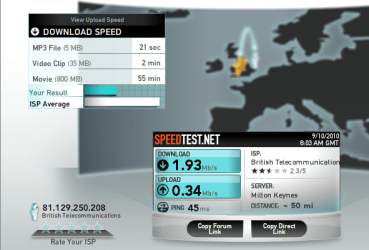
Speedtest.net - The Global Broadband Speed Test

I use speakeasy.net/speedtest. Both yield very below results, although today, it seems to be a bit faster (see attached)

I can't seem to pinpoint the problem here. My computer can't seem to connect to the internet at the speeds my internet provider gives. I'm supposed to get 12 Mbps, but I only get about 4. I thought it was the adapter, but I can't be sure anymore. Before my fresh new reinstall of Windows 7, the adapter gave me up to about 11 or 12 Mbps on average. But after the new install of Windows 7, my speed dropped drastically

The same versions of Windows 7 were installed on the machine, and drivers are up to date according to DriverMax and Windows update. The adapter is the Airlink 101 Ultra Mini USB Wireless Adapter.

If anyone can help, I would really appreciate it!!

How is the signal strength ? Have you gone directly to Airlink for the newest possible driver? Have you testes your download speed at a site like speedtest.net?


Ken

Yeah, I went to airlink for the newest driver. I've attached a screenshot of the speakeasy.net/speedtest that I use.
 

Attachments

  • speakeasy.png
    speakeasy.png
    187.7 KB · Views: 157

My Computer My Computer

At a glance

Windows 7AMD Phenom II X4 5552x2GB OCZ Platinum Edition DDR3 PC3-10666Sapphire Radeon 6870
OS
Windows 7
CPU
AMD Phenom II X4 555
Motherboard
Biostar TA785G3
Memory
2x2GB OCZ Platinum Edition DDR3 PC3-10666
Graphics Card(s)
Sapphire Radeon 6870
Hard Drives
Generic SSD (64GB)
Samsung F3 (1TB)
Seagate (1TB)
Case
Antec 300
have you tried to change the channel on the router i have to now and then due to interference a high channel i find is best at 11 (1-12)also reset the router:)
 
Last edited:

My Computer My Computer

At a glance

Operating System : Windows 7 Home Premium Edi...Processor : Intel Core 2 Quad Q8300 @ 2500 MHzPhysical Memory :8GB Corsair4x 2GB 800MHz C5 ...Video Card : XFX 6700 AMD
Computer Manufacturer/Model Number
packard bell IXTREME M5722
OS
Operating System : Windows 7 Home Premium Edition 6.01.7600 SP1 (x64)
CPU
Processor : Intel Core 2 Quad Q8300 @ 2500 MHz
Motherboard
Mainboard : Packard Bell (Acer EG43M )
Memory
Physical Memory :8GB Corsair4x 2GB 800MHz C5 DDR2
Graphics Card(s)
Video Card : XFX 6700 AMD
Monitor(s) Displays
Maestro 234DL - BenQ V2220 - BenQ VW2420H
Screen Resolution
Current Display :1920x1080p pixels at 60 Hz in HD LED
Hard Drives
Hard Disks : WDC (1000 GB)
Drive C: (Hard Disk) : 428 GB available on 491 GB
Drive D: (Hard Disk) : 426 GB available on 492 GB
SAMSUNG spinpoint HD103SJ 1000.2 GB
(X 2) KINGSTON SSD NOW V 30GB
PSU
XFX ProSeries 550W PSU
Case
PACKARD BELL IXTREME
Cooling
System Blower Current: 150mA Air Flow16CFM ;Akasa 90mm rear
Keyboard
Gigabyte Aivia K8100
Mouse
TRUST-Wireless Laser Mouse - Carbon edition MI-7770C
Internet Speed
TP-LINK > TL-WN951N / AV500 Gigabit Powerline Adapters
Browser
chrome dev
Other Info
EXTRA COOLING>(FAN CONTROLLER) PC Bay Cooler 3 x 40mm fans; Akasa AK-HD-BL Blue hard drive cooler 2 x 40 mm fan 4500 rpm 29.7 dBA
Bios> American Megatrends Inc.
Version : P01-A1
Date : 08/31/2009
have you tried to change the channel on the router i have to now and then due to interference a high channel i find is best at 11 (1-12)also reset the router:)

But see, the thing is that my laptop connects to internet just fine, and almost always gets 11 Mbps. I'm not sure what's up with my adapter =/
 

My Computer My Computer

At a glance

Windows 7AMD Phenom II X4 5552x2GB OCZ Platinum Edition DDR3 PC3-10666Sapphire Radeon 6870
OS
Windows 7
CPU
AMD Phenom II X4 555
Motherboard
Biostar TA785G3
Memory
2x2GB OCZ Platinum Edition DDR3 PC3-10666
Graphics Card(s)
Sapphire Radeon 6870
Hard Drives
Generic SSD (64GB)
Samsung F3 (1TB)
Seagate (1TB)
Case
Antec 300
Back
Top