Using heaps of ram

I just took IE to stand for a browser - any browser. It was not supposed to be IE specific.

Thanks for clarifying that!

~Maxx~
f9cf3207.gif
 

My Computer My Computer

Computer Manufacturer/Model Number
HP HPE 270f
OS
Windows 7 x64 Home Premium
CPU
Intel Core i7 930 @ 2.8 Ghz Socket 1366 LGA
Motherboard
Pegatron Truckee v1.04E41
Memory
8 GB 1366 Mhz DDR3 (PC3-10700) RAM
Graphics Card(s)
ATI Radeon 5770 1 GB DDR5 RAM
Sound Card
Realtech High Definition
Monitor(s) Displays
32" Sony Bravia
Screen Resolution
1366 X 768
Hard Drives
Intel 25nm 120 GB Series 320 SSD HD Tune- 265 MBps Read/ 130 MBps Write

LaCie 1TB + 1TB RAID 0 eSATA Drive HD Tune- 160 MBps Read/ 90 MBps Write
Keyboard
Logitech Illuminated
Mouse
Logitech MX Revolution
Internet Speed
36.4 Mbps Maximum on a 37 Mbps Motorola SB501 Modem
Ok, I get the drit now:p..."don't worry about the ram movement".
Thank you all for your consideration.
 

My Computer My Computer

Computer type
PC/Desktop
Computer Manufacturer/Model Number
custom build
OS
Windows 7 Ultimate Service Pack 1
CPU
Intel Core i5 2500K @ 3.30GHz Sandy Bridge 32nm
Motherboard
ASUSTeK P8Z68-V LX (LGA1155)
Memory
8.00GB Dual-Channel DDR3 @ 668MHz (9-9-9-24)
Graphics Card(s)
1023MB NVIDIA GeForce GTX 550 Ti
Sound Card
Realtek High Definition Audio
Monitor(s) Displays
AOC 2416 (1920x1200 pixels); Dell E193FP (1280x1024 pixels)
Screen Resolution
1920x1200
Hard Drives
Boot - ST3200822AS ATA Device
Seagate Barracuda 2 terra SATA II
WD 1 Terra SATA II
WD 640Mb SATA II
Cooling
550 watt output
Keyboard
Ms
Mouse
Dell (old)
Internet Speed
slow
Antivirus
Comodo Internet Securitry 2013
Browser
Firefox 22 (Eng)
I think it is just beautiful that a operating system (W7) just takes care of all that Ram stuff for us?
 

My Computer My Computer

Computer type
PC/Desktop
Computer Manufacturer/Model Number
Home made Desktop
OS
Windows 10 Pro. 64/ version 1709 Windows 7 Pro/64
CPU
Intel i7-6800K @ 4.3
Motherboard
ASUS X-99 Deluxe II
Memory
Corsair Platinum 16 gig @2400
Graphics Card(s)
EVGA GTX 1070 OC
Monitor(s) Displays
Asus 27" LED LCD/VE278Q
Screen Resolution
1920-1080 or 1280-720 HDMI
Hard Drives
INTEL SSD 730-240 Gb Sata 3.0/
PSU
EVGA Platium 1200W
Case
Phanteks Luxe Tempered Glass 8 fans/ one radiator
Cooling
XSPC/ Water Cooled CPU
Keyboard
Das 4 Professional
Mouse
Logitech M705/MX Anywhere 2-S
Internet Speed
100 mbits
Antivirus
Microsoft Security Essentials/ Malwarebytes Premium 3.0/ SAS
Browser
I.E. 11 default/Firefox/ ISP Time Warner Cable/Spectrum
Other Info
LG BluRay Burner/
Sound system-KLipsch-THX/
Icy Dock ssd Hot Swap bays.
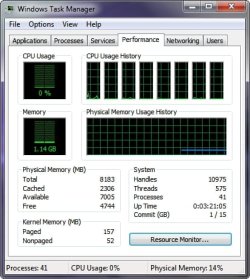
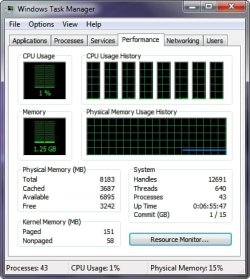
Maxxwire, Check the cache in the morning after system start and then again at night before shutdown - you will already see a considerable difference in cache size (provided you have done many different things during the day).

I did as you suggested and there is some difference in the amount of RAM cached in Win 7 x64 with 8 GB of RAM. I was using my Vista x86 laptop also yesterday and it caches within a few MB of its entire 3 GB of RAM and I am wondering if the reason that the amount of RAM cashed in Win 7 is smaller might be because it has 266% more RAM on board to begin with?

~Maxx~
.
da59fa57.png
 

Attachments

  • TM Early.jpg
    TM Early.jpg
    39.2 KB · Views: 5
  • TM Nite.jpg
    TM Nite.jpg
    39 KB · Views: 3

My Computer My Computer

Computer Manufacturer/Model Number
HP HPE 270f
OS
Windows 7 x64 Home Premium
CPU
Intel Core i7 930 @ 2.8 Ghz Socket 1366 LGA
Motherboard
Pegatron Truckee v1.04E41
Memory
8 GB 1366 Mhz DDR3 (PC3-10700) RAM
Graphics Card(s)
ATI Radeon 5770 1 GB DDR5 RAM
Sound Card
Realtech High Definition
Monitor(s) Displays
32" Sony Bravia
Screen Resolution
1366 X 768
Hard Drives
Intel 25nm 120 GB Series 320 SSD HD Tune- 265 MBps Read/ 130 MBps Write

LaCie 1TB + 1TB RAID 0 eSATA Drive HD Tune- 160 MBps Read/ 90 MBps Write
Keyboard
Logitech Illuminated
Mouse
Logitech MX Revolution
Internet Speed
36.4 Mbps Maximum on a 37 Mbps Motorola SB501 Modem
I run 8GB as well.

But for some reason, mine doesn't usually have anything free.

Typically around 2GB in use @ idle, the rest cached & showing 0 free is normal for mine.

I use a great deal of Video encoding tools though, so that may be why.
Then again, around 62-65 running processes at idle is normal for me too.
 

Attachments

  • Capture.JPG
    Capture.JPG
    25.6 KB · Views: 9

My Computer My Computer

Computer Manufacturer/Model Number
Custom (Self Build)
OS
Windows 7 Home Premium 64bit
CPU
Intel Core i7 2700k
Motherboard
eVGA P67 SLI
Memory
8GB Mushkin Redline Ridgebacks @1866
Graphics Card(s)
EVGA GTX570 SC
Sound Card
XiFi Titanium HD
Monitor(s) Displays
LG W2453V
Screen Resolution
1920x1080
Hard Drives
Intel 320 80GB -- Intel X25-V 40GB --WD Black 1TB x2 -- WD Blue 640GB
PSU
Seasonic x750
Case
Corsair 600T SE White
Cooling
eVGA Superclocked CPU Cooler
Keyboard
Saitek Cyborg
Antivirus
Kaspersky
Browser
IE
Other Info
LG BD/DVD
I run 8GB as well.

But for some reason, mine doesn't usually have anything free.

Typically around 2GB in use @ idle, the rest cached & showing 0 free is normal for mine.

Wishmaster- I have just added your 'Super-DuperFetch' to the top of my Win 7 wish list!

~Maxx~
.
da59fa57.png
 

My Computer My Computer

Computer Manufacturer/Model Number
HP HPE 270f
OS
Windows 7 x64 Home Premium
CPU
Intel Core i7 930 @ 2.8 Ghz Socket 1366 LGA
Motherboard
Pegatron Truckee v1.04E41
Memory
8 GB 1366 Mhz DDR3 (PC3-10700) RAM
Graphics Card(s)
ATI Radeon 5770 1 GB DDR5 RAM
Sound Card
Realtech High Definition
Monitor(s) Displays
32" Sony Bravia
Screen Resolution
1366 X 768
Hard Drives
Intel 25nm 120 GB Series 320 SSD HD Tune- 265 MBps Read/ 130 MBps Write

LaCie 1TB + 1TB RAID 0 eSATA Drive HD Tune- 160 MBps Read/ 90 MBps Write
Keyboard
Logitech Illuminated
Mouse
Logitech MX Revolution
Internet Speed
36.4 Mbps Maximum on a 37 Mbps Motorola SB501 Modem
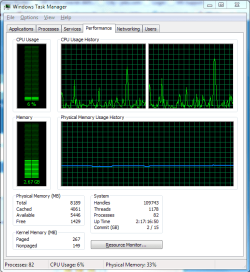
This is what I have running on Win 7 Ultimate x64, 8 gigs of ram and I think this is Day 4 or 5 uptime...
 

Attachments

  • Capture.PNG
    Capture.PNG
    20.2 KB · Views: 6

My Computer My Computer

Computer Manufacturer/Model Number
Alienware Area 51 Desktop and Dell Inspirion 17R (N7010)
OS
Windows 7 Ultimate x64 and Home Premium x64
CPU
Intel i7 960 (3.2 GHz Quad Core)
Motherboard
Alienware Intel based X58
Memory
12 Gigs (Triple Channel)
Graphics Card(s)
Alienware OEM nVidia GTX 560 Ti (1.25 Gig)
Sound Card
Creative Labs X-Fi Titanium
Monitor(s) Displays
Samsung PX2370 LED 23" Monitor
Screen Resolution
1920x1080
Hard Drives
2 320 Gig SATA in Raid 1 Configuration (System/App)
1 1 Tera SATA (Games)
1 1 Tera SATA (Data/Music/Videos)
PSU
750 Watt Power Supply
Case
Alienware Area 51 Desktop
Cooling
Liquid Cooled
Keyboard
Logitech G510
Mouse
Microsoft Trackball Explorer
Internet Speed
Cable
Here are a few quoted from this article about Superfetch...

" If you open Task Manager (in Windows 7), it'll tell you Total, Cached, Available, and Free. The problems arise from the "Cached" figure, since this figure is generally substantially higher than the "Free" figure.

When people look at the Task Manager, and they see the figure for "Cached" compared to the number of "Free", people assume that only very little of their memory is available for the applications they are about to launch. What they forget is that the Cache filled by SuperFetch and the standard caching mechanism runs on a lower priority; in other words, memory requests by applications will always supersede SuperFetch.

In other words, whatever you see in the "Cached" figure is actually accessible to applications.

SuperFetch does not impact your every day computing experience in a negative way. SuperFetch makes often-used applications load fast - it doesn't make other applications load any slower. As such, turning it off, as some guides advise you to do, can only result in a slowdown, not a speed up."

~Maxx~
.
da59fa57.png
 

My Computer My Computer

Computer Manufacturer/Model Number
HP HPE 270f
OS
Windows 7 x64 Home Premium
CPU
Intel Core i7 930 @ 2.8 Ghz Socket 1366 LGA
Motherboard
Pegatron Truckee v1.04E41
Memory
8 GB 1366 Mhz DDR3 (PC3-10700) RAM
Graphics Card(s)
ATI Radeon 5770 1 GB DDR5 RAM
Sound Card
Realtech High Definition
Monitor(s) Displays
32" Sony Bravia
Screen Resolution
1366 X 768
Hard Drives
Intel 25nm 120 GB Series 320 SSD HD Tune- 265 MBps Read/ 130 MBps Write

LaCie 1TB + 1TB RAID 0 eSATA Drive HD Tune- 160 MBps Read/ 90 MBps Write
Keyboard
Logitech Illuminated
Mouse
Logitech MX Revolution
Internet Speed
36.4 Mbps Maximum on a 37 Mbps Motorola SB501 Modem
Those are good points Max, and I must say I agree.

This is the big reason why I think leaving Superfetch On, (Even with SSDs) is a excellent idea.

True SSDs are fast, but nowhere near as fast as RAM, so Superfetch is still very useful no matter what setup someone may have.

It can only help :)
 

My Computer My Computer

Computer Manufacturer/Model Number
Custom (Self Build)
OS
Windows 7 Home Premium 64bit
CPU
Intel Core i7 2700k
Motherboard
eVGA P67 SLI
Memory
8GB Mushkin Redline Ridgebacks @1866
Graphics Card(s)
EVGA GTX570 SC
Sound Card
XiFi Titanium HD
Monitor(s) Displays
LG W2453V
Screen Resolution
1920x1080
Hard Drives
Intel 320 80GB -- Intel X25-V 40GB --WD Black 1TB x2 -- WD Blue 640GB
PSU
Seasonic x750
Case
Corsair 600T SE White
Cooling
eVGA Superclocked CPU Cooler
Keyboard
Saitek Cyborg
Antivirus
Kaspersky
Browser
IE
Other Info
LG BD/DVD
This is what I have running on Win 7 Ultimate x64, 8 gigs of ram and I think this is Day 4 or 5 uptime...


Uptime is 2:17:xx. showed in the task manager snip. and not bad for being up 2+ days


Ken
 

My Computer My Computer

Computer Manufacturer/Model Number
HP Pavillion dv-7 1005 Tx
OS
Win 8 Release candidate 8400
CPU
[email protected]
Memory
4 gigs
Graphics Card(s)
Nvidia 9600M
Sound Card
HD built-in
Monitor(s) Displays
17" Wxga
Screen Resolution
1440x900
Cooling
none
Internet Speed
45Mb down 5Mb up
Those are good points Max, and I must say I agree.

True SSDs are fast, but nowhere near as fast as RAM.:)

I was trying to explain that to someone the other day, but they just couldn't seem to process the information. Speaking of fast RAM I have 667 Mhz DDR2 RAM in my Vista computer and 1333 Mhz DDR3 RAM in my Win 7 computer and it makes an incredible difference when Win 7 grabs an entire GB of DDR3 RAM and performs a common RAM intensive task 10 times faster than the Vista computer can. Its just a thing of beauty to watch when Win 7 teams up with today's 2X faster RAM!

~Maxx~
.
da59fa57.png
 

My Computer My Computer

Computer Manufacturer/Model Number
HP HPE 270f
OS
Windows 7 x64 Home Premium
CPU
Intel Core i7 930 @ 2.8 Ghz Socket 1366 LGA
Motherboard
Pegatron Truckee v1.04E41
Memory
8 GB 1366 Mhz DDR3 (PC3-10700) RAM
Graphics Card(s)
ATI Radeon 5770 1 GB DDR5 RAM
Sound Card
Realtech High Definition
Monitor(s) Displays
32" Sony Bravia
Screen Resolution
1366 X 768
Hard Drives
Intel 25nm 120 GB Series 320 SSD HD Tune- 265 MBps Read/ 130 MBps Write

LaCie 1TB + 1TB RAID 0 eSATA Drive HD Tune- 160 MBps Read/ 90 MBps Write
Keyboard
Logitech Illuminated
Mouse
Logitech MX Revolution
Internet Speed
36.4 Mbps Maximum on a 37 Mbps Motorola SB501 Modem
This is what I have running on Win 7 Ultimate x64, 8 gigs of ram and I think this is Day 4 or 5 uptime...


Uptime is 2:17:xx. showed in the task manager snip. and not bad for being up 2+ days


Ken

Meh... Shows how often I look at certain things... I have had the computer on for much longer at times. Must have been the Flash update that PSI suggested to do. Lately I have gone on longer stints on my computer due to work and having to hop on for a raid as soon as I got home.
 

My Computer My Computer

Computer Manufacturer/Model Number
Alienware Area 51 Desktop and Dell Inspirion 17R (N7010)
OS
Windows 7 Ultimate x64 and Home Premium x64
CPU
Intel i7 960 (3.2 GHz Quad Core)
Motherboard
Alienware Intel based X58
Memory
12 Gigs (Triple Channel)
Graphics Card(s)
Alienware OEM nVidia GTX 560 Ti (1.25 Gig)
Sound Card
Creative Labs X-Fi Titanium
Monitor(s) Displays
Samsung PX2370 LED 23" Monitor
Screen Resolution
1920x1080
Hard Drives
2 320 Gig SATA in Raid 1 Configuration (System/App)
1 1 Tera SATA (Games)
1 1 Tera SATA (Data/Music/Videos)
PSU
750 Watt Power Supply
Case
Alienware Area 51 Desktop
Cooling
Liquid Cooled
Keyboard
Logitech G510
Mouse
Microsoft Trackball Explorer
Internet Speed
Cable
Back
Top