windows media player not installed properly

stevostrong

New member
Local time
3:23 PM
Messages
5
Hi im running windows 7 home basic and i have done a file transfer from a vista machine but now my media player wont open gives me an error saying it was not installed properally
I have tried to uninstall it but when i go to turn windows features off there is nothing in the box
any ideas please
 

Attachments
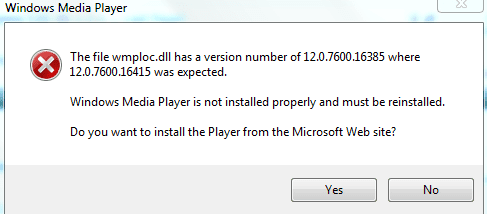
  • Capture.PNG
    Capture.PNG
    7.3 KB · Views: 27

My Computer My Computer

Computer Manufacturer/Model Number
acer aspire 5532
OS
windows home basic 64bit
Memory
4 gigs ram
Hi Stevostrong and welcome to the Forum
When you get the pop up message what happens when you click the Yes button to agree to the auto un-install? hen you say you "go to turn windows features off there is nothing in the box ". Where are you trying to turn windows features off and what box are you referring to?
 

My Computer My Computer

Computer type
PC/Desktop
OS
Microsoft Windows 7 Home Premium 64-bit 7601 Multiprocessor Free Service Pack 1
CPU
Intel(R) Core(TM) i7-3770 CPU @ 3.40GHz
Motherboard
ASUSTeK COMPUTER INC. P8H77-M
Memory
8.00 GB
Graphics Card(s)
Intel(R) HD Graphics 4000
Sound Card
On Board
Monitor(s) Displays
Dell 24"
Screen Resolution
1920 x 1080
Hard Drives
(1) INTEL SSDSC2CT180A3 ATA Device (2) ST500DM002-1BD142 ATA Device (3) WDC WD3200AAKS-75L9A0 ATA Device (4) Generic- Compact Flash USB Device (5) Generic- MS/MS-Pro USB Device (6) Generic- SD/MMC USB Device (7) Generic- SM/xD-Picture USB
PSU
500w Corsair
Case
Cooler Master
Cooling
3 Fans
Keyboard
Logitech MK300
Mouse
Logitech WOM
Internet Speed
75Mb
Antivirus
Norton 360
Browser
Firefox, Opera, IE
Download another windows media player. Then try installing it on top and it should unistall the older one.
 

My Computer My Computer

Computer Manufacturer/Model Number
Fujitsu Siemens
OS
Windows 7 Professional
Memory
2gb
Graphics Card(s)
1gb
Sound Card
265
Monitor(s) Displays
1080p
Hard Drives
1 external 1tb
Cooling
fan
Welcome to Seven Forums stevostrong. Try the following steps to see if they don't fix your problem.

Update the Windows Media Player Version

Make sure that Windows Media Player is closed
Start> Type cmd in search box> Right click CMD.exe in results above, and select Run as Administrator.
Click Continue if you get a UAC prompt
In the Command Prompt type the following and press Enter:

UNREGMP2.EXE /UPDATEWMPVERSION


If this does not work, reregister the wmp.dll file

Log on as an administrator.
Start> Type cmd in search box> Right click CMD.exe in results above, and select Run as Administrator.
Click Continue if you get a UAC prompt
At the command prompt, type

regsvr32 wmp.dll

And then press enter

Restart PC and try it now. A Guy
 

My Computer My Computer

Computer type
PC/Desktop
OS
Windows 10 Home x64
CPU
INTEL Core i5-750 Quad-Core 3.37GHz
Motherboard
ASUS P7P55D
Memory
HyperX Fury Black Series 8GB (2 x 4GB) 1866Mhz
Graphics Card(s)
EVGA GeForce GTX 750 Superclocked 1GB 128-Bit GDDR5
Monitor(s) Displays
LG 32MA68HY 32" IPS
Screen Resolution
1920 x 1080
Hard Drives
Samsung 840 Evo 120GB, SEAGATE 500GB Barracuda® 7200.12, SATA 3 Gb/s, 7200 RPM, 16MB cache
PSU
ANTEC TruePower New TP-550, 80 PLUS, 550W
Case
ANTEC Three Hundred Illusion
Cooling
COOLER MASTER Hyper 212 Plus, 4 x 120mm 1 x 140mm Noctua's
Internet Speed
85 + Mbps
Antivirus
Avast
Browser
Vivaldi
Download another windows media player. Then try installing it on top and it should unistall the older one.
Tried to do that but a message comes up telling me i do not need this installion on my version of windows
 

My Computer My Computer

Computer Manufacturer/Model Number
acer aspire 5532
OS
windows home basic 64bit
Memory
4 gigs ram
Download another windows media player. Then try installing it on top and it should unistall the older one.

Welcome to Seven Forums stevostrong. Try the following steps to see if they don't fix your problem.

Update the Windows Media Player Version

Make sure that Windows Media Player is closed
Start> Type cmd in search box> Right click CMD.exe in results above, and select Run as Administrator.
Click Continue if you get a UAC prompt
In the Command Prompt type the following and press Enter:

UNREGMP2.EXE /UPDATEWMPVERSION


If this does not work, reregister the wmp.dll file

Log on as an administrator.
Start> Type cmd in search box> Right click CMD.exe in results above, and select Run as Administrator.
Click Continue if you get a UAC prompt
At the command prompt, type

regsvr32 wmp.dll

And then press enter

Restart PC and try it now. A Guy


Tried this and it didnt work any other ideas a guy
 

My Computer My Computer

Computer Manufacturer/Model Number
acer aspire 5532
OS
windows home basic 64bit
Memory
4 gigs ram
My next choice normally would be to have you uninstall and reinstall WMP, but you said it doesn't show up on your Turn Windows Features On Or Off? I recently had to reinstall Windows because , amongst other things, windows features were missing. Was this an upgrade install? It's suggested a clean install is much less problematic.

I found this workaround that may work if indeed the correct resources are installed on your system:

HERE

OR as an alternative, I can off this x64 wmploc.dll, it has a different skin, but I think you'll like it.

WMP.jpg

Here is the file

View attachment 96301

This is the correct version, and it may correct your problem, but as I say, you may have an issue with your installation. Suggest you post a screenshot of your windows features.

Features.jpg

A Guy
 

My Computer My Computer

Computer type
PC/Desktop
OS
Windows 10 Home x64
CPU
INTEL Core i5-750 Quad-Core 3.37GHz
Motherboard
ASUS P7P55D
Memory
HyperX Fury Black Series 8GB (2 x 4GB) 1866Mhz
Graphics Card(s)
EVGA GeForce GTX 750 Superclocked 1GB 128-Bit GDDR5
Monitor(s) Displays
LG 32MA68HY 32" IPS
Screen Resolution
1920 x 1080
Hard Drives
Samsung 840 Evo 120GB, SEAGATE 500GB Barracuda® 7200.12, SATA 3 Gb/s, 7200 RPM, 16MB cache
PSU
ANTEC TruePower New TP-550, 80 PLUS, 550W
Case
ANTEC Three Hundred Illusion
Cooling
COOLER MASTER Hyper 212 Plus, 4 x 120mm 1 x 140mm Noctua's
Internet Speed
85 + Mbps
Antivirus
Avast
Browser
Vivaldi
Download another windows media player. Then try installing it on top and it should unistall the older one.


Cheers tried that no good have done a sys restore done the job thanks for help
 

My Computer My Computer

Computer Manufacturer/Model Number
acer aspire 5532
OS
windows home basic 64bit
Memory
4 gigs ram
Download another windows media player. Then try installing it on top and it should unistall the older one.

Download another windows media player. Then try installing it on top and it should unistall the older one.


Cheers tried that no good have done a sys restore done the job thanks for help

My next choice normally would be to have you uninstall and reinstall WMP, but you said it doesn't show up on your Turn Windows Features On Or Off? I recently had to reinstall Windows because , amongst other things, windows features were missing. Was this an upgrade install? It's suggested a clean install is much less problematic.

I found this workaround that may work if indeed the correct resources are installed on your system:

HERE

OR as an alternative, I can off this x64 wmploc.dll, it has a different skin, but I think you'll like it.

View attachment 96300

Here is the file

View attachment 96301

This is the correct version, and it may correct your problem, but as I say, you may have an issue with your installation. Suggest you post a screenshot of your windows features.

View attachment 96302

A Guy
Thanks for all the help .I done a sys restore in the end solved problems,None of the above worked but was well wort trying
Thanks
 

My Computer My Computer

Computer Manufacturer/Model Number
acer aspire 5532
OS
windows home basic 64bit
Memory
4 gigs ram

My Computer My Computer

Computer type
PC/Desktop
OS
Windows 10 Home x64
CPU
INTEL Core i5-750 Quad-Core 3.37GHz
Motherboard
ASUS P7P55D
Memory
HyperX Fury Black Series 8GB (2 x 4GB) 1866Mhz
Graphics Card(s)
EVGA GeForce GTX 750 Superclocked 1GB 128-Bit GDDR5
Monitor(s) Displays
LG 32MA68HY 32" IPS
Screen Resolution
1920 x 1080
Hard Drives
Samsung 840 Evo 120GB, SEAGATE 500GB Barracuda® 7200.12, SATA 3 Gb/s, 7200 RPM, 16MB cache
PSU
ANTEC TruePower New TP-550, 80 PLUS, 550W
Case
ANTEC Three Hundred Illusion
Cooling
COOLER MASTER Hyper 212 Plus, 4 x 120mm 1 x 140mm Noctua's
Internet Speed
85 + Mbps
Antivirus
Avast
Browser
Vivaldi
Thanks a lot "A Guy", that helped me!! :D:D:D
 

My Computer My Computer

OS
Windows 7 Professional 32bit
Great, glad I could help :)

A Guy
 

My Computer My Computer

Computer type
PC/Desktop
OS
Windows 10 Home x64
CPU
INTEL Core i5-750 Quad-Core 3.37GHz
Motherboard
ASUS P7P55D
Memory
HyperX Fury Black Series 8GB (2 x 4GB) 1866Mhz
Graphics Card(s)
EVGA GeForce GTX 750 Superclocked 1GB 128-Bit GDDR5
Monitor(s) Displays
LG 32MA68HY 32" IPS
Screen Resolution
1920 x 1080
Hard Drives
Samsung 840 Evo 120GB, SEAGATE 500GB Barracuda® 7200.12, SATA 3 Gb/s, 7200 RPM, 16MB cache
PSU
ANTEC TruePower New TP-550, 80 PLUS, 550W
Case
ANTEC Three Hundred Illusion
Cooling
COOLER MASTER Hyper 212 Plus, 4 x 120mm 1 x 140mm Noctua's
Internet Speed
85 + Mbps
Antivirus
Avast
Browser
Vivaldi
Back
Top