Internet Explorer 9 beta: The beauty of the web

Status
Not open for further replies.

My Computer My Computer

Computer Manufacturer/Model Number
Self
OS
Windows 7
CPU
Phenom II X4 955 Black Ed. 3.2 GHz (OC'd to 3.74 GHz) AM3
Motherboard
ASUS M5A99x EVO AM3+ UEFI
Memory
4 X 4 GB - GSkill Ripjaws DDR3 1333 (running @ 1241 MHz
Graphics Card(s)
2 X EVGA GTX 460 768MB
Sound Card
Realtek on board
Monitor(s) Displays
Samsung SMS27A350H 27" ; LG-L227WTG 22"
Screen Resolution
1920 X 1080; 1680 X 1050
Hard Drives
2 X WD 1 TB Green - RAID 1
2 X WD 2 TB Green - RAID 1
PSU
CORSAIR CMPSU-750TX 750W ATX12V v2.2 80 Plus Certified
Case
Cooler Master Storm Scout
Cooling
Xigmatek S-1283 CPU, Case 2 X 140mm, 2 x 120mm
Keyboard
Microsoft Sidewinder X6
Mouse
Logitech wireless wheel
Internet Speed
Cable 20 down, 5 up
Other Info
New Build 3 June 2009
9/30/2011 Replace MB with ASUS M5A99X EVO
I started installing this at 601PM EST. 30min later still not done. Just says downloading required updates. Doesn't look like anything is downloading.
How fast did it install for you guys and how much does it need to download?
 

My Computer My Computer

Computer type
PC/Desktop
Computer Manufacturer/Model Number
Made by Dixon Butz
OS
Win7 Win 10, Win 8.1
CPU
AMD FX-8350, Corsair H100i
Motherboard
ASUS Crosshair V Formula-Z
Memory
16GB G.SKILL Ripjaws DDR3
Graphics Card(s)
EVGA GTX 980, EVGA GTX 860
Sound Card
Denon x4200 Dolby AMOS!
Monitor(s) Displays
65" Samsung 4K, +3 27inch
Screen Resolution
4K, 1080x3
Hard Drives
2TB Samsung hd204ui

1X Samsung 850 SSD
PSU
1000w EVGA, 2000VA UPS, 1000VA UPS and many others
Case
Lian Li
Cooling
Corsair H100i
Keyboard
Logitech K800
Mouse
Logitech Couch Mouse
Internet Speed
Gigabit!
Antivirus
Defender
Browser
Slimjet Chrome
I dunno, I still prefer FF. But, then, I will admit I'm a little biased.

IE9.JPG FF4.07bpre.JPG

Otherwise, IE9 x64 seems to be humming along quite nicely with the Flash "Square" x64 preview.
 

My Computer My Computer

Computer Manufacturer/Model Number
Toshiba L355D
OS
Windows 7 Ultimate x64 SP1
CPU
Core2 Duo
Motherboard
Intel
Memory
4 GB
Graphics Card(s)
GM965 on-board
Sound Card
RealTek on-board
Monitor(s) Displays
19"+17"(laptop)
Screen Resolution
1440x900 (x 2)
Hard Drives
500GB Ext. 200GB Internal
PSU
N/A
Case
N/A
Cooling
N/A
Some glaring omissions.
  1. No Search box. I found that useful in IE8, especially when I could quickly do a search with any of my allocated search providers.
  2. No means of opening a Favorite in a new tab in the same manner as IE8 (i.e. the right-pointing arrow to the right of a favorite name is no longer there). This means having to right-click and select Open in new tab. Groups are not affected.

1. You search directly from the address bar.
2. Just middle click on the favorite tab to open.
Thanks, I didn't know how to get the middle click in the touchpad, eventually I have found a setting in synaptics to assign a bottom corner for the middle click and it works. I miss that blue arrow in favourites drop down.
 

My Computer My Computer

Computer Manufacturer/Model Number
Acer Aspire 5750
OS
Windows 7 Home Premium 64bit
CPU
Intel Core i3-2310M
Motherboard
Acer OEM
Memory
8GB
Graphics Card(s)
Intel HD3000
Screen Resolution
1366x768
Hard Drives
320GB Toshiba
I started installing this at 601PM EST. 30min later still not done. Just says downloading required updates. Doesn't look like anything is downloading.
How fast did it install for you guys and how much does it need to download?
It took me about three minutes.
 

My Computer My Computer

Computer Manufacturer/Model Number
Custom
OS
Windows 8 Professional 64-bit
CPU
Intel Core i3-2100
Motherboard
ASRock Intel Z68M/USB3
Memory
4GB
Graphics Card(s)
GeForece GTX 550 Ti
Screen Resolution
1680 x 1050
PSU
750w
I started installing this at 601PM EST. 30min later still not done. Just says downloading required updates. Doesn't look like anything is downloading.
How fast did it install for you guys and how much does it need to download?
It took me about three minutes.
Same here. Quite fast. Could it be an Internet connection issue, Dixon (he says, stating the obvious :o)?
 

My Computer My Computer

Computer Manufacturer/Model Number
Toshiba L355D
OS
Windows 7 Ultimate x64 SP1
CPU
Core2 Duo
Motherboard
Intel
Memory
4 GB
Graphics Card(s)
GM965 on-board
Sound Card
RealTek on-board
Monitor(s) Displays
19"+17"(laptop)
Screen Resolution
1440x900 (x 2)
Hard Drives
500GB Ext. 200GB Internal
PSU
N/A
Case
N/A
Cooling
N/A
I started installing this at 601PM EST. 30min later still not done. Just says downloading required updates. Doesn't look like anything is downloading.
How fast did it install for you guys and how much does it need to download?
It took me about three minutes.

Thx looks like mine is stuck at about 66%.
Made an image just in case...
 

My Computer My Computer

Computer type
PC/Desktop
Computer Manufacturer/Model Number
Made by Dixon Butz
OS
Win7 Win 10, Win 8.1
CPU
AMD FX-8350, Corsair H100i
Motherboard
ASUS Crosshair V Formula-Z
Memory
16GB G.SKILL Ripjaws DDR3
Graphics Card(s)
EVGA GTX 980, EVGA GTX 860
Sound Card
Denon x4200 Dolby AMOS!
Monitor(s) Displays
65" Samsung 4K, +3 27inch
Screen Resolution
4K, 1080x3
Hard Drives
2TB Samsung hd204ui

1X Samsung 850 SSD
PSU
1000w EVGA, 2000VA UPS, 1000VA UPS and many others
Case
Lian Li
Cooling
Corsair H100i
Keyboard
Logitech K800
Mouse
Logitech Couch Mouse
Internet Speed
Gigabit!
Antivirus
Defender
Browser
Slimjet Chrome
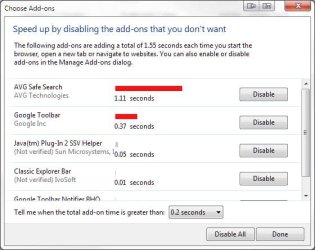
Interesting, I was just greeted by the addon timer assistant.
addon timer.JPG

A rather nice surprise. Nice work, Microsoft. :)
 

My Computer My Computer

Computer Manufacturer/Model Number
Toshiba L355D
OS
Windows 7 Ultimate x64 SP1
CPU
Core2 Duo
Motherboard
Intel
Memory
4 GB
Graphics Card(s)
GM965 on-board
Sound Card
RealTek on-board
Monitor(s) Displays
19"+17"(laptop)
Screen Resolution
1440x900 (x 2)
Hard Drives
500GB Ext. 200GB Internal
PSU
N/A
Case
N/A
Cooling
N/A
I am more interested in an option to bring back a website to the new tab page after I dismissed it. No luck on my own, even the product guide didn't say anyting xD
Just click on the star and history ... it's right there.
 

My Computer My Computer

Computer type
PC/Desktop
Computer Manufacturer/Model Number
Bruce ... somewhere in his 40's
OS
Windows 7 Ultimate 32bit SP1
CPU
Intel(R) Core(TM)2 Quad CPU @ 2.40GHz, 2400 MHz
Motherboard
INTEL/D975XBX2
Memory
4 GB
Graphics Card(s)
ATI Radeon HD 2600 Pro
Monitor(s) Displays
Samsung SyncMaster 914v
Screen Resolution
1280 x 1024
Hard Drives
2/500GB each ... ST3500630AS ATA Device.
One is not connected
PSU
Rocketfish 700 W
Case
G.Skill Gigabyte Chassis
Keyboard
Standard PS/2 Keyboard
Mouse
Microsoft PS/2 Mouse
Internet Speed
DSL
Antivirus
Avira Internet Security
Browser
IE 11
Other Info
ATI HDMI Audio
No no, I meant as a thumbnail on the "New Tab" page... Doesn't matter, I did a reset of IE's settings and got them back, it only took me 2 more minutes to re-setup IE.
 

My Computer My Computer

Computer type
Laptop
Computer Manufacturer/Model Number
Custom
OS
Windows 7 Home Premium x64
CPU
Intel Core i5 2500K
Motherboard
MSI MS-7750
Memory
8GB DDR3
Graphics Card(s)
nVidia GeForce GTX650 Ti BOOST
Sound Card
Realtek
Monitor(s) Displays
21' Philips
Screen Resolution
Full HD
Hard Drives
1TB
PSU
500W
It's really nice. Just wish I had noscript.

All my add ons work. Lastpass, roboform, keyscrambler, and I was able to do citrix to do a little work for tomorrow.

I'm also able to use inprivate filtering in a way I can't talk about here.
 

My Computer My Computer

Computer Manufacturer/Model Number
Samsung rv520
OS
Windows Seven, Ubuntu
CPU
Intel
Graphics Card(s)
Intel
Anybody have a good way to block Java until I want to see it?
 

My Computer My Computer

Computer Manufacturer/Model Number
Samsung rv520
OS
Windows Seven, Ubuntu
CPU
Intel
Graphics Card(s)
Intel
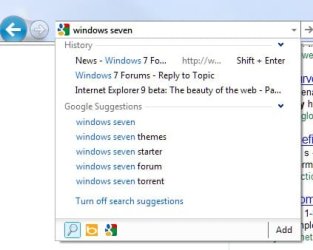
How do I get search suggestions in the address bar? It lets me search within it but it will not show suggestions or let me change between search engines. Thanks
 

My Computer My Computer

Computer Manufacturer/Model Number
HP
OS
Windows 7
How do I get search suggestions in the address bar? It lets me search within it but it will not show suggestions or let me change between search engines. Thanks
Click on the gear, go to "Manage addons" and then click on "search providers." Settings are there.
 

My Computer My Computer

Computer Manufacturer/Model Number
Toshiba L355D
OS
Windows 7 Ultimate x64 SP1
CPU
Core2 Duo
Motherboard
Intel
Memory
4 GB
Graphics Card(s)
GM965 on-board
Sound Card
RealTek on-board
Monitor(s) Displays
19"+17"(laptop)
Screen Resolution
1440x900 (x 2)
Hard Drives
500GB Ext. 200GB Internal
PSU
N/A
Case
N/A
Cooling
N/A
How do I get search suggestions in the address bar? It lets me search within it but it will not show suggestions or let me change between search engines. Thanks
Install bing toolbar, then go to settings within it, that little "wrench", then click "search" tab, and you'll find the tick mark you need there.
 

My Computer My Computer

Computer Manufacturer/Model Number
Custom
OS
Windows 8 Professional 64-bit
CPU
Intel Core i3-2100
Motherboard
ASRock Intel Z68M/USB3
Memory
4GB
Graphics Card(s)
GeForece GTX 550 Ti
Screen Resolution
1680 x 1050
PSU
750w
A little disappointed, but good thing it's still in beta. Flash still runs the exact same on my PC as it did in IE8 and .gifs don't run at full speed yet, either. I was really hoping that flash would be as good as it is on the other popular browsers. Hope this is fixed in a later or final release. =[
 

My Computer My Computer

Computer Manufacturer/Model Number
Gigabyte GA-EP43T-UD3L
OS
Windows 7 Home Premium 32-bit SP1
CPU
Intel Core 2 Duo E8500 @ 3.80 GHz
Motherboard
GIGABYTE Intel Chipset
Memory
4GB of Kingston HyperX 1333 MHz DDR3 Dual Channel RAM
Graphics Card(s)
nVIDIA GTX 460 768 MB GDDR5
Sound Card
Realtek ALC888 HD audio
Monitor(s) Displays
BENQ FP731
Screen Resolution
1280 x 1024
Hard Drives
640 GB Western Digital Caviar Black SATA 7200 rpm
260 GB Western Digital SATA 7200 rpm
PSU
750W Ultra X Pro
Case
Cooler Master G Lite
Cooling
Zalman CNPS9500
Keyboard
Logitech Deluxe
Mouse
Logitech HD
Internet Speed
30 Mbps
Ok I went and looked under the add-ons and the search suggestions is enabled for both google and bing. If i install the bing toolbar is that going to get the google search suggestions to work also? Thanks
 

My Computer My Computer

Computer Manufacturer/Model Number
HP
OS
Windows 7
Ok I went and looked under the add-ons and the search suggestions is enabled for both google and bing. If i install the bing toolbar is that going to get the google search suggestions to work also? Thanks

I dunno, the search suggestions work fine for me. No troubles.Screenshot_1.jpg
 

My Computer My Computer

Computer Manufacturer/Model Number
Toshiba L355D
OS
Windows 7 Ultimate x64 SP1
CPU
Core2 Duo
Motherboard
Intel
Memory
4 GB
Graphics Card(s)
GM965 on-board
Sound Card
RealTek on-board
Monitor(s) Displays
19"+17"(laptop)
Screen Resolution
1440x900 (x 2)
Hard Drives
500GB Ext. 200GB Internal
PSU
N/A
Case
N/A
Cooling
N/A
Yeah that is what it does not do for me. It won't show what you just posted.
 

My Computer My Computer

Computer Manufacturer/Model Number
HP
OS
Windows 7
Yeah that is what it does not do for me. It won't show what you just posted.
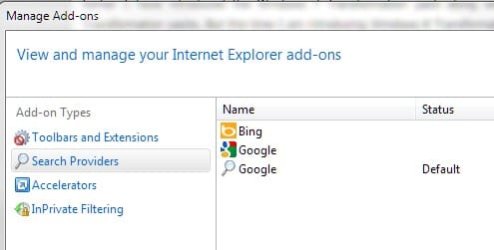
Do you have Google set as your default search provider in the "Tools (Gear)">"Manage add-ons">"Search Providers" settings choices?

Screenshot_2.jpg

Note: I probably have two Google choices because I had the Google Toolbar installed in IE8 - I've since removed it in IE9 (for now).
 

My Computer My Computer

Computer Manufacturer/Model Number
Toshiba L355D
OS
Windows 7 Ultimate x64 SP1
CPU
Core2 Duo
Motherboard
Intel
Memory
4 GB
Graphics Card(s)
GM965 on-board
Sound Card
RealTek on-board
Monitor(s) Displays
19"+17"(laptop)
Screen Resolution
1440x900 (x 2)
Hard Drives
500GB Ext. 200GB Internal
PSU
N/A
Case
N/A
Cooling
N/A
Status
Not open for further replies.
Back
Top