Asus k61 won't hibernate

Jinks88

New member
Local time
12:29 PM
Messages
3
Asus n61 won't hibernate

Hy I just bought this Asus n61vn laptop as described in my avatar, and i installed win 7 ultimate.

The problem is that I can't make it hibernate on its' own.

I went to power options and set the display to turn off after 20 min,the harddisk as well, sleep after 30 and hibernate after 35. It goes to sleep, but it won't hibernate. I also tried: sleep never, and only hibernate, but it just goes to sleep.
I have power4gear app installed and I went to every power profile and changed it but no result.
I read that it could be the usb stuff plugged in, that are keeping it awake. I went to device manager and stopped them, still it won't hibernate.

I can put it to hibernate from startup menu, or from a shortcut I created using a tutorial, but the biiiip thing won't hibernate on its' own.

What is the reason, and can i somehow fix it? Thanks
 
Last edited:

My Computer My Computer

Computer Manufacturer/Model Number
Asus n61vn laptop
OS
windows 7
CPU
Intel core 2 duo p7450 , 2.13 ghz
Memory
4 gb ddr3
Graphics Card(s)
nvidia gt240m
Monitor(s) Displays
16' led
Hard Drives
500 gb sata 5400 rpm

My Computer My Computer

Computer type
PC/Desktop
Computer Manufacturer/Model Number
Dell XPS 420
OS
Windows 10, Home Clean Install
CPU
Intel Core2 processsor Q8200(2.33Ghz 1333FSB) Quad Core Tech
Motherboard
Dell
Memory
6 gb
Graphics Card(s)
ATI Radeon 256MB HD3650
Sound Card
Intergrated 7.1 Channel Audio
Monitor(s) Displays
Dell SP2009W 20"
Hard Drives
640 GB Serial ATA Hard drive
Cooling
Fan
Keyboard
Dell USB Keyboard
Mouse
Dell Premium Optical USB
Internet Speed
DSL 2.85
thanks i will try it..maybe it works this time..
 

My Computer My Computer

Computer Manufacturer/Model Number
Asus n61vn laptop
OS
windows 7
CPU
Intel core 2 duo p7450 , 2.13 ghz
Memory
4 gb ddr3
Graphics Card(s)
nvidia gt240m
Monitor(s) Displays
16' led
Hard Drives
500 gb sata 5400 rpm
Wish you luck.
 

My Computer My Computer

Computer type
PC/Desktop
Computer Manufacturer/Model Number
Dell XPS 420
OS
Windows 10, Home Clean Install
CPU
Intel Core2 processsor Q8200(2.33Ghz 1333FSB) Quad Core Tech
Motherboard
Dell
Memory
6 gb
Graphics Card(s)
ATI Radeon 256MB HD3650
Sound Card
Intergrated 7.1 Channel Audio
Monitor(s) Displays
Dell SP2009W 20"
Hard Drives
640 GB Serial ATA Hard drive
Cooling
Fan
Keyboard
Dell USB Keyboard
Mouse
Dell Premium Optical USB
Internet Speed
DSL 2.85
Win 7 Won't Hibernate

How did you fix your problem? I have the same problem as was stated above.

It will not hibernate with any combination of choices to power plan. I have tried between 75 and 100 options over the past month. It won't hibernate with a keyboard shortcut, or a function key.

My laptop is 6 weeks old. I downloaded all available drivers for all parts of the laptop. No help.

How do you fix this please?
 

My Computer My Computer

OS
7, 64 bit
Hello seekandfind, welcome to Seven Forums!


You will have much better success finding a solution starting a new thread.


FAQ : How to start a new thread
 

My Computer My Computer

Computer Manufacturer/Model Number
* BFK Customs *
OS
W 7 64-bit Ultimate
CPU
Intel Q9550 Yorkfield
Motherboard
ASUS P5Q Pro
Memory
8GB Dominator 8500C5D
Graphics Card(s)
ATI : XFX 5870
Sound Card
Realtek HD Audio 7-1
Monitor(s) Displays
1x 47" LCD HDMI & 3x 26" LCD HDMI
Screen Resolution
1920x1080P & 1920x1200
Hard Drives
1x 80GB Intel X25-M G2 SSD : 1x 500GB & 1x 640GB WD Caviar Black(s)
PSU
Corsair 620HX
Case
Cooler Master RC-690
Cooling
Tuniq Tower 120, 2x 140mm and 3x 120mm case fans
Keyboard
Microsoft 500
Mouse
Razer Diamondback 3G
Internet Speed
14 Mb/s
Other Info
1x Koutech 3Gb/s SATA HDD Hot Swap Rack
Actually I didn't fix it. Nothing worked, except creating a shortcut button on the desktop, but that didn't really help me as I wanted it to hibernate on its' own. However I noticed that when I disconected the Internet cable from it, it hibernated. SO I can only assume that the net cable is the one keeping it from hibernating. However I don't know how to fix this, maybe you will have more luck finding the answer and let me know as well. Good luck.
 

My Computer My Computer

Computer Manufacturer/Model Number
Asus n61vn laptop
OS
windows 7
CPU
Intel core 2 duo p7450 , 2.13 ghz
Memory
4 gb ddr3
Graphics Card(s)
nvidia gt240m
Monitor(s) Displays
16' led
Hard Drives
500 gb sata 5400 rpm
Actually I didn't fix it. Nothing worked, except creating a shortcut button on the desktop, but that didn't really help me as I wanted it to hibernate on its' own. However I noticed that when I disconected the Internet cable from it, it hibernated. SO I can only assume that the net cable is the one keeping it from hibernating. However I don't know how to fix this, maybe you will have more luck finding the answer and let me know as well. Good luck.


Hello again, I've asked some others to have a look at this for you as I have no experience at with using hibernate.
 

My Computer My Computer

Computer Manufacturer/Model Number
* BFK Customs *
OS
W 7 64-bit Ultimate
CPU
Intel Q9550 Yorkfield
Motherboard
ASUS P5Q Pro
Memory
8GB Dominator 8500C5D
Graphics Card(s)
ATI : XFX 5870
Sound Card
Realtek HD Audio 7-1
Monitor(s) Displays
1x 47" LCD HDMI & 3x 26" LCD HDMI
Screen Resolution
1920x1080P & 1920x1200
Hard Drives
1x 80GB Intel X25-M G2 SSD : 1x 500GB & 1x 640GB WD Caviar Black(s)
PSU
Corsair 620HX
Case
Cooler Master RC-690
Cooling
Tuniq Tower 120, 2x 140mm and 3x 120mm case fans
Keyboard
Microsoft 500
Mouse
Razer Diamondback 3G
Internet Speed
14 Mb/s
Other Info
1x Koutech 3Gb/s SATA HDD Hot Swap Rack
Hello...

It's probably one of the preinstalled ASUS live support applications that comes with your laptop that's preventing hibernation when connected to the internet. I'm not familiar with ASUS laptops or the software that comes with them, but I would check the all the software you have installed for automatic update settings.. or install a firewall that can block all connections at will.
 
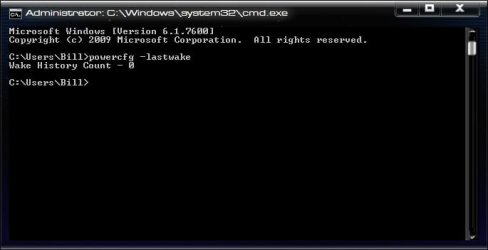
To find out what woke up your Windows from sleep:

Start> Type CMD in search box> Click on CMD.exe in results above> Type in:

powercfg –lastwake

Enter

1.jpg


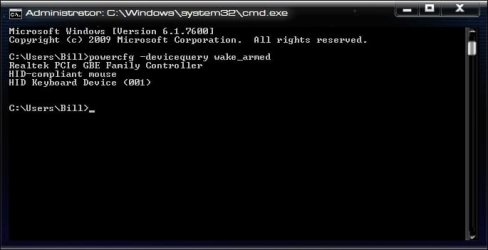
To get the more detailed info on the device that wakes your Windows up during the sleep, and the most likely suspect, type:

powercfg –devicequery wake_armed

Enter

2.jpg

If the PC was last awoken by itself, this will be your culprit

A Guy
 

My Computer My Computer

Computer type
PC/Desktop
OS
Windows 10 Home x64
CPU
INTEL Core i5-750 Quad-Core 3.37GHz
Motherboard
ASUS P7P55D
Memory
HyperX Fury Black Series 8GB (2 x 4GB) 1866Mhz
Graphics Card(s)
EVGA GeForce GTX 750 Superclocked 1GB 128-Bit GDDR5
Monitor(s) Displays
LG 32MA68HY 32" IPS
Screen Resolution
1920 x 1080
Hard Drives
Samsung 840 Evo 120GB, SEAGATE 500GB Barracuda® 7200.12, SATA 3 Gb/s, 7200 RPM, 16MB cache
PSU
ANTEC TruePower New TP-550, 80 PLUS, 550W
Case
ANTEC Three Hundred Illusion
Cooling
COOLER MASTER Hyper 212 Plus, 4 x 120mm 1 x 140mm Noctua's
Internet Speed
85 + Mbps
Antivirus
Avast
Browser
Vivaldi
Back
Top