Someone must know how I can fix my disc drive?

Liisa

New member
Local time
8:09 PM
Messages
16
I'm not exactly computer savvy, I play games, I do graphics and video, but the innnerworkings are beyond me. I have a basic grasp, but that's as far as it goes.

Anyway I was using my computer fine, turned it off one night and when I next turned it on it wouldn't start and said I had to do a system restore, which I did.
Since then my drive will just not work. I can see it under 'my computer' scanned for viruses and checked everything was up to date and it is.
It won't recognise discs (CD/Games/DVDS) and I'm at a loss for how to fix it.

If anyone can help I'd be very grateful.

Thanks :)
 

My Computer My Computer

At a glance

Windows 7 Ultimate x64
OS
Windows 7 Ultimate x64
Can you give us the make & model of you computer ? Desktop or Laptop ?
 

My Computer My Computer

At a glance

Win7 Enterprise, Win7 x86 (Ult 7600), Win7 x6...AMD fx8350 4ghz, AMD-32 2400mhz, AMD-64 3200m...2gb, 4gb on the Ult 7600, 4gb on Technet RTM,...Draw my own Graphics, several nVidia cards
Computer type
PC/Desktop
Computer Manufacturer/Model Number
Built them myself, Science Experiments !
OS
Win7 Enterprise, Win7 x86 (Ult 7600), Win7 x64 Ult 7600, TechNet RTM on AMD x64 (2.8Ghz)
CPU
AMD fx8350 4ghz, AMD-32 2400mhz, AMD-64 3200mhz, AMDx64 2.8G
Motherboard
SIS 755, ECS-K8M890M-M (Ult 7600), GigaByte & others
Memory
2gb, 4gb on the Ult 7600, 4gb on Technet RTM, 32gb on FX8350
Graphics Card(s)
Draw my own Graphics, several nVidia cards
Sound Card
on motherboard
Monitor(s) Displays
19" flat scr, 28" I-Inc widescr,22" Emprex Widescr, 23" Acer
Screen Resolution
1280 x 1024, 1440 x 900, 1920 x 1080
Hard Drives
6 pata Ide HD's & 2 Sata HD's
added 80gb external on Ult 7600 computer,
numerous extra 1tb, 2TB, 3Tb SATA HD's
A collection of ext HD Docks w/ HDs
PSU
430w, 550w, 600w, 700, 800, etc
Case
All Generic Full Towers
Cooling
Open Air & a few fans, some w/ colored LEDs
Keyboard
Compaq & Dell recycled from GoodWill
Mouse
Made in China Optical Wired Mouse
Internet Speed
Fast Cable InterNet
Antivirus
AVG Free on 24 different Desktops, NO Problems!
Browser
IE 8 is preferred, but use FireFox sometimes
Other Info
Linksys Routers, switches, & Hubs
Too Many USB Flash Drives to count, Biggest is 64GB !
Eight computers in my home network.
Sixteen computers at my business network.
Linked via TeamViewer !
Lots of old used spare computer parts everywhere!
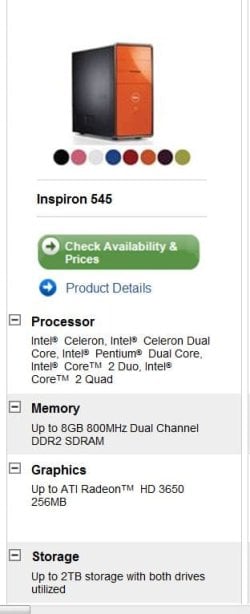
Dell Inspiron 545, Desktop
 

My Computer My Computer

At a glance

Windows 7 Ultimate x64
OS
Windows 7 Ultimate x64
Are you running on one hard drive, or more than one?

You state it was having problems recognizing discs, so how old is this computer by any chance? When did you get it from Dell or from a store?

Try also rebooting the computer one more time, see if you can get it to see any CD/DVDs you have.

First guess is that the CD/DVD drive may have gone bad. If it is an old computer, it might not be under warranty anymore and you may need to just have the DVD drive replaced.

Worst case scenario - System is going really bad.
 

My Computer My Computer

At a glance

Windows 7 Ultimate x64 and Home Premium x64Intel i7 960 (3.2 GHz Quad Core)12 Gigs (Triple Channel)Alienware OEM nVidia GTX 560 Ti (1.25 Gig)
Computer Manufacturer/Model Number
Alienware Area 51 Desktop and Dell Inspirion 17R (N7010)
OS
Windows 7 Ultimate x64 and Home Premium x64
CPU
Intel i7 960 (3.2 GHz Quad Core)
Motherboard
Alienware Intel based X58
Memory
12 Gigs (Triple Channel)
Graphics Card(s)
Alienware OEM nVidia GTX 560 Ti (1.25 Gig)
Sound Card
Creative Labs X-Fi Titanium
Monitor(s) Displays
Samsung PX2370 LED 23" Monitor
Screen Resolution
1920x1080
Hard Drives
2 320 Gig SATA in Raid 1 Configuration (System/App)
1 1 Tera SATA (Games)
1 1 Tera SATA (Data/Music/Videos)
PSU
750 Watt Power Supply
Case
Alienware Area 51 Desktop
Cooling
Liquid Cooled
Keyboard
Logitech G510
Mouse
Microsoft Trackball Explorer
Internet Speed
Cable
Dell Inspiron 545, Desktop
that's not enough info.. with a Dell you have to know the 7 digit service tag in order to get a list of hardware. if you don't know what it is or how to find it, go to support.dell.com, click on drivers and downloads, then below where it says enter your service tag, there's a link where Dell can find it for you.
 
Might be more to it. I'm more worried about your pc not turning on one day. Download and install Malwarebytes, boot into safe mode, and scan.
 

My Computer My Computer

At a glance

Systems 1 and 2: Windows 7 Enterprise x64, Wi...System 1: i7 [email protected], System 2: AMD FX-41...System 1: 8GB System 2: 8GBSystem 1: ATI FirePro V4800 System 2: Radeon ...
Computer Manufacturer/Model Number
Dell and Custom
OS
Systems 1 and 2: Windows 7 Enterprise x64, Win 8 Developer
CPU
System 1: i7 [email protected], System 2: AMD FX-4100 Zambezi 3.6G
Motherboard
System 1:Dell 06NWYK System 2: ASUS M5A97 AM3+
Memory
System 1: 8GB System 2: 8GB
Graphics Card(s)
System 1: ATI FirePro V4800 System 2: Radeon HD 6850
Sound Card
System 1: onboard System 2: onboard
Monitor(s) Displays
System1: Viewsonic HDMI 24"
Screen Resolution
System 1: 1920x1080 System 2: 1920x1080
Hard Drives
System 1: Mirrored .5B drives System 2: Seagate Barracuda ST1000DM003 1TB 7200 RPM 64MB Cache SATA 6.0Gb/s
Case
System 1: Dell System 2: Cooler Master
Internet Speed
10 MBPS
After performing what I said above, you can upgrade the firmware on the appropriate drive.

Drivers & Downloads
 

My Computer My Computer

At a glance

Systems 1 and 2: Windows 7 Enterprise x64, Wi...System 1: i7 [email protected], System 2: AMD FX-41...System 1: 8GB System 2: 8GBSystem 1: ATI FirePro V4800 System 2: Radeon ...
Computer Manufacturer/Model Number
Dell and Custom
OS
Systems 1 and 2: Windows 7 Enterprise x64, Win 8 Developer
CPU
System 1: i7 [email protected], System 2: AMD FX-4100 Zambezi 3.6G
Motherboard
System 1:Dell 06NWYK System 2: ASUS M5A97 AM3+
Memory
System 1: 8GB System 2: 8GB
Graphics Card(s)
System 1: ATI FirePro V4800 System 2: Radeon HD 6850
Sound Card
System 1: onboard System 2: onboard
Monitor(s) Displays
System1: Viewsonic HDMI 24"
Screen Resolution
System 1: 1920x1080 System 2: 1920x1080
Hard Drives
System 1: Mirrored .5B drives System 2: Seagate Barracuda ST1000DM003 1TB 7200 RPM 64MB Cache SATA 6.0Gb/s
Case
System 1: Dell System 2: Cooler Master
Internet Speed
10 MBPS
Looks like a fairly new computer :D
 

Attachments

  • Dell_Insp_545.JPG
    Dell_Insp_545.JPG
    33.3 KB · Views: 11

My Computer My Computer

At a glance

Win7 Enterprise, Win7 x86 (Ult 7600), Win7 x6...AMD fx8350 4ghz, AMD-32 2400mhz, AMD-64 3200m...2gb, 4gb on the Ult 7600, 4gb on Technet RTM,...Draw my own Graphics, several nVidia cards
Computer type
PC/Desktop
Computer Manufacturer/Model Number
Built them myself, Science Experiments !
OS
Win7 Enterprise, Win7 x86 (Ult 7600), Win7 x64 Ult 7600, TechNet RTM on AMD x64 (2.8Ghz)
CPU
AMD fx8350 4ghz, AMD-32 2400mhz, AMD-64 3200mhz, AMDx64 2.8G
Motherboard
SIS 755, ECS-K8M890M-M (Ult 7600), GigaByte & others
Memory
2gb, 4gb on the Ult 7600, 4gb on Technet RTM, 32gb on FX8350
Graphics Card(s)
Draw my own Graphics, several nVidia cards
Sound Card
on motherboard
Monitor(s) Displays
19" flat scr, 28" I-Inc widescr,22" Emprex Widescr, 23" Acer
Screen Resolution
1280 x 1024, 1440 x 900, 1920 x 1080
Hard Drives
6 pata Ide HD's & 2 Sata HD's
added 80gb external on Ult 7600 computer,
numerous extra 1tb, 2TB, 3Tb SATA HD's
A collection of ext HD Docks w/ HDs
PSU
430w, 550w, 600w, 700, 800, etc
Case
All Generic Full Towers
Cooling
Open Air & a few fans, some w/ colored LEDs
Keyboard
Compaq & Dell recycled from GoodWill
Mouse
Made in China Optical Wired Mouse
Internet Speed
Fast Cable InterNet
Antivirus
AVG Free on 24 different Desktops, NO Problems!
Browser
IE 8 is preferred, but use FireFox sometimes
Other Info
Linksys Routers, switches, & Hubs
Too Many USB Flash Drives to count, Biggest is 64GB !
Eight computers in my home network.
Sixteen computers at my business network.
Linked via TeamViewer !
Lots of old used spare computer parts everywhere!
With Dells, the same model number can have 100 different permutations of chipsets, drives, cpus, graphics and sound options and so on, that's why I always check the service tag.
 
Finland must be sleeping now. zzzzzzzzzzz :sleepy:
 

My Computer My Computer

At a glance

Systems 1 and 2: Windows 7 Enterprise x64, Wi...System 1: i7 [email protected], System 2: AMD FX-41...System 1: 8GB System 2: 8GBSystem 1: ATI FirePro V4800 System 2: Radeon ...
Computer Manufacturer/Model Number
Dell and Custom
OS
Systems 1 and 2: Windows 7 Enterprise x64, Win 8 Developer
CPU
System 1: i7 [email protected], System 2: AMD FX-4100 Zambezi 3.6G
Motherboard
System 1:Dell 06NWYK System 2: ASUS M5A97 AM3+
Memory
System 1: 8GB System 2: 8GB
Graphics Card(s)
System 1: ATI FirePro V4800 System 2: Radeon HD 6850
Sound Card
System 1: onboard System 2: onboard
Monitor(s) Displays
System1: Viewsonic HDMI 24"
Screen Resolution
System 1: 1920x1080 System 2: 1920x1080
Hard Drives
System 1: Mirrored .5B drives System 2: Seagate Barracuda ST1000DM003 1TB 7200 RPM 64MB Cache SATA 6.0Gb/s
Case
System 1: Dell System 2: Cooler Master
Internet Speed
10 MBPS
Dell Inspiron 545, Desktop
that's not enough info.. with a Dell you have to know the 7 digit service tag in order to get a list of hardware. if you don't know what it is or how to find it, go to support.dell.com, click on drivers and downloads, then below where it says enter your service tag, there's a link where Dell can find it for you.


I did the scan and it says the service tag is 2CHBL4J :)
 

My Computer My Computer

At a glance

Windows 7 Ultimate x64
OS
Windows 7 Ultimate x64
Are you running on one hard drive, or more than one?

You state it was having problems recognizing discs, so how old is this computer by any chance? When did you get it from Dell or from a store?

Try also rebooting the computer one more time, see if you can get it to see any CD/DVDs you have.

First guess is that the CD/DVD drive may have gone bad. If it is an old computer, it might not be under warranty anymore and you may need to just have the DVD drive replaced.

Worst case scenario - System is going really bad.

I only bought it in January this year and I haven't had any trouble with it until now. I've done other system restores on the advice of friends but nothing. If I insert a disc and click on the drive from 'my computer' it simply opens the disc tray and tells me to insert something. It just won't recognise that there's even something there.
 

My Computer My Computer

At a glance

Windows 7 Ultimate x64
OS
Windows 7 Ultimate x64
If you can get to the start menu type in "event" (without the quotes) then click on "view event logs". Go through the various logs to see if anything shows up at about the time you first began experiencing the problems.

From the start menu you could also type in "device manager" (again, no quotes) and then click on Device Manager. See if anything shows either a yellow triangle with an exclamation mark (!) or a red X. Let us know if either the event logs or device manager shows anything.
 

My Computer My Computer

At a glance

Win 7 Pro 64-bitIntel i5 2.4 Ghz8GB DDR3Intel HD 3000
Computer type
Laptop
Computer Manufacturer/Model Number
Sony Vaio VPCEB47GM Laptop
OS
Win 7 Pro 64-bit
CPU
Intel i5 2.4 Ghz
Memory
8GB DDR3
Graphics Card(s)
Intel HD 3000
Sound Card
IDT High Definition
Monitor(s) Displays
15.6 WGXA Anti-Glare LED
Screen Resolution
1280x800
Hard Drives
640Gb 7200rpm
Antivirus
MSE
Browser
Opera (primary) with IE9 backup
okay.. this page lists firmware upgrades for 12 different types of DVD drive (see what I mean), it's a known issue with that particular model.

So what you need to do is check device manager for the type of dvd drive you have and if it's not there, restart and hit f2 repeatedly to get into the bios setup and find out that way,
if it's not in BIOS you've got a bad DVD drive,
here's the service manual.. View attachment 99799 ..which should help, as I'm not familiar with that particular BIOS.
 
Last edited:
If you can get to the start menu type in "event" (without the quotes) then click on "view event logs". Go through the various logs to see if anything shows up at about the time you first began experiencing the problems.

From the start menu you could also type in "device manager" (again, no quotes) and then click on Device Manager. See if anything shows either a yellow triangle with an exclamation mark (!) or a red X. Let us know if either the event logs or device manager shows anything.

Ok done both of those, in the device manager there aren't exclamations or crosses however in some of the logs there are quite a lot of them especially in the administrative ones.
 

My Computer My Computer

At a glance

Windows 7 Ultimate x64
OS
Windows 7 Ultimate x64
okay.. this page lists firmware upgrades for 12 different types of DVD drive (see what I mean), it's a known issue with that particular model.

So what you need to do is check device manager for the type of dvd drive you have and if it's not there, restart and hit f2 repeatedly to get into the bios setup and find out that way,
if it's not in BIOS you've got a bad DVD drive,
here's the service manual.. View attachment 99799 ..which should help, as I'm not familiar with that particular BIOS.
through device manager I clicked drives and the only one listed is this one TSSTcorp DVD+-RW TS-H653G ATA Device.

is that it?

I only have one drive so I guess it has to be?
 

My Computer My Computer

At a glance

Windows 7 Ultimate x64
OS
Windows 7 Ultimate x64
Sorry if I sound like a div, I guess I should really learn more about computers since I like to use them so much. Thanks for all the help yous are giving anyway :)
 

My Computer My Computer

At a glance

Windows 7 Ultimate x64
OS
Windows 7 Ultimate x64
everyone has to learn somewhere.. at least you're trying to learn how to fix it yourself instead of paying someone to do it for you..so try the firmware update. and let us know how it works
 

My Computer My Computer

At a glance

Win 7 Pro 64-bitIntel i5 2.4 Ghz8GB DDR3Intel HD 3000
Computer type
Laptop
Computer Manufacturer/Model Number
Sony Vaio VPCEB47GM Laptop
OS
Win 7 Pro 64-bit
CPU
Intel i5 2.4 Ghz
Memory
8GB DDR3
Graphics Card(s)
Intel HD 3000
Sound Card
IDT High Definition
Monitor(s) Displays
15.6 WGXA Anti-Glare LED
Screen Resolution
1280x800
Hard Drives
640Gb 7200rpm
Antivirus
MSE
Browser
Opera (primary) with IE9 backup
Click the Start button and then click Control Panel. In the search box (top right), type troubleshooter, and then click Troubleshooting. In the left pane, click View all, and then click Playing and Burning CDs, DVDs. Then follow the instructions.
 

My Computer My Computer

At a glance

Vista, Windows7, Mint Mate, Zorin, Windows 8from 1.6GHz Duo to i7
Computer Manufacturer/Model Number
HP, Dell, Gateway, Toshiba - 4 laptops and 2 desktops
OS
Vista, Windows7, Mint Mate, Zorin, Windows 8
CPU
from 1.6GHz Duo to i7
Monitor(s) Displays
2x HP w2207
Hard Drives
5x HDD, 7x SSD, 12x Externals
Keyboard
with trackball - no mices
Mouse
Trackball mice
Internet Speed
DSL 6000
Back
Top