not enough space to temp install files

liquidflesh

New member
Local time
9:56 AM
Messages
12
I have seen this post in a few differant spots but never an answer that works. im tring to upgrade a computer with vista premium to 7 ultimate. Ever time it tells me that there is not enough space for the temp install files. there is over 60gb of free harddrive space. i have ran system cleanup, defrag, i have deleted all the temp files i can find and still the same thing.

please dont tell me to just do a clean install as this is not an option for this computer.

i have spent the last 5 hrs searching for a solution, and everyone i have found doesnt work.

does anbody know a solution that does.

thanks

edit: i did not mean to type xp. the computer is running vista
 
Last edited:

My Computer My Computer

At a glance

windows 7 ultimate
OS
windows 7 ultimate
Hello liquidflesh, welcome to Seven Forums!


There is no straight upgrade path from Windows XP to Windows 7, I have seen some recommend a third party SW that will do it but I have no first-hand knowledge if it's a safe method to use or if you will lose data in the process.

How's that, I didn't say that a clean install is the only way, not in so many words anyway. ;)
 

My Computer My Computer

At a glance

W 7 64-bit UltimateIntel Q9550 Yorkfield8GB Dominator 8500C5DATI : XFX 5870
Computer Manufacturer/Model Number
* BFK Customs *
OS
W 7 64-bit Ultimate
CPU
Intel Q9550 Yorkfield
Motherboard
ASUS P5Q Pro
Memory
8GB Dominator 8500C5D
Graphics Card(s)
ATI : XFX 5870
Sound Card
Realtek HD Audio 7-1
Monitor(s) Displays
1x 47" LCD HDMI & 3x 26" LCD HDMI
Screen Resolution
1920x1080P & 1920x1200
Hard Drives
1x 80GB Intel X25-M G2 SSD : 1x 500GB & 1x 640GB WD Caviar Black(s)
PSU
Corsair 620HX
Case
Cooler Master RC-690
Cooling
Tuniq Tower 120, 2x 140mm and 3x 120mm case fans
Keyboard
Microsoft 500
Mouse
Razer Diamondback 3G
Internet Speed
14 Mb/s
Other Info
1x Koutech 3Gb/s SATA HDD Hot Swap Rack
i didn't mean to type xp, it is running vista.

thanks and thanks for the welcome
 

My Computer My Computer

At a glance

windows 7 ultimate
OS
windows 7 ultimate
That's different, though before we make any specific recommendations will you please post a snip/screen-shot of the entire disk management drive map with a full description as to which drive/partition is which, so we can see what you have going on as there may be a fairly simple way to resolve the situation.

In the Windows start menu right click computer and click manage, in the left pane of the "Computer Management" window that opens click disk management and post a snip of that.

How to Upload and Post a Screenshot and File in Seven Forums
 

My Computer My Computer

At a glance

W 7 64-bit UltimateIntel Q9550 Yorkfield8GB Dominator 8500C5DATI : XFX 5870
Computer Manufacturer/Model Number
* BFK Customs *
OS
W 7 64-bit Ultimate
CPU
Intel Q9550 Yorkfield
Motherboard
ASUS P5Q Pro
Memory
8GB Dominator 8500C5D
Graphics Card(s)
ATI : XFX 5870
Sound Card
Realtek HD Audio 7-1
Monitor(s) Displays
1x 47" LCD HDMI & 3x 26" LCD HDMI
Screen Resolution
1920x1080P & 1920x1200
Hard Drives
1x 80GB Intel X25-M G2 SSD : 1x 500GB & 1x 640GB WD Caviar Black(s)
PSU
Corsair 620HX
Case
Cooler Master RC-690
Cooling
Tuniq Tower 120, 2x 140mm and 3x 120mm case fans
Keyboard
Microsoft 500
Mouse
Razer Diamondback 3G
Internet Speed
14 Mb/s
Other Info
1x Koutech 3Gb/s SATA HDD Hot Swap Rack
here is the screen shot
 

Attachments

  • screen shot.jpg
    screen shot.jpg
    48.6 KB · Views: 131

My Computer My Computer

At a glance

windows 7 ultimate
OS
windows 7 ultimate
today is not my day. i will get the right picture up in a sec

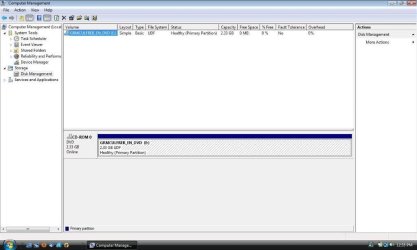
ok. that is the right thing. why is the harddrive not listed??
 

My Computer My Computer

At a glance

windows 7 ultimate
OS
windows 7 ultimate
That just shows an Optical Disk Drive (DVD-ROM) and doesn't detect a Hard Disk Drive (HDD) that's the issue, the Windows installer in not detecting a HDD to do the upgrade to.


Where's the HDD? :roflmao:
 

My Computer My Computer

At a glance

W 7 64-bit UltimateIntel Q9550 Yorkfield8GB Dominator 8500C5DATI : XFX 5870
Computer Manufacturer/Model Number
* BFK Customs *
OS
W 7 64-bit Ultimate
CPU
Intel Q9550 Yorkfield
Motherboard
ASUS P5Q Pro
Memory
8GB Dominator 8500C5D
Graphics Card(s)
ATI : XFX 5870
Sound Card
Realtek HD Audio 7-1
Monitor(s) Displays
1x 47" LCD HDMI & 3x 26" LCD HDMI
Screen Resolution
1920x1080P & 1920x1200
Hard Drives
1x 80GB Intel X25-M G2 SSD : 1x 500GB & 1x 640GB WD Caviar Black(s)
PSU
Corsair 620HX
Case
Cooler Master RC-690
Cooling
Tuniq Tower 120, 2x 140mm and 3x 120mm case fans
Keyboard
Microsoft 500
Mouse
Razer Diamondback 3G
Internet Speed
14 Mb/s
Other Info
1x Koutech 3Gb/s SATA HDD Hot Swap Rack
today is not my day. i will get the right picture up in a sec


That's what I wanted but it doesn't show a HDD being detected by Windows Vista.
 

My Computer My Computer

At a glance

W 7 64-bit UltimateIntel Q9550 Yorkfield8GB Dominator 8500C5DATI : XFX 5870
Computer Manufacturer/Model Number
* BFK Customs *
OS
W 7 64-bit Ultimate
CPU
Intel Q9550 Yorkfield
Motherboard
ASUS P5Q Pro
Memory
8GB Dominator 8500C5D
Graphics Card(s)
ATI : XFX 5870
Sound Card
Realtek HD Audio 7-1
Monitor(s) Displays
1x 47" LCD HDMI & 3x 26" LCD HDMI
Screen Resolution
1920x1080P & 1920x1200
Hard Drives
1x 80GB Intel X25-M G2 SSD : 1x 500GB & 1x 640GB WD Caviar Black(s)
PSU
Corsair 620HX
Case
Cooler Master RC-690
Cooling
Tuniq Tower 120, 2x 140mm and 3x 120mm case fans
Keyboard
Microsoft 500
Mouse
Razer Diamondback 3G
Internet Speed
14 Mb/s
Other Info
1x Koutech 3Gb/s SATA HDD Hot Swap Rack
good question. windows loads just fine. everthing runs just fine. what would cause that?
 

My Computer My Computer

At a glance

windows 7 ultimate
OS
windows 7 ultimate
Sorry mate, I didn't mean to make light of your situation.


Is the BIOS detecting the HDD?

Take the installer disk out before you do anything.
 

My Computer My Computer

At a glance

W 7 64-bit UltimateIntel Q9550 Yorkfield8GB Dominator 8500C5DATI : XFX 5870
Computer Manufacturer/Model Number
* BFK Customs *
OS
W 7 64-bit Ultimate
CPU
Intel Q9550 Yorkfield
Motherboard
ASUS P5Q Pro
Memory
8GB Dominator 8500C5D
Graphics Card(s)
ATI : XFX 5870
Sound Card
Realtek HD Audio 7-1
Monitor(s) Displays
1x 47" LCD HDMI & 3x 26" LCD HDMI
Screen Resolution
1920x1080P & 1920x1200
Hard Drives
1x 80GB Intel X25-M G2 SSD : 1x 500GB & 1x 640GB WD Caviar Black(s)
PSU
Corsair 620HX
Case
Cooler Master RC-690
Cooling
Tuniq Tower 120, 2x 140mm and 3x 120mm case fans
Keyboard
Microsoft 500
Mouse
Razer Diamondback 3G
Internet Speed
14 Mb/s
Other Info
1x Koutech 3Gb/s SATA HDD Hot Swap Rack
Yes. i can see it in bios. I just read a post that a trojan could cause that problem. Im gonna see if i can fix it that way. ill post again in a few.

thanks for the help so far
 

My Computer My Computer

At a glance

windows 7 ultimate
OS
windows 7 ultimate

My Computer My Computer

At a glance

W 7 64-bit UltimateIntel Q9550 Yorkfield8GB Dominator 8500C5DATI : XFX 5870
Computer Manufacturer/Model Number
* BFK Customs *
OS
W 7 64-bit Ultimate
CPU
Intel Q9550 Yorkfield
Motherboard
ASUS P5Q Pro
Memory
8GB Dominator 8500C5D
Graphics Card(s)
ATI : XFX 5870
Sound Card
Realtek HD Audio 7-1
Monitor(s) Displays
1x 47" LCD HDMI & 3x 26" LCD HDMI
Screen Resolution
1920x1080P & 1920x1200
Hard Drives
1x 80GB Intel X25-M G2 SSD : 1x 500GB & 1x 640GB WD Caviar Black(s)
PSU
Corsair 620HX
Case
Cooler Master RC-690
Cooling
Tuniq Tower 120, 2x 140mm and 3x 120mm case fans
Keyboard
Microsoft 500
Mouse
Razer Diamondback 3G
Internet Speed
14 Mb/s
Other Info
1x Koutech 3Gb/s SATA HDD Hot Swap Rack
i ran trojan remover and it found nothing. ill tr the other one in a few minutes. Im running chkdsk right now. Im not sure what is going on. everything works fine, i can see the hard drive in explorer, and can use it, install, un-install. but it wont show up in disk managment
 

My Computer My Computer

At a glance

windows 7 ultimate
OS
windows 7 ultimate
update. the laptop is an hp dv4t. the bois doesn't really show anything. but like i said before everything boots fine. i just can't see it in disk management
 

My Computer My Computer

At a glance

windows 7 ultimate
OS
windows 7 ultimate
update again. i install the malwarebytes, and it will not open. not matter how i tr to run it, it wont open. but if i click the file for the uninstall, which is in the same folder as the exe it runs and uninstalls it. i just d/l and installed trojan remover and it ran fine. it didn't find anything but it still ran.

ARG
 

My Computer My Computer

At a glance

windows 7 ultimate
OS
windows 7 ultimate
I didn't want you to feel ignored but I'm in the middle of some things so I'm not much help right now, keep checking back as someone will help you when they're able.
 

My Computer My Computer

At a glance

W 7 64-bit UltimateIntel Q9550 Yorkfield8GB Dominator 8500C5DATI : XFX 5870
Computer Manufacturer/Model Number
* BFK Customs *
OS
W 7 64-bit Ultimate
CPU
Intel Q9550 Yorkfield
Motherboard
ASUS P5Q Pro
Memory
8GB Dominator 8500C5D
Graphics Card(s)
ATI : XFX 5870
Sound Card
Realtek HD Audio 7-1
Monitor(s) Displays
1x 47" LCD HDMI & 3x 26" LCD HDMI
Screen Resolution
1920x1080P & 1920x1200
Hard Drives
1x 80GB Intel X25-M G2 SSD : 1x 500GB & 1x 640GB WD Caviar Black(s)
PSU
Corsair 620HX
Case
Cooler Master RC-690
Cooling
Tuniq Tower 120, 2x 140mm and 3x 120mm case fans
Keyboard
Microsoft 500
Mouse
Razer Diamondback 3G
Internet Speed
14 Mb/s
Other Info
1x Koutech 3Gb/s SATA HDD Hot Swap Rack
no worries. thanks for the help so far. I'll check back later
 

My Computer My Computer

At a glance

windows 7 ultimate
OS
windows 7 ultimate
anymore ideas?
 

My Computer My Computer

At a glance

windows 7 ultimate
OS
windows 7 ultimate
Check all the connections at the HDD and the motherboard.
 

My Computer My Computer

At a glance

W 7 64-bit UltimateIntel Q9550 Yorkfield8GB Dominator 8500C5DATI : XFX 5870
Computer Manufacturer/Model Number
* BFK Customs *
OS
W 7 64-bit Ultimate
CPU
Intel Q9550 Yorkfield
Motherboard
ASUS P5Q Pro
Memory
8GB Dominator 8500C5D
Graphics Card(s)
ATI : XFX 5870
Sound Card
Realtek HD Audio 7-1
Monitor(s) Displays
1x 47" LCD HDMI & 3x 26" LCD HDMI
Screen Resolution
1920x1080P & 1920x1200
Hard Drives
1x 80GB Intel X25-M G2 SSD : 1x 500GB & 1x 640GB WD Caviar Black(s)
PSU
Corsair 620HX
Case
Cooler Master RC-690
Cooling
Tuniq Tower 120, 2x 140mm and 3x 120mm case fans
Keyboard
Microsoft 500
Mouse
Razer Diamondback 3G
Internet Speed
14 Mb/s
Other Info
1x Koutech 3Gb/s SATA HDD Hot Swap Rack
all good. i finally got malwarebtes to run but only after i changed the name of the exe. and it still didn't find anthing. still can't find the hd in DM, and i have noticed now that evertime i do a google search and click on the link, i get redirected to a random site.

who remembers the scene from office space with the printer......oh yeah
 

My Computer My Computer

At a glance

windows 7 ultimate
OS
windows 7 ultimate
Back
Top