Solved ATI Graphics Problem

DevilSniper666

New member
Local time
10:42 PM
Messages
3
Hi Guys!

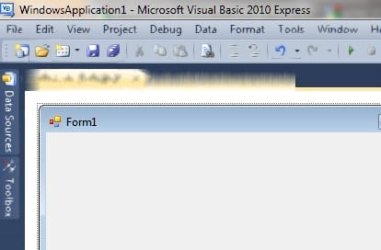
I have this weird graphics problem where sometimes programs look like ink(the pictures will help to show you what I mean)

Ive only noticed it on iTunes, Visual Basic 2010 and a screen capture software :confused:

Ive also made a Video on youtube to show you what happen on iTunes.

YouTube - Weird ATI or Windows 7 Display Problem

It looks like when water runs on ink and it smuges.

Im using a an ATI Sapphire HD5770 graphics card (not overclocked)

Any solutions or fixes?

Thanks in advance! :)
 

Attachments

  • Blurry iTunes.jpg
    Blurry iTunes.jpg
    36.2 KB · Views: 71
  • Blurry.jpg
    Blurry.jpg
    13.1 KB · Views: 45

My Computer My Computer

At a glance

Windows 7 Home Premium 64bitAMD Phenom II X4 975 BE2X 2gb 1333Mhz RAM 2x 1g 1333Mhz RAMATI Sapphire HD 5770
Computer Manufacturer/Model Number
N/A
OS
Windows 7 Home Premium 64bit
CPU
AMD Phenom II X4 975 BE
Motherboard
Asus M4A79XTD-EVO
Memory
2X 2gb 1333Mhz RAM 2x 1g 1333Mhz RAM
Graphics Card(s)
ATI Sapphire HD 5770
Monitor(s) Displays
Samsung 26" HDTV
Hard Drives
500gb Western Digital 7500rpm HDD
PSU
600W OCZ
Case
Antec 300
Cooling
Air
Hey DevilSniper, looks like you've come to the right place.

As it goes, I'm running the same graphics card in my machine and have never run into this type of problem before.

So we have several options. The most likely cause is that you installed the drivers improperly. To begin with, I'd like you to uninstall and reinstall the latest drivers.

http://sites.amd.com/us/game/downloads/Pages/radeon_win7-64.aspx

This is the latest drivers for your version of Windows (from your sig's information), please download that.

Next download this.

Guru3D - Driver Sweeper

This is Driver Sweeper. Now most of the time, general registry sweepers are rather nasty, but this one is designed for only video drivers, so should be alright.

Uninstall the Catalyst Suite that is already installed on you computer, then restart and run Driver Sweeper. After that you'll need to restart and let it do its things, follow the instructions till its complete, then reinstall the catalyst drivers. Report back if or not this helped.

Thanks!
 

My Computer My Computer

At a glance

Windows 7 Ultimate x64Intel i7-860Corsair Dominator 1600Mhz, 8-8-8-24 1.65v 2x2GBATI Radeon 5770 HD
Computer Manufacturer/Model Number
Zen Productions
OS
Windows 7 Ultimate x64
CPU
Intel i7-860
Motherboard
Gigabyte GA-P55A-UD4P
Memory
Corsair Dominator 1600Mhz, 8-8-8-24 1.65v 2x2GB
Graphics Card(s)
ATI Radeon 5770 HD
Sound Card
Intel High Definition Sound
Monitor(s) Displays
Samsung P2570HD
Screen Resolution
1920x1080
Hard Drives
Western Digital Caviar Black 500gb
PSU
Corsair CMPSU-750HX 750W
Case
Antec p183
Cooling
Corsair H50 Water Cooler
Keyboard
Logitech G110
Mouse
Logitech MX Revolution
Internet Speed
768 mb/s
Assuming you are using catalyst 11.2 or newer, open the Catalyst Control Center, click on Gaming and then on 3D Application Settings and look for Morphological Anti-Aliasing (MLAA) and if it is enabled, set it to disabled. That should fix things.
 

My Computer My Computer

At a glance

Win 7 Ultimate x64FX-8350 @ 4.6 GHz so farADATA XPG V1 Series Black 8GB DDR3 1600Sapphire R9 270x Dual-X
Computer type
PC/Desktop
Computer Manufacturer/Model Number
Me
OS
Win 7 Ultimate x64
CPU
FX-8350 @ 4.6 GHz so far
Motherboard
Asus M5A97 EVO
Memory
ADATA XPG V1 Series Black 8GB DDR3 1600
Graphics Card(s)
Sapphire R9 270x Dual-X
Sound Card
Xonar DGX w/ Corsair Vengence 1300
Monitor(s) Displays
Acer S232HL Abid
Screen Resolution
1920x1080
Hard Drives
120 GB OCZ Vertex 3
500 GB Seagate 7200.12
PSU
Antec Earthwatts 650W Green
Case
Antec Three Hundred
Cooling
Cooler Master 212 EVO
Keyboard
Logitech G510
Mouse
Logitech G500s
Internet Speed
35000/3000
Or you can do as Stormy says, as he seems familiar with the issue. :)
 

My Computer My Computer

At a glance

Windows 7 Ultimate x64Intel i7-860Corsair Dominator 1600Mhz, 8-8-8-24 1.65v 2x2GBATI Radeon 5770 HD
Computer Manufacturer/Model Number
Zen Productions
OS
Windows 7 Ultimate x64
CPU
Intel i7-860
Motherboard
Gigabyte GA-P55A-UD4P
Memory
Corsair Dominator 1600Mhz, 8-8-8-24 1.65v 2x2GB
Graphics Card(s)
ATI Radeon 5770 HD
Sound Card
Intel High Definition Sound
Monitor(s) Displays
Samsung P2570HD
Screen Resolution
1920x1080
Hard Drives
Western Digital Caviar Black 500gb
PSU
Corsair CMPSU-750HX 750W
Case
Antec p183
Cooling
Corsair H50 Water Cooler
Keyboard
Logitech G110
Mouse
Logitech MX Revolution
Internet Speed
768 mb/s
Thank you for the quick, and very helpful advice Zen and Stormy!
I have unticked Morphological Anti-Aliasing and it worked!

Thank you very much! :D
 

My Computer My Computer

At a glance

Windows 7 Home Premium 64bitAMD Phenom II X4 975 BE2X 2gb 1333Mhz RAM 2x 1g 1333Mhz RAMATI Sapphire HD 5770
Computer Manufacturer/Model Number
N/A
OS
Windows 7 Home Premium 64bit
CPU
AMD Phenom II X4 975 BE
Motherboard
Asus M4A79XTD-EVO
Memory
2X 2gb 1333Mhz RAM 2x 1g 1333Mhz RAM
Graphics Card(s)
ATI Sapphire HD 5770
Monitor(s) Displays
Samsung 26" HDTV
Hard Drives
500gb Western Digital 7500rpm HDD
PSU
600W OCZ
Case
Antec 300
Cooling
Air
I had the exact same issue - and switching off morphological anti-aliasing also did the trick for me.

Thanks a million Stormy - that was going to get nasty because although itunes was still sort of usable - dbvisualizer was completely unusable.
 

My Computer My Computer

At a glance

windows 7 Pro x64
OS
windows 7 Pro x64
Just to confirm I had the same issue and disabling morphological filtering under Game settings did the trick for me.

Catalyst 11.12
 

My Computer My Computer

At a glance

Windows 7 Ultimate x64
OS
Windows 7 Ultimate x64
Back
Top