Dell 5748 Won't Start Unless I uninstall graphics drivers

When you ran chckdsk did it say that it found bad sectors? If so.. I'm sorry if I missed this in your past posts but this a good indicator that your HDD is on it's way out. Backup all your important data just to be safe. Now create a system image. Time to look for a new hard drive. I've installed a lot of HDD's over the years in Laptops and towers so if it comes down to it I could walk you through the process. Anyway... Get this done OK..

This is the event log from chkdsk:

Checking file system on C:
The type of the file system is NTFS.
Volume label is OS.

A disk check has been scheduled.
Windows will now check the disk.

CHKDSK is verifying files (stage 1 of 5)...
232960 file records processed. File verification completed.
1800 large file records processed. 0 bad file records processed. 0 EA records processed. 44 reparse records processed. CHKDSK is verifying indexes (stage 2 of 5)...
307824 index entries processed. Index verification completed.
0 unindexed files scanned. 0 unindexed files recovered. CHKDSK is verifying security descriptors (stage 3 of 5)...
232960 file SDs/SIDs processed. Cleaning up 38 unused index entries from index $SII of file 0x9.
Cleaning up 38 unused index entries from index $SDH of file 0x9.
Cleaning up 38 unused security descriptors.
Security descriptor verification completed.
37433 data files processed. CHKDSK is verifying Usn Journal...
35975256 USN bytes processed. Usn Journal verification completed.
CHKDSK is verifying file data (stage 4 of 5)...
232944 files processed. File data verification completed.
CHKDSK is verifying free space (stage 5 of 5)...
215733565 free clusters processed. Free space verification is complete.
Windows has checked the file system and found no problems.

951834623 KB total disk space.
88426972 KB in 152737 files.
109956 KB in 37434 indexes.
0 KB in bad sectors.
363435 KB in use by the system.
65536 KB occupied by the log file.
862934260 KB available on disk.

4096 bytes in each allocation unit.
237958655 total allocation units on disk.
215733565 allocation units available on disk.

Internal Info:
00 8e 03 00 dd be 02 00 72 e8 04 00 00 00 00 00 ........r.......
fa 00 00 00 2c 00 00 00 00 00 00 00 00 00 00 00 ....,...........
00 00 00 00 00 00 00 00 00 00 00 00 00 00 00 00 ................

Windows has finished checking your disk.
Please wait while your computer restarts.

I've done the system image, on a flash drive, will that work, or does it have to be a disk? And, is it possible to re-use an old hard drive out of a different laptop, or does it have to be new? I don't have a Windows disc, just the factory image I made when I got the laptop.
 
Last edited:

My Computer My Computer

At a glance

Windows 7 Home Premium 64bitIntel I7 4510U8gbonboard graphics
Computer type
Laptop
Computer Manufacturer/Model Number
Dell Inspiron 5748
OS
Windows 7 Home Premium 64bit
CPU
Intel I7 4510U
Memory
8gb
Graphics Card(s)
onboard graphics
Antivirus
Avast Free
Browser
Firefox
Hi Matron, Seeing as chkdsk found 0 KB in bad sectors, and windows has checked the file system and

found no problems, I was just wondering if it could be something running on startup causing the problem.

I noticed you have Avast Free Antivirus, is it running on startup.

Click on the startorb

Type in msconfig in the search box

Click Startup

If Avast has a tick in the box, uncheck it, click apply, ok and then restart. It is just something else to

try :D
 

My Computer My Computer

At a glance

Windows 10 Pro 64 bitAMD A4-5300 APU with Radeon(tm) HD Graphics8.00 GBAMD Radeon HD 7480D
Computer type
PC/Desktop
Computer Manufacturer/Model Number
ASUS A85XM-A custom build
OS
Windows 10 Pro 64 bit
CPU
AMD A4-5300 APU with Radeon(tm) HD Graphics
Motherboard
ASUSTeK COMPUTER INC. A85XM-A
Memory
8.00 GB
Graphics Card(s)
AMD Radeon HD 7480D
Sound Card
(1) High Definition Audio Device (2) Realtek High Definiti
Monitor(s) Displays
HP W2072a 20 inch Led Backlit Monitor
Screen Resolution
1600 x 900 x 32 bits (4294967296 colors) @ 60 Hz
Hard Drives
TOSHIBA DT01ACA100 SATA Disk Device
Keyboard
Acer
Mouse
Acer
Internet Speed
varies
Antivirus
Windows Defender Antivirus
Browser
Waterfox, Edge
It just crashed on my again, while I was watching a news video. The whole laptop locked up, I could hear a harsh buzzing sound from the video itself, and it wouldn't respond to anything, including ctrl alt delete. I had to hold down the power button to get it to go off, and then when it restarted, I could hear all the windows startup sounds, but the screen never came on after the Microsoft splash screen. Right now, I'm back in safe mode, which always starts up ok.
 

My Computer My Computer

At a glance

Windows 7 Home Premium 64bitIntel I7 4510U8gbonboard graphics
Computer type
Laptop
Computer Manufacturer/Model Number
Dell Inspiron 5748
OS
Windows 7 Home Premium 64bit
CPU
Intel I7 4510U
Memory
8gb
Graphics Card(s)
onboard graphics
Antivirus
Avast Free
Browser
Firefox

My Computer My Computer

At a glance

Desk1 7 Home Prem / Desk2 10 Pro / Main lap A...Desk1 i5 3750K / Laptop i7 GTX 860M / Desk2 i...Desk1 8GB (1866) / Desk2 16GB (1333) / Laptop...Desk 1& 2NVidia GTX 650 & Laptops on board Intel
Computer type
PC/Desktop
Computer Manufacturer/Model Number
Own build (new) Desk1 / Asus ROG Win 7 / Desk2 1st build
OS
Desk1 7 Home Prem / Desk2 10 Pro / Main lap Asus ROG 10 Pro 2 laptop Toshiba 7 Pro Asus P2520 7 & 10
CPU
Desk1 i5 3750K / Laptop i7 GTX 860M / Desk2 i5 2500
Motherboard
Desk1 Asus P877-V / Desk2 Gigabyte H67 UD3H / Laptop ?
Memory
Desk1 8GB (1866) / Desk2 16GB (1333) / Laptop 8Gb DDR3
Graphics Card(s)
Desk 1& 2NVidia GTX 650 & Laptops on board Intel
Sound Card
Desk 1 & 2 -XONAR DG Realtek High Def audio Laptop
Monitor(s) Displays
Desk 1 Benq HD 2450 / Desk2 Philips 24" / Laptop 17.5"
Screen Resolution
1920x1080 D1 & D2 & Laptop 1
Hard Drives
Desk1 Samsung 120GB 830 SSD
Asus ROG 256GB 850 Pro SSD
Desk2 Samsung 840 256 SSD
Toshiba 120GB EVO
PSU
Desk 1 Corsair HX 1050/ Laptop ? / Desk 2 Corsair HX 650
Case
Desk 1 Cooler HAF XM ? Toshiba laptop / Desk2 Coolermaster
Cooling
Fans on all Desk1 -2 Desk2 - all Coolermasters 5 Laptop ?
Keyboard
Desk 1 MS Sidewinder X6 Desk 2 MS Sidewinder X 4
Mouse
Desk 1&2 - Gigabyte MS 900 gamer - laptop - Logitec wireless
Internet Speed
ADSL2+
Other Info
One other Desktop (tester) and spare Toshba laptop both with SSD's
Running Kaspersky 2016 ISS on all machines config'd identically
Logitec audio stereo systems on each machine (x3)
Canon MG5250MFC
Router/modem TP-Link running WPA2SK
Ok Matron my two cents worth I would dump the Avast try MSE for the time being and try installing the Intel driver Downloads for Intel® HD Graphics 4400 for the graphics

OK, giving that a shot.

Another glitch in the system: today when I went to start up my laptop, I was greeted by 8 really loud beeps. This happened twice and then it started up, went into windows repair, was unable to find the problem, and then started, with the resolution all messed up. I don't currently have the latest graphics drivers installed.
 

My Computer My Computer

At a glance

Windows 7 Home Premium 64bitIntel I7 4510U8gbonboard graphics
Computer type
Laptop
Computer Manufacturer/Model Number
Dell Inspiron 5748
OS
Windows 7 Home Premium 64bit
CPU
Intel I7 4510U
Memory
8gb
Graphics Card(s)
onboard graphics
Antivirus
Avast Free
Browser
Firefox
Ok mate now the beeps are part of a system that warn one of things that are happening however the coding system can vary from brand of BIOS to BIOS or indeed the manufacturers machine as you can see from this article Computer POST and beep codes For example many desktops will sound one beep to let you know the RAM has been found to be ok.

So it then follows we have to determine first up what BIOS you have in that machine and to do that you need to power on the machine while tapping a dedicated key in your case a Dell which is usually F2 when the screen comes up you can then determine the brand (for want of a better term) of the BIOS.

From the article for example you can see in an AMI BIOS the eight beeps would indicate a memory issue - probably bad or requiring attention ie reseating it often works. If those fixes did not work then it means replacing the memory as there is no way of fixing RAM sticks, and if you are really unlucky bad RAM slots which would mean the motherboard is either dying or a RAM slot you are currently using is no good, and cannot be used .

Please say if I am telling my grandmother how to suck eggs as I am not sure if you know this already.

So find out the make of BIOS and then from that article you should be able to track down the source of those eight beeps but I strongly suspect this is a memory issue as it is one of the more common failures.
 

My Computer My Computer

At a glance

Desk1 7 Home Prem / Desk2 10 Pro / Main lap A...Desk1 i5 3750K / Laptop i7 GTX 860M / Desk2 i...Desk1 8GB (1866) / Desk2 16GB (1333) / Laptop...Desk 1& 2NVidia GTX 650 & Laptops on board Intel
Computer type
PC/Desktop
Computer Manufacturer/Model Number
Own build (new) Desk1 / Asus ROG Win 7 / Desk2 1st build
OS
Desk1 7 Home Prem / Desk2 10 Pro / Main lap Asus ROG 10 Pro 2 laptop Toshiba 7 Pro Asus P2520 7 & 10
CPU
Desk1 i5 3750K / Laptop i7 GTX 860M / Desk2 i5 2500
Motherboard
Desk1 Asus P877-V / Desk2 Gigabyte H67 UD3H / Laptop ?
Memory
Desk1 8GB (1866) / Desk2 16GB (1333) / Laptop 8Gb DDR3
Graphics Card(s)
Desk 1& 2NVidia GTX 650 & Laptops on board Intel
Sound Card
Desk 1 & 2 -XONAR DG Realtek High Def audio Laptop
Monitor(s) Displays
Desk 1 Benq HD 2450 / Desk2 Philips 24" / Laptop 17.5"
Screen Resolution
1920x1080 D1 & D2 & Laptop 1
Hard Drives
Desk1 Samsung 120GB 830 SSD
Asus ROG 256GB 850 Pro SSD
Desk2 Samsung 840 256 SSD
Toshiba 120GB EVO
PSU
Desk 1 Corsair HX 1050/ Laptop ? / Desk 2 Corsair HX 650
Case
Desk 1 Cooler HAF XM ? Toshiba laptop / Desk2 Coolermaster
Cooling
Fans on all Desk1 -2 Desk2 - all Coolermasters 5 Laptop ?
Keyboard
Desk 1 MS Sidewinder X6 Desk 2 MS Sidewinder X 4
Mouse
Desk 1&2 - Gigabyte MS 900 gamer - laptop - Logitec wireless
Internet Speed
ADSL2+
Other Info
One other Desktop (tester) and spare Toshba laptop both with SSD's
Running Kaspersky 2016 ISS on all machines config'd identically
Logitec audio stereo systems on each machine (x3)
Canon MG5250MFC
Router/modem TP-Link running WPA2SK
Ok, here are things I've tried: the BIOS is AMI/American Megatrends, and according to their site, 8 short beeps means the system video adapter is missing or defective, which goes along with the video drivers issue. Suggestions include replacing or reseating your video card, but this has onboard graphics.

I followed the instructions to run that Pre Boot test thing (PSA?), and everything passed. Again.

I uninstalled Avast, ran CCleaner to clean up after, installed MSE, and installed the intel video drivers that were linked in post 24. It initially started after that installation and restart, but has since crashed once (Blue screen, memory dump), and is now back to not booting except in safe mode.

Another odd thing, that the laptop has been doing for at least a year, long before this problem started, is it makes the New Hardware beeping sound whenever it's jostled. I've tried to see in Device Manager what's causing it, but I've never managed to see what changes, the menu moves to quickly. Not sure if it has anything to do with anything, but I HAVE taken the laptop apart, and nothing seems loose.
 

My Computer My Computer

At a glance

Windows 7 Home Premium 64bitIntel I7 4510U8gbonboard graphics
Computer type
Laptop
Computer Manufacturer/Model Number
Dell Inspiron 5748
OS
Windows 7 Home Premium 64bit
CPU
Intel I7 4510U
Memory
8gb
Graphics Card(s)
onboard graphics
Antivirus
Avast Free
Browser
Firefox
The Avast did you just uninstall it in Control Panel if so then you should run the Avast removal tool as with AV's they have their own dedicated removal tools Avast Uninstall Utility | Download aswClear for Avast Removal

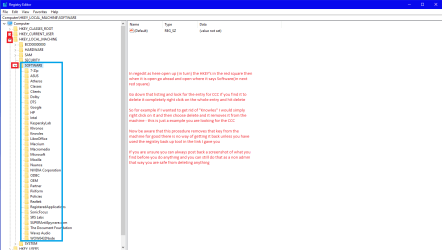
Now personally I always check in the registry in the HKEYs' LOCAL_MACHINE and CURRENT_USER > Software to make sure any entries are still left in there because I know for past experience even the removal tool does not clear those registry entries - Norton (Symantec) is a prime example of that happening even though one has run the Norton removal tool. Attached is a pic of what I mean that I made up for someone else.

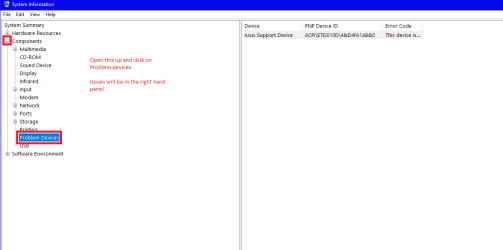
If you can could you resend the dump files please and if you like you can run msconfig32 and see if there are any problem devices - see pic
You probably know how to dot that but Start type "msinfo" without quotes and open it up see my pic

let us know what comes up
 

Attachments

  • HKEY.PNG
    HKEY.PNG
    28.3 KB · Views: 2
  • MSINFO.PNG
    MSINFO.PNG
    10.2 KB · Views: 0

My Computer My Computer

At a glance

Desk1 7 Home Prem / Desk2 10 Pro / Main lap A...Desk1 i5 3750K / Laptop i7 GTX 860M / Desk2 i...Desk1 8GB (1866) / Desk2 16GB (1333) / Laptop...Desk 1& 2NVidia GTX 650 & Laptops on board Intel
Computer type
PC/Desktop
Computer Manufacturer/Model Number
Own build (new) Desk1 / Asus ROG Win 7 / Desk2 1st build
OS
Desk1 7 Home Prem / Desk2 10 Pro / Main lap Asus ROG 10 Pro 2 laptop Toshiba 7 Pro Asus P2520 7 & 10
CPU
Desk1 i5 3750K / Laptop i7 GTX 860M / Desk2 i5 2500
Motherboard
Desk1 Asus P877-V / Desk2 Gigabyte H67 UD3H / Laptop ?
Memory
Desk1 8GB (1866) / Desk2 16GB (1333) / Laptop 8Gb DDR3
Graphics Card(s)
Desk 1& 2NVidia GTX 650 & Laptops on board Intel
Sound Card
Desk 1 & 2 -XONAR DG Realtek High Def audio Laptop
Monitor(s) Displays
Desk 1 Benq HD 2450 / Desk2 Philips 24" / Laptop 17.5"
Screen Resolution
1920x1080 D1 & D2 & Laptop 1
Hard Drives
Desk1 Samsung 120GB 830 SSD
Asus ROG 256GB 850 Pro SSD
Desk2 Samsung 840 256 SSD
Toshiba 120GB EVO
PSU
Desk 1 Corsair HX 1050/ Laptop ? / Desk 2 Corsair HX 650
Case
Desk 1 Cooler HAF XM ? Toshiba laptop / Desk2 Coolermaster
Cooling
Fans on all Desk1 -2 Desk2 - all Coolermasters 5 Laptop ?
Keyboard
Desk 1 MS Sidewinder X6 Desk 2 MS Sidewinder X 4
Mouse
Desk 1&2 - Gigabyte MS 900 gamer - laptop - Logitec wireless
Internet Speed
ADSL2+
Other Info
One other Desktop (tester) and spare Toshba laptop both with SSD's
Running Kaspersky 2016 ISS on all machines config'd identically
Logitec audio stereo systems on each machine (x3)
Canon MG5250MFC
Router/modem TP-Link running WPA2SK
I used the Avast removal tools, and I can't find any trace of the program anywhere on my laptop. I have WSE running instead. It's still randomly not booting up properly, and now, I'm having crashes, as well. Several blue screen memory dumps, as well as a few where everything just freezes, the screen turns grey, and the system reboots. If I knew for sure it was the hard drive, I'd just replace that, but I hate to spend the 50 bucks and then still have to buy a new laptop, when I really can't afford either one.
 

My Computer My Computer

At a glance

Windows 7 Home Premium 64bitIntel I7 4510U8gbonboard graphics
Computer type
Laptop
Computer Manufacturer/Model Number
Dell Inspiron 5748
OS
Windows 7 Home Premium 64bit
CPU
Intel I7 4510U
Memory
8gb
Graphics Card(s)
onboard graphics
Antivirus
Avast Free
Browser
Firefox
Ok mate now please follow these if you are having blue screens I for one would like to see the dumps and it you are worried about the drive then I would also be testing it you do this use this http://www.seagate.com/au/en/support/downloads/seatools/ you only need run the short generic test unless it comes up with some really suspect stuff then we may need to run the long generic but it takes a fair while to do

Dump Files - Configure Windows to Create on BSOD

[FONT=Arial, sans-serif]&[/FONT]

Blue Screen of Death (BSOD) Posting Instructions[FONT=Arial, sans-serif][/FONT]

Now I don't know if you have access to another machine but you could use the second machine to run Seatools for example.

Just as a by the by when you start up the machine is there any noticeable noise coming from the area where the hard drive is for example is there any quite loud clicking or scraping noises.

But really it would be good to get those dump files if at all possible.
 

My Computer My Computer

At a glance

Desk1 7 Home Prem / Desk2 10 Pro / Main lap A...Desk1 i5 3750K / Laptop i7 GTX 860M / Desk2 i...Desk1 8GB (1866) / Desk2 16GB (1333) / Laptop...Desk 1& 2NVidia GTX 650 & Laptops on board Intel
Computer type
PC/Desktop
Computer Manufacturer/Model Number
Own build (new) Desk1 / Asus ROG Win 7 / Desk2 1st build
OS
Desk1 7 Home Prem / Desk2 10 Pro / Main lap Asus ROG 10 Pro 2 laptop Toshiba 7 Pro Asus P2520 7 & 10
CPU
Desk1 i5 3750K / Laptop i7 GTX 860M / Desk2 i5 2500
Motherboard
Desk1 Asus P877-V / Desk2 Gigabyte H67 UD3H / Laptop ?
Memory
Desk1 8GB (1866) / Desk2 16GB (1333) / Laptop 8Gb DDR3
Graphics Card(s)
Desk 1& 2NVidia GTX 650 & Laptops on board Intel
Sound Card
Desk 1 & 2 -XONAR DG Realtek High Def audio Laptop
Monitor(s) Displays
Desk 1 Benq HD 2450 / Desk2 Philips 24" / Laptop 17.5"
Screen Resolution
1920x1080 D1 & D2 & Laptop 1
Hard Drives
Desk1 Samsung 120GB 830 SSD
Asus ROG 256GB 850 Pro SSD
Desk2 Samsung 840 256 SSD
Toshiba 120GB EVO
PSU
Desk 1 Corsair HX 1050/ Laptop ? / Desk 2 Corsair HX 650
Case
Desk 1 Cooler HAF XM ? Toshiba laptop / Desk2 Coolermaster
Cooling
Fans on all Desk1 -2 Desk2 - all Coolermasters 5 Laptop ?
Keyboard
Desk 1 MS Sidewinder X6 Desk 2 MS Sidewinder X 4
Mouse
Desk 1&2 - Gigabyte MS 900 gamer - laptop - Logitec wireless
Internet Speed
ADSL2+
Other Info
One other Desktop (tester) and spare Toshba laptop both with SSD's
Running Kaspersky 2016 ISS on all machines config'd identically
Logitec audio stereo systems on each machine (x3)
Canon MG5250MFC
Router/modem TP-Link running WPA2SK
Matron:

Rather than booting into Safe Mode, you could boot into VGA Mode (I believe it is called "Enable VGA Mode"). This should allow you to run Windows in normal mode, because it will disable the video driver you have installed and put you into standard VGA mode for the current Windows session.

As for how to get a good video driver installed, there are two things you could try:

1. See if there is a Vista driver for your video card. If there is, it may work better than the Windows 7 driver.

2. Try the VEN-DEV method for finding a video driver. Check the following thread for more information:

Need drivers for HP 23-r111 Windows 7

Good luck!

Jim
 

My Computer My Computer

At a glance

Linux Mint 18.2 xfce 64-bit (VMWare host) / W...Haswell4 GB
Computer type
PC/Desktop
Computer Manufacturer/Model Number
Dell
OS
Linux Mint 18.2 xfce 64-bit (VMWare host) / Windows 8.1 Pro 32-bit (VMWare guest)
CPU
Haswell
Memory
4 GB
Monitor(s) Displays
Acer 23"
Screen Resolution
1920 x 1080
Hard Drives
Two hard drives, 1TB each: One for Linux, one for my data.
Keyboard
IBM Model M
Antivirus
Sophos (Linux), Trend Micro (Windows)
Browser
Firefox, Opera
Other Info
I use Samba to share my data drive with the other computers at my house and with my guest session in VMWare Workstation Player.
Well, last night, I ended up putting a different hard drive, from an older, unused laptop in it. I loaded the Dell startup disc, it loaded everything up, and, so far, it seems to be running fine. No crashes today, anyway. Fingers crossed, this fixes the problem, but I've thought it was fixed before, and it started crashing on me again.
 

My Computer My Computer

At a glance

Windows 7 Home Premium 64bitIntel I7 4510U8gbonboard graphics
Computer type
Laptop
Computer Manufacturer/Model Number
Dell Inspiron 5748
OS
Windows 7 Home Premium 64bit
CPU
Intel I7 4510U
Memory
8gb
Graphics Card(s)
onboard graphics
Antivirus
Avast Free
Browser
Firefox

My Computer My Computer

At a glance

Desk1 7 Home Prem / Desk2 10 Pro / Main lap A...Desk1 i5 3750K / Laptop i7 GTX 860M / Desk2 i...Desk1 8GB (1866) / Desk2 16GB (1333) / Laptop...Desk 1& 2NVidia GTX 650 & Laptops on board Intel
Computer type
PC/Desktop
Computer Manufacturer/Model Number
Own build (new) Desk1 / Asus ROG Win 7 / Desk2 1st build
OS
Desk1 7 Home Prem / Desk2 10 Pro / Main lap Asus ROG 10 Pro 2 laptop Toshiba 7 Pro Asus P2520 7 & 10
CPU
Desk1 i5 3750K / Laptop i7 GTX 860M / Desk2 i5 2500
Motherboard
Desk1 Asus P877-V / Desk2 Gigabyte H67 UD3H / Laptop ?
Memory
Desk1 8GB (1866) / Desk2 16GB (1333) / Laptop 8Gb DDR3
Graphics Card(s)
Desk 1& 2NVidia GTX 650 & Laptops on board Intel
Sound Card
Desk 1 & 2 -XONAR DG Realtek High Def audio Laptop
Monitor(s) Displays
Desk 1 Benq HD 2450 / Desk2 Philips 24" / Laptop 17.5"
Screen Resolution
1920x1080 D1 & D2 & Laptop 1
Hard Drives
Desk1 Samsung 120GB 830 SSD
Asus ROG 256GB 850 Pro SSD
Desk2 Samsung 840 256 SSD
Toshiba 120GB EVO
PSU
Desk 1 Corsair HX 1050/ Laptop ? / Desk 2 Corsair HX 650
Case
Desk 1 Cooler HAF XM ? Toshiba laptop / Desk2 Coolermaster
Cooling
Fans on all Desk1 -2 Desk2 - all Coolermasters 5 Laptop ?
Keyboard
Desk 1 MS Sidewinder X6 Desk 2 MS Sidewinder X 4
Mouse
Desk 1&2 - Gigabyte MS 900 gamer - laptop - Logitec wireless
Internet Speed
ADSL2+
Other Info
One other Desktop (tester) and spare Toshba laptop both with SSD's
Running Kaspersky 2016 ISS on all machines config'd identically
Logitec audio stereo systems on each machine (x3)
Canon MG5250MFC
Router/modem TP-Link running WPA2SK
I'll run those checks, thanks!

I do know everything isn't fixed. Today, it wouldn't come out of sleep mode, so I had to reset, and it gave me the loud beeps again, twice, before it started. It ran startup repair, but couldn't fix anything. It did start back up and is running normally at the moment.

ETA: ok I downloaded the seatools, and it passed all the tests but the long generic, which fails at 10%, ran it twice, same result both times.
 
Last edited:

My Computer My Computer

At a glance

Windows 7 Home Premium 64bitIntel I7 4510U8gbonboard graphics
Computer type
Laptop
Computer Manufacturer/Model Number
Dell Inspiron 5748
OS
Windows 7 Home Premium 64bit
CPU
Intel I7 4510U
Memory
8gb
Graphics Card(s)
onboard graphics
Antivirus
Avast Free
Browser
Firefox
I have given up. After working fairly decent for a week or two, it went right back to the same issue, and only starting if I delete the graphics drivers, getting stuck in sleep mode and doing the 8 beeps when I try to reset. This was a different hard drive, so it shouldn't be the hard drive. Even though it wasn't a new one, I don't know how two different hard drives could cause the same failure, but someone please, tell me if I'm wrong there.

So I'm guessing it's either the mobo, or something in the monitor itself, because kind of tapping at the top left side of the screen is usually the only way to get it to start up, when it's doing the beeping. I thought about taking it to a repair shop, but I'm not sure if it would even be cost effective. I've never done that before, no idea what they cost.

So I'm just using my daughter's laptop until I can get myself a new one. Yay, Windows 10! (sarcasm)
 

My Computer My Computer

At a glance

Windows 7 Home Premium 64bitIntel I7 4510U8gbonboard graphics
Computer type
Laptop
Computer Manufacturer/Model Number
Dell Inspiron 5748
OS
Windows 7 Home Premium 64bit
CPU
Intel I7 4510U
Memory
8gb
Graphics Card(s)
onboard graphics
Antivirus
Avast Free
Browser
Firefox
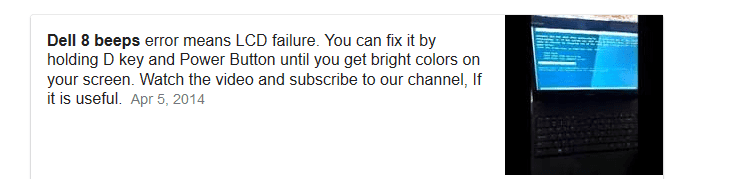
Ok sorry late reply mate now I suppose you could be just downright unlucky enough to have two drives that are out of whack. So is it still the 8 beeps? if so then form a simple Google I still find it is the monitor see pic.

That might explain why tapping on the screen wakes the darn thing up.

Now I don't know what repair shops charge where you are but out here $85 and hour is not uncommon in fact about average.

The tapping on he screen is to me at least very suggestive of a loose connection to the monitor or within it but without actually see this in action it is so hard to tell.

Edit sorry the pic cut off the video How to fix 8 beeps on Dell laptop within 1 minute? - YouTube
 

Attachments

  • BEEPS.PNG
    BEEPS.PNG
    13.1 KB · Views: 7

My Computer My Computer

At a glance

Desk1 7 Home Prem / Desk2 10 Pro / Main lap A...Desk1 i5 3750K / Laptop i7 GTX 860M / Desk2 i...Desk1 8GB (1866) / Desk2 16GB (1333) / Laptop...Desk 1& 2NVidia GTX 650 & Laptops on board Intel
Computer type
PC/Desktop
Computer Manufacturer/Model Number
Own build (new) Desk1 / Asus ROG Win 7 / Desk2 1st build
OS
Desk1 7 Home Prem / Desk2 10 Pro / Main lap Asus ROG 10 Pro 2 laptop Toshiba 7 Pro Asus P2520 7 & 10
CPU
Desk1 i5 3750K / Laptop i7 GTX 860M / Desk2 i5 2500
Motherboard
Desk1 Asus P877-V / Desk2 Gigabyte H67 UD3H / Laptop ?
Memory
Desk1 8GB (1866) / Desk2 16GB (1333) / Laptop 8Gb DDR3
Graphics Card(s)
Desk 1& 2NVidia GTX 650 & Laptops on board Intel
Sound Card
Desk 1 & 2 -XONAR DG Realtek High Def audio Laptop
Monitor(s) Displays
Desk 1 Benq HD 2450 / Desk2 Philips 24" / Laptop 17.5"
Screen Resolution
1920x1080 D1 & D2 & Laptop 1
Hard Drives
Desk1 Samsung 120GB 830 SSD
Asus ROG 256GB 850 Pro SSD
Desk2 Samsung 840 256 SSD
Toshiba 120GB EVO
PSU
Desk 1 Corsair HX 1050/ Laptop ? / Desk 2 Corsair HX 650
Case
Desk 1 Cooler HAF XM ? Toshiba laptop / Desk2 Coolermaster
Cooling
Fans on all Desk1 -2 Desk2 - all Coolermasters 5 Laptop ?
Keyboard
Desk 1 MS Sidewinder X6 Desk 2 MS Sidewinder X 4
Mouse
Desk 1&2 - Gigabyte MS 900 gamer - laptop - Logitec wireless
Internet Speed
ADSL2+
Other Info
One other Desktop (tester) and spare Toshba laptop both with SSD's
Running Kaspersky 2016 ISS on all machines config'd identically
Logitec audio stereo systems on each machine (x3)
Canon MG5250MFC
Router/modem TP-Link running WPA2SK
Still the 8 beeps. Not every time, but happening more an more often. When it first started, it only did it on fresh startup, but now it's doing it on coming out of sleep, too. And I've tried the D key thing, too. It showed the colors....and beep beep beeped, lol! And still, even when I tap the screen and get it to go, it won't go past the starting windows screen (that black screen with Microsoft, with the lime green bar going right and left), unless it has no graphics drivers at all installed.
 

My Computer My Computer

At a glance

Windows 7 Home Premium 64bitIntel I7 4510U8gbonboard graphics
Computer type
Laptop
Computer Manufacturer/Model Number
Dell Inspiron 5748
OS
Windows 7 Home Premium 64bit
CPU
Intel I7 4510U
Memory
8gb
Graphics Card(s)
onboard graphics
Antivirus
Avast Free
Browser
Firefox
Well you are running Intel 4440 HD graphics and maybe it is worth a try updating the driver Downloads for Intel® HD Graphics 4400 but the problem is if it is not booting then it really is not an option. If only you could get into safe mode the driver could then updated via a USB stick.

Can you get into the BIOS at all?? If so can you check to see if the secure boot and/or the CSM is enabled?

Now there is this and perhaps it worth a look though to see if anything clicks because you cna see just waht is happening whereas I don't
Troubleshooting Windows 7 Failure to Boot - Windows 7 Help Forums
 

My Computer My Computer

At a glance

Desk1 7 Home Prem / Desk2 10 Pro / Main lap A...Desk1 i5 3750K / Laptop i7 GTX 860M / Desk2 i...Desk1 8GB (1866) / Desk2 16GB (1333) / Laptop...Desk 1& 2NVidia GTX 650 & Laptops on board Intel
Computer type
PC/Desktop
Computer Manufacturer/Model Number
Own build (new) Desk1 / Asus ROG Win 7 / Desk2 1st build
OS
Desk1 7 Home Prem / Desk2 10 Pro / Main lap Asus ROG 10 Pro 2 laptop Toshiba 7 Pro Asus P2520 7 & 10
CPU
Desk1 i5 3750K / Laptop i7 GTX 860M / Desk2 i5 2500
Motherboard
Desk1 Asus P877-V / Desk2 Gigabyte H67 UD3H / Laptop ?
Memory
Desk1 8GB (1866) / Desk2 16GB (1333) / Laptop 8Gb DDR3
Graphics Card(s)
Desk 1& 2NVidia GTX 650 & Laptops on board Intel
Sound Card
Desk 1 & 2 -XONAR DG Realtek High Def audio Laptop
Monitor(s) Displays
Desk 1 Benq HD 2450 / Desk2 Philips 24" / Laptop 17.5"
Screen Resolution
1920x1080 D1 & D2 & Laptop 1
Hard Drives
Desk1 Samsung 120GB 830 SSD
Asus ROG 256GB 850 Pro SSD
Desk2 Samsung 840 256 SSD
Toshiba 120GB EVO
PSU
Desk 1 Corsair HX 1050/ Laptop ? / Desk 2 Corsair HX 650
Case
Desk 1 Cooler HAF XM ? Toshiba laptop / Desk2 Coolermaster
Cooling
Fans on all Desk1 -2 Desk2 - all Coolermasters 5 Laptop ?
Keyboard
Desk 1 MS Sidewinder X6 Desk 2 MS Sidewinder X 4
Mouse
Desk 1&2 - Gigabyte MS 900 gamer - laptop - Logitec wireless
Internet Speed
ADSL2+
Other Info
One other Desktop (tester) and spare Toshba laptop both with SSD's
Running Kaspersky 2016 ISS on all machines config'd identically
Logitec audio stereo systems on each machine (x3)
Canon MG5250MFC
Router/modem TP-Link running WPA2SK
Back
Top