Screen Tearing with AMD/ATI Graphics

feetand nches

New member
Power User
VIP
Local time
6:30 AM
Messages
555
Below is the first post of a Thread I started at the AMD site, but could not get any good answers. Located here
https://community.amd.com/thread/201562

I just reinstalled Windows 7 Vanilla to a new SSD on my Toshiba, here is the exact laptop at Toshiba
Satellite L505D-LS5007 Support | Toshiba
And here is the Speccy

http://speccy.piriform.com/results/E34zQygSz1vXIBsaKXkcVlE

I have installed the proper driver that was used on the original OEM Install and am still getting some chattering when I scroll on web pages. I also have the ATI Catalyst installed but don't understand if it will be of any help. I've wasted to much time with all this just to get some simple function, what is wrong? I even had a newer driver to start with but they were both the same. Any info needed please just ask.

I also don't think I need the Catalyst, can someone advise about this if possible?

Thanks, Nasty7

Also have this Thread below, but thought maybe it was not the right content for the thread so posted here instead.
http://www.sevenforums.com/installation-setup/396716-new-ssd-install-official-windows-iso.html

If nothing else, would love to know how to Uninstall the driver and re-install a newer one. I have done this once but seems as though I did not do it properly. It installed, but don't think I followed the correct procedure.

One thing I am unsure of is the Uninstall part. I tried the "Update Driver" route but that would not work. I then Uninstalled the driver, and reinstalled the new driver all at once without reboot.

1. My question is: Should I have Uninstalled then Rebooted? Because it seems then I would not have any graphics to work with. Once Uninstalled Windows asks me to reboot.
2. If I Uninstall and Reboot, will I need to be in Safe Mode to reinstall Graphics Drivers.

I already read some of the documentation here about this, but did not see this particular information. Also read about how to install driver without Catalyst, I think this would be good for me as I don't Game, or use any graphics intense programs.

Thanks, Nasty7
 

My Computer My Computer

Computer type
Laptop
Computer Manufacturer/Model Number
HP Pavilion dv7-6c23cl
OS
Windows 7 Home Premium 64bit
CPU
AMD A8-3520M
Motherboard
Hewlett-Packard 180B (Socket FS1)
Memory
6.00GB DDR3 @ 674MHz (9-9-9-24)
Graphics Card(s)
512MB ATI AMD Radeon HD 6620G
Sound Card
IDT High Definition Audio CODEC
Monitor(s) Displays
Generic PnP Monitor
Screen Resolution
(1600x900@60Hz)
Hard Drives
Samsung 850 EVO 250GB SSD
Mouse
Logitec M525
Internet Speed
30-75Mbps
Antivirus
Avast Free, Unfortunately
Browser
Google Chrome, Firefox, IE
Catalyst is a control panel type program. You don't necessarily need it, and it can be safely uninstalled.

Rebooting after you've uninstalled your graphics drivers is important because it completes the uninstall. Don't worry, when you reboot, your laptop will use the standard VGA adapter drivers to give you a screen. You don't need to be in Safe Mode to reinstall your drivers. The regular Windows boot will be fine. You just won't have the fancier graphics available with the standard VGA adapter, but it is fine to install your new graphics drivers with.

Incidentally, you should only use graphics drivers from your laptop's manufacturer, not from anywhere else. The Toshiba drivers may have been optimized for the laptop. Using other drivers may be depriving you of features, or they may not work as well.
 

My Computer My Computer

Computer type
PC/Desktop
Computer Manufacturer/Model Number
Mellon Labs (custom build)
OS
Win 7 Pro x64/Win 10 Pro x64 dual boot
CPU
AMD FX 8350 Vishera @ 4200
Motherboard
ASUS M5A97 R2.0
Memory
16 GB Mushkin Blackline DDR3-2400 @ 1866 (9-10-10-10-31)
Graphics Card(s)
XFX Radeon R9 280 Double D Black Edition
Sound Card
Realtek HD Audio on MB. Sounds great.
Monitor(s) Displays
Acer 24", Acer 22"
Screen Resolution
3840 x 1080
Hard Drives
1 x Mushkin Chronos 120 GB SSD (Win 10)
1 x Samsung 850 EVO 250 GB SSD (Win 7)
1 x WD 1TB SATA Blue
1 x WD 1TB SATA Green
PSU
Corsair TX-750
Case
CoolerMaster HAF 912+
Cooling
Coolermaster Seidon 240M Liquid AIO. 6 case fans
Keyboard
Logitech G710+
Mouse
Logitech G500s
Internet Speed
Much better since I got fiber, but still way overpriced.
Antivirus
MSE, Malware Bytes for scanning
Browser
Firefox
Other Info
Corsair VOID USB headphones.

A Mellon Labs X-1 - LCD Smartie driven system status display.

Brought to you by the letter E

My Computer My Computer

Computer type
PC/Desktop
Computer Manufacturer/Model Number
Self Built
OS
Win 10 Pro x64
CPU
Intel I5-2500K @3.3GHz
Motherboard
Asrock P67 Extreme4
Memory
16GB G.Skill Ripjaws X (4x4GB)
Graphics Card(s)
EVGA GeForce 750 Ti SC 2GB
Sound Card
ASUS Xonar DG 5.1 Channels 24-bit 96KHz PCI Interface Sound
Monitor(s) Displays
auria eq2367
Screen Resolution
1920 x 1080
Hard Drives
250GB Samsung 850 EVO SSD
1TB WD Blue
1TB Hitachi
PSU
SeaSonic X 650W 80 Plus Gold
Case
Corsair Obsidian 750D
Cooling
Corsair H60, Three 140mm case fans
Keyboard
Logitech Wireless Keyboard K520
Mouse
Logitech Wireless Mouse M310
Internet Speed
Wave Broadband ~ 100 dn 5 up
Antivirus
Windows Defender, Malwarebytes Premium
Browser
Edge, IE11, Chrome
Other Info
Laptop specs: HP g7-1365dx /
CPU: AMD A6-3420M APU with Radeon(tm) HD Graphics /
RAM: Crucial 8Gb (2x4Gb) /
SSD: Crucial M4-CT128M4SSD2 ATA Device/ FW 000F /
GFX: AMD Radeon HD 6520G /
OS: Windows 10 Pro x64
Rebooting after you've uninstalled your graphics drivers is important because it completes the uninstall. Don't worry, when you reboot, your laptop will use the standard VGA adapter drivers to give you a screen. You don't need to be in Safe Mode to reinstall your drivers. The regular Windows boot will be fine. You just won't have the fancier graphics available with the standard VGA adapter, but it is fine to install your new graphics drivers with.

Incidentally, you should only use graphics drivers from your laptop's manufacturer, not from anywhere else. The Toshiba drivers may have been optimized for the laptop. Using other drivers may be depriving you of features, or they may not work as well.

Thanks Mellon Head that is exactly what I needed to know, I'm still timid with these things.

As far as using Graphics Drivers from my laptop's manufacturer, that's what I am using now, but having screen-tearing issues and have no idea why? And, there are no Drivers for graphics at the official Link I provided, I got them from "Driver Magician" Folder that I used to backup drivers from OEM Install, and compared the version. Another Advisor here also looked for me to see if I was just missing them...AddRAM I think. So don't waste to much time looking for them, I think there is another issue as you will see below.
http://support.toshiba.com/support/modelHome?freeText=2520796

Was also having this issue with a slightly newer driver I got from another source, they were official AMD Drivers with the Catalyst as far as I could tell. I scanned them after download if that matters, and checked the site reputation with Virustotal. I was also pointed to the newest drivers at the AMD site, but as you say, I also don't think they will help.
Legacy

IMPORTANT NOTE: One thing to note, it seems only on "websites while scrolling" that this happens, any ideas?
 

My Computer My Computer

Computer type
Laptop
Computer Manufacturer/Model Number
HP Pavilion dv7-6c23cl
OS
Windows 7 Home Premium 64bit
CPU
AMD A8-3520M
Motherboard
Hewlett-Packard 180B (Socket FS1)
Memory
6.00GB DDR3 @ 674MHz (9-9-9-24)
Graphics Card(s)
512MB ATI AMD Radeon HD 6620G
Sound Card
IDT High Definition Audio CODEC
Monitor(s) Displays
Generic PnP Monitor
Screen Resolution
(1600x900@60Hz)
Hard Drives
Samsung 850 EVO 250GB SSD
Mouse
Logitec M525
Internet Speed
30-75Mbps
Antivirus
Avast Free, Unfortunately
Browser
Google Chrome, Firefox, IE

My Computer My Computer

Computer type
Laptop
Computer Manufacturer/Model Number
HP Pavilion dv7-6c23cl
OS
Windows 7 Home Premium 64bit
CPU
AMD A8-3520M
Motherboard
Hewlett-Packard 180B (Socket FS1)
Memory
6.00GB DDR3 @ 674MHz (9-9-9-24)
Graphics Card(s)
512MB ATI AMD Radeon HD 6620G
Sound Card
IDT High Definition Audio CODEC
Monitor(s) Displays
Generic PnP Monitor
Screen Resolution
(1600x900@60Hz)
Hard Drives
Samsung 850 EVO 250GB SSD
Mouse
Logitec M525
Internet Speed
30-75Mbps
Antivirus
Avast Free, Unfortunately
Browser
Google Chrome, Firefox, IE
IMPORTANT NOTE: One thing to note, it seems only on "websites while scrolling" that this happens, any ideas?
It could be your browser that is causing this. What browser are you using?
 

My Computer My Computer

Computer type
PC/Desktop
Computer Manufacturer/Model Number
Mellon Labs (custom build)
OS
Win 7 Pro x64/Win 10 Pro x64 dual boot
CPU
AMD FX 8350 Vishera @ 4200
Motherboard
ASUS M5A97 R2.0
Memory
16 GB Mushkin Blackline DDR3-2400 @ 1866 (9-10-10-10-31)
Graphics Card(s)
XFX Radeon R9 280 Double D Black Edition
Sound Card
Realtek HD Audio on MB. Sounds great.
Monitor(s) Displays
Acer 24", Acer 22"
Screen Resolution
3840 x 1080
Hard Drives
1 x Mushkin Chronos 120 GB SSD (Win 10)
1 x Samsung 850 EVO 250 GB SSD (Win 7)
1 x WD 1TB SATA Blue
1 x WD 1TB SATA Green
PSU
Corsair TX-750
Case
CoolerMaster HAF 912+
Cooling
Coolermaster Seidon 240M Liquid AIO. 6 case fans
Keyboard
Logitech G710+
Mouse
Logitech G500s
Internet Speed
Much better since I got fiber, but still way overpriced.
Antivirus
MSE, Malware Bytes for scanning
Browser
Firefox
Other Info
Corsair VOID USB headphones.

A Mellon Labs X-1 - LCD Smartie driven system status display.

Brought to you by the letter E
Using Chrome, and just tested this in Firefox and IE. Firefox had the same exact problem, IE not so bad, a bit chattery/jumpy, but no screen tearing.

I wonder if this has anything to do with running a new SSD, and just learned that my laptop is only SATA2 and thought it was SATA3 for some reason. Would that create an issue with the speed in which the pc can handle the scrolling speeds being processed? Here is a quote from the "Samsung_SSD_White_Paper"

"SATA 2.0, also known as SATA 3Gb/s, is the second generation of the SATA specification. Released in 2004, it is capable
of communicating at up to 300MB/s. This revision also introduces Native Command Queuing (NCQ), a feature that
improves multitasking performance. SATA 2.0 is more than capable of handling the best hard drives on the market, but
it is easily overwhelmed by the onslaught of Flash devices (SSDs) that are now popular. Computers purchased in 2005 or
later are likely equipped with SATA 2.0 support."

5TljGi2.png

I can live with this if it is indeed what is going on, it's not that bad. Only a little tearing in one Horizontal Line across Text. I might have purchased something else had I known though, like a high quality HDD.

Thanks guys, Nasty7
 

My Computer My Computer

Computer type
Laptop
Computer Manufacturer/Model Number
HP Pavilion dv7-6c23cl
OS
Windows 7 Home Premium 64bit
CPU
AMD A8-3520M
Motherboard
Hewlett-Packard 180B (Socket FS1)
Memory
6.00GB DDR3 @ 674MHz (9-9-9-24)
Graphics Card(s)
512MB ATI AMD Radeon HD 6620G
Sound Card
IDT High Definition Audio CODEC
Monitor(s) Displays
Generic PnP Monitor
Screen Resolution
(1600x900@60Hz)
Hard Drives
Samsung 850 EVO 250GB SSD
Mouse
Logitec M525
Internet Speed
30-75Mbps
Antivirus
Avast Free, Unfortunately
Browser
Google Chrome, Firefox, IE
Try turning off "Hardware Acceleration" in your browser and see if that helps.
 

My Computer My Computer

Computer type
PC/Desktop
Computer Manufacturer/Model Number
Mellon Labs (custom build)
OS
Win 7 Pro x64/Win 10 Pro x64 dual boot
CPU
AMD FX 8350 Vishera @ 4200
Motherboard
ASUS M5A97 R2.0
Memory
16 GB Mushkin Blackline DDR3-2400 @ 1866 (9-10-10-10-31)
Graphics Card(s)
XFX Radeon R9 280 Double D Black Edition
Sound Card
Realtek HD Audio on MB. Sounds great.
Monitor(s) Displays
Acer 24", Acer 22"
Screen Resolution
3840 x 1080
Hard Drives
1 x Mushkin Chronos 120 GB SSD (Win 10)
1 x Samsung 850 EVO 250 GB SSD (Win 7)
1 x WD 1TB SATA Blue
1 x WD 1TB SATA Green
PSU
Corsair TX-750
Case
CoolerMaster HAF 912+
Cooling
Coolermaster Seidon 240M Liquid AIO. 6 case fans
Keyboard
Logitech G710+
Mouse
Logitech G500s
Internet Speed
Much better since I got fiber, but still way overpriced.
Antivirus
MSE, Malware Bytes for scanning
Browser
Firefox
Other Info
Corsair VOID USB headphones.

A Mellon Labs X-1 - LCD Smartie driven system status display.

Brought to you by the letter E
Tried it with no success? Thanks for the suggestion though because I meant to try this early on and forgot.
 

My Computer My Computer

Computer type
Laptop
Computer Manufacturer/Model Number
HP Pavilion dv7-6c23cl
OS
Windows 7 Home Premium 64bit
CPU
AMD A8-3520M
Motherboard
Hewlett-Packard 180B (Socket FS1)
Memory
6.00GB DDR3 @ 674MHz (9-9-9-24)
Graphics Card(s)
512MB ATI AMD Radeon HD 6620G
Sound Card
IDT High Definition Audio CODEC
Monitor(s) Displays
Generic PnP Monitor
Screen Resolution
(1600x900@60Hz)
Hard Drives
Samsung 850 EVO 250GB SSD
Mouse
Logitec M525
Internet Speed
30-75Mbps
Antivirus
Avast Free, Unfortunately
Browser
Google Chrome, Firefox, IE
Firefox has an option for smooth scrolling, if I recall correctly. You could try setting that.

And your hard disk wouldn't cause a problem like this. It would mostly cause slowdowns in booting and program load times, in relation to a faster drive. Basically, you wouldn't have the speed of data access that you would out of a faster drive. But it won't affect your browser.
 

My Computer My Computer

Computer type
PC/Desktop
Computer Manufacturer/Model Number
Mellon Labs (custom build)
OS
Win 7 Pro x64/Win 10 Pro x64 dual boot
CPU
AMD FX 8350 Vishera @ 4200
Motherboard
ASUS M5A97 R2.0
Memory
16 GB Mushkin Blackline DDR3-2400 @ 1866 (9-10-10-10-31)
Graphics Card(s)
XFX Radeon R9 280 Double D Black Edition
Sound Card
Realtek HD Audio on MB. Sounds great.
Monitor(s) Displays
Acer 24", Acer 22"
Screen Resolution
3840 x 1080
Hard Drives
1 x Mushkin Chronos 120 GB SSD (Win 10)
1 x Samsung 850 EVO 250 GB SSD (Win 7)
1 x WD 1TB SATA Blue
1 x WD 1TB SATA Green
PSU
Corsair TX-750
Case
CoolerMaster HAF 912+
Cooling
Coolermaster Seidon 240M Liquid AIO. 6 case fans
Keyboard
Logitech G710+
Mouse
Logitech G500s
Internet Speed
Much better since I got fiber, but still way overpriced.
Antivirus
MSE, Malware Bytes for scanning
Browser
Firefox
Other Info
Corsair VOID USB headphones.

A Mellon Labs X-1 - LCD Smartie driven system status display.

Brought to you by the letter E
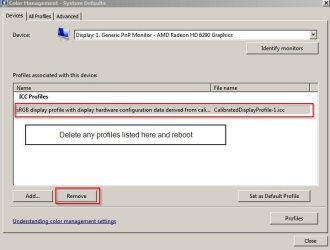
Well I had the same problem today. Updated graphics driver - custom install without CCC. Rebooted. Same issue. Then I had to delete color profiles:

Color Management - System Defaults.jpg

Then re-calibrate display.

Color Management.jpg

Problem fixed. Maybe it will work for you but it could also be that you have issues with your graphics card, cables or connectors.
 

My Computer My Computer

Computer type
Laptop
Computer Manufacturer/Model Number
ASUS
OS
Microsoft Windows 7 Home Premium 64-bit 7601 Multiprocessor Free Service Pack 1
CPU
AMD C-60 APU with Radeon(tm) HD Graphics
Motherboard
ASUSTeK COMPUTER INC. X501U
Memory
4.00 GB
Graphics Card(s)
AMD Radeon HD 6290 Graphics
Sound Card
(1) AMD High Definition Audio Device (2) Realtek High Defi
Screen Resolution
1366 x 768 x 32 bits (4294967296 colors) @ 60 Hz
Hard Drives
Hitachi HTS545050A7E380 SATA Disk Device
Antivirus
Comodo CIS & FW, SecureAplus App Whitelisting, Threatfire
Browser
Cyberfox 64bit, Opera 64bit, Airfox
Other Info
Spy-The-Spy, HitmanPro.Alert, Norton Connect Safe, MJRegWatcher, BitDefender TrafficLight, Voodoo Shield, Zemana AntiMalware
Try turning off "Hardware Acceleration" in your browser and see if that helps.
Opps, This did help! Thanks, will work with this for a while and look at "Callender's" fix also.

Turned off Smooth Scrolling in Firefox and that worked also, but without it's unbearable, luckily I use Chrome for most things. Don't know if I'd ever buy AMD Stuff again. Hopefully someone is watching lol...not.

Still have to wonder why this would happen with this Vanilla install and not the OEM? Will look into it for sure.

Thanks for your expertise, Nasty7
 

My Computer My Computer

Computer type
Laptop
Computer Manufacturer/Model Number
HP Pavilion dv7-6c23cl
OS
Windows 7 Home Premium 64bit
CPU
AMD A8-3520M
Motherboard
Hewlett-Packard 180B (Socket FS1)
Memory
6.00GB DDR3 @ 674MHz (9-9-9-24)
Graphics Card(s)
512MB ATI AMD Radeon HD 6620G
Sound Card
IDT High Definition Audio CODEC
Monitor(s) Displays
Generic PnP Monitor
Screen Resolution
(1600x900@60Hz)
Hard Drives
Samsung 850 EVO 250GB SSD
Mouse
Logitec M525
Internet Speed
30-75Mbps
Antivirus
Avast Free, Unfortunately
Browser
Google Chrome, Firefox, IE
Well I had the same problem today. Updated graphics driver - custom install without CCC. Rebooted. Same issue. Then I had to delete color profiles:

Problem fixed. Maybe it will work for you but it could also be that you have issues with your graphics card, cables or connectors.

Thanks so much Callender, this might be the ticket for me to get this low end laptop working good. After buying a new Samsung SSD I was pretty excited, but then this?

Just to be clear, I did not Update the Driver...Well...I did but then reverted to the OEM one, they both worked the same. I also did not do the "custom install" without the CCC, but am going to remove it or go to a newer driver then do it.

I don't think any wires are loose or that the graphics card has problems but will go there if needed. I am also going to install Linux next, that should tell me more. In fact...could run it from USB to test, but will be installing it anyway. Linux has some niggles with this Card also, but some work OOTB.

I thought I did all my homework before this install, but never foreseen this lol.

Nasty7
 
Last edited:

My Computer My Computer

Computer type
Laptop
Computer Manufacturer/Model Number
HP Pavilion dv7-6c23cl
OS
Windows 7 Home Premium 64bit
CPU
AMD A8-3520M
Motherboard
Hewlett-Packard 180B (Socket FS1)
Memory
6.00GB DDR3 @ 674MHz (9-9-9-24)
Graphics Card(s)
512MB ATI AMD Radeon HD 6620G
Sound Card
IDT High Definition Audio CODEC
Monitor(s) Displays
Generic PnP Monitor
Screen Resolution
(1600x900@60Hz)
Hard Drives
Samsung 850 EVO 250GB SSD
Mouse
Logitec M525
Internet Speed
30-75Mbps
Antivirus
Avast Free, Unfortunately
Browser
Google Chrome, Firefox, IE
@Callender, I went into "Color Management" but there were no "IIC Profiles" so I chose "Calibrate Display" and set it up, unfortunately this did not work. I now have a profile showing, but don't know if it would help to remove it as it was just set. I'm confident that there is a way so won't give up, might even try a newer/newest Driver available.

Before I made this change went back and set Browsers to Default Settings, or basically reversed the Hardware Acceleration in Chrome and Smooth Scrolling in FF, to see if it worked with default settings.

I will need to look at the Garbage that Toshiba had installed to see if any of it would effect this problem.

Thanks again!
 

My Computer My Computer

Computer type
Laptop
Computer Manufacturer/Model Number
HP Pavilion dv7-6c23cl
OS
Windows 7 Home Premium 64bit
CPU
AMD A8-3520M
Motherboard
Hewlett-Packard 180B (Socket FS1)
Memory
6.00GB DDR3 @ 674MHz (9-9-9-24)
Graphics Card(s)
512MB ATI AMD Radeon HD 6620G
Sound Card
IDT High Definition Audio CODEC
Monitor(s) Displays
Generic PnP Monitor
Screen Resolution
(1600x900@60Hz)
Hard Drives
Samsung 850 EVO 250GB SSD
Mouse
Logitec M525
Internet Speed
30-75Mbps
Antivirus
Avast Free, Unfortunately
Browser
Google Chrome, Firefox, IE
Back
Top