Dell 5748 Won't Start Unless I uninstall graphics drivers

Matron

New member
Local time
4:49 PM
Messages
19
I have a Dell Inspiron 5748, running Windows 7 Home Premium, that, more often than not, will not boot properly unless I uninstall the graphics drivers. Whenever I start the laptop (or try to bring it out of sleep mode after being inactive for a bit), I'll see the Dell boot screen, then the Starting Windows screen, and then it either goes totally black, like no power at all, or it turns grey, like it's trying to start, but never goes any further. It'll boot into safe mode, and I can then uninstall the graphics drivers, and it'll start normally, and it reinstalls the graphics drivers. Works fine until I reboot again, rinse, repeat, every day. I've since turned off automatic updates, to keep this from happening.

I've tried running Windows repair, and it says there are no problems. I've tried updating to the latest graphics drivers via Windows update, via Dell.com, and even hunted down an older driver, and they all give me the same issue.I've scanned for viruses. I've ran all the startup tests, memory, hard drive, video, etc, and they all pass. I even reformatted my laptop, using the factory repair setting that you get to by hitting F8, and the problem persists.

It's just a standard laptop, so no dedicated graphics, and I just don't know what else to try. There's no video card to replace.

I've looked all over the net for help with my problem, most solutions say it's a driver issue, which it seems to be, since it boots into safe mode, but it never fixes the issue.

I downloaded Driver Booster, to check my drivers. It found 15 outdated drivers, including the video driver, chipset driver, and a bunch of others. I let it run, and when it restarted, once again, I got to the Starting Windows screen, before going grey and going no further. I did a rollback, let it install everything but the graphics driver, and it started back up just fine.

If I don't update the graphics driver, beyond the very most basic that the laptop came with, It runs ok, I just can't make any adjustments to the display, it's at the highest brightness setting, all the time. I even tried that flux program, but it didn't do anything at all, either. The display NEVER dims, it just goes into sleep mode when left idle. There's not even a brightness setting under power options where it used to be.
 

My Computer My Computer

At a glance

Windows 7 Home Premium 64bitIntel I7 4510U8gbonboard graphics
Computer type
Laptop
Computer Manufacturer/Model Number
Dell Inspiron 5748
OS
Windows 7 Home Premium 64bit
CPU
Intel I7 4510U
Memory
8gb
Graphics Card(s)
onboard graphics
Antivirus
Avast Free
Browser
Firefox
Welcome to W7F Matron. It's possible it could be hardware related. Head over to DELL in my link and run online diagnostics on the video and post the results.

Inspiron 5748 Diagnostics
 

My Computer My Computer

At a glance

Windows 10 Pro 64 bitAMD FX 9590 8 Core Black EditionCorsair Vengeance 16GB DDR3AMD Radeon (TM) R9 380 Gaming Series
Computer type
PC/Desktop
Computer Manufacturer/Model Number
Custom Built By Me.
OS
Windows 10 Pro 64 bit
CPU
AMD FX 9590 8 Core Black Edition
Motherboard
MSI 990FXA GAMING (MS-7893)
Memory
Corsair Vengeance 16GB DDR3
Graphics Card(s)
AMD Radeon (TM) R9 380 Gaming Series
Sound Card
AMD High Definition
Monitor(s) Displays
Samsung 32" 60Hz 4ms Curved PLS LED
Screen Resolution
1920 X 1080
Hard Drives
C: 223 GB SSD = E: 465 GB HDD = F: 931 GB HDD = G: 149 GB HDD = H: 931 GB HDD
PSU
EVGA Supernova NEX750B 750W ATX EPS12V 80PLUS Bronze
Case
Cool Master
Cooling
Noctua NH-D15 Premium Cooler with 2x NF-A15 PWM 140mm Fan
Internet Speed
Fiber Optic: Download 332.7 Mbps / Upload 331.5 Mbps
Antivirus
Windows Defender
Browser
Slimjet (64bit)
For just the basic video card and the stress test, I got this error: We are unable to find the selected device. The device driver for your selected diagnostic is either not installed or installed incorrectly. Please ensure your device is enabled through your device manager or go to Drivers and Downloads to install the latest driver.

Which I guess makes sense, since I don't have drivers installed, because they cause my system not to start.
 

My Computer My Computer

At a glance

Windows 7 Home Premium 64bitIntel I7 4510U8gbonboard graphics
Computer type
Laptop
Computer Manufacturer/Model Number
Dell Inspiron 5748
OS
Windows 7 Home Premium 64bit
CPU
Intel I7 4510U
Memory
8gb
Graphics Card(s)
onboard graphics
Antivirus
Avast Free
Browser
Firefox
For just the basic video card and the stress test, I got this error: We are unable to find the selected device. The device driver for your selected diagnostic is either not installed or installed incorrectly. Please ensure your device is enabled through your device manager or go to Drivers and Downloads to install the latest driver.

Which I guess makes sense, since I don't have drivers installed, because they cause my system not to start.

How long after you install the drivers does this issue occur? Can you install the drivers and immediately go to my link and run the diagnostic? Or is the issue immediately? Heading to work, I'll check back when I get home.
 

My Computer My Computer

At a glance

Windows 10 Pro 64 bitAMD FX 9590 8 Core Black EditionCorsair Vengeance 16GB DDR3AMD Radeon (TM) R9 380 Gaming Series
Computer type
PC/Desktop
Computer Manufacturer/Model Number
Custom Built By Me.
OS
Windows 10 Pro 64 bit
CPU
AMD FX 9590 8 Core Black Edition
Motherboard
MSI 990FXA GAMING (MS-7893)
Memory
Corsair Vengeance 16GB DDR3
Graphics Card(s)
AMD Radeon (TM) R9 380 Gaming Series
Sound Card
AMD High Definition
Monitor(s) Displays
Samsung 32" 60Hz 4ms Curved PLS LED
Screen Resolution
1920 X 1080
Hard Drives
C: 223 GB SSD = E: 465 GB HDD = F: 931 GB HDD = G: 149 GB HDD = H: 931 GB HDD
PSU
EVGA Supernova NEX750B 750W ATX EPS12V 80PLUS Bronze
Case
Cool Master
Cooling
Noctua NH-D15 Premium Cooler with 2x NF-A15 PWM 140mm Fan
Internet Speed
Fiber Optic: Download 332.7 Mbps / Upload 331.5 Mbps
Antivirus
Windows Defender
Browser
Slimjet (64bit)
How long after you install the drivers does this issue occur? Can you install the drivers and immediately go to my link and run the diagnostic? Or is the issue immediately? Heading to work, I'll check back when I get home.


Well, whenever you update graphics drivers, it always prompts you to restart your computer for the changes to take effect, and when it restarts, it shows the Dell screen, the Starting Windows screen, and then the screen turns grey. I can still hear the startup sounds, so long as my sound is up.
 

My Computer My Computer

At a glance

Windows 7 Home Premium 64bitIntel I7 4510U8gbonboard graphics
Computer type
Laptop
Computer Manufacturer/Model Number
Dell Inspiron 5748
OS
Windows 7 Home Premium 64bit
CPU
Intel I7 4510U
Memory
8gb
Graphics Card(s)
onboard graphics
Antivirus
Avast Free
Browser
Firefox
Ok, right now, it says all the drivers are up to date. It's actually running, although I did get a blue screen memory dump error earlier. It was too quick to catch what it said, as I was out of the room when it crashed. I'll post back if it crashes again.

I did the videocard test and the stress test, and both passed. I'm pretty sure I've run the whole page of tests before, and everything passed. I also ran the tests that you can access by pressing F1(I think, maybe F2) on startup, and it passed those, too.


Hardware
Video Card
Hardware Type
Diagnostic Name
Result


Intel(R) HD Graphics Family
Shader Rendering DX11 Test
Passed

Intel(R) HD Graphics Family
Shader Rendering DX10 Test
Passed

Intel(R) HD Graphics Family
Wireframe Shader Rendering Test
Passed

Intel(R) HD Graphics Family
Shader Rendering Test
Passed

Intel(R) HD Graphics Family
GPU Pipeline Data Test
Passed

Intel(R) HD Graphics Family
Fixed Transformation and Lighting Test
Passed

Intel(R) HD Graphics Family
Wireframe Line Test
Passed

Intel(R) HD Graphics Family
Primary Surface Test
Passed

Intel(R) HD Graphics Family
Video Memory Test
Passed
Intel(R) HD Graphics Family
Transformation and Lighting Stress Test
Passed

Intel(R) HD Graphics Family
Wireframe Stress Test
Passed

Intel(R) HD Graphics Family
Multiple Rendering DX9 Test
Passed
 

My Computer My Computer

At a glance

Windows 7 Home Premium 64bitIntel I7 4510U8gbonboard graphics
Computer type
Laptop
Computer Manufacturer/Model Number
Dell Inspiron 5748
OS
Windows 7 Home Premium 64bit
CPU
Intel I7 4510U
Memory
8gb
Graphics Card(s)
onboard graphics
Antivirus
Avast Free
Browser
Firefox
There may be a conflict occurring in your system. There are two things I can think of. One is to go into safe mode. Click Start and type CMD in the search. Right click CMD.EXE and select Run As Administrator. Type sfc /scannow and let it run. once it is complete we'll need to see a detailed text that we can check. So open another CMD as I described. Copy and past this in the CMD. findstr /c:"[SR]" %windir%\Logs\CBS\CBS.log >"%userprofile%\Desktop\sfcdetails.txt" Zip and upload the sfcdetails.txt file in you next post. We'll start with this and see how it goes.
 

My Computer My Computer

At a glance

Windows 10 Pro 64 bitAMD FX 9590 8 Core Black EditionCorsair Vengeance 16GB DDR3AMD Radeon (TM) R9 380 Gaming Series
Computer type
PC/Desktop
Computer Manufacturer/Model Number
Custom Built By Me.
OS
Windows 10 Pro 64 bit
CPU
AMD FX 9590 8 Core Black Edition
Motherboard
MSI 990FXA GAMING (MS-7893)
Memory
Corsair Vengeance 16GB DDR3
Graphics Card(s)
AMD Radeon (TM) R9 380 Gaming Series
Sound Card
AMD High Definition
Monitor(s) Displays
Samsung 32" 60Hz 4ms Curved PLS LED
Screen Resolution
1920 X 1080
Hard Drives
C: 223 GB SSD = E: 465 GB HDD = F: 931 GB HDD = G: 149 GB HDD = H: 931 GB HDD
PSU
EVGA Supernova NEX750B 750W ATX EPS12V 80PLUS Bronze
Case
Cool Master
Cooling
Noctua NH-D15 Premium Cooler with 2x NF-A15 PWM 140mm Fan
Internet Speed
Fiber Optic: Download 332.7 Mbps / Upload 331.5 Mbps
Antivirus
Windows Defender
Browser
Slimjet (64bit)
I'm not sure if I did this right? But this is the file.
 

Attachments

My Computer My Computer

At a glance

Windows 7 Home Premium 64bitIntel I7 4510U8gbonboard graphics
Computer type
Laptop
Computer Manufacturer/Model Number
Dell Inspiron 5748
OS
Windows 7 Home Premium 64bit
CPU
Intel I7 4510U
Memory
8gb
Graphics Card(s)
onboard graphics
Antivirus
Avast Free
Browser
Firefox
OK. There are no errors in that file so. My next thought is to do a clean Startup or Clean Boot. Go to this post by Brink How to Troubleshoot a Problem by Performing a Clean Startup in Windows 7 and follow the instructions there to see if a clean boot clears up your issue. If it does, then you need to trackdown the culprit program. Of Course you'll have to do this in Safe Mode with Networking. Let us know how it goes.
 

My Computer My Computer

At a glance

Windows 10 Pro 64 bitAMD FX 9590 8 Core Black EditionCorsair Vengeance 16GB DDR3AMD Radeon (TM) R9 380 Gaming Series
Computer type
PC/Desktop
Computer Manufacturer/Model Number
Custom Built By Me.
OS
Windows 10 Pro 64 bit
CPU
AMD FX 9590 8 Core Black Edition
Motherboard
MSI 990FXA GAMING (MS-7893)
Memory
Corsair Vengeance 16GB DDR3
Graphics Card(s)
AMD Radeon (TM) R9 380 Gaming Series
Sound Card
AMD High Definition
Monitor(s) Displays
Samsung 32" 60Hz 4ms Curved PLS LED
Screen Resolution
1920 X 1080
Hard Drives
C: 223 GB SSD = E: 465 GB HDD = F: 931 GB HDD = G: 149 GB HDD = H: 931 GB HDD
PSU
EVGA Supernova NEX750B 750W ATX EPS12V 80PLUS Bronze
Case
Cool Master
Cooling
Noctua NH-D15 Premium Cooler with 2x NF-A15 PWM 140mm Fan
Internet Speed
Fiber Optic: Download 332.7 Mbps / Upload 331.5 Mbps
Antivirus
Windows Defender
Browser
Slimjet (64bit)
As of right now, everything seems to be working properly. I ran a scheduled chkdsk, and then yesterday I manually updated the graphics drivers using the one on the Dell website, and, so far anyway, it seems to be running properly. No freeze ups, no crashes, and it started up fine today. I think I'll leave it alone for the moment, and try that clean boot thing if it starts acting up again.

I'll wait another day or two, and if it keeps working, I'll come back and mark this as closed.
 

My Computer My Computer

At a glance

Windows 7 Home Premium 64bitIntel I7 4510U8gbonboard graphics
Computer type
Laptop
Computer Manufacturer/Model Number
Dell Inspiron 5748
OS
Windows 7 Home Premium 64bit
CPU
Intel I7 4510U
Memory
8gb
Graphics Card(s)
onboard graphics
Antivirus
Avast Free
Browser
Firefox
Hope the best! Good Luck..
 

My Computer My Computer

At a glance

Windows 10 Pro 64 bitAMD FX 9590 8 Core Black EditionCorsair Vengeance 16GB DDR3AMD Radeon (TM) R9 380 Gaming Series
Computer type
PC/Desktop
Computer Manufacturer/Model Number
Custom Built By Me.
OS
Windows 10 Pro 64 bit
CPU
AMD FX 9590 8 Core Black Edition
Motherboard
MSI 990FXA GAMING (MS-7893)
Memory
Corsair Vengeance 16GB DDR3
Graphics Card(s)
AMD Radeon (TM) R9 380 Gaming Series
Sound Card
AMD High Definition
Monitor(s) Displays
Samsung 32" 60Hz 4ms Curved PLS LED
Screen Resolution
1920 X 1080
Hard Drives
C: 223 GB SSD = E: 465 GB HDD = F: 931 GB HDD = G: 149 GB HDD = H: 931 GB HDD
PSU
EVGA Supernova NEX750B 750W ATX EPS12V 80PLUS Bronze
Case
Cool Master
Cooling
Noctua NH-D15 Premium Cooler with 2x NF-A15 PWM 140mm Fan
Internet Speed
Fiber Optic: Download 332.7 Mbps / Upload 331.5 Mbps
Antivirus
Windows Defender
Browser
Slimjet (64bit)
It's still working fine, so I'm going to mark this as solved for now. Thanks for walking me through whatever step worked, lol! I don't know what did the job, but I'm grateful it is.
 

My Computer My Computer

At a glance

Windows 7 Home Premium 64bitIntel I7 4510U8gbonboard graphics
Computer type
Laptop
Computer Manufacturer/Model Number
Dell Inspiron 5748
OS
Windows 7 Home Premium 64bit
CPU
Intel I7 4510U
Memory
8gb
Graphics Card(s)
onboard graphics
Antivirus
Avast Free
Browser
Firefox
You're most welcome.. We are a huge community here. If I can't help.. Someone else will!
 

My Computer My Computer

At a glance

Windows 10 Pro 64 bitAMD FX 9590 8 Core Black EditionCorsair Vengeance 16GB DDR3AMD Radeon (TM) R9 380 Gaming Series
Computer type
PC/Desktop
Computer Manufacturer/Model Number
Custom Built By Me.
OS
Windows 10 Pro 64 bit
CPU
AMD FX 9590 8 Core Black Edition
Motherboard
MSI 990FXA GAMING (MS-7893)
Memory
Corsair Vengeance 16GB DDR3
Graphics Card(s)
AMD Radeon (TM) R9 380 Gaming Series
Sound Card
AMD High Definition
Monitor(s) Displays
Samsung 32" 60Hz 4ms Curved PLS LED
Screen Resolution
1920 X 1080
Hard Drives
C: 223 GB SSD = E: 465 GB HDD = F: 931 GB HDD = G: 149 GB HDD = H: 931 GB HDD
PSU
EVGA Supernova NEX750B 750W ATX EPS12V 80PLUS Bronze
Case
Cool Master
Cooling
Noctua NH-D15 Premium Cooler with 2x NF-A15 PWM 140mm Fan
Internet Speed
Fiber Optic: Download 332.7 Mbps / Upload 331.5 Mbps
Antivirus
Windows Defender
Browser
Slimjet (64bit)
I seem to be borked again! It was working fine, and I know what I was doing when it messed up. I was watching a video on IGN.com, and the laptop got closed with the video still running. When I opened my laptop, I could still hear the video playing, but the screen was black. Nothing I did caused anything to happen on the screen, and when I hard reset (press and hold down power button), it's back to doing the same thing. I see the Dell splash screen, the Windows screen, the one with the green bar going across the screen, then it goes grey, then black, then nothing.

I can only start it in safe mode (what I'm in right now), unless I once again uninstall the display drivers.

Clean boot did the exact same thing as regular startup. I see Dell, I see the Microsoft screen, then black. It sounds like the fan is still running. If I uninstall the graphics drivers, it'll start up, but with bare minimum graphics wise, and I can't dim the display.
 

My Computer My Computer

At a glance

Windows 7 Home Premium 64bitIntel I7 4510U8gbonboard graphics
Computer type
Laptop
Computer Manufacturer/Model Number
Dell Inspiron 5748
OS
Windows 7 Home Premium 64bit
CPU
Intel I7 4510U
Memory
8gb
Graphics Card(s)
onboard graphics
Antivirus
Avast Free
Browser
Firefox
Try booting into Advance Boot Options. Restart the system and start tapping F8. When the Advance Boot Options screen shows up select Last Known Good Configuration Let us know if this helps.
 

My Computer My Computer

At a glance

Windows 10 Pro 64 bitAMD FX 9590 8 Core Black EditionCorsair Vengeance 16GB DDR3AMD Radeon (TM) R9 380 Gaming Series
Computer type
PC/Desktop
Computer Manufacturer/Model Number
Custom Built By Me.
OS
Windows 10 Pro 64 bit
CPU
AMD FX 9590 8 Core Black Edition
Motherboard
MSI 990FXA GAMING (MS-7893)
Memory
Corsair Vengeance 16GB DDR3
Graphics Card(s)
AMD Radeon (TM) R9 380 Gaming Series
Sound Card
AMD High Definition
Monitor(s) Displays
Samsung 32" 60Hz 4ms Curved PLS LED
Screen Resolution
1920 X 1080
Hard Drives
C: 223 GB SSD = E: 465 GB HDD = F: 931 GB HDD = G: 149 GB HDD = H: 931 GB HDD
PSU
EVGA Supernova NEX750B 750W ATX EPS12V 80PLUS Bronze
Case
Cool Master
Cooling
Noctua NH-D15 Premium Cooler with 2x NF-A15 PWM 140mm Fan
Internet Speed
Fiber Optic: Download 332.7 Mbps / Upload 331.5 Mbps
Antivirus
Windows Defender
Browser
Slimjet (64bit)
I had tried that before too, and it didn't work.

I ran chckdsk again last night, as I did last week, and it seems to be working correctly again. I guess something keeps getting corrupted on my hard drive, maybe it's a sign my hard drive is going out?
 

My Computer My Computer

At a glance

Windows 7 Home Premium 64bitIntel I7 4510U8gbonboard graphics
Computer type
Laptop
Computer Manufacturer/Model Number
Dell Inspiron 5748
OS
Windows 7 Home Premium 64bit
CPU
Intel I7 4510U
Memory
8gb
Graphics Card(s)
onboard graphics
Antivirus
Avast Free
Browser
Firefox
Hi Everyone, This is probably a long shot, but I was wondering if unchecking the box in Firefox, use

hardware acceleration when available may help, seeing as it happened while watching a video.:D
 

My Computer My Computer

At a glance

Windows 10 Pro 64 bitAMD A4-5300 APU with Radeon(tm) HD Graphics8.00 GBAMD Radeon HD 7480D
Computer type
PC/Desktop
Computer Manufacturer/Model Number
ASUS A85XM-A custom build
OS
Windows 10 Pro 64 bit
CPU
AMD A4-5300 APU with Radeon(tm) HD Graphics
Motherboard
ASUSTeK COMPUTER INC. A85XM-A
Memory
8.00 GB
Graphics Card(s)
AMD Radeon HD 7480D
Sound Card
(1) High Definition Audio Device (2) Realtek High Definiti
Monitor(s) Displays
HP W2072a 20 inch Led Backlit Monitor
Screen Resolution
1600 x 900 x 32 bits (4294967296 colors) @ 60 Hz
Hard Drives
TOSHIBA DT01ACA100 SATA Disk Device
Keyboard
Acer
Mouse
Acer
Internet Speed
varies
Antivirus
Windows Defender Antivirus
Browser
Waterfox, Edge
Hi Everyone, This is probably a long shot, but I was wondering if unchecking the box in Firefox, use

hardware acceleration when available may help, seeing as it happened while watching a video.:D

I can't seem to find how to change this?
 

My Computer My Computer

At a glance

Windows 7 Home Premium 64bitIntel I7 4510U8gbonboard graphics
Computer type
Laptop
Computer Manufacturer/Model Number
Dell Inspiron 5748
OS
Windows 7 Home Premium 64bit
CPU
Intel I7 4510U
Memory
8gb
Graphics Card(s)
onboard graphics
Antivirus
Avast Free
Browser
Firefox
Hi Matron, Sorry about that. Under the Firefox menu, the 3 lines at the top right.

Click Options

General

Scroll down to Performance, and where it says use recommended performance settings

Click on learn more

Uncheck the box use hardware acceleration when available. :D
 

My Computer My Computer

At a glance

Windows 10 Pro 64 bitAMD A4-5300 APU with Radeon(tm) HD Graphics8.00 GBAMD Radeon HD 7480D
Computer type
PC/Desktop
Computer Manufacturer/Model Number
ASUS A85XM-A custom build
OS
Windows 10 Pro 64 bit
CPU
AMD A4-5300 APU with Radeon(tm) HD Graphics
Motherboard
ASUSTeK COMPUTER INC. A85XM-A
Memory
8.00 GB
Graphics Card(s)
AMD Radeon HD 7480D
Sound Card
(1) High Definition Audio Device (2) Realtek High Definiti
Monitor(s) Displays
HP W2072a 20 inch Led Backlit Monitor
Screen Resolution
1600 x 900 x 32 bits (4294967296 colors) @ 60 Hz
Hard Drives
TOSHIBA DT01ACA100 SATA Disk Device
Keyboard
Acer
Mouse
Acer
Internet Speed
varies
Antivirus
Windows Defender Antivirus
Browser
Waterfox, Edge
I had tried that before too, and it didn't work.

I ran chckdsk again last night, as I did last week, and it seems to be working correctly again. I guess something keeps getting corrupted on my hard drive, maybe it's a sign my hard drive is going out?

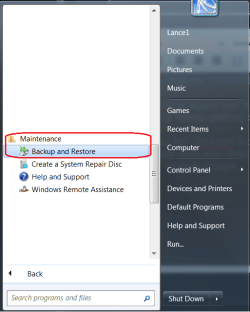
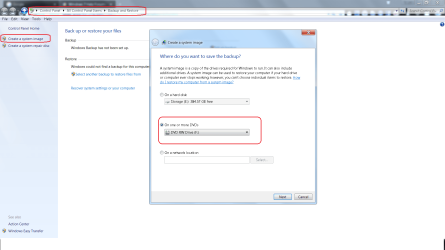
When you ran chckdsk did it say that it found bad sectors? If so.. I'm sorry if I missed this in your past posts but this a good indicator that your HDD is on it's way out. Backup all your important data just to be safe. Now create a system image. Time to look for a new hard drive. I've installed a lot of HDD's over the years in Laptops and towers so if it comes down to it I could walk you through the process. Anyway... Get this done OK..
 

Attachments

  • Untitled.png
    Untitled.png
    29.6 KB · Views: 19
  • System Image Backup.png
    System Image Backup.png
    90.8 KB · Views: 0

My Computer My Computer

At a glance

Windows 10 Pro 64 bitAMD FX 9590 8 Core Black EditionCorsair Vengeance 16GB DDR3AMD Radeon (TM) R9 380 Gaming Series
Computer type
PC/Desktop
Computer Manufacturer/Model Number
Custom Built By Me.
OS
Windows 10 Pro 64 bit
CPU
AMD FX 9590 8 Core Black Edition
Motherboard
MSI 990FXA GAMING (MS-7893)
Memory
Corsair Vengeance 16GB DDR3
Graphics Card(s)
AMD Radeon (TM) R9 380 Gaming Series
Sound Card
AMD High Definition
Monitor(s) Displays
Samsung 32" 60Hz 4ms Curved PLS LED
Screen Resolution
1920 X 1080
Hard Drives
C: 223 GB SSD = E: 465 GB HDD = F: 931 GB HDD = G: 149 GB HDD = H: 931 GB HDD
PSU
EVGA Supernova NEX750B 750W ATX EPS12V 80PLUS Bronze
Case
Cool Master
Cooling
Noctua NH-D15 Premium Cooler with 2x NF-A15 PWM 140mm Fan
Internet Speed
Fiber Optic: Download 332.7 Mbps / Upload 331.5 Mbps
Antivirus
Windows Defender
Browser
Slimjet (64bit)
Back
Top