Solved Computer not Reading Mass Storage Devices

jeepmann4x4

Rubber side down!
Guru
VIP
Local time
8:16 AM
Messages
512
Location
St.Louis,Mo
Alright guys/gals, I'm stuck!

Here we go.... I have a Android Phone(evo4g) and I also have a 60n1 Card Reader neither of then will read cards!

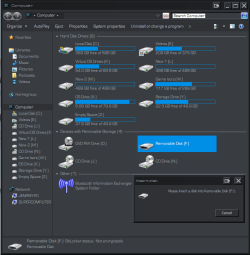
Card Reader= I put any card into it slot (sd,mirosd,sdhc,microsdhc) and it WILL show in computer as a "removable device" but if I go to open them I get "Please insert disk into Removable Disk (f:)" or whatever drive letter for the others.

Android Phone= Same as above but going through a usb cord.

(See pics...1&2... 1 card not inserted and 2 card inserted)Computer (card not inserted).PNG
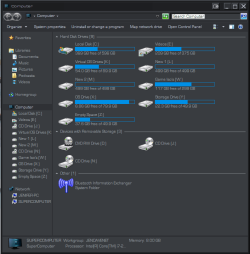
Computer (card inserted).PNG

Also I noticed that in my Device Manager the drop down that should be "Universal Serial Bus Controllers" is shown as "Unknown". (See pic 3)
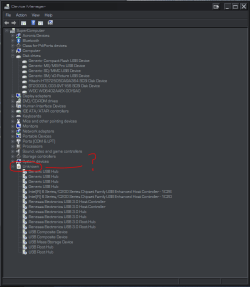
device manager.PNG

I have uninstalled and re-installed all of the above devices and their driver (including the Mass Storage Device drivers)
I have also run "sfc /scannow" 3+ times .. all with no errors.

Now I do know that the issue is with this Computer only, because I have tested all above Devices on my laptop that is running the same OS as this one and they all work as they should!

So If you can help me out please throw your smarts my way!!!

Pre-Thanks
Jeep
 

My Computer My Computer

Computer type
PC/Desktop
Computer Manufacturer/Model Number
Jeepmann/Custom Built
OS
Windows 7 Ultimate 64bit
CPU
Intel Core i7-2600K Sandy Bridge 3.4GHz (@[email protected])
Motherboard
Asus Maximus IV Extreme LGA 1155 Intel P67
Memory
G.SKILL Ripjaws X Series 16GB 1600Mhz (4 x 4GB) (Stock)
Graphics Card(s)
x2 EVGA GeForce GTX 760's w/ACXCoolers in SLI Surround
Sound Card
On-Board
Monitor(s) Displays
3x Acer 24" HDMI Widescreen LCD Monitor
Screen Resolution
3@ 1920x1080 (5760x1080 In Surround)
Hard Drives
Samsung 830 128gb ssd
Western Digital Caviar Black 640GB 7200 RPM
Western Digital Caviar Black 500GB 7200 RPM
Seagate 2tb 7200 RPM
PSU
COOLER MASTER Silent Pro 1000W
Case
COOLER MASTER HAF X Black
Cooling
CORSAIR Hydro H70
Keyboard
Logitech G510
Mouse
Zalman M300
Internet Speed
100mbps-ish Down & 5mbps-ish Up
Other Info
I installed the stock 140mm case fan outside of case then installed the H70+ 1 of its 120mm fans inside case. Used the 2nd 120mm from the H70 to go in the Gpu tunnel.
230mm Front,200mm side,200mm top,120mm Gpu tunnel,120mm&140mm on H70.
When did you install the card reader into your system? Are you sure that you have the card reader header plugged in the right way if a 4 pin or 5 pin plug? If the card reader is a usb internal connection; is it connected to the right usb port and is that port activated in the BIOS?
 

My Computer My Computer

Computer Manufacturer/Model Number
Custom built
OS
Windows 7 Ultimate 64 bit
CPU
AMD Phenom II X4 965 Black Edition
Motherboard
Gigabyte GA-MA790X-DS4
Memory
GSkill 4 X 2 GB PC 8500
Graphics Card(s)
XFX Radeon HD 6790 D
Sound Card
On board RealTek HD
Monitor(s) Displays
Dual monitors:Samsung SyncMaster S20B300
Screen Resolution
1600 X 900
Hard Drives
Seagate Barracuda 1TB (primary)
Seagate Barracuda 2 X 320 GB
PSU
Ultra X4 750 watt fully modular
Case
Thermaltake Overseer RX 1 full tower
Cooling
Core-Contact 92 mm CPU Cooler
Keyboard
Logitech G510
Mouse
Razor DeathAdder
Internet Speed
50/5 Mbps UL/DL
Other Info
Optical: Super Muliti DVD burner w/lightscribe, Hauppauge WinTV HVR-1800
When did you install the card reader into your system? Are you sure that you have the card reader header plugged in the right way if a 4 pin or 5 pin plug? If the card reader is a usb internal connection; is it connected to the right usb port and is that port activated in the BIOS?

Card Reader is new installed over the weekend. I got it because I had this issue between my phone(in mass storage mode) and the computer, figured I'd just work around it but discoverd it is not only the phone its any mass storage device.(my usb flash drives still work fine)

Anyway the Reader is an internal one yes it is plugged in the right way and activated in bios. Further more the bios does see it fine as does windows(as seen in device manager)
 

My Computer My Computer

Computer type
PC/Desktop
Computer Manufacturer/Model Number
Jeepmann/Custom Built
OS
Windows 7 Ultimate 64bit
CPU
Intel Core i7-2600K Sandy Bridge 3.4GHz (@[email protected])
Motherboard
Asus Maximus IV Extreme LGA 1155 Intel P67
Memory
G.SKILL Ripjaws X Series 16GB 1600Mhz (4 x 4GB) (Stock)
Graphics Card(s)
x2 EVGA GeForce GTX 760's w/ACXCoolers in SLI Surround
Sound Card
On-Board
Monitor(s) Displays
3x Acer 24" HDMI Widescreen LCD Monitor
Screen Resolution
3@ 1920x1080 (5760x1080 In Surround)
Hard Drives
Samsung 830 128gb ssd
Western Digital Caviar Black 640GB 7200 RPM
Western Digital Caviar Black 500GB 7200 RPM
Seagate 2tb 7200 RPM
PSU
COOLER MASTER Silent Pro 1000W
Case
COOLER MASTER HAF X Black
Cooling
CORSAIR Hydro H70
Keyboard
Logitech G510
Mouse
Zalman M300
Internet Speed
100mbps-ish Down & 5mbps-ish Up
Other Info
I installed the stock 140mm case fan outside of case then installed the H70+ 1 of its 120mm fans inside case. Used the 2nd 120mm from the H70 to go in the Gpu tunnel.
230mm Front,200mm side,200mm top,120mm Gpu tunnel,120mm&140mm on H70.
NOTE: Just from personal experience, if the header is not plugged in with the right pin order it can still pick up the device but it won't be a functioning device. I had to go in and flip the header around and bingo I had a functioning card reader.

Is there any drivers for this card reader that needs to be installed? What make and model carder reader is it?
 

My Computer My Computer

Computer Manufacturer/Model Number
Custom built
OS
Windows 7 Ultimate 64 bit
CPU
AMD Phenom II X4 965 Black Edition
Motherboard
Gigabyte GA-MA790X-DS4
Memory
GSkill 4 X 2 GB PC 8500
Graphics Card(s)
XFX Radeon HD 6790 D
Sound Card
On board RealTek HD
Monitor(s) Displays
Dual monitors:Samsung SyncMaster S20B300
Screen Resolution
1600 X 900
Hard Drives
Seagate Barracuda 1TB (primary)
Seagate Barracuda 2 X 320 GB
PSU
Ultra X4 750 watt fully modular
Case
Thermaltake Overseer RX 1 full tower
Cooling
Core-Contact 92 mm CPU Cooler
Keyboard
Logitech G510
Mouse
Razor DeathAdder
Internet Speed
50/5 Mbps UL/DL
Other Info
Optical: Super Muliti DVD burner w/lightscribe, Hauppauge WinTV HVR-1800
Ok guys/gals,

I been off dealing with other stuff for a few days, but I happy to say I have got both the Phone(mass storage) and Card Reader working!!

So here is what I did,
First I went into Bios and turned off ALL usb support, rebooted,(had to use a ps2 keyboard) and let system boot, shutdown, back into Bios turned on ALL usb support, rebooted, let system boot up, then I when into Disk Management and re-assigned all of the New Drives (phone(mass storage) & card reader) New Drive letters (they had letters the whole time but I switched them around) and after all that they are now working (have been of two days) :party:

Thanks to everyone for helping out!!!
 

My Computer My Computer

Computer type
PC/Desktop
Computer Manufacturer/Model Number
Jeepmann/Custom Built
OS
Windows 7 Ultimate 64bit
CPU
Intel Core i7-2600K Sandy Bridge 3.4GHz (@[email protected])
Motherboard
Asus Maximus IV Extreme LGA 1155 Intel P67
Memory
G.SKILL Ripjaws X Series 16GB 1600Mhz (4 x 4GB) (Stock)
Graphics Card(s)
x2 EVGA GeForce GTX 760's w/ACXCoolers in SLI Surround
Sound Card
On-Board
Monitor(s) Displays
3x Acer 24" HDMI Widescreen LCD Monitor
Screen Resolution
3@ 1920x1080 (5760x1080 In Surround)
Hard Drives
Samsung 830 128gb ssd
Western Digital Caviar Black 640GB 7200 RPM
Western Digital Caviar Black 500GB 7200 RPM
Seagate 2tb 7200 RPM
PSU
COOLER MASTER Silent Pro 1000W
Case
COOLER MASTER HAF X Black
Cooling
CORSAIR Hydro H70
Keyboard
Logitech G510
Mouse
Zalman M300
Internet Speed
100mbps-ish Down & 5mbps-ish Up
Other Info
I installed the stock 140mm case fan outside of case then installed the H70+ 1 of its 120mm fans inside case. Used the 2nd 120mm from the H70 to go in the Gpu tunnel.
230mm Front,200mm side,200mm top,120mm Gpu tunnel,120mm&140mm on H70.
Back
Top