External USB drive unmounts when system idle

jbr613

New member
Local time
8:18 AM
Messages
4
When I'm away from my computer for a while, the external USB drive unmounts. I've gone into Advanced Power Settings so that the hard disk never turns off, the system doesn't sleep or hibernate and the USB selective suspend is disabled, but the problem remains. This didn't happen to the exact same system under XP. Any suggestions would be greatly appreciated!

Jon
 

My Computer My Computer

At a glance

Windows 7 64-bitAMD Athlon 64 X2 3800+3.25GBSapphire Radeon X700 Pro
OS
Windows 7 64-bit
CPU
AMD Athlon 64 X2 3800+
Motherboard
MSI K8N Neo4 Platinum
Memory
3.25GB
Graphics Card(s)
Sapphire Radeon X700 Pro
Monitor(s) Displays
Viewsonic VG2230wm + AG Neovo F-419
Hard Drives
WD Caviar 1 TB SATA
WD Caviar 250 GB SATA
WD Caviar 120 GB EIDE
PSU
Antec True 430W
Case
Antec P160
Cooling
120 mm
The HDD could be failing.
 

My Computer My Computer

At a glance

7600.20510 x86P4 550 3.4 GHz HT running at 3.5 GHzOCZ 2 GB(2x1GB) DDR400mHz running @ 414 mHzHIS Radeon HD 3850 IceQ 3 Turbo HDMI Dual DL-...
Computer Manufacturer/Model Number
self built
OS
7600.20510 x86
CPU
P4 550 3.4 GHz HT running at 3.5 GHz
Motherboard
MSI PM8M3-V (MS-7211 v1.x) Micro-ATX mainboard
Memory
OCZ 2 GB(2x1GB) DDR400mHz running @ 414 mHz
Graphics Card(s)
HIS Radeon HD 3850 IceQ 3 Turbo HDMI Dual DL-DVI AGP
Sound Card
MOTU Traveler firewire studio interface 192 kHz 24 bit
Monitor(s) Displays
22" widescreen Acer X223W LCD, 17" Compaq P75 CRT
Screen Resolution
1680x1050 and 1280x1024
Hard Drives
SATA I x2 WD, 400 GB and 120 GB, SATA 2 WD Caviar Black 1 TB
PSU
350W generic
Case
Cybertronpc, it glows blue
Cooling
stock cpu fan, Ice-Q 3 gpu and system, many case fans
Keyboard
Logitch Classical Keyboard 200
Mouse
Logitech Mediaplay cordless
Internet Speed
1792/448 kbits/sec
Other Info
SATA II PCI fake RAID adapter, 1 GB Readyboost, original ATI Remote Wonder (even works with WMC perfectly), Logitech Rumblepad 2 game controller x2
Are you connecting it to a USB port on the case or one on the back panel?
 

My Computer My Computer

At a glance

XP Pro/Vista Ultimate (64)/Windows 7 Ultimate...Core 2 Duo E8500 @ stock8Gb (4 X 2Gb) Corsair Dominator 1066Mhz DDR2XFX ATI Radeon 4870 1Gb
OS
XP Pro/Vista Ultimate (64)/Windows 7 Ultimate Signature Edition(64)
CPU
Core 2 Duo E8500 @ stock
Motherboard
Gigabyte EP45-UD3R
Memory
8Gb (4 X 2Gb) Corsair Dominator 1066Mhz DDR2
Graphics Card(s)
XFX ATI Radeon 4870 1Gb
Sound Card
Onboard 7.1
Monitor(s) Displays
BenQ E2200Hd, Asus VW161D, HP L1506
Screen Resolution
1920 X 1080
Hard Drives
Seagate 7200.12 500Gb
2 X Hitachi 1Tb
PSU
CoolerMaster 650 EPD
Case
Thermaltake
Cooling
2 X Noctua 120mm's, Stock Intel
Keyboard
Logitech
Mouse
Logitech
Connected through a USB hub. Going to try direct to the PC and see if that takes care of it.

Jon
 

My Computer My Computer

At a glance

Windows 7 64-bitAMD Athlon 64 X2 3800+3.25GBSapphire Radeon X700 Pro
OS
Windows 7 64-bit
CPU
AMD Athlon 64 X2 3800+
Motherboard
MSI K8N Neo4 Platinum
Memory
3.25GB
Graphics Card(s)
Sapphire Radeon X700 Pro
Monitor(s) Displays
Viewsonic VG2230wm + AG Neovo F-419
Hard Drives
WD Caviar 1 TB SATA
WD Caviar 250 GB SATA
WD Caviar 120 GB EIDE
PSU
Antec True 430W
Case
Antec P160
Cooling
120 mm
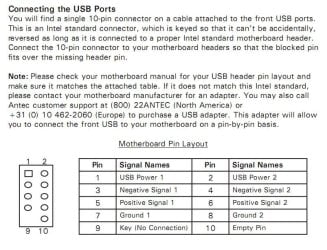
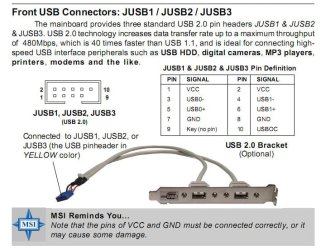
The reason I'm asking is because there appears to be an issue with the Antec front panel header's USB configuration, ie. pin 10 (USBOC) is live and connected, whereas it shouldn't be used at all.
See the screen snips of your MB's pin layout and the Antec P180's USB jumper layout that I've attached.
There is a possible solution to all this, if you're willing to try it. Shut down your pc, remove the side panel, ground yourself, remove the front panel USB header/s from the motherboard, locate pin 10 (should be a brown wire) in the jumper. Look at the header from the top, where the wire terminates into the connector, there should be a tiny little copper tab which acts as a retainer for the pin into the connector. Carefully push a small pin into the connector for the USBOC wire (pin 10) and release it by pressing back the tiny tab while sliding the wire out. Bend the wire back onto the cable bunch and insulate it with some electrical tape.
Post back and let me know how it goes.

There's further information here, on the MSI and Antec forums
 

Attachments

  • Antec P180 USB Header  layout.JPG
    Antec P180 USB Header layout.JPG
    94.7 KB · Views: 57
  • MSI K8N MB USB pin layout.JPG
    MSI K8N MB USB pin layout.JPG
    71.8 KB · Views: 1,776

My Computer My Computer

At a glance

XP Pro/Vista Ultimate (64)/Windows 7 Ultimate...Core 2 Duo E8500 @ stock8Gb (4 X 2Gb) Corsair Dominator 1066Mhz DDR2XFX ATI Radeon 4870 1Gb
OS
XP Pro/Vista Ultimate (64)/Windows 7 Ultimate Signature Edition(64)
CPU
Core 2 Duo E8500 @ stock
Motherboard
Gigabyte EP45-UD3R
Memory
8Gb (4 X 2Gb) Corsair Dominator 1066Mhz DDR2
Graphics Card(s)
XFX ATI Radeon 4870 1Gb
Sound Card
Onboard 7.1
Monitor(s) Displays
BenQ E2200Hd, Asus VW161D, HP L1506
Screen Resolution
1920 X 1080
Hard Drives
Seagate 7200.12 500Gb
2 X Hitachi 1Tb
PSU
CoolerMaster 650 EPD
Case
Thermaltake
Cooling
2 X Noctua 120mm's, Stock Intel
Keyboard
Logitech
Mouse
Logitech
The front panel USB is probably controlled by the same chip that controls the back panel USB's, so the front panel configuration could also be affecting the back panel USB's performance...
 

My Computer My Computer

At a glance

XP Pro/Vista Ultimate (64)/Windows 7 Ultimate...Core 2 Duo E8500 @ stock8Gb (4 X 2Gb) Corsair Dominator 1066Mhz DDR2XFX ATI Radeon 4870 1Gb
OS
XP Pro/Vista Ultimate (64)/Windows 7 Ultimate Signature Edition(64)
CPU
Core 2 Duo E8500 @ stock
Motherboard
Gigabyte EP45-UD3R
Memory
8Gb (4 X 2Gb) Corsair Dominator 1066Mhz DDR2
Graphics Card(s)
XFX ATI Radeon 4870 1Gb
Sound Card
Onboard 7.1
Monitor(s) Displays
BenQ E2200Hd, Asus VW161D, HP L1506
Screen Resolution
1920 X 1080
Hard Drives
Seagate 7200.12 500Gb
2 X Hitachi 1Tb
PSU
CoolerMaster 650 EPD
Case
Thermaltake
Cooling
2 X Noctua 120mm's, Stock Intel
Keyboard
Logitech
Mouse
Logitech
There's also the possibility the power management scheme is placing the hub into passive, or sleep, mode after a certain period of inactivity and that this could allow the drive to disconnect - and itself enter a sleep state.
 

My Computer My Computer

At a glance

W7 x64Intel Q9300 2.5Ghz Quad LGA775 (Would like Q9...4Gb OCZ Gold 1,333MhzPalit HD4850 O/C Sonic 512Mb DDR3, Dual DViD's
Computer Manufacturer/Model Number
Custom built machine
OS
W7 x64
CPU
Intel Q9300 2.5Ghz Quad LGA775 (Would like Q9650)
Motherboard
Gigabyte GA-EP45T-UD3R (F6 Bios)
Memory
4Gb OCZ Gold 1,333Mhz
Graphics Card(s)
Palit HD4850 O/C Sonic 512Mb DDR3, Dual DViD's
Sound Card
Azalia to twin Samson 50w Studio Monitors
Monitor(s) Displays
Twin Dell (E-IPS) U2311H 23.6" Screens
Screen Resolution
1920 x 1080 @ 60Hz
Hard Drives
Crucial M4 SSD, archives on twin Western Digital Caviar Black WD2002FAEX, 2TB, 7200rpm HDD's, Samsung Ritemaster CD/DVD Burner...
PSU
OCZ 600w
Case
Lian-Li PC8 acoustifoamed' aluminium tower
Cooling
Scythe 140mm Zipang
Keyboard
Cherry PS/2 custom model
Mouse
Lenovo USB laser "Thinkpad" Mouse
Internet Speed
ADSL2+ @14Mbps downstream & Cat6 Gigabit Ethernet
Antivirus
NOD32
Browser
Opera
Other Info
Silicon Dust HD Homerun Dual FTA (Ethernet) TV Tuners, Dray Tek Vigor 2850Vn router and 8x HP Gigabit Switch. Lian-Li CR26 Card Reader, Canon MF4430 iSensys laser printer/scanner.
Hi jbr613, how did you go? Did you get the usb problem sorted out? If so, what was the cause?
 

My Computer My Computer

At a glance

XP Pro/Vista Ultimate (64)/Windows 7 Ultimate...Core 2 Duo E8500 @ stock8Gb (4 X 2Gb) Corsair Dominator 1066Mhz DDR2XFX ATI Radeon 4870 1Gb
OS
XP Pro/Vista Ultimate (64)/Windows 7 Ultimate Signature Edition(64)
CPU
Core 2 Duo E8500 @ stock
Motherboard
Gigabyte EP45-UD3R
Memory
8Gb (4 X 2Gb) Corsair Dominator 1066Mhz DDR2
Graphics Card(s)
XFX ATI Radeon 4870 1Gb
Sound Card
Onboard 7.1
Monitor(s) Displays
BenQ E2200Hd, Asus VW161D, HP L1506
Screen Resolution
1920 X 1080
Hard Drives
Seagate 7200.12 500Gb
2 X Hitachi 1Tb
PSU
CoolerMaster 650 EPD
Case
Thermaltake
Cooling
2 X Noctua 120mm's, Stock Intel
Keyboard
Logitech
Mouse
Logitech
Orpheous: I had thought the problem was solved by connecting the drive through the back panel USB, but this morning the drive had unmounted again, so I'm going to try the pin 10 mod you suggested today.

Qdos: I have modified the power mgt scheme so that the system doesn't sleep. Basically, I just turn off the monitors.

Thanks to both of you for your suggestions, though I still don't understand why this wasn't a problem in XP!

Jon
 

My Computer My Computer

At a glance

Windows 7 64-bitAMD Athlon 64 X2 3800+3.25GBSapphire Radeon X700 Pro
OS
Windows 7 64-bit
CPU
AMD Athlon 64 X2 3800+
Motherboard
MSI K8N Neo4 Platinum
Memory
3.25GB
Graphics Card(s)
Sapphire Radeon X700 Pro
Monitor(s) Displays
Viewsonic VG2230wm + AG Neovo F-419
Hard Drives
WD Caviar 1 TB SATA
WD Caviar 250 GB SATA
WD Caviar 120 GB EIDE
PSU
Antec True 430W
Case
Antec P160
Cooling
120 mm
Before you try the pin 10 mod, can you check in your bios for power management settings, it may be under advanced chipset features and make sure that 1. HDD Down in suspend & 2. HDD Power Down are set to disabled. Being as you don't use sleep mode you don't need them.
If you've disabled sleep mode in W7 it should overide these settings if they're enabled, but stranger things have happened....
 

My Computer My Computer

At a glance

XP Pro/Vista Ultimate (64)/Windows 7 Ultimate...Core 2 Duo E8500 @ stock8Gb (4 X 2Gb) Corsair Dominator 1066Mhz DDR2XFX ATI Radeon 4870 1Gb
OS
XP Pro/Vista Ultimate (64)/Windows 7 Ultimate Signature Edition(64)
CPU
Core 2 Duo E8500 @ stock
Motherboard
Gigabyte EP45-UD3R
Memory
8Gb (4 X 2Gb) Corsair Dominator 1066Mhz DDR2
Graphics Card(s)
XFX ATI Radeon 4870 1Gb
Sound Card
Onboard 7.1
Monitor(s) Displays
BenQ E2200Hd, Asus VW161D, HP L1506
Screen Resolution
1920 X 1080
Hard Drives
Seagate 7200.12 500Gb
2 X Hitachi 1Tb
PSU
CoolerMaster 650 EPD
Case
Thermaltake
Cooling
2 X Noctua 120mm's, Stock Intel
Keyboard
Logitech
Mouse
Logitech
Well, I'd like to use sleep mode, but I've disabled it to try to track down the problem here. So I'm inclined to go ahead with the Pin 10 mod.
 

My Computer My Computer

At a glance

Windows 7 64-bitAMD Athlon 64 X2 3800+3.25GBSapphire Radeon X700 Pro
OS
Windows 7 64-bit
CPU
AMD Athlon 64 X2 3800+
Motherboard
MSI K8N Neo4 Platinum
Memory
3.25GB
Graphics Card(s)
Sapphire Radeon X700 Pro
Monitor(s) Displays
Viewsonic VG2230wm + AG Neovo F-419
Hard Drives
WD Caviar 1 TB SATA
WD Caviar 250 GB SATA
WD Caviar 120 GB EIDE
PSU
Antec True 430W
Case
Antec P160
Cooling
120 mm
Back
Top