How do I change the thumbnail on my videos to show a picture?

Reckless

New member
Local time
8:00 PM
Messages
17
Ever since I recorded a video file- WMV to be exact, the other videos that I record that are AVCHD seem to not show a thumbnail anymore. I can't figure out why this is. I'm at a loss at how to fix this because I'm a visual person and need to know which one of my videos is which from the thumbnail and now they all just look like this:
thumbnailpreview.jpg

^Problem

Anyone who knows how to put image/thumbnails back onto videos would help me out a ton! thnks :o
 

My Computer My Computer

At a glance

Windows 7, 64 bit
OS
Windows 7, 64 bit

My Computer My Computer

At a glance

Originally Win 7 Hm Prem x64 Ver 6.1.7600 Bui...Intel i3 530 2.93GHz, 2933MHz 2 Cores 4 Logic...6GB of 1,333MHz DDR3 SDRAM32MB Intel Graphics Media Accelerator HD IGChip
Computer type
PC/Desktop
Computer Manufacturer/Model Number
Gateway DX4831-01e (Mid-Tower Desktop)
OS
Originally Win 7 Hm Prem x64 Ver 6.1.7600 Build 7601-SP1 | Upgraded to Windows 10 December 14, 2019
CPU
Intel i3 530 2.93GHz, 2933MHz 2 Cores 4 Logical Processors
Motherboard
Gateway H57M01 133 megahertz
Memory
6GB of 1,333MHz DDR3 SDRAM
Graphics Card(s)
32MB Intel Graphics Media Accelerator HD IGChip
Sound Card
Realtek High Definition Audio
Monitor(s) Displays
Gateway HX2000 20inch TFT active matrix TN
Screen Resolution
1600 x 900 x 59 hertz
Hard Drives
WDC WD10EADS-00M2B0 [HDD] (1000.20 GB) -- drive 0,
HL-DT-ST DVDRAM GH41N [CD-ROM dr]
Four card readers, and Four USB 2.0
PSU
300watts.
Case
Mid-Tower Desktop
Cooling
Stock from Gateway
Keyboard
Natural Ergonomic Keyboard 4000, see Other Info
Mouse
Orig. Gateway wore out now using Insignia USB wired optical
Internet Speed
Vz FIOS 10ms png 57.64Mbps down 65.53Mbps up Speedtest.org
Antivirus
Zamana Anti-logger with Anti-malware, MSE, Windows Firewall,
Browser
IE11.0.9600.19399-Upd ver11.0.135, Firefox 68.0.1 x64
Other Info
System Specs by Belarc.

BIOS: American Megatrends Inc. P01-A0 11/17/2009

Replaced the MS 'Natural' Standard PS/2 Enhanced 101-102 Keyboard with a new Natural Ergonomic Keyboard 4000 on August 1st 2014.

Canon Pixma MG3222 Printer.

Updated to IE11 on 12102015 | Fios Quantum Router g1100

Additional AV: SpywareBlaster, manual Mbam, SAS
I cleared the cache like the link said, but does it take a long time for it to take effect? The videos still look the same. :/
 

My Computer My Computer

At a glance

Windows 7, 64 bit
OS
Windows 7, 64 bit
It shouldn't take too long, over 30 to 40secs would be excessive.

Do you have your indexing turned on?

In the Menu Bar, at the very beginning of:

  • Tools
  • >Folder Options
  • >View Tab
  • >In Advanced settings
Make sure Display file icon on thumbnails is unchecked.

Have you tried a system restore?
 

My Computer My Computer

At a glance

Originally Win 7 Hm Prem x64 Ver 6.1.7600 Bui...Intel i3 530 2.93GHz, 2933MHz 2 Cores 4 Logic...6GB of 1,333MHz DDR3 SDRAM32MB Intel Graphics Media Accelerator HD IGChip
Computer type
PC/Desktop
Computer Manufacturer/Model Number
Gateway DX4831-01e (Mid-Tower Desktop)
OS
Originally Win 7 Hm Prem x64 Ver 6.1.7600 Build 7601-SP1 | Upgraded to Windows 10 December 14, 2019
CPU
Intel i3 530 2.93GHz, 2933MHz 2 Cores 4 Logical Processors
Motherboard
Gateway H57M01 133 megahertz
Memory
6GB of 1,333MHz DDR3 SDRAM
Graphics Card(s)
32MB Intel Graphics Media Accelerator HD IGChip
Sound Card
Realtek High Definition Audio
Monitor(s) Displays
Gateway HX2000 20inch TFT active matrix TN
Screen Resolution
1600 x 900 x 59 hertz
Hard Drives
WDC WD10EADS-00M2B0 [HDD] (1000.20 GB) -- drive 0,
HL-DT-ST DVDRAM GH41N [CD-ROM dr]
Four card readers, and Four USB 2.0
PSU
300watts.
Case
Mid-Tower Desktop
Cooling
Stock from Gateway
Keyboard
Natural Ergonomic Keyboard 4000, see Other Info
Mouse
Orig. Gateway wore out now using Insignia USB wired optical
Internet Speed
Vz FIOS 10ms png 57.64Mbps down 65.53Mbps up Speedtest.org
Antivirus
Zamana Anti-logger with Anti-malware, MSE, Windows Firewall,
Browser
IE11.0.9600.19399-Upd ver11.0.135, Firefox 68.0.1 x64
Other Info
System Specs by Belarc.

BIOS: American Megatrends Inc. P01-A0 11/17/2009

Replaced the MS 'Natural' Standard PS/2 Enhanced 101-102 Keyboard with a new Natural Ergonomic Keyboard 4000 on August 1st 2014.

Canon Pixma MG3222 Printer.

Updated to IE11 on 12102015 | Fios Quantum Router g1100

Additional AV: SpywareBlaster, manual Mbam, SAS
I did try System Restore and it didn't fix the problem. :|
 

My Computer My Computer

At a glance

Windows 7, 64 bit
OS
Windows 7, 64 bit

My Computer My Computer

At a glance

Windows 7 Home Premium x64 SP1intel(R)core(TM)2 duo CPU T6600 @ 2.20GHz3 gb ddr3ati radeon hd4570/512mb
Computer Manufacturer/Model Number
acer aspire 5935g
OS
Windows 7 Home Premium x64 SP1
CPU
intel(R)core(TM)2 duo CPU T6600 @ 2.20GHz
Motherboard
intel gm45/gm47 revision 07
Memory
3 gb ddr3
Graphics Card(s)
ati radeon hd4570/512mb
Monitor(s) Displays
lop156wh2-tle1 15.3 flat
Screen Resolution
1366x768
Hard Drives
OCZ-Agility3 60gig ssd
320gig external hdd
500gig external hdd
Mouse
Optical
Internet Speed
30Mbps Down/30Mbps Up

My Computer My Computer

At a glance

Windows 7, 64 bit
OS
Windows 7, 64 bit
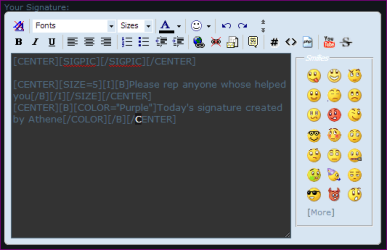
Im no expert on this but I think you need to insert the following code [SIGPIC][/SIGPIC] rather than IMG

Here is a snip of mine
Capture.PNG

Danny
 

My Computer My Computer

At a glance

Windows 7 Home Premium x64 SP1intel(R)core(TM)2 duo CPU T6600 @ 2.20GHz3 gb ddr3ati radeon hd4570/512mb
Computer Manufacturer/Model Number
acer aspire 5935g
OS
Windows 7 Home Premium x64 SP1
CPU
intel(R)core(TM)2 duo CPU T6600 @ 2.20GHz
Motherboard
intel gm45/gm47 revision 07
Memory
3 gb ddr3
Graphics Card(s)
ati radeon hd4570/512mb
Monitor(s) Displays
lop156wh2-tle1 15.3 flat
Screen Resolution
1366x768
Hard Drives
OCZ-Agility3 60gig ssd
320gig external hdd
500gig external hdd
Mouse
Optical
Internet Speed
30Mbps Down/30Mbps Up
I did try System Restore and it didn't fix the problem. :|
Can you answer my other two concerns?

I'm kinda' out of ideas. Hopefully with danny's help we can figure this out.

As in your other two threads it would help greatly if you would fill in your System Specs, see step #7 you can automate the entries. http://www.sevenforums.com/tutorials/180324-system-info-see-your-system-specs.html


And about your sig: Windows 7 Forums - FAQ: User Profile Features

Here's the Main Page: Windows 7 Forums - FAQ
 

My Computer My Computer

At a glance

Originally Win 7 Hm Prem x64 Ver 6.1.7600 Bui...Intel i3 530 2.93GHz, 2933MHz 2 Cores 4 Logic...6GB of 1,333MHz DDR3 SDRAM32MB Intel Graphics Media Accelerator HD IGChip
Computer type
PC/Desktop
Computer Manufacturer/Model Number
Gateway DX4831-01e (Mid-Tower Desktop)
OS
Originally Win 7 Hm Prem x64 Ver 6.1.7600 Build 7601-SP1 | Upgraded to Windows 10 December 14, 2019
CPU
Intel i3 530 2.93GHz, 2933MHz 2 Cores 4 Logical Processors
Motherboard
Gateway H57M01 133 megahertz
Memory
6GB of 1,333MHz DDR3 SDRAM
Graphics Card(s)
32MB Intel Graphics Media Accelerator HD IGChip
Sound Card
Realtek High Definition Audio
Monitor(s) Displays
Gateway HX2000 20inch TFT active matrix TN
Screen Resolution
1600 x 900 x 59 hertz
Hard Drives
WDC WD10EADS-00M2B0 [HDD] (1000.20 GB) -- drive 0,
HL-DT-ST DVDRAM GH41N [CD-ROM dr]
Four card readers, and Four USB 2.0
PSU
300watts.
Case
Mid-Tower Desktop
Cooling
Stock from Gateway
Keyboard
Natural Ergonomic Keyboard 4000, see Other Info
Mouse
Orig. Gateway wore out now using Insignia USB wired optical
Internet Speed
Vz FIOS 10ms png 57.64Mbps down 65.53Mbps up Speedtest.org
Antivirus
Zamana Anti-logger with Anti-malware, MSE, Windows Firewall,
Browser
IE11.0.9600.19399-Upd ver11.0.135, Firefox 68.0.1 x64
Other Info
System Specs by Belarc.

BIOS: American Megatrends Inc. P01-A0 11/17/2009

Replaced the MS 'Natural' Standard PS/2 Enhanced 101-102 Keyboard with a new Natural Ergonomic Keyboard 4000 on August 1st 2014.

Canon Pixma MG3222 Printer.

Updated to IE11 on 12102015 | Fios Quantum Router g1100

Additional AV: SpywareBlaster, manual Mbam, SAS
I did try System Restore and it didn't fix the problem. :|
Can you answer my other two concerns?

I'm kinda' out of ideas. Hopefully with danny's help we can figure this out.

As in your other two threads it would help greatly if you would fill in your System Specs, see step #7 you can automate the entries. http://www.sevenforums.com/tutorials/180324-system-info-see-your-system-specs.html


And about your sig: Windows 7 Forums - FAQ: User Profile Features

Here's the Main Page: Windows 7 Forums - FAQ

Okay, the System Specs link helped because I didn't know where to look for it manually on my computer.

@xxxdannyxxx - I did manage to see the pictures once again, but the AVCHD video pics refuse to show for some reason (even though I checked all the boxes)

I still can't figure out how to post a signature, and I'm not new to forums (this forums is outdated compared to most I've been on).
 

My Computer My Computer

At a glance

Windows 7, 64 bit
OS
Windows 7, 64 bit
I still can't figure out how to post a signature, and I'm not new to forums (this forums is outdated compared to most I've been on).

newer isnt necessary beter

your thumbnail issue, perhaps you could try using icaros it will display thumbnails for all sorts of filetypes including mkv and avi
available here...

|MG| Icaros 2.0.0 Download

if you go with it here is a list of file extensions to add to icaros, wou will have to paste them one line at a time adding each line to the end of the previous one

.mkv, .0gm, ,3g2, .3gp, .3gpp, ,avi, ,divç evo, .f4v, fly, hdmov,
.k3g, .m2p, ,mp2, ,m2v, .m4v, mod, ,mov, mpg, mpeg. ,m4p,
.mp4, .mp4v, .ogv, .qt, ,rm, .rmm, rrrìvb, .tp, .m2ts, .ts, ,mts, .vob,
.webm
 

My Computer My Computer

At a glance

Microsoft Windows 7 Home Premium 64-bit 7600IIx4 amd athelon 635 processor2x2gbati radeon HD 5450
Computer Manufacturer/Model Number
Hewlett packard/p6512uk
OS
Microsoft Windows 7 Home Premium 64-bit 7600
CPU
IIx4 amd athelon 635 processor
Motherboard
FOXCONN 2AA9
Memory
2x2gb
Graphics Card(s)
ati radeon HD 5450
Sound Card
(1) Realtek High Definition Audio (2) AMD High Definition
Monitor(s) Displays
samsung lcd tv 32"
Screen Resolution
1360x 768
Hard Drives
(1) WDC WD10 01FAES-60Z2A0 SATA Disk Device (2) Maxtor OneTouch USB Device (3) ST310003 33AS USB Device (4) WD My Book 1111 USB Device
PSU
?
Cooling
air!
Keyboard
wireless hp
Mouse
wireless Hp,optical
Internet Speed
1.10mb/s
Antivirus
MSE
Browser
Firefox
Have you installed any codec packs, these are known to mess with windows 7 thumbnails?

Hi Booh:)

Try Anaks links for the signature
 

My Computer My Computer

At a glance

Windows 7 Home Premium x64 SP1intel(R)core(TM)2 duo CPU T6600 @ 2.20GHz3 gb ddr3ati radeon hd4570/512mb
Computer Manufacturer/Model Number
acer aspire 5935g
OS
Windows 7 Home Premium x64 SP1
CPU
intel(R)core(TM)2 duo CPU T6600 @ 2.20GHz
Motherboard
intel gm45/gm47 revision 07
Memory
3 gb ddr3
Graphics Card(s)
ati radeon hd4570/512mb
Monitor(s) Displays
lop156wh2-tle1 15.3 flat
Screen Resolution
1366x768
Hard Drives
OCZ-Agility3 60gig ssd
320gig external hdd
500gig external hdd
Mouse
Optical
Internet Speed
30Mbps Down/30Mbps Up
Have you installed any codec packs, these are known to mess with windows 7 thumbnails?

Hi Booh:)

Try Anaks links for the signature

What's a Codec pack? Sorry, I'm not computer savy xD

I downloaded that link you provided Danny, and specifically had to type in 'avchd' and that did it!

Thank you all for helping me with this, I have a Youtube channel and needed to organize all my gameplay videos and this helped a lot!

*btw I gave a rep to you guys for being so patient with helping me.
number1.gif
 

My Computer My Computer

At a glance

Windows 7, 64 bit
OS
Windows 7, 64 bit
Good Stuff Reckless :)
 

My Computer My Computer

At a glance

Windows 7 Home Premium x64 SP1intel(R)core(TM)2 duo CPU T6600 @ 2.20GHz3 gb ddr3ati radeon hd4570/512mb
Computer Manufacturer/Model Number
acer aspire 5935g
OS
Windows 7 Home Premium x64 SP1
CPU
intel(R)core(TM)2 duo CPU T6600 @ 2.20GHz
Motherboard
intel gm45/gm47 revision 07
Memory
3 gb ddr3
Graphics Card(s)
ati radeon hd4570/512mb
Monitor(s) Displays
lop156wh2-tle1 15.3 flat
Screen Resolution
1366x768
Hard Drives
OCZ-Agility3 60gig ssd
320gig external hdd
500gig external hdd
Mouse
Optical
Internet Speed
30Mbps Down/30Mbps Up
I like how I looked up the word 'codec' and I still am confused by what it actually means. Good thing I'm not a computer programmer... XD
 

My Computer My Computer

At a glance

Windows 7, 64 bit
OS
Windows 7, 64 bit
glad icaros worked for you.
 

My Computer My Computer

At a glance

Microsoft Windows 7 Home Premium 64-bit 7600IIx4 amd athelon 635 processor2x2gbati radeon HD 5450
Computer Manufacturer/Model Number
Hewlett packard/p6512uk
OS
Microsoft Windows 7 Home Premium 64-bit 7600
CPU
IIx4 amd athelon 635 processor
Motherboard
FOXCONN 2AA9
Memory
2x2gb
Graphics Card(s)
ati radeon HD 5450
Sound Card
(1) Realtek High Definition Audio (2) AMD High Definition
Monitor(s) Displays
samsung lcd tv 32"
Screen Resolution
1360x 768
Hard Drives
(1) WDC WD10 01FAES-60Z2A0 SATA Disk Device (2) Maxtor OneTouch USB Device (3) ST310003 33AS USB Device (4) WD My Book 1111 USB Device
PSU
?
Cooling
air!
Keyboard
wireless hp
Mouse
wireless Hp,optical
Internet Speed
1.10mb/s
Antivirus
MSE
Browser
Firefox
Glad to hear you solved your situation and thank you for the rep!

Codec
Used to compress or decompress any type of data.
I would wager that almost all data, recorded audio/video is compressed in some way.

You may not realize it, but if you didn't have a decompressor in your machine you wouldn't be able to open and use any of your pixs, songs or games.


Now, about your sig, boo might back me up on this, but I thought there was a post count one needed before sigs were allowed; it may have been rescinded. Are you getting any warnings?

Are you trying at this page?
Windows 7 Forums > User Control Panel » Edit Signature

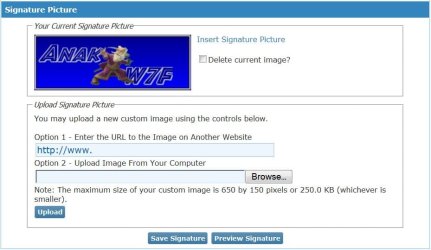
Below that is the Signature Picture area:

sig2.JPG

If you do not see your pix in the upper left of this area, then it will not show in your posts.
What size is it? The forum will try to reduce the size, but it can fail if too big.

If you do see it-make sure you click on the blue "Insert Signature Picture", don't just copy/paste[SIGPIC][/SIGPIC] into the edit area.

Can you see it in Preview?
Are you saving it?

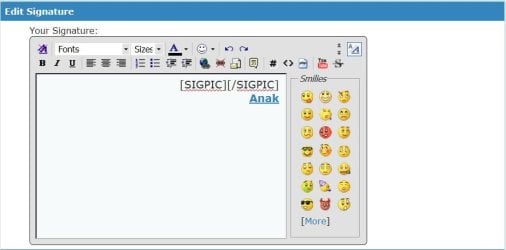
When your done all you will see in your Edit Signature area is [SIGPIC][/SIGPIC] minus the Anak:

sig.JPG
 

My Computer My Computer

At a glance

Originally Win 7 Hm Prem x64 Ver 6.1.7600 Bui...Intel i3 530 2.93GHz, 2933MHz 2 Cores 4 Logic...6GB of 1,333MHz DDR3 SDRAM32MB Intel Graphics Media Accelerator HD IGChip
Computer type
PC/Desktop
Computer Manufacturer/Model Number
Gateway DX4831-01e (Mid-Tower Desktop)
OS
Originally Win 7 Hm Prem x64 Ver 6.1.7600 Build 7601-SP1 | Upgraded to Windows 10 December 14, 2019
CPU
Intel i3 530 2.93GHz, 2933MHz 2 Cores 4 Logical Processors
Motherboard
Gateway H57M01 133 megahertz
Memory
6GB of 1,333MHz DDR3 SDRAM
Graphics Card(s)
32MB Intel Graphics Media Accelerator HD IGChip
Sound Card
Realtek High Definition Audio
Monitor(s) Displays
Gateway HX2000 20inch TFT active matrix TN
Screen Resolution
1600 x 900 x 59 hertz
Hard Drives
WDC WD10EADS-00M2B0 [HDD] (1000.20 GB) -- drive 0,
HL-DT-ST DVDRAM GH41N [CD-ROM dr]
Four card readers, and Four USB 2.0
PSU
300watts.
Case
Mid-Tower Desktop
Cooling
Stock from Gateway
Keyboard
Natural Ergonomic Keyboard 4000, see Other Info
Mouse
Orig. Gateway wore out now using Insignia USB wired optical
Internet Speed
Vz FIOS 10ms png 57.64Mbps down 65.53Mbps up Speedtest.org
Antivirus
Zamana Anti-logger with Anti-malware, MSE, Windows Firewall,
Browser
IE11.0.9600.19399-Upd ver11.0.135, Firefox 68.0.1 x64
Other Info
System Specs by Belarc.

BIOS: American Megatrends Inc. P01-A0 11/17/2009

Replaced the MS 'Natural' Standard PS/2 Enhanced 101-102 Keyboard with a new Natural Ergonomic Keyboard 4000 on August 1st 2014.

Canon Pixma MG3222 Printer.

Updated to IE11 on 12102015 | Fios Quantum Router g1100

Additional AV: SpywareBlaster, manual Mbam, SAS
I still can't figure out how to post a signature, and I'm not new to forums (this forums is outdated compared to most I've been on).
newer isnt necessary beter

your thumbnail issue, perhaps you could try using icaros it will display thumbnails for all sorts of filetypes including mkv and avi
available here...

|MG| Icaros 2.0.0 Download

if you go with it here is a list of file extensions to add to icaros, wou will have to paste them one line at a time adding each line to the end of the previous one

.mkv, .0gm, ,3g2, .3gp, .3gpp, ,avi, ,divç evo, .f4v, fly, hdmov,
.k3g, .m2p, ,mp2, ,m2v, .m4v, mod, ,mov, mpg, mpeg. ,m4p,
.mp4, .mp4v, .ogv, .qt, ,rm, .rmm, rrrìvb, .tp, .m2ts, .ts, ,mts, .vob,
.webm

Sorry to hijack an old thread, but I'm having this problem too. I don't know what I've done with my Windows installations in the past, but I've never had a problem with my thumbnails. Now, I can't see them. I installed media player classic using the communist codec pack, and also installed Icaros. I still don't see any thumbnails :(
 

My Computer My Computer

At a glance

Windows 7AMD Phenom II X4 5552x2GB OCZ Platinum Edition DDR3 PC3-10666Sapphire Radeon 6870
OS
Windows 7
CPU
AMD Phenom II X4 555
Motherboard
Biostar TA785G3
Memory
2x2GB OCZ Platinum Edition DDR3 PC3-10666
Graphics Card(s)
Sapphire Radeon 6870
Hard Drives
Generic SSD (64GB)
Samsung F3 (1TB)
Seagate (1TB)
Case
Antec 300
'xxxdannyxxx- If you can't force windows to show the thumbnails you could trythis little program - MediaPreview Freeware download and reviews from SnapFiles'


I apologise for resurrecting an old thread but without the advice of xxxdannyxxx I would not have solved the problem of having no picture and would still have a nondescript icon.

I'd tried every 'cure' to the problem that I could find (checking and unchecking boxes, clearing caches and much more) and was getting to the point of believing that a solution was not out there until I saw this thread.

Using the Media Preview Freeware took about half an hour to renew my pictures to the icon and I much appreciate the help this forum provided.

I post a lot of Motorhome related videos on to my Youtube Channel and seeing the picture of the video greatly assists me in cataloguing the clips I film.

Many thanks.
 

My Computer My Computer

At a glance

Windows 7 64 bit
Computer type
PC/Desktop
OS
Windows 7 64 bit
Back
Top