Windows could not Automatically detect this network proxy settings ;[

alecooly

New member
Local time
6:01 PM
Messages
1
hi today i deleted some viruses with malwarebytes and like i had to restart my computer so when i did i logged back in and i see my internet wasnt working so i went to go check if my other computer was connected to the internet and it was so i click troubleshoot problems and it says this Windows could not automatically detect this networks proxy settings....... and i dont know what really to do am frustrated so can anyone please help me because i really dont know what to do thank you :D :D
 

My Computer

OS
Windows 7 home premium 32bit
Alecooly, Welcome to Sevenforums. Hopefully I can be of assistance.

If you use Internet Explorer, try this method: http://www.sevenforums.com/tutorials/1222-internet-explorer-reset.html

If that doesn't work, try this:
In an elevated command prompt (in start menu search, type cmd, right-click it and select run as administrator), Type "netsh winsock reset" without quotes. Restart your computer. If that doesn't work either, follow the same method but instead type "netsh int ipv4 reset" without quotes. Let me know how this works. Does your updated regular antivirus and updated malwarebytes pick up any other viruses?

You might try a system restore to a point that was before the viruses were present.
 

My Computer

Computer type
PC/Desktop
Computer Manufacturer/Model Number
Custom Asus Build
OS
Microsoft Windows 8.1 Pro 64-bit
CPU
Intel(R) Core(TM) i3-4130 CPU @ 3.40GHz
Motherboard
B85M-E
Memory
8.00 GB
Graphics Card(s)
None
Sound Card
Realtek High Definition Audio
Monitor(s) Displays
Asus 23.6" Monitor
Screen Resolution
1920 x 1080 x 32 bits (4294967296 colors) @ 60 Hz
Hard Drives
INTEL SSDSC2BW180A4
Samsung SSD 840 PRO Series
PSU
Seasonic S12II-380Bronze
Case
Lian Li
Cooling
Fan, Passive
Keyboard
Logitech K120
Mouse
Microsoft Touch Mouse
Internet Speed
4ms Ping, 19.0 Mbps Download, 19.0 Mbps Upload
Antivirus
Eset Endpoint
Browser
Internet Explorer, Chrome
DustySailor, A big thank you for your post! I was able to fix my network proxy settings by using your first suggestion of "netsh winsock reset". I am not sure why the settings changed and why I was not able to get internet connection... but since I have 3 computers running on the network 2 using Vista and one using Windows 7. I am certain Windows 7 has an issue of some kind; oddly I only use my windows 7 machine for video editing and very little internet browsing. Thanks again!!
 

My Computer

OS
Windows 7 64bit
Alecooly, I hope you've managed to find some solution to your problem. Please let us know, as I may have other solutions for you to try.

JDam, A big welcome to Sevenforums to you as well! It is a right pleasure that I was able to help you solve your problem. I hope the Sevenforum members are able to answer any questions you may have in the future. The Tutorials section may come in handy with anything from fixes for problems to customizing Windows 7. Feel free to look around, and create a new thread in the event that you cannot find the answer to a problem. We're here to help!
 

My Computer

Computer type
PC/Desktop
Computer Manufacturer/Model Number
Custom Asus Build
OS
Microsoft Windows 8.1 Pro 64-bit
CPU
Intel(R) Core(TM) i3-4130 CPU @ 3.40GHz
Motherboard
B85M-E
Memory
8.00 GB
Graphics Card(s)
None
Sound Card
Realtek High Definition Audio
Monitor(s) Displays
Asus 23.6" Monitor
Screen Resolution
1920 x 1080 x 32 bits (4294967296 colors) @ 60 Hz
Hard Drives
INTEL SSDSC2BW180A4
Samsung SSD 840 PRO Series
PSU
Seasonic S12II-380Bronze
Case
Lian Li
Cooling
Fan, Passive
Keyboard
Logitech K120
Mouse
Microsoft Touch Mouse
Internet Speed
4ms Ping, 19.0 Mbps Download, 19.0 Mbps Upload
Antivirus
Eset Endpoint
Browser
Internet Explorer, Chrome
I am having the same problem and I've already tried all of the above options but it did not
work. Somehow I could not complete the system restore method. Can anybody please give me some other options to fix the problem.
 

My Computer

OS
Windows Professional 32 bit and 64 bit
Lets try flushing DNS cache and renewing your IP.

Flush the DNS cache and restore MS's Hosts file ...
Copy and paste these lines in Note pad.

@Echo on
pushd\windows\system32\drivers\etc
attrib -h -s -r hosts
echo 127.0.0.1 localhost>HOSTS
attrib +r +h +s hosts
popd
ipconfig /release
ipconfig /renew
ipconfig /flushdns
netsh winsock reset all
netsh int ip reset all
shutdown -r -t 1
del %0

Save as flush.bat to your desktop. Right click on the flush.bat file to run it as Administrator.

Your computer will reboot itself.
 

My Computer

Computer type
PC/Desktop
Computer Manufacturer/Model Number
Home built
OS
Windows 7 Ult, Windows 8.1 Pro,
CPU
Q9650-4.275GHz, E8600 4.5GHz, E6750-3.8GHz
Motherboard
Evga 780i FTW
Memory
G.Skill PC2 9600 1200Mhz 5 5 5 15 2T
Graphics Card(s)
GTX480
Sound Card
Asus Xonar D2
Monitor(s) Displays
HannsG
Screen Resolution
1680X1050
Hard Drives
GSkill Phoenix Pro 120GB SSD
PSU
ThermalTake Toughpower 1000Watt modular
Case
ThermalTake XaserV
Cooling
Xigmatek S1283
Keyboard
Logitech G15
Mouse
Logitech G9
Internet Speed
T1
chev65, I've tried it but it's still not working. thanks for your help anyway.
 

My Computer

OS
Windows Professional 32 bit and 64 bit

My Computer

Computer type
PC/Desktop
Computer Manufacturer/Model Number
Custom Asus Build
OS
Microsoft Windows 8.1 Pro 64-bit
CPU
Intel(R) Core(TM) i3-4130 CPU @ 3.40GHz
Motherboard
B85M-E
Memory
8.00 GB
Graphics Card(s)
None
Sound Card
Realtek High Definition Audio
Monitor(s) Displays
Asus 23.6" Monitor
Screen Resolution
1920 x 1080 x 32 bits (4294967296 colors) @ 60 Hz
Hard Drives
INTEL SSDSC2BW180A4
Samsung SSD 840 PRO Series
PSU
Seasonic S12II-380Bronze
Case
Lian Li
Cooling
Fan, Passive
Keyboard
Logitech K120
Mouse
Microsoft Touch Mouse
Internet Speed
4ms Ping, 19.0 Mbps Download, 19.0 Mbps Upload
Antivirus
Eset Endpoint
Browser
Internet Explorer, Chrome
I've managed to check the DHCP Client. Startup type is automatic but the service status is stopped and I couldn't start it due to error 1075: the dependency service does not exist or has been marked for deletion
 

My Computer

OS
Windows Professional 32 bit and 64 bit
Have you deleted any services/changed any settings in the 'services' section?
 

My Computer

Computer type
PC/Desktop
Computer Manufacturer/Model Number
Custom Asus Build
OS
Microsoft Windows 8.1 Pro 64-bit
CPU
Intel(R) Core(TM) i3-4130 CPU @ 3.40GHz
Motherboard
B85M-E
Memory
8.00 GB
Graphics Card(s)
None
Sound Card
Realtek High Definition Audio
Monitor(s) Displays
Asus 23.6" Monitor
Screen Resolution
1920 x 1080 x 32 bits (4294967296 colors) @ 60 Hz
Hard Drives
INTEL SSDSC2BW180A4
Samsung SSD 840 PRO Series
PSU
Seasonic S12II-380Bronze
Case
Lian Li
Cooling
Fan, Passive
Keyboard
Logitech K120
Mouse
Microsoft Touch Mouse
Internet Speed
4ms Ping, 19.0 Mbps Download, 19.0 Mbps Upload
Antivirus
Eset Endpoint
Browser
Internet Explorer, Chrome
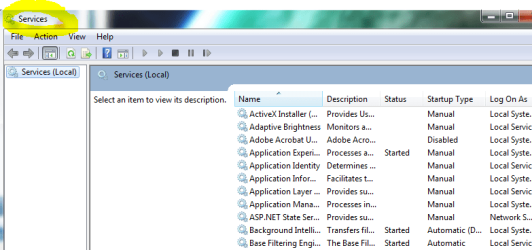
I haven't changed/deleted anything in the services section. And I'm pretty sure I don't know how to do that. What is this services section you talked about?
 

My Computer

OS
Windows Professional 32 bit and 64 bit
Looks like this:
d.PNG

You haven't edited the registry? Are you connecting wirelessly? If so, download (if you can't, use a USB drive and download from another computer) the wireless adapter driver for your computer, remove the previous one, and install the new one.

This problem often is due to incorrect installations/uninstalls, or using any kind of registry editor. Are you using any type of computer cleaning tool or tool to increase computer performance?

If you need help finding the correct driver, let us know.

Follow this tutorial (if it finds errors, restart computer and do twice more) : http://www.sevenforums.com/tutorials/1538-sfc-scannow-command-system-file-checker.html - created by Brink

Failing all of that, do this registry edit. :warn:Warning: be very careful in the registry or you could mess up your computer. If you don't know how, ask!


[URL="http://answers.microsoft.com/en-us/profile/a6aaa22b-177f-4284-a1b4-8bc7f5dceb49" said:
sheeko1[/URL]]Just delete the registry entry and reboot the system. It should work just fine. it worked for me.
  1. Click Start, click Run, type regedit in the Open box, and then click OK.
  2. In Registry Editor, locate and then click the following registry subkey:HKEY_LOCAL_MACHINE\SYSTEM\CurrentControlSet\Services\Dhcp
  3. Right-click the DependOnService entry, and then click delete instead of modify
 

My Computer

Computer type
PC/Desktop
Computer Manufacturer/Model Number
Custom Asus Build
OS
Microsoft Windows 8.1 Pro 64-bit
CPU
Intel(R) Core(TM) i3-4130 CPU @ 3.40GHz
Motherboard
B85M-E
Memory
8.00 GB
Graphics Card(s)
None
Sound Card
Realtek High Definition Audio
Monitor(s) Displays
Asus 23.6" Monitor
Screen Resolution
1920 x 1080 x 32 bits (4294967296 colors) @ 60 Hz
Hard Drives
INTEL SSDSC2BW180A4
Samsung SSD 840 PRO Series
PSU
Seasonic S12II-380Bronze
Case
Lian Li
Cooling
Fan, Passive
Keyboard
Logitech K120
Mouse
Microsoft Touch Mouse
Internet Speed
4ms Ping, 19.0 Mbps Download, 19.0 Mbps Upload
Antivirus
Eset Endpoint
Browser
Internet Explorer, Chrome
Alecooly, Welcome to Sevenforums. Hopefully I can be of assistance.

If you use Internet Explorer, try this method: http://www.sevenforums.com/tutorials/1222-internet-explorer-reset.html

If that doesn't work, try this:
In an elevated command prompt (in start menu search, type cmd, right-click it and select run as administrator), Type "netsh winsock reset" without quotes. Restart your computer. If that doesn't work either, follow the same method but instead type "netsh int ipv4 reset" without quotes. Let me know how this works. Does your updated regular antivirus and updated malwarebytes pick up any other viruses?

You might try a system restore to a point that was before the viruses were present.


that was great it worked can you help me to reboot my computers and upgrade my desktop to windows 7
 

My Computer

OS
windows 7

My Computer

Computer type
PC/Desktop
Computer Manufacturer/Model Number
Custom Asus Build
OS
Microsoft Windows 8.1 Pro 64-bit
CPU
Intel(R) Core(TM) i3-4130 CPU @ 3.40GHz
Motherboard
B85M-E
Memory
8.00 GB
Graphics Card(s)
None
Sound Card
Realtek High Definition Audio
Monitor(s) Displays
Asus 23.6" Monitor
Screen Resolution
1920 x 1080 x 32 bits (4294967296 colors) @ 60 Hz
Hard Drives
INTEL SSDSC2BW180A4
Samsung SSD 840 PRO Series
PSU
Seasonic S12II-380Bronze
Case
Lian Li
Cooling
Fan, Passive
Keyboard
Logitech K120
Mouse
Microsoft Touch Mouse
Internet Speed
4ms Ping, 19.0 Mbps Download, 19.0 Mbps Upload
Antivirus
Eset Endpoint
Browser
Internet Explorer, Chrome
Internet connection problems

i tried using this script and my laptop refuses to reboot for the past 8 hours. What do i do next? I am running windows 8

Lets try flushing DNS cache and renewing your IP.

Flush the DNS cache and restore MS's Hosts file ...
Copy and paste these lines in Note pad.

@Echo on
pushd\windows\system32\drivers\etc
attrib -h -s -r hosts
echo 127.0.0.1 localhost>HOSTS
attrib +r +h +s hosts
popd
ipconfig /release
ipconfig /renew
ipconfig /flushdns
netsh winsock reset all
netsh int ip reset all
shutdown -r -t 1
del %0

Save as flush.bat to your desktop. Right click on the flush.bat file to run it as Administrator.

Your computer will reboot itself.
 

My Computer

Computer type
Laptop
Computer Manufacturer/Model Number
HP
OS
Windows 8 32 bit Enterprise x64
CPU
Intel Core Duo
I don't know any code to tell you if this one is bad or not, but MS has tools that automates any troubleshooting problems you have. Just download the troubleshooter that applies to your problem: Microsoft Support
I don't like code from the internet because there is a chance you could use the wrong code, mistype a code, or use malicious code...

To fix your new problem:
Option 2: http://www.sevenforums.com/tutorials/700-system-restore.html
 

My Computer

Computer type
PC/Desktop
Computer Manufacturer/Model Number
Custom Asus Build
OS
Microsoft Windows 8.1 Pro 64-bit
CPU
Intel(R) Core(TM) i3-4130 CPU @ 3.40GHz
Motherboard
B85M-E
Memory
8.00 GB
Graphics Card(s)
None
Sound Card
Realtek High Definition Audio
Monitor(s) Displays
Asus 23.6" Monitor
Screen Resolution
1920 x 1080 x 32 bits (4294967296 colors) @ 60 Hz
Hard Drives
INTEL SSDSC2BW180A4
Samsung SSD 840 PRO Series
PSU
Seasonic S12II-380Bronze
Case
Lian Li
Cooling
Fan, Passive
Keyboard
Logitech K120
Mouse
Microsoft Touch Mouse
Internet Speed
4ms Ping, 19.0 Mbps Download, 19.0 Mbps Upload
Antivirus
Eset Endpoint
Browser
Internet Explorer, Chrome
i tried using this script and my laptop refuses to reboot for the past 8 hours. What do i do next? I am running windows 8

Lets try flushing DNS cache and renewing your IP.

Flush the DNS cache and restore MS's Hosts file ...
Copy and paste these lines in Note pad.

@Echo on
pushd\windows\system32\drivers\etc
attrib -h -s -r hosts
echo 127.0.0.1 localhost>HOSTS
attrib +r +h +s hosts
popd
ipconfig /release
ipconfig /renew
ipconfig /flushdns
netsh winsock reset all
netsh int ip reset all
shutdown -r -t 1
del %0

Save as flush.bat to your desktop. Right click on the flush.bat file to run it as Administrator.

Your computer will reboot itself.

The code is fine and it's been successfully used many times here on this forum, push the start button if your machine won't reboot. :)
 

My Computer

Computer type
PC/Desktop
Computer Manufacturer/Model Number
Home built
OS
Windows 7 Ult, Windows 8.1 Pro,
CPU
Q9650-4.275GHz, E8600 4.5GHz, E6750-3.8GHz
Motherboard
Evga 780i FTW
Memory
G.Skill PC2 9600 1200Mhz 5 5 5 15 2T
Graphics Card(s)
GTX480
Sound Card
Asus Xonar D2
Monitor(s) Displays
HannsG
Screen Resolution
1680X1050
Hard Drives
GSkill Phoenix Pro 120GB SSD
PSU
ThermalTake Toughpower 1000Watt modular
Case
ThermalTake XaserV
Cooling
Xigmatek S1283
Keyboard
Logitech G15
Mouse
Logitech G9
Internet Speed
T1
Alecooly, Welcome to Sevenforums. Hopefully I can be of assistance.

If you use Internet Explorer, try this method: http://www.sevenforums.com/tutorials/1222-internet-explorer-reset.html

If that doesn't work, try this:
In an elevated command prompt (in start menu search, type cmd, right-click it and select run as administrator), Type "netsh winsock reset" without quotes. Restart your computer. If that doesn't work either, follow the same method but instead type "netsh int ipv4 reset" without quotes. Let me know how this works. Does your updated regular antivirus and updated malwarebytes pick up any other viruses?

You might try a system restore to a point that was before the viruses were present.

Hi.

I have ended up on this forum while looking for solution to same problem. However none of the above 3 worked for me.

I just got my laptop back from the service centre after they checked it for possible hardrive issues. they said there r some bad sectors but i can use it without having to exchange it atleast for sometime. But i don't know why suddenly i am having this issue now, could it be somehow related?
 

My Computer

Computer type
Laptop
Computer Manufacturer/Model Number
Sony Vaio
OS
Windows 7, 64 bit

My Computer

Computer type
PC/Desktop
Computer Manufacturer/Model Number
Custom Asus Build
OS
Microsoft Windows 8.1 Pro 64-bit
CPU
Intel(R) Core(TM) i3-4130 CPU @ 3.40GHz
Motherboard
B85M-E
Memory
8.00 GB
Graphics Card(s)
None
Sound Card
Realtek High Definition Audio
Monitor(s) Displays
Asus 23.6" Monitor
Screen Resolution
1920 x 1080 x 32 bits (4294967296 colors) @ 60 Hz
Hard Drives
INTEL SSDSC2BW180A4
Samsung SSD 840 PRO Series
PSU
Seasonic S12II-380Bronze
Case
Lian Li
Cooling
Fan, Passive
Keyboard
Logitech K120
Mouse
Microsoft Touch Mouse
Internet Speed
4ms Ping, 19.0 Mbps Download, 19.0 Mbps Upload
Antivirus
Eset Endpoint
Browser
Internet Explorer, Chrome
the Flush dns WORKS!

Hats off to Chev65, the flush dns file works.....after 5 hours of a locked up PC this simple and focused solution worked....Thanks Chev65......
 

My Computer

Computer type
PC/Desktop
Computer Manufacturer/Model Number
SYX
OS
Windows 7 64bit
CPU
3.4 Intel i7
Motherboard
MSI
Memory
16GB RAM
Graphics Card(s)
GTX 660
Hard Drives
Crucial SSD 510GB
Back
Top