Installing new wireless adapter, hardware switch won't turn it on.

kevdlandrig

New member
Local time
2:08 AM
Messages
38
Location
Indiana
Aight. I've been having a lot of issues installing my new wireless adapter because Acer is retarded.

I just got a new Intel AC-7260 wifi adapter with bluetooth, and I promptly installed it onto my computer.
-I have all the correct drivers installed
-Launch manager is installed
-The hardware switch is not working anymore, but if I install the old wifi adapter, the switch will still control it
-the wireless adapter is enabled on the OS side, but without a working hardware switch, it will refuse to turn on.
-according to PROSet, the wireless hardware switch is set to 'off', but wifi is on

Anyone know how I can tie the new adapter into the launch manager so I can use the adapter?

System info: windows 7 x64 professional
Acer Timeline 8573T
 

My Computer My Computer

Computer type
Laptop
Computer Manufacturer/Model Number
Acer
OS
Windows 7 professional 64 bit
CPU
Intel i5
Memory
6 gb
Graphics Card(s)
Intel HD3000
Monitor(s) Displays
2
Screen Resolution
1366x786
Hard Drives
1 TB WD Blue
Keyboard
Microsoft Ergonomic 4000
Mouse
Logitech Wireless
Internet Speed
25 mb/s
Antivirus
Kaspersky Antivirus
Browser
Google Chrome
Hi there,

Please try the resolution that was provided here.

An update will be nice, good or bad news.... :D
 

My Computer My Computer

Computer Manufacturer/Model Number
Lenovo Desktop/Samsung Laptop
OS
Win7 & Win8 64bit
CPU
Intel i5
Internet Speed
Charter-20 Mbps
Antivirus
Avast
Browser
FF, IE9 and Chrome
so I forgot to mention that fn+f3 only controls the old bluetooth radio (it controlled both the old wireless adapter and the old bluetooth adapter when it was plugged in, and there are now two bluetooth adapters in the computer). The new bluetooth adapter works fine.

I know that it is possible to get this working with acer computers, by the way some of the other forums were talking, but there is some sort of computer voodoo that nobody seems willing to talk about. I get the feeling it has something to do with rewriting the launch manager or something...

The link in the previous post wasn't very helpful; it only showed me some information that i have already tried (I think, Microsoft forums never feel very coherent to me.)
 
Last edited:

My Computer My Computer

Computer type
Laptop
Computer Manufacturer/Model Number
Acer
OS
Windows 7 professional 64 bit
CPU
Intel i5
Memory
6 gb
Graphics Card(s)
Intel HD3000
Monitor(s) Displays
2
Screen Resolution
1366x786
Hard Drives
1 TB WD Blue
Keyboard
Microsoft Ergonomic 4000
Mouse
Logitech Wireless
Internet Speed
25 mb/s
Antivirus
Kaspersky Antivirus
Browser
Google Chrome
Sorry for the delay, I received your PM, I work >40hrs each week and I'm trying my best to logon to the forums to answer all replies.

Anyway, regarding your issue, I'd like you to boot to Safe Mode to Networking (restart your computer tap F8 then select this option). Disable Kaspersky for now.... download the latest Wi-Fi driver, uninstall the device driver from Device Manager then install the new driver.

If the above suggestion didn't work, double check your Acer's computer chipsets for the latest driver.
 

My Computer My Computer

Computer Manufacturer/Model Number
Lenovo Desktop/Samsung Laptop
OS
Win7 & Win8 64bit
CPU
Intel i5
Internet Speed
Charter-20 Mbps
Antivirus
Avast
Browser
FF, IE9 and Chrome
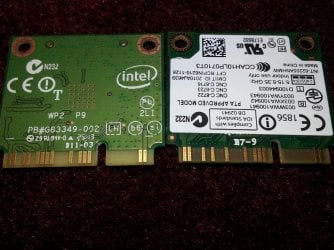
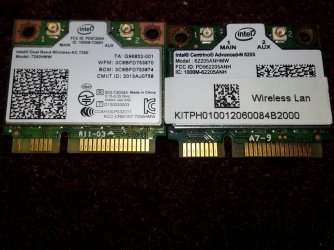
Why must all my problems be so annoyingly unique? there aren't any new chipset drivers, and once I verified that the safe mode fix failed, I took a look at the cards themselves, and I noticed something.
wifi3.jpg

wifi2.jpg
The card on the left right is the old card in each picture. notice how both cards have a different number of pins?
I am wondering if a pair of these pins that are missing on the new card are important to the launch manager. If so I am not sure what else we can try.
 
Last edited:

My Computer My Computer

Computer type
Laptop
Computer Manufacturer/Model Number
Acer
OS
Windows 7 professional 64 bit
CPU
Intel i5
Memory
6 gb
Graphics Card(s)
Intel HD3000
Monitor(s) Displays
2
Screen Resolution
1366x786
Hard Drives
1 TB WD Blue
Keyboard
Microsoft Ergonomic 4000
Mouse
Logitech Wireless
Internet Speed
25 mb/s
Antivirus
Kaspersky Antivirus
Browser
Google Chrome
Are you sure that the card on the left is the old one? The card on the left is an 802.11 a/c adapter which is a newer technology than the one on the right which is an 802.11 n adapter. It would probably be for the best to get the same type of adapter for the replacement part.
 

My Computer My Computer

Computer type
PC/Desktop
Computer Manufacturer/Model Number
Dell
OS
Win 7 x64
CPU
Core I5
Sorry, I am a bit lysdexic when it comes to saying these things. the one on the RIGHT is the old one, and I fixed my post to reflect that. I always have difficulties like that, blame my 6th grade English teacher.

Sorry for the confusion.
 

My Computer My Computer

Computer type
Laptop
Computer Manufacturer/Model Number
Acer
OS
Windows 7 professional 64 bit
CPU
Intel i5
Memory
6 gb
Graphics Card(s)
Intel HD3000
Monitor(s) Displays
2
Screen Resolution
1366x786
Hard Drives
1 TB WD Blue
Keyboard
Microsoft Ergonomic 4000
Mouse
Logitech Wireless
Internet Speed
25 mb/s
Antivirus
Kaspersky Antivirus
Browser
Google Chrome
Bumping this thread for any new ideas.
 

My Computer My Computer

Computer type
Laptop
Computer Manufacturer/Model Number
Acer
OS
Windows 7 professional 64 bit
CPU
Intel i5
Memory
6 gb
Graphics Card(s)
Intel HD3000
Monitor(s) Displays
2
Screen Resolution
1366x786
Hard Drives
1 TB WD Blue
Keyboard
Microsoft Ergonomic 4000
Mouse
Logitech Wireless
Internet Speed
25 mb/s
Antivirus
Kaspersky Antivirus
Browser
Google Chrome
Back
Top