Mixed Win7 / WinXP network issues (again)

But Work Network is what has been set per the previously attached Network and Sharing Center pic.

Even so, I can not connect to anything from the XP computer until I move User Docs to Public Docs.

k
 

My Computer My Computer

At a glance

Win 7
OS
Win 7
When you said this> In order to share the Windows 7 MyDoc folder I had to "move" it to Libraries/Documents/Public Documents. I haven't seen this step anywhere but it is required (by me) to get the share. I am not able to similarly move the secondary drive.

That tells me that you are using Library's which is a Homegroup only function as far as network sharing is concerend. If the only network was Work than you should not be able to use Library's to share things. Not sure what's up with that.


I think it might be worth mentioning that when I was sharing between my Win7 and XP machine "before I updated to all Win 7 machines", if I wanted to share something I also had to put it in the Public files. Maybe that is why you are trying to share the entire drive?

I think there are ways around this by changing permissions but I never got that far into it with Public file sharing.
 

My Computer My Computer

At a glance

Windows 7 Ult, Windows 8.1 Pro,Q9650-4.275GHz, E8600 4.5GHz, E6750-3.8GHzG.Skill PC2 9600 1200Mhz 5 5 5 15 2TGTX480
Computer type
PC/Desktop
Computer Manufacturer/Model Number
Home built
OS
Windows 7 Ult, Windows 8.1 Pro,
CPU
Q9650-4.275GHz, E8600 4.5GHz, E6750-3.8GHz
Motherboard
Evga 780i FTW
Memory
G.Skill PC2 9600 1200Mhz 5 5 5 15 2T
Graphics Card(s)
GTX480
Sound Card
Asus Xonar D2
Monitor(s) Displays
HannsG
Screen Resolution
1680X1050
Hard Drives
GSkill Phoenix Pro 120GB SSD
PSU
ThermalTake Toughpower 1000Watt modular
Case
ThermalTake XaserV
Cooling
Xigmatek S1283
Keyboard
Logitech G15
Mouse
Logitech G9
Internet Speed
T1
All of the XP computers on my network are connected through the network workgroup "WorkGroup". The only Win7 I have on is the one I am playing with. I have turned on multiple Win7 Virtual Machines (VMware is great for that) and the networking works perfectly.

I am getting more confused as this goes on.

Any more thoughts?

Thanks

k
 

My Computer My Computer

At a glance

Win 7
OS
Win 7
Ok lets try and relax and go through this step by step.

On XP

1) Create the share by right-clicking the folder (example here is a folder called "test"), click Sharing and Security...then tick boxes as seen. Note the share name is test.


Note: the folder is shared when you see the hand under the folder icon. also go into your Shares location and it also exist there.


2) Checking the credentials to access this share. Here i am going to use my user account which i am using to log on to Xp with.


On W7

3) Mapping to the xp test share. You can do it in many ways.

I do it like this:

Start > type in search box, the share location, mine is \\192.168.1.8\test


Note: If you are prompted with a logon box. Just use the user name in step 2.
either as:

<username> or <computername\username>
<password>

That is it.
 
Last edited:

My Computer My Computer

At a glance

Windows 7 Ultimate 64BitGenuineIntel Intel(R) Core(TM) DuoCore T2400 ...2.00 GBMobile Intel(R) 945 Express Chipset
Computer Manufacturer/Model Number
Lenovo ThinkPad T60
OS
Windows 7 Ultimate 64Bit
CPU
GenuineIntel Intel(R) Core(TM) DuoCore T2400 @ 1.83GHz
Motherboard
Intel(R) 82801G (ICH7 Family)
Memory
2.00 GB
Graphics Card(s)
Mobile Intel(R) 945 Express Chipset
Sound Card
SoundMAX Integrated Digital HD Audio
Monitor(s) Displays
ThinkPad Display
Screen Resolution
1400x1050
Hard Drives
100Gb SATA
Keyboard
Standard Keyboard
Mouse
HID-compliant Mouse
Internet Speed
Cable Broadband - 54Mbps
Other Info
Intel(R) PRO/1000 PL Network Connection
11a/b/g Wireless LAN Mini PCI Express Adapter
Connections from Win7 to WinXP are not my problem, (mea culpa if I wasn't clear).

My Problem is connections in the other direction, i.e., connecting from the WinXP computers to the various Win7 folders and drives (Also noticed that there is no longer a "Hand" under these devices to indicate which are set to be shared.

Thanks for your patience.

k
 

My Computer My Computer

At a glance

Win 7
OS
Win 7
Ok lets do it post by post.

1) Create the share on W7. Right-click the folder, Share With, Specific People..choose you user account, and click Share. Then Done button.

do that and reply ok.
 

My Computer My Computer

At a glance

Windows 7 Ultimate 64BitGenuineIntel Intel(R) Core(TM) DuoCore T2400 ...2.00 GBMobile Intel(R) 945 Express Chipset
Computer Manufacturer/Model Number
Lenovo ThinkPad T60
OS
Windows 7 Ultimate 64Bit
CPU
GenuineIntel Intel(R) Core(TM) DuoCore T2400 @ 1.83GHz
Motherboard
Intel(R) 82801G (ICH7 Family)
Memory
2.00 GB
Graphics Card(s)
Mobile Intel(R) 945 Express Chipset
Sound Card
SoundMAX Integrated Digital HD Audio
Monitor(s) Displays
ThinkPad Display
Screen Resolution
1400x1050
Hard Drives
100Gb SATA
Keyboard
Standard Keyboard
Mouse
HID-compliant Mouse
Internet Speed
Cable Broadband - 54Mbps
Other Info
Intel(R) PRO/1000 PL Network Connection
11a/b/g Wireless LAN Mini PCI Express Adapter
I can't wait so here is the rest.

------------------------------------

2) Turn ON File and Printer Sharing (in Homegroup Advance settings).

3) Test ping W7 from XP,

If success, continue.

4) Map to the w7 share. Start > type in search box [URL="file://\\ipaddress"]\\ipaddress[/URL] of w7\sharefoldername

You should be prompted with a login box

Put in the user account name and it’s password, you’ve “added” in point 1

<Username>
<password>

If you your ping from xp to w7 is successful so will this. If unsuccessful, at what point?
 

My Computer My Computer

At a glance

Windows 7 Ultimate 64BitGenuineIntel Intel(R) Core(TM) DuoCore T2400 ...2.00 GBMobile Intel(R) 945 Express Chipset
Computer Manufacturer/Model Number
Lenovo ThinkPad T60
OS
Windows 7 Ultimate 64Bit
CPU
GenuineIntel Intel(R) Core(TM) DuoCore T2400 @ 1.83GHz
Motherboard
Intel(R) 82801G (ICH7 Family)
Memory
2.00 GB
Graphics Card(s)
Mobile Intel(R) 945 Express Chipset
Sound Card
SoundMAX Integrated Digital HD Audio
Monitor(s) Displays
ThinkPad Display
Screen Resolution
1400x1050
Hard Drives
100Gb SATA
Keyboard
Standard Keyboard
Mouse
HID-compliant Mouse
Internet Speed
Cable Broadband - 54Mbps
Other Info
Intel(R) PRO/1000 PL Network Connection
11a/b/g Wireless LAN Mini PCI Express Adapter
At this point, I am unable to duplicate why I was not able to network in the first case; do something a hundred times and it becomes natural.

One bit of knowledge I can add (having found it elsewhere) is how to include the root of a drive into the network. Yes I know this is not a recommended configuration, but the heart wants what the heart wants. And anyway this is only for a secondary drive which only contains data.

Right click on the hardrive from windows explorer. Go to properties. Click on Security. Click edit. Add "everyone" to the group and assign the permissions you want. Then go to sharing and share the drive as you would normally. The root of the drive will now be accessible over the network.
Complete link here: How do I share the root of a hardrive in Win7?

Thanks 10^6 for everyone's patience in keeping this thread alive. I have found my way through the dark but couldn't have done it without you all.


k
 

My Computer My Computer

At a glance

Win 7
OS
Win 7
Everything networking works.

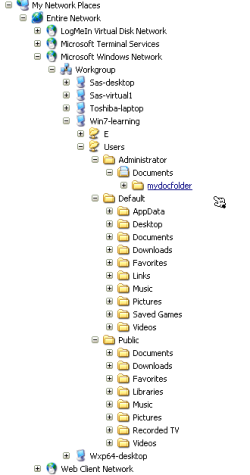
As you will notice a lot of Win7 folders are shown in the WinXP network view. Is there any way to restrict this view to only include the "E:\" Drive and Administrator "Documents" folder and sub-folders?

Thanks

k
 

Attachments

  • NetworkFolders.png
    NetworkFolders.png
    7.1 KB · Views: 11

My Computer My Computer

At a glance

Win 7
OS
Win 7

My Computer My Computer

At a glance

Windows 7 Ult, Windows 8.1 Pro,Q9650-4.275GHz, E8600 4.5GHz, E6750-3.8GHzG.Skill PC2 9600 1200Mhz 5 5 5 15 2TGTX480
Computer type
PC/Desktop
Computer Manufacturer/Model Number
Home built
OS
Windows 7 Ult, Windows 8.1 Pro,
CPU
Q9650-4.275GHz, E8600 4.5GHz, E6750-3.8GHz
Motherboard
Evga 780i FTW
Memory
G.Skill PC2 9600 1200Mhz 5 5 5 15 2T
Graphics Card(s)
GTX480
Sound Card
Asus Xonar D2
Monitor(s) Displays
HannsG
Screen Resolution
1680X1050
Hard Drives
GSkill Phoenix Pro 120GB SSD
PSU
ThermalTake Toughpower 1000Watt modular
Case
ThermalTake XaserV
Cooling
Xigmatek S1283
Keyboard
Logitech G15
Mouse
Logitech G9
Internet Speed
T1
Just right click on the folder that you don't want shared and then choose to share with "nobody".

I already had a pretty good idea that it was about ownership and permissions, I mean just look at my first post.
I dunno what more I could have done to help. ;)
Anyway glad you got it working.
Don't forget to rep.

http://www.sevenforums.com/network-...n7-winxp-network-issues-again.html#post487028

Yeh i think we have covered everything in this thread that needs tobe covered.

The issue of not able to share is either a networking issue, or a permissions issue. Not an OS issue.

As for Rep, lol, unless you ask for it in your sig, you aint getting it. Which is a shame cos that sort of throws the system's integrity off the line :(

Gold member is my aim now i recon.

cheers ya'll.
 

My Computer My Computer

At a glance

Windows 7 Ultimate 64BitGenuineIntel Intel(R) Core(TM) DuoCore T2400 ...2.00 GBMobile Intel(R) 945 Express Chipset
Computer Manufacturer/Model Number
Lenovo ThinkPad T60
OS
Windows 7 Ultimate 64Bit
CPU
GenuineIntel Intel(R) Core(TM) DuoCore T2400 @ 1.83GHz
Motherboard
Intel(R) 82801G (ICH7 Family)
Memory
2.00 GB
Graphics Card(s)
Mobile Intel(R) 945 Express Chipset
Sound Card
SoundMAX Integrated Digital HD Audio
Monitor(s) Displays
ThinkPad Display
Screen Resolution
1400x1050
Hard Drives
100Gb SATA
Keyboard
Standard Keyboard
Mouse
HID-compliant Mouse
Internet Speed
Cable Broadband - 54Mbps
Other Info
Intel(R) PRO/1000 PL Network Connection
11a/b/g Wireless LAN Mini PCI Express Adapter
Back
Top