Please help with disk management - can't delete 14GB free space

Judgment

New member
Local time
7:35 AM
Messages
12
Here's my issue. I had three partitions, but I turned one of them into "free space" to be merged into my "C" disk.

So in the picture, it would be the 129.84 GB plus the 14.33 GB partitions. The 4.89 GB is for Ubuntu.

capturepwv.png


However, when I go right click on the free space and select "delete partition", it gives me the error:

There is not enough space available on the disk(s) to complete this operation.

What does it mean?? Please help.
 
Last edited:

My Computer My Computer

At a glance

Windows 7 Ultimate 32-bitGenuine Intel(R) CPU 585 @ 2.16GHz2.0GB Dual-Channel DDR2 @ 332MHz (5-5-5-15)Mobile Intel(R) 4 Series Express Chipset Family
Computer Manufacturer/Model Number
Compaq Presario CQ60-211DX Notebook PC
OS
Windows 7 Ultimate 32-bit
CPU
Genuine Intel(R) CPU 585 @ 2.16GHz
Motherboard
Wistron 3612
Memory
2.0GB Dual-Channel DDR2 @ 332MHz (5-5-5-15)
Graphics Card(s)
Mobile Intel(R) 4 Series Express Chipset Family
Sound Card
High Definition Audio Device
Monitor(s) Displays
Generic PnP Monitor
Hard Drives
156GB Seagate ST9160310AS ATA Device
PSU
what?
Case
not guilty
Cooling
i use the freezer
You can't merge the right 14GB back to C with the 4GB in the middle.
C can't be split in two partitions.

You can put the 14 and 4 together.

If Ubuntu isn't installed yet you can remerge everything then split off a partition for Ubuntu by itself on the right end.

Mike

1- http://www.sevenforums.com/tutorials/2668-partition-volume-delete.html?ltr=P

2- http://www.sevenforums.com/tutorials/2670-partition-volume-extend.html
-------------------------------------------------------------------------

This would be simplest I think.
You can also shrink the 14GB to 5GB. This will put the 5 on the right and make the middle 14GB.
http://www.sevenforums.com/tutorials/2672-partition-volume-shrink.html

Then add the middle back to "C".
Extend the C to include the 14GB.
http://www.sevenforums.com/tutorials/2670-partition-volume-extend.html
 

My Computer My Computer

At a glance

Windows7 Pro 64bit SP-1; Windows XP Pro 32bitIntel Core i7-870 Lynnfield 2.93GHz LGA 1156 ...8GB@1400MHz Crucial Ballistix DDR3-1600 4x2GBASUS ENGTX460 DirectCU/2DI/1GD5 1GB 256-bit G...
Computer Manufacturer/Model Number
Hopalong/ Godzilla
OS
Windows7 Pro 64bit SP-1; Windows XP Pro 32bit
CPU
Intel Core i7-870 Lynnfield 2.93GHz LGA 1156 95W Quad-Core
Motherboard
ASUS P7P55D-E PRO
Memory
8GB@1400MHz Crucial Ballistix DDR3-1600 4x2GB
Graphics Card(s)
ASUS ENGTX460 DirectCU/2DI/1GD5 1GB 256-bit GDDR5
Sound Card
VIA Onboard
Monitor(s) Displays
Asus VS248H-P 24"; Samsung SyncMaster 941BW 19"ws
Screen Resolution
1920x1080; 1440x900
Hard Drives
Samsung 830 120GB SSD
Intel 320 120GB SSD
Western Digital Caviar Black WD7501AALS 750GB 7200 RPM SATA 3.0Gb/s
Western Digital Caviar Black WD6401AALS 640GB 7200 RPM SATA 3.0Gb/s
PSU
COOLER MASTER Silent Pro RS850-AMBAJ3-US 850W Modular
Case
COOLER MASTER HAF 932 RC-932-KKN5-GP Black
Cooling
Scythe "Mugen-2 Rev.B" (2 ScytheKaze-Jyuni PWM fans)
Keyboard
Logitech K-320
Mouse
Kensington
Antivirus
Avast Inernet Suite
Browser
IE 9 ; Chrome
Joules

You can't merge seperated partitions.

The partitions have to be next to each other in Disk Management to be merged.

Mike
 

My Computer My Computer

At a glance

Windows7 Pro 64bit SP-1; Windows XP Pro 32bitIntel Core i7-870 Lynnfield 2.93GHz LGA 1156 ...8GB@1400MHz Crucial Ballistix DDR3-1600 4x2GBASUS ENGTX460 DirectCU/2DI/1GD5 1GB 256-bit G...
Computer Manufacturer/Model Number
Hopalong/ Godzilla
OS
Windows7 Pro 64bit SP-1; Windows XP Pro 32bit
CPU
Intel Core i7-870 Lynnfield 2.93GHz LGA 1156 95W Quad-Core
Motherboard
ASUS P7P55D-E PRO
Memory
8GB@1400MHz Crucial Ballistix DDR3-1600 4x2GB
Graphics Card(s)
ASUS ENGTX460 DirectCU/2DI/1GD5 1GB 256-bit GDDR5
Sound Card
VIA Onboard
Monitor(s) Displays
Asus VS248H-P 24"; Samsung SyncMaster 941BW 19"ws
Screen Resolution
1920x1080; 1440x900
Hard Drives
Samsung 830 120GB SSD
Intel 320 120GB SSD
Western Digital Caviar Black WD7501AALS 750GB 7200 RPM SATA 3.0Gb/s
Western Digital Caviar Black WD6401AALS 640GB 7200 RPM SATA 3.0Gb/s
PSU
COOLER MASTER Silent Pro RS850-AMBAJ3-US 850W Modular
Case
COOLER MASTER HAF 932 RC-932-KKN5-GP Black
Cooling
Scythe "Mugen-2 Rev.B" (2 ScytheKaze-Jyuni PWM fans)
Keyboard
Logitech K-320
Mouse
Kensington
Antivirus
Avast Inernet Suite
Browser
IE 9 ; Chrome
the problem is...I can't even change the "free space" that is green into "unallocated space" which is black. (key on the bottom left)

so why does shrinking the 14 make the ubuntu partition (4GB) go to the right? yes ubuntu is already installed, and I'm duel-booting. I can't delete the 4 cause then I will delete the GRUB too.
 

My Computer My Computer

At a glance

Windows 7 Ultimate 32-bitGenuine Intel(R) CPU 585 @ 2.16GHz2.0GB Dual-Channel DDR2 @ 332MHz (5-5-5-15)Mobile Intel(R) 4 Series Express Chipset Family
Computer Manufacturer/Model Number
Compaq Presario CQ60-211DX Notebook PC
OS
Windows 7 Ultimate 32-bit
CPU
Genuine Intel(R) CPU 585 @ 2.16GHz
Motherboard
Wistron 3612
Memory
2.0GB Dual-Channel DDR2 @ 332MHz (5-5-5-15)
Graphics Card(s)
Mobile Intel(R) 4 Series Express Chipset Family
Sound Card
High Definition Audio Device
Monitor(s) Displays
Generic PnP Monitor
Hard Drives
156GB Seagate ST9160310AS ATA Device
PSU
what?
Case
not guilty
Cooling
i use the freezer

My Computer My Computer

At a glance

Windows 7 Ultimate 32-bitGenuine Intel(R) CPU 585 @ 2.16GHz2.0GB Dual-Channel DDR2 @ 332MHz (5-5-5-15)Mobile Intel(R) 4 Series Express Chipset Family
Computer Manufacturer/Model Number
Compaq Presario CQ60-211DX Notebook PC
OS
Windows 7 Ultimate 32-bit
CPU
Genuine Intel(R) CPU 585 @ 2.16GHz
Motherboard
Wistron 3612
Memory
2.0GB Dual-Channel DDR2 @ 332MHz (5-5-5-15)
Graphics Card(s)
Mobile Intel(R) 4 Series Express Chipset Family
Sound Card
High Definition Audio Device
Monitor(s) Displays
Generic PnP Monitor
Hard Drives
156GB Seagate ST9160310AS ATA Device
PSU
what?
Case
not guilty
Cooling
i use the freezer
The second partition has Ubuntu on it plus GRUB. We're getting off topic here.

I just want to delete the last partition, the 14 GB free space, so that it becomes an "unallocated space".

Then, I should be able to merge that with my main 129 GB partition.

What I want:
1. My main 129 + the 14 GB free space together
2. A 4 GB partition for Ubuntu + GRUB

I DON'T want to delete ubuntu on the second partition.

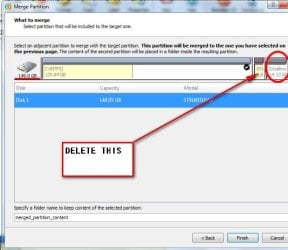
As for Partition Wizard, I got the premium version but still was not able to merge the 14GB partition with my 129 GB partition.

image attached:

http://img412.imageshack.us/img412/6563/partitionwizardi.png

Do I need a CD version instead? Will that work?
 

My Computer My Computer

At a glance

Windows 7 Ultimate 32-bitGenuine Intel(R) CPU 585 @ 2.16GHz2.0GB Dual-Channel DDR2 @ 332MHz (5-5-5-15)Mobile Intel(R) 4 Series Express Chipset Family
Computer Manufacturer/Model Number
Compaq Presario CQ60-211DX Notebook PC
OS
Windows 7 Ultimate 32-bit
CPU
Genuine Intel(R) CPU 585 @ 2.16GHz
Motherboard
Wistron 3612
Memory
2.0GB Dual-Channel DDR2 @ 332MHz (5-5-5-15)
Graphics Card(s)
Mobile Intel(R) 4 Series Express Chipset Family
Sound Card
High Definition Audio Device
Monitor(s) Displays
Generic PnP Monitor
Hard Drives
156GB Seagate ST9160310AS ATA Device
PSU
what?
Case
not guilty
Cooling
i use the freezer
DELETE-THIS.jpg


"Merge" all the unallocated space. Then recreate the 4gb partition for Ubuntu.

Or Move the 4gb partition to the right of the Unallocated space, then "merge".

EDIT - sorry - got interrupted mid-post.

I have put "merge" in brackets , because although you will in fact be merging in the English sense, the Partition Wizard Merge function applies only to two partitions that are side by side.

To "merge" or Incorporate Unallocated space, use the Partition Wizard Move/Resize function. That is for incorporating unallocated space into the partition next to it.

If you move the 4.8 gb to the right of the unallocated space , then all unallocated space will be on the left of the 4.8gb and can be incorporated with the Move /Resize function.

If you move two areas of unallocated space so they are next to each - it will show as one single larger unallocated space.
 
Last edited:

My Computers My Computers

  • At a glance

    7 X64i5 84002x8gb 3200mhz
    Computer type
    PC/Desktop
    OS
    7 X64
    CPU
    i5 8400
    Motherboard
    gigabyte b365m ds3h
    Memory
    2x8gb 3200mhz
    Hard Drives
    various
    PSU
    pure power 11 400w cm
    Case
    Coolermaster
    Cooling
    cryorig m9i
  • At a glance

    7x64g54008gb ddr4 2400
    Computer type
    PC/Desktop
    OS
    7x64
    CPU
    g5400
    Motherboard
    ga b365m ds3h
    Memory
    8gb ddr4 2400
    PSU
    xfx pro 450w
SIW2, thanks for your post. So how do I move the 4.8 over to the right of the unallocated space?

Right now, the Move/Resize isn't working for the 129 GB, probably because it's not adjacent to the 4.8. darn

So how do I move it? Will i have to delete my 4.8 partition (one with ubuntu/GRUB on it)
 

My Computer My Computer

At a glance

Windows 7 Ultimate 32-bitGenuine Intel(R) CPU 585 @ 2.16GHz2.0GB Dual-Channel DDR2 @ 332MHz (5-5-5-15)Mobile Intel(R) 4 Series Express Chipset Family
Computer Manufacturer/Model Number
Compaq Presario CQ60-211DX Notebook PC
OS
Windows 7 Ultimate 32-bit
CPU
Genuine Intel(R) CPU 585 @ 2.16GHz
Motherboard
Wistron 3612
Memory
2.0GB Dual-Channel DDR2 @ 332MHz (5-5-5-15)
Graphics Card(s)
Mobile Intel(R) 4 Series Express Chipset Family
Sound Card
High Definition Audio Device
Monitor(s) Displays
Generic PnP Monitor
Hard Drives
156GB Seagate ST9160310AS ATA Device
PSU
what?
Case
not guilty
Cooling
i use the freezer
Rt click the 4.8gb, select Move/Resize.

In the next window , use the mouse to grab the 4.8 in the centre and drag it all the way right.

Click OK. Click Apply.

Might take a couple of mins as it moves all the data on the 4.8 over to the right.
 

My Computers My Computers

  • At a glance

    7 X64i5 84002x8gb 3200mhz
    Computer type
    PC/Desktop
    OS
    7 X64
    CPU
    i5 8400
    Motherboard
    gigabyte b365m ds3h
    Memory
    2x8gb 3200mhz
    Hard Drives
    various
    PSU
    pure power 11 400w cm
    Case
    Coolermaster
    Cooling
    cryorig m9i
  • At a glance

    7x64g54008gb ddr4 2400
    Computer type
    PC/Desktop
    OS
    7x64
    CPU
    g5400
    Motherboard
    ga b365m ds3h
    Memory
    8gb ddr4 2400
    PSU
    xfx pro 450w
Back
Top