
Solved Diskpart freespace mismatch with Disk Management

FastTurtle

New member
Local time
9:06 AM
Messages
38
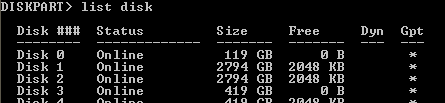
Running diskpart from an Elevated command prompt shows me


Diskpart shows that drive 3 has 0 free space diskpatEntry.PNG

File Manager shows that Drive 3 has plenty DiskMngMnt.PNG


Anyone have an idea what the problem is
 

My Computer

Computer type
PC/Desktop
Computer Manufacturer/Model Number
White Box
OS
Win7-64/Sp1 Ultimate
CPU
AMD Ryzen 5 1600
Motherboard
Asrock B450m Pro
Memory
64GB
Graphics Card(s)
GTX 1060 6GB
Hard Drives
Boot = Crucial MX500 250GB M2 Sata/AHCI
LSI 9211-8i HBA/IT card
Port1 = 1x Team Group GX2 256GB SSD (boot)
1x Crucial MX500 1TB (Raid 1 storage)
2x Team Group GX2 1TB (storage)
Port2 = 1x Team Group GX2 256GB SSD (boot)
1x Crucial MX500 1TB
PSU
EVGA B450
Keyboard
88 key (TKL) mechanical
Running diskpart from an Elevated command prompt shows me


Diskpart shows that drive 3 has 0 free space

File Manager shows that Drive 3 has plenty

Anyone have an idea what the problem is

They're not showing the same thing, File manager shows the properties of partitions, Diskpart's disk command shows the properties of hard drives.

Diskpart is telling you that hard drive 3 has no free space to create any more partitions, all it's 419GB is already used by partition(s) - in this case the one partition that you see as F: in file Manager.

File Manager is telling you that the F: partition has 200GB of free space.
 

My Computers

System One System Two

  • Computer type
    Laptop
    Computer Manufacturer/Model Number
    Toshiba satellite C650D
    OS
    Windows 7 Home Premium x64
    CPU
    AMD V120
    Memory
    4GB
    Internet Speed
    150 Mbps
    Antivirus
    MSE
    Browser
    IE11, Edge, Firefox
    Other Info
    I also have W7 Pro on my System Two, and several W7 Hyper-V VMs. My other machines run Windows 10/11. Their specs are in my Ten Forums & Eleven Forum profiles.
  • Computer type
    Laptop
    System Manufacturer/Model Number
    Lenovo Thinkpad T430
    OS
    Windows 7 Pro x64
    CPU
    Intel i5-3320M
    Memory
    8 GB
    Hard Drives
    250GB Samsung SSD 860 EVO
    Other Info
    Antivirus: MSE
Thanks for the explanation. Straight forward and Clear as a bell that Diskpart is reporting a different space
 

My Computer

Computer type
PC/Desktop
Computer Manufacturer/Model Number
White Box
OS
Win7-64/Sp1 Ultimate
CPU
AMD Ryzen 5 1600
Motherboard
Asrock B450m Pro
Memory
64GB
Graphics Card(s)
GTX 1060 6GB
Hard Drives
Boot = Crucial MX500 250GB M2 Sata/AHCI
LSI 9211-8i HBA/IT card
Port1 = 1x Team Group GX2 256GB SSD (boot)
1x Crucial MX500 1TB (Raid 1 storage)
2x Team Group GX2 1TB (storage)
Port2 = 1x Team Group GX2 256GB SSD (boot)
1x Crucial MX500 1TB
PSU
EVGA B450
Keyboard
88 key (TKL) mechanical
Back
Top