tell me how to delete System Volume Information on D:

Local time
11:02 AM
Messages
64
Location
Jakarta
I delete it, but it stays there, nothing happened. How can I delete it?
And is it safe to do?
 

My Computer My Computer

At a glance

Windows 7 build 7100, XP SP3QX6850Patriot 4GB Viper IIASUS HD4890
Computer Manufacturer/Model Number
Desktop
OS
Windows 7 build 7100, XP SP3
CPU
QX6850
Motherboard
DFI LANParty UT P45 T3RS
Memory
Patriot 4GB Viper II
Graphics Card(s)
ASUS HD4890
Monitor(s) Displays
Asus LS201 LCD 20"
Hard Drives
Hitachi 160GB x2
PSU
CoolerMaster Real Power 850w
Case
Thermaltake Armor
Internet Speed
768kbps DSL
I delete it, but it stays there, nothing happened. How can I delete it?
And is it safe to do?

Check the box at "hide system files", you won't even know it's there. :D
 

My Computer My Computer

At a glance

Win7 Build 7600 x86Pentium II 300MHz32mb EDO RAMDiamond Viper
OS
Win7 Build 7600 x86
CPU
Pentium II 300MHz
Motherboard
Asus
Memory
32mb EDO RAM
Graphics Card(s)
Diamond Viper
Sound Card
Soundblaster 16
Monitor(s) Displays
14" AOC CRT 16K color
Screen Resolution
800x600
Hard Drives
300mb Quantum fireball
PSU
110 Watts
Cooling
Passive
Keyboard
Trust Ergonomic
Mouse
Generic
Internet Speed
256K u 128K d
System information is were your System Restore points and other stuff are stored.

The System Volume Information can get bloated pretty fast over time; mainly by installing and uninstalling programs.

Open the Disk Cleanup utility, go to the More Options tab and and Cleanup the System Restore.
it will delete all your restore points except the last one.

moontan
 

My Computer My Computer

At a glance

Windows 7
OS
Windows 7
You can set the max allocated space in System Volume Information for each disk by System Restore.

Open the Control Panel and click System, or right-click on Computer / Properties. The System window will open, where you can see your WEI, comp name, etc. On the left click on System protection to open that dialog. One by one select each drive under Protection Settings and click Configure. There you can select the max amount it will use for the drive's System Volume Information folder, or none at all. I only enable it for my system drive.
 

My Computer My Computer

At a glance

Windows 7 RTM x64Core i7 980X @ 4.04GHz OC /// Core Duo L7500 ...12GB G. Skill @ DDR-1600 OC /// 4GBSaphire HD4870 Toxic 1GB /// Intel Mobile GMA...
Computer Manufacturer/Model Number
Custom workstation /// Lenovo X61t tablet notebook
OS
Windows 7 RTM x64
CPU
Core i7 980X @ 4.04GHz OC /// Core Duo L7500 @ 1.6GHz
Motherboard
Asus P6T6 WS Revolution ///
Memory
12GB G. Skill @ DDR-1600 OC /// 4GB
Graphics Card(s)
Saphire HD4870 Toxic 1GB /// Intel Mobile GMA X3100
Monitor(s) Displays
Dual Eizo 24" SX2461W /// 12"
Screen Resolution
1920x1200 /// 1400x1050
Hard Drives
Workstation:
5x 750GB Barracuda-11 on Areca ARC-1220;
4x 1.5TB Barracuda-11 on Intel ICH10R;
Volumes:
300GB RAID 0, 2.7TB RAID 10 on Intel;
100GB RAID 0, 1.4TB RAID 10 on Areca ///
Notebook: G.Skill Titan 256GB SSD
PSU
Tagan ITZ 1100
Case
GHS-1500 ///
Cooling
Thermalright IFX-14 + a slew of stealth fans ///
Keyboard
Logitech Edge ///
Mouse
Logitech Wireless Optical Trackball
Internet Speed
5Mbps down / 820Kbps up
Other Info
Main use: photography;
DVD Drive: L.G GGW-H20L Blu-Ray / DVD;
OC: QPI/DRAM @ 1.33v, CPU @ 1.293v, DRAM Bus @ 1.65v, CPU PLL @ 1.88v, CPU mult = 25x, BCLK = 160, DDR3-1604 @ 7-8-7-24
Disable system restore.
 

My Computer My Computer

At a glance

Windows 8.1 PRO3rd Generation Intel Core i7‐3612QM CPU @ 2.1...8GB DDR3NVIDIA GeForce GT 525M (128 bit), 1GB Grpahics
Computer type
PC/Desktop
Computer Manufacturer/Model Number
DELL VOSTRO 3650
OS
Windows 8.1 PRO
CPU
3rd Generation Intel Core i7‐3612QM CPU @ 2.10GHZ
Memory
8GB DDR3
Graphics Card(s)
NVIDIA GeForce GT 525M (128 bit), 1GB Grpahics
Screen Resolution
1920X1080
Hard Drives
750GB 5400RPM

My Computer My Computer

At a glance

win7 7600x64 RTMQ9300DDR2 Corsair 4*1gb 800MhzNvidia Ge Force 9800 gtx
OS
win7 7600x64 RTM
CPU
Q9300
Motherboard
P5N-D
Memory
DDR2 Corsair 4*1gb 800Mhz
Graphics Card(s)
Nvidia Ge Force 9800 gtx
Sound Card
SB audigy
Monitor(s) Displays
Samsung syncmaster 2232bw
Screen Resolution
1680*1050
Hard Drives
1*60gb SSD (system)
2*500gb Sata 7200rpm (raid 0)
1*1tb external(backup)
PSU
thermaltake 750w
Case
Thermaltake(something :P)
Cooling
Normal fans // Cpu cooler+fan(Thermaltake)
Only if you have a safe image of your system, because it saved me many times while testing stuff.
+++1

I do system backups fairly often but still like sys restore for those tweaks that didn't quite work as advertsed :sarc:. Especially with Win 7 where I've been trying all kinds of things to see what works and what doesn't, sys restore has been a real boon.
 

My Computer My Computer

At a glance

Windows 7 RTM x64Core i7 980X @ 4.04GHz OC /// Core Duo L7500 ...12GB G. Skill @ DDR-1600 OC /// 4GBSaphire HD4870 Toxic 1GB /// Intel Mobile GMA...
Computer Manufacturer/Model Number
Custom workstation /// Lenovo X61t tablet notebook
OS
Windows 7 RTM x64
CPU
Core i7 980X @ 4.04GHz OC /// Core Duo L7500 @ 1.6GHz
Motherboard
Asus P6T6 WS Revolution ///
Memory
12GB G. Skill @ DDR-1600 OC /// 4GB
Graphics Card(s)
Saphire HD4870 Toxic 1GB /// Intel Mobile GMA X3100
Monitor(s) Displays
Dual Eizo 24" SX2461W /// 12"
Screen Resolution
1920x1200 /// 1400x1050
Hard Drives
Workstation:
5x 750GB Barracuda-11 on Areca ARC-1220;
4x 1.5TB Barracuda-11 on Intel ICH10R;
Volumes:
300GB RAID 0, 2.7TB RAID 10 on Intel;
100GB RAID 0, 1.4TB RAID 10 on Areca ///
Notebook: G.Skill Titan 256GB SSD
PSU
Tagan ITZ 1100
Case
GHS-1500 ///
Cooling
Thermalright IFX-14 + a slew of stealth fans ///
Keyboard
Logitech Edge ///
Mouse
Logitech Wireless Optical Trackball
Internet Speed
5Mbps down / 820Kbps up
Other Info
Main use: photography;
DVD Drive: L.G GGW-H20L Blu-Ray / DVD;
OC: QPI/DRAM @ 1.33v, CPU @ 1.293v, DRAM Bus @ 1.65v, CPU PLL @ 1.88v, CPU mult = 25x, BCLK = 160, DDR3-1604 @ 7-8-7-24
You can set the max allocated space in System Volume Information for each disk by System Restore.

Open the Control Panel and click System, or right-click on Computer / Properties. The System window will open, where you can see your WEI, comp name, etc. On the left click on System protection to open that dialog. One by one select each drive under Protection Settings and click Configure. There you can select the max amount it will use for the drive's System Volume Information folder, or none at all. I only enable it for my system drive.
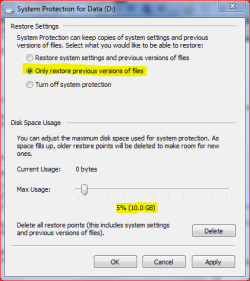
Highlight is mine

You need to be careful with this on multi drive/partition systems as the System volume information also holds the shadow copy data for Files in addition to the restore points. I would recommend that for a data drive you use a setting such as shown in the following screen (The percentage would be based on the amount of files you work with and the overall drive size) ...

SVI.PNG

This will provide some protection for your data, although I agree that the system restore on a data drive is not of any use as the system restore ignores data files.

The ammount required for a system drive is variable from system to system and is best set by observation - delete all but the last restore point and check the size then set the max to this figure times how many points you want to retain. 3-5 times is a good compromise (personal preference will decide the actual amount of restore points you wish to keep)
 

My Computers My Computers

  • At a glance

    Windows 11 Pro x64 [Latest Release and Releas...Ryzen 9 5950X, 3.8 - 5.2 MHz64GB [2 x 32GB] DDR4 3200MHz4GB NVIDIA GEFORCE GTX 1650 Ti
    Computer type
    PC/Desktop
    Computer Manufacturer/Model Number
    ChillBlast - Custom to my design
    OS
    Windows 11 Pro x64 [Latest Release and Release Preview]
    CPU
    Ryzen 9 5950X, 3.8 - 5.2 MHz
    Motherboard
    Asus Prime X570-Pro
    Memory
    64GB [2 x 32GB] DDR4 3200MHz
    Graphics Card(s)
    4GB NVIDIA GEFORCE GTX 1650 Ti
    Sound Card
    On-board SPDIF to 5.1 System + HDMI [5.1 system]
    Monitor(s) Displays
    32" UHD 32 Bit HDR Monitor + 43" UHD 4K 32Bit HDR TV
    Screen Resolution
    2 x 3840 x 2160 @60Hz
    Hard Drives
    1TB M2 SSD OS, 500GB Fast Access SSD, 2 x 8TB Data + Various Externals from 1TB to 4TB, 10TB NAS
    PSU
    NZXT C750 80 PLUS Gold 750W Modular PSU
    Case
    Workstation Case [Matt Black]
    Cooling
    NZXT Kraken X63 280mm CPU Cooler +2x Quiet Case fans
    Keyboard
    Logitech Wireless MX Keys & K400 + others
    Mouse
    Logitech Wireless MX Master 3S
    Internet Speed
    920 MB Down 50 MB Up
    Antivirus
    BitDefender Total Security Pro
    Browser
    Chrome (always run latest Non-Beta)
    Other Info
    Also run ...
    Laptop - Quad 8GB - Windows 10 Pro x64
    Nexus 7 Android tablet x2
    Samsung 10.2" tablet
    Blackview TAB 8 4G Android Tablet c/w Keyboard
    Wacom Intuos Pro Medium Pen Pad
    Wacom Intuos Pro Small Pen Pad
    Wacom Expresskeys Remote
    Loopdeck+ Graphics Controller
    Shuttle Pro v2 Control
  • At a glance

    Windows 11 Pro x64 Latest RPIntel I7 10750H 5.0GHz32GB [2x16GB] DDR4 2933 MHznVidia GTX1650Ti 4 GB GDDR6
    Computer type
    Laptop
    System Manufacturer/Model Number
    Dell XPS 17 10750H
    OS
    Windows 11 Pro x64 Latest RP
    CPU
    Intel I7 10750H 5.0GHz
    Motherboard
    Dell XPS
    Memory
    32GB [2x16GB] DDR4 2933 MHz
    Graphics Card(s)
    nVidia GTX1650Ti 4 GB GDDR6
    Sound Card
    Stock [Realtek] 4 Speaker
    Monitor(s) Displays
    17" IPS UHD+ Infinity Edge Touchscreen
    Screen Resolution
    3840 x 2400
    Hard Drives
    2TB M2 NVMe, 4TB External + various 500GB & 1TB External NVMe (also have access to spinner HDD from
    PSU
    Stock
    Case
    Stock XPS Aluminium & Carbon Fibre
    Cooling
    Stock - Active Fan Control
    Keyboard
    Backlit + Various Logitech
    Mouse
    Stock Track Pad + Logitech MX Trackball
    Internet Speed
    72 MB Down 18MB Up
    Browser
    Chrome
    Other Info
    Also run ...
    Laptop - Quad 8GB - Windows 10 Pro x64
    Nexus 7 Android tablet x2
    10.2" tablet
    Sony Z3 Android Smartphone
    Wacom Intuos Pro Medium Pen Pad
    Wacom Intuos Pro Small Pen Pad
    Wacom Expresskeys Remote
    Loopdeck+ Graphics Controller
    Shuttle Pro v2 Control Pad
    10TB NAS
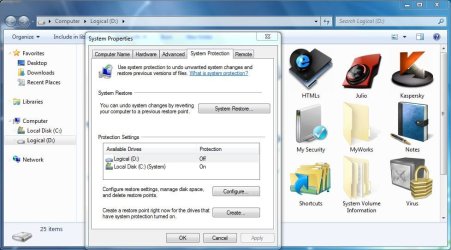
I have disabled system protection (system restore) on drive D, but it's still standing.
 

My Computer My Computer

At a glance

Windows 7 build 7100, XP SP3QX6850Patriot 4GB Viper IIASUS HD4890
Computer Manufacturer/Model Number
Desktop
OS
Windows 7 build 7100, XP SP3
CPU
QX6850
Motherboard
DFI LANParty UT P45 T3RS
Memory
Patriot 4GB Viper II
Graphics Card(s)
ASUS HD4890
Monitor(s) Displays
Asus LS201 LCD 20"
Hard Drives
Hitachi 160GB x2
PSU
CoolerMaster Real Power 850w
Case
Thermaltake Armor
Internet Speed
768kbps DSL
I have disabled system protection (system restore) on drive D, but it's still standing.
Please define still standing - is System Volume Information still taking up space after disabling the drive in the System Restore configuration? Or you disabled it but if you go back and check it's still configured to reserve recovery space?
 

My Computer My Computer

At a glance

Windows 7 RTM x64Core i7 980X @ 4.04GHz OC /// Core Duo L7500 ...12GB G. Skill @ DDR-1600 OC /// 4GBSaphire HD4870 Toxic 1GB /// Intel Mobile GMA...
Computer Manufacturer/Model Number
Custom workstation /// Lenovo X61t tablet notebook
OS
Windows 7 RTM x64
CPU
Core i7 980X @ 4.04GHz OC /// Core Duo L7500 @ 1.6GHz
Motherboard
Asus P6T6 WS Revolution ///
Memory
12GB G. Skill @ DDR-1600 OC /// 4GB
Graphics Card(s)
Saphire HD4870 Toxic 1GB /// Intel Mobile GMA X3100
Monitor(s) Displays
Dual Eizo 24" SX2461W /// 12"
Screen Resolution
1920x1200 /// 1400x1050
Hard Drives
Workstation:
5x 750GB Barracuda-11 on Areca ARC-1220;
4x 1.5TB Barracuda-11 on Intel ICH10R;
Volumes:
300GB RAID 0, 2.7TB RAID 10 on Intel;
100GB RAID 0, 1.4TB RAID 10 on Areca ///
Notebook: G.Skill Titan 256GB SSD
PSU
Tagan ITZ 1100
Case
GHS-1500 ///
Cooling
Thermalright IFX-14 + a slew of stealth fans ///
Keyboard
Logitech Edge ///
Mouse
Logitech Wireless Optical Trackball
Internet Speed
5Mbps down / 820Kbps up
Other Info
Main use: photography;
DVD Drive: L.G GGW-H20L Blu-Ray / DVD;
OC: QPI/DRAM @ 1.33v, CPU @ 1.293v, DRAM Bus @ 1.65v, CPU PLL @ 1.88v, CPU mult = 25x, BCLK = 160, DDR3-1604 @ 7-8-7-24
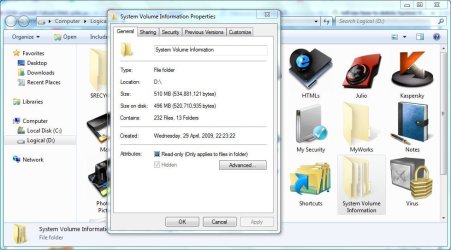
hope this inset explains everything

everytime I delete it it asks "Do u want to move it to recycle bin?" or when I use with the shift key "Do u want to delete this permanently?"
I chose yes. But nothing happened. It's still STANDING there in my D: partition drive.
 

Attachments

  • Capture.JPG
    Capture.JPG
    81.7 KB · Views: 552

My Computer My Computer

At a glance

Windows 7 build 7100, XP SP3QX6850Patriot 4GB Viper IIASUS HD4890
Computer Manufacturer/Model Number
Desktop
OS
Windows 7 build 7100, XP SP3
CPU
QX6850
Motherboard
DFI LANParty UT P45 T3RS
Memory
Patriot 4GB Viper II
Graphics Card(s)
ASUS HD4890
Monitor(s) Displays
Asus LS201 LCD 20"
Hard Drives
Hitachi 160GB x2
PSU
CoolerMaster Real Power 850w
Case
Thermaltake Armor
Internet Speed
768kbps DSL
OK, you mean you're trying to delete the System Volume Information folder in D:? You cannot delete it, Windows will not allow it, but it should be empty - if you right-click / Properties on it, it should show 0 bytes, 0 files and 0 folders.
 

My Computer My Computer

At a glance

Windows 7 RTM x64Core i7 980X @ 4.04GHz OC /// Core Duo L7500 ...12GB G. Skill @ DDR-1600 OC /// 4GBSaphire HD4870 Toxic 1GB /// Intel Mobile GMA...
Computer Manufacturer/Model Number
Custom workstation /// Lenovo X61t tablet notebook
OS
Windows 7 RTM x64
CPU
Core i7 980X @ 4.04GHz OC /// Core Duo L7500 @ 1.6GHz
Motherboard
Asus P6T6 WS Revolution ///
Memory
12GB G. Skill @ DDR-1600 OC /// 4GB
Graphics Card(s)
Saphire HD4870 Toxic 1GB /// Intel Mobile GMA X3100
Monitor(s) Displays
Dual Eizo 24" SX2461W /// 12"
Screen Resolution
1920x1200 /// 1400x1050
Hard Drives
Workstation:
5x 750GB Barracuda-11 on Areca ARC-1220;
4x 1.5TB Barracuda-11 on Intel ICH10R;
Volumes:
300GB RAID 0, 2.7TB RAID 10 on Intel;
100GB RAID 0, 1.4TB RAID 10 on Areca ///
Notebook: G.Skill Titan 256GB SSD
PSU
Tagan ITZ 1100
Case
GHS-1500 ///
Cooling
Thermalright IFX-14 + a slew of stealth fans ///
Keyboard
Logitech Edge ///
Mouse
Logitech Wireless Optical Trackball
Internet Speed
5Mbps down / 820Kbps up
Other Info
Main use: photography;
DVD Drive: L.G GGW-H20L Blu-Ray / DVD;
OC: QPI/DRAM @ 1.33v, CPU @ 1.293v, DRAM Bus @ 1.65v, CPU PLL @ 1.88v, CPU mult = 25x, BCLK = 160, DDR3-1604 @ 7-8-7-24
no, it's over 500MB
so.. any expert suggestion?
 

Attachments

  • Capture.JPG
    Capture.JPG
    78.7 KB · Views: 218

My Computer My Computer

At a glance

Windows 7 build 7100, XP SP3QX6850Patriot 4GB Viper IIASUS HD4890
Computer Manufacturer/Model Number
Desktop
OS
Windows 7 build 7100, XP SP3
CPU
QX6850
Motherboard
DFI LANParty UT P45 T3RS
Memory
Patriot 4GB Viper II
Graphics Card(s)
ASUS HD4890
Monitor(s) Displays
Asus LS201 LCD 20"
Hard Drives
Hitachi 160GB x2
PSU
CoolerMaster Real Power 850w
Case
Thermaltake Armor
Internet Speed
768kbps DSL
Ok I can see things are a little heated - can we calm down please.

Julio

What I suggest you do is follow the instructions in previous posts exactly (in addition you may want to set the allocation to 0 and use the delete button on the dialog to empty the store, as switching the function off will not necessarily do this) and then reboot your pc.

You will not be able to delete the actual system information file store but it should now be set to 0. As this is a system file the fact that it exists should not cause any problems and you will have your space back. You will of course not have the safety net that the system provides but on our machine that is your choice
 

My Computers My Computers

  • At a glance

    Windows 11 Pro x64 [Latest Release and Releas...Ryzen 9 5950X, 3.8 - 5.2 MHz64GB [2 x 32GB] DDR4 3200MHz4GB NVIDIA GEFORCE GTX 1650 Ti
    Computer type
    PC/Desktop
    Computer Manufacturer/Model Number
    ChillBlast - Custom to my design
    OS
    Windows 11 Pro x64 [Latest Release and Release Preview]
    CPU
    Ryzen 9 5950X, 3.8 - 5.2 MHz
    Motherboard
    Asus Prime X570-Pro
    Memory
    64GB [2 x 32GB] DDR4 3200MHz
    Graphics Card(s)
    4GB NVIDIA GEFORCE GTX 1650 Ti
    Sound Card
    On-board SPDIF to 5.1 System + HDMI [5.1 system]
    Monitor(s) Displays
    32" UHD 32 Bit HDR Monitor + 43" UHD 4K 32Bit HDR TV
    Screen Resolution
    2 x 3840 x 2160 @60Hz
    Hard Drives
    1TB M2 SSD OS, 500GB Fast Access SSD, 2 x 8TB Data + Various Externals from 1TB to 4TB, 10TB NAS
    PSU
    NZXT C750 80 PLUS Gold 750W Modular PSU
    Case
    Workstation Case [Matt Black]
    Cooling
    NZXT Kraken X63 280mm CPU Cooler +2x Quiet Case fans
    Keyboard
    Logitech Wireless MX Keys & K400 + others
    Mouse
    Logitech Wireless MX Master 3S
    Internet Speed
    920 MB Down 50 MB Up
    Antivirus
    BitDefender Total Security Pro
    Browser
    Chrome (always run latest Non-Beta)
    Other Info
    Also run ...
    Laptop - Quad 8GB - Windows 10 Pro x64
    Nexus 7 Android tablet x2
    Samsung 10.2" tablet
    Blackview TAB 8 4G Android Tablet c/w Keyboard
    Wacom Intuos Pro Medium Pen Pad
    Wacom Intuos Pro Small Pen Pad
    Wacom Expresskeys Remote
    Loopdeck+ Graphics Controller
    Shuttle Pro v2 Control
  • At a glance

    Windows 11 Pro x64 Latest RPIntel I7 10750H 5.0GHz32GB [2x16GB] DDR4 2933 MHznVidia GTX1650Ti 4 GB GDDR6
    Computer type
    Laptop
    System Manufacturer/Model Number
    Dell XPS 17 10750H
    OS
    Windows 11 Pro x64 Latest RP
    CPU
    Intel I7 10750H 5.0GHz
    Motherboard
    Dell XPS
    Memory
    32GB [2x16GB] DDR4 2933 MHz
    Graphics Card(s)
    nVidia GTX1650Ti 4 GB GDDR6
    Sound Card
    Stock [Realtek] 4 Speaker
    Monitor(s) Displays
    17" IPS UHD+ Infinity Edge Touchscreen
    Screen Resolution
    3840 x 2400
    Hard Drives
    2TB M2 NVMe, 4TB External + various 500GB & 1TB External NVMe (also have access to spinner HDD from
    PSU
    Stock
    Case
    Stock XPS Aluminium & Carbon Fibre
    Cooling
    Stock - Active Fan Control
    Keyboard
    Backlit + Various Logitech
    Mouse
    Stock Track Pad + Logitech MX Trackball
    Internet Speed
    72 MB Down 18MB Up
    Browser
    Chrome
    Other Info
    Also run ...
    Laptop - Quad 8GB - Windows 10 Pro x64
    Nexus 7 Android tablet x2
    10.2" tablet
    Sony Z3 Android Smartphone
    Wacom Intuos Pro Medium Pen Pad
    Wacom Intuos Pro Small Pen Pad
    Wacom Expresskeys Remote
    Loopdeck+ Graphics Controller
    Shuttle Pro v2 Control Pad
    10TB NAS
Yes, two of them. DO NOT insult professionals who are trying to help you free of charge. Take your PC to BestBuy and let the Geek Squad "repair" it when you hose it.

10-7
I'm sorry, I never meant to insult, in fact I wasn't talking to you. If anyone finds my particular reply irritating, it was just me lacking of capabilities in how to put it in english, I realize I'm not so fluent in english, I apologize. Such unpleasant temper you got there though. I'm sorry once again, I never meant to disrespect.
DJG I'm sorry if I offended you, I didn't mean to, really.
 

My Computer My Computer

At a glance

Windows 7 build 7100, XP SP3QX6850Patriot 4GB Viper IIASUS HD4890
Computer Manufacturer/Model Number
Desktop
OS
Windows 7 build 7100, XP SP3
CPU
QX6850
Motherboard
DFI LANParty UT P45 T3RS
Memory
Patriot 4GB Viper II
Graphics Card(s)
ASUS HD4890
Monitor(s) Displays
Asus LS201 LCD 20"
Hard Drives
Hitachi 160GB x2
PSU
CoolerMaster Real Power 850w
Case
Thermaltake Armor
Internet Speed
768kbps DSL
And about that System Information folder, just forget it, it's not so annoying, I was just curious so I post this thread. Just forget it 500MB won't hurt. Thanks for all of your attention and time. I thank you all.
 

My Computer My Computer

At a glance

Windows 7 build 7100, XP SP3QX6850Patriot 4GB Viper IIASUS HD4890
Computer Manufacturer/Model Number
Desktop
OS
Windows 7 build 7100, XP SP3
CPU
QX6850
Motherboard
DFI LANParty UT P45 T3RS
Memory
Patriot 4GB Viper II
Graphics Card(s)
ASUS HD4890
Monitor(s) Displays
Asus LS201 LCD 20"
Hard Drives
Hitachi 160GB x2
PSU
CoolerMaster Real Power 850w
Case
Thermaltake Armor
Internet Speed
768kbps DSL
I use a old program called "ERD Commander 2003 Explorer"..
you can enter "System Volume information" folder with that program..

It shows all hidden and system files.. I do not use system restore..
I usually delete everything in the folder.. use it at your own risk
 
Last edited:

My Computer My Computer

At a glance

Windows 7Intel® Core™ 2 Duo Processor P86004GB (2X2GB) DDR2 SDRAM Memory512MB ATI Mobility Radeon HD 4570
Computer Manufacturer/Model Number
Dell Studio 1555
OS
Windows 7
CPU
Intel® Core™ 2 Duo Processor P8600
Motherboard
Intel PM45
Memory
4GB (2X2GB) DDR2 SDRAM Memory
Graphics Card(s)
512MB ATI Mobility Radeon HD 4570
Sound Card
IDT High Definition Audio
Monitor(s) Displays
15.6” 720p WLED
Screen Resolution
1366X768 Display
Hard Drives
320GB SATA Hard Drive
Keyboard
Dell Keyboard with Touchpad (English)
Mouse
Dell Bluetooth Travel Mouse
Internet Speed
Dn 400 Kbps, Up 100 Kbps
I use a old program called "ERD Commander 2003 Explorer"..
you can enter "System Volume information" folder with that program..

It shows all hidden and system files.. I do not use system restore..
I usually delete everything in the folder.. I use it at your own risk

Thank you, I can see inside the folder by taking ownership of the folder, but thanks for your help. I'm sure that everybody in this forum and myself prefers this kind of reply.
 
Last edited by a moderator:

My Computer My Computer

At a glance

Windows 7 build 7100, XP SP3QX6850Patriot 4GB Viper IIASUS HD4890
Computer Manufacturer/Model Number
Desktop
OS
Windows 7 build 7100, XP SP3
CPU
QX6850
Motherboard
DFI LANParty UT P45 T3RS
Memory
Patriot 4GB Viper II
Graphics Card(s)
ASUS HD4890
Monitor(s) Displays
Asus LS201 LCD 20"
Hard Drives
Hitachi 160GB x2
PSU
CoolerMaster Real Power 850w
Case
Thermaltake Armor
Internet Speed
768kbps DSL
Back
Top