How often should you empty your recycle bin

Melissa

New member
Power User
Local time
5:47 PM
Messages
394
Dear Forum,

I am just enquring as to whether or not too permantely delete the contents in my recycle bin and if it is affecting the performance of my machine.

I had the Norton team delete the back up of the previous version of their software and I went for assistance online and they decided to go along with my idea of removing all the items in the %temp% and temp folder.

I gather that the other files - I am not too sure if I may require them down the track.

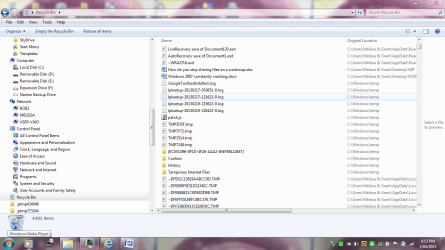
I did not know that there was that much in the recycle bin and have not been advised on the best action.

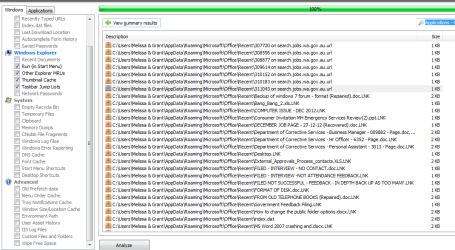
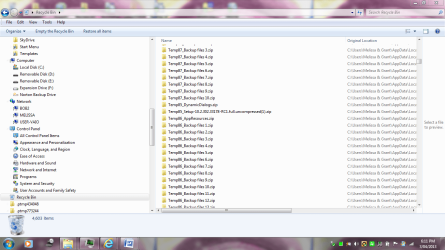
I took a few snap shots of what type of items are in the current file at the moment.


Mel
 

Attachments
  • RECYCLE BIN ONE.PNG
    RECYCLE BIN ONE.PNG
    359.1 KB · Views: 33
  • RECYCLE BIN TWO.PNG
    RECYCLE BIN TWO.PNG
    349.3 KB · Views: 25

My Computer

Computer type
Laptop
Computer Manufacturer/Model Number
Sony VAIO / E Series VPCEB46FG
OS
Windows 7 Home Premium 64bit
CPU
Windows 7 Service Pack 1 x86 NTFS
Motherboard
AMD E-350 Processor
Memory
4 GB
Hard Drives
500GB
Other Info
1.6GHz
How often to empty that bin?
As often as you wish.

Will it impact performance?
In theory, yes. In reality, no.
In theory, the more files that you have on your computer, then the longer it takes for security software to complete a full scan.

Download CCleaner (avoid using the registry tool).
Let it clean up old files for you - as well as empty the recycle bin.
 

My Computer

Computer type
Laptop
Computer Manufacturer/Model Number
Employer provided Dell Latitude
OS
W7 Pro SP1 64bit
CPU
i7
Memory
8GB
Graphics Card(s)
Intel HD Graphics
Hard Drives
crappy SSD
Antivirus
Employer mandated Symantec Endpoint Protection
Browser
Pale Moon 64bit, IE11 64bit & Chrome 64bit
Hi Melissa!

Check your bin and see if there's any item there you might need. If you need nothing, empty it! Empty bin is always better than a filled one, whatever the reason be! Why keep things you don't wanna use and let them take up your precious hard disk space? :)

Also, you can right click Recycle Bin > Click Properties and set the amount allocated to the dustbin on each partition according to your needs. ;)
 
I am a paranoid.:D

I am forgetful.

And sometimes I do delete some files by mistake - and everybody does it :).

With these qualities, I do not allow CCleaner to do the job for me and I always believe in excercising my own control wherever possible.

Whenever I feel the urge to empty the trash on seeing a dirty bin - which happens once in two or three days - I go an extra mile of exploring the contents of the Recycle Bin, confirm I haven't made a mistake of my life and then delete them all manually.

I do not want to run Recuva.:)

In one sentence, it all depends upon your own personality traits and computer usage. ( I don't think I ever use my computer. :D )
 

My Computer

OS
Windows 7 Home Premium 32 bit
Thanks for the realistic answer.

I am not that confident in using CCleaner as it has some components.

I had the old CCleaner - it told me to update it. I then went into the control panel and I removed the old version.

How do I download the new one. Do I run it or download it from the website. I am not that computer literate?

I also do not like the idea of some of the old components of CCleaner - like the 'Run" section.

I just need assistance in trying to load the most recent version. I do not have any money - so the free one if possible.

Thanks for your assistance

Step by step instructions - I am not one hundred per cent
 

Attachments

  • cc cleaner 10-02-2013.PNG
    cc cleaner 10-02-2013.PNG
    122.7 KB · Views: 17
  • cc setup dowload.PNG
    cc setup dowload.PNG
    5.4 KB · Views: 19

My Computer

Computer type
Laptop
Computer Manufacturer/Model Number
Sony VAIO / E Series VPCEB46FG
OS
Windows 7 Home Premium 64bit
CPU
Windows 7 Service Pack 1 x86 NTFS
Motherboard
AMD E-350 Processor
Memory
4 GB
Hard Drives
500GB
Other Info
1.6GHz
Just wondered if it does also cause any issues in the running of your computer.

I better get off this one for an update. I heard there where some issues with the New Platform Update KB2670838 - I did with Google and pasting. Hopefully they have fixed that. I went on the Microsoft Community for that one.

Thanks again. I guess it does depend on your personality and how you operate as a person with how you like your computer set up. I always forget where I file items or if I may have accidentally moved it to the recycle bin.

Thanks people.
 

My Computer

Computer type
Laptop
Computer Manufacturer/Model Number
Sony VAIO / E Series VPCEB46FG
OS
Windows 7 Home Premium 64bit
CPU
Windows 7 Service Pack 1 x86 NTFS
Motherboard
AMD E-350 Processor
Memory
4 GB
Hard Drives
500GB
Other Info
1.6GHz
I tried to do a print screen - but can not.

When I go to open the .exe file and the User Acccount Control section comes up - I select the option yes.

Then I am getting no program installing at all. I have tried running and installing it to no avail.

Any troubleshooting I could do? Doing it on Internet Explorer
 

My Computer

Computer type
Laptop
Computer Manufacturer/Model Number
Sony VAIO / E Series VPCEB46FG
OS
Windows 7 Home Premium 64bit
CPU
Windows 7 Service Pack 1 x86 NTFS
Motherboard
AMD E-350 Processor
Memory
4 GB
Hard Drives
500GB
Other Info
1.6GHz
In my opinion I'd rather not use 3rd party software but use what is built into Windows on a regular basis.

Always do it on a new boot up that way if anything is still updating or installing parts will have finished using the files.

Once a week I start with a Clean Up, which you will find in your Programs, that will clean out all the Temp files and empty the Recycle bin plus other files that can be safely cleaned out. There is an option to look at the files it will delete for you to check.

I then do a scan with my installed MalwareBytes program, even though I have the Pro version which runs all the time I'll still do a weekly scan.

The inbuilt Defrag is scheduled to run weekly at a time I'm not using my machine.

Hope that helps you. :)
 

My Computer

Computer type
PC/Desktop
Computer Manufacturer/Model Number
Acer Aspire XC-704 x64 bit/ Asus K55A Notebook PC/HP Envy x360 Convertible 15-bq0xx
OS
Windows 10 64bit/Windows 10 64bit/Windows 10 64bit
CPU
Intel Pentium J3710 @ 60GHz/Intel B820,1.7GHz/AMD A9 Radeon
Motherboard
Acer Aspire XC-704 (SOCKET 0)/Asus/HP 8312 (Socket FP4)
Memory
8.00GB DDR3 @ 1599MHz/8GB 2 x 4GB DDR3/8.00GB Dual-Channel
Graphics Card(s)
Intel HD Graphics/Intel/512MB ATI AMD Radeon R5 Graphics (HP
Sound Card
Realtek High Definition Audio/Onboard/AMD High Definition Au
Monitor(s) Displays
Acer LCD K222HQL /Asus 15.6/Generic PnP Monitor (1920x1080@6
Screen Resolution
1920x1080@59Hz/1366 x 768/1920x1080@60Hz
Hard Drives
1863GBWesternn Digital WDC/Asus/119GB SanDisk SD8SN8U-128G-1006 (SSD)
931GB Hitachi HGST HTS721010A9E630 (SATA)
Keyboard
Microsoft Natural Ergonomic Keyboard 4000 (UK)/Inbuilt/Inbui
Mouse
Microsoft Optical Wheel Mouse/Same plus Touchpad/Same + Pad
Internet Speed
Infinity 2 up to 76 Mbps
Antivirus
MSE/MSE/MSE and all 3 have MalwareBytes Premium
Browser
Edge, Firefox/Edge, Firefox/Edge, Firefox, Chrome
Other Info
Seagate Expansion 500GB External Desktop Drive
Seagate Expansion Portable Drives 500GB and 1TB
Epson XP-332 Wireless Printer
Thanks people.

I am not even sure what MalwareBytes does - but I am willing to learn.

Now my machine has the VAIO Gate having issues. So perhaps you are correct. I will wait until the update has been done and process everything. I think that I have a lot of 3rd (third) party applications on my computer and I do not know how to use them. For instance, I recently got told to download and update my external drive back up - now I am trying to find something user friendly.

I am going to post about my other issues - but I gather that a clean boot is when you boot the computer from scratch or by turning it on then off.
 

Attachments

  • control panel 03-04-13.PNG
    control panel 03-04-13.PNG
    341.6 KB · Views: 11
  • control panel 03-04-13a.PNG
    control panel 03-04-13a.PNG
    313.8 KB · Views: 10
  • control panel 03-04-13b.PNG
    control panel 03-04-13b.PNG
    342.4 KB · Views: 9
  • control panel 03-04-13c.PNG
    control panel 03-04-13c.PNG
    339.4 KB · Views: 9
  • VAIO GATE - TASK MANAGER.PNG
    VAIO GATE - TASK MANAGER.PNG
    51.8 KB · Views: 9

My Computer

Computer type
Laptop
Computer Manufacturer/Model Number
Sony VAIO / E Series VPCEB46FG
OS
Windows 7 Home Premium 64bit
CPU
Windows 7 Service Pack 1 x86 NTFS
Motherboard
AMD E-350 Processor
Memory
4 GB
Hard Drives
500GB
Other Info
1.6GHz
MalwareBytes is an Anti-malware program and is highly thought of by a lot of the experts. I see from your screen shots that you have it installed and yes I did mean doing the clean up after first turning on the machine.

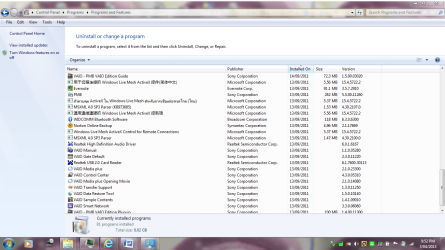
You do seem to have quite a lot of programs installed and I notice you have Adobe Reader, I use Foxit Reader which isn't as bloated as Adobe plus I use Microsoft Security Essentials as my anti-virus program and have had no problems with it, it's something else that is built into your Windows 7 so that's another expense saved.

You also have a built in backup program that you can use to make a system image, that is something you want to put onto an external drive for safety.

OK think I've said enough for now and you'll need the experts to tell you what you ought to get rid of after looking at those shots.

Most of all try to enjoy your computer and not fret about it and remember we are here to give you help. :)
 

My Computer

Computer type
PC/Desktop
Computer Manufacturer/Model Number
Acer Aspire XC-704 x64 bit/ Asus K55A Notebook PC/HP Envy x360 Convertible 15-bq0xx
OS
Windows 10 64bit/Windows 10 64bit/Windows 10 64bit
CPU
Intel Pentium J3710 @ 60GHz/Intel B820,1.7GHz/AMD A9 Radeon
Motherboard
Acer Aspire XC-704 (SOCKET 0)/Asus/HP 8312 (Socket FP4)
Memory
8.00GB DDR3 @ 1599MHz/8GB 2 x 4GB DDR3/8.00GB Dual-Channel
Graphics Card(s)
Intel HD Graphics/Intel/512MB ATI AMD Radeon R5 Graphics (HP
Sound Card
Realtek High Definition Audio/Onboard/AMD High Definition Au
Monitor(s) Displays
Acer LCD K222HQL /Asus 15.6/Generic PnP Monitor (1920x1080@6
Screen Resolution
1920x1080@59Hz/1366 x 768/1920x1080@60Hz
Hard Drives
1863GBWesternn Digital WDC/Asus/119GB SanDisk SD8SN8U-128G-1006 (SSD)
931GB Hitachi HGST HTS721010A9E630 (SATA)
Keyboard
Microsoft Natural Ergonomic Keyboard 4000 (UK)/Inbuilt/Inbui
Mouse
Microsoft Optical Wheel Mouse/Same plus Touchpad/Same + Pad
Internet Speed
Infinity 2 up to 76 Mbps
Antivirus
MSE/MSE/MSE and all 3 have MalwareBytes Premium
Browser
Edge, Firefox/Edge, Firefox/Edge, Firefox, Chrome
Other Info
Seagate Expansion 500GB External Desktop Drive
Seagate Expansion Portable Drives 500GB and 1TB
Epson XP-332 Wireless Printer
I do it several times a day.
 

My Computer

Computer type
PC/Desktop
Computer Manufacturer/Model Number
Custom Build
OS
Win 10 Pro 64
CPU
Intel Core i7 960 @3.20 GHz
Motherboard
MSI MS7522
Memory
24.0 GB DDR3
Graphics Card(s)
EVGA GTX 750Ti
Monitor(s) Displays
LG E2341 23 Inch
Screen Resolution
1920x1080
Hard Drives
1TB Western Dgital 1002FAEX-00Y9A0
1TB Hitachi HDS721010CLA322
PSU
700 Watt
Case
Haf 912
Cooling
Fans
Keyboard
Logitech MK710
Mouse
Logitech M705
Internet Speed
Cable
Antivirus
AIS 2015 .10.0.2225
Browser
Firefox 49
Other Info
MalwareBytes Anti-Rootkit utility
@Melissa,
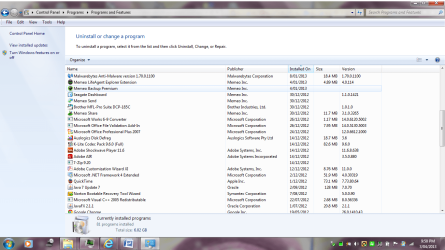
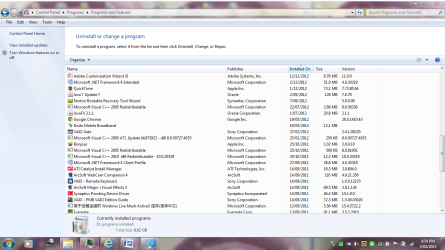
Judging from these screenshots of yours, you should uninstall Java 7 Update 7 - the current version is Java 7 Update 17. I would suggest that you uninstall Java it and leave it off of your computer.

Also, you probably do not need these:
JavaFX 2.1.1
Adobe AIR
Any app that needs them should let you know to reinstall them.
 
Last edited:

My Computer

Computer type
Laptop
Computer Manufacturer/Model Number
Employer provided Dell Latitude
OS
W7 Pro SP1 64bit
CPU
i7
Memory
8GB
Graphics Card(s)
Intel HD Graphics
Hard Drives
crappy SSD
Antivirus
Employer mandated Symantec Endpoint Protection
Browser
Pale Moon 64bit, IE11 64bit & Chrome 64bit
I never even let items go into my recycle bin, it`s set to delete them straight away.
 

My Computer

Computer type
PC/Desktop
Computer Manufacturer/Model Number
Skylake Special #666
OS
Windows 10 Pro x64
CPU
Intel Core i7 6700K
Motherboard
Asus Sabertooth Z170 Mark 1
Memory
GSkill TridentZ RGB 16GB 3600 16-16-16-36
Graphics Card(s)
EVGA GTX 980 Ti SC x2
Sound Card
Realtek High Definition
Monitor(s) Displays
AOC G2460PG
Screen Resolution
1920 x 1080 144Hz
Hard Drives
Samsung 860 Pro 256GB, Seagate Barracuda 4TB x2
PSU
EVGA 1000 P2, EVGA White Custom Braided Cables
Case
Corsair Vengeance C70 Gunmetal Black
Cooling
Corsair H100i v2, Corsair ML120 x2, Thermal Grizzly Kryonaut
Keyboard
Logitech G910 Orion Spectrum
Mouse
Logitech G700s
Internet Speed
Verizon Fios Quantum Gateway 75/75
Antivirus
Windows Defender, Malwarebytes Free 3.8.3
Browser
Chrome
Other Info
Corsair SP120 x4, LG Blu-ray Drive, Durabrand HT-395 100 Watt Dolby Digital Amp, Corsair H2100 Wireless 7.1 Headset
Just wondered if it does also cause any issues in the running of your computer.

I better get off this one for an update. I heard there where some issues with the New Platform Update KB2670838 - I did with Google and pasting. Hopefully they have fixed that. I went on the Microsoft Community for that one.

Thanks again. I guess it does depend on your personality and how you operate as a person with how you like your computer set up. I always forget where I file items or if I may have accidentally moved it to the recycle bin.

Thanks people.
It [CCleaner] has a very good reputation. And if you only use it to clean out files that it thinks you do not need, then it is safer than you attempting to do that manually in all of the places that such files hide. That is why I suggested it. You can do some of the same cleanup using the Disk Cleanup tool built into Windows. Just know that both tools will (by default) delete thumbs.db files that you discussed keeping in one of your other threads. You can uncheck that option if you want or let the thumb.db files go away. You might see a slight delay when viewing thumbnails as a particular thumb.db file is rebuilt... but this delay should only happen one time (until the next time you delete thumb.db files).

> New Platform Update KB2670838:
It probably will not be an issue for you... but you can read thru this thread:
http://www.sevenforums.com/windows-...40-platform-update-kb2670838-windows-7-a.html


I tried to do a print screen - but can not.

When I go to open the .exe file and the User Acccount Control section comes up - I select the option yes.

Then I am getting no program installing at all. I have tried running and installing it to no avail.

Any troubleshooting I could do? Doing it on Internet Explorer
I think that the quote above is dealing with CCleaner not installing. If you want to work on that issue, then start a new topic just for that; otherwise, just use the native Disk Cleanup applet.
 

My Computer

Computer type
Laptop
Computer Manufacturer/Model Number
Employer provided Dell Latitude
OS
W7 Pro SP1 64bit
CPU
i7
Memory
8GB
Graphics Card(s)
Intel HD Graphics
Hard Drives
crappy SSD
Antivirus
Employer mandated Symantec Endpoint Protection
Browser
Pale Moon 64bit, IE11 64bit & Chrome 64bit
@Melissa,
Judging from these screenshots of yours, you should uninstall Java 7 Update 7 - the current version is Java 7 Update 17. I would suggest that you uninstall Java it and leave it off of your computer.

Also probably do not need these:
JavaFX 2.1.1
Adobe AIR
Any app that needs them should let you know to reinstall them.

Hey UI, could you tell me what Adobe AIR actually does? I have that installed too but have no idea what purpose does it serve. :o
 
If you don`t use it, there`s no reason to have it. Adobe will just keep bugging you to update it every other week.


Adobe AIR
Deliver engaging applications beyond the browser across screens

The Adobe® AIR® 3 runtime enables developers to use HTML, JavaScript, Adobe Flash® software, and ActionScript® to build web applications that run as standalone client applications without the constraints of a browser.

For more information, visit the Product page

http://www.adobe.com/products/air.html
 

My Computer

Computer type
PC/Desktop
Computer Manufacturer/Model Number
Skylake Special #666
OS
Windows 10 Pro x64
CPU
Intel Core i7 6700K
Motherboard
Asus Sabertooth Z170 Mark 1
Memory
GSkill TridentZ RGB 16GB 3600 16-16-16-36
Graphics Card(s)
EVGA GTX 980 Ti SC x2
Sound Card
Realtek High Definition
Monitor(s) Displays
AOC G2460PG
Screen Resolution
1920 x 1080 144Hz
Hard Drives
Samsung 860 Pro 256GB, Seagate Barracuda 4TB x2
PSU
EVGA 1000 P2, EVGA White Custom Braided Cables
Case
Corsair Vengeance C70 Gunmetal Black
Cooling
Corsair H100i v2, Corsair ML120 x2, Thermal Grizzly Kryonaut
Keyboard
Logitech G910 Orion Spectrum
Mouse
Logitech G700s
Internet Speed
Verizon Fios Quantum Gateway 75/75
Antivirus
Windows Defender, Malwarebytes Free 3.8.3
Browser
Chrome
Other Info
Corsair SP120 x4, LG Blu-ray Drive, Durabrand HT-395 100 Watt Dolby Digital Amp, Corsair H2100 Wireless 7.1 Headset
It is a "runtime environment" like Java. Adobe Integrated Runtime (AIR)

Programmers can write an app in AIR and that app should run on a Windows OS, Apple OS, Android...

60+ Useful Adobe AIR Applications You Should Know

Adobe bundled it with the adobe reader several versions back, then they stopped doing that.
 

My Computer

Computer type
Laptop
Computer Manufacturer/Model Number
Employer provided Dell Latitude
OS
W7 Pro SP1 64bit
CPU
i7
Memory
8GB
Graphics Card(s)
Intel HD Graphics
Hard Drives
crappy SSD
Antivirus
Employer mandated Symantec Endpoint Protection
Browser
Pale Moon 64bit, IE11 64bit & Chrome 64bit
If you don`t use it, there`s no reason to have it. Adobe will just keep bugging you to update it every other week.


Adobe AIR
Deliver engaging applications beyond the browser across screens

The Adobe® AIR® 3 runtime enables developers to use HTML, JavaScript, Adobe Flash® software, and ActionScript® to build web applications that run as standalone client applications without the constraints of a browser.

For more information, visit the Product page

Adobe AIR | Adobe AIR 3 | Deploy applications

It is a "runtime environment" like Java.

Programmers can write an app in AIR and that app should run on a Windows OS, Apple OS, Android...

60+ Useful Adobe AIR Applications You Should Know

Adobe bundled it with the adobe reader several versions back, then they stopped doing that.

That's enough to convince me that I don't really need it. :D

Thanks guys! ;)
 
Back
Top