sfc /scannow cannot repair explorer.exe

initialsHL

New member
Local time
11:57 AM
Messages
7
Hi everyone,

I am having problems using sfc /scannow in my elevated command prompt,
as it reported that errors are found but cannot be fixed, in my CBS.log.

I searched "cannot repair" in my CBS.log, and it reported error with my
explorer.exe. I edited it before when using custom theme (Shine 2.0).

I am using Windows 7 64-bit SP1, can anyone help me?
Does anyone have a fix, or a backup of the explorer.exe?

Thanks!!!
 

My Computer My Computer

Computer type
PC/Desktop
OS
Windows 7 Ultimate x64
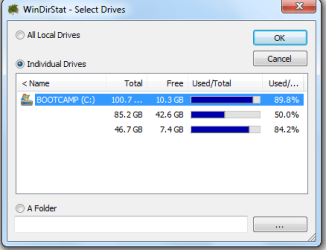
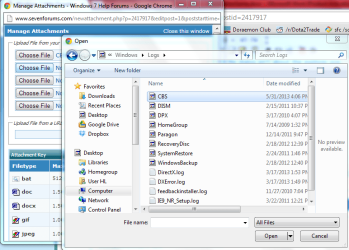
I am having some problems such as icons not displaying correctly in Open/Save file dialog,
and some programs' Open/Save file dialog crashes the program, such as Adobe illustrator.
 

Attachments

  • 1.PNG
    1.PNG
    3.9 KB · Views: 58
  • Capture.PNG
    Capture.PNG
    9.6 KB · Views: 57

My Computer My Computer

Computer type
PC/Desktop
OS
Windows 7 Ultimate x64
Hello initialsHL and welcome to the forums :)

I have uploaded my two copies of explorer.exe for you: https://dl.dropboxusercontent.com/u/16537616/Fixes/Other/initialsHL.zip

amd64 --> C:\Windows\system32
x86 --> C:\Windows\SysWOW64

Tom

initialsHL

Try to follow this tutorial i hope it will help you to solve your problem

SFC /SCANNOW : Run in Command Prompt at Boot


Best of luck....


Won't help, I'm afraid. There are no clean copies of these files to perform the replacement with so SFC is useless here :)
 

My Computer My Computer

Computer type
PC/Desktop
Computer Manufacturer/Model Number
Build #1
OS
Windows 8.1 Pro x64
CPU
Intel i7 3770K @4.5GHz
Motherboard
ASUS P8Z77-V PRO
Memory
Corsair Vengeance 2x4GB DDR3 1600MHz Low Profile (White)
Graphics Card(s)
Gigabyte Radeon HD 7850 (2GB GDDR5)
Sound Card
Integrated on motherboard
Monitor(s) Displays
23" LG LCD/LED IPS
Screen Resolution
1920*1080
Hard Drives
Samsung EVO 128GB SSD
Seagate Barracuda 2GB 7200rpm
2x Seagate FreeAgent [500gb]
PSU
Corsair TX650W V2 (80+ Bronze)
Case
NZXT Phantom 410 White
Cooling
Corsair H100 Water Cooler
Keyboard
Microsoft Desktop 2000 Wireless Keyboard
Mouse
Microsoft Desktop 2000 Wireless Mouse
Internet Speed
95 Mb/s Download 70 Mb/s Upload
Antivirus
MSE + MBAM Pro
Browser
Firefox
Thank you! i will try it now
 

My Computer My Computer

Computer type
PC/Desktop
OS
Windows 7 Ultimate x64
It seems that my problems with Open/Save file dialog isn't about the explorer.exe,
even after I replaced them.

Does anyone have any idea?

Edit:
I got the same error after replacing with an explorer.exe of Windows 7 64 bit SP1,
and the CBS.log is attached.
 

Attachments

  • Capture.PNG
    Capture.PNG
    53.1 KB · Views: 2
Last edited:

My Computer My Computer

Computer type
PC/Desktop
OS
Windows 7 Ultimate x64
Hi initialsHL,

Code:
2013-05-31 16:26:16, Info                  CSI    0000038c [SR] Repairing 1 components2013-05-31 16:26:16, Info                  CSI    0000038d [SR] Beginning Verify and Repair transaction
2013-05-31 16:26:17, Info                  CSI    0000038e Hashes for file member \SystemRoot\WinSxS\amd64_microsoft-windows-explorer_31bf3856ad364e35_6.1.7601.17567_none_afa79dc39081d0ba\explorer.exe do not match actual file [l:24{12}]"explorer.exe" :
  Found: {l:32 b:c+wCrABS/hrHbL70PUMGH30tefK32qqOPZkI5yorz6k=} Expected: {l:32 b:a+0aOpVqhZ70Qg/rJGbAQIAOrwHvUyFO+dq1Ou/xz/A=}
2013-05-31 16:26:17, Info                  CSI    0000038f [SR] Cannot repair member file [l:24{12}]"explorer.exe" of Microsoft-Windows-explorer, Version = 6.1.7601.17567, pA = PROCESSOR_ARCHITECTURE_AMD64 (9), Culture neutral, VersionScope = 1 nonSxS, PublicKeyToken = {l:8 b:31bf3856ad364e35}, Type neutral, TypeName neutral, PublicKey neutral in the store, hash mismatch
2013-05-31 16:26:17, Info                  CSI    00000390 Hashes for file member \SystemRoot\WinSxS\amd64_microsoft-windows-explorer_31bf3856ad364e35_6.1.7601.17567_none_afa79dc39081d0ba\explorer.exe do not match actual file [l:24{12}]"explorer.exe" :
  Found: {l:32 b:c+wCrABS/hrHbL70PUMGH30tefK32qqOPZkI5yorz6k=} Expected: {l:32 b:a+0aOpVqhZ70Qg/rJGbAQIAOrwHvUyFO+dq1Ou/xz/A=}
2013-05-31 16:26:17, Info                  CSI    00000391 [SR] Cannot repair member file [l:24{12}]"explorer.exe" of Microsoft-Windows-explorer, Version = 6.1.7601.17567, pA = PROCESSOR_ARCHITECTURE_AMD64 (9), Culture neutral, VersionScope = 1 nonSxS, PublicKeyToken = {l:8 b:31bf3856ad364e35}, Type neutral, TypeName neutral, PublicKey neutral in the store, hash mismatch
2013-05-31 16:26:17, Info                  CSI    00000392 [SR] This component was referenced by [l:154{77}]"Package_1_for_KB2515325~31bf3856ad364e35~amd64~~6.1.1.0.2515325-2_neutral_GDR"


SFCFix Script


Warning: this fix is specific to the user in this thread. No one else should follow these instructions as it may cause more harm than good. If you are after assistance, please start a thread of your own.


  1. Download SFCFix.exe (by niemiro) and save this to your Desktop.
  2. Download the file below, SFCFix.zip, and save this to your Desktop. Ensure that this file is named SFCFix.zip - do not rename it.
  3. Save any open documents and close all open windows.
  4. On your Desktop, you should see two files: SFCFix.exe and SFCFix.zip.
  5. Drag the file SFCFix.zip onto the file SFCFix.exe and release it.
  6. SFCFix will now process the script.
  7. Upon completion, a files should be created on your Desktop: SFCFix.txt.
  8. Copy (Ctrl + C) and Paste (Ctrl + V) the contents of this file into your next post for me to analyse please - put [CODE][/CODE] tags around the log to break up the text.


https://dl.dropboxusercontent.com/u/16537616/Fixes/SFCFix/Scripts/initialsHL/SFCFix.zip


SFC Scan


  1. Click on the Start
    Start%20Orb.jpg
    button and in the search box, type Command Prompt
  2. When you see Command Prompt on the list, right-click on it and select Run as administrator
  3. When command prompt opens, copy and paste the following commands into it, press enter after each


    sfc /scannow


    Wait for this to finish before you continue


    copy %windir%\logs\cbs\cbs.log %userprofile%\Desktop\cbs.txt


  4. This will create a file, cbs.txt on your Desktop. Please attach this to your next post.


Tom
 

My Computer My Computer

Computer type
PC/Desktop
Computer Manufacturer/Model Number
Build #1
OS
Windows 8.1 Pro x64
CPU
Intel i7 3770K @4.5GHz
Motherboard
ASUS P8Z77-V PRO
Memory
Corsair Vengeance 2x4GB DDR3 1600MHz Low Profile (White)
Graphics Card(s)
Gigabyte Radeon HD 7850 (2GB GDDR5)
Sound Card
Integrated on motherboard
Monitor(s) Displays
23" LG LCD/LED IPS
Screen Resolution
1920*1080
Hard Drives
Samsung EVO 128GB SSD
Seagate Barracuda 2GB 7200rpm
2x Seagate FreeAgent [500gb]
PSU
Corsair TX650W V2 (80+ Bronze)
Case
NZXT Phantom 410 White
Cooling
Corsair H100 Water Cooler
Keyboard
Microsoft Desktop 2000 Wireless Keyboard
Mouse
Microsoft Desktop 2000 Wireless Mouse
Internet Speed
95 Mb/s Download 70 Mb/s Upload
Antivirus
MSE + MBAM Pro
Browser
Firefox
Hello initialsHL and welcome to the forums :)

I have uploaded my two copies of explorer.exe for you: https://dl.dropboxusercontent.com/u/16537616/Fixes/Other/initialsHL.zip

amd64 --> C:\Windows\system32
x86 --> C:\Windows\SysWOW64

Tom

initialsHL

Try to follow this tutorial i hope it will help you to solve your problem

SFC /SCANNOW : Run in Command Prompt at Boot


Best of luck....


Won't help, I'm afraid. There are no clean copies of these files to perform the replacement with so SFC is useless here :)

If above solution didn't help you.I suggest you to do repair install to fix your problem .

Repair Install
 

My Computer My Computer

Computer type
PC/Desktop
OS
microsoft window7 Ultimate x64
Thanks guys, i think i will just do a clean install of windows 8,
since it's been 3 years and my windows folder takes up 40gb, with winsxs and Installer folder, etc.

Just a question, I downloaded DreamSpark - Windows 8 Professional 64-bit (English) from Dreamspark Premium,
is it an upgrade to Windows 7 or is it a standalone OS?
 

My Computer My Computer

Computer type
PC/Desktop
OS
Windows 7 Ultimate x64
From Windows 7 Ultimate to Windows 8 Professional, there is a valid upgrade path but I would highly recommend you do a clean install rather than upgrade - it's much safer!

Tom
 

My Computer My Computer

Computer type
PC/Desktop
Computer Manufacturer/Model Number
Build #1
OS
Windows 8.1 Pro x64
CPU
Intel i7 3770K @4.5GHz
Motherboard
ASUS P8Z77-V PRO
Memory
Corsair Vengeance 2x4GB DDR3 1600MHz Low Profile (White)
Graphics Card(s)
Gigabyte Radeon HD 7850 (2GB GDDR5)
Sound Card
Integrated on motherboard
Monitor(s) Displays
23" LG LCD/LED IPS
Screen Resolution
1920*1080
Hard Drives
Samsung EVO 128GB SSD
Seagate Barracuda 2GB 7200rpm
2x Seagate FreeAgent [500gb]
PSU
Corsair TX650W V2 (80+ Bronze)
Case
NZXT Phantom 410 White
Cooling
Corsair H100 Water Cooler
Keyboard
Microsoft Desktop 2000 Wireless Keyboard
Mouse
Microsoft Desktop 2000 Wireless Mouse
Internet Speed
95 Mb/s Download 70 Mb/s Upload
Antivirus
MSE + MBAM Pro
Browser
Firefox
Yes I would like to do a clean install. Do I uninstall my current Windows 7, before installing Windows 8, or must I keep it?

Because I am using a MacBook with Boot Camp, I may actually uninstall Windows 7 and install Windows 8 if it is standalone. I am not sure...
 

My Computer My Computer

Computer type
PC/Desktop
OS
Windows 7 Ultimate x64
Yes, it's a full OS, not just an upgrade. Follow this tutorial:

Clean Install - Windows 8


In step 7, format your drive before you continue. Make sure all of your data is backed up to an external hard drive first though!


Tom
 

My Computer My Computer

Computer type
PC/Desktop
Computer Manufacturer/Model Number
Build #1
OS
Windows 8.1 Pro x64
CPU
Intel i7 3770K @4.5GHz
Motherboard
ASUS P8Z77-V PRO
Memory
Corsair Vengeance 2x4GB DDR3 1600MHz Low Profile (White)
Graphics Card(s)
Gigabyte Radeon HD 7850 (2GB GDDR5)
Sound Card
Integrated on motherboard
Monitor(s) Displays
23" LG LCD/LED IPS
Screen Resolution
1920*1080
Hard Drives
Samsung EVO 128GB SSD
Seagate Barracuda 2GB 7200rpm
2x Seagate FreeAgent [500gb]
PSU
Corsair TX650W V2 (80+ Bronze)
Case
NZXT Phantom 410 White
Cooling
Corsair H100 Water Cooler
Keyboard
Microsoft Desktop 2000 Wireless Keyboard
Mouse
Microsoft Desktop 2000 Wireless Mouse
Internet Speed
95 Mb/s Download 70 Mb/s Upload
Antivirus
MSE + MBAM Pro
Browser
Firefox
Back
Top