
Solved How to disable RC4 Ciphers in TLS?

Callender

New member
I'm not sure if this is the correct section for this question but anyway....

Having read this article:

Microsoft Giving .NET Users The Option to Shed RC4

Then this one:

Security Advisory 2868725: Recommendation to disable RC4

It leaves me slightly confused on how to disable RC4 on a home based Windows 7 machine.

I see the following advice:

How to Completely Disable RC4
Clients and Servers that do not wish to use RC4 ciphersuites, regardless of the other party's supported ciphers, can disable the use of RC4 cipher suites completely by setting the following registry keys. In this manner any server or client that is talking to a client or server that must use RC4, can prevent a connection from happening. Clients that deploy this setting will not be able to connect to sites that require RC4 while servers that deploy this setting will not be able to service clients that must use RC4.

  • [HKEY_LOCAL_MACHINE\SYSTEM\CurrentControlSet\Control\SecurityProviders\SCHANNEL\Ciphers\RC4 128/128]
    • "Enabled"=dword:00000000

  • [HKEY_LOCAL_MACHINE\SYSTEM\CurrentControlSet\Control\SecurityProviders\SCHANNEL\Ciphers\RC4 40/128]
    • "Enabled"=dword:00000000

  • [HKEY_LOCAL_MACHINE\SYSTEM\CurrentControlSet\Control\SecurityProviders\SCHANNEL\Ciphers\RC4 56/128]
    • "Enabled"=dword:00000000


That seems to confilct with the advice in this article:


https://support.microsoft.com/kb/245030


Notes

  • The Ciphers key should contain no values or subkeys
(Or are they saying that by default the Ciphers should be empty) and that modifying this key will provide the fix?


If anyone has made the modifications and can provide a registry key to import please post!


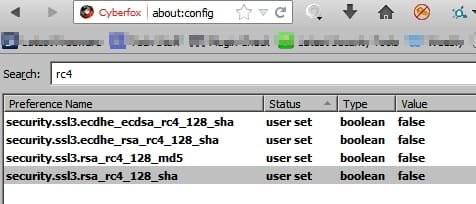
Is it a good enough fix to ignore all of the above and just make the following browser settings changes?
about_config - Cyberfox.jpg
 
Last edited:

My Computer

Computer type
Laptop
Computer Manufacturer/Model Number
ASUS
OS
Microsoft Windows 7 Home Premium 64-bit 7601 Multiprocessor Free Service Pack 1
CPU
AMD C-60 APU with Radeon(tm) HD Graphics
Motherboard
ASUSTeK COMPUTER INC. X501U
Memory
4.00 GB
Graphics Card(s)
AMD Radeon HD 6290 Graphics
Sound Card
(1) AMD High Definition Audio Device (2) Realtek High Defi
Screen Resolution
1366 x 768 x 32 bits (4294967296 colors) @ 60 Hz
Hard Drives
Hitachi HTS545050A7E380 SATA Disk Device
Antivirus
Comodo CIS & FW, SecureAplus App Whitelisting, Threatfire
Browser
Cyberfox 64bit, Opera 64bit, Airfox
Other Info
Spy-The-Spy, HitmanPro.Alert, Norton Connect Safe, MJRegWatcher, BitDefender TrafficLight, Voodoo Shield, Zemana AntiMalware
Solved - disable weak cyphers

Solved the problem myself. Here's how:

Important: Backup the following registry key

HKEY_LOCAL_MACHINE\SYSTEM\CurrentControlSet\Control\SecurityProviders\SCHANNEL

Save the attached file as a PowerShell script (with the .ps1 extension) and run it.

View attachment DisableWeakCiphers.txt

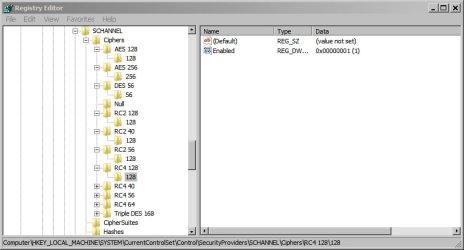
Results:

SCHANNEL.jpg

Weak cyphers are now disabled

Strong cyphers are enabled

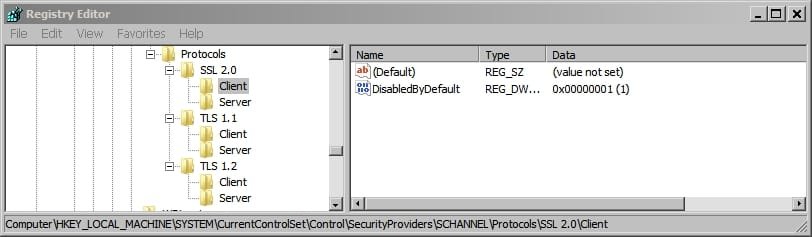
Protocols:

Protocols.jpg
 
Last edited:

My Computer

Computer type
Laptop
Computer Manufacturer/Model Number
ASUS
OS
Microsoft Windows 7 Home Premium 64-bit 7601 Multiprocessor Free Service Pack 1
CPU
AMD C-60 APU with Radeon(tm) HD Graphics
Motherboard
ASUSTeK COMPUTER INC. X501U
Memory
4.00 GB
Graphics Card(s)
AMD Radeon HD 6290 Graphics
Sound Card
(1) AMD High Definition Audio Device (2) Realtek High Defi
Screen Resolution
1366 x 768 x 32 bits (4294967296 colors) @ 60 Hz
Hard Drives
Hitachi HTS545050A7E380 SATA Disk Device
Antivirus
Comodo CIS & FW, SecureAplus App Whitelisting, Threatfire
Browser
Cyberfox 64bit, Opera 64bit, Airfox
Other Info
Spy-The-Spy, HitmanPro.Alert, Norton Connect Safe, MJRegWatcher, BitDefender TrafficLight, Voodoo Shield, Zemana AntiMalware
Nice last post, assuming it affects IE.

I suggest you disable all rc4 tho and now (especially with poodle) also sslv3.

so here is may altered file.
 

Attachments

My Computer

Computer type
PC/Desktop
Computer Manufacturer/Model Number
home built
OS
windows 8.1 Pro x64
CPU
intel i5 4670k @ 4.3ghz
Motherboard
asus z87-plus
Memory
16 gig ram ddr3 @ 1600 corsair vengeance
Graphics Card(s)
evga 970 GTX 4 GIG FTW ACX 2.0
Sound Card
asus xonar D2X
Monitor(s) Displays
benq gw2765ht
Screen Resolution
2560x1440
Hard Drives
Samsung 850 pro SSD 512gig - boot device wooosh
WD black cavalier 640gig WD6401AALS
Seagate 500gig ST3500630AS
WD 2TB Green WDC20EARS
2 x WD Red 3TB WD30EFRX
Samsung 750gig HD753LG - on asmedia controller
PSU
coolermaster silent pro 600watt modular
Case
fractal define R4
Cooling
artic freezer i30, 3 case fans
Keyboard
microsoft business ps2 keyboard
Mouse
microsoft optical black mouse
Internet Speed
80/20 FTTC SkyBB
Antivirus
Nod32 AV v8, HitmanProAlert, SRP, System Hardening
Browser
Chrome x64
Other Info
Intel controller is in AHCI mode currently using IaSTOR 12.8.0.1016 drivers
Disable RC4 and SSLv3

Nice last post, assuming it affects IE.

I suggest you disable all rc4 tho and now (especially with poodle) also sslv3.

so here is may altered file.

Well I was just looking into a script to disable SSLv3 this week and didn't know about the advice to disable RC4 so thank you very much indeed! I have made use if your script. (Disable RC4 is what the original post was about)

As far as i know it takes care of windows and in theory browsers including IE but it wouldn't hurt to open IE settings and set it to disabled there - just to be on the safe side.

Here's a few testers anyway:

SSL/ TLS Tests

Just use the two SSL/ TLS tester links.

Edit: I'd sorted out the Poodle vulnerability this week but great suggestion anyway!
 
Last edited:

My Computer

Computer type
Laptop
Computer Manufacturer/Model Number
ASUS
OS
Microsoft Windows 7 Home Premium 64-bit 7601 Multiprocessor Free Service Pack 1
CPU
AMD C-60 APU with Radeon(tm) HD Graphics
Motherboard
ASUSTeK COMPUTER INC. X501U
Memory
4.00 GB
Graphics Card(s)
AMD Radeon HD 6290 Graphics
Sound Card
(1) AMD High Definition Audio Device (2) Realtek High Defi
Screen Resolution
1366 x 768 x 32 bits (4294967296 colors) @ 60 Hz
Hard Drives
Hitachi HTS545050A7E380 SATA Disk Device
Antivirus
Comodo CIS & FW, SecureAplus App Whitelisting, Threatfire
Browser
Cyberfox 64bit, Opera 64bit, Airfox
Other Info
Spy-The-Spy, HitmanPro.Alert, Norton Connect Safe, MJRegWatcher, BitDefender TrafficLight, Voodoo Shield, Zemana AntiMalware
I sadly found out rc4 is needed for youtube, google only support 2 ciphers on googlevideos, rc4 and a new gcm cipher which isnt in any major browsers yet, at least its not in IE and firefox, might be in chrome.

But more bad news is these registry tweaks seem to do absolutely nothing in IE11, e.g. I disabled the AES ciphers, ran ssllabs browser test and it reports AES in use, although its possible that test just assumes its available due to browser version as it does run very fast but youtube should have been broken when I disabled RC4 and was not. I may do more tests later using one of my websites. Not confirmed in outlook yet if affects ciphers in use.

https://news.ycombinator.com/item?id=7977167

Of course it is at least trivial to disable sslv3 in the IE options pages. But other microsoft applications its not so easy.
 

My Computer

Computer type
PC/Desktop
Computer Manufacturer/Model Number
home built
OS
windows 8.1 Pro x64
CPU
intel i5 4670k @ 4.3ghz
Motherboard
asus z87-plus
Memory
16 gig ram ddr3 @ 1600 corsair vengeance
Graphics Card(s)
evga 970 GTX 4 GIG FTW ACX 2.0
Sound Card
asus xonar D2X
Monitor(s) Displays
benq gw2765ht
Screen Resolution
2560x1440
Hard Drives
Samsung 850 pro SSD 512gig - boot device wooosh
WD black cavalier 640gig WD6401AALS
Seagate 500gig ST3500630AS
WD 2TB Green WDC20EARS
2 x WD Red 3TB WD30EFRX
Samsung 750gig HD753LG - on asmedia controller
PSU
coolermaster silent pro 600watt modular
Case
fractal define R4
Cooling
artic freezer i30, 3 case fans
Keyboard
microsoft business ps2 keyboard
Mouse
microsoft optical black mouse
Internet Speed
80/20 FTTC SkyBB
Antivirus
Nod32 AV v8, HitmanProAlert, SRP, System Hardening
Browser
Chrome x64
Other Info
Intel controller is in AHCI mode currently using IaSTOR 12.8.0.1016 drivers
Insecure Cipher Suites

My knowledge on this is pretty sketchy - hence the original question.

This is interesting: Disabling the RC4 Cipher | Windows content from Windows IT Pro

Tested secure connection to Youtube with the following registry settings applied:

View attachment DisableWeakCiphers.txt

View attachment SSL Cipher tweak RC4 removed.txt

View attachment SSL Cipher Preferred Order.txt

Disabled RC4 in browser:

RC4 Disabled - Cyberfox.jpg

Can still get a secure connection to Youtube:

Page Info -youtube.jpg

I suspect that registry settings take care of weak cyphers in windows but browsers need tweaking separately. Of course that could be entirely wrong!
 

My Computer

Computer type
Laptop
Computer Manufacturer/Model Number
ASUS
OS
Microsoft Windows 7 Home Premium 64-bit 7601 Multiprocessor Free Service Pack 1
CPU
AMD C-60 APU with Radeon(tm) HD Graphics
Motherboard
ASUSTeK COMPUTER INC. X501U
Memory
4.00 GB
Graphics Card(s)
AMD Radeon HD 6290 Graphics
Sound Card
(1) AMD High Definition Audio Device (2) Realtek High Defi
Screen Resolution
1366 x 768 x 32 bits (4294967296 colors) @ 60 Hz
Hard Drives
Hitachi HTS545050A7E380 SATA Disk Device
Antivirus
Comodo CIS & FW, SecureAplus App Whitelisting, Threatfire
Browser
Cyberfox 64bit, Opera 64bit, Airfox
Other Info
Spy-The-Spy, HitmanPro.Alert, Norton Connect Safe, MJRegWatcher, BitDefender TrafficLight, Voodoo Shield, Zemana AntiMalware
Back
Top